Extension pointers #15: Create blueprints to carry out business processes smoothly
When the various stages of a business process are well-planned and executed efficiently, the entire process runs smoothly and the overall functionality is efficient.
Blueprint is a useful feature available in Zoho CRM that is currently supported in the Zoho Developer platform. It allows you to plan different stages of a business process and set up predefined transitions between the stages to achieve the desired results. Along with defining the stages for a blueprint, you can associate people to each stage, guide them through the process, mandate information, validate information, and automate routine processes if necessary.
Components of a blueprint
A blueprint is made up of two major components or blocks: states and transitions. We’ll discuss each below.
State
A business process might involve one or more stages that need to be crossed for its completion. A state is a stage that is involved in a business process. It’s a particular condition/stage that a process is in at a given point of time.
Transition
A transition acts as a connecting factor or link between stages. It consists of the conditions that must be met to move from one stage to another.
Let's consider an example that demonstrates how blueprints can be effectively implemented/incorporated through an extension to achieve desired business processes.
Assume you run a campaign management organization. Several companies hire (outsource) you as a vendor to work on campaigns to help their businesses grow. Depending on your clients’ business needs, you manage the processes involved in preparing these campaigns using the Campaigns module in Zoho CRM. Campaigns can be of different types, such as webinar, advertisements, emails, etc.
Each of these campaign types will require following a different flow in order to be organized and executed. For example, for a webinar, you’ll need to check on resource availability and target audience, whereas for advertisements, you must check on content and banner design. It would be difficult to manually ensure that all of your team members assigned to a client’s campaign follows the correct flow each time.
A blueprint would be useful in this situation because a fixed process can be designed for a specific campaign type. This way, whenever one of your team members is assigned to handle that campaign type, they follow the defined process flow to execute it.
Similarly, different blueprints can be designed for different campaign types and collectively rendered as an extension to help your campaign management process as a whole. In this post, we'll build the overall blueprint flow for a webinar-type campaign.
A company contacts your campaign management organization about organizing a webinar to promote their business. You plan a webinar idea based on the needs of the company, gather the requirements to organize the campaign, generate or execute your campaign plan and share it with the manager, decide whether the plan is active or inactive based on feedback and discussion, and, finally, complete the campaign by finalizing (active) or closing (inactive) based on discussion.
Creating a blueprint for the Campaigns module in Zoho developer console
Here are the process steps for creating a blueprint flow:
- Go to the Extension's detail page in the Zoho Developer console.
- Choose Workflow under Automate from the left panel of the Zoho CRM console under Build, and then click Blueprint.
- Click Create Blueprint.
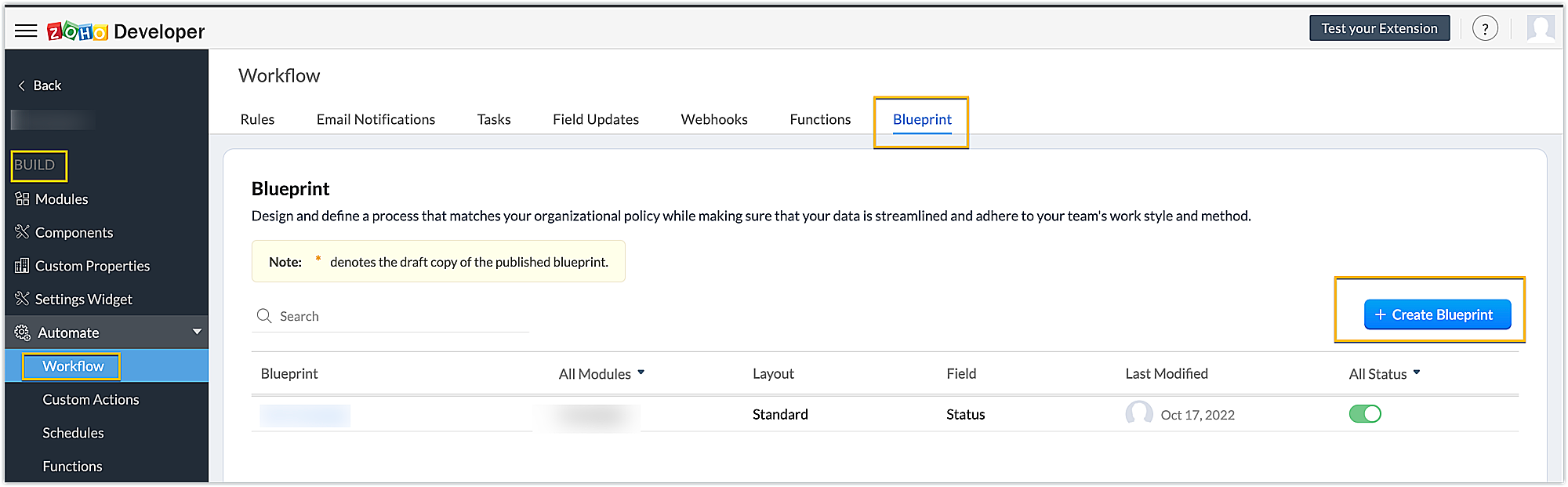
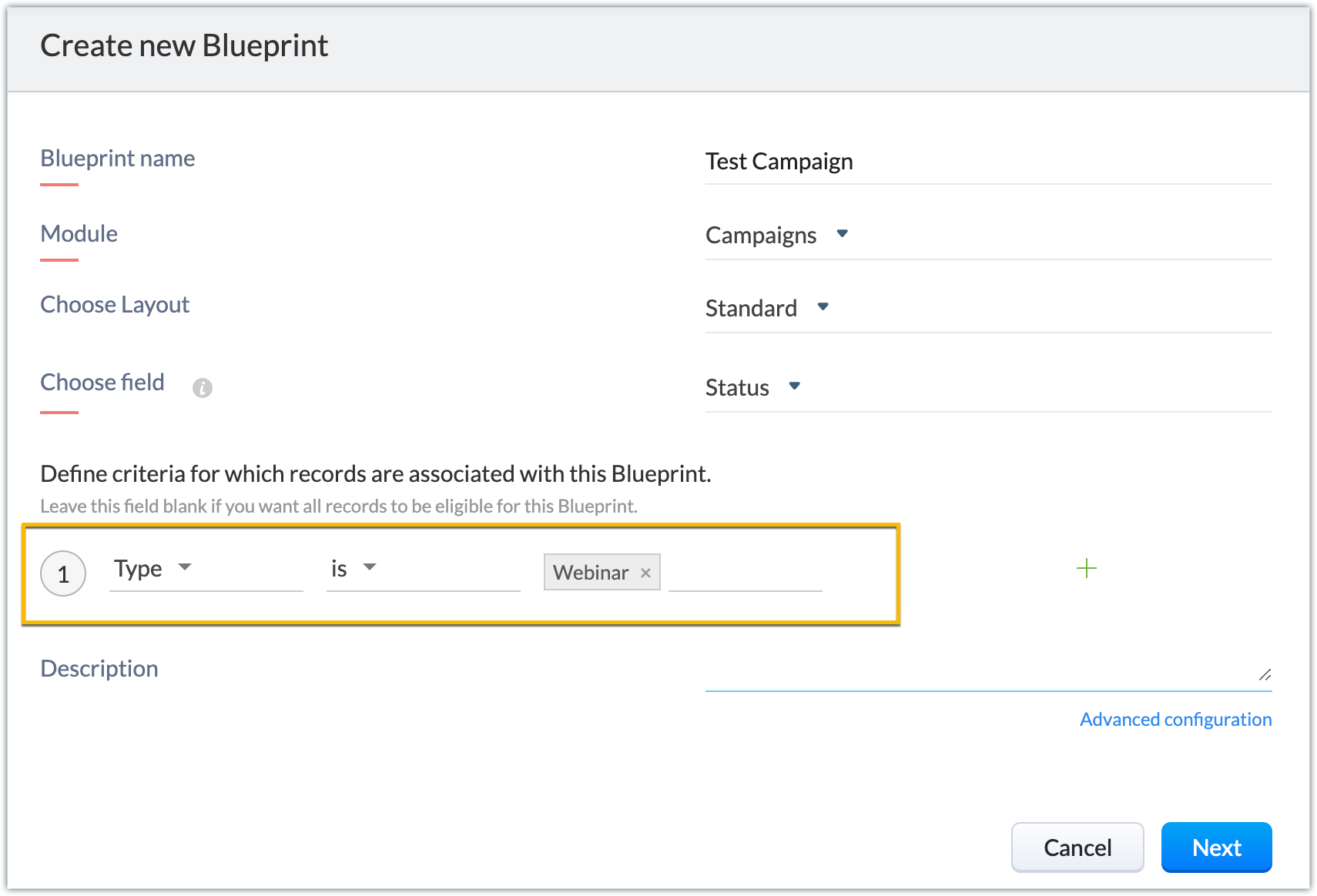
- Enter the necessary details. You can refer to this link to get detailed information on creating a blueprint. In our example, the module is Campaign, the layout is Standard and the field is Status.
Note: You can create picklist fields through the extension and choose them as the field for the blueprint. This helps you run blueprints specific to your campaign’s organization-related Zoho CRM fields as well.
- When the basic details are filled in, next you’ll define the criteria based on which records will be associated with this blueprint. In our example, we choose the campaign records of the webinar type to be associated with this blueprint.
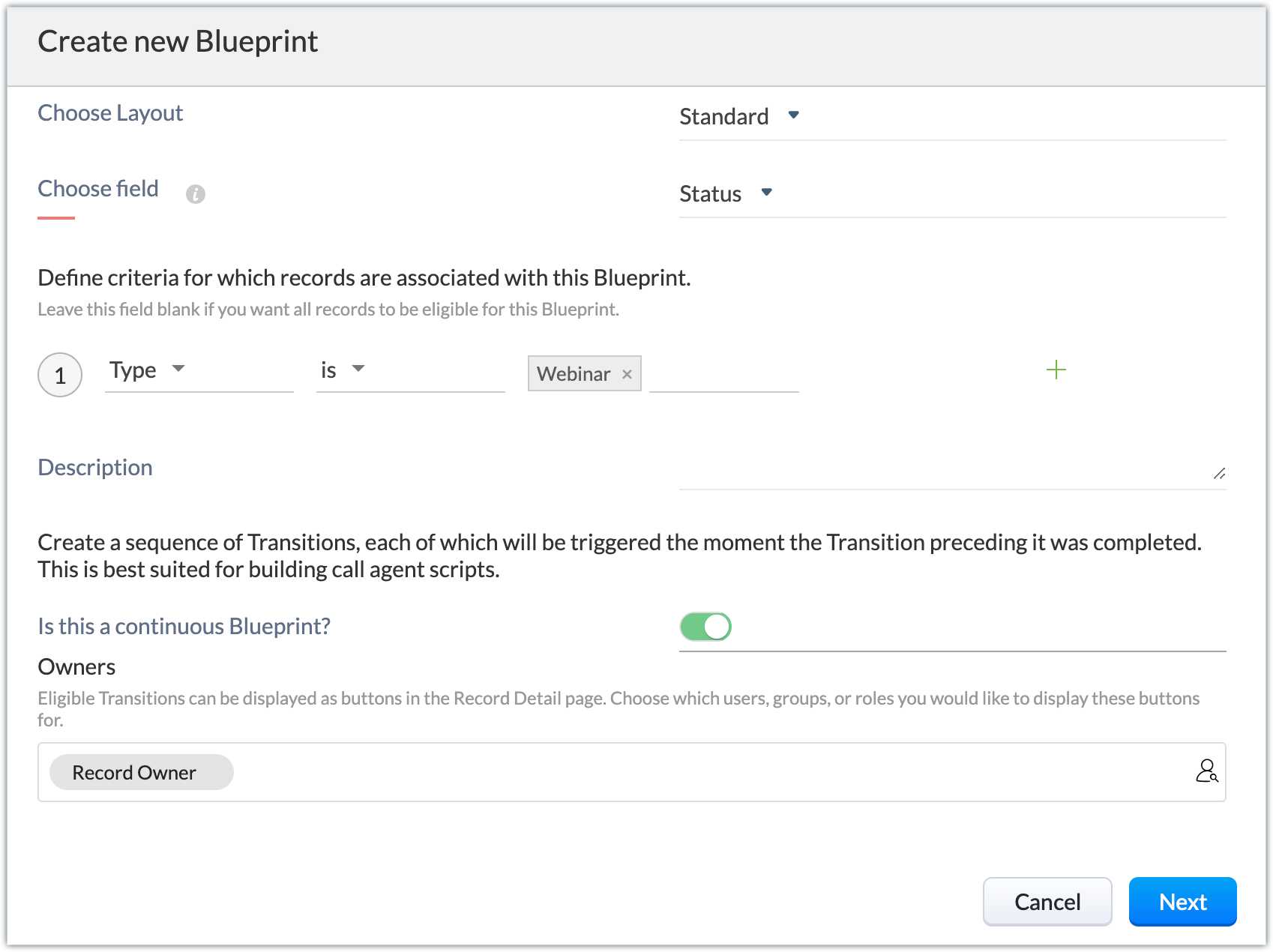
- There’s an option to create continuous blueprints, i.e., with the completion of a transition the next transition is automatically triggered, and so on. To achieve this, click Advanced configuration. Enable the Is this a continuous Blueprint? option. Choose the owners who will be eligible to view the transitions as buttons in the record's detail page.
Note: In our example, we don't enable this option; we manually execute transitions one after the other when the preceding transition's conditions are met and the next one is ready to be implemented. Click Next.
- Below is the blueprint created for our example.
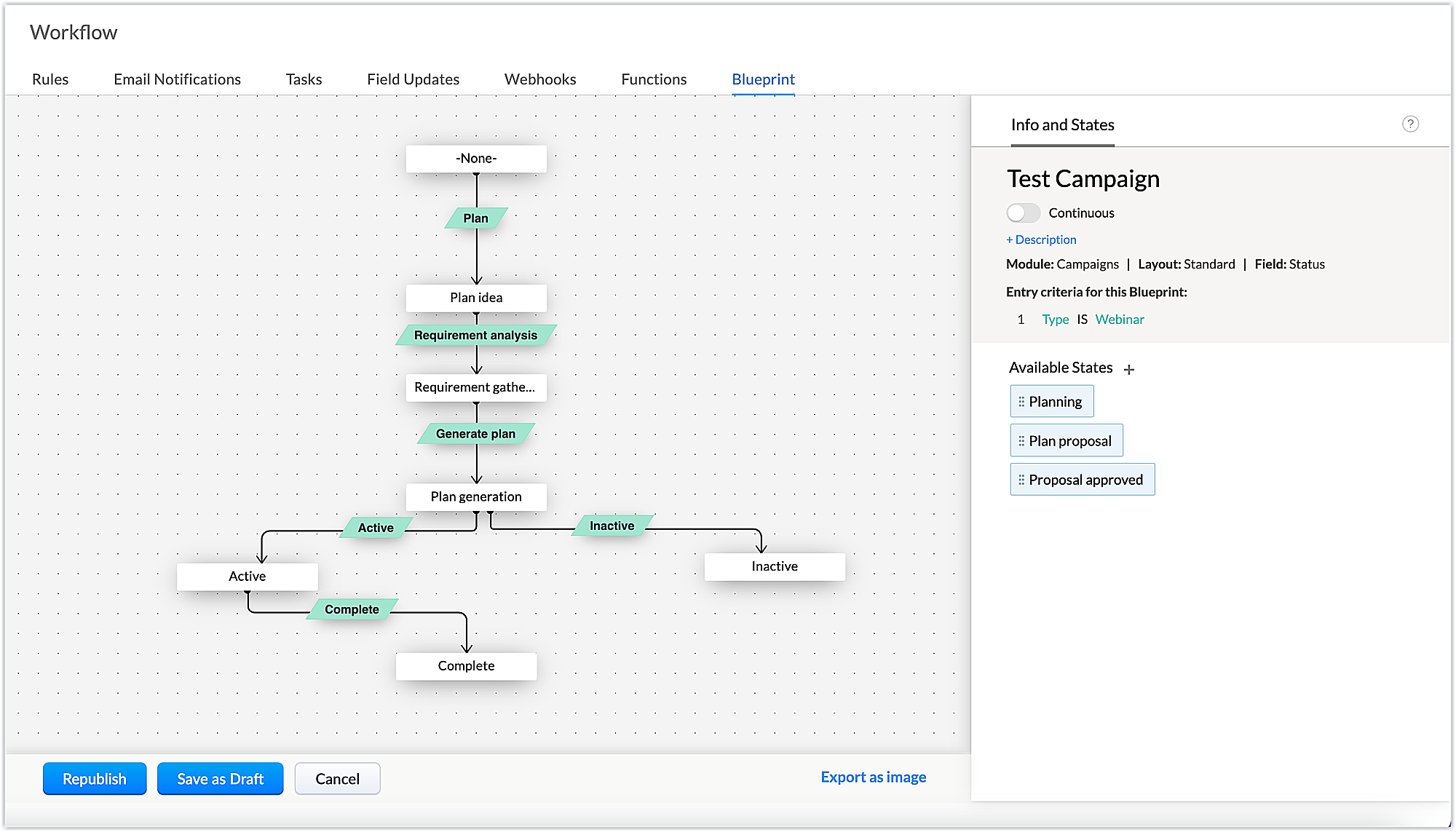
- The states and the transitions involved in our example are listed below.
States | Transitions |
Plan idea | Plan |
Requirement gathering | Requirement analysis |
Plan generation | Generate plan |
Active | Active |
Inactive | Inactive |
Complete | Complete |
- Next, add the criteria to be met at different stages of the transition (BEFORE, DURING, and AFTER). These transitions are conditions to be met to cross from one state to another, and will appear as buttons on the record details page.
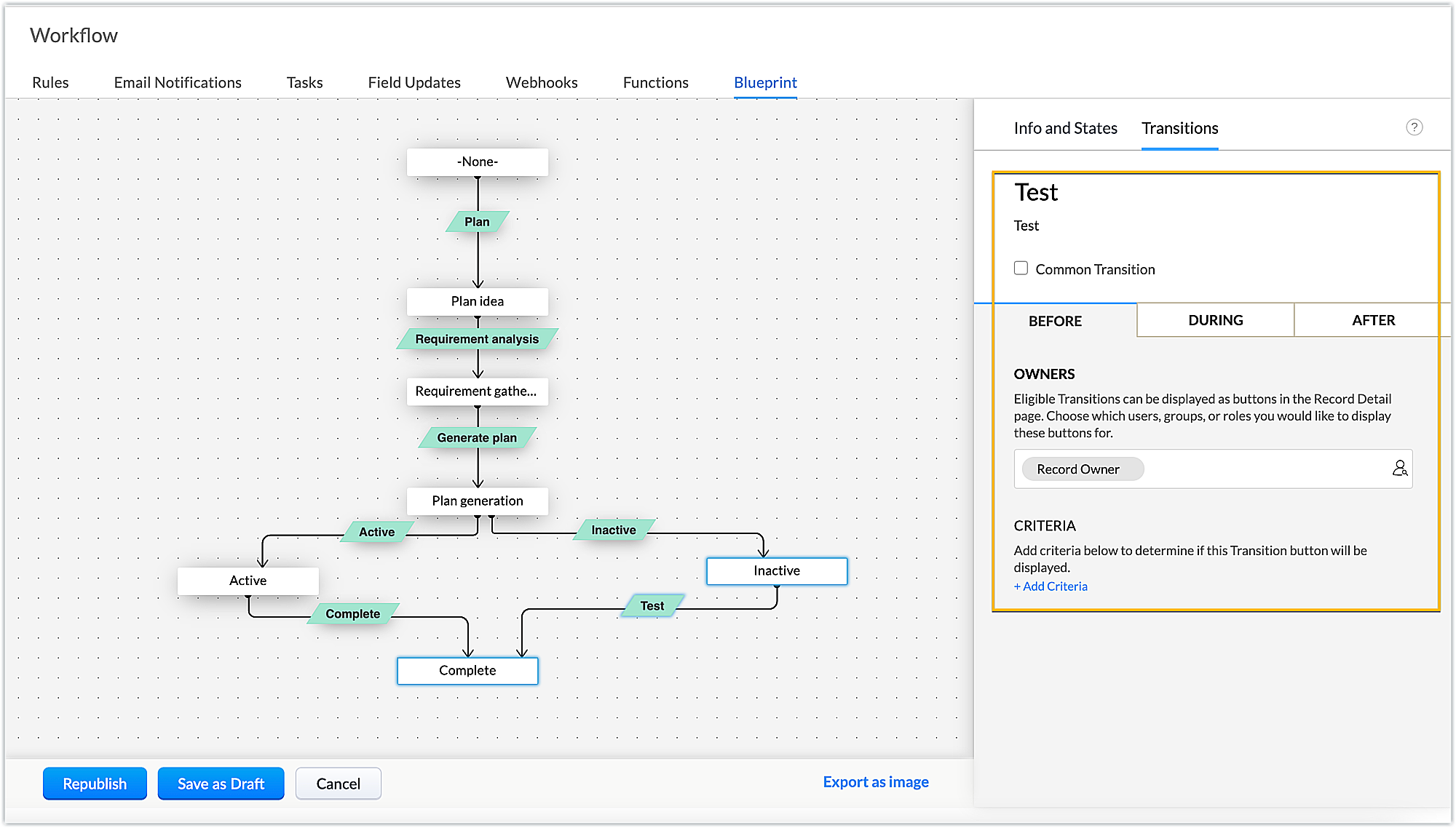
- Let's see the criteria involved in our example for each transition.
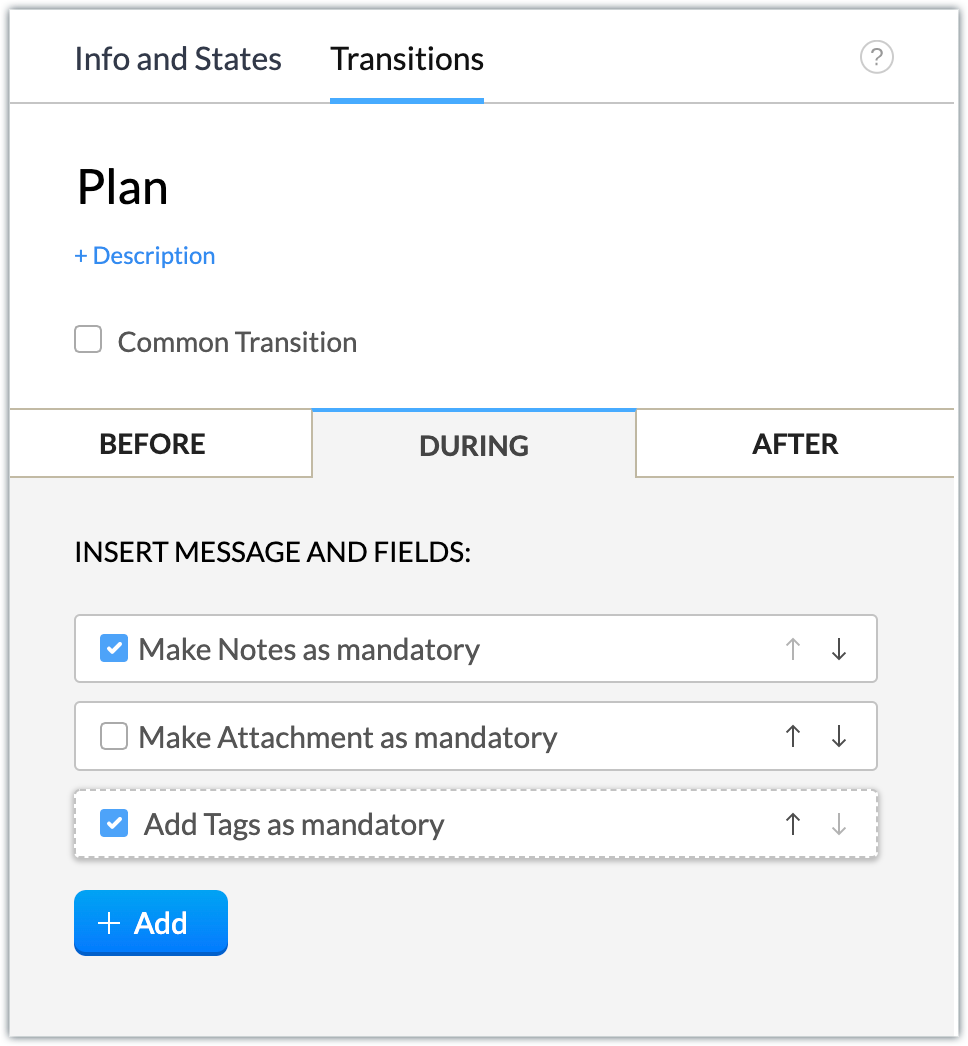
Plan: Notes on the webinar plan and tags are mandatory during this transition.
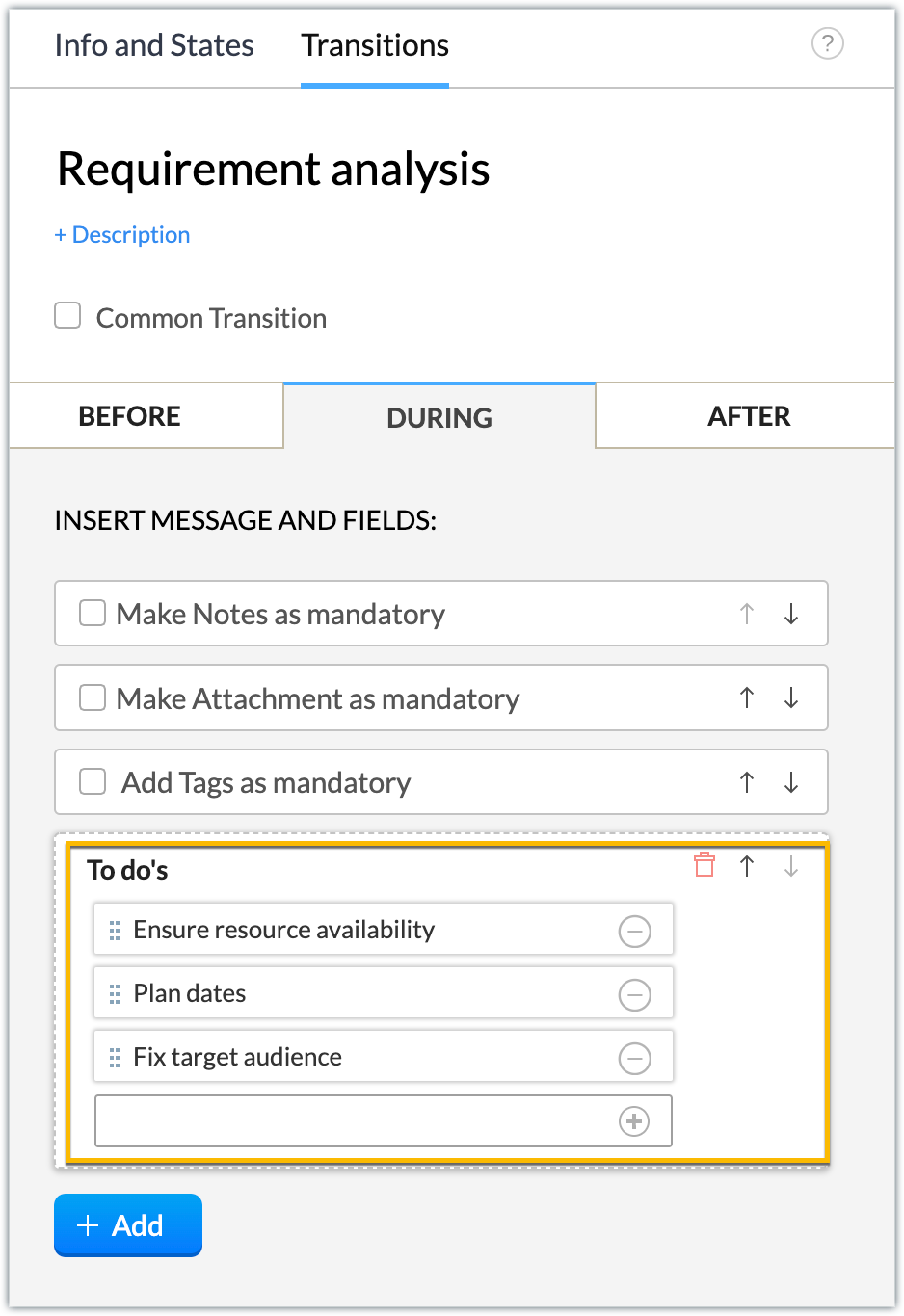
Requirement analysis: Create a checklist for analyzing the requirements by using the Add > Checklists during the transition.
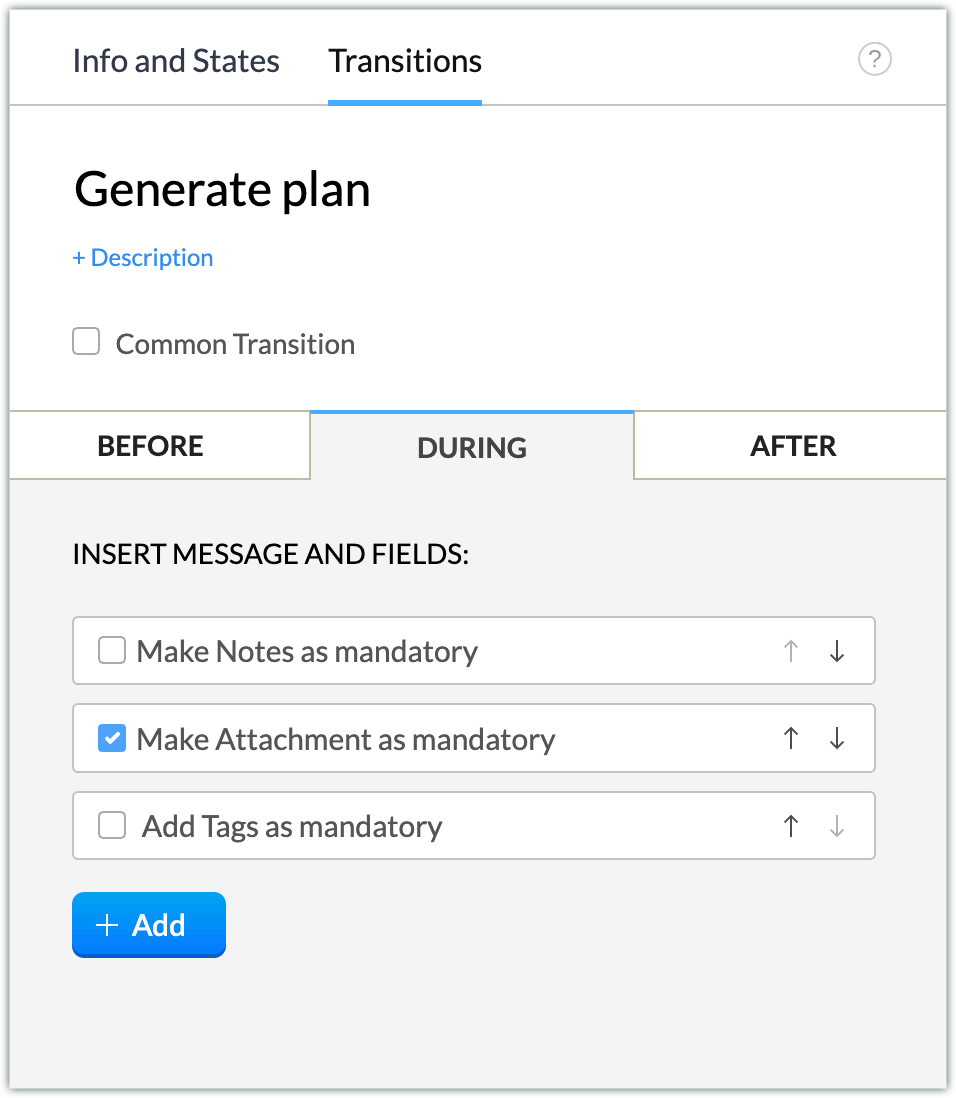
Generate plan: Make attachments of the contents or related documents required for the webinar mandatory during the transition.
After the transition, generate an email notification to your manager with the campaign plan details. We’ve associated a campaign plan email template that includes the description of the campaign record as part of the email body.
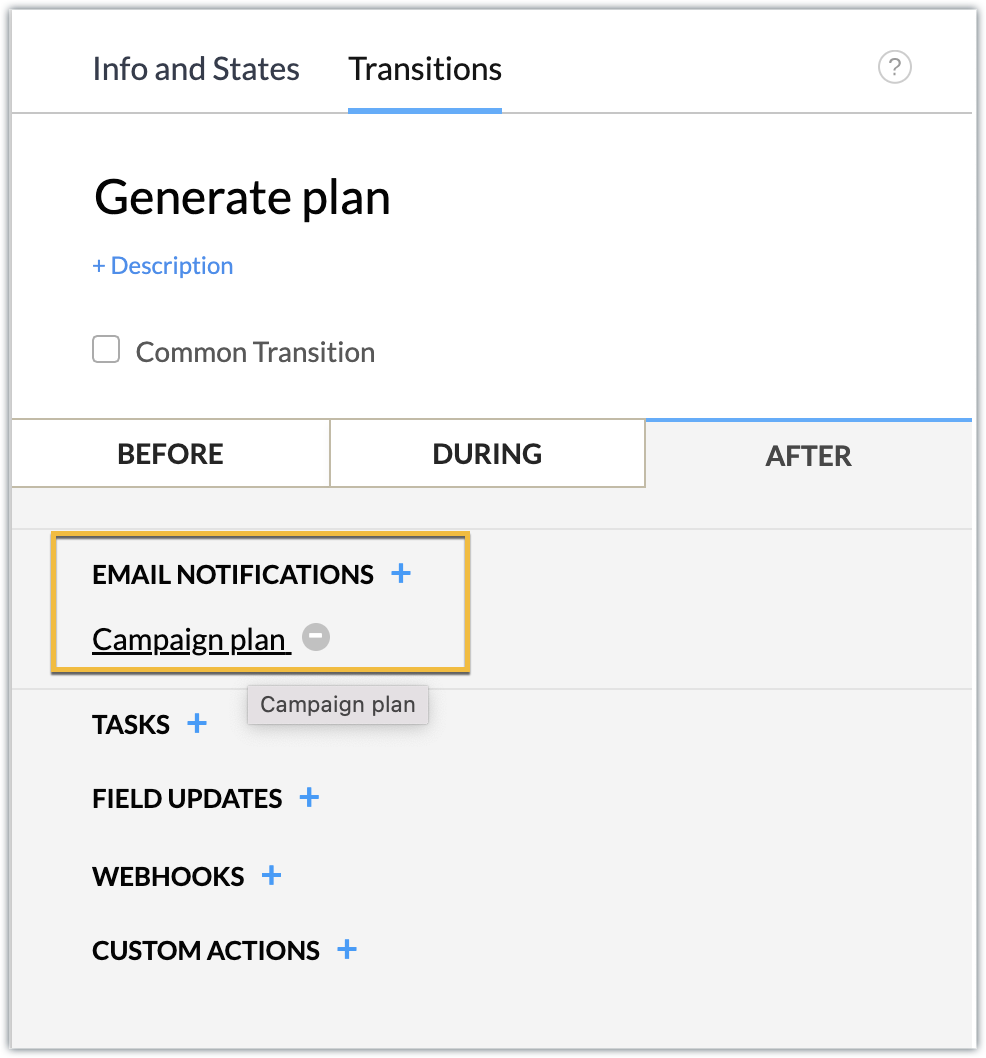
Active: Upon discussion with the manager, if the plan is approved, the campaign plan is active and is to be executed further. Make tags mandatory during the transition.
Schedule the campaign start date for 15 days from the current execution date (i.e., the date the plan changes to active status) after the transition is completed.
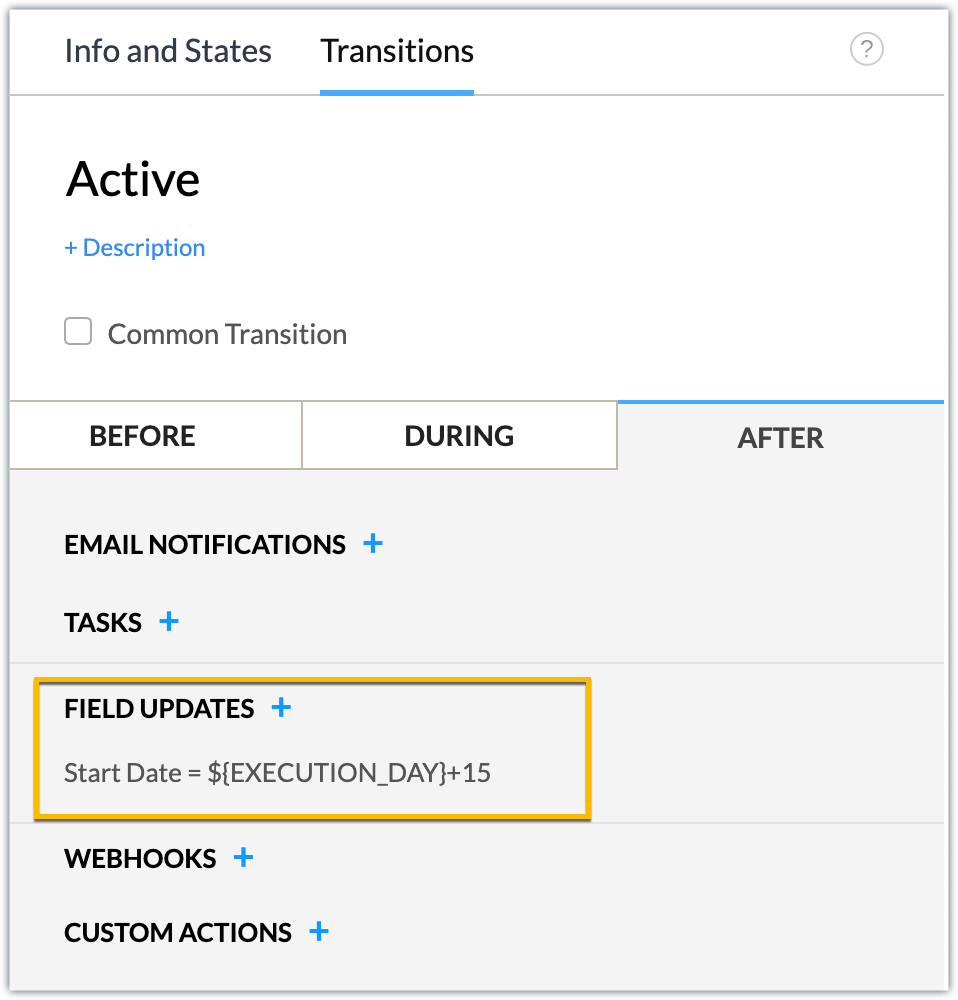
Inactive: After discussion with the manager, if the plan is not approved, the campaign plan is inactive and is then moved to an inactive state. When you click Inactive, the campaign is automatically moved to Complete status.
Complete: Finally, whether the plan is active and ready to be executed, we can move it to a closed state by making tags mandatory to establish that the record for creating the webinar campaign plan has been completed.
- Now that the blueprint is designed, click Publish.
- You can now publish the extension and install it in your Zoho CRM account.
Sample Output
You can view the sample output attached as a video.
In this manner, any webinar campaign will follow the blueprint process to completion. Similarly, you can create blueprints for each campaign and efficiently manage your campaign management process.
We hope you find this information useful. Keep following us for more inputs!!
Topic Participants
Nanditha Somasundaram Somasundaram
Sticky Posts
Kaizen #222 - Client Script Support for Notes Related List
Hello everyone! Welcome to another week of Kaizen. The final Kaizen post of the year 2025 is here! With the new Client Script support for the Notes Related List, you can validate, enrich, and manage notes across modules. In this post, we’ll explore howKaizen #217 - Actions APIs : Tasks
Welcome to another week of Kaizen! In last week's post we discussed Email Notifications APIs which act as the link between your Workflow automations and you. We have discussed how Zylker Cloud Services uses Email Notifications API in their custom dashboard.Kaizen #216 - Actions APIs : Email Notifications
Welcome to another week of Kaizen! For the last three weeks, we have been discussing Zylker's workflows. We successfully updated a dormant workflow, built a new one from the ground up and more. But our work is not finished—these automated processes areKaizen #152 - Client Script Support for the new Canvas Record Forms
Hello everyone! Have you ever wanted to trigger actions on click of a canvas button, icon, or text mandatory forms in Create/Edit and Clone Pages? Have you ever wanted to control how elements behave on the new Canvas Record Forms? This can be achievedKaizen #142: How to Navigate to Another Page in Zoho CRM using Client Script
Hello everyone! Welcome back to another exciting Kaizen post. In this post, let us see how you can you navigate to different Pages using Client Script. In this Kaizen post, Need to Navigate to different Pages Client Script ZDKs related to navigation A.
Recent Topics
About Zoneminder (CCTV) and Zoho People
Hi team I would like to implement a CCTV service for our branches, with the aim of passively detecting both the entry and exit of personnel enrolled in Zoho Peeple, but my question is: It is possible to integrate Zoho People with Zoneminder, I understandIntroducing the Zoho Projects Learning Space
Every product has its learning curve, and sometimes having a guided path makes the learning experience smoother. With that goal, we introduce a dedicated learning space for Zoho Projects, a platform where you can explore lessons, learn at your own pace,Create CRM Deal from Books Quote and Auto Update Deal Stage
I want to set up an automation where, whenever a Quote is created in Zoho Books, a Deal is automatically created in Zoho CRM with the Quote amount, customer details, and some custom fields from Zoho Books. Additionally, when the Sales Order is convertedHow to show branch instead of org name on invoice template?
Not sure why invoices are showing the org name not the branch name? I can insert the branch name using the ${ORGANIZATION.BRANCHNAME} placeholder, but then it isn't bold text anymore. Any other ideas?Admin asked me for Backend Details when I wanted to verify my ZeptoMail Account
Please provide the backend details where you will be adding the SMTP/API information of ZeptoMail Who knows what this means?Unable to remove the “Automatically Assigned” territory from existing records
Hello Zoho Community Team, We are currently using Territory Management in Zoho CRM and have encountered an issue with automatically assigned territories on Account records. Once any account is created the territory is assigned automatically, the AutomaticallyKaizen #223 - File Manager in CRM Widget Using ZRC Methods
Hello, CRM Wizards! Here is what we are improving this week with Kaizen. we will explore the new ZRC (Zoho Request Client) introduced in Widget SDK v1.5, and learn how to use it to build a Related List Widget that integrates with Zoho WorkDrive. It helpsSet connection link name from variable in invokeurl
Hi, guys. How to set in parameter "connection" a variable, instead of a string. connectionLinkName = manager.get('connectionLinkName').toString(); response = invokeurl [ url :"https://www.googleapis.com/calendar/v3/freeBusy" type :POST parameters:requestParams.toString()Possible to connect Zoho CRM's Sandbox with Zoho Creator's Sandbox?
We are making some big changes on our CRM so we are testing it out in CRM's Sandbox. We also have a Zoho Creator app that we need to test. Is it possible to connect Zoho CRM's Sandbox to Zoho Creator's Sandbox so that I can perform those tests?I Need Help Verifying Ownership of My Zoho Help Desk on Google Search Console
I added my Zoho desk portal to Google Search Console, but since i do not have access to the html code of my theme, i could not verify ownership of my portal on Google search console. I want you to help me place the html code given to me from Google searchTimeline Tracker
Hi Team, I am currently using Zoho Creator – Blueprint Workflows, and I would like to know if there is a way to track a timeline of the approval process within a Blueprint. Specifically, I am looking for details such as: Who submitted the record Who clickedPrimary / Other Billing Contacts
If you add an additional contact to a Zoho Billing Customer record, and then mark this new contact as the primary contact, will both the new primary and old primary still receive notifications? Can you stop notifications from going to the additional contactsMissing Import Options
Hello, do I miss something or is there no space import option inside of this application? In ClickUp, you can import from every common application. We don't want to go through every page and export them one by one. That wastes time. We want to centralizeCRM x WorkDrive: File storage for new CRM signups is now powered by WorkDrive
Availability Editions: All DCs: All Release plan: Released for new signups in all DCs. It will be enabled for existing users in a phased manner in the upcoming months. Help documentation: Documents in Zoho CRM Manage folders in Documents tab Manage filesIs it possible to enforce a single default task for all users in a Zoho Projects ?
In Zoho Projects, the Tasks module provides multiple views, including List, Gantt, and Kanban. Additionally, users can create and switch to their own custom views. During project review meetings, this flexibility creates confusion because different users[Free Webinar] Zoho Creator webinars - Learning Table and Creator Tech Connect Series in 2026
Hello everyone, Wishing you all a wonderful new year! May 2026 and the years ahead bring more opportunities, growth, and learning your way 🙂 We’re excited to kick off the 2026 edition of the Learning Table Series and Creator Tech Connect Series ! LearningReply and react to comments
Hi everyone! We're excited to bring to you a couple of new features that'll make your sprint process simpler. A cloud application brings with it an array of social media features that can be efficiently used in your organizational setup. As an agile scrumRestrict Users access to login into CRM?
I’m wanting my employees to be able to utilize the Zoho CRM Lookup field within Zoho Forms. For them to use lookup field in Zoho Forms it is my understanding that they need to be licensed for Forms and the CRM. However, I don’t want them to be able toModule Customisation - Lookup function not available
Good evening, Within my business, I can have multiple customers, who have multiple mobile assets. When I set these assets up, I enter information such as vehicle registration, Vehicle identification number (VIN), Unit number, YOM, in addition to others.zoho click, and nord VPN
Unfortunately, we've been having problems with Zoho Click, where essentially the line cuts off after about a minute's worth of conversation every time we are on VPN. Is there a way we can change this within the settings so it does not cut the line offZoho Calender
a) does the clanender in zoho project allow you to see the name of the event in the celnder view, it currently says either "Task (1) or "Milestoen (1)" b) Alternatively does the calender in Zoho project integrate with zoho calender?Matching ZOHO Payments in Banking
Our company has recently integrated ZOHO Payments into our system. This seemed really convenient at first because our customers could pay their account balance by clicking on a link imbedded in the emailed invoice. Unfortunately, we can't figure out howTeam Gamification
Would love to motivate, engage and encourage our team with our social media posts. Would like to include Gamification features of Social Media in Zoho Social or Marketing Automation. And also bring in Social Advocacy tools/tracking/management to these,Power up your Kiosk Studio with Real-Time Data Capture, Client Scripts & More!
Hello Everyone, We’re thrilled to announce a powerful set of enhancements to Kiosk Studio in Zoho CRM. These new updates give you more flexibility, faster record handling, and real-time data capture, making your Kiosk flows smarter and more efficientNew Enhancements to Zoho CRM and Zoho Creator Integration
Hello Everyone, We’ve rolled out enhancements to the Zoho Creator and Zoho CRM integration to align with recent updates made to the Zoho Creator platform. With enhancements to both the UI and functionality, This update also tightens access control byWork Type - Limitation
Hello, I'm setting up work types and have noticed, a limitation on the parts area to 10 lines. Can this be increased to 20 or greater? In addition to this, when I attempt to add the work type to a work order, the correct labour hours doesn't flow through.Emails sent through Bigin are not posting in IMAP Sent folder
I have set up my email to work from within Bigin using IMAP. I am using IMAP so I can sync my email across multiple devices - phone / laptop / desktop / iPad / etc. I want all my emails to populate my email client (outlook & iphone email) whether orTurning the page for Zoho SalesIQ: 2025 to 2026
As we wrap up 2025, we would like to take a moment to reflect on what we set out to achieve this year, what we’ve delivered, and where we’re headed next. What we focused on in 2025 This year was all about strengthening the core of engagement and AI, makingStage-probability mapping feature in custom module
Hi, I'm building a custom module for manage projects. I would like to implement the stage-probability feature that Potentials has. Is this possible?Temporary Outage in Zoho Cliq Affecting US Users – July 23, 2025
We experienced a service disruption in Zoho Cliq that impacted core functionality for users in the US region. The issue occurred between Jul 23, 2025, 06:54:00 PM IST and 07:13:13 PM IST, lasting approximately 19 minutes. To restore service stability,Why Sharing Rules do Not support relative date comparison???
I am creating a Sharing Rule and simply want to share where "Last Day of Coverage" (Date field) is Greater than TODAY (Starting Tomorrow). However, sharing rules don't have the option to compare a date field to a relative date (like today), only to StaticZoho Cliq not working on airplanes
Hi, My team and I have been having this constant issue of cliq not working when connected to an airplane's wifi. Is there a reason for this? We have tried on different Airlines and it doesn't work on any of them. We need assistance here since we are constantlyProblem with Workdrive folders
I'm having a problem a problem accessing files in a Zoho work drive folder when using the Zoho writer app. The problem folder appears grayed out in the Zoho work drive window in both the online and writer application. However I can open the folder inMulti-currency and Products
One of the main reasons I have gone down the Zoho route is because I need multi-currency support. However, I find that products can only be priced in the home currency, We sell to the US and UK. However, we maintain different price lists for each.Create an Eye-Catching Announcement Widget for Your Help Center
Hello Everyone! In this week’s edition, let’s explore how to keep your customers updated with exciting news in the Help Center. See how ZylkerMobile wowed their customers by bringing updates right to their portal. ZylkerMobile, the renowned brand forSend Whatsapp with API including custom placeholders
Is is possible to initiate a session on whatsapp IM channel with a template that includes params (placeholders) that are passed on the API call? This is very usefull to send a Utility message for a transactional notification including an order numberCustomer Management: #6 Common Mistakes in Customer Handling
Managing customers doesn't usually fall apart overnight. More often, slight gaps in the process slowly become bigger problems. Incidents like missed follow-ups, billing confusion, and unhappy customers will lead to revenue loss. Many businesses don'tZoho Desk iOS app update: UI enhancement of picklist and multi picklist fields
Hello everyone! We have enhanced the UI of the picklist and multiselect picklist fields on the Zoho Desk iOS app to provide a more refined, efficient, and user-friendly experience. We have now supported an option to Search within the picklist and multiselectZoho Desk iOS app update: Revamped scribbles with Apple pencil kit
Hello everyone! We’re excited to introduce a revamped Scribble experience, rebuilt from the ground up using Apple PencilKit for smooth strokes, proper scaling, and seamless image uploads. Please update the app to the latest version directly from the AppZoho Desk Android app update: Norwegian language support
Hello everyone! In the most recent Android version of the Zoho Desk app update, we have brought in support to access the app in Norwegian language. We have introduced the Norwegian language on the IM module of the Zoho Desk app as well. Please updateNext Page