Kaizen #125 Manipulating Multi-Select Lookup fields (MxN) using Zoho CRM APIs
Hello everyone!
Welcome back to another week of Kaizen. In last week's post in the Kaizen series, we discussed how subforms work in Zoho CRM and how to manipulate subform data using Zoho CRM APIs.
In this post, we will discuss how to manipulate a multi-select lookup fields using Zoho CRM APIs.
Multi-select lookup field
The Multi-Select Lookup Field enables you to establish a many-to-many relationship between two different modules in CRM. It allows you to associate multiple records with each other, from two different modules.
These associations are stored in an individual module called "Linking Module". Consider there are two modules, Employees and Skills. The Employees module contains details regarding Zylker's workforce, and the Skills module contains details regarding various skills like Social Media Marketing and Content Marketing.
We want to associate multiple skills to an employee. So, a multi-select lookup can be created in the Employees module. When doing so, similar multi-select lookup field will be automatically created in the Skills module, along with the EmpXSkills linking module by Zoho CRM. The underlying data model is described in the below image.
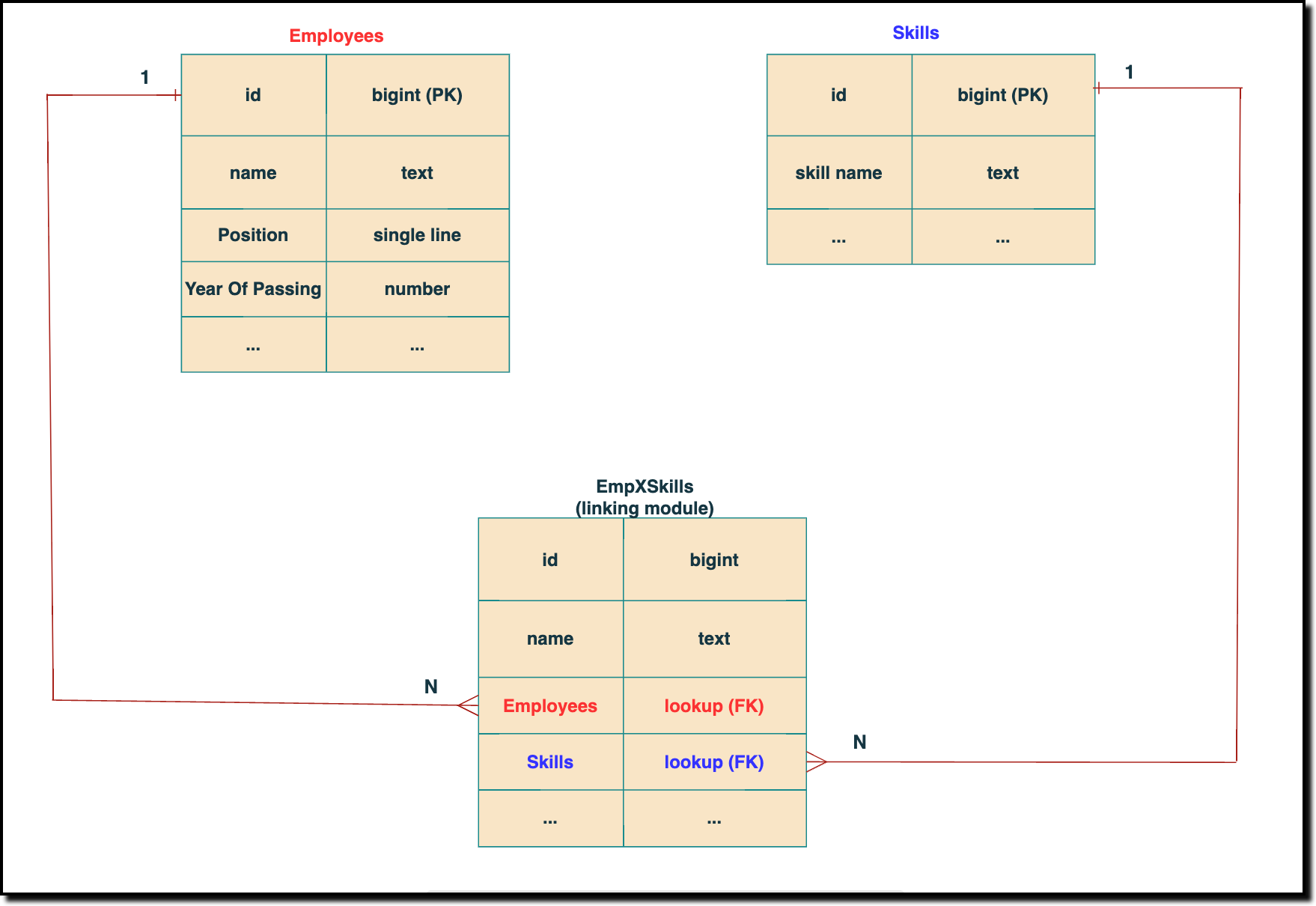 The above chart shows the data model representation when you create a multi-select lookup field in a module. Here, there are two lookup fields—one pointing to the Employees module and the other pointing to the Skills module.
 In the linking module, two lookup fields (lookup fields with api names - Employees and Skills) will be created. The lookup fields, one pointing to Employees and the other pointing to Skills from the linking module, establish a connection between the linking module and its associated module.
How to associate an employee's skills while creating an Employee record through the Insert Records API
API names you need before invoking the API
- The API name of the multi-select lookup field in the modules you want to insert data.
- API names of the lookup fields in the linking module. Eg: here the API Name of the linking module is "EmpXSkills" and the corresponding lookup field api names are "Employees" & "Skills". You can use the Fields Metadata API for Employees and Skills to get these details.
Step 1
Know the API name of the multi-select lookup field in the module (In our case, Skills is the multi-select lookup field in the Employees module)
To know the API names of the multi-select lookup fields, make a GET - Fields Metadata API call. Among all the Employee's fields, multi-select lookup field can be identified by the json key data_type with the value multiselectlookup. The corresponding connected module can be found from the json connected_module. Below is the API call & response for such a multi-select lookup field.
Request URL : {api-domain}/crm/v6/settings/fields?module=Employees
Request Method: GET
Sample Response:
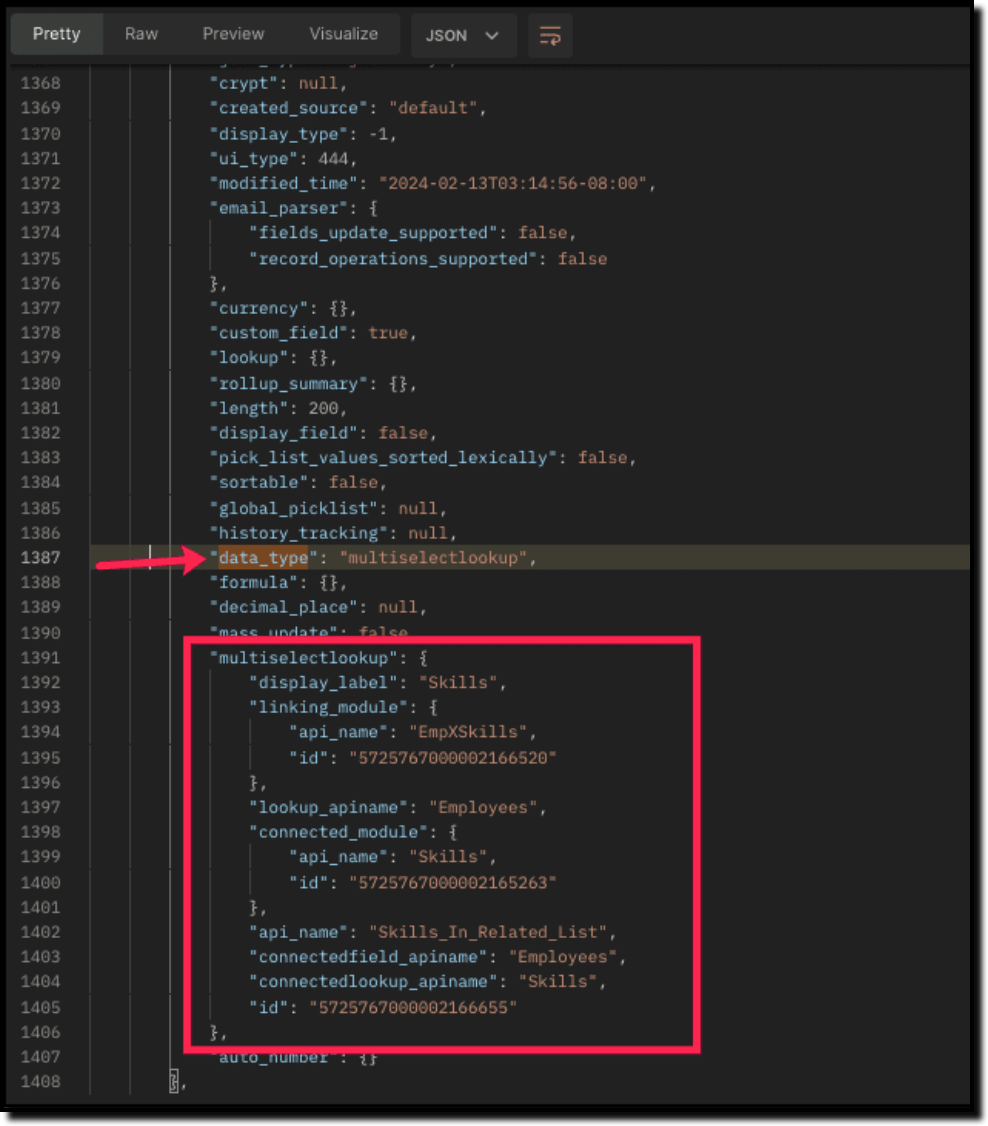
The above highlighted keys are the details of the Multi select lookup field. The corresponding keys are explained below:
"multiselectlookup": { "display_label": "Skills", //Display label of the MxN field in the Employees module "linking_module": { "api_name": "EmpXSkills", //API name of the linking module "id": "5725767000002166520" ... "lookup_apiname": "Employees", //API name of the Employee lookup field in the linking module "connected_module": { "api_name": "Skills", //API name of the connected module "id": "5725767000002165263" }, "api_name": "Skills_In_Related_List", //API of the related list of the connected module Skills in the Employees module. "connectedfield_apiname": "Employees", //API Name of the multi-select lookup field in the connected module (Skills) "connectedlookup_apiname": "Skills", //API name of the Skills module lookup field in the linking module. "id": "5725767000002166655" //Related List ID }, ... |
Step 2
Using the api_name of the linking module, make a GET Fields metadata API call to get the list of fields (along with their api_name) present in it. It lists all fields of the linking module in the response.
Sample Request and Response
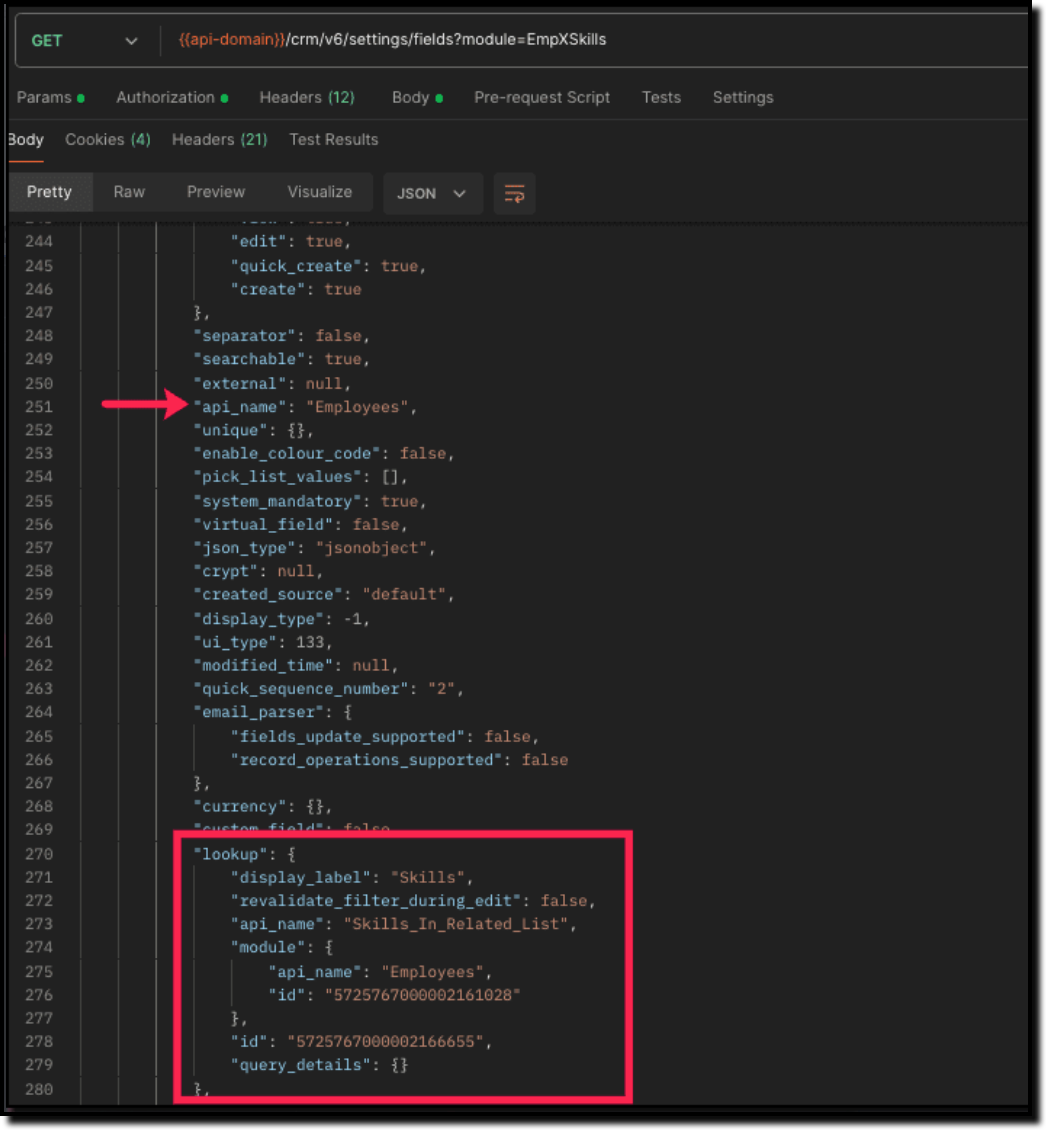
Search for the "data_type": "lookup" in the response. The lookup fields represent the connected modules in association with the linking module.
For example, in our case, the response will have two lookup fields. One of the lookup fields (with api name Employees) points to the Employees module, and the other one (with api name Skills) points to the Skills module.
Step 3
Associate records via the Multi-select lookup field using the Insert Records API
To associate records via the MxN field, you need to know the IDs of the records in the Skills module. Here is the input body to insert the skills in the Employee module with the multi-select lookup field Skills.
Here is the input body to insert a new Employee record and associate a Skills record to it using the MxN field.
Request URL: {{api-domain}}/crm/v6/Employees
Request Method: POST
Sample Input:
{ "data": [ { "Name": "Patricia", "Email": "patricia@mail.com", "Position": "Marketing Specialist", "Year_of_Experience": 5, "Skills": [ //API name of the multi-select lookup field in Employee module { "Skills": { //API Name of the lookup field pointing to the Skills module in the linking module "name": "Marketing", "id": "5725767000002149427" //Record ID in the Skills module } }, { "Skills": { "name": "Social Media Marketing", "id": "5725767000002149476" } } ] } ] } |
How to disassociate an employee & skills relation while updating an Employee record through the Update Records API
Request URL: {{api-domain}}/crm/v6/Employees
Request Method: PUT
Sample Input:
{ "data": [ { "id": "7890710000097291", "Name": "Patricia", "Email": "patricia@mail.com", "Position": "Marketing Specialist", "Year_of_Experience": 5, "Skills": [ { "_delete": null, //This association in the linking module will be deleted "id": "5725767000008126002" //Record created in the linking module } ] } ] } |
Sending _delete:null will cause delinking of the association.
How to associate an employee's skills via "Linking Module"
You can associate the relationship between Employees and Skills module by creating records in the Linking module (EmpXSkills). Use the API names for the corresponding lookup fields, Employee (API Name: Employees) and Skills (API Name: Skills) in the input body.
Request URL: {{api-domain}}/crm/v6/EmpXSkills
Request Method: POST
Sample Response
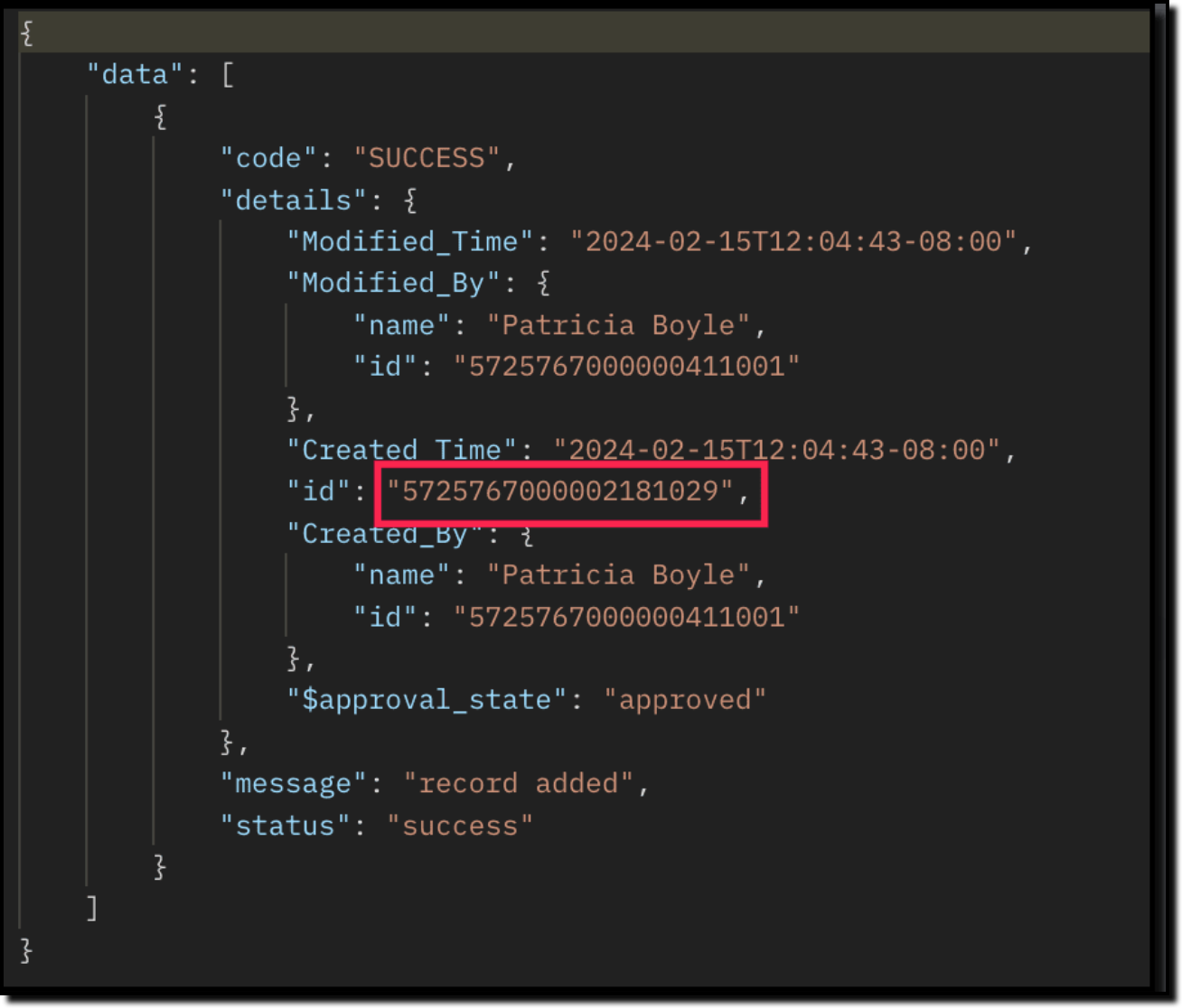
The id in the above response is the Primary Key ID of an Employee-Skill association record in the linking module. This ID can later be used to do specific operations like association update or deletion via API.
How to disassociate an employee & skills relationship via "Linking Module"
Use the Delete Records API to delete the record which corresponds to the specific relation between Employee and Skills module in the EmpXSkills module. You can get the record ID for the specific association using the Get Records API for the linking module.
Use the Delete Record API to delete the specific record, thereby deleting the specific association between the Employee and Skills record. Please note that only the association is removed, and not the individual records.
Sample Request and Response
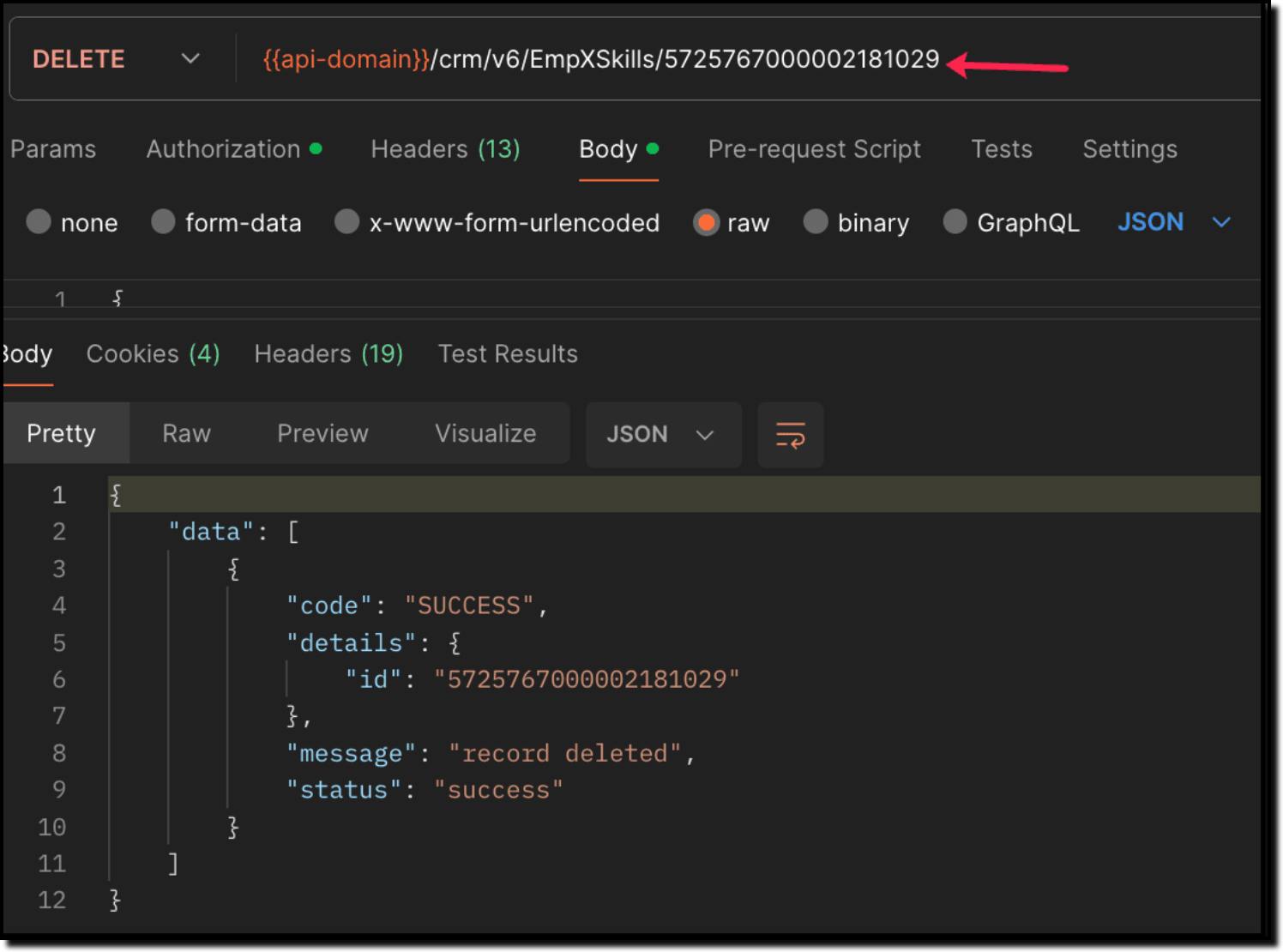
When to use create/update operation in Employees/EmpXSkills module?
Use "Employees" module: When you want to create/update records in the Employees module, and associate the record with a Skills record in a single API call.
Use "EmpXSkills" module: When you want to associate/disassociate the relationship between existing Employees and Skills records.
Retrieve data via COQL API and Bulk Read API
There may be situations where you need to fetch records based upon certain conditions.
For example, Zylker's HR team wants to retrieve the list of employees having more than 4 years of experience and are experts in Social media marketing. In this case, they can use Zoho CRM's COQL API or Bulk Read API. Let's see how to achieve this.
Retrieving MxN data via COQL API
We know that both the Employees and Skills modules' association data is maintained in the linking module. In order to retrieve data from the linking module, query using the API name of the lookup fields in the linking module.
Request URL: {{api-domain}}/crm/v6/coql
Request Method: POST
Sample Input:
{ "select_query" : "select Employees.Name as employee_name, Employees.Year_of_Experience as employee_experience, Skills.Name as skill_name from EmpXSkills where Employees.Year_of_Experience > 4 and Skills.Name like '%Social%'" } |
From the SQL perspective, above COQL can be interpreted as
select emp.Name as employee_name, emp.Year_of_Experience as employee_experience, skill.Name as skill_name from EmpXSkills left join Employees as emp on EmpXSkills.Employees = emp.id left join Skills as ski on EmpXSkills.Skills = ski.id where emp.Year_of_Experience > 4 and ski.Name like '%Social%' |
Sample Response
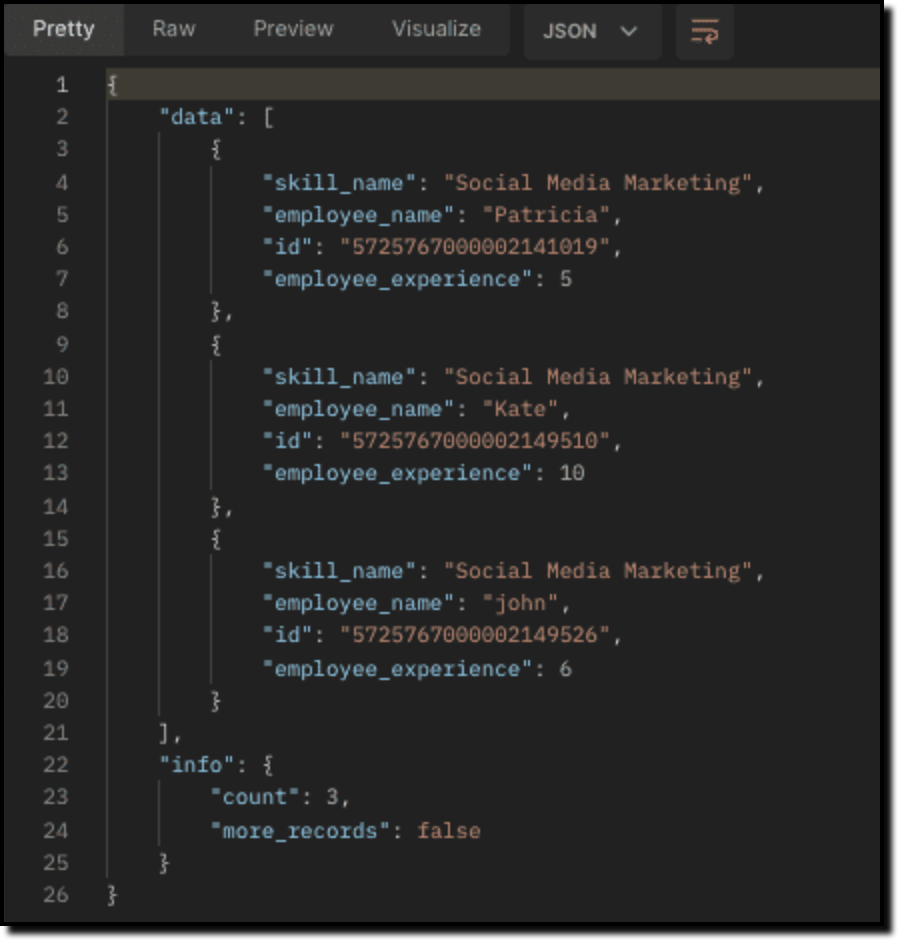
Retrieving MxN data via Bulk Read API
Bulk Read API allows you to fetch a large set of data i.e., you can fetch a maximum of 200,000 records in a single API call.
To export linking module records, use its API name.
Request URL: https://www.zohoapis.com/crm/bulk/v6/read
Request Method: POST
Sample input to export linking module's records:
{ "callback": { "method": "post" }, "query": { "module": { "api_name": "EmpXSkills" //API name of the linking module }, "file_type": "csv" } } |
Export linking module records that meet the specified criteria
To export linking module's records based on the given criteria above (similar to the COQL API).
{ "callback": { "method": "post" }, "query": { "module": { "api_name": "EmpXSkills" }, "fields": [ "Employees.Name", "Employees.Year_of_Experience", "Skills.Name" ], "criteria": { "group": [ { "field": { "api_name": "Employees.Year_of_Experience" }, "comparator": "greater_than", "value": "4" }, { "field": { "api_name": "Skills.Name" }, "comparator": "contains", "value": "Social" } ], "group_operator": "AND" } } } |
As the API is an asynchronous API, the response will not be available instantly; the bulk read job is scheduled, and the status can be checked. Once the job is completed, you will be notified in the callback URL. The records are available in a downloadable CSV file or ICS file (for events). See the Bulk Read API document to know how to view the status of the scheduled job and download the file, along with more sample requests and responses.
We trust that this post meets your needs and is helpful. Let us know your thoughts in the comment section or reach out to us at support@zohocrm.com
Stay tuned for more insights in our upcoming Kaizen posts!
------------------------------------------------------------------------------------------------------------------------------
Previous Kaizen Post : Kaizen #124 - Manipulating Subform using Zoho CRM APIs
-------------------------------------------------------------------------------------------------------------------------------
Cheers!
Additional Reading:
Kaizen Posts:
- Kaizen #26 - Linking module and Multi-select Lookup fields
- Kaizen #77 - Multi-select Lookup Fields in API V4
- Kaizen #80 - COQL API - Part I
- Kaizen #81 - COQL API - Part II
API Documentation - Linking Module APIs
Topic Participants
Subramanian K
Andres
Haiku Technical Support
Sticky Posts
Kaizen #226: Using ZRC in Client Script
Hello everyone! Welcome to another week of Kaizen. In today's post, lets see what is ZRC (Zoho Request Client) and how we can use ZRC methods in Client Script to get inputs from a Salesperson and update the Lead status with a single button click. In thisKaizen #222 - Client Script Support for Notes Related List
Hello everyone! Welcome to another week of Kaizen. The final Kaizen post of the year 2025 is here! With the new Client Script support for the Notes Related List, you can validate, enrich, and manage notes across modules. In this post, we’ll explore howKaizen #217 - Actions APIs : Tasks
Welcome to another week of Kaizen! In last week's post we discussed Email Notifications APIs which act as the link between your Workflow automations and you. We have discussed how Zylker Cloud Services uses Email Notifications API in their custom dashboard.Kaizen #216 - Actions APIs : Email Notifications
Welcome to another week of Kaizen! For the last three weeks, we have been discussing Zylker's workflows. We successfully updated a dormant workflow, built a new one from the ground up and more. But our work is not finished—these automated processes areKaizen #152 - Client Script Support for the new Canvas Record Forms
Hello everyone! Have you ever wanted to trigger actions on click of a canvas button, icon, or text mandatory forms in Create/Edit and Clone Pages? Have you ever wanted to control how elements behave on the new Canvas Record Forms? This can be achieved
Recent Topics
CRM gets location smart with the all new Map View: visualize records, locate records within any radius, and more
Hello all, We've introduced a new way to work with location data in Zoho CRM: the Map View. Instead of scrolling through endless lists, your records now appear as pins on a map. Built on top of the all-new address field and powered by Mappls (MapMyIndia),PDF Annotation is here - Mark Up PDFs Your Way!
Reviewing PDFs just got a whole lot easier. You can now annotate PDFs directly in Zoho Notebook. Highlight important sections, add text, insert images, apply watermarks, and mark up documents in detail without leaving your notes. No app switching. NoBulk update Profile Permissions
Dears, What should we do if we add new forms or reports and need to update more than 20 permissions? Updating them one by one feels pretty harsh, doesn’t it?From Zoho CRM to Paper : Design & Print Data Directly using Canvas Print View
Hello Everyone, We are excited to announce a new addition to your Canvas in Zoho CRM - Print View. Canvas print view helps you transform your custom CRM layouts into print-ready documents, so you can bring your digital data to the physical world withUnify Overlapping Functionalities Across Zoho Products
Hi Zoho One Team, We would like to raise a concern about the current overlap of core functionalities across various Zoho applications. While Zoho offers a rich suite of tools, many applications include similar or identical features—such as shift management,Filter in fields from Jira extension
We have installed the Jira extension so we can maken Jira issues from Zoho desk. In Zoho desk I can also see the Jira issue status for example but I can not filter on this field. I would like to setup an filter showing me the closed Jira issues. How cantext length in list report mobile/tablet
Is there a way to make the full text of a text field appear in the list report on mobile and tablet? With custom layouts, the text is always truncated after a certain number of characters.Zoho Creator customer portal limitation | Zoho One
I'm asking you all for any feedback as to the logic or reasoning behind drastically limiting portal users when Zoho already meters based on number of records. I'm a single-seat, Zoho One Enterprise license holder. If my portal users are going to add records, wouldn't that increase revenue for Zoho as that is how Creator is monetized? Why limit my customer portal to only THREE external users when more users would equate to more records being entered into the database?!? (See help ticket reply below.)Link Contacts to Billed Accounts
Hello, I want to do a survey on all my customers of 2025. For that I want to select all contacts linked to accounts who where billed in 2025. How to I create this link to I can then use Zoho Survey with this database of contacts?Export all of our manuals from Zoho Learn in one go
Hi, I know there's a way to export manuals in Zoho Learn, but I want to export everything in one go so it won't take so long. I can't see a way to do this, can I get some assistance or is this a feature in the pipeline? Thanks, HannahBring Zoho Shifts Capabilities into Zoho People Shift Module
Hello Zoho People Product Team, After a deep review of the Zoho People Shift module and a direct comparison with Zoho Shifts, we would like to raise a feature request and serious concern regarding the current state of shift management in Zoho People.Historical Sales Info - Blend with Finance Invoice Line Items, Access in CRM and Desk
My company has been using Zoho One since 2021, with sales data going back through 2020. However, we have been in business much longer, and we have historical sales information that we want to have at our fingertips when talking with customers (usuallyPre-Zoho Sales Info - Best Way to Add to Desk / CRM
My company has been using Zoho One since 2021, with sales data going back through 2020. However, we have been in business much longer, and we have historical sales information that we want to have at our fingertips when talking with customers (usuallyShift-Centric View for Assigning and Managing Shifts in Zoho People
Hello Zoho People Product Team, Greetings and hope you are doing well. This feature request is related to Zoho People - please don't move it to zoho one! We would like to submit a feature request regarding the shift assignment and management view in ZohoCRM function REST API response format
Is there a way to control the JSON response returned by the CRM function REST API? If I call a function using either OAuth or an API key it returns a 200 OK response with a string in the format shown below. I am using a particular feature of an externalAdd Employee Availability Functionality to Zoho People Shift Module
Hello Zoho People Product Team, Greetings and hope you are doing well. We would like to submit a feature request to enhance the Zoho People Shift module by adding employee availability management, similar to the functionality available in Zoho Shifts.Using MPN across multiple SKUs and inventory tracking
I have several different SKU's that share a common MPN and would like to track inventory by MPN. SKU1 has MPN1 assigned SKU2 has MPN1 assigned Here is an example If I start with 5 of MPN 1 in stock I want each SKU1 and SKU2 to show as 5 in stock, If IUnable to Access Application:
Whenever I try to access my application from the desktop, say I am editing it and want to test something in the desktop environment I get: An error has occurred. An internal error has occurred. Please check the URL , or try refreshing the page I can editCannot see Application from Lookup field
Hi all, I am trying to access data for an application on our account via a lookup field; however, the application doesn't appear in the dropdown at all. Can anyone shed any light on this, please? I have asked Zoho support; however, they're just as confused,Cannot see correct DNS config for mail after moving domain to another provider
I have moved my domain from one provider to another and after that zoho mail stopped working (expected). Problem is, zoho mail admin panel still shows (10 hours after move) that all records are correct while I haven't changed anything in my domain DNSZoho CRM Meetings Module Issues
We have a use-case that is very common in today's world, but won't work in Zoho CRM. We have an SDR (Sales Development Rep) who makes many calls per day to Leads and Contacts, and schedules meetings for our primary Sales Reps. He does this by loggingZoho Books integration sync from Zoho CRM does not work
Hi Zoho Community & Zoho Support We just tried to get a sync some products into Zoho Books from CRM using the native sync and we're getting an error: "It looks like some mandatory fields you're trying to map are empty. Please provide valid field namesP & L Sub-categorized accounts
How can I show sub-categorized Income and Expense accounts on the P & L report?Report showing Bill Details with Project and Sales Invoice Number
Hi There, I am hoping that someone can help, I am looking for report that can show the bill and expense details along with project its as assigned to and the invoice number that the sales has been raised in. The goal is I can filter a customer/projectAdvanced Payment for Inventory Items with serial numbers
Hello, We sell equipment that we track the unique serial numbers on using Sales Orders. We can charge the customers an advanced payment, then the balance on delivery. We cannot figure out a way to do this in Books/Inventory: - Cannot part invoice a SOIs it possible to restrict ZCRM user to see only custom views created by administrator
I have segmented data in my CRM and I want to allow different users to be able to see only parts of it based on some criteria. I've tried to create and share a custom view, but then there is always an option for user to see all open lead for example.Issues Logging into ZOHO
Hello, one of my coworkers is having issues logging into ZOHO, she has requested a code when entering and the email is correct but she has not received the code. can you help us with this?Google Fonts Integration in Pagesense Popup Editor
Hello Zoho Pagesense Team, We hope you're doing well. We’d like to submit a feature request to enhance Zoho Pagesense’s popup editor with Google Fonts support. Current Limitation: Currently, Pagesense offers a limited set of default fonts. Google FontsAdd Popup Rejection Metrics to Reports
Hello Zoho PageSense Team, We would like to request improved reporting for popup interactions. Current Limitation: PageSense currently provides conversion data, but there is no clear visibility into: Popup rejections Popup closes (✕ button clicks) DismissalsAbility to Reset / Reinitialize Popup Cookies
Hello Zoho PageSense Team, We would like to request the ability to manually reset popup cookies. Current Limitation: At the moment, it is not possible to initiate a new popup cookie from the our side. Visitors who rejected or closed a popup will not seeControl Popup Cookie Expiration Duration
Hello Zoho PageSense Team, We would like to request an enhancement related to popup cookie management. Current Limitation: Currently, PageSense popup cookies remain active for 365 days, and this duration cannot be modified by us. If a visitor closes orClone / Export Popup Design Across PageSense Projects
Hello Zoho PageSense Team, We hope you’re doing well. We would like to request an enhancement that allows popup designs to be reused across different PageSense projects. Problem Statement: Currently, Zoho PageSense allows popups to be duplicated onlyAre there settings for hyperlinks?
Clicking a hyperlinked cell in Sheet creates this little pop-up with the actual hyperlink inside. Is it possible to have a 1-click link where if you click the cell it opens the link directly with no pop-up?Automatically include all ticket attachments in the ticket resolution email
Hello Zoho Community, We are implementing Zoho Desk in a real customer-facing production environment and have run into a limitation that is becoming a blocking requirement for our clients. The problem When a ticket is closed or resolved, Zoho Desk sendsFinding text within a ticket: Expand All or Search this Ticket
The auto-collapse feature within a ticket is nice for screen scrolling, however it makes it difficult to find text within the ticket if the email is collapsed. In fact you cannot find text if it is collapsed. I would like to propose a feature that allowsBooks & Desk. Client mapping
Hi, I’ve been using Zoho Books for several years and am now looking to improve my customer service. I'm experimenting with Zoho Desk and want to sync and map my client data from Zoho Books. However, it seems that mapping requires both contacts to haveZoho Creator to Zoho CRM Images
Right now, I am trying to setup a Notes form within Zoho Creator. This Notes will note the Note section under Accounts > Selected Account. Right now, I use Zoho Flow to push the notes and it works just fine, with text only. Images do not get sent (thereString handling
If I cut a currency string from a quote and try and paste it into the Deal "Amount", it will fail unless I manually delete any commas. Dollar signs are no problem, but comma's seem to fail. Please correct this Input Validation error.What's new in Zoho Sheet: Simplify data entry and collaboration
Hello, Zoho Sheet community! Last year, our team was focused on research and development so we could deliver updates that enhance your spreadsheet experience. This year, we’re excited to deliver those enhancements—but we'll be rolling them out incrementallyWebDAV / FTP / SFTP protocols for syncing
I believe the Zoho for Desktop app is built using a proprietary protocol. For the growing number of people using services such as odrive to sync multiple accounts from various providers (Google, Dropbox, Box, OneDrive, etc.) it would be really helpfulNext Page