Kaizen #177: Duplicate Check Preferences API vs. Upsert API

- What is the Duplicate Check Preferences API?
- Use Case
- Duplicate Check Configurations
- Updating Duplicate Check Configuration
- How Duplicate Check Preferences Work During Record Creation/Update?
- What is the Upsert API?
- Use Case
- Differences between Duplicate Check Preferences API and Upsert API
What is the Duplicate Check Preferences API
in Zoho CRM. Based on the given criteria, the system will restrict the creation or update of duplicate records. For example, if the Phone field is marked as unique and set for duplicate checks, the system will make sure that no two records have the same phone number during records creation or update.
Use case
Duplicate Check Configurations
The following is the configuration for duplicate check in the Leads module via API.
- The "module" parameter is mandatory, and its supported value is Leads.
- The above URL applies to both Leads and Contacts module configurations.
- You must mark at least one field as mandatory. So, the system can check for duplicates based on the value in the unique field within the Leads module when creating a record.
{ "duplicate_check_preference": { "type": "converted_records", //Converted Leads custom view in Leads module } } |
{ "duplicate_check_preference": { "code": "SUCCESS", "details": {}, "message": "Duplicate check enabled for converted_records successfully.", "status": "success" } } |
{ "duplicate_check_preference": { "type": "mapped_module_records", "type_configurations": [ { "field_mappings": [ { "current_field": { "api_name": "Email", "id": "5725767000000002601" }, "mapped_field": { "api_name": "Email", "id": "5725767000000002503" } } ], "mapped_module": { "api_name": "Contacts", "id": "5725767000000002179" } } ] } } |
How Duplicate Check Preferences Work During Record Creation/Update
Use the Insert Records API to create records in a module.
{ "data": [ { "Company": "Villa Margarita", "Last_Name": "Dolan", "First_Name": "Brian", "Phone": "12345", "State": "Texas" } ] } |
Response
{ "data": [ { "code": "DUPLICATE_DATA", "details": { "api_name": "Email", "duplicate_record": { "Owner": { "name": "Patricia Boyle", "id": "5725767000000411001", "zuid": "808233918" }, "module": { "api_name": "Contacts", "id": "5725767000000002179" }, "id": "5725767000000774010" //The record that already exists in the Contacts module. }, "json_path": "$.data[0].Email", "more_records": false }, "message": "duplicate data", "status": "error" } ] } |
Duplicates are also checked during record updates. If a record is updated with a value that already exists in a unique field, the system indicates it as a duplicate and returns a "DUPLICATE_DATA" error.
Update Duplicate Check Configuration
Input JSON
{ "duplicate_check_preference": { "type": "mapped_module_records", "type_configurations": [ { "field_mappings": [ { "mapped_field": { "api_name": "Phone", //The previously configured Email field as a unique identifier in Contacts has now been replaced with the Phone field. "name": "Contacts", "id": "5725767000000411001" }, "current_field": { "api_name": "Phone", "name": "Leads", //The previously configured Email field as a unique identifier in Leads has now been replaced with the Phone field. "id": "5725767000005381030" } } ], "mapped_module": { "api_name": "Contacts", "name": "Contacts", "id": "5725767000000002179" } } ] } } |
What is the Upsert API?
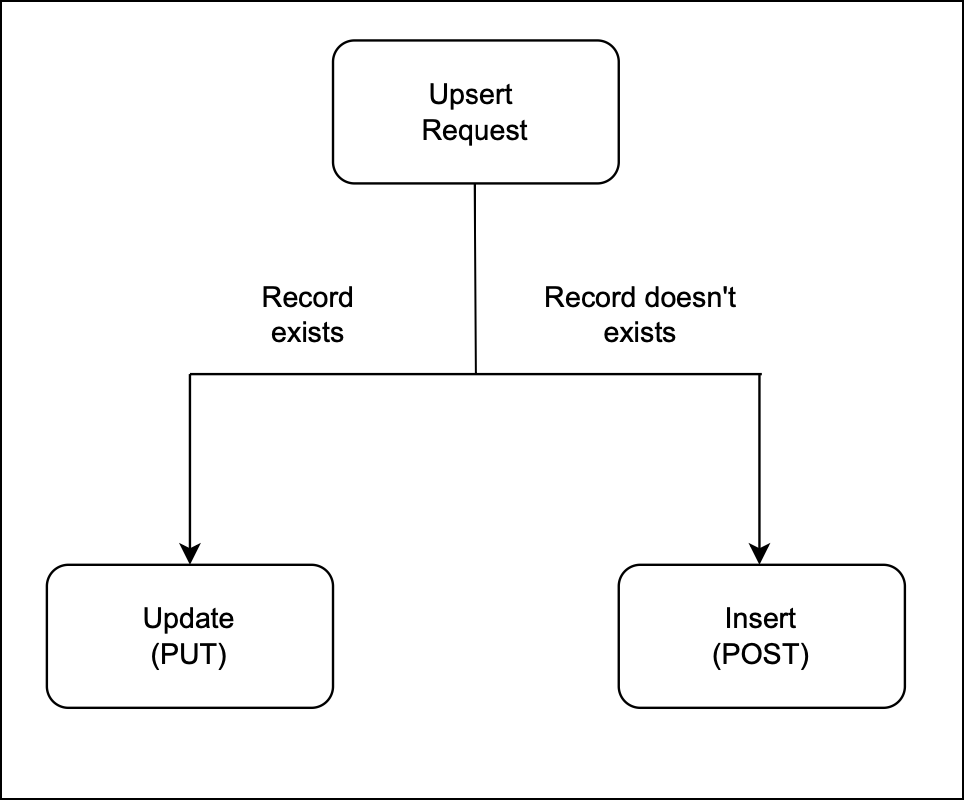
The Upsert API is a combination of "update" and "insert".
How it works?
You provide a unique identifier (e.g., email, phone number, or a custom field) to check for existing records.
If a record with the same identifier exists, it updates that record.
If no matching record is found, it creates a new one.
Use Case
- Update existing customer records details if the given unique identifier, such as email or phone number, matches an existing record in Zoho CRM.
- Insert a new record if no match is found. This way, Zylker ensures that new customers are added efficiently.
There are two types of duplicate check fields:
The table below lists the system-defined unique fields. When you create a record using the Upsert API, the system checks these fields for duplicate entries.
Leads | |
Contacts | |
Accounts | Account_Name |
Deals | Deal_Name |
Campaigns | Campaign_Name |
Cases | Subject |
Solutions | Solution_Title |
Products | Product_Name |
Vendors | Vendor_Name |
PriceBooks | Price_Book_Name |
Quotes | Subject |
SalesOrders | Subject |
PurchaseOrders | Subject |
Invoices | Subject |
Custom Module | Name |
ii. User-defined duplicate check fields
You can set a normal field as a duplicate check field by enabling "Do not allow duplicate values." Note that you can only set fields with the following field-types as unique— Single Line, Email, Phone, Number, Long Integer, and URL.
Sample Input JSON
Here, "Email," a system-defined field, has been used as a duplicate check field.
{ "data": [ { "Email": "alice@mail.com", "First_Name": "Alice", "Last_Name": "Brown", "Phone": "+1-555-222-3333", "Order_Date": "2024-01-10", "Order_Value": "$175.00" }, { "Email": "pat@mail.com", "First_Name": "pat", "Last_Name": "Davis", "Phone": "+1-555-666-7777", "Order_Date": "2024-01-15", "Order_Value": "$300.00" } ], "duplicate_check_fields": [ "Email" //You can set the order in which the system checks for duplicate records by specifying the duplicate_check_field array in the input. ] } |
Response
{ "data": [ { "code": "SUCCESS", "duplicate_field": null, "action": "insert", "details": { "Modified_Time": "2025-02-08T09:43:08-08:00", "Modified_By": { "name": "Patricia Boyle", "id": "5725767000000411001" }, "Created_Time": "2025-02-08T09:43:08-08:00", "id": "5725767000005425036", "Created_By": { "name": "Patricia Boyle", "id": "5725767000000411001" } }, "message": "record added", "status": "success" }, { "code": "SUCCESS", "duplicate_field": "Email", "action": "update", "details": { "Modified_Time": "2025-02-08T09:43:08-08:00", "Modified_By": { "name": "Patricia Boyle", "id": "5725767000000411001" }, "Created_Time": "2025-02-08T08:52:22-08:00", "id": "5725767000005425002", "Created_By": { "name": "Patricia Boyle", "id": "5725767000000411001" } }, "message": "record updated", "status": "success" } ] } |
Differences between Duplicate Check Preferences API and Upsert API
Duplicate Check API | Upsert API |
Duplicate Check Preferences can be enabled only in the Leads module. | Supports all modules. |
Throws a "DUPLICATE_DATA" error if a duplicate is detected. | Updates the existing record with new field values if a match is found for the unique fields; otherwise, inserts a new record. |

- More enhancements in the COQL API are now live in Zoho CRM API Version 7. Check out the V7 Changelog
for detailed information on these updates. ✨
- OAuth Scopes Page for Zoho CRM APIs. ✨

Topic Participants
Subramanian K
Andres
Jeganprabhu S
Sticky Posts
Kaizen #217 - Actions APIs : Tasks
Welcome to another week of Kaizen! In last week's post we discussed Email Notifications APIs which act as the link between your Workflow automations and you. We have discussed how Zylker Cloud Services uses Email Notifications API in their custom dashboard.Kaizen #216 - Actions APIs : Email Notifications
Welcome to another week of Kaizen! For the last three weeks, we have been discussing Zylker's workflows. We successfully updated a dormant workflow, built a new one from the ground up and more. But our work is not finished—these automated processes areKaizen #152 - Client Script Support for the new Canvas Record Forms
Hello everyone! Have you ever wanted to trigger actions on click of a canvas button, icon, or text mandatory forms in Create/Edit and Clone Pages? Have you ever wanted to control how elements behave on the new Canvas Record Forms? This can be achievedKaizen #142: How to Navigate to Another Page in Zoho CRM using Client Script
Hello everyone! Welcome back to another exciting Kaizen post. In this post, let us see how you can you navigate to different Pages using Client Script. In this Kaizen post, Need to Navigate to different Pages Client Script ZDKs related to navigation A.Kaizen #210 - Answering your Questions | Event Management System using ZDK CLI
Hello Everyone, Welcome back to yet another post in the Kaizen Series! As you already may know, for the Kaizen #200 milestone, we asked for your feedback and many of you suggested topics for us to discuss. We have been writing on these topics over the
Recent Topics
Zoho Flow Credits
Hi , I would like to ask the reason why every time I added plus credit but few days later I will return back to default? (as below I add credit to 3000 but today It change back to 1000) Most important is, when the credit fully used, not any reminder toZoho learn Custom portal - networkurl & CustomPortalId
I want to get my individual account’s networkurl and customportalId to use in this API: https://learn.zoho.com/learn/api/v1/portal/<networkurl>/customportal/<customportalId>/manual How can I retrieve the networkurl and customportalId using the API? IConnecting zoho creator to zoho writer to send prefilled documents
i will paste the worflow below // Get user's submitted data from the form userSalary = input.Current_Salary; userCIBIL = input.CIBIL_Score; userEmail = input.Email; userName = input.Name; // You need to get the Document ID from the URL of your Zoho WriterZoho Creator to Zoho Writer for prefilled documents...
In response to the question about connecting Zoho Creator to Zoho Writer for prefilled documents, I wanted to share a working implementation that demonstrates how to use the record_id parameter with the Zoho Writer Merge API. This allows Writer to automaticallyWebDAV / FTP / SFTP protocols for syncing
I believe the Zoho for Desktop app is built using a proprietary protocol. For the growing number of people using services such as odrive to sync multiple accounts from various providers (Google, Dropbox, Box, OneDrive, etc.) it would be really helpfulManaging functions
Can someone let me know if there are any plans to improve the features for managing functions in CRM? I have lots of functions and finding them is hard. The search only works on the function name and the filter only works on function type. I have createdIntroducing our latest privacy enhancement - Hiding email IDs in Zoho Cliq Networks
Hello everyone, Zoho Cliq Networks offers a powerful collaboration platform that allows businesses to create dedicated digital workspaces for external vendors, partners, or individuals you want to communicate with professionally without adding them tozoho performance
OVERALL CONFIGURATION OF ZOHO PERFORMANCE Quarterly performance review Self rating and scoring Manager rating and scoringZoho Social API for generating draft posts from a third-party app ?
Hello everyone, I hope you are all well. I have a question regarding Zoho Social. I am developing an application that generates social media posts, and I would like to be able to incorporate a feature that allows saving these posts as drafts in Zoho Social.When will it be possible to edit Subform records via either views or tabular reports?
Hey there, data maintenance often requires mass update of quite a lot of records. While this is a piece of cake via either List view or Zoho sheet view, the same cannot be carried out for subform records yet. When one of the two options will be made available?Onboarding
Hello Team, Im yuktha working as HR at Ossisto Technologies. We are currently utilizing zoho for onboarding candidate. right now facing issue with onboarding Attaching the screenshots for your referenceArchiving Contacts
How do I archive a list of contacts, or individual contacts?How do I change a form's name? Why isn't this more intuitive?
Can someone please let me know how to change a form's name?Control Over Zia Generative AI Reply Assistance Behavior
Hello, I would like to request an enhancement to the Zia Generative AI feature, specifically concerning the Reply Assistance within Zoho Desk. Current Issue: When replying to a ticket, the Ticket Properties section is automatically replaced by the ZiaZia now integrated with Open AI in Zoho Desk
The powerful integration of Zia with OpenAI, has empowered Zoho Desk reach a new level of efficiency and performance. With contextual self-service capabilities, Zia enables agents to boost their productivity and delivers superior customer experiences.Zoho Desk Partners with Microsoft's M365 Copilot for seamless customer service experiences
Hello Zoho Desk users, We are happy to announce that Zoho Desk has partnered with Microsoft's M365 to empower customer service teams with enhanced capabilities and seamless experiences for agents. Microsoft announced their partnership during their keynoteEmployee self-service portal: Onboarding and continuous learning platform for support reps
Hello everyone, In any organization, employees must go through multiple courses to learn about the product, their organization's standards, and how to respond to customer queries using the knowledge base articles available. This typically requires completing2024 Email Authentication Standards: Elevating Security with Google and Yahoo
In contemporary email communication, email authentication plays a pivotal role in mitigating email fraud, spam, and phishing attacks. Brace yourself for a new level of security. Starting February 2024, Gmail and Yahoo will be implementing robust emailContact custom field in layout
Good day, all, I have an "Extension" custom field in contacts, and would like to display the contact extension in the ticket layout, but I don't seem to be able to. What am I missing? Thanks RudyExact match in name when searching workdrive
Hello, I am wondering how to search workdrive files/folders with an exact match in the name. For example, when I search across folder with the url param search[name]=someName, I get multiple results such as "someName", "someNameAndMore", or "someNameMeeting impossible to use when sharing screen
he Meeting tool in Brazil is practically unusable when sharing anything, whether it’s a presentation or simple navigation. When accessed via Cliq, the situation gets even worse: even basic calls fail to work properly, constantly freezing. And as you areAdd System Pre-Defined Lookup Field to Subform?
Hi there! New to using Zoho, so this may already exist, but I'm having trouble figuring it out. Is there a way to get the system pre-defined Account Lookup field (in our case, renamed to Company Name), as the starting point for a subform? In our company,Changing the Default Search Criteria for Finding Duplicates
Hey everyone, is it possible to adjust the default search criteria for finding and merging duplicate records? Right now, CRM uses some (in my opinion nonsensical) fields as search criteria for duplicate records which do nothing except dilute the results.Is there a way to create a desktop shortcut for a website course portal?
Hello everyone, I recently got a laptop and bought an online course from a website, Skillwint.com, which I visit regularly. I open that site many times a day and want to create a desktop shortcut so I can open it directly instead of searching in the browserCondition based aggregate fields in subforms
Hello everyone, We're excited to inform you about the latest enhancements made to our aggregate field capabilities in subforms; create aggregate fields based on conditions! An aggregate field is a column on which a mathematical function has been applied.SalesIQ Tip for Admins: Your Safety Net for Data Recovery
Ever clicked 'Delete' in your SalesIQ and then realized it was the wrong item? Maybe it was a prospect's chat that held important context you needed to refer to later on. Or, maybe you deleted an elaborate Zobot that you were still testing or planningDepreciated mergeAndStore Function Help!
Hello, I have a function designed to create a PDF containing information from the fields in a Deals record. There is a Writer Mail Merge template in WorkDrive that is populated via Deluge code, and a copy of the resulting PDF is then attached to the record.Can I execute two 'functions' when completing a mail merge from CRM?
Hi, I have set up a mail merge from CRM Deals to a template. I want a copy of this to be saved in Workdrive, and then a copy also saved back into the deal record from which the merge occurred. I can do both independent of each other, and managed to getExternal Share > Edit: Cannot Create Zoho Files
Hi Zoho, When we create an external share link with Edit permission, our external users are unable to create a Zoho file (Zoho Writer, Zoho Sheet and Zoho Show). They can only upload files. They can edit the Zoho files if we create them internally andthe custom domain forwards by default to the old career site / how to switch it off??
dear friends, how to switch off the old version of the career site?? The set up custom domain forwards directly to the old site, so that I cant publish it... Any ideas? Thank you! KR, VictoriaZoho Mail iOS app update - RTL languages support and access emails using permalink and universal link, image upload resolution
Hello everyone! In the most recent version of the Zoho Mail iOS app update, we have brought in support for RTL languages(Arabic and Urudu), providing a seamless reading experience with proper text alignment and layout throughout the app. We have alsoPresenting ABM for Zoho CRM: Expand and retain your customers with precision
Picture this scenario: You're a growing SaaS company ready to launch a powerful business suite, and are looking to gain traction and momentum. But as a business with a tight budget, you know acquiring new customers is slow, expensive, and often deliversWhy are emails sending with @viazohocrm.com ?
I just sent out mass emails from CRM. They are sending from the email below and people cannot reply, and they are getting this message: Address not found Your message wasn't delivered to sales.XXXXXXXX.com.au@viazohocrm.com because the address couldn'tDuplicating and referencing datasets
I am moving from PowerBI to Zoho Analytics and while I find Zoho easier to use in many ways, there is one function that I use in PowerBI that I have not been able to find in Zoho. I have several data sets that I need to modify in different ways to getFrom Zoho CRM to Paper : Design & Print Data Directly using Canvas Print View
Hello Everyone, We are excited to announce a new addition to your Canvas in Zoho CRM - Print View. Canvas print view helps you transform your custom CRM layouts into print-ready documents, so you can bring your digital data to the physical world withZoho Inventory Now Supports VeriFactu for Businesses in Spain
Starting from January 1, 2026, Spain requires real-time invoice reporting for all B2B transactions. From July 2026, this requirement will extend to B2C transactions as well. All reporting must be carried out through the VeriFactu to AEAT (Agencia EstatalConditional Email Forwarding
How can I set conditional email forwarding of the users? For example: Mail should be forwarded to a address only if it comes from a particular sender. So, I want such email forwarding, which forwards mails based on particular conditions, like the incomingWhy am I seeing deleted records in Zoho Analytics syncing with Zoho CRM?
I have done a data sync between Zoho CRM and Zoho Analytics, and the recycle bin is empty. Why do I see deleted leads/deals/contacts in Zoho Analytics if it doesn't exist in Zoho CRM? How can I solve this problem? ThanksEnhancements to Zoho Map integration tasks
Hello everyone, We're excited to announce enhancements to the Zoho Map integration tasks in Deluge, which will boost its performance. This post will walk you through the upcoming changes, explain why we're making them, and detail the steps you need toLet’s Talk Recruit: Meet Zia, your all-in-one AI assistant (Part-3)
Welcome back to the Let’s Talk Recruit series. In the part 2 post, we explored how Zia has evolved with smarter summaries and seamless AI-assisted content creation. This time, we’re diving into the latest upgrades that take productivity even further —Next Page