Let’s Talk Recruit: Forms that think before you do!
Welcome back to our Let's Talk Recruit series. In our previous post, we shared highlights from our community meetups held across India.
This time, we’re talking about something that often gets overlooked but makes a huge difference once you set it up right: Webforms and Form Rules.
Let’s say you're rolling out a hiring drive or posting jobs on multiple channels. Candidates start pouring in—but half of them forget to attach their resumes, a few skip critical questions, and some apply to the wrong roles altogether. And that’s before you’ve even started shortlisting.
That’s exactly the kind of cleanup Webforms and Form Rules are built to prevent. They help you collect the right details, personalize the experience for candidates, and automate the little things that usually slow you down. And once you get the hang of them, you'll wonder why you didn’t start sooner.
The Problem
If your team still relies on email attachments or inconsistent spreadsheets to gather applicant info, chances are you’re wasting time fixing errors that shouldn’t exist in the first place.
Candidates entering outdated contact details
Missing info on key fields like skill set, location, or availability
Manually categorizing candidates for different roles or hiring pipelines
Without a structure in place, things slip through the cracks. And when you're hiring at scale, that’s a problem.
Why Webforms matter
A webform is often the first step a candidate takes to engage with your company. Whether it’s embedded on your careers page, linked on a social post, or shared during campus drives — it sets the tone.
But a lot of recruiters still use basic forms. Candidates fill them out, and then it’s a game of manual edits, sorting, and follow-ups.
What if the form did more? What if it already knew:
Which fields to show and when?
Whom to assign the record to?
Whether the candidate should be redirected after submission?
That’s where form rules come in.
What are Form Rules?
Form rules let you customize the candidate’s experience while they’re filling out the form by triggering actions based on their input.
Actions include: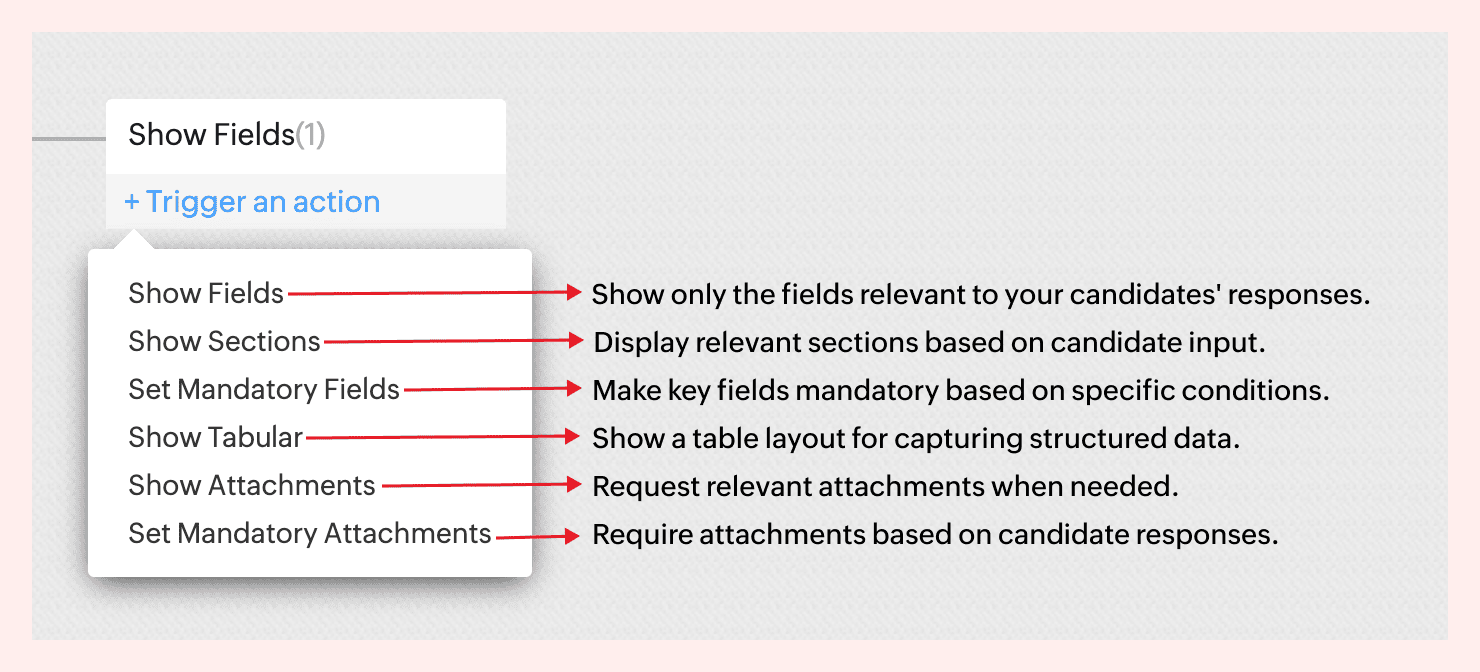
For instance, not all candidates come with the same background—and your forms shouldn’t treat them like they do.
If a candidate indicates they’re a fresher, there’s no need to show fields like Work History or Current Salary. But if they’re experienced, you might want to ask about key projects, past employers, or management experience.
With form rules, you can create this branching logic in just a few clicks—keeping the form clean for early talent and detailed where it matters.
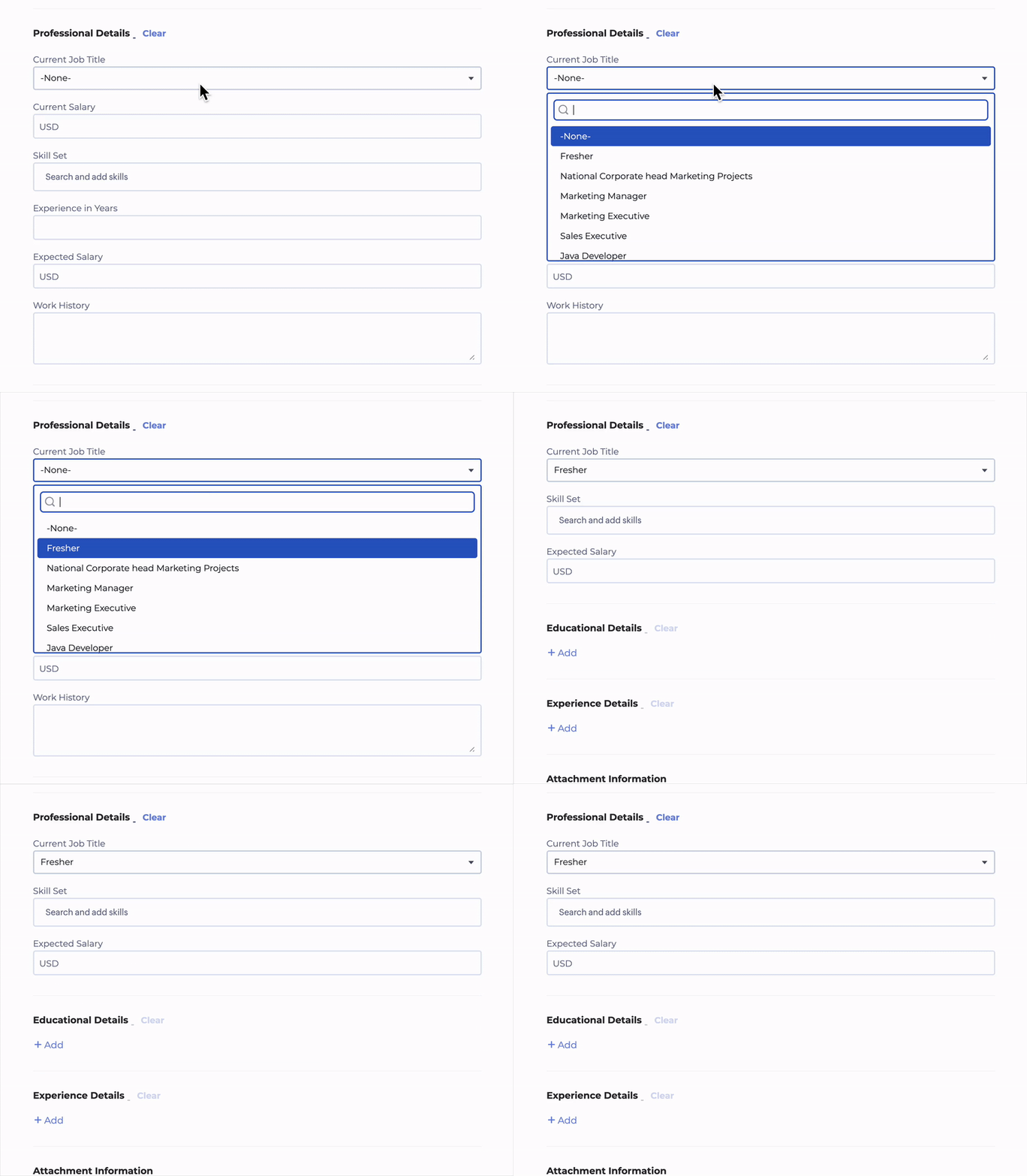
No code required. Just simple logic-based conditions.
→ Learn more
A few use cases to consider
Client Intake to Job Requisition
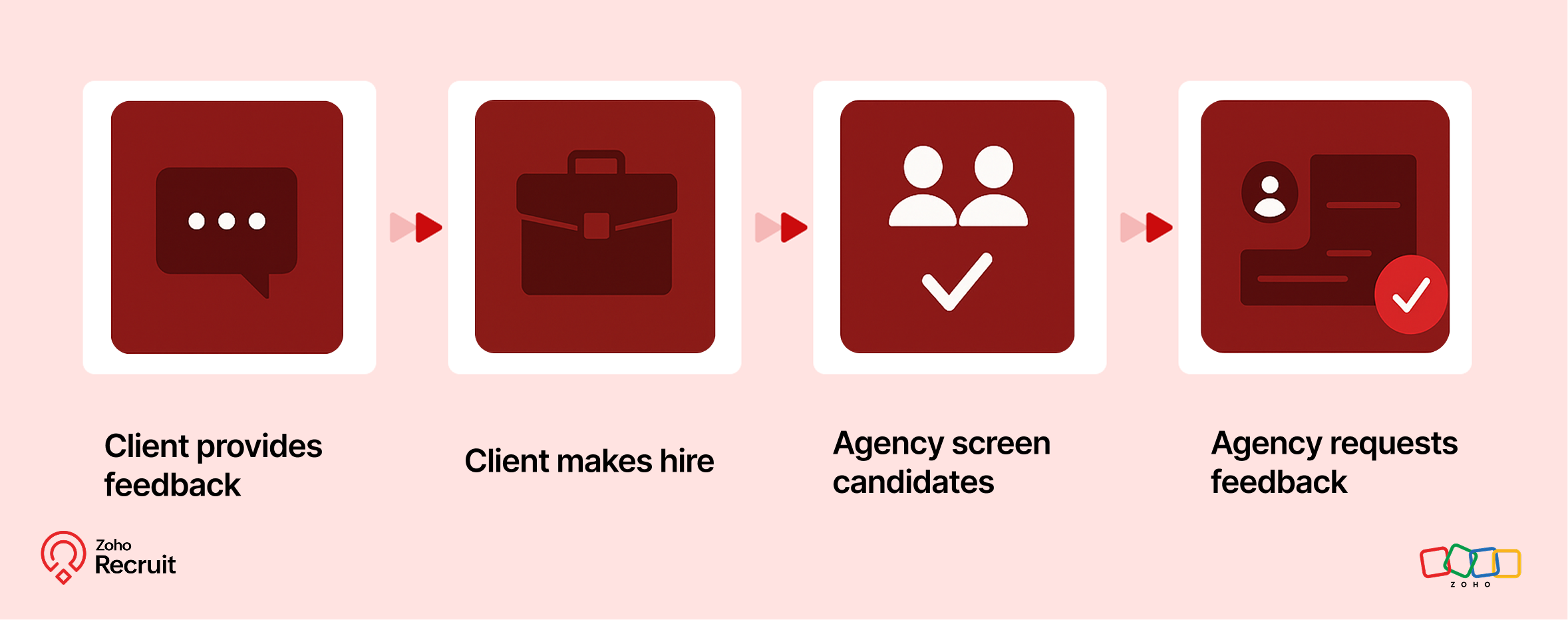
Step 1: Client submits contact form
Embed a Contact webform on your website to capture leads—clients who want to work with your staffing agency.
Step 2: Client shares job details
Once onboarded, clients can submit job requirements through a Job Requisition form. These details feed directly into your system.
Step 3: Agency hires candidates
Use the shared job details to source, match, and hire candidates for the role.
Step 4: Agency requests feedback
After successfully filling positions, request feedback from clients using a Feedback webform.
Candidate Onboarding & Documentation
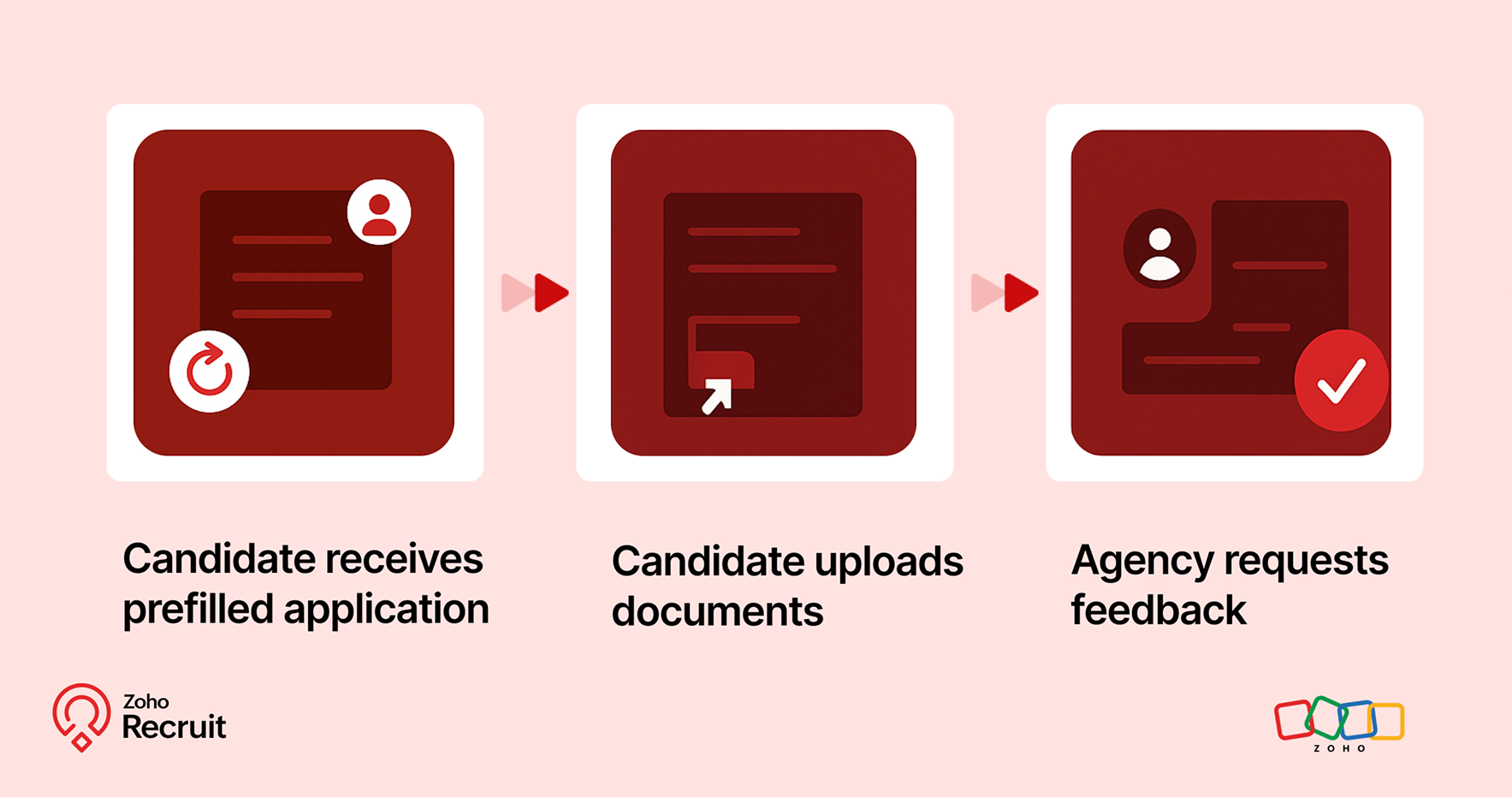
Step 1: Candidate receives prefilled application
Once candidates are selected, use known data to prefill details into a Background Check form.
Step 2: Candidate uploads documents
Share the form with candidates to collect necessary documents—ensuring accuracy and reducing redundant data entry.
Step 3: Agency requests feedback
After onboarding is complete, send a Feedback webform to capture the candidate’s experience.

A quick look at the numbers
Webforms and Form Rules aren’t just about convenience — they actually influence how well candidates interact with your hiring process.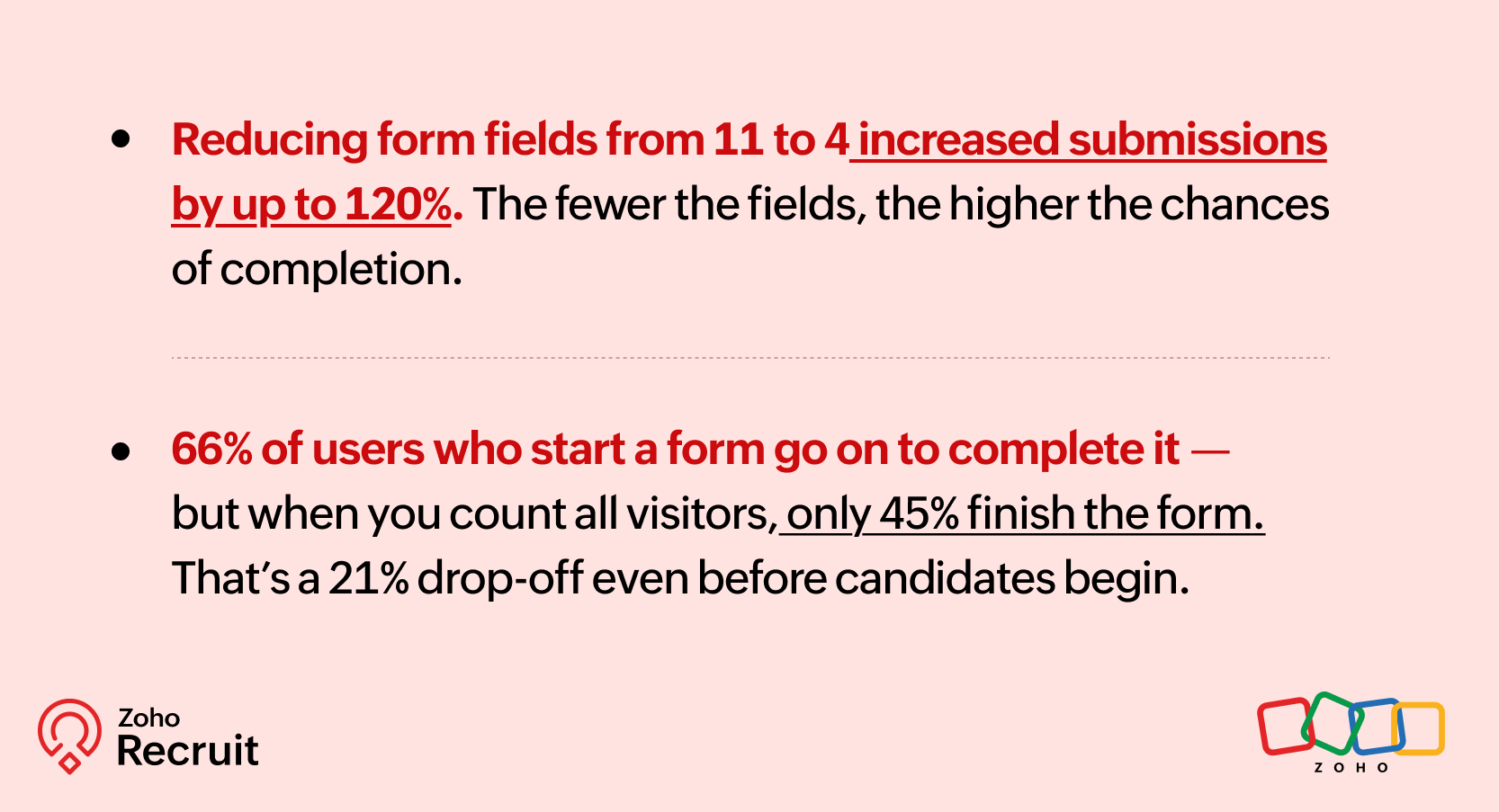
These numbers reinforce what we already know — clearer, shorter, and smarter forms can keep more candidates moving forward.
Getting started: A few setup tips
If you’re new to webforms or haven’t reviewed your setup in a while, here are three things to check:
Do you have job-specific forms?
A generic form might be easier to maintain — but it might also be collecting unnecessary or missing important info.Have you mapped fields correctly?
Ensure that all form fields map directly to your Recruit modules (Candidate, Job Opening, etc.) to avoid duplicates or errors.Are you using rules to simplify things?
Even one simple rule — like showing a “Notice Period” field only for full-time roles — can improve form quality.
Need help setting this up? Here’s how to build a webform and how to configure Form Rules.
Let’s Talk Recruit!
Do you already use Webforms in your hiring flow? Have you explored conditional form rules yet—or is that still on your to-do list?
Drop your experience below or tell us what kind of form use case you'd love to automate—we're all ears (and maybe one of our product folks will drop in with a tip or two!).
Topic Participants
Akshaya P
Sticky Posts
Zoho Recruit Community Meet-up - India (Venues Finalised)
Zoho Recruit Community Meet-up - India (Venues Finalised) Namaste, India. 🙏🏼 The Zoho Recruit team is hitting the road—and we're absolutely excited behind the scenes. Join us for the Zoho Recruit India Meet-up 2026, a morning designed to make your recruitingZoho Recruit Community Meetup - London 🇬🇧 (Venue Finalised)
Hello Recruiters! We’re excited to announce that the Zoho Recruit team is coming to the UK for an in-person Zoho User Group (ZUG) Meetup in London! This is your chance to connect with fellow Zoho users, learn from experts, and walk away with actionableAn update to improve email delivery | Email Authentication & Relay
Update Rollout Latest Update: Enterprise users (8th July, 2025) This update is now live for Enterprise plan users in all regions. This includes People Plus, but not Zoho One, which will be covered in an upcoming update. Professional users (31st May 2025)Zoho Recruit User Group Meet-up | INDIA 2025 (Venue Finalised)
Hello Zoho Recruit users from India, We’re pleased and excited to announce our 2025 edition of Zoho user group meet-up in India in five cities! In this meet-up, our team of experts will help you understand the intricate nuances to use Zoho Recruit better,Zoho Recruit is coming to the UK | Zoho Community Learning Series
Customers from the United Kingdom, Exciting news: We will be in London for the Zoho Recruit user meet up. Our team will help you better understand the intricate nuances of Zoho Recruit to help you hire faster, inform about new and upcoming features, and
Recent Topics
Dynamic Remaining Quantity in Lookup During Allocation
Hi everyone, From what I understand in Zoho Creator, lookup fields only display the stored value from the source record and do not dynamically update while a form is being filled. Because of this, showing a real-time updated remaining quantity insideIs it possible to use HTML formatting in SMS messages sent from Zoho?
Hi everyone, I have a question regarding sending SMS from Zoho When we send emails from Zoho, we can include HTML code to format the message (like adding links, styling, etc.). Is it possible to do something similar when sending SMS messages through ZohoImportant update: Migrate to the new SalesIQ live chat widget before April 14, 2026
The old SalesIQ live chat widget will be deprecated on April 14, 2026. This is a final reminder to migrate to the new SalesIQ live chat widget before this date. After April 14, 2026, the old widget will no longer be maintained, which can lead to slowerIf your IM chats aren’t auto-assigning, here’s what to check
Hey everyone! We’ve been seeing quite a few questions around Instant Messaging (IM) Chat Routing in Zoho Desk, especially around how it actually behaves in real time. So I thought I’d share a practical breakdown of what’s happening behind the scenes.connect zoho creator with google drive
Hello everyone, I need to connect to a folder drive. The idea, is that google drive loads a text document with some data, I must read that text document to be able to autofill a form that I have in zoho creator with that data. I also attach PDFs and placeUploaded files are not included when using "Include user submitted data" in Email Notification
In Send Email notification workflow in Zoho Creator, there is an option called "Include user submitted data" which allows the email to contain all the form submission details. However, when this option is enabled, files or images uploaded through FileExtend Zoho Canvas Customization to Zoho Creator Forms and Reports
Currently, Zoho Canvas allows users to design and customize the UI of Zoho CRM modules with a much better visual experience. This helps organizations create cleaner layouts, improve usability, and design interfaces that match their workflows. However,Kanban View for Projects.
At our organization, we describe active projects with various statuses like "In Proofing" or "Printing" or "Mailing". In the Projects view, one can set these project statuses by selecting from the appropriate drop-down. While this works, it's difficult to view and comprehend the progress of all of your projects relative to each other in a table. Creating a Kanban view for projects where I can move them from one status to another allows me to see where each project is in the order of our workflow.Button ''I'm Interested'' won't translate
Since our main platform is in French, I would like to get this ''I'm Interested'' button translated to French ''Je suis intéressé''. We managed to translate the whole carreer site in French, except the button. How come ? We have a standard subscription,Feature request - image resizing on sales orders
I need to be able to show the items on the sales orders, currently the item image shows really small and no way to resize it, need the ability to make the image larger to showcase the product on the pdfsZOHO.CRM.UI.Record.open not working properly
I have a Zoho CRM Widget and in it I have a block where it will open the blocks Meeting like below block.addEventListener("click", () => { ZOHO.CRM.UI.Record.open({ Entity: "Events", RecordID: meeting.id }).catch(err => { console.error("Open record failed:",Email Parser Not Extracting Fields Correctly with Certain Label Formats
I’ve been testing the Email Parser functionality in Zoho CRM to automatically extract data from incoming emails and map it to CRM fields. During testing, I noticed that parsing sometimes fails when the email contains field labels formatted like this:Zoho CRM Community Digest - February 2026 | Part 1
Hello Everyone! February has been off to a productive start in the Zoho CRM Community, with several thoughtful product enhancements and helpful technical discussions making their way into the forums. To help you stay up to speed, we’ve rounded up theNouvelle fonctionnalité : donnez du style à vos pages avec le Branding
Que vous prépariez un webinaire important. Vous avez investi du temps dans votre contenu, invité des intervenants de qualité, et les inscriptions commencent à affluer. Mais votre page d’inscription ? Elle ressemble à toutes les autres : générique, sansHow to sync Zoho CRM Quotes with Zoho Books/Finance Estimates or Quotes
Hi everyone, We’re building quotes in the Zoho CRM Quotes module because of its strong CPQ features and better communication options (multiple contacts, email customization, etc.). However, these don’t sync directly with Zoho Books/Finance for invoicing.Marketing Tip #24: Encourage customers to leave reviews
Reviews are one of the strongest trust signals in ecommerce. When shoppers see real feedback from other customers, they feel more confident about buying, especially when they’re choosing a brand for the first time. Not all reviews are equal. DetailedAbility to Attach Record-Specific Files Automatically in Workflow Email Templates
Currently in Zoho CRM, email templates allow attachments to be added, but these attachments are static and remain the same for every recipient. There is no straightforward option to automatically attach a file that is stored within the specific CRM recordThis version of app doesn't support this notecard type Error
So this problem is happening for any notes created within the last week, as well as any note recently edited on Android. I can open them on my phone fine, but they don't open on the website version. They DO work on the desktop app version. It's just webIssue with Picklist Dropdown Not Opening on Mobile
Hello I am experiencing an issue with picklist values on mobile. While the arrow is visible, the dropdown to scroll through the available values often does not open. This issue occurs sporadically, it has worked occasionally, but it is very rare and quite{Action Required} Re-authenticate your Google Accounts to Continue Data Sync
Hello Users! To align with Google’s latest updates on how apps access files in Google Drive, we’ve enhanced our integration to comply with the updated security and privacy standards, ensuring safer and more reliable access to your data. With this update,Allocating inventory to specific SO's
Is there a way that allocate inventory to a specific sales order? For example, let's say we have 90 items in stock. Customer 1 orders 100 items. This allocates all 90 items to their order, and they have a back order for the remaining 10 items which couldIs this a SCAM email or is it really Zoho?
L.S. I received the following message. Is this from Zoho? I have had a Zoho One account for many years and my website has been online for years. If it is a scam, I think you should know about it.How to close an estimate ?
Hello, I have created estimates, and converted them to invoices to get 50% payment. Now I have 2 cases where the estimate stills shows status partially invoiced, however: 1. for one of them, project stopped half way, so the remaining part will never beUpdating Analytical Fields Data
Dear Zoho team, I'm having an issue with the recently added fields in both Analytical Desk and Analytical. How can I generate the data in Analytical when new fields are added? https://analytics.zoho.com/workspace/2436819000000007005/edit/24368190000Looking for Guidance on Building a Zoho Website
I'm exploring the possibility of building a custom website with specific features using Zoho as an alternative platform. My goal is to create something similar to https://gtasandresapk.com , with the same kind of functionality and user experience. I'dMy Zoho mail stopped receiving or sending emails about 3 hours ago
Its a pop 3 account. The emails get into the actual mailbox on the server and I can send emails directly from the server, but they are no longer in Zoho, in neither of my Zoho accounts. All green ticks under Mail Accounts under SettingsZoho Cliq not working on airplanes
Hi, My team and I have been having this constant issue of cliq not working when connected to an airplane's wifi. Is there a reason for this? We have tried on different Airlines and it doesn't work on any of them. We need assistance here since we are constantlyRequest to Recover Deleted Task List – Project ID: RIV-MOD-10722
Hi Zoho Team, I hope this message finds you well. My Zoho task list associated with Project ID: RIV-MOD-10722 appears to have been deleted. When I clicked on the task link from the email notification, I received the following message: "Task has been deletedEmail Insights included in Bigin emals are marked as SPAM everywhere
Today I noticed that email recipients who use Office 365 never receive emails sent from Bigin. Further examination showed that all Email Insights links in email headers are marked as spam/phishing by Office 365. Example screen included. The problem isHow do I import Connected Records for a Deal?
Can you point me to an example of the CSV file that would add related records to an existing CRM Deal? I imported a Deal, then tried importing a connected record using a unique ID that references the Deal ID, but it doesn't attach it to the Deal recFile Upload Field in Zoho Forms Not Updating Existing File in Zoho CRM
Hi everyone, I’m trying to understand the behavior of a file upload field mapped from Zoho Forms to Zoho CRM. Scenario There is a File Upload field in a Zoho CRM module. A Zoho Form also has a File Upload field, which is mapped to that CRM field. WhenZoho Training
Greetings! I am trainer. My focus area is Project Management and MS Project. I have used Zoho CRM to a good extent. Though, I was interested in using ZOHO projects, as there were no live projects, I could not take it up for studies. Recently a clientDetailed list of scoring rules in Zoho CRM
Good morning Zoho community, warm greetings The reason for my message today is that I have a problem with my CRM, which I will explain below: Our organization has scoring rules designed to rate our potential customers or leads in the application basedHow to create a summary document from Projects details
Hi, Our team is creating many projects inside Zoho Project. When closing a project, they write a summary document containing data from the projects it-self (understand project budget, customers, etc...), and editable (ie the document is either a WriterHost in US Data Centre
I humble apply to be registered on US Data centreconvert the project to templet
i have some deployment ME product for different customer , i need to create a fixed template for use it rather then keeping creating this template every timeBest practices for managing Project Charters, Business Case and RAID logs within Zoho?
Hello everyone, I’m currently refining our PMO setup within Zoho Projects and I’m curious how others are handling high-level governance documentation. We’ve been using the standardized Project Charter, Business Case and RAID frameworks from projectmanagertemplate.comWork Orders / Bundle Requests
Zoho Inventory needs a work order / bundle request system. This record would be analogous to a purchase order in the purchasing workflow or a sales order in the sales cycle. It would be non-journaling, but it would reserve the appropriate inventory ofIzettle or Sumup Integration for Zoho Books.
The Stripe & Square clearing works great in Zoho Books. Any further integrations planned in the future for Izettle or Sumup? These card processors are very common for taking payments with a card reader.Trying to access records in a custom module in Zoho Desk and not having luck
I've built a custom module in Zoho Desk and am using a custom function to query the records in the module and I'm not having any luck. The only way I have found to retreive a record is by getting it by its recordID (the long zoho assigned one). The functionNext Page