What's New - January 2026
Hello Users!
We are starting the year with a strong lineup of updates, marking the beginning of many improvements planned to enhance your analytics experience. Explore the latest improvements built to boost performance, simplify analysis, and help you extract more value from your data.

Archive Data
No more querying all records while generating reports! Analyze data faster and optimize workspace performance with Archive Data. Move older or less-frequently used records out of active tables, and store them securely.
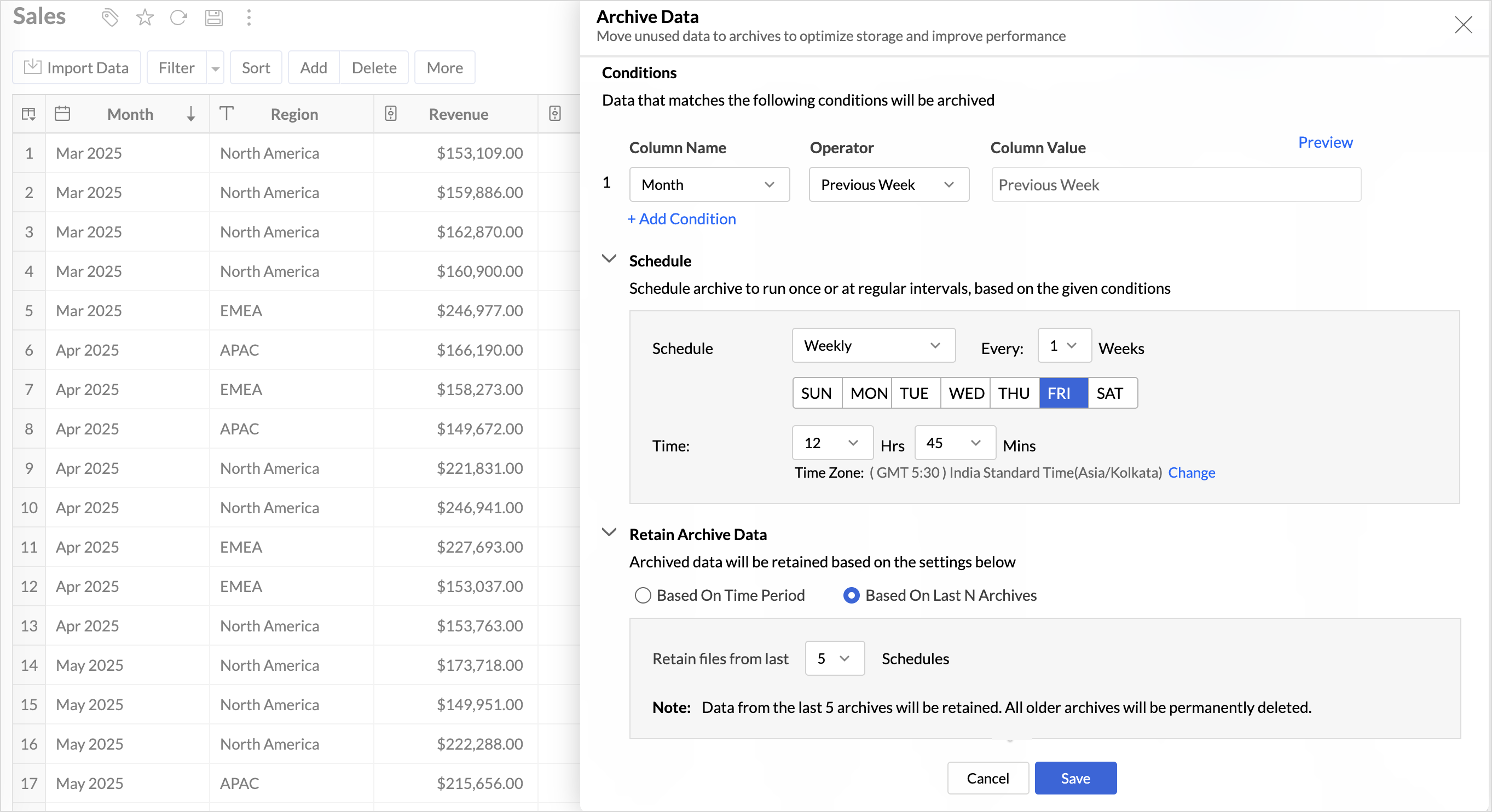
Key Benefits
- Pay only for what you analyze: Active data is reserved for analysis, while historical data is retained without impacting usage limits.
- Improved Querying and Faster Analysis: By limiting queries to relevant data, report generation and dashboard loading times are significantly reduced, resulting in faster insights and a more responsive analytics experience.
- Optimized Storage Usage: Archiving older data helps control table size, preventing unnecessary growth, and better management of row limits.
Organize Views with Tags
Group related views, and manage reports and dashboards effortlessly. Use tags to organize views by teams, departments, projects, or specific use cases, making it easy for users to navigate large workspaces.
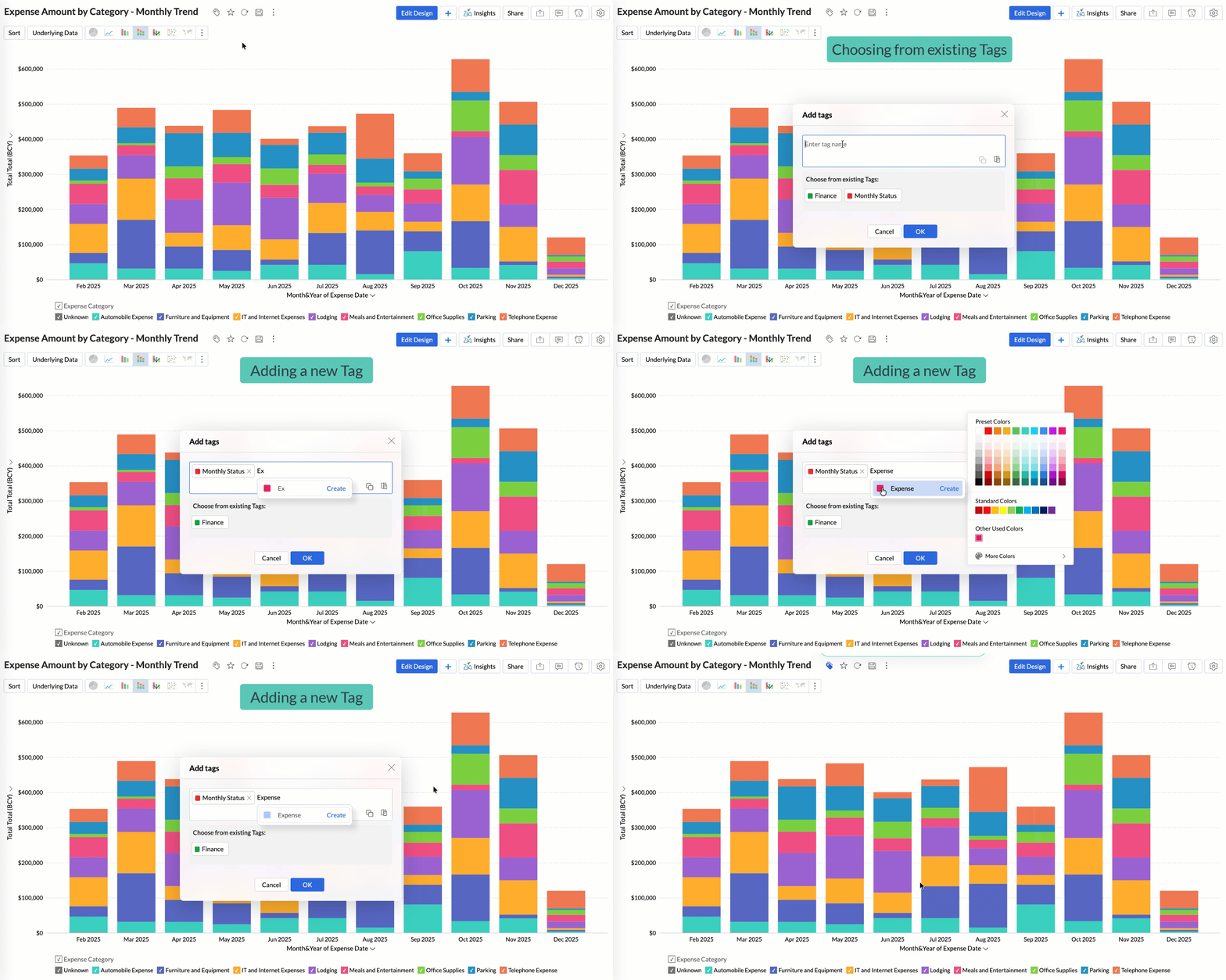
Quickly filter and find the right reports and dashboards, reduce clutter, and ensure teams always have access to the views that matter most to them.
Global Custom Sort
Custom sort was limited to individual reports previously. With recent enhancements, you can now define the sort order for text data types at the workspace level.
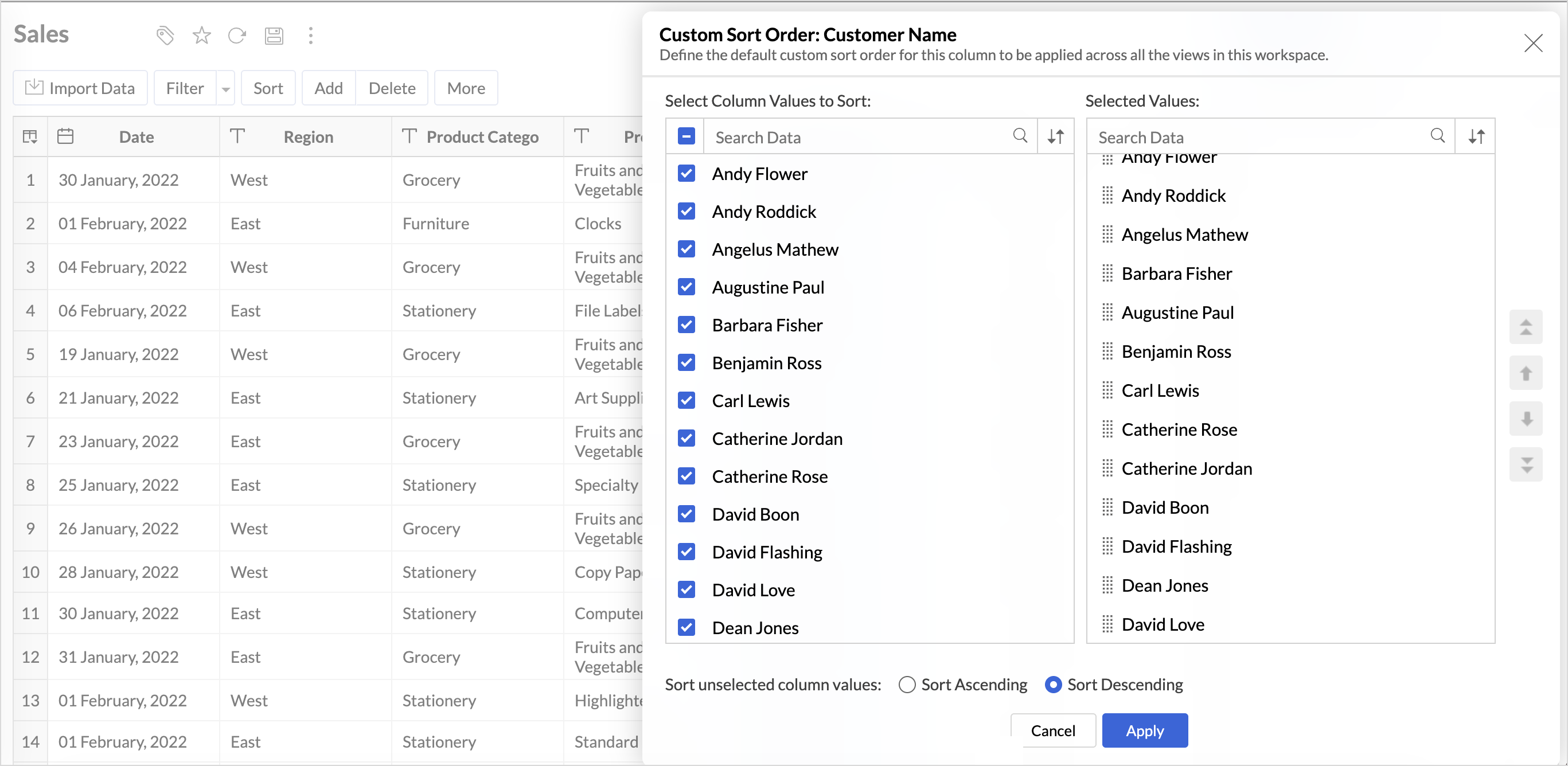
This improvement helps you maintain a consistent sorting across all reports, reduces repetitive setup, and saves time. It also ensures a standardized view of your data throughout the workspace.
Timeframe Selection for Overview Charts
Overview charts now offer flexible timeframe selection, allowing you to focus on relevant periods for deeper trend analysis.
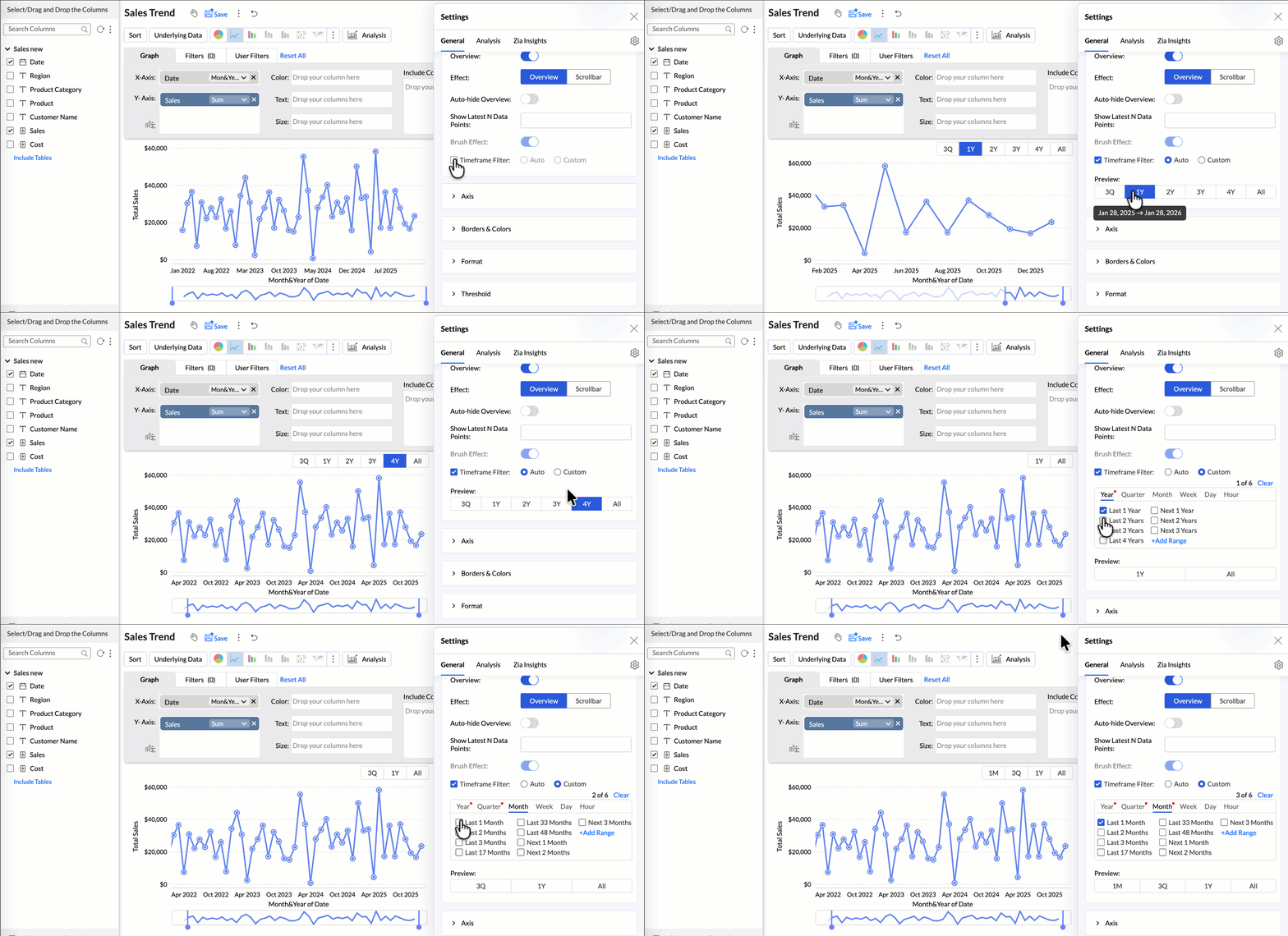
By narrowing the time range, you can better compare performance, identify patterns, and gain clearer insights without distraction from older data.
Customize Zia Insights placement in Dashboards
Choose where and how the insights are displayed, so that they complement your analysis without disrupting your dashboard layout. This gives you greater flexibility to present insights in the way that best suits your audience and reporting style.
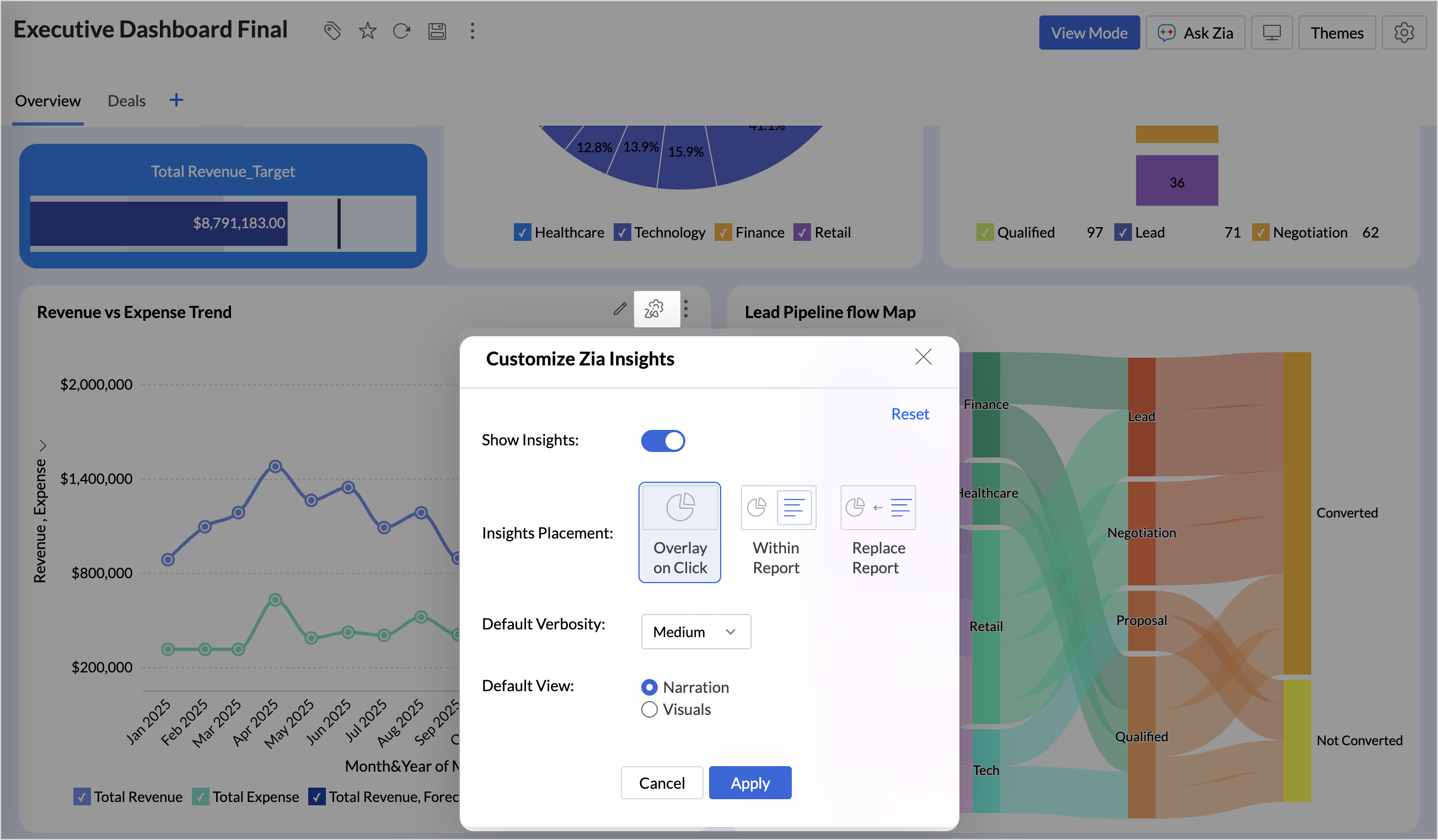
- Overlay: Displays insights in a floating panel that opens on demand, allowing users to review insights without leaving or altering the report view.
- Within Report: Embeds insights directly within the report, enabling users to view data and insights together in a single, continuous view.
- Replace Report: Displays insights as the primary view by replacing the report entirely, offering an insight-first experience focused on conclusions, rather than raw data.
Customize Image Size in Dashboards
Dashboards now support image size settings that let you control how images are displayed.
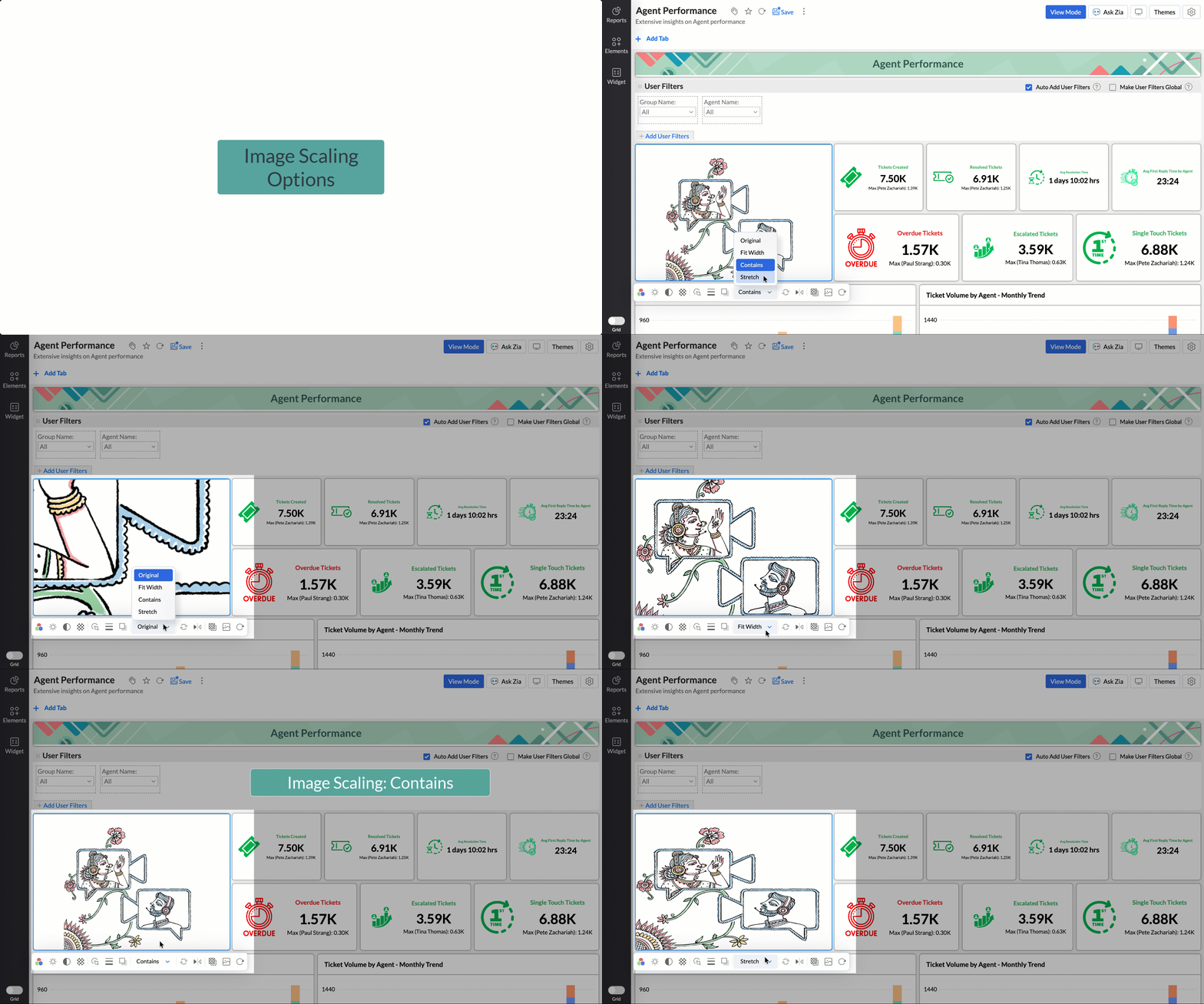
Choose from options like Original, Fit to width, Contain, or Stretch to ensure images align well with your dashboard layout, and thus improve visual clarity.
Tabular View Enhancements
- With this enhancement, all tables linked via lookup columns are now available in the Filter Criteria tab. This makes it easier to share views with users using associated filters, ensuring the specified criteria are automatically applied to the shared report.
- You can now customize lookup columns and the join paths used within Tabular View. This enhancement gives you control over how related tables are connected, helps avoid incorrect or ambiguous joins, and ensures more accurate and reliable data representation in your tabular reports.
New Business App Connectors
We have now introduced integration with two new business connectors Zoho FSM and Magento.
Zoho FSM
Connect your Zoho FSM Data with Zoho Analytics to analyze your field service operations in depth. Identify bottlenecks, optimize resource allocation with interactive reports and dashboards. Analyze revenue, service costs, and customer trends to improve profitability and service quality.
Adobe Commerce (Magento)
Analyze sales, orders, customers, and product performance with ready-made reports and dashboards. Track key metrics like revenue trends, average order value, and top-selling products. Gain insights into customer behavior and regional sales patterns. Make faster, data-driven decisions to optimize store performance and growth.
Topic Participants
Nisha Angel J
Sticky Posts
What's New in Zoho Analytics - January 2026
Hello Users! We are starting the year with a strong lineup of updates, marking the beginning of many improvements planned to enhance your analytics experience. Explore the latest improvements built to boost performance, simplify analysis, and help youWhat's New in Zoho Analytics - November 2025
We're thrilled to announce a significant update focused on expanding your data connectivity, enhancing visualization capabilities, and delivering a more powerful, intuitive, and performant analytics experience. Here’s a look at what’s new. Explore What'sWhat's New in Zoho Analytics - October 2025
Hello Users! We're are back with a fresh set of updates and enhancements to make data analysis faster and more insightful. Take a quick look at what’s new and see how these updates can power up your reports and dashboards. Explore What's New! ExtremeWhat’s New in Zoho Analytics – September 2025
Hello Users!! In this month’s update, we’re raising the bar across multiple touchpoints, from how you bring in data, plan and track projects to how you design and brand your dashboards. We’ve added the all-new Gantt chart for project visualization, expandedAnnouncing Agentic AI - Ask Zia!
We are delighted to roll out the new agentic AI capabilities in Ask Zia, where every stage of the BI workflow is assisted by AI. With a human-in-the-loop approach, Ask Zia ensures that you’re in command of the decision, while AI handles the complexity.
Recent Topics
sync two zoho crm
Hello everyone. Is it possible to sync 2 zoho crm? what would be the easiest way? I am thinking of Flow. I have a Custom Module that I would like to share with my client. We both use zoho crm. Regards.Side-by-Side view on Windows 11
Is there a way to open two notes in a side-by-side view? I'm running Notebook on a Desktop running Windows 11. If this feature doesn't exist, do you have plans for it?Value shows in balance sheet for Goods in Transit
We have transferred goods from one warehouse to another warehouse and accepted the same at another warehouse. Although my balance sheet shows X amount as goods in transit value. I don't understand, how to clear that Can anyone guide us please?Ask for a quote to multple vendors
We are able to send a Purchase order, but How can we Send a quote request to our vendor, once the value changes every time? I didn't see any feature like this in Zoho Books/ Inventory. Send this request with the Items that we want to know the cost, toBigin merge field in email template for subject line to match lead name
Hello We Are using email in to automatically create leads in our pipelines. When we want to reply from conversations, and apply an email template, it’s not matching the original subject line. It should be lead name to match. But it’s not working. EvenHow to create auto-link between Invoice and Quote in CRM
It's strange that when you 'convert' a quote into an invoice, it doesn't auto-link the two. How can we develop an auto sync so we don't need to manually link each invoice to their respective quote?Why Are Columns Reset When Deleting Entry
Hello, this is quite annoying. We use forms as a questionnaire for candidates, we filter entries by removing columns, when we delete an entry the columns reset. Every "delete" the columns reset, why!? Thank youPi or Pie? A slice of infinity in customer service
Hey everyone! While Pi Day is on March 14 (3.14), July 22 marks another special occasion: Pi Approximation Day! On this day, we recognize the mathematical constant π (pi ≈ 22/7); a number that's infinite, irrational, and never-ending. Pi is essentialConfiguración
Hola acabo de instalar Zoho CRM y quiero configurarlo correctamente. Al respecto me surgen algunas dudas tales como la diferencia entre: Cuentas, posibles Clientes y Contactos. ¿Conceptualmente que son cada uno? ¿Como se se relacionan entre ellos? SiGL account associated to each supplier for new bill
Hello I'm facing problem for all items of my bills that are not inventoried. The need is each time I enter new bill and after I select supplier the GL account section is autopopulated with default GL account (that I would like to add in supplier settings)LinkedIn verification link and otp not receiving
For the last 2 to 3 weeks I'm trying to verify my LinkedIn account to access my company's LinkedIn page, Linkedin is sending verification links and codes to this email address but I have not received any codes or links. Please help me here. Looking forwardMail Merge Stuck in Queue
I am trying to send Mail Merge's and it never sends out to the full list. It always hits a portion and the rest remain in the "Queue" - the emails I am sending are time sensitive, so I need this to be resolved or have a way to push the emails throughSMTP Email Sending Not Working for My Domains and Apps
Hello Zoho Support Team, I am experiencing a critical issue with sending emails via Zoho SMTP for my domain humanhup.com. Both of my applications, HumanHup and CheapUI, are unable to send emails using Zoho SMTP, even though the same setup was workingWhy is Zoho supporting the Proud Boys?
Hello. This is the only way I can find to contact your company. There is someone in Maine posing as a law enforcement officer, attempting to kidnap immigrants. They are also recruiting for a known hate group. They have an email address hosted by Zoho.com.Composite Item - Associated/Component Items
I am trying to find the Associated Item/Component Item field in the Composite Item Table in Analytics. Has anyone been able to find and utilize this field in Analytics?Use openUrl() to edit a specific record
I am working on a queue app for my organization. I have a master queue that is a report of meetings with workflow buttons to manipulate the records. One of these buttons I would like to open the record and edit for the purpose of changing the queue lookupwhy i cant access my web without the www
please help meHelp Centre Articles in Desk, Zia and iframe
Hi, We embed SOP documents into articles from Scribe into using iframe. We are looking at zia indexing articles to present to agents to aid their work. Please advise if zia can view and learn from the content within the iframe?Rich Text/WYSIWYG Input Area
I'd like to have an option on ZoHo creator to create an input text area for HTML/rich text formatting. :)How to create a directory report from one-to-many relationship
Hi all, Newbie here. I'm converting an Access DB to Creator. I've learned Forms are tables and Reports are used to edit table rows, not Forms. I've got the data loaded and can maintain it with the Reports already done. I've done filtering and sorting,Change Default Selection for Lookup field
I have a Lookup field that I have locked, when I unlock it - the user can select the proper Zone but I need it locked, since this may change based on user selection of another field. Example. There are 3 potential zones. User A selects the Hospital AccountRestrict visibility and user permissions Creator 5
I don't understand how restrict visibility for reports interacts with the already established role permissions. It seems that the default on restrict visibility has everything checked for all users, but I cannot set up different levels of permission for different individuals. Right now I have three different ways to manage users and their access and it's confusing because everything has not migrated to Creator 5. Don't the role permissions extend to the reports as well? Are the selections underLMS - Why do Trainers have to be Users?
I'm not sure why the software is set up where trainers must be users (i.e., employees). This should really be changed, as there are many cases (the majority of cases for some companies) where classroom trainers are external or contractors. If this isZOho mail not stopped working with my domain.
i have changed my name server settings in my domain sigmasquaretec.in . After that my emails are not working with ZOHO.Request to Cancel Zoho Mail Subscription
Hello Zoho Team, I have migrated to Google Workspace and would like to cancel my Zoho Mail subscription for my organization. Organization Name: AR Creators Media Admin Email: roman@arcreatorsmedia.com Subscription ID: RPUS2005901960812 Please cancel thezoho smtp limit for free users
What is Zoho SMTP limit for free users?Mailboxes and Alias Email Addeases - Best Palestine’s and Advice:
Mailboxes and Alias Email Addresses - Best Practices and Advice: what is the best practice for the efficient means to manage And sort, alias, email addresses and third-party after or even the Zoho app itself. I am currently using both Thunderbird andHas anyone built a discussion forum with a Creator Portal?
I have built a Creator app for organisations to apply for refurbished tools that are sent by a charity. The charity now wants recipient organisations to be able to connect with each other within a region or country, to share advice on maintaining theAbility for Super Admin to Set Locale Information for Users in Zoho Recruit
Dear Zoho Recruit Team, I hope you're doing well. We would like to request the ability for Super Admins to configure Locale Information (Country/Region, Date Format, and Time Format) for users in Zoho Recruit. Currently these settings are only configurableAdd a block or widget to Zoho Sites that allows users to create an interactive contact card with contact buttons (email, LinkedIn, website, etc)
The proposed feature consists of a pre-designed, customizable block that displays a person's contact information (e.g., a speaker, sales representative, or independent professional) and offers quick access to: Email (icon with mailto: link) LinkedIn profileZoho Recruit > Email Templates
Dear All Background: We are using Zoho Recruit for the 4 business units under our group of company it our posting our of Job it will be done via our internal recruiter. In the Email templates, i want to be able to insert the individual business unit,Zoho Voice & Zoho Recruit/CRM
Hello, I'd love to use Zoho Voice with Recruit and CRM but it would need something very important to me, that has been a game changer to my daily routine, like Calendly has been for scheduling interview. It's call transcription with AI. I'm using NootaChange start time after starting the timer
Hello Projects Community, an amazing feature would be to change the start time of a running timer. I know this from some other time tracking softwares. Any idea about this? Best wishes NielsSending possible. Receiving not possible.
We are not receiving mail in our company email. Could you please solve this. It has been recurring and I want it to be resolved once and for all. Please help.Problema para enviar y recibir correos
Buenos días, mi cuenta de correo secretaria@construccmauro.com presenta problemas y no me permite ni me envía ni recibe correos, me sale este error.No fue posible enviar el mensaje; Motivo: 554 5.1.8 Correo electrónico bloqueado saliente. Aprende más., AgradezcoData access tasks like 'For each record' aren't supported for 'integration forms'.
My code is not running because i get the error "Data access tasks like 'For each record' aren't supported for 'integration forms'." I have my integration setup with Zoho CRM + Zoho Creator, the form is visible and working on my zoho creator however inZoho Reports Not Grouping from Subforms
I have created reports from a subform. We have a budget from a standard field, and the bills added to a subform. I've summarised the bills in a field. In edit mode, the bills are joined per supplier, which is what we want. But then it converts and separates/duplicatesCreate Automation for the Field "Mark up by"
Hello everyone, I'm importing expenses from Zoho Expense to Zoho Books. I want to auto-calculate the "Mark up by" field based on the custom field “Discount” I created before. The trigger of the workflow will be the creation of the expense itself. TheFree Webinar Alert! Before vs After: Proven ROI from Zoho CRM + Workplace Integration
Hello Zoho Workplace Community! Before: Scattered tools, lost leads, fragmented communication. Are you ready to stop the constant back and forth between tools to manage leads, emails, and team communication? After: Connected tools, streamlined processes,Zoho Forms to Zoho Sign Integration - Fields Missing
If a Zoho Form has image fields, it seems these can't be transferred to a Zoho Sign template for digital signature. Is there any way of pre-filling Zoho Form images onto a Zoho Sign template? Many thanks.Next Page