Announcing Zoho Analytics 6.0 Beta!
We are delighted to open up the next major version, Zoho Analytics 6.0 Beta! The new version comes packed with a wide range of functionalities for all persona, namely business users, data analysts, data engineers, and data scientists. Zoho Analytics team has meticulously developed these functionalities with a focus on current and future business needs, incorporating valuable user & market feedback.

New capabilities in Zoho Analytics 6.0 Beta includes more data connectors, new visualizations, new interactions, advanced analytical models , the ability to build custom ML models, and 60+ features.

Note: 6.0 Beta is now available in all paid plans to try out. Features available in specific plans are annotated inline.
1. Data Connectors & Data Management
New Connectors
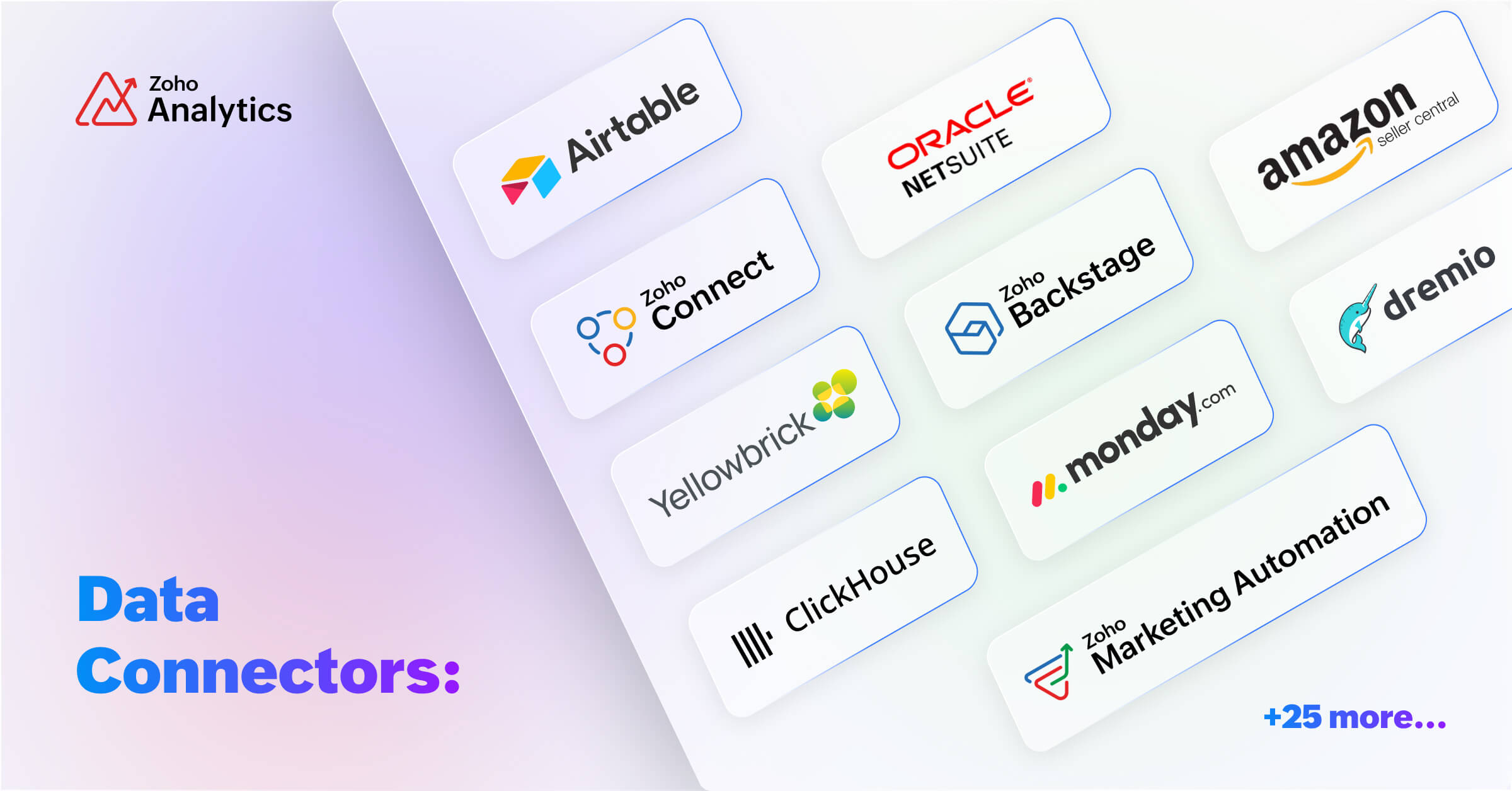
We are expanding our already available 500+ data connectors with 25+ new connectors for big data platforms and business applications that includes Yellowbricks, ClickHouse, Dremio, Zoho Connect, Zoho Marketing Automation, Zoho Backstage, Amazon Seller Central, Airtable and many more.
Also, managing data has now become easier with the following features -- Audit history, Sync history, and Import roll back.
Audit History
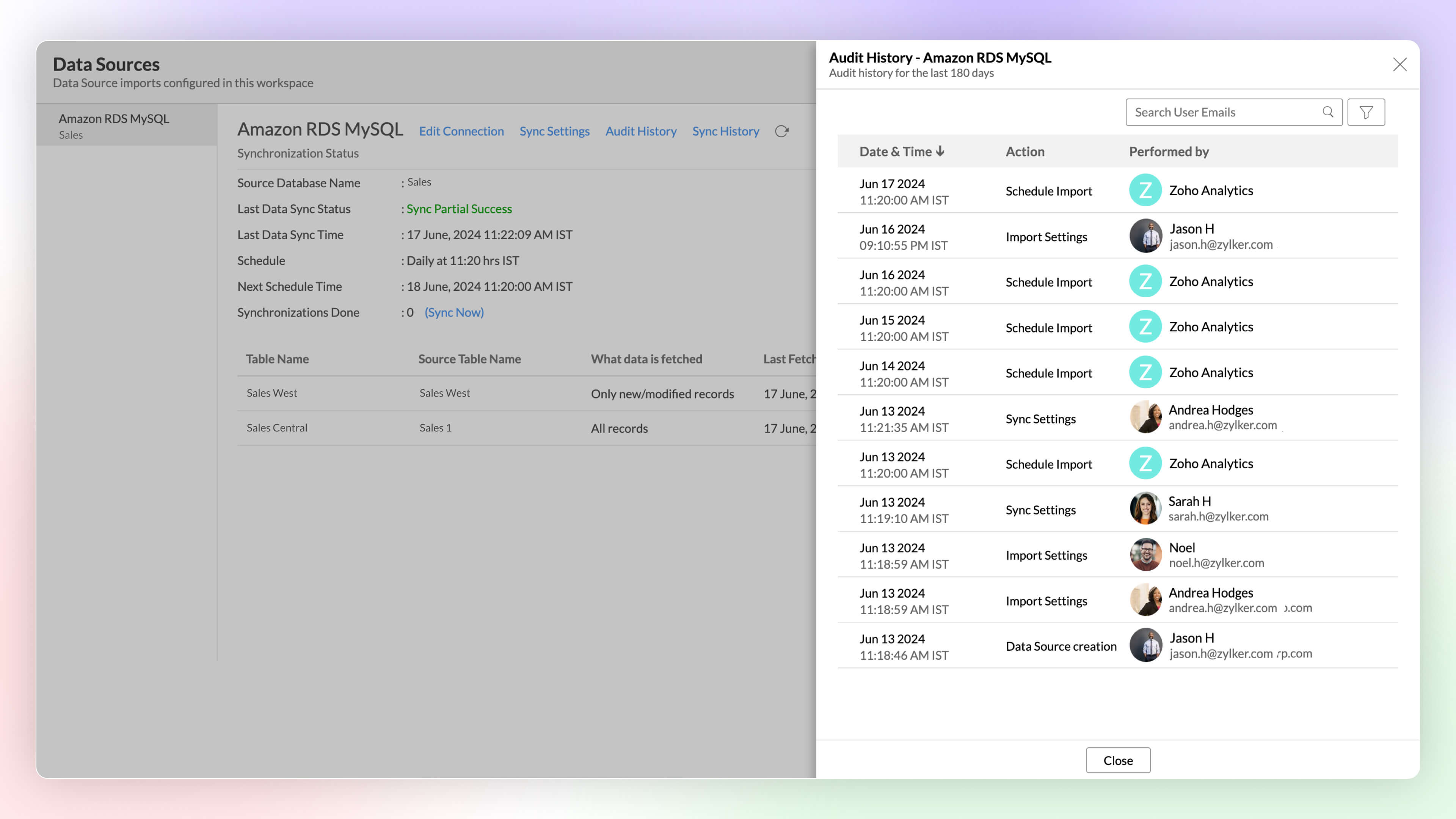
Audit logs are crucial for maintaining security and troubleshooting issues. They provide a comprehensive record of user and system Actions, including details of the time when the action occurred and information about the administrator who performed the action.
Sync History
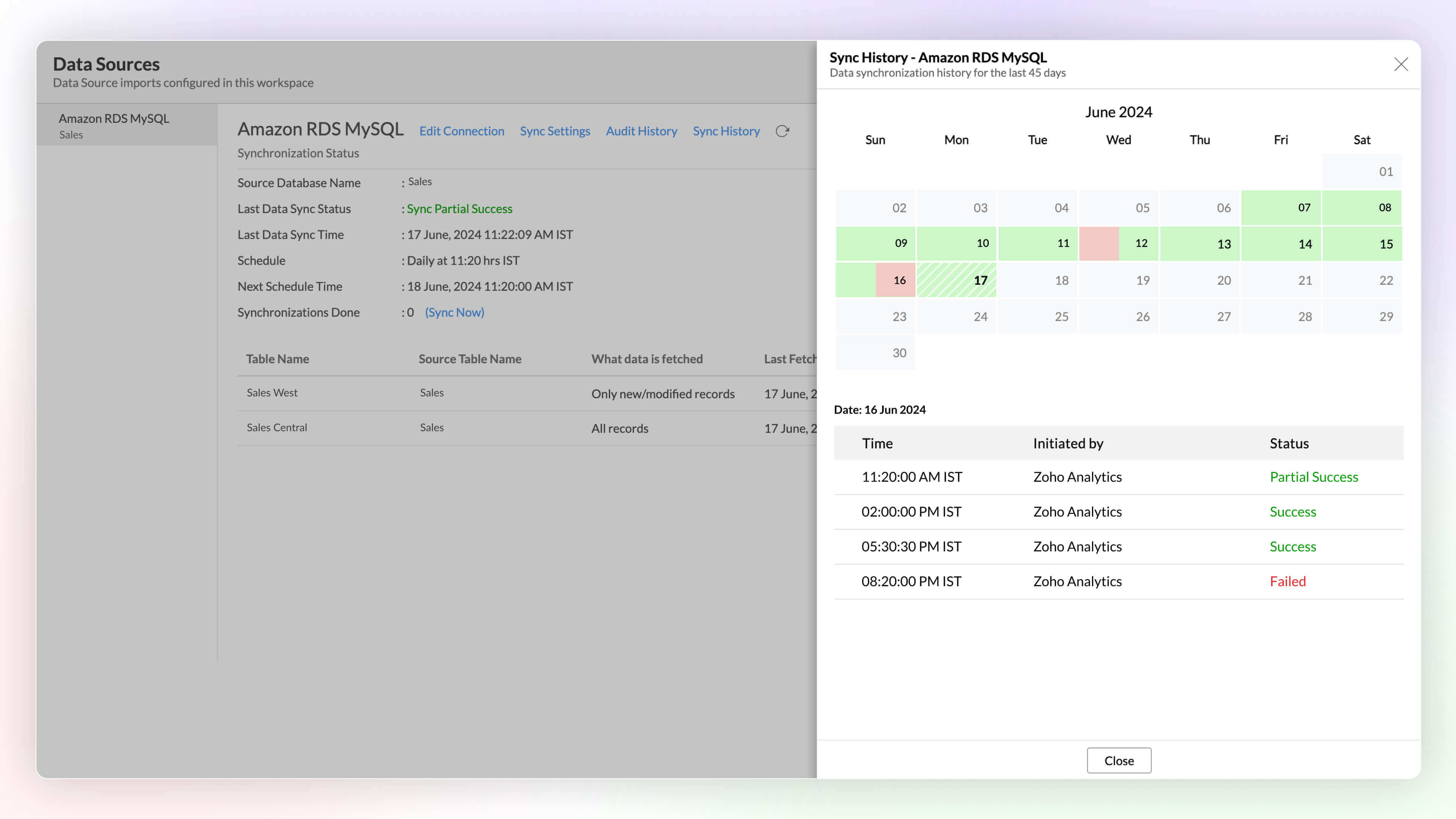
Sync history provides a detailed record of data synchronization activities, making it easy for the administrators to track the status of each data sync. The sync operations are color-coded for immediate recognition. Successful data syncs are indicated in green, and failed data syncs are marked in red with the reasons for failure along with the necessary action to be taken.
Import Rollback 
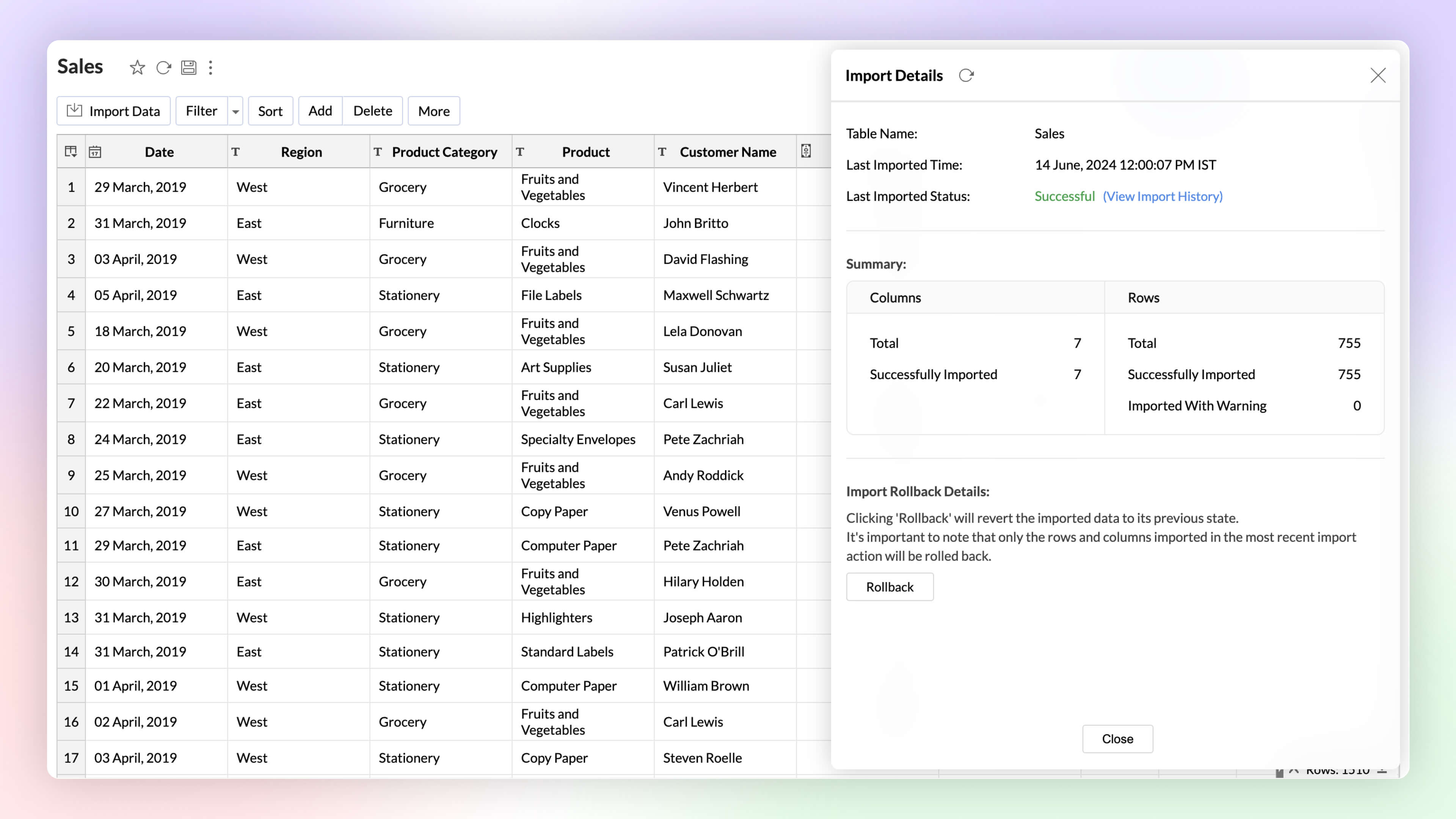
Automated imports can sometimes have errors and inconsistencies in data, and this can affect the data quality and the results. The import rollback capability reverts the current data import version to its previous version without affecting the existing data flow and analysis, ensuring data integrity.
Unified Metrics
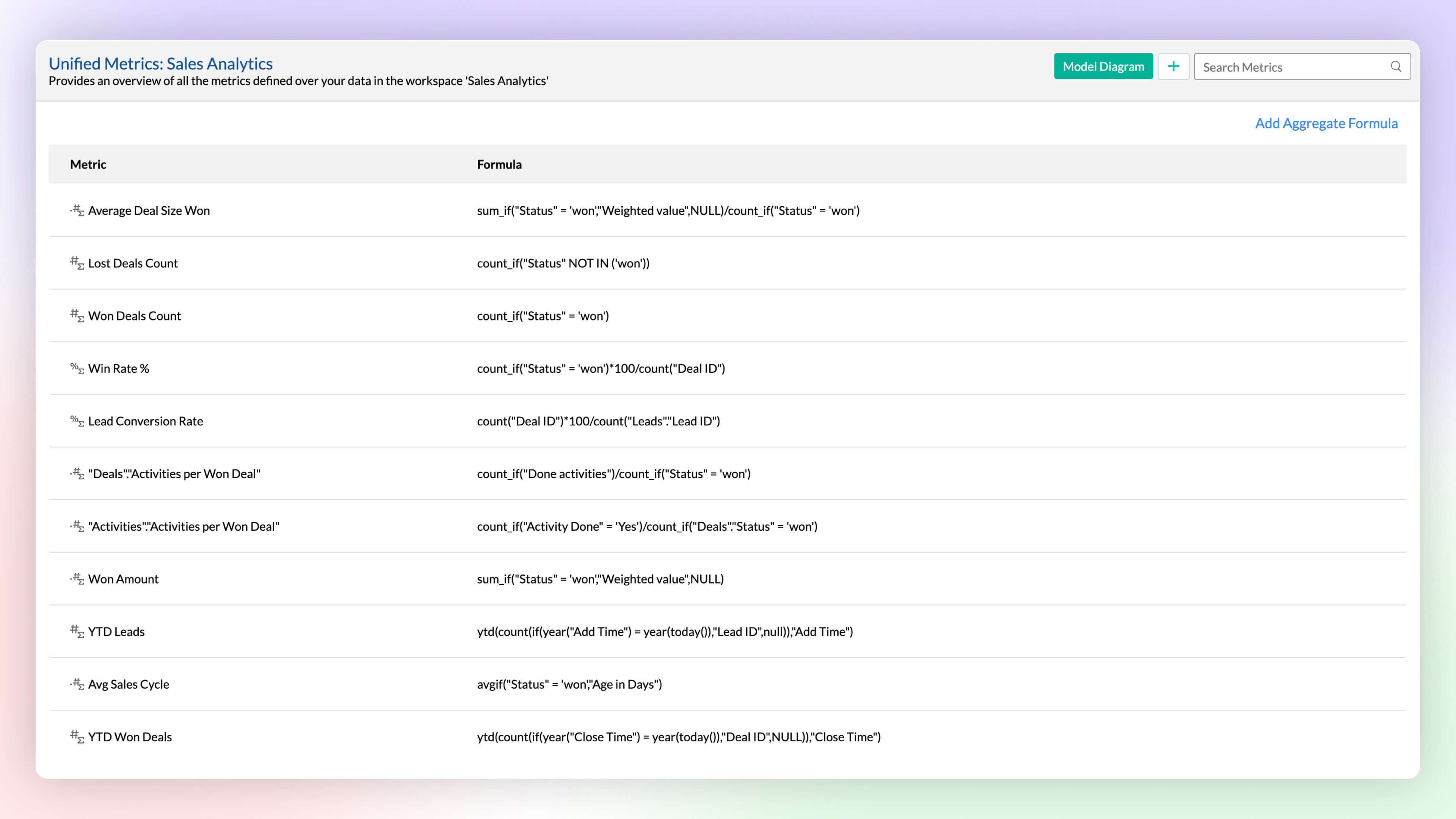
Workspace will have data imported from varied sources, and each data source or table will have different metrics (aggregates) computed for analysis. A unified metrics consolidates all the metrics used across the workspace, helps in standardization, promotes usage, and avoids duplication.
Data Bucketing
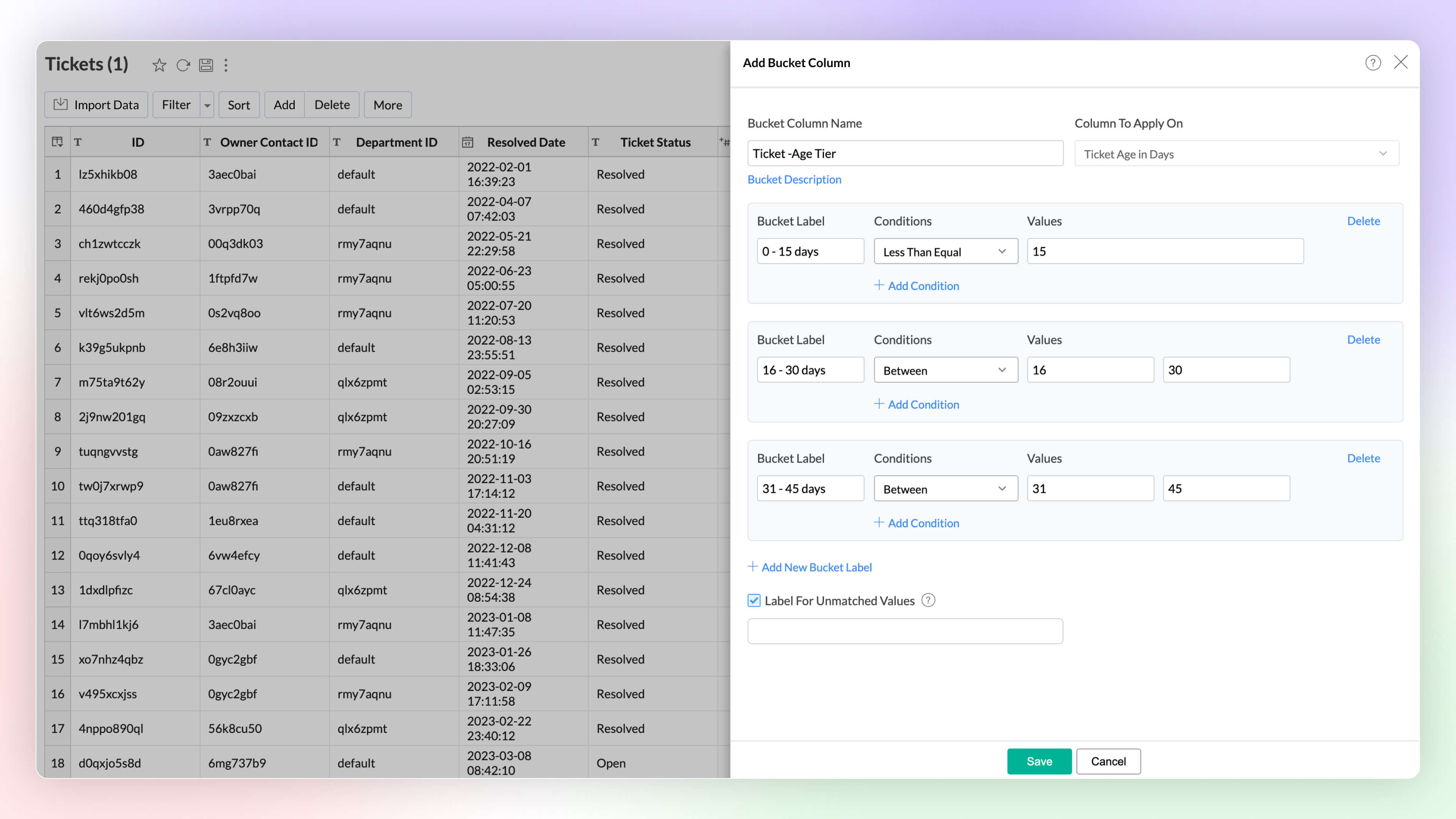
Categorize or group data points easily with the Bucket Columns options in Zoho Analytics. (Until now, users had to write formulas to achieve this; now, it is available as an inbuilt option.) Bucketing reduces the number of distinct values (cardinality). It facilitates the transformation of numerical data into different categorical bins and makes data analysis easier.
2. Visual Analytics
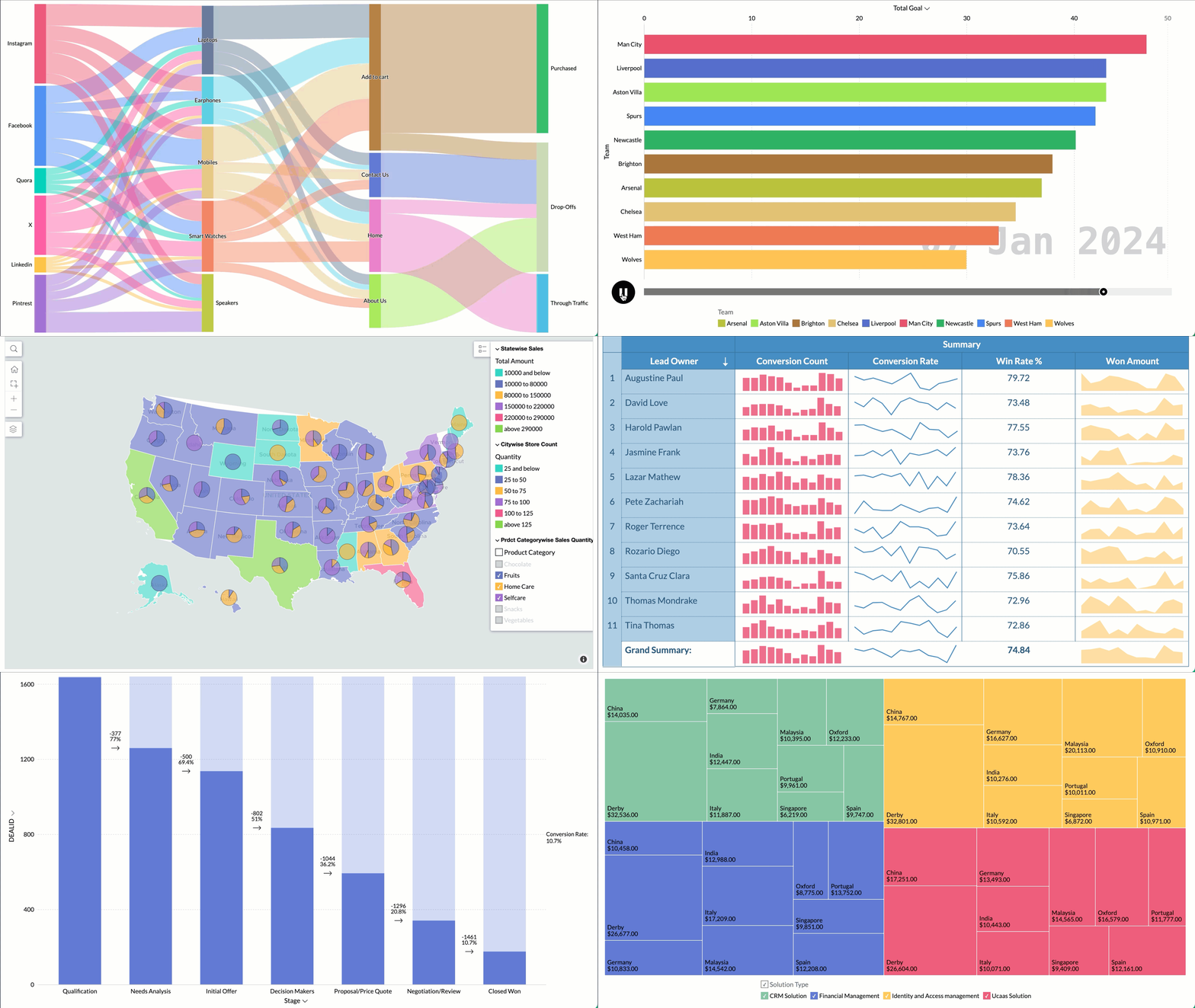
Zoho Analytics supports 7+ new chart types (on top of 50+ existing ones) with extensive customization options to enhance the presentation and interpretation of the data.
- Sankey charts are best suited for visualizing the flow of any process, as they clearly capture the movement of data from one point to another. It helps understand the movement of events through interconnected lines.
- Racing charts are animated views that are best suited for visualizing the changes in the data over a period of time where the relative ranking of categories is important. They highlight and help comprehend the fluctuations and progression in the data. These types of charts grab the user's attention instantly, providing an immersive experience and helping craft a compelling story about the data.
- Spark lines are compact charts that show the trends and variations in the data without taking up much space. They are widely used alongside pivot tables and help grasp trends and allow quick comparison of metrics across different fields. Zoho Analytics supports three variations that includes line chart, area chart, and bar chart.
- Geo Map Layering, add multiple data layers to the geo map to visualize various dimensions of information. This feature includes interactive options for enhanced data exploration.
- Sunburst charts represent hierarchical data through a series of rings, or concentric circles. Each ring corresponds to a level in the hierarchy. The central or innermost circle represents the root node, or the top-level category. Moving outwards, each subsequent ring represents a subcategory, where the outermost ring is the leaf node. The size of each arc in the ring is proportional to the value of the data.
- Conversion bar charts show the connected stages of a process and the gradual decrease in data as it moves through different stages of the process. Each stage is represented by a bar, with a step or stair case pattern indicating the shift in values (along with conversion percentage) at each stage.
- Tree Map is a visualization composed of differently-sized rectangles that represent your data values. This is beneficial when you want to depict the part to whole relationship among various categories.
Zia Suggestions
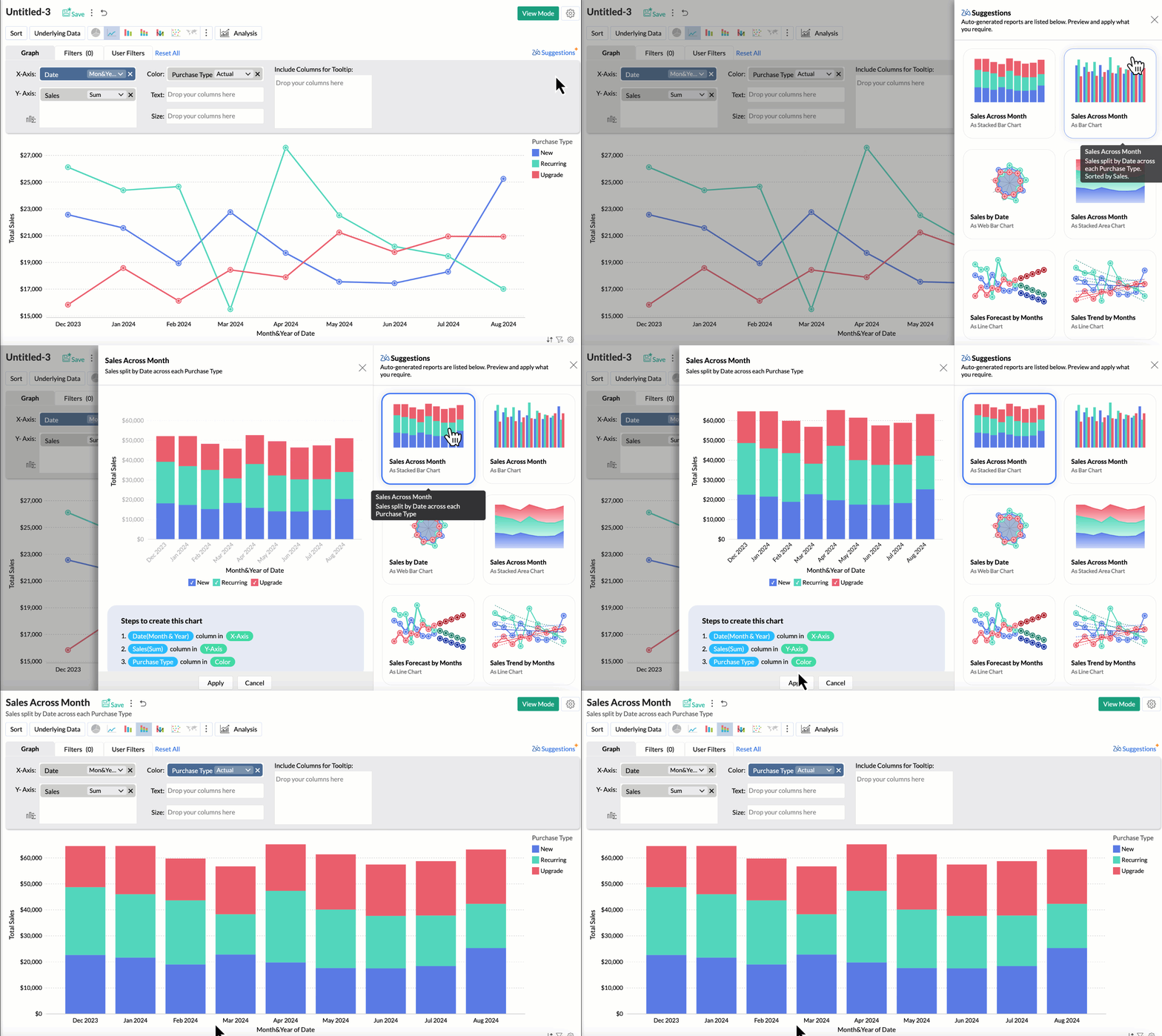
Now, with the new Zia Suggestions, you can effortlessly receive insightful chart recommendations while you are in the creation process. Zia suggests a variety of charts suggestions tailored to your data, allowing you to preview and apply them seamlessly with just a click.
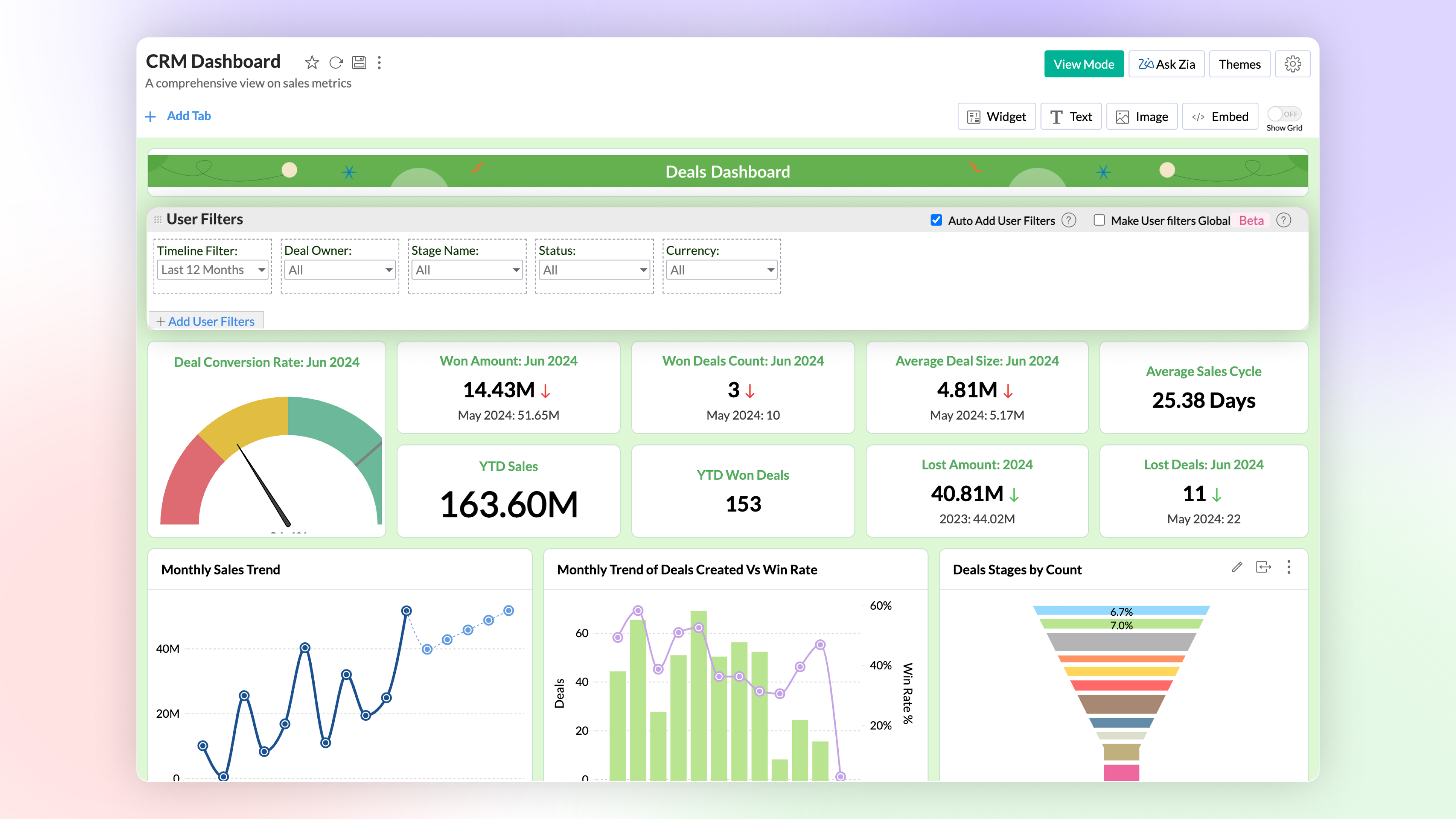
Global User Filter in Dashboards
You can now have a common user filter across all tabs in the dashboard. Global user filter gets applied across all reports in all tabs of the dashboard.
3. Advanced Data Analytics
Zoho Analytics now supports two more advanced data analytics methods: Anomaly Detection and Cluster Analysis.
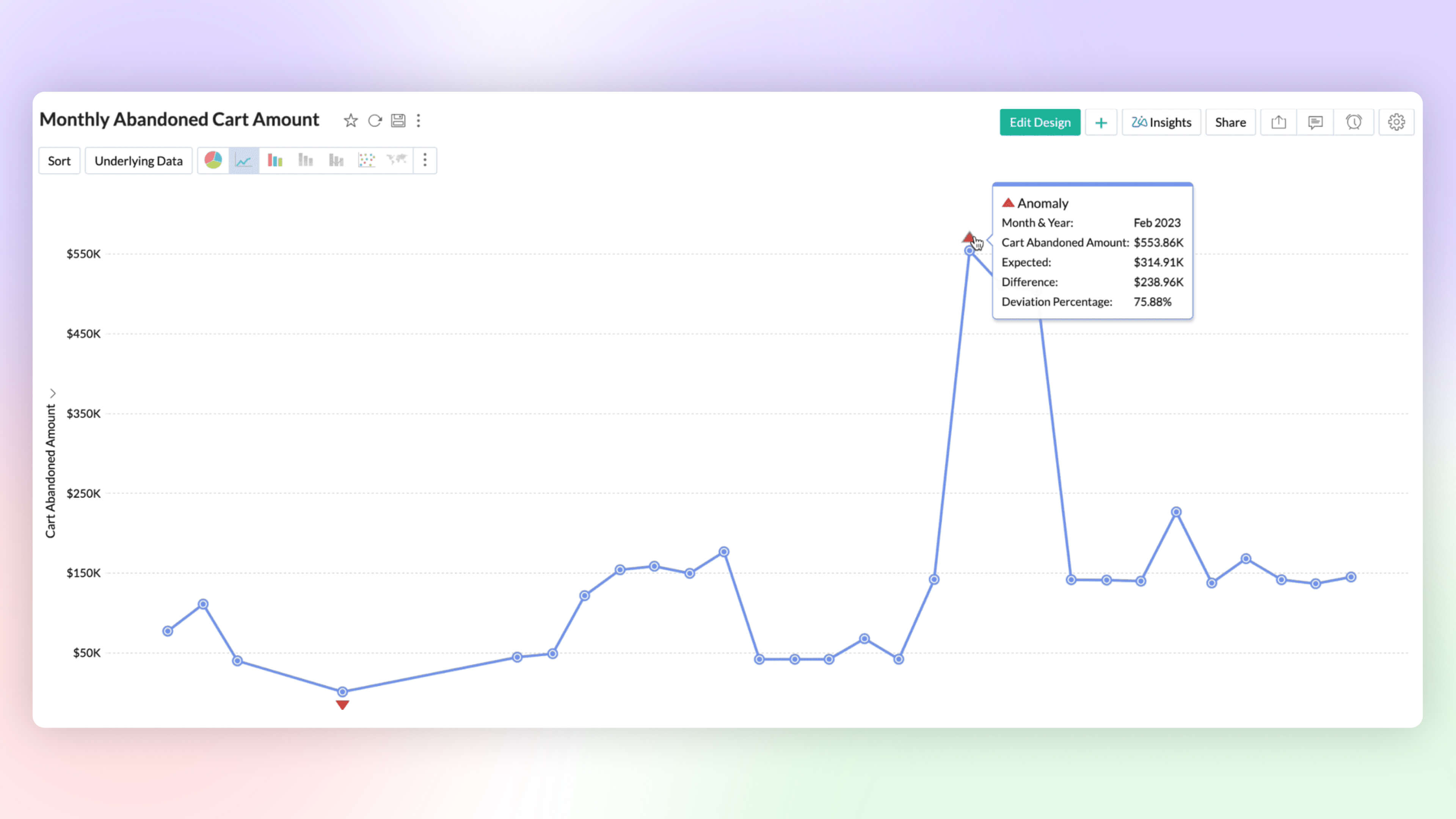
Anomaly Detection 
Anomaly detection helps you to flag outliers in your data or metrics easily. You can now create charts which highlight anomalous points visually for your attention and action. Zoho Analytics deploys robust ML algorithms and various statistical models for detecting outliers.
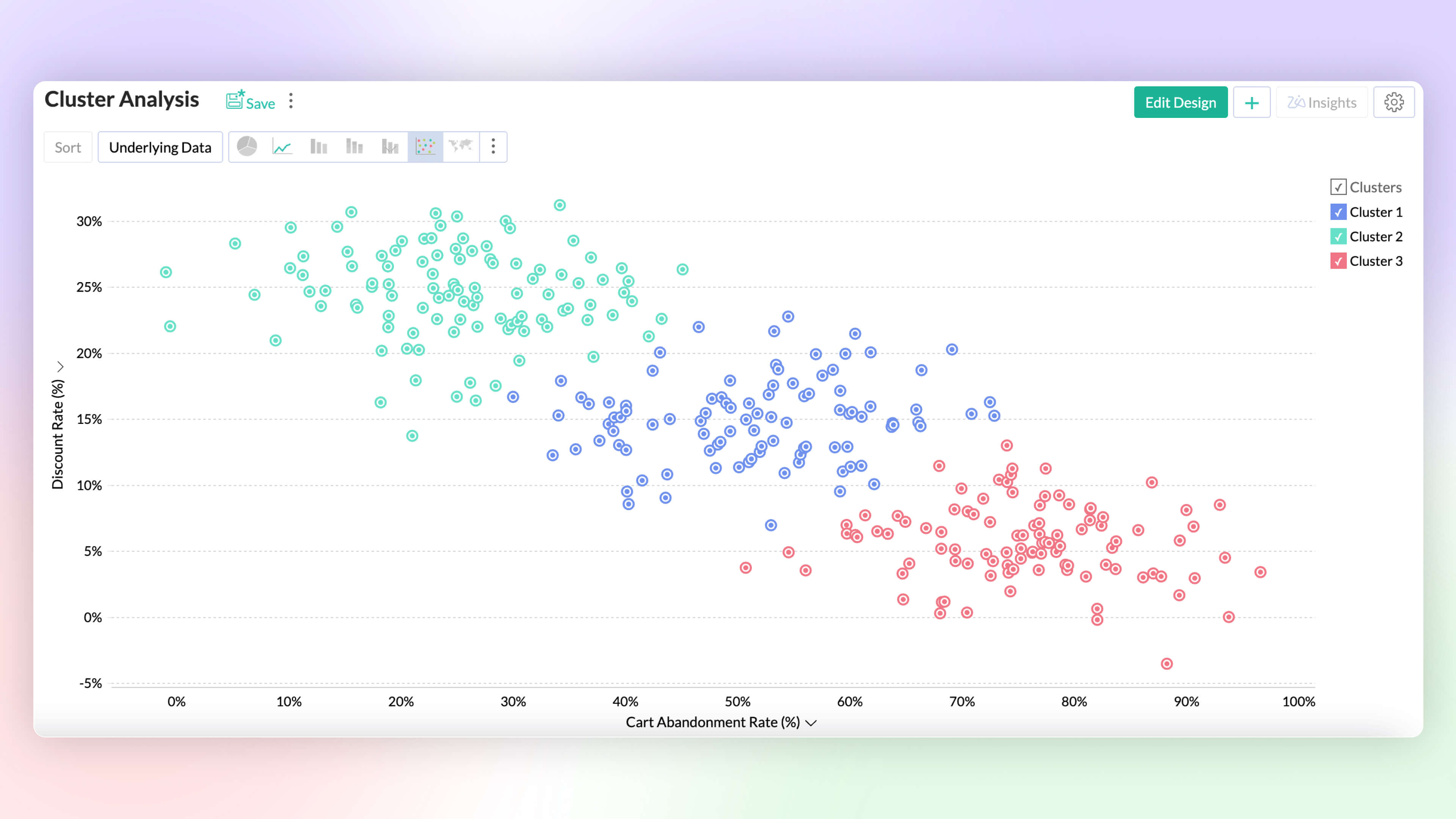
Cluster Analysis 
Cluster analysis groups similar data points together based on certain factors or conditions. Each cluster contains data points that are more similar to each other than to those in other clusters, reducing the complexity of the data. Zoho Analytics deploys K-means, K-modes and K-prototypes algorithms for clustering the data points.
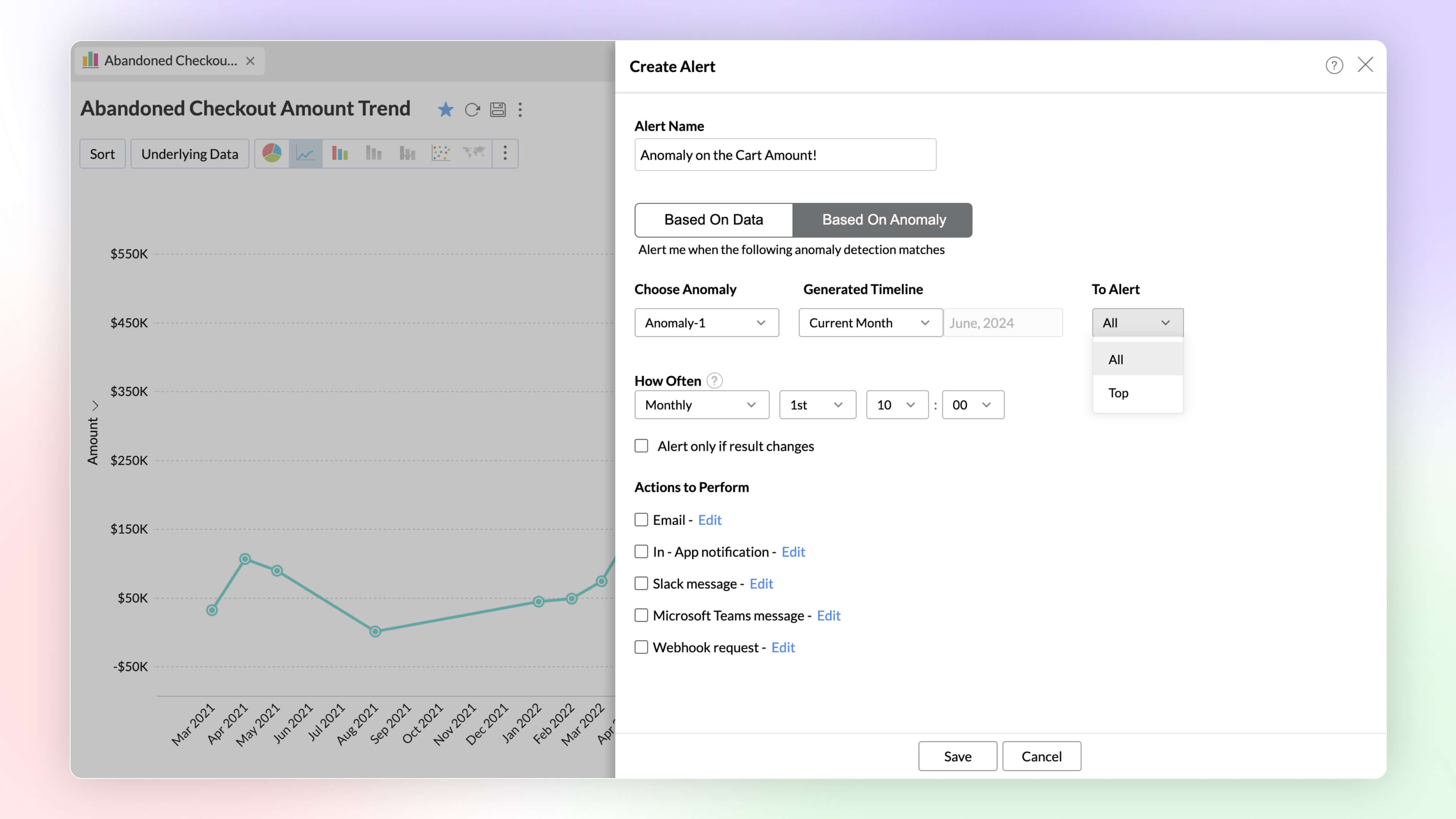
Alerts Based on Threshold and Anomalies
Set data alerts based on thresholds and anomalies to ensure timely identification of vital change in the key business metrics and potential issues.
Ask Zia Bot in Microsoft Teams
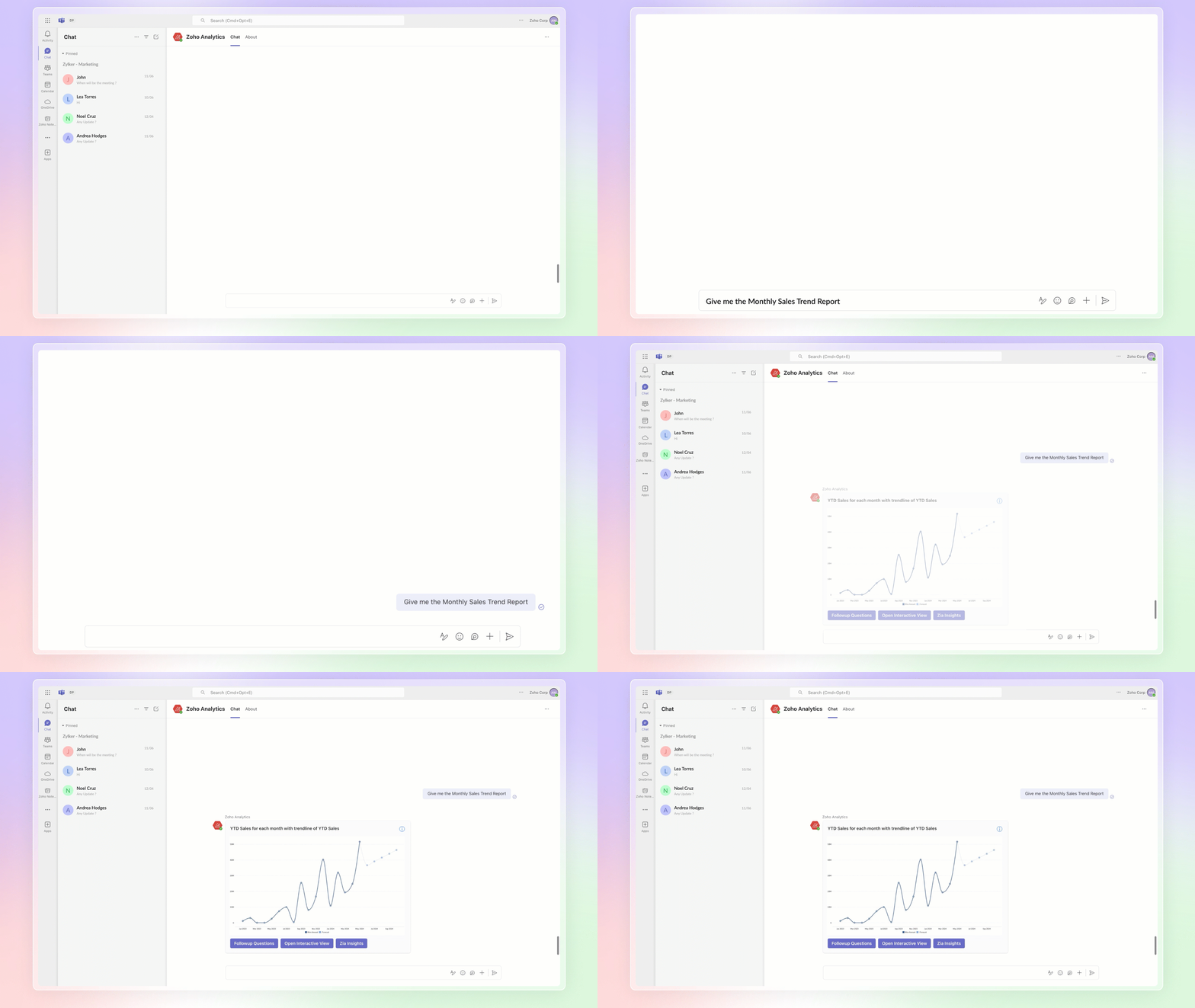
Combine the generative AI capabilities of Zoho Analytics' Ask Zia with Microsoft Teams. Get answers to your data queries, access key business insights quickly, predict future trends, and build reports right from within Microsoft Teams with Ask Zia bot.
4. Build your ML Models with AutoML & Code Studio
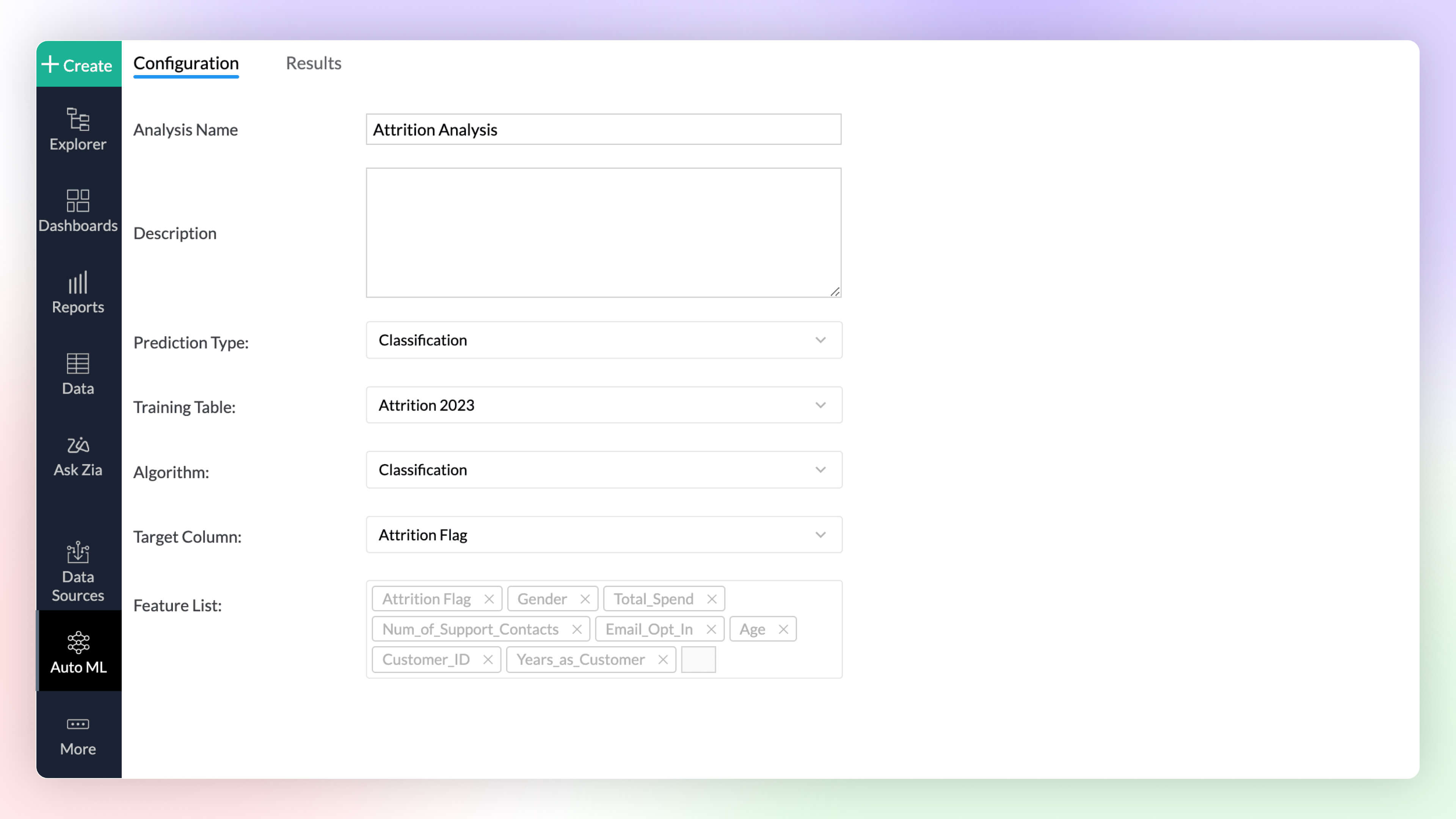
Auto ML 
Automated machine learning provides a code-free (low-code/no-code) experience to train, verify, and build custom machine learning models with high efficiency. The simple and user-friendly design makes it possible for people with varied data-level expertise to create ML models easily for their custom needs.
Code Studio 
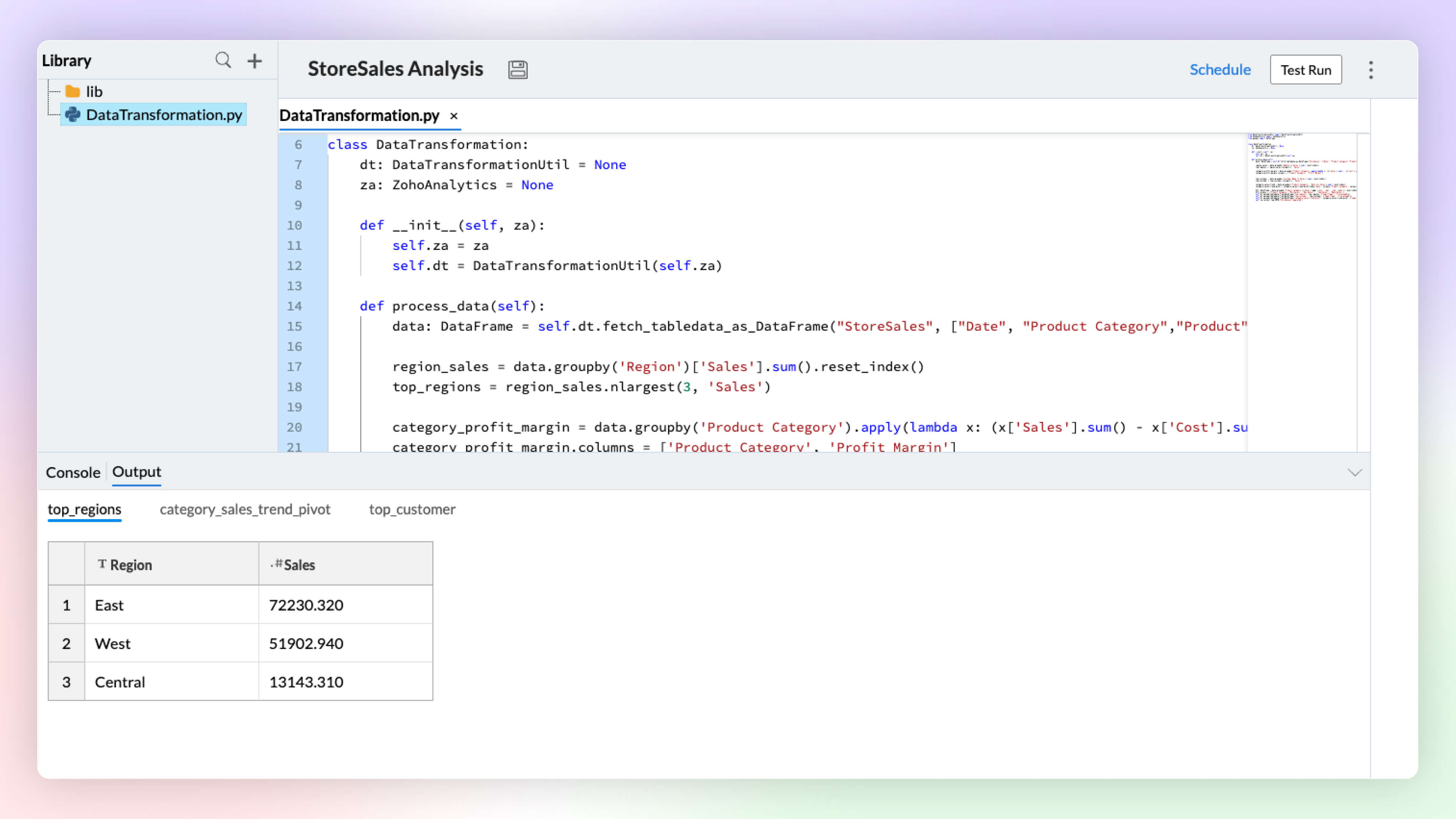
Python Code Studio enables you to build/import custom logic and ML models for your specific data preparation, transformation, enrichment, and analytical modeling needs.
5. Data Storytelling
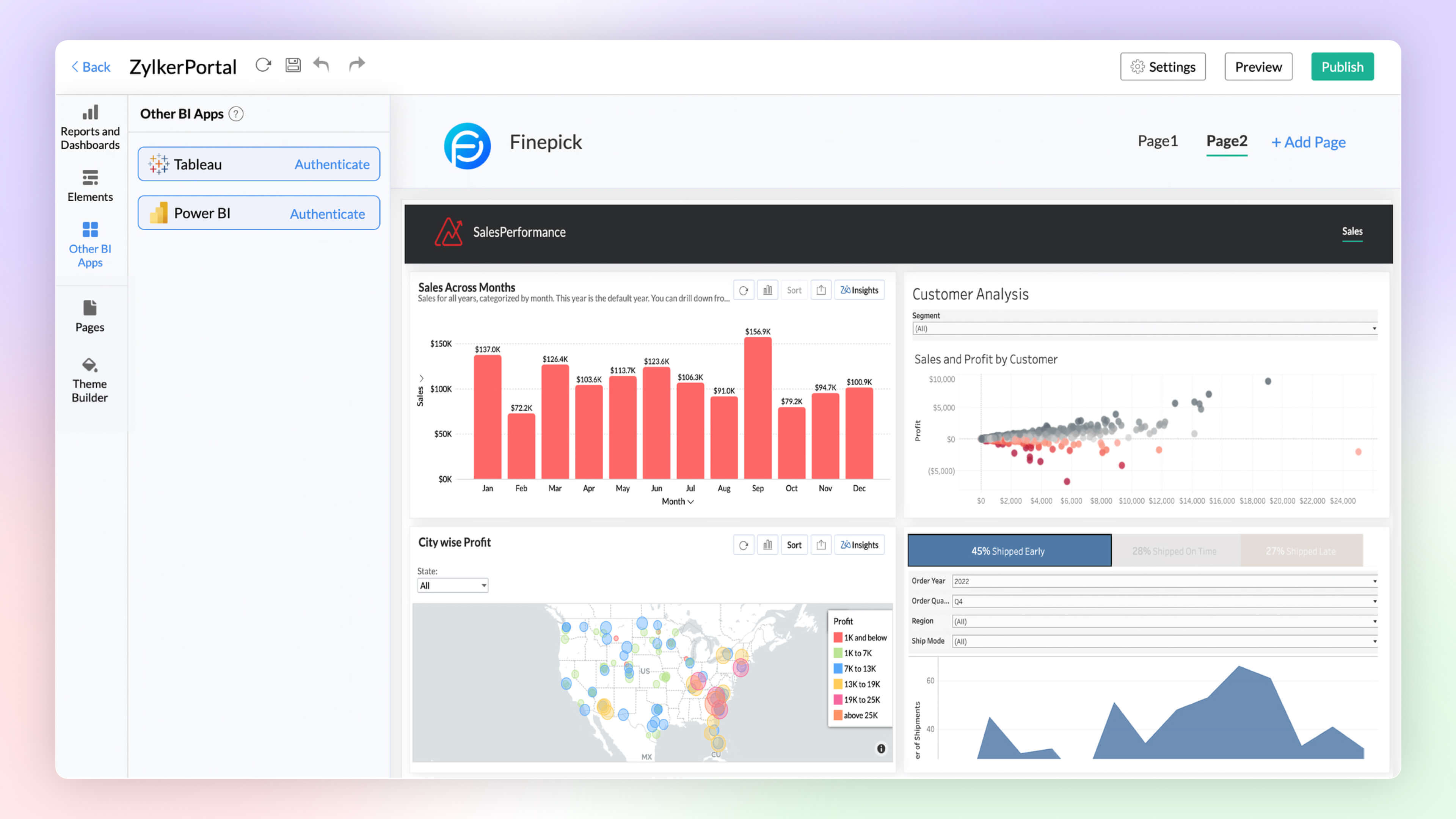
BI Fabric
Create unified BI portals for your organization's business needs. Collate reports from other BI applications like Tableau and Power BI. Having a unified portal improves collaboration, promotes centralized accessibility, and makes it easy for C-level executives to make robust business decisions.
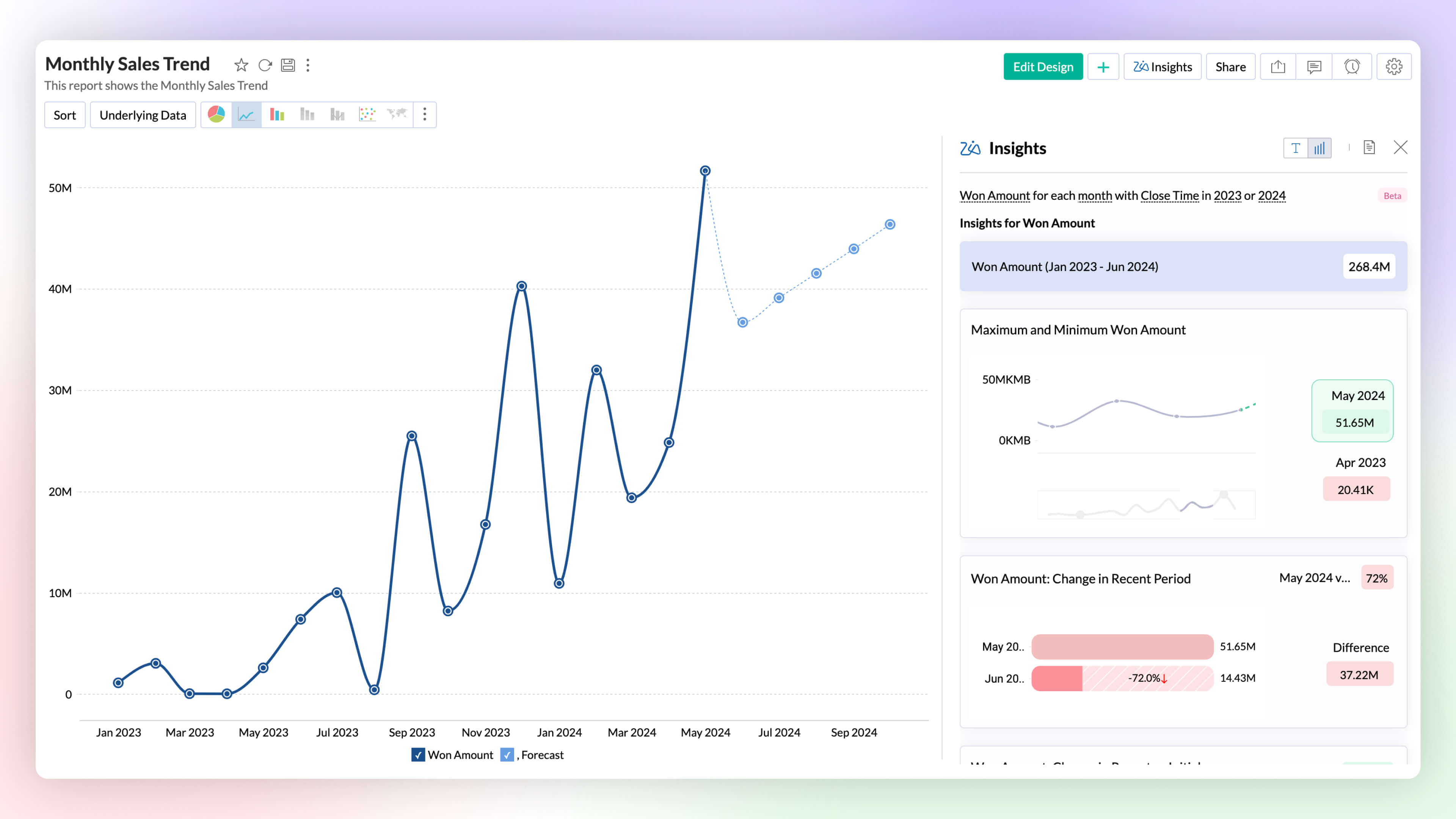
Visual Zia Insights
Zia Insights now provides visual narratives! Visuals help process information far more efficiently than lengthy text descriptions. These visuals facilitate multi-dimensional interpretations like comparison, contribution, distribution, trends and proportions.
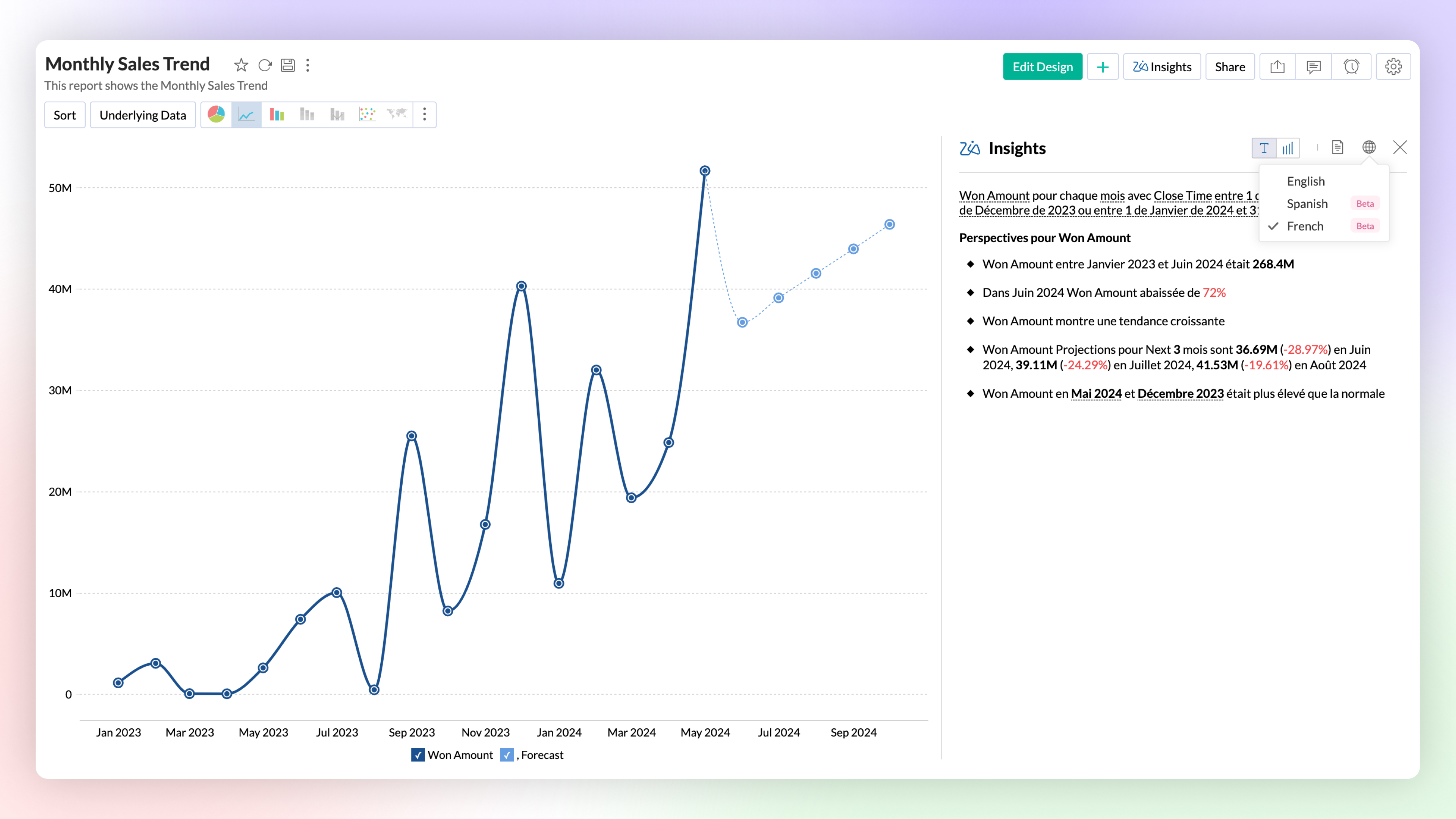
Zia Insights -Multilingual Support
Zia Insights is now available in French and Spanish. Users can choose their preferred language when accessing Zia Insights for a specific report.
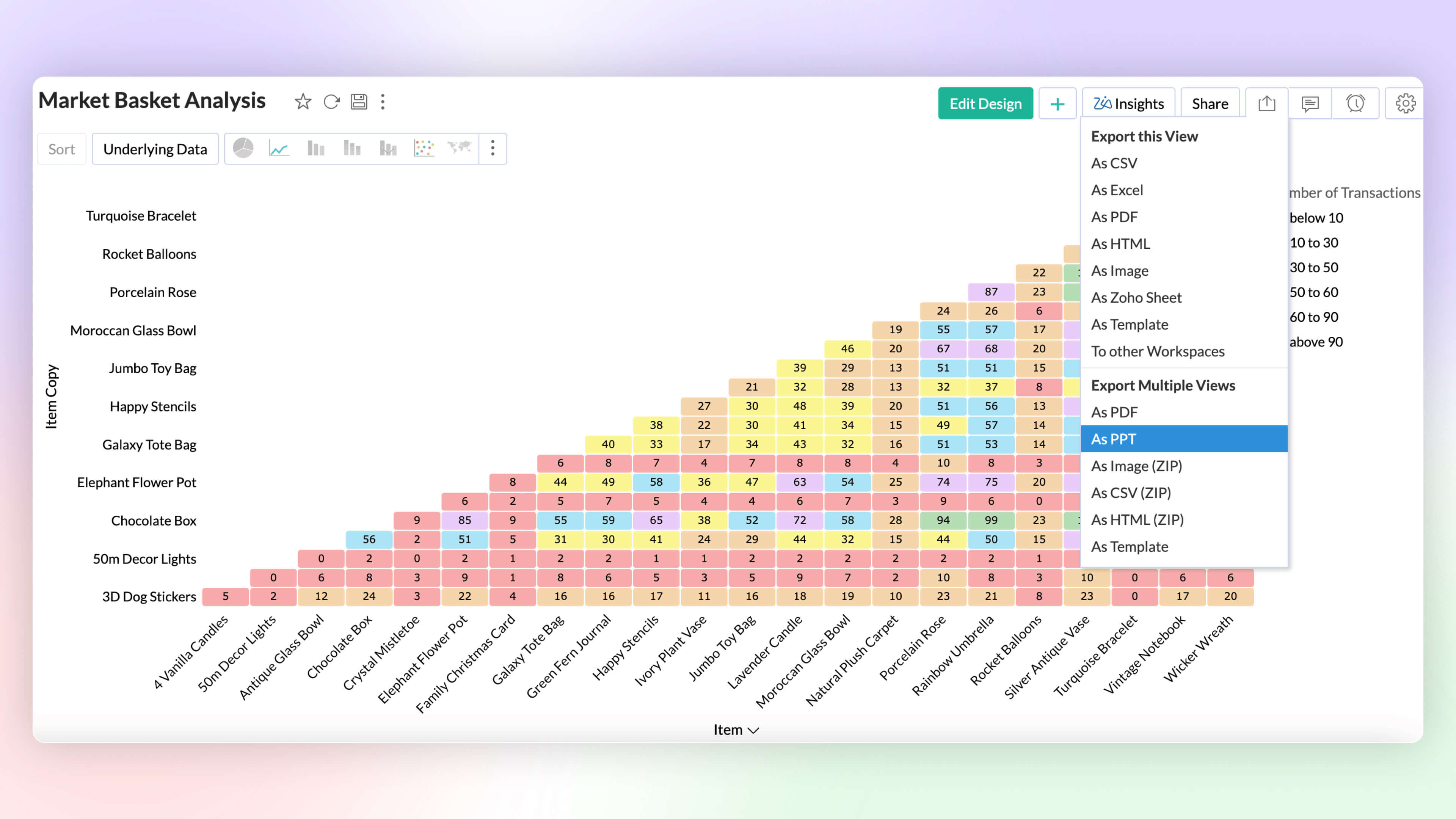
Export as PPT
Export multiple views as a Microsoft PowerPoint presentation. Enhance security by protecting the file with a password.
6. More enhancements
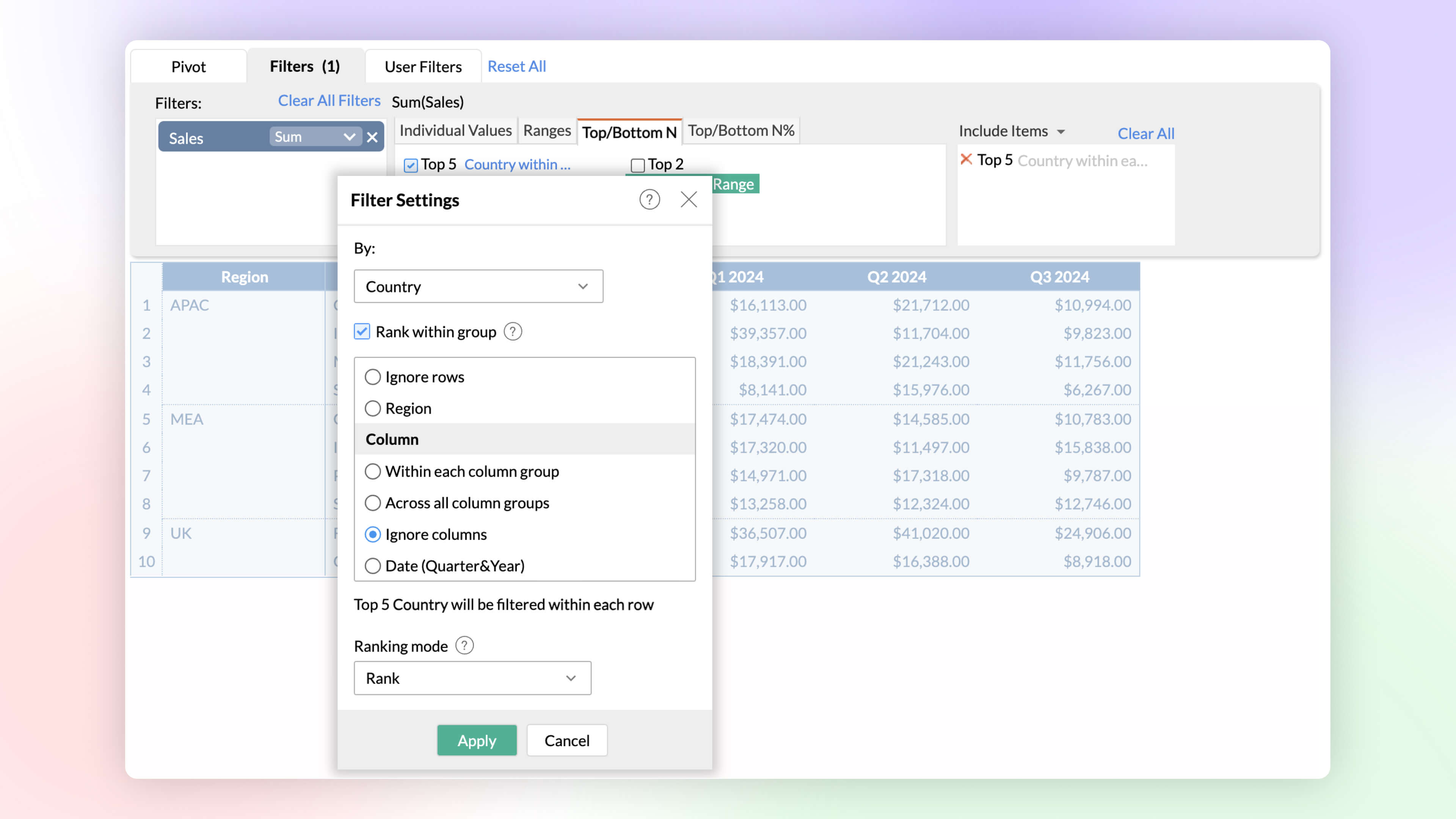
Rank within Filters
Identify and analyze top and bottom performers across various dimensions. The rank-based ability helps find the top or bottom performers within and across individual groups without having to write complex formulas.
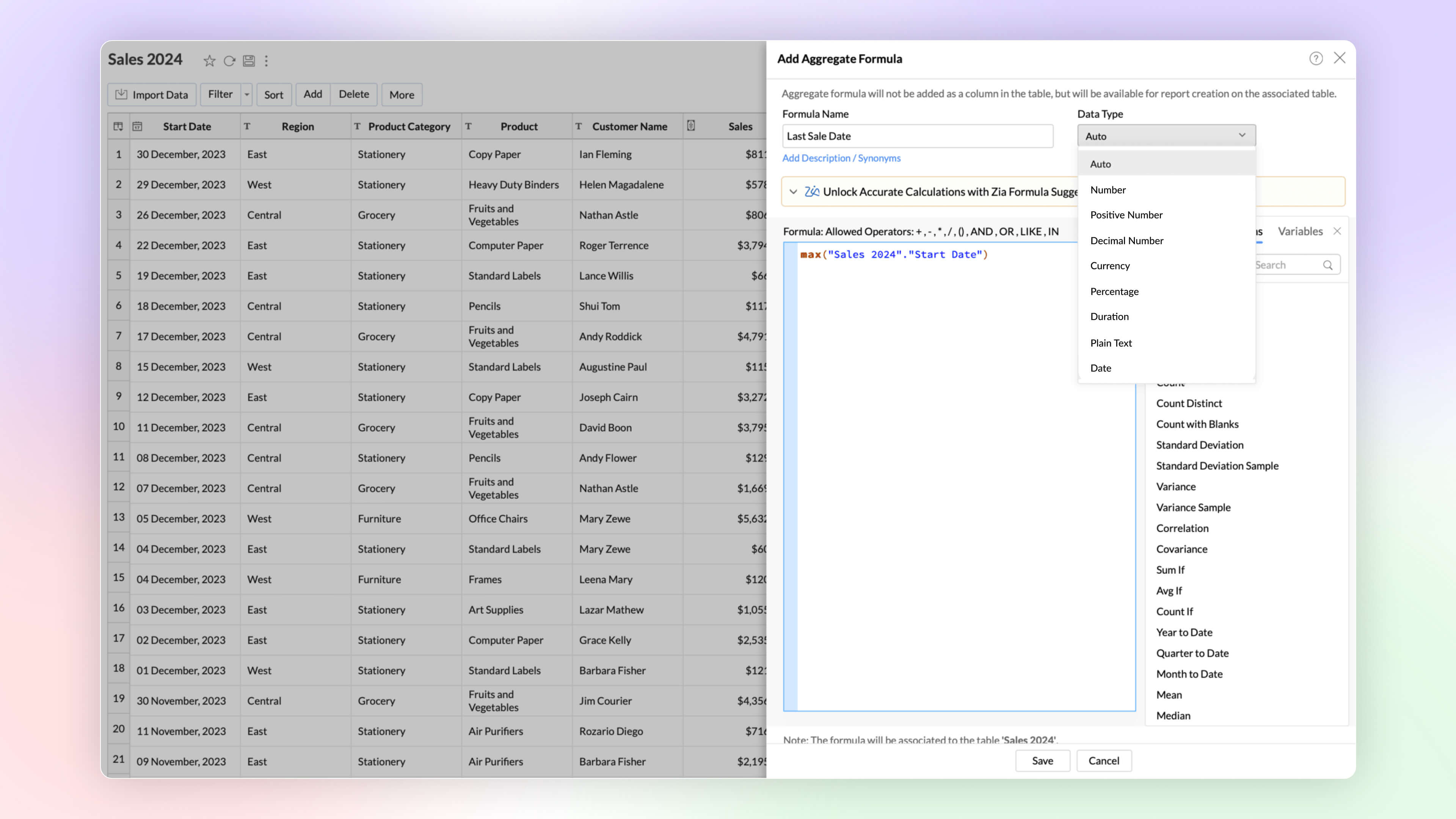
Date and String data types in Aggregate Formula
Zoho Analytics now supports the date and plain text as return data types in aggregate functions. This improvement proves immensely beneficial in scenarios such as cohort analysis, project milestone tracking, and various other use cases.
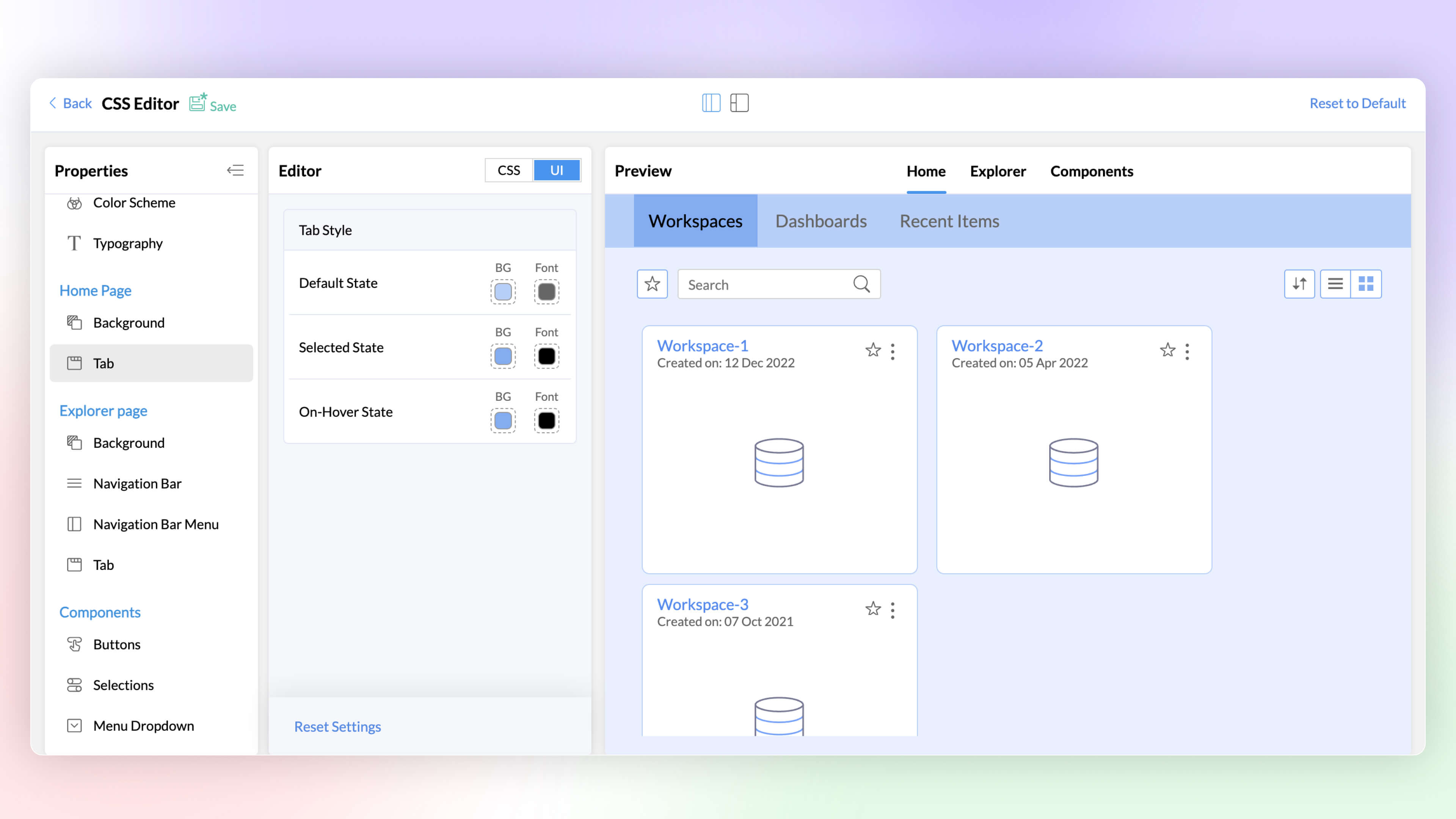
White Label CSS Customization
Elevate the visual appeal of your white labeled product and align it with your brand through the CSS customization feature. This latest addition to Zoho Analytics enables you to customize text, colors, and more on pages, tabs, selections, hover options, enhancing the overall look and feel.
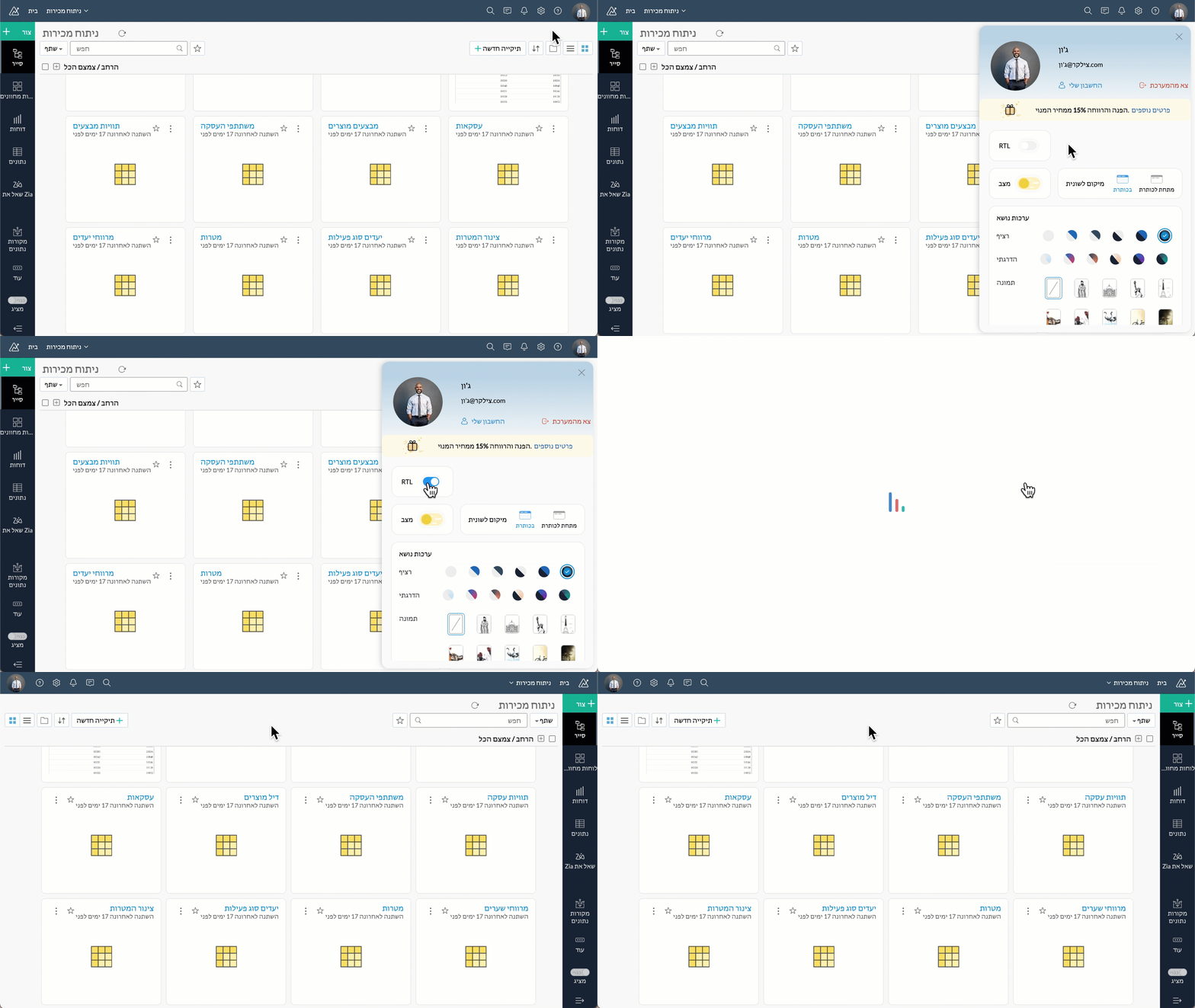
Right to left User Interface
Zoho Analytics now supports a right to left user interface. This option is best suited for languages like Arabic and Hebrew that are read from right to left.
Security
At Zoho Analytics, ensuring data privacy and security remains our topmost priority. We have implemented additional measures to strengthen security through the following enhancements.
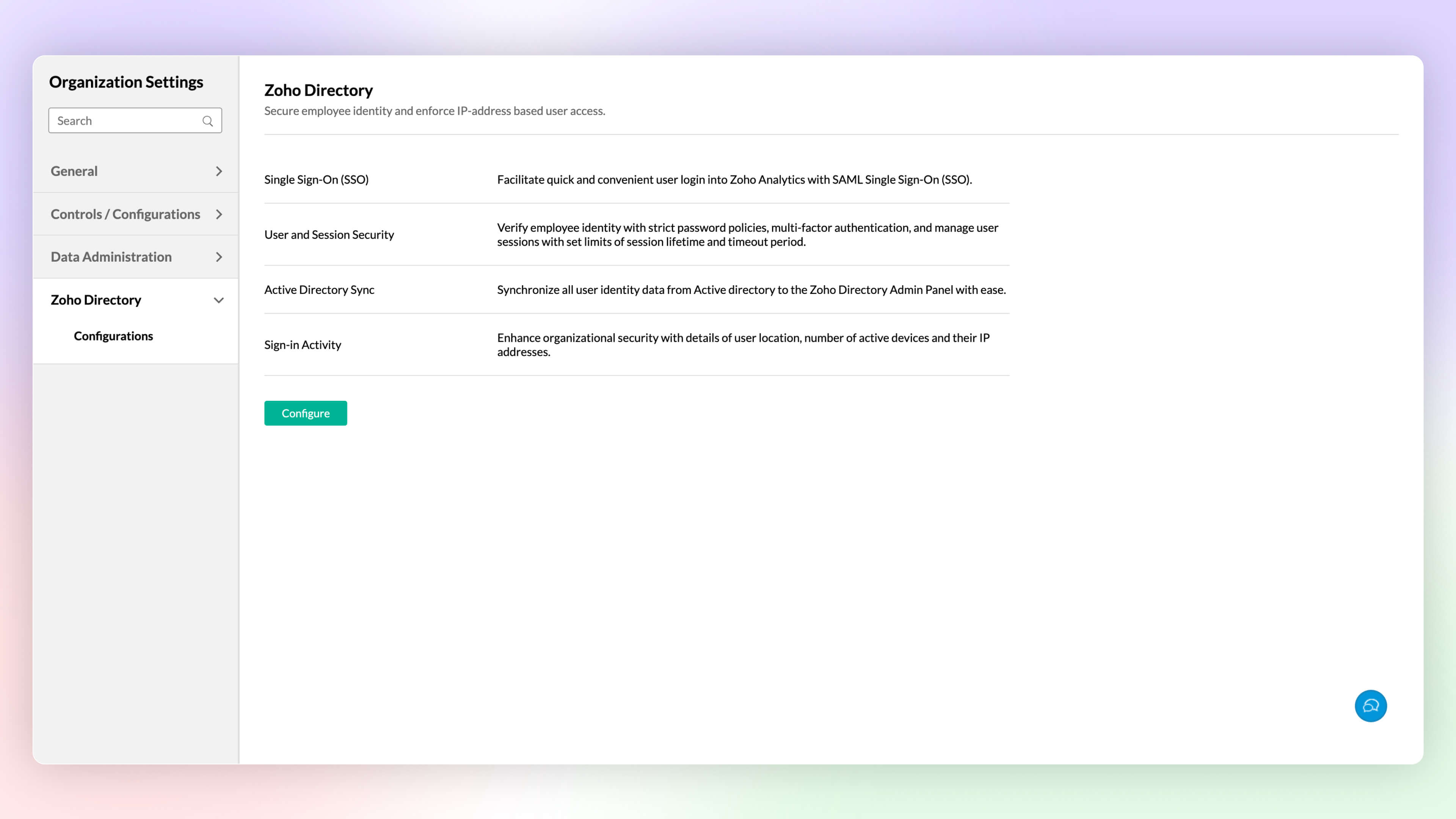
Zoho Directory
Zoho Analytics' integration with Zoho Directory allows administrators to handle identity and user access management with ease. You can now easily setup Single Sign-on, setup Active Directory sync, manage user access, etc.,with Zoho Directory.
Workspace Level IP Restriction
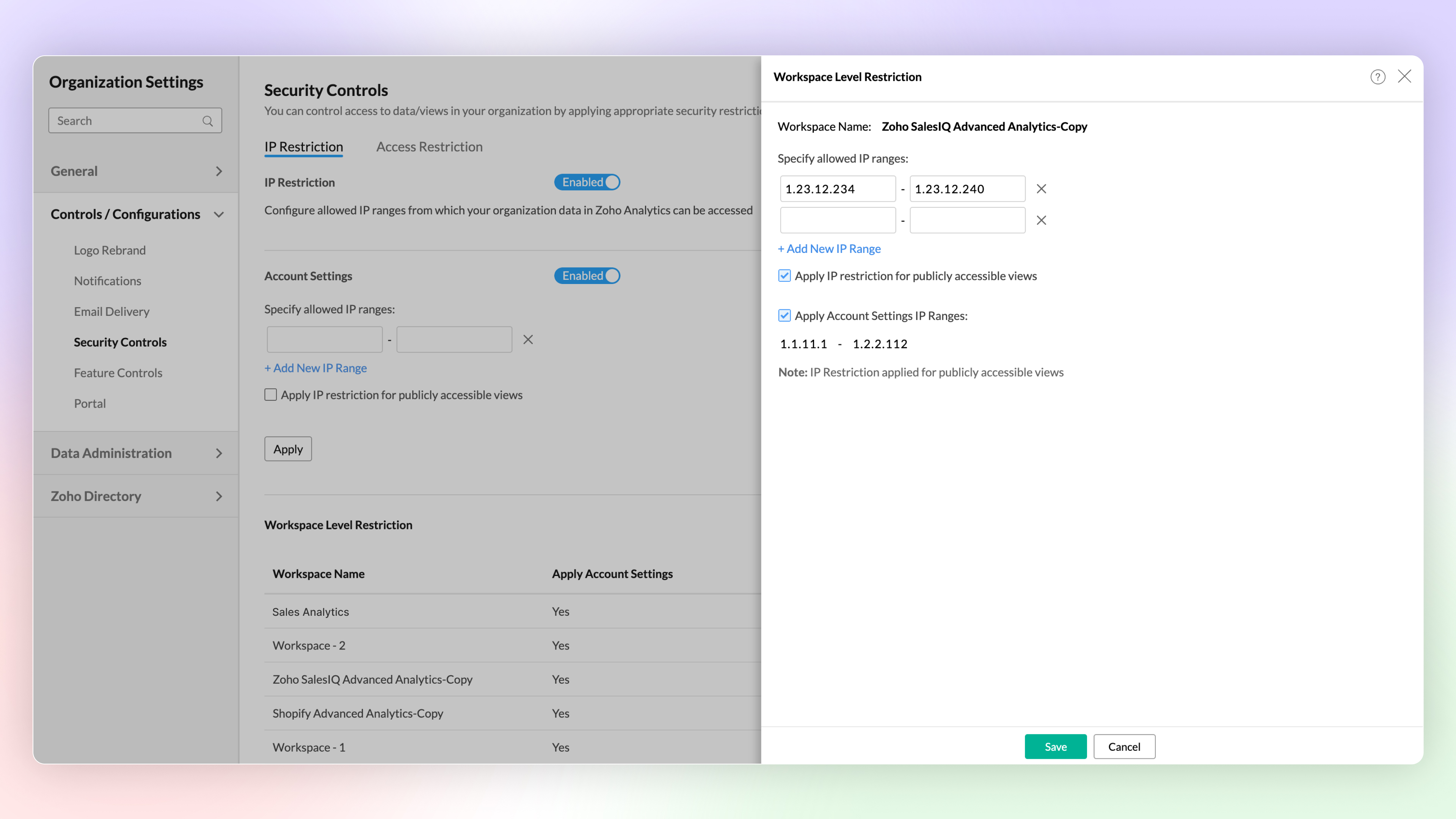
Configure workspace-level IP restrictions for enhanced security and to prevent unauthorized access. Previously, IP restrictions were available only at the account level.
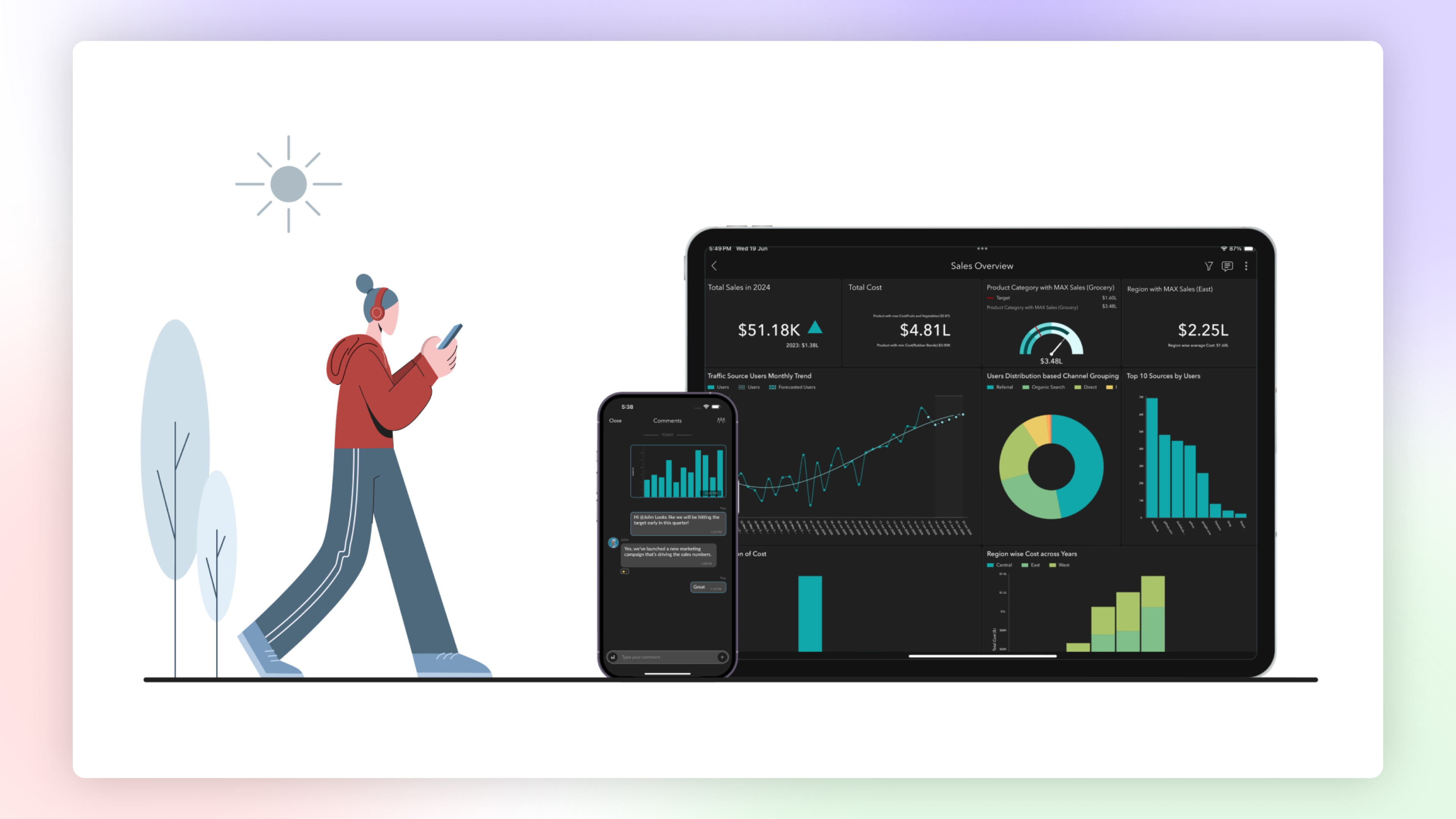
Zoho Analytics Mobile App
The Zoho Analytics Mobile app has been upgraded as a native app, optimized for your specific device. This enhancement provides faster loading times, high-quality visuals, and advanced security features specific to your device's operating system to protect your data.
Email Schedule APIs
A new set of APIs are now available for managing your email schedules. These APIs enable you to create, update, trigger and delete email schedules easily.
Features in Private Beta
ChatGPT in Ask Zia
Ask Zia now integrates with ChatGPT assisting you to write complex queries and formulas for effective data analysis.
Diagnostic Analysis
Zia insights now supports diagnostic analysis helping you understand the root causes for a certain outcome.
Custom Connector
Zoho Analytics now enables you create your own integration with third party applications.
Try Zoho Analytics 6.0 Beta!
Do try out the new features and share your valuable feedback with us at support@zohoanalytics.com. Your suggestions are crucial to helping us improve and serve you better.
Topic Participants
Nisha Angel J
Sellers
paul
César Pedrolini
Heike
Sticky Posts
What's New in Zoho Analytics - February 2026
Hello Users! We're back with another round of updates for Zoho Analytics. This month's release focuses on giving you greater flexibility in how you visualize, manage, and act on your data - with new features like custom visualizations, remote MCP server,What's New in Zoho Analytics - January 2026
Hello Users! We are starting the year with a strong lineup of updates, marking the beginning of many improvements planned to enhance your analytics experience. Explore the latest improvements built to boost performance, simplify analysis, and help youWhat's New in Zoho Analytics - November 2025
We're thrilled to announce a significant update focused on expanding your data connectivity, enhancing visualization capabilities, and delivering a more powerful, intuitive, and performant analytics experience. Here’s a look at what’s new. Explore What'sWhat's New in Zoho Analytics - October 2025
Hello Users! We're are back with a fresh set of updates and enhancements to make data analysis faster and more insightful. Take a quick look at what’s new and see how these updates can power up your reports and dashboards. Explore What's New! ExtremeWhat’s New in Zoho Analytics – September 2025
Hello Users!! In this month’s update, we’re raising the bar across multiple touchpoints, from how you bring in data, plan and track projects to how you design and brand your dashboards. We’ve added the all-new Gantt chart for project visualization, expanded
Recent Topics
Deletion Workflows
Hello, Unless I missed it, we can't create deletion workflows. My usecase is to auto-delete junk leads. We have field called lead status, and an agent qualify all our new leads. When it's a junk lead she chose the correspondant value in the picklist. My goal is that the system delete them automatically. Is that possible? Planed ?URGENTImpossible to book an appointement
J'essaie plusieurs fois mais aucun créneau n''est disponible Message d'erreur lorsque j'essaie de sélectionner une dateSendpulse SMTP/IMAP Issues
It’s possible Zoho made some changes on their side. Sometimes, even if your regular password works, Zoho requires an app-specific password for external apps like SendPulse to connect via IMAP. You can create this in Zoho’s security settings and use itInsane mail security
I cannot access my email... anywhere. For some reason the password for the Mail app on my Mac is being rejected, it worked yesterday but now it doesn't? Ok let's try the web interface. I can access my general Zoho login with the password but if I wantTask list flag Internal/External for all phases
Phases are commonly used in projects to note milestones in the progression of a project, while task lists can be used to group different types of tasks together. It makes sense to be able to define a task list as either internal or external however theHAVING PROBLEM WITH SENDING EMAIL
Hi all, I'm unable to receive emails on info@germanforgirls.eu. I'm getting an error code 550. 5.1.1. invalid email recipients. Moreso, I would like info@germanforgirls.eu to be the default "send from" email and not solomon@germanforgirls.eu. Kindly seeSharing my portal URL with clients outside the project
Hi I need help making my project public for anyone to check on my task. I'm a freelance artist and I use trello to keep track on my client's projects however I wanted to do an upgrade. Went on here and so far I'm loving it. However, I'm having an issue sharing my url to those to see progress. They said they needed an account to access my project. How do I fix this? Without them needing an account.Different Task Layouts for Subtasks
I was wondering how it would be possible for a subtask to have a different task layout to the parent task.Subscription went to default (@zoho.com) address instead for custom domain
Hello! So I bought a lite sub to test things out, wanting to use my own domain. However, after passing through all the verification steps (completed now), it seems that the sub I bought was assigned to the default email that I already had with Zoho andCanvas templates and font-family
i dont understant why its always the smallest things that waste all of my time! why in some videos i see they have tamplates in the Canvas editor and i cant seem to fint it? and why oih why cant i cange the font? i just want simple Arial! help meeeeeeeeeeRe: Ca.gory groups and not all email addresses being added to a group emails
Hi, I have added emails under 'Contacts' into categories but when sending a group email and putting the category name in not all email addresses go onto the email. I have refreshed the page, deleted and redone the info etc with no luck. I only found outIMPORTANT
Dear Zoho Support Team, I am currently experiencing an issue when trying to send emails from my Zoho Mail account. Each time I attempt to send a message, I receive the following error: "Unable to send message; Reason: 554 5.1.8 Email Outgoing Blocked."Able to Send Emails from Zoho but Not Receiving Emails from Gmail
Hello, I am experiencing an issue with my shopify domain email setup and would appreciate your help. Current situation: I can successfully send emails using Zoho. I can receive emails from some services (for example, Facebook). However, I cannot receiveAnnouncing new features in Trident for Windows (v.1.38.5.0)
Hello Community! Trident for Windows just received a major update, with a range of capabilities that focuses on strengthening and enhancing communication. Let’s dive into what’s new! View complete technical email details. For those who need deeper visibilityAccounting of Amazon
I have recently started selling on Amazon.in and I am facing issues with different types of transactions: What entry to do in case of return? If I had sent two products and customer returned both the products but I had received only one and got the claimCompose Emails Faster Using Templates and Snippet
Hello everyone, We have made an enhancement to the Send as Email option in Tickets. Agents can use templates and snippets to draft their response, which helps save time and maintain consistency. The Send as Email page will display the available templatesCustomize Colors used on graphs and charts according to users desire.
It would be great if we could customize the graph's colors as we see fit. I hate that yellow is always the default color!Emails not integrating
My emails from Hubspot did not integrtate over. How do I fix that?Creating meetings from an email
Hi. Similar to Outlook, it would be helpful if a meeting can be scheduled from an email so that the attendees need not be manually entered every time it's created.Zoho Social API for generating draft posts from a third-party app ?
Hello everyone, I hope you are all well. I have a question regarding Zoho Social. I am developing an application that generates social media posts, and I would like to be able to incorporate a feature that allows saving these posts as drafts in Zoho Social.RouteIQ for Zoho FSM
Beste, Zou wel top zijn dat we een RouteIQ hebben voor FSM aangezien we constant moeten zien wat de beste route is voor onze monteurs. Nu moeten we een speciale aparte programma hebben om de beste route te berrekenen voor onze monteurs aangezien de planningLet us view and export the full price books data from CRM
I quote out of CRM, some of my clients have specialised pricing for specific products - therefore we use Price Books to manage these special prices. I can only see the breakdown of the products listed in the price book and the specialised pricing forChanges to the send mail Deluge task in Zoho CRM
Hello everyone, At Zoho, we continuously enhance our security measures to ensure a safer experience for all users. As part of our ongoing security enhancements, we're making an important update on using the send mail Deluge task in Zoho CRM. What's changing?How to Invoice Based on Timesheet Hours Logged on a Zoho FSM Work Order
Hi everyone, We’re working on optimizing our invoicing process in Zoho FSM, and we’ve run into a bit of a roadblock. Here’s our goal: We want to invoice based on the actual number of hours logged by our technicians on a job, specifically using the timesheetsInclusion is the new engagement
When in a very challenging situation, it helps to have peers or friends around you saying, “Everything will be okay.” They speak to you in common or shared language. But your inner voice comes to you in a truly uplifting language that stays close to yourDKIM verification for Squarespace website - Corrections to instructions
Zoho Campaigns DKIM TXT record instructions for Squarespace show that Host field should show: 22111._domainkey.[domain name, e.g. mywebsite.com] However, after 72hrs, I had to reach out to Squarespace tech support, and they confirmed that the domain nameMy client requires me to have custom pdf file names to except payment for invoices, how can I customize this before emailing.
Hello! I love the program so far but there are a few things that are standing in the way. I hope you guys can code them in so I can keep the program for years to come. My client requires I customize the pdf file names I send in for billing. Can you pleaseDisable All
I want to disable all the fields on the form when it loads. I know there is a way to do this by listing all the fields as follows: disable Name; disable Address; disable City; ... I have over 50 fields on my form and i am wondering if there is a single command or way to just disable all fields on load. On load = disable All Thank you for any help.Migrating my email from GMAIL to ZOHO MAIL..........
I am a long time GMAIL user and I really only understand how they operate, but after reviewing your tutorials and forums online, it is quite unbelievable how much more and how much more streamlined ZOHO mail is, not to mention ZOHO's wonderful, more advanced capabilities. I do have several questions about transitioning over to ZOHO. Primarily, where is the best place to start, what do I do first? And how hard is it actually to move all my business and personal accounts over here? When I sign upiOS Zoho Mail App Crashesruni
Whenever I trying to search emails via the Zoho Mail app on my iPhone the app crashes, I am running the latest version of the app and the latest iOS version. I have all set reset the app and deleted the app and still have the same issue. Thank you inAssessment Answered - Automation (Related List)
Hello everyone, We have linked a candidate assessment to our job posting. When someone applies, they are required to answer all the assessment questions. However, some candidates submit their applications without completing the questions. In such cases,Paid Support Plans with Automated Billing
We (like many others, I'm sure) are designing or have paid support plans. Our design involves a given number of support hours in each plan. Here are my questions: 1) Are there any plans to add time-based plans in the Zoho Desk Support Plans feature? TheCan't change form's original name in URL
Hi all, I have been duplicating + editing forms for jobs regarding the same department to maintain formatting + styling. The issue I've not run into is because I've duplicated it from an existing form, the URL doesn't seem to want to update with the newShared Views
Hello, is there a way to prevent an agent from changing a shared table view? I have no issues with agents being able to create and customize their own view, but when I create a view and share it to my team -- the expectation is that they are viewing itUsing Zoho answer bot across departments (help center articles from another department)
Hi Zoho Community, I’ve run into a major issue and hope someone here has experience with this setup. We currently have a Help Center in the department A where all of our knowledge base articles are maintained. However, we would like to use a Zoho AnswerZoho Mail will not set up in Thunderbird
I am using Thunderbird 13.0.1 in Linux Mint 13 64-bit. I cannot set up my Zoho IMAP email in this client. This is evidently a common problem as evidenced by these postings in the Thunderbird forum: thunderbird can't seem to "find the settings" I cannotZoho Desk Partners with Microsoft's M365 Copilot for seamless customer service experiences
Hello Zoho Desk users, We are happy to announce that Zoho Desk has partnered with Microsoft's M365 to empower customer service teams with enhanced capabilities and seamless experiences for agents. Microsoft announced their partnership during their keynoteThe Social Wall: January 2026
Hello everyone, We’re back with the first edition of The Social Wall of 2026. There’s a lot planned for the year ahead, and we’re starting with a few useful features and improvements released in January to help you get started. Create a GBP in SocialPipeline: Copying rulesets from one data source to another
When creating and editing data pipelines, it would be really helpful to be able to copy the ruleset from one data source and 'paste' it to another. This would save time and reduce manual mistakes.Doubt about maximum email reach
Good morning, greetings. This is Bramdon García from EDULABS S.A.S ESP, located in Colombia. I'm writing to inquire about the possibility of sending an email to 35,000 people simultaneously. Our company has a Zoho account, but we'd like to know if there'sNext Page