Enhance Data Visibility with Mapping Fields from Lookup Module
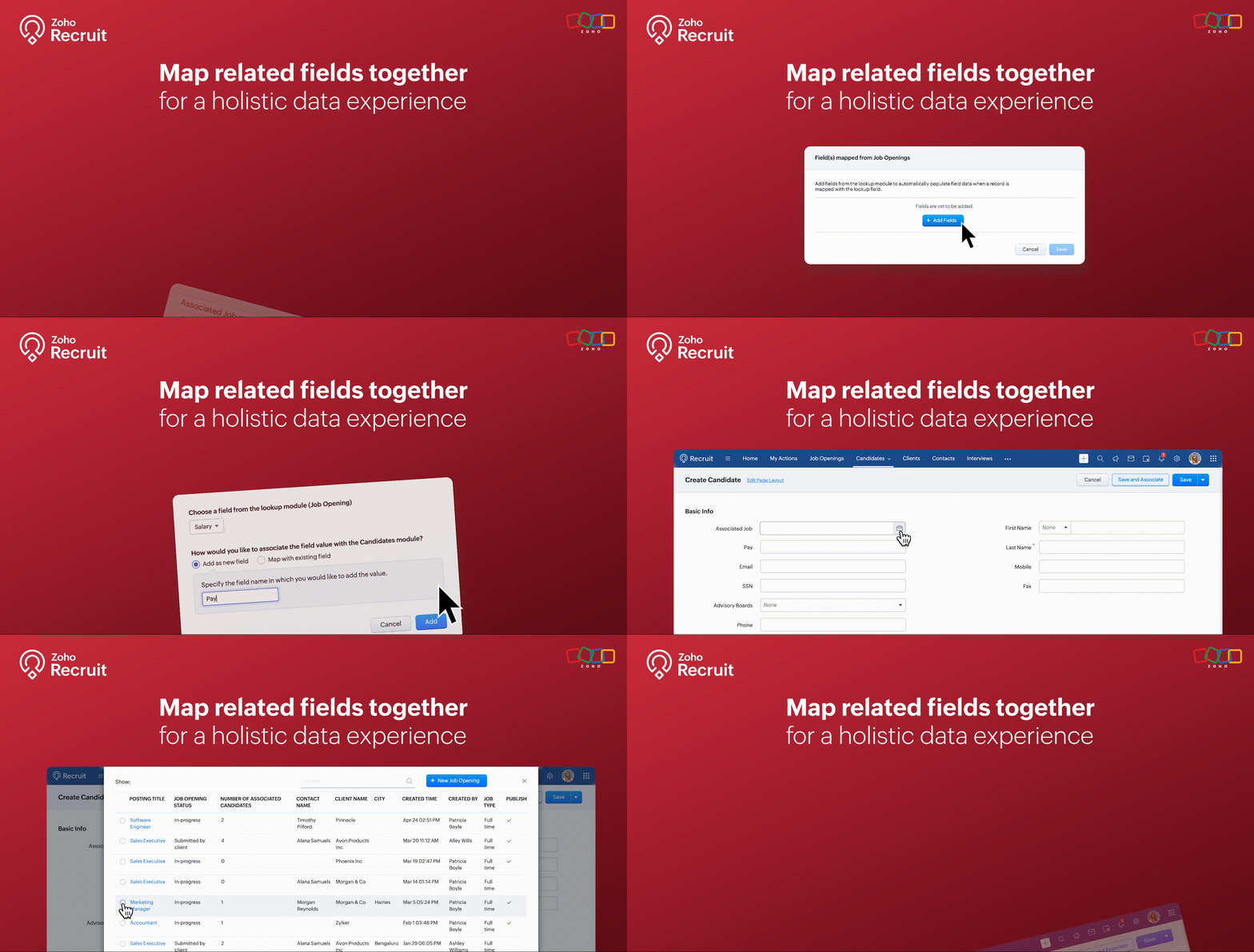
We’re thrilled to announce an exciting new feature in Zoho Recruit: Mapping Fields from Lookup Module! This powerful addition is designed to display additional details from a related module when using lookup fields. This enhances data visibility and provides more context within a single module view.
What is Mapping Fields from Lookup Module?
The "Mapping Fields from Lookup Module" feature allows you to incorporate additional fields from related (lookup) modules directly into your primary module's layout. This means you can now view more contextual information within a single view without the need to switch back and forth between different modules.
For example, if you're in the Candidates module, you can map fields like Job Location, Job Type, and Hiring Manager from the Job Openings module. This way, you can see all key details about the job opening a candidate applied for right within the candidate’s record.
Benefits
- Enhanced Data Visibility: By mapping fields from related modules, you can see all pertinent information at a glance. This comprehensive view enables better decision-making since all the relevant data is readily accessible within a single module.
- Improved Workflow Efficiency: Say goodbye to the constant toggling between different modules. With mapped fields, you have a more streamlined workflow, saving time and reducing the chances of missing critical information.
- Better Data Consistency: Ensure that all necessary information is consistently available across different modules. This reduces data silos and enhances the reliability of your recruitment data.
Use Cases
1. Streamlined Candidate Evaluation:
Managing candidate evaluations often requires accessing various details about job openings they’ve applied for. Mapping fields from the Job Openings module to the Candidates module makes this process seamless and efficient.
Example:
A recruiter at a healthcare organization is evaluating candidates for multiple nursing positions. By mapping fields like Shift Type, Department, and Hiring Manager from the Job Openings module, they can view all relevant job details directly within the candidate’s profile. This comprehensive view helps the recruiter quickly assess each candidate's fit for the roles based on the specific requirements of each department, without needing to navigate to the Job Openings module.
2. Comprehensive Interview Scheduling:
Scheduling interviews for candidates can be a complex task, especially when coordinating with multiple hiring managers. Mapping fields from the Interview Schedule module to the Candidates module can streamline this process.
Example:
An HR coordinator at a retail company is responsible for scheduling interviews for various store manager positions. By mapping fields such as Interview Date, Interview Time, and Interviewer from the Interview Schedule module to the Candidates module, they can keep track of all upcoming interviews directly from the candidate’s profile. This ensures that the coordinator can efficiently manage interview schedules and communicate details to candidates without missing any critical information.
3. Enhanced Client-Specific Job Management:
Recruitment firms often manage job postings for multiple clients, each with specific requirements and details. Mapping fields from the Clients module to the Job Openings module can provide a unified view of client-specific job postings.
Example:
A recruitment consultant at a staffing agency is managing job postings for several clients in the finance sector. By mapping fields such as Client Industry, Client Contact, and Special Requirements from the Clients module to the Job Openings module, the consultant can view all client-related information directly within each job opening. This comprehensive view helps the consultant tailor their recruitment efforts to meet the unique needs of each client, ensuring better client relationship management and more successful job placements.
How to Use the Mapping Fields from Lookup Module
- Identify the Fields: Determine which fields you want to map from the lookup module to your primary module.
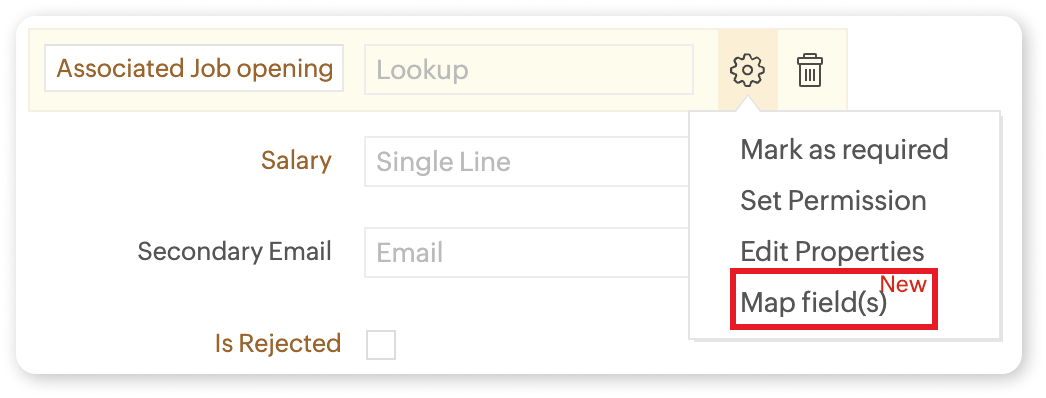
- Add the Lookup Field: Include the lookup field in your module layout where you want the additional information to appear.
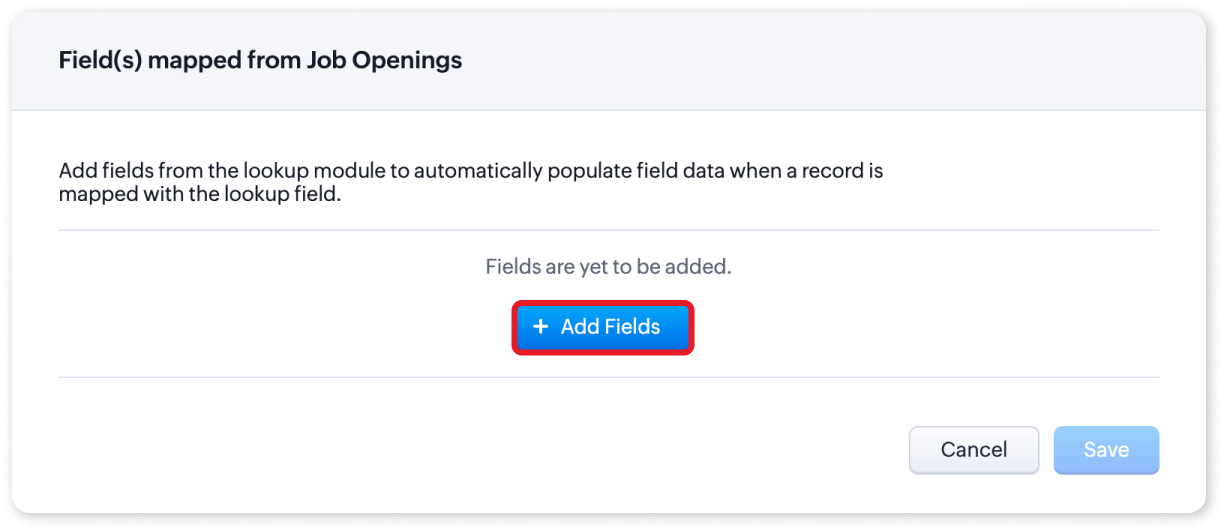
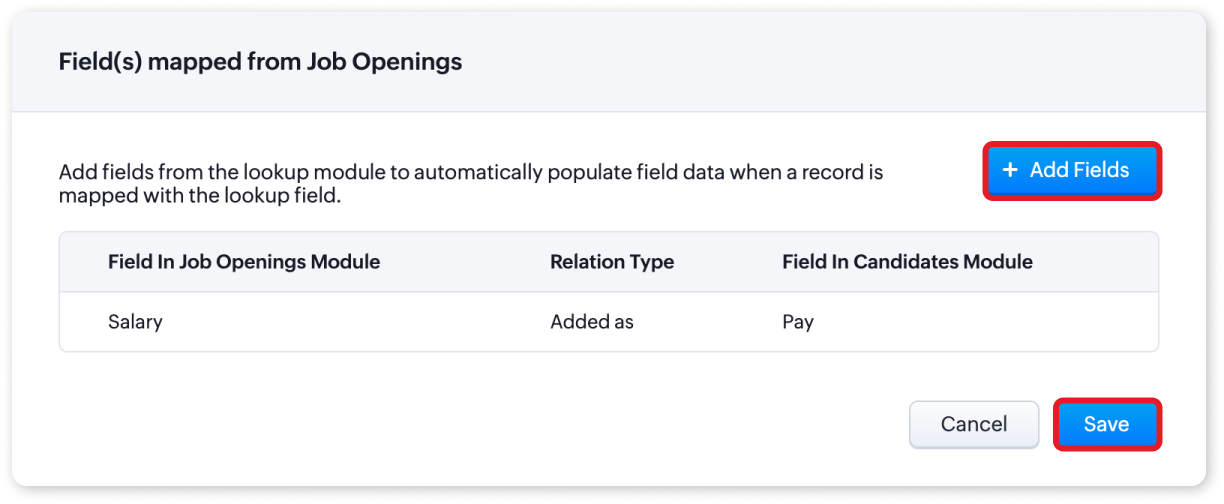
- Map the Fields: Click on the settings icon and select "Map Field(s)". You can choose to add the fields as new or map them to existing fields.
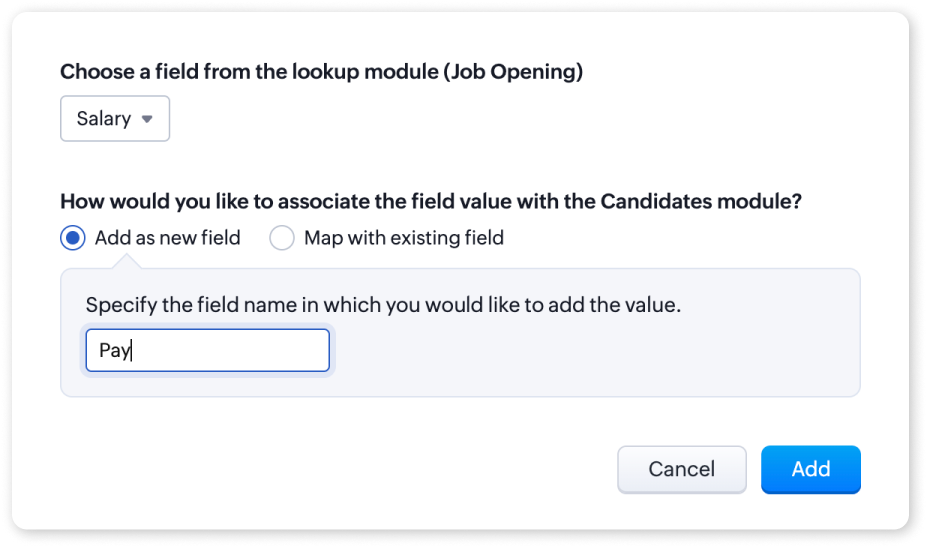
- Save Changes: Once you have mapped the fields, save the changes to your layout.
For more detailed information, please refer to our help article on Mapping fields from Lookup Module. If you have any questions or suggestions regarding this update, feel free to leave a comment below or reach out to our customer support team at support@zohorecruit.com.
Regards
Team Zoho Recruit
Topic Participants
Akshaya P
fundae Careers
Gowtham Prashanth
Sticky Posts
An update to improve email delivery | Email Authentication & Relay
Update Rollout Latest Update: Enterprise users (8th July, 2025) This update is now live for Enterprise plan users in all regions. This includes People Plus, but not Zoho One, which will be covered in an upcoming update. Professional users (31st May 2025)Zoho Recruit User Group Meet-up | INDIA 2025 (Venue Finalised)
Hello Zoho Recruit users from India, We’re pleased and excited to announce our 2025 edition of Zoho user group meet-up in India in five cities! In this meet-up, our team of experts will help you understand the intricate nuances to use Zoho Recruit better,Zoho Recruit is coming to the UK | Zoho Community Learning Series
Customers from the United Kingdom, Exciting news: We will be in London for the Zoho Recruit user meet up. Our team will help you better understand the intricate nuances of Zoho Recruit to help you hire faster, inform about new and upcoming features, andAsk the experts - A live Q & A discussion on Zoho Recruit
We are delighted to come back with another edition of Ask the Experts community series. This edition, we'll be focusing on everything about Zoho Recruit. The topics will focus on the features that are used/asked by the majority of users and also basedRestriction on 'From' addresses with a public domain
Dear Zoho Recruit Community, We hope this message finds you well. This post is to inform you about some important updates regarding email restrictions within Zoho Recruit. Effective post 31st March 2025, we will be implementing changes to the use of email
Recent Topics
Receiving too many Spam Leads. Why?
I am receiving so many junk leads from web forms created by zoho's platform. The junk queries are increasing day by day and are affecting our business. I am continuously following up with zoho team from the past one year but not getting any satisfactoryWhy is Zoho supporting the Proud Boys?
Hello. This is the only way I can find to contact your company. There is someone in Maine posing as a law enforcement officer, attempting to kidnap immigrants. They are also recruiting for a known hate group. They have an email address hosted by Zoho.com.Composite Item - Associated/Component Items
I am trying to find the Associated Item/Component Item field in the Composite Item Table in Analytics. Has anyone been able to find and utilize this field in Analytics?Use openUrl() to edit a specific record
I am working on a queue app for my organization. I have a master queue that is a report of meetings with workflow buttons to manipulate the records. One of these buttons I would like to open the record and edit for the purpose of changing the queue lookupwhy i cant access my web without the www
please help meSend Whatsapp with API including custom placeholders
Is is possible to initiate a session on whatsapp IM channel with a template that includes params (placeholders) that are passed on the API call? This is very usefull to send a Utility message for a transactional notification including an order numberHelp Centre Articles in Desk, Zia and iframe
Hi, We embed SOP documents into articles from Scribe into using iframe. We are looking at zia indexing articles to present to agents to aid their work. Please advise if zia can view and learn from the content within the iframe?Rich Text/WYSIWYG Input Area
I'd like to have an option on ZoHo creator to create an input text area for HTML/rich text formatting. :)How to create a directory report from one-to-many relationship
Hi all, Newbie here. I'm converting an Access DB to Creator. I've learned Forms are tables and Reports are used to edit table rows, not Forms. I've got the data loaded and can maintain it with the Reports already done. I've done filtering and sorting,Change Default Selection for Lookup field
I have a Lookup field that I have locked, when I unlock it - the user can select the proper Zone but I need it locked, since this may change based on user selection of another field. Example. There are 3 potential zones. User A selects the Hospital AccountRestrict visibility and user permissions Creator 5
I don't understand how restrict visibility for reports interacts with the already established role permissions. It seems that the default on restrict visibility has everything checked for all users, but I cannot set up different levels of permission for different individuals. Right now I have three different ways to manage users and their access and it's confusing because everything has not migrated to Creator 5. Don't the role permissions extend to the reports as well? Are the selections underLMS - Why do Trainers have to be Users?
I'm not sure why the software is set up where trainers must be users (i.e., employees). This should really be changed, as there are many cases (the majority of cases for some companies) where classroom trainers are external or contractors. If this isZOho mail not stopped working with my domain.
i have changed my name server settings in my domain sigmasquaretec.in . After that my emails are not working with ZOHO.Request to Cancel Zoho Mail Subscription
Hello Zoho Team, I have migrated to Google Workspace and would like to cancel my Zoho Mail subscription for my organization. Organization Name: AR Creators Media Admin Email: roman@arcreatorsmedia.com Subscription ID: RPUS2005901960812 Please cancel thezoho smtp limit for free users
What is Zoho SMTP limit for free users?Mailboxes and Alias Email Addeases - Best Palestine’s and Advice:
Mailboxes and Alias Email Addresses - Best Practices and Advice: what is the best practice for the efficient means to manage And sort, alias, email addresses and third-party after or even the Zoho app itself. I am currently using both Thunderbird andHas anyone built a discussion forum with a Creator Portal?
I have built a Creator app for organisations to apply for refurbished tools that are sent by a charity. The charity now wants recipient organisations to be able to connect with each other within a region or country, to share advice on maintaining theAbility for Super Admin to Set Locale Information for Users in Zoho Recruit
Dear Zoho Recruit Team, I hope you're doing well. We would like to request the ability for Super Admins to configure Locale Information (Country/Region, Date Format, and Time Format) for users in Zoho Recruit. Currently these settings are only configurableAdd a block or widget to Zoho Sites that allows users to create an interactive contact card with contact buttons (email, LinkedIn, website, etc)
The proposed feature consists of a pre-designed, customizable block that displays a person's contact information (e.g., a speaker, sales representative, or independent professional) and offers quick access to: Email (icon with mailto: link) LinkedIn profileZoho Recruit > Email Templates
Dear All Background: We are using Zoho Recruit for the 4 business units under our group of company it our posting our of Job it will be done via our internal recruiter. In the Email templates, i want to be able to insert the individual business unit,Zoho Voice & Zoho Recruit/CRM
Hello, I'd love to use Zoho Voice with Recruit and CRM but it would need something very important to me, that has been a game changer to my daily routine, like Calendly has been for scheduling interview. It's call transcription with AI. I'm using NootaChange start time after starting the timer
Hello Projects Community, an amazing feature would be to change the start time of a running timer. I know this from some other time tracking softwares. Any idea about this? Best wishes NielsSending possible. Receiving not possible.
We are not receiving mail in our company email. Could you please solve this. It has been recurring and I want it to be resolved once and for all. Please help.Problema para enviar y recibir correos
Buenos días, mi cuenta de correo secretaria@construccmauro.com presenta problemas y no me permite ni me envía ni recibe correos, me sale este error.No fue posible enviar el mensaje; Motivo: 554 5.1.8 Correo electrónico bloqueado saliente. Aprende más., AgradezcoData access tasks like 'For each record' aren't supported for 'integration forms'.
My code is not running because i get the error "Data access tasks like 'For each record' aren't supported for 'integration forms'." I have my integration setup with Zoho CRM + Zoho Creator, the form is visible and working on my zoho creator however inZoho Reports Not Grouping from Subforms
I have created reports from a subform. We have a budget from a standard field, and the bills added to a subform. I've summarised the bills in a field. In edit mode, the bills are joined per supplier, which is what we want. But then it converts and separates/duplicatesCreate Automation for the Field "Mark up by"
Hello everyone, I'm importing expenses from Zoho Expense to Zoho Books. I want to auto-calculate the "Mark up by" field based on the custom field “Discount” I created before. The trigger of the workflow will be the creation of the expense itself. TheFree Webinar Alert! Before vs After: Proven ROI from Zoho CRM + Workplace Integration
Hello Zoho Workplace Community! Before: Scattered tools, lost leads, fragmented communication. Are you ready to stop the constant back and forth between tools to manage leads, emails, and team communication? After: Connected tools, streamlined processes,Zoho Forms to Zoho Sign Integration - Fields Missing
If a Zoho Form has image fields, it seems these can't be transferred to a Zoho Sign template for digital signature. Is there any way of pre-filling Zoho Form images onto a Zoho Sign template? Many thanks.Is zoho SMTP slow today?
Hi guys, Since yesterday I'm facing a slow communication over SMTP while sending emails. I already tried to use tls and ssl but nothing changes. There is anyone else experiencing related issues? I didn't find any maintenance in progress. Tested anotherLink project invoices to sales orders
As a business owner and project manager I create estimates with my clients which then become sales orders. When billing for project work I want to invoice against the agreed sales order. I see that I can create invoices and link them to sales orders inThe Urgent Need for Native Brazilian Payment Integrations: PIX and Direct Bank Connections
Hello Zoho Team, I am writing to emphasize a critical functionality gap for Zoho Books in the Brazilian market: the lack of modern, native payment gateway integrations. The current options are insufficient. The Mercado Pago integration, for instance,How to Fetch Images from Related Modules in Zoho CRM Mail Merge Templates?
Hi team , Hope this email finds you well. I have a requirement where I need to create mail merge templates within Zoho CRM in such a way that they fetch images from a record stored in a different module. The way it works is I have one module "A" whichZoho Calendar (Refresh Rate)
Why don't the calendars refresh more than every 12 hours? That is crazy. I cannot be the only user who wants to see this change? I see and understand that I can MANUALLY update them, but need them to auto refresh either (1) whenever there is a change"In Zoho CRM, during the Blueprint transition to the QC stage, I want to make the 'Packing Proof' image field mandatory."
@Dr Saurabh Joshi @Haiku Technical Support @Ishwarya SG @Sparrow Hill President @Hugh Marshall "In Zoho CRM, during the Blueprint transition to the QC stage, I want to make the 'Packing Proof' image field mandatory."Flow Error
Hi Zoho Team, Any idea on this? This happens recently. Zoho Desk says "You are not authorized to access this resource."Zoho Books/Square integration, using 2 Square 'locations' with new Books 'locations'?
Hello! I saw some old threads about this but wasn't sure if there were any updates. Is there a way to integrate the Square locations feature with the Books locations feature? As in, transactions from separate Books locations go to separate Square locationsBooks/Square integration with multiple bank accounts
Hello, I need some workaround ideas! We have two parts of our business which have their own bank accounts and customers. We use 'locations' in Square to allocate the payments to the correct place and we use 'branches' in Zoho Books to define which transactionsIntergrating multi location Square account with Zoho Books
Hi, I have one Square account but has multiple locations. I would like to integrate that account and show aggregated sales in zoho books. How can I do that? thanks.[Webinar] Deluge Learning Series - Deluge Learning Series Built-in Functions in Deluge
We’re excited to welcome you to the next session in our Deluge Learning Series – Built-in Functions in Deluge – Part 1. In this focused 1-hour live session, we will explore the practical use of built-in functions in Deluge scripting, with a spotlightNext Page