Advance Your Churn Predictions with Zia's Usage Data Feature: Event Mapping
Greetings all,
This is an important and exciting update about feeding usage data into Zoho CRM. To expand the scope of how usage data can be used by Zia, we are introducing a new section called Usage Data under Zia. Users can now easily import, edit, and update usage data within their CRM.
This feature helps you understand if your customers are losing interest or satisfaction with your service, experiencing technical difficulties, or switching to a different platform with the usage data you feed. Identifying these behavioral changes early on can provide valuable insights for businesses to step in and re-engage customers.

Through this enhancement,
- Improve the CRM's capability to leverage usage data for Zia-generated insights such as churn prediction, recommendations, and engagement signals.
- Enable users to link key attributes from usage data to terms that the system can understand for accurate Zia processing.
- Facilitate the seamless import of usage data from different sources into Zoho CRM.
What's new?
When AI models sometimes struggle to interpret the usage data, customers often find it challenging to use their usage data in CRM systems effectively. Event mapping is a proper mapping mechanism to utilize usage data fully, not missing any opportunity on customer engagement, retention, and personalized service delivery.
With the new Usage Data under Zia, you can map each static set of events to the fields of the custom module. This enhancement helps Zia provide a deep analysis that can help predict more insights. Likewise, your churn prediction goes on, and the data is automatically updated with incoming data whenever your customers engage.
Zia can expand the range of applications for the usage data beyond Churn prediction after being trained with the data. The scope of Zia expands with the full utilization of usage data, helping with the following use cases in other features.
- Recommendations help you decide what products you can cross-sell or upsell to which customers.
- Analyze your customers' signals and engagement rates to gain deeper insights.
- Bring in more accuracy to churn predictions, like when a specific customer is likely to churn.
Additionally, Zoho CRM can now access usage data sourced via API, URL, or any supported file format from any tool to be stored in a custom module. This lowers your dependency on restricted tools.
Let's get started with the details of the enhancement.
What is usage data?
All businesses need transactional data as a base to study user purchase behavior on metrics like customer details, date and time, payment methods, discounts, and inventory movements.
Unlike transactional data, which only includes information about customer purchases and subscription details, usage data tracks how these customers interact with or use them, through an app or a website, concentrating on metrics like frequency, duration, and patterns of usage, helping businesses understand user behavior and preferences.
Tools like Google Analytics track customer actions, such as logins, interests, purchases, and location, to provide us with this data. It is used for behavior analysis, engagement metrics, churn prediction, and more.

What is event mapping?
Event mapping is a learning technique for the system so the user can activate Predictions, such as churn prediction. Through event mapping, the system will learn and understand how to interpret usage data. Mapping involves certain data attributes like event name, event timestamp, event initiator, and others.
Why event mapping?
Since event mapping requires the mapping of information, you are directly feeding in more details about the user interactions, easing the accuracy of churn prediction. In simple words, more details give you more accurate prediction.
For instance, a sudden reduction in the amount of logins serves as a significant indication of decreasing engagement, potentially indicating churn. Through event mapping, Zia can anticipate the reasons why a certain demographic of users cease logging in at specific times and whether device-related factors impact their logins.
Moreover, event mapping unlocks various functionalities like calculating churn scores, generating personalized recommendations, and monitoring customer engagement. For example, through Workflow Rules, users can send promotional emails to encourage customers who have not logged in for over 30 days to stay engaged.
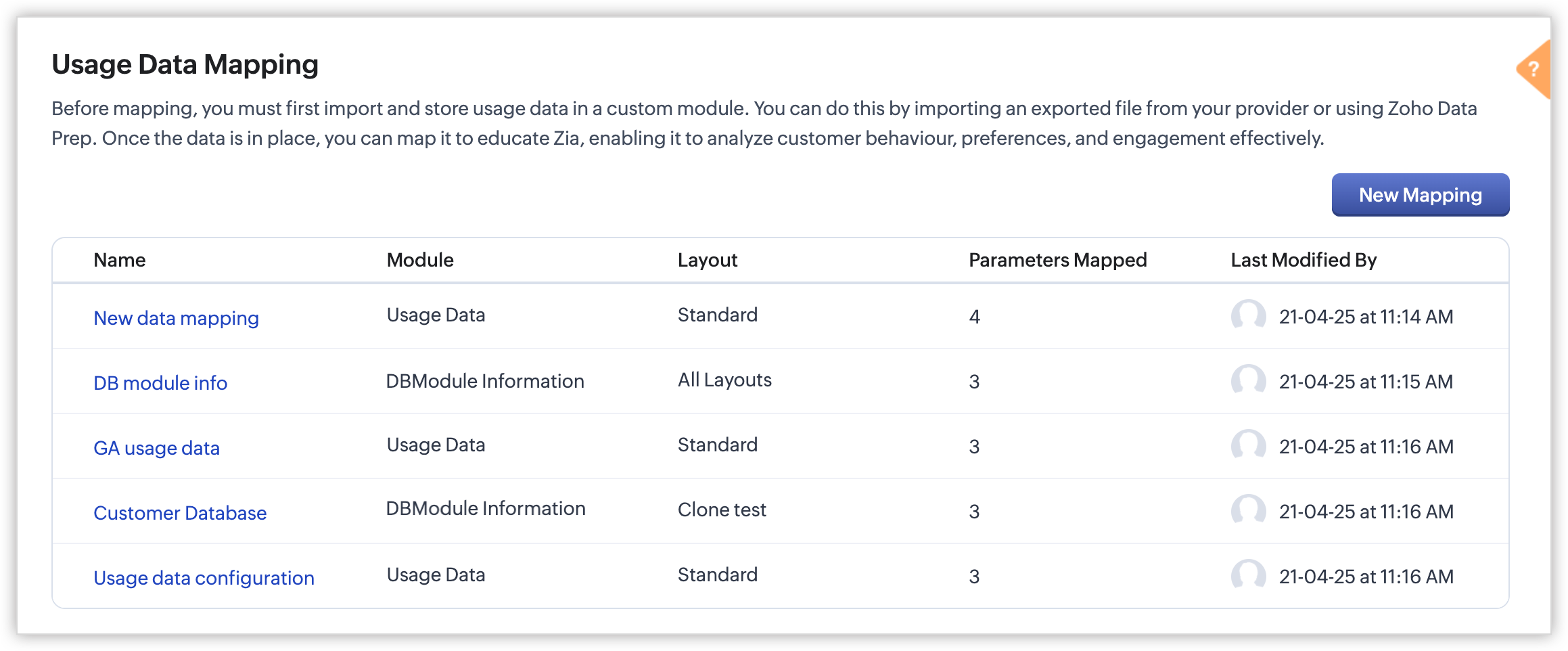
Steps to configure:
With the enhancement, import usage data into a CRM custom module, create a mapping of the data called event mapping, and utilize that data for churn prediction and more Zia insights. Through event mapping, AI increases the accuracy of Zia-driven predictions and also widens its scope for personal recommendations and other predictions.
Let's look at this activation in the below steps:
- Create a custom module and three (mandatory) fields to store the following data: event name, event timestamp, and event initiator.
- Import the usage data from other sources (via API, DataPrep, CSV, or any supported file format) to the created custom module and map the fields.
- In Usage Data under Zia, perform the event mapping to create a way that the system understands.
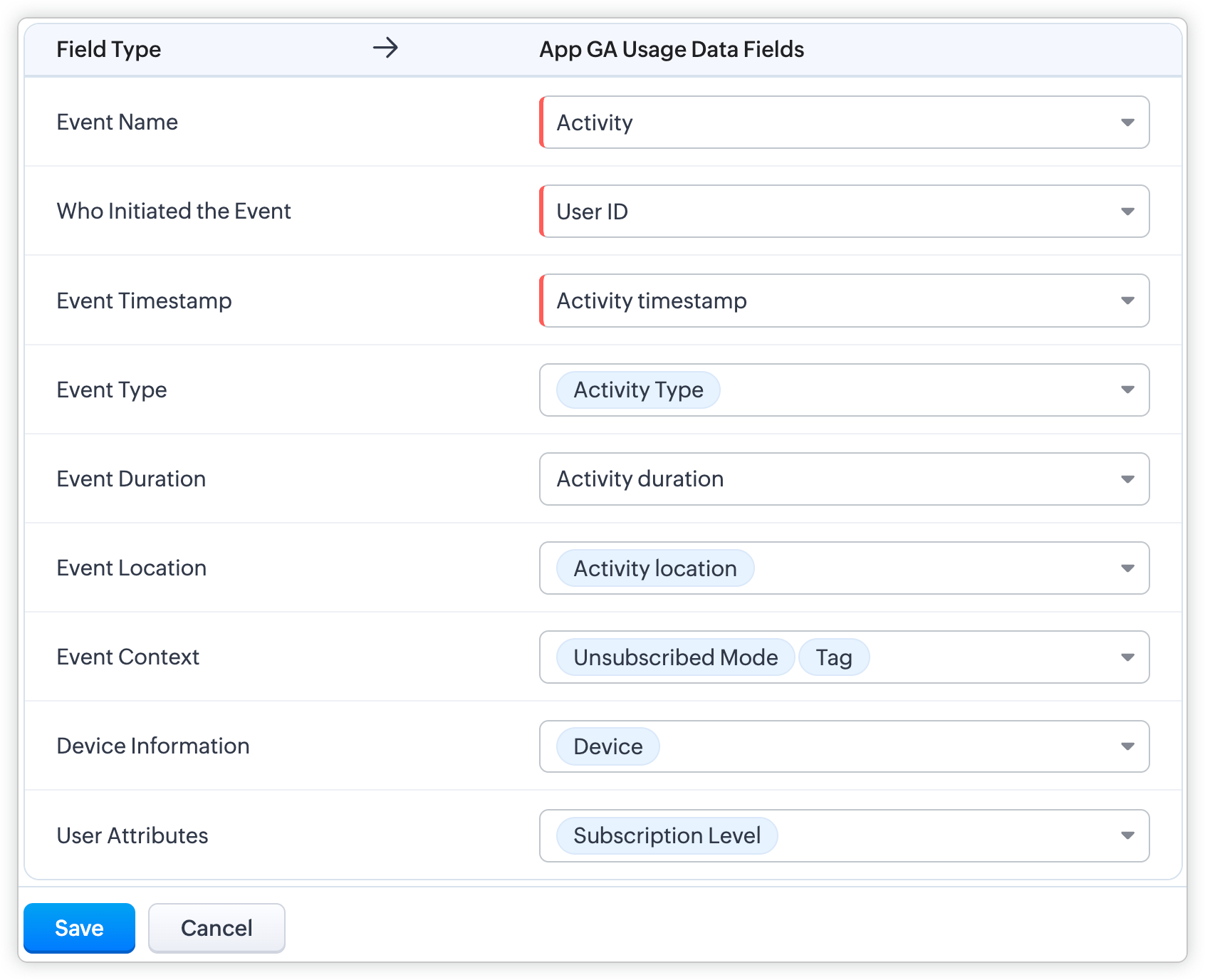
Availability
DC: All DCs
Editions: Enterprise and Ultimate editions
Release Plan: This feature will be released phase-wise to all DCs
For detailed description and guide, refer to our resources:
Topic Participants
Pauplin Fiona Peries G
Rich Brandwein
Sunderjan Siddharth
Sticky Posts
Presenting ABM for Zoho CRM: Expand and retain your customers with precision
Picture this scenario: You're a growing SaaS company ready to launch a powerful business suite, and are looking to gain traction and momentum. But as a business with a tight budget, you know acquiring new customers is slow, expensive, and often deliversGood news! Calendar in Zoho CRM gets a face lift
Dear Customers, We are delighted to unveil the revamped calendar UI in Zoho CRM. With a complete visual overhaul aligned with CRM for Everyone, the calendar now offers a more intuitive and flexible scheduling experience. What’s new? Distinguish activitiesCreate and populate a record in an instant: Introducing zero-shot field prompting to Zia's ICR
A couple of months ago, we upgraded our in-house AI image detection and validation tool, Zia Vision, with intelligent character recognition (ICR). By training Zia with sample images, you could create and enrich CRM records with data extracted from standardIn-person ZUG Meetups for Real Estate Professionals - US Q1 2026
The Real Estate Zoho User Group is going on a multi-city, in-person meetup tour across the US, and we’d love to see you there! These meetups are a great opportunity to: Connect with fellow real estate professionals using Zoho Share challenges and discoverNimble enhancements to WhatsApp for Business integration in Zoho CRM: Enjoy context and clarity in business messaging
Dear Customers, We hope you're well! WhatsApp for business is a renowned business messaging platform that takes your business closer to your customers; it gives your business the power of personalized outreach. Using the WhatsApp for Business integration
Recent Topics
Can I view a gallery of attachments related to an Account, Contact, or Subscription
It is often useful to review photos related to an account or contact by service type. It would be nice to be able to see the photos collected through workorders or appointments all associated.Language Field on Contact Person-level
Dear at Zoho Books, would it be possible for you to have a Field for 'Language' for the Contact Persons under a Company. In CRM and Bigin we could create a Custom Field (Dropdown) for this effect but without any present in Zoho Books we could never syncCustomise Zoho FSM Work Order Name
Hi there, is there a way for us to customise the work order number? For example - I want to add auto look up for company name or dates at the end of the work order number. WO4 - Company ABCIntroducing Dynamic Display in Zoho CRM mobile apps
Hello everyone, We're happy to announce that Dynamic Display is now available in the Zoho CRM mobile app for both iOS and Android devices. Mobile apps have become synonymous with convenience and flexibility. As more and more businesses rely on mobileHow we can integrate pdf attachments in zoho crm with xero
when i tried to integrate the data and attchment from zoho crm to to xero only the data get integrated with xero how we can integrate the pdf attachment as well nb zoho apis are not working via functionsDelete user profile
Hello, How can I delete a User Profile?Send emails directly via Cases module
Greetings all, The ability to send emails from the Cases module, which users have been eagerly anticipating, is now available, just like in the other modules. In Zoho CRM, Cases is a module specifically designed for managing support tickets. If your organizationIntroducing delegate signing in Zoho Sign
Hi everyone! We are happy to announce a new feature in Zoho Sign — Delegate Signing! Whether you're tied up in meetings, away on vacation, or managing multiple responsibilities, you can now assign a delegate to sign documents on your behalf. This ensuresDeleting Salutation Field
We have updated our lead input screen and 'Salutation' has appeared. This is not visible in the 'Edit Pgae Layout' screen so cannot be moved to 'List of Removed Fields' Salutation is visible in the list in 'Customization - Fields' however I can only 'Edit' or 'Replace' I cannot delete and I do not need this field on my lead input screen. Please can you advise how to get rid of this. Screen shots can be provided if needed. Thank you TashaZoho Voice VS in Zoho CRM for logging calls
I don't understand the differences between logging calls in Zoho Voice VS in Zoho CRM. Why the 2 separate platforms? Seems confusingUpdates to Auto-Upgrade in Zoho Campaigns
Hello everyone, We've rolled out a new update that slightly modifies how the auto-upgrade option in Zoho Campaigns works. Even if you hit the contact limit, this update ensures that your account is upgraded and that contacts are imported smoothly—withoutAdding Sub-Forms to Merge Documents
I am setting up a Mail Merge, which includes sub-form table data. I've done it before but now I am having issues: 1. The headings don't show. I had to enter these manually 2. The table lines are separated. I want them together. Anyone know how to fixZoho Bookings Online Training | July 31, 2025
Hi everyone! We’re back with the second session of our Zoho Bookings training series! This time, we’ll show you how to automate your scheduling, manage appointments more efficiently, and explore advanced features for your industry. Join our free, two-hourTranslation of Tooltip Messages
The descriptive help messages should be available to provide translations for.CREATE button is grayed
On Android adding new notes to notebooks with collections is impossible because the CREATE button is grayed. What can be done?Can Zoho Creator Apps have multiple actors and steps? Example
Mortgage Application App- Outside party fills out form via published website form, Inside party approves for additional documentation, outside party recieved requests for x, y, and z documents. Outside party submits x, y and z but z is wrong. InsideRe-Apply SLA When Ticket Reopened from Closed Status?
If you have an SLA applied, timers are deactivated when going to "On Hold" status type and reactivated when going back to an Open status type. What we discovered is when a customer replies to a closed case and it reopens, the SLA is not applied and timersZoho Expense Reimbursement
I am using Zoho Expense for employee expenses. At year end I accounted for reimbursement for the founders' expenses by doing a manual entry between employee reimbursements and shareholder loan. All is correct in the balance sheet, but in Zoho expense the expense report totals are showing as owing still. It doesn't impact the books, but I don't want to see amounts owing. How can I zero these out? The only way I can see it is by creating a transaction in Books that pays the employee via a bankRequest to Delete Mistakenly Created Zoho Desk Account – Access Blocked to Company Directory
Dear Zoho Support Team, I hope this message finds you well. I am writing to request assistance regarding a Zoho Desk account I mistakenly created using my company email address. I created the account before being officially onboarded by my company, andIntroducing an AI-driven CAPTCHA for Help Center that offers improved accessibility and enhanced security | Zoho Desk | Product Update
Captcha protects your help center from fraud and abuse without creating friction. What is a CAPTCHA? CAPTCHA is a test used in computing to verify that a user is human by requiring them to complete a challenge. It helps prevent bot attacks and reduceAnnouncing new features in Trident for Windows (v.1.29.4.0)
Hello Community! Trident for Windows just got better! It’s packed with new features designed to enhance communication, manage important information securely, and give you a smoother, more productive experience. Let’s dive into what’s new! Access ZohoExporting Ticket Threads/Comments and Attachments in Reports
Hi, I would like to know is it possible for Ticket Comments and/or Attachments to be displayed in Reports?Product management across integrated apps
Hi everyone, I’m setting up my business for selling products and integrating CRM, Inventory/Books, Ecommerce, and other apps. Where should I load products for the first time so they reflect across all apps? And for updating prices or adding new products—whereCalculate Number of Days Between Two Dates
Can someone help me with how to create a field using the formula function to calculate the number of dates between a campaign start date and end date? The closest I have gotten is using the "Datecomp" function but it gives you the dates in minutes, ratherZoho Writer Docx files not able to be converted into Google Docs
Since July 23rd, I've encountered an issue where DOCX files exported from Zoho Writer no longer convert properly into Google Docs when uploaded to Google Drive. My workflow relies on generating merged DOCX documents from Zoho Forms using Zoho Writer templates,Schedule Campaign - Recipients Time Zone
Something seems to be wrong with the scheduling feature for scheduling campaigns to be deployed at a specific time to the recipients time zone. I scheduled campaigns twice to be sent at the recipients time zone and the campaigns are deploying at the wrong time. When communicating with Zoho support they said to make sure it was scheduled at least 24 hours in advance so we did this with our last campaign and it was still deployed at the wrong time. Anyone else having this issue?Zoho Vault App for Windows
Hello, is there a Windows app that can be used to access the passwords saved in Zoho Vault? Thank youZoho Cursor Jumping
Hi, Zoho Support, We received the below email for a bug when using Zoho on Firefox. Please let us know if there is anything that can be done to solve this issue. Have any other Zoho Mail users reported issues the past few days with Zoho auto-saving draftstomorrow option within the due date section and drag and drop into calendar
Firstly, thank you for creating such a well-designed and user-friendly to-do list app. It’s almost perfect for my needs, but I wanted to offer a couple of suggestions that I believe could significantly enhance its usability, particularly for those wholow quality videos
when in puplish videos or reel in social media platforms it pulished in low qualityUsing Zoho Forms vs Zoho Survey
Hello - I'm looking for advice on whether to use Zoho Survey or Zoho Forms for our small non-profit. We have a Zoho One subscription, so have access to both. The main use case at the moment is application forms for our professional development programs.Kaizen #200 - Answering Your Questions | Authentication using Zoho CRM Python SDK
We’re incredibly excited to bring you the 200th post in our Kaizen series! This journey has been as much about listening as it has been about sharing. And today, we’re making both count. Over the past few weeks, we’ve collected your feedback through theZoho CRM sync
Just wondering if the plan is for the Zoho CRM implementation to always be just an import and not a sync? At the very least, a one-way sync that kept the data in Tables up-to-date would increase the amount of usecases, but ideally the option to two-wayAdd serial number in print page list
How can i add serial number in print page for every entries?Trying to Delete records from Creator not found in CRM
Hi, In the following script, I am trying to delete records from Creator not found in CRM, but I am getting the error message "Error at line number: 55 Improper Statement Error might be due to missing ';' at end of the line or incomplete expression". PleaseREST API for Branch and Budget
Hi Team, Can you please guide me with the appropriate rest API documentation for fetching Branch and Budget details?STOP FRAUDULENT TRANSACTION IMMEDIATELY
I DID NOT AUTHORIZE THIS TRANSACTION OR RENEWAL, STOP IMMEDIATELY CHARGING MY CARD I CAN NOT CONTACT SUPPORT, NO ONE IS AVAILABLE ON CHAT PAYMENT ID RPCW2003260759193Best way to handle a credit card download fiasco
Hi there, hoping that someone knowledgable with book keeping can give me the answer here. One of my credit cards has been integrated with Zoho books and we have been downloading transactions with no issue. The credit card got compromised and was usedWhen Opening Zoho Mail I always get a Tab with an error (See attached image)
Everytime I open Zoho mail I get this. It is trying to open a deleted email. I already tried going to Settings > While Starting up Changed that option back and forth but this persists. Its annoying. Other than that I love this. Any help would be appreciated.Pre-Registration - Suggestion
Suggest to add a Pre-Registration feature for non-scheduled events. Scenario is that we have a training academy and would like to collect pre-registrants prior to an actual scheduled event so we can use this as a basis for demand management and scheduling of new events for those expressing interest.Next Page