Advance Your Churn Predictions with Zia's Usage Data Feature: Event Mapping
Greetings all,
This is an important and exciting update about feeding usage data into Zoho CRM. To expand the scope of how usage data can be used by Zia, we are introducing a new section called Usage Data under Zia. Users can now easily import, edit, and update usage data within their CRM.
This feature helps you understand if your customers are losing interest or satisfaction with your service, experiencing technical difficulties, or switching to a different platform with the usage data you feed. Identifying these behavioral changes early on can provide valuable insights for businesses to step in and re-engage customers.

Through this enhancement,
- Improve the CRM's capability to leverage usage data for Zia-generated insights such as churn prediction, recommendations, and engagement signals.
- Enable users to link key attributes from usage data to terms that the system can understand for accurate Zia processing.
- Facilitate the seamless import of usage data from different sources into Zoho CRM.
What's new?
When AI models sometimes struggle to interpret the usage data, customers often find it challenging to use their usage data in CRM systems effectively. Event mapping is a proper mapping mechanism to utilize usage data fully, not missing any opportunity on customer engagement, retention, and personalized service delivery.
With the new Usage Data under Zia, you can map each static set of events to the fields of the custom module. This enhancement helps Zia provide a deep analysis that can help predict more insights. Likewise, your churn prediction goes on, and the data is automatically updated with incoming data whenever your customers engage.
Zia can expand the range of applications for the usage data beyond Churn prediction after being trained with the data. The scope of Zia expands with the full utilization of usage data, helping with the following use cases in other features.
- Recommendations help you decide what products you can cross-sell or upsell to which customers.
- Analyze your customers' signals and engagement rates to gain deeper insights.
- Bring in more accuracy to churn predictions, like when a specific customer is likely to churn.
Additionally, Zoho CRM can now access usage data sourced via API, URL, or any supported file format from any tool to be stored in a custom module. This lowers your dependency on restricted tools.
Let's get started with the details of the enhancement.
What is usage data?
All businesses need transactional data as a base to study user purchase behavior on metrics like customer details, date and time, payment methods, discounts, and inventory movements.
Unlike transactional data, which only includes information about customer purchases and subscription details, usage data tracks how these customers interact with or use them, through an app or a website, concentrating on metrics like frequency, duration, and patterns of usage, helping businesses understand user behavior and preferences.
Tools like Google Analytics track customer actions, such as logins, interests, purchases, and location, to provide us with this data. It is used for behavior analysis, engagement metrics, churn prediction, and more.

What is event mapping?
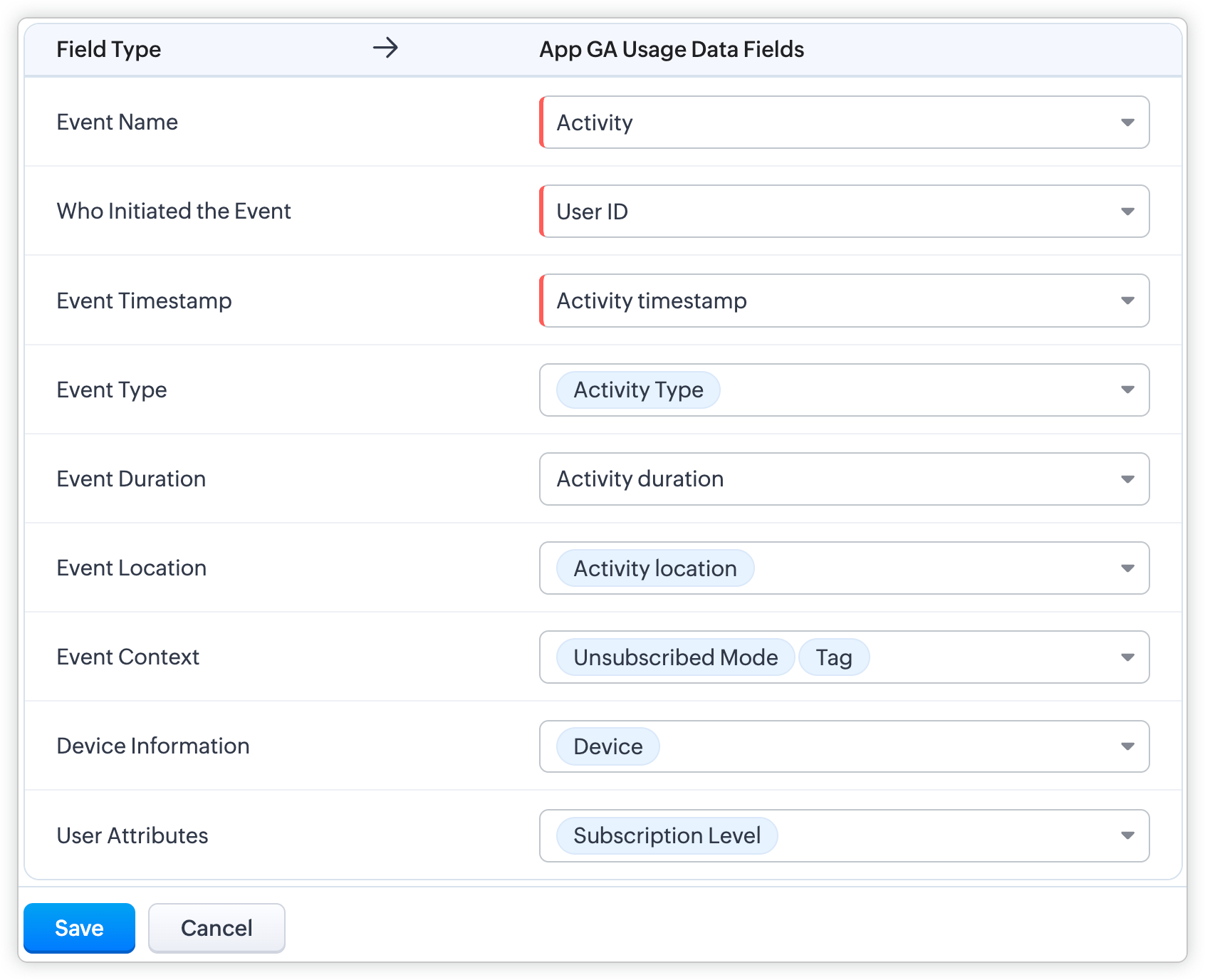
Event mapping is a learning technique for the system so the user can activate Predictions, such as churn prediction. Through event mapping, the system will learn and understand how to interpret usage data. Mapping involves certain data attributes like event name, event timestamp, event initiator, and others.
Why event mapping?
Since event mapping requires the mapping of information, you are directly feeding in more details about the user interactions, easing the accuracy of churn prediction. In simple words, more details give you more accurate prediction.
For instance, a sudden reduction in the amount of logins serves as a significant indication of decreasing engagement, potentially indicating churn. Through event mapping, Zia can anticipate the reasons why a certain demographic of users cease logging in at specific times and whether device-related factors impact their logins.
Moreover, event mapping unlocks various functionalities like calculating churn scores, generating personalized recommendations, and monitoring customer engagement. For example, through Workflow Rules, users can send promotional emails to encourage customers who have not logged in for over 30 days to stay engaged.
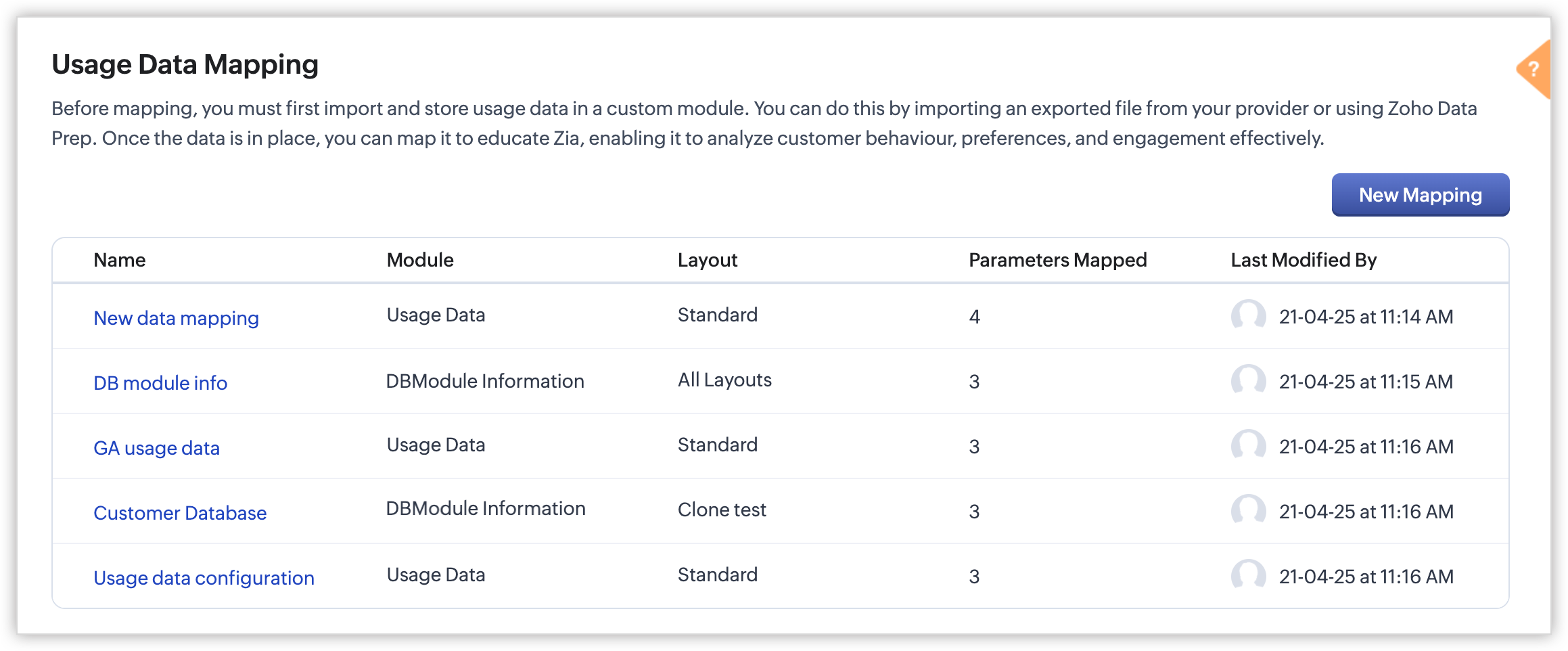
Steps to configure:
With the enhancement, import usage data into a CRM custom module, create a mapping of the data called event mapping, and utilize that data for churn prediction and more Zia insights. Through event mapping, AI increases the accuracy of Zia-driven predictions and also widens its scope for personal recommendations and other predictions.
Let's look at this activation in the below steps:
- Create a custom module and three (mandatory) fields to store the following data: event name, event timestamp, and event initiator.
- Import the usage data from other sources (via API, DataPrep, CSV, or any supported file format) to the created custom module and map the fields.
- In Usage Data under Zia, perform the event mapping to create a way that the system understands.
Availability
DC: All DCs
Editions: Enterprise and Ultimate editions
Release Plan: This feature will be released phase-wise to all DCs
For detailed description and guide, refer to our resources:
Topic Participants
Pauplin Fiona Peries G
Rich Brandwein
Sunderjan Siddharth
Sticky Posts
Presenting ABM for Zoho CRM: Expand and retain your customers with precision
Picture this scenario: You're a growing SaaS company ready to launch a powerful business suite, and are looking to gain traction and momentum. But as a business with a tight budget, you know acquiring new customers is slow, expensive, and often deliversGood news! Calendar in Zoho CRM gets a face lift
Dear Customers, We are delighted to unveil the revamped calendar UI in Zoho CRM. With a complete visual overhaul aligned with CRM for Everyone, the calendar now offers a more intuitive and flexible scheduling experience. What’s new? Distinguish activitiesCreate and populate a record in an instant: Introducing zero-shot field prompting to Zia's ICR
A couple of months ago, we upgraded our in-house AI image detection and validation tool, Zia Vision, with intelligent character recognition (ICR). By training Zia with sample images, you could create and enrich CRM records with data extracted from standardIn-person ZUG Meetups for Real Estate Professionals - US Q1 2026
The Real Estate Zoho User Group is going on a multi-city, in-person meetup tour across the US, and we’d love to see you there! These meetups are a great opportunity to: Connect with fellow real estate professionals using Zoho Share challenges and discoverNimble enhancements to WhatsApp for Business integration in Zoho CRM: Enjoy context and clarity in business messaging
Dear Customers, We hope you're well! WhatsApp for business is a renowned business messaging platform that takes your business closer to your customers; it gives your business the power of personalized outreach. Using the WhatsApp for Business integration
Recent Topics
transforming 1D tables to 2D and the other way round
Does Dataprep have tools to convert 1D tables to 2D tables and the other way round? The actions that are commonly called "pivot" and "melt". What I mean is transitioning between these two kinds of table: 2D id ____ name ____ surname ____ age 00 ____ MattHow I Migrate data from one SharePoint Tenant to another
I want to perform SharePoint tenant to tenant migration, but the problem is I don't know how to do so. I’ve heard about different SharePoint Migrator, but I’m not sure which one is the best for this type of migration. Any guidance would be really heRebrand your CRM with the all-new custom domain mapping setup
UPDATES TO THIS FEATURE! 19th Jan, 2024 — Custom domain mapping has been made available for portal users in Zoho One and CRM Plus. 23rd June, 2023 — Custom domain mapping has been made available for all users, in all DCs. Hello everyone! We are elatedauthentication
We cannot connect via IMAP. We are receiving the following error: Error: You are yet to enable IMAP for your account. Please contact your administrator (Failure)Bad User: Authenticated but not connected
Zoho CRM cannot send/receive emails and it appears as if it may be an api configuration change either via Zoho or MS. Does anyone have information on how to fix this error message? I am admin on all my accounts. Zoho and MS are blaming each other.Edit email address that appears on invoice
Hi How do I change the email address that appears on invoices, it is showing the email address that i used to sign up to zoho with but I want to change it to another email address that we use for accounts. also is there a way to edit the position of aZoho Tasks - Add Sorting by Priority
We are able to Group by and Filter by Priority but for some reason we can't Sort by Priority on the Task lists. Please allow for sorting by priority if the current view is not grouped by priority.Zoho People > Candidate Form > error Editable Primary Lookup is needed to set add permission
Hello All I have try to turn on the add feature in the candidate form It show the error Editable Primary Lookup is needed to set add permission What is missing from my side?6 time-saving tips for working with tables in Zoho Writer
Tables have always been the best way to represent data. They help you structure and categorize information systematically and present them in a simpler way. While tables in Zoho Writer are easy to implement, some tasks might not be that obvious. Here are some time-saving tips to help you work better with tables in Zoho Writer: 1. Insert Multiple Rows / Columns in a Table Adding more rows and columns is the most common action performed while working with tables. Instead of using the Table tab,Add Built-in "Partner Finder" / "Contractor Directory" Tab to Zoho Desk Help
Hi Zoho Team, We hope you're doing well. We would like to request a new feature for the Zoho Desk Help Center: A built-in, configurable "Partner Finder" / "Contractor Directory" tab or section, similar in concept to your own Zoho Partner Finder at: 🔗Can't get sender adress to work
Hi, I am having some trouble getting the sender adress to work for responses on tickets. I would like to configure a sender adress that is different from the zohodesk emailadress that is normally used. These are the steps I have followed: 1. Add a newQuestion Regarding Deleted Reports in Zoho Desk Analytics
Dear Zoho Desk Support Team, I hope this message finds you well. We have a question regarding the Analytics module in Zoho Desk, specifically related to deleted reports/dashboards. We would like to understand the following: Is there a recycle bin, recoveryAdd an option to start zobot when user clicks the Chat with Us button
I would like to have an option to start the zobot when user clicks on "Chat with us" button when chat widget is maximized that way visitors could see first the homepage and decide which channel they would like to use to connect, or to see the quicke helpZoho Books - Feature Request - Provide "Show PDF View" toggle on Invoice records
I have noticed it is possible to activate or deactivate the PDF preview on some records but not all. This would be very helpful on Invoices when a custom template is being used and the PDF preview does not represent the output file. Not available on:Incorrect Handling of XLSX data
Trying to import an XLSX schedule of bills into Zoho Books I ran across the problem of date formatting. To replicate: Build a CSV file with bill dates in whatever format you like and import it - this should work if you match the "dd/MM/yyy" etc. formatDisable Smart Filters By Default
The smart filters "feature" is causing confusion for Zoho Mail users. New emails should be delivered to the inbox unless they have specifically opted to redirect them somewhere else. People don't understand that new emails might be waiting in a randomAdding Columns to Reports
Hi, Is it possible to choose fields to be added as columns in the reports? Thank you.How do I automatically assign the project owner for all tasks in Zoho Projects?
I have been researching for days on how to automatically assign all the tasks to the project owner on creation of the project in Zoho Projects. I have been having to go in and manually change all the task owner from 'unassigned' to the owner of the projectCRM Kiosk - Action for GetRecords
I have a Kiosk screen with GetRecords and want to use the selected records in a custom function. My particular case is to set a lookup value on the selected records. Generally speaking though, I want to work with the selected records in a function. IEmail for customer to provide payment information
Is there a way for customers when you set up a subscription to get an email that prompts them to put in their billing information to start their subscription? Also, can you show the subscription in their portal?Unable to display field label from a hidden Single Line Textbox in Description
Hi folks, I'm unable to display my hidden field, e.g. ${zf:SingleLine4} , in my description. I'm pre-filling this hidden Single Line Text box via "Field Alias - Pre-fill URL" settings. I noticed that my decimal form fields work, e.g. ${zf:Decimal}, andLookup fields
Is there any way to add Lookup fields to Zoho FSM -- I do not see the option but I see default lookup fields in different modulesZoho Analytics - Bill Table
Hi I am new to Zoho and mainly work in Books. Recently learned of Zoho Analytics and am exploring it to create reports that would be useful for me. For example, I want to create a bills cash forecast by week for cash flow planning. When I start to createCreating a tax - amount table in Analytics
Hi everyone, I would like to create a report in Zoho Anayltics that creates the tax and amounts in a table. I have been able to create a report that shows me all the tax accounts, but I can't get it combined with the amounts of the accounts. Is thereIs it possible to do custom domains on test accounts that use saml setups?
In Zoho Billing, Is it possible to do custom domains on test accounts that use saml setups for the customer portal?I’m facing an issue while trying to upload a PDF file to a custom file upload field within the Leads module via the Zoho CRM API.
Hi Zoho Team, I’m facing an issue while trying to upload a PDF file to a custom file upload field within the Leads module via the Zoho CRM API. I am able to manually upload a PDF into this field through the UI. I am also able to upload files as attachmentsNo chat option
Chat option is not available in Android app.How to add custom templates in zoho sheets mobile
How can I add custom templates in Zoho spreadsheet mobile?Order Items
Hi .. We have to implement orders with line but each line should have a separate record and not as a subform, does anyone have experience with that kind of solution what is the best practice for that kind of thing ThanksTrello: Invalid Client - Client ID passed does not exist
Hello, I am trying to authorize the Zoho CRM power-up in Trello but always land on the following page: I tried adding a trello client to the Zoho API console but this generated a different client ID to the one in the link of the page in the above picture.Zoho Sprints - Q2 updates for 2025
Hello everyone! We’re excited to share the latest updates from Zoho Sprints for Q2 2025! This quarter, we rolled out a few highly-requested features designed to enhance collaboration and time management across your projects. Here's a look back at theCRM Email Insights Not Working - Status not Changing
I used to be able to see if a customer opened/read an email in CRM, but I no longer get those status changes inside their record. I have everything enabled and I am sending the email from CRM. The experience center has the status' enabled as well. AnyThe use of Ticket statuses
When your support team mark a ticket "Closed" before I had a time to check what your team has done on the ticket - I have to consider this as you consider the ticket closed even if I dont consider it closed. Which automatically produce a negative sentiment."Replace" an existing version of CRM
Hi all, I have a question, I saw an article about this once, but I now cannot find it. I am working with a client who has had their CRM in Zoho One built and extensively modified. But it is non-functional now, and rather than try and unpick the system,Data Import From a private PostgreSQL RDS Instance
Hello All, I feel like the problem I am experiencing has been seen before; however, I am having a difficult time finding any solutions. Hoping the community has some insights. I am trying to import data from a PostgreSQL RDS instance that is behind anAssistance Required: Authentication Error When Sending Credit Application Form
Hi, I'm encountering an error message that states: "Authentication unsuccessful – the user credentials were incorrect." This occurs when I attempt to send the credit application form to our customers. I've attached the form I’m trying to send for yourMissing Fields in Lead Conversion Mapping
I’ve been using Zoho CRM since 2013 to manage leads and convert them into contacts and jobs. When I convert a lead to a customer, I create a new contact and a job. Previously, this process automatically transferred key information from the lead to theAllow selection of select inactive users in User data fields
Hello, We sometimes need to select a previous employee that has an inactive account in the User data field. For example, when doing database cleanup and indicating actions are done by a certain employee that weren't filled out when they were part of theConnection to Zoho One
My org has a Zoho One account, which includes Zoho Social. We are wanting to try linkthread. However, I want to make sure it is set up properly from an account perspective, as I have accidentally created Zoho accounts separate from Zoho One when I didn'tTicket Automatically Created from Closed Chat
Is there a way to prevent a ticket being create for every chat.... or at the very least have it automatically closed.Next Page