Advance Your Churn Predictions with Zia's Usage Data Feature: Event Mapping
Greetings all,
This is an important and exciting update about feeding usage data into Zoho CRM. To expand the scope of how usage data can be used by Zia, we are introducing a new section called Usage Data under Zia. Users can now easily import, edit, and update usage data within their CRM.
This feature helps you understand if your customers are losing interest or satisfaction with your service, experiencing technical difficulties, or switching to a different platform with the usage data you feed. Identifying these behavioral changes early on can provide valuable insights for businesses to step in and re-engage customers.

Through this enhancement,
- Improve the CRM's capability to leverage usage data for Zia-generated insights such as churn prediction, recommendations, and engagement signals.
- Enable users to link key attributes from usage data to terms that the system can understand for accurate Zia processing.
- Facilitate the seamless import of usage data from different sources into Zoho CRM.
What's new?
When AI models sometimes struggle to interpret the usage data, customers often find it challenging to use their usage data in CRM systems effectively. Event mapping is a proper mapping mechanism to utilize usage data fully, not missing any opportunity on customer engagement, retention, and personalized service delivery.
With the new Usage Data under Zia, you can map each static set of events to the fields of the custom module. This enhancement helps Zia provide a deep analysis that can help predict more insights. Likewise, your churn prediction goes on, and the data is automatically updated with incoming data whenever your customers engage.
Zia can expand the range of applications for the usage data beyond Churn prediction after being trained with the data. The scope of Zia expands with the full utilization of usage data, helping with the following use cases in other features.
- Recommendations help you decide what products you can cross-sell or upsell to which customers.
- Analyze your customers' signals and engagement rates to gain deeper insights.
- Bring in more accuracy to churn predictions, like when a specific customer is likely to churn.
Additionally, Zoho CRM can now access usage data sourced via API, URL, or any supported file format from any tool to be stored in a custom module. This lowers your dependency on restricted tools.
Let's get started with the details of the enhancement.
What is usage data?
All businesses need transactional data as a base to study user purchase behavior on metrics like customer details, date and time, payment methods, discounts, and inventory movements.
Unlike transactional data, which only includes information about customer purchases and subscription details, usage data tracks how these customers interact with or use them, through an app or a website, concentrating on metrics like frequency, duration, and patterns of usage, helping businesses understand user behavior and preferences.
Tools like Google Analytics track customer actions, such as logins, interests, purchases, and location, to provide us with this data. It is used for behavior analysis, engagement metrics, churn prediction, and more.

What is event mapping?
Event mapping is a learning technique for the system so the user can activate Predictions, such as churn prediction. Through event mapping, the system will learn and understand how to interpret usage data. Mapping involves certain data attributes like event name, event timestamp, event initiator, and others.
Why event mapping?
Since event mapping requires the mapping of information, you are directly feeding in more details about the user interactions, easing the accuracy of churn prediction. In simple words, more details give you more accurate prediction.
For instance, a sudden reduction in the amount of logins serves as a significant indication of decreasing engagement, potentially indicating churn. Through event mapping, Zia can anticipate the reasons why a certain demographic of users cease logging in at specific times and whether device-related factors impact their logins.
Moreover, event mapping unlocks various functionalities like calculating churn scores, generating personalized recommendations, and monitoring customer engagement. For example, through Workflow Rules, users can send promotional emails to encourage customers who have not logged in for over 30 days to stay engaged.
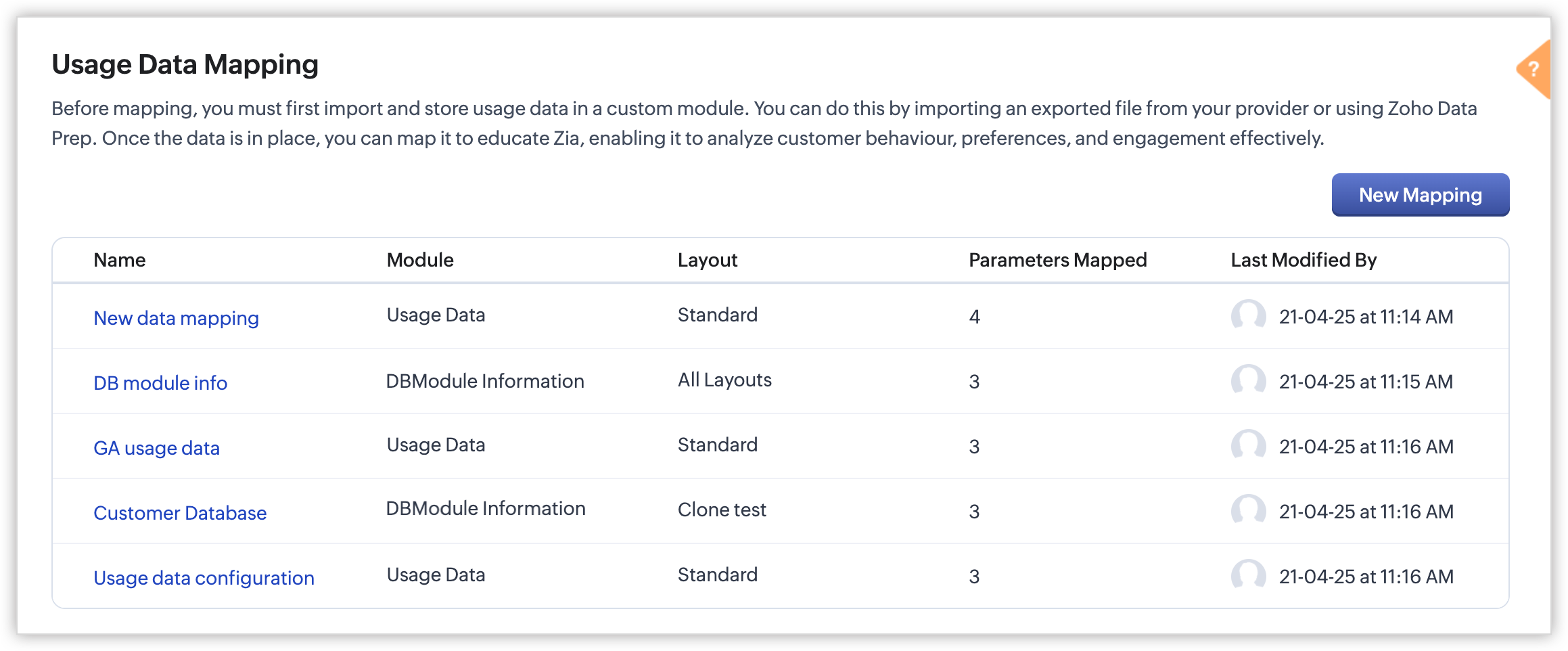
Steps to configure:
With the enhancement, import usage data into a CRM custom module, create a mapping of the data called event mapping, and utilize that data for churn prediction and more Zia insights. Through event mapping, AI increases the accuracy of Zia-driven predictions and also widens its scope for personal recommendations and other predictions.
Let's look at this activation in the below steps:
- Create a custom module and three (mandatory) fields to store the following data: event name, event timestamp, and event initiator.
- Import the usage data from other sources (via API, DataPrep, CSV, or any supported file format) to the created custom module and map the fields.
- In Usage Data under Zia, perform the event mapping to create a way that the system understands.
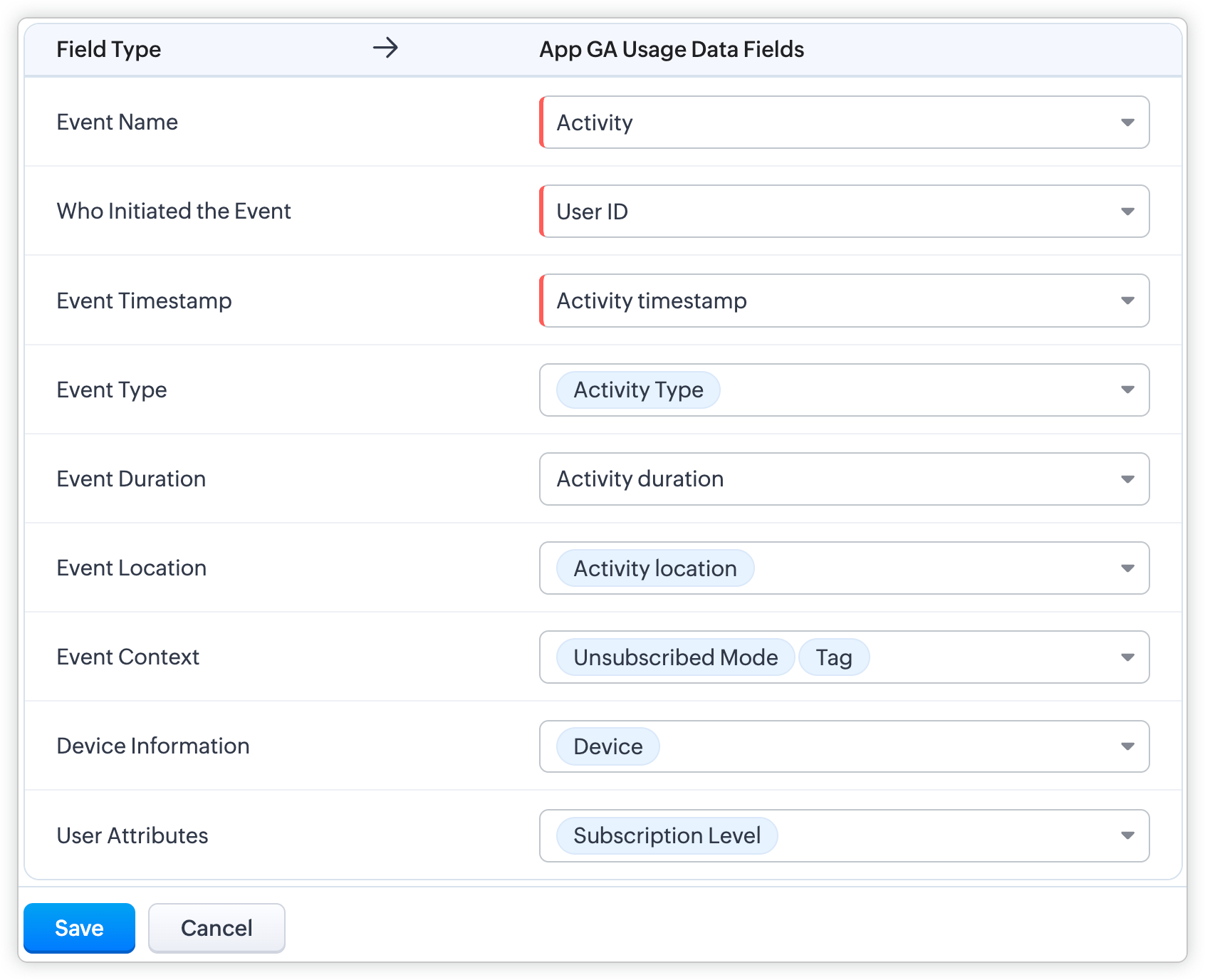
Availability
DC: All DCs
Editions: Enterprise and Ultimate editions
Release Plan: This feature will be released phase-wise to all DCs
For detailed description and guide, refer to our resources:
Topic Participants
Pauplin Fiona Peries G
Rich Brandwein
Sunderjan Siddharth
Sticky Posts
Presenting ABM for Zoho CRM: Expand and retain your customers with precision
Picture this scenario: You're a growing SaaS company ready to launch a powerful business suite, and are looking to gain traction and momentum. But as a business with a tight budget, you know acquiring new customers is slow, expensive, and often deliversGood news! Calendar in Zoho CRM gets a face lift
Dear Customers, We are delighted to unveil the revamped calendar UI in Zoho CRM. With a complete visual overhaul aligned with CRM for Everyone, the calendar now offers a more intuitive and flexible scheduling experience. What’s new? Distinguish activitiesCreate and populate a record in an instant: Introducing zero-shot field prompting to Zia's ICR
A couple of months ago, we upgraded our in-house AI image detection and validation tool, Zia Vision, with intelligent character recognition (ICR). By training Zia with sample images, you could create and enrich CRM records with data extracted from standardIn-person ZUG Meetups for Real Estate Professionals - US Q1 2026
The Real Estate Zoho User Group is going on a multi-city, in-person meetup tour across the US, and we’d love to see you there! These meetups are a great opportunity to: Connect with fellow real estate professionals using Zoho Share challenges and discoverNimble enhancements to WhatsApp for Business integration in Zoho CRM: Enjoy context and clarity in business messaging
Dear Customers, We hope you're well! WhatsApp for business is a renowned business messaging platform that takes your business closer to your customers; it gives your business the power of personalized outreach. Using the WhatsApp for Business integration
Recent Topics
Connection to Zoho One
My org has a Zoho One account, which includes Zoho Social. We are wanting to try linkthread. However, I want to make sure it is set up properly from an account perspective, as I have accidentally created Zoho accounts separate from Zoho One when I didn'tTicket Automatically Created from Closed Chat
Is there a way to prevent a ticket being create for every chat.... or at the very least have it automatically closed.IMPORT INVOICES CSV
Hi, Impossible to import invoices in Zoho books with a csv file. I have also tried with the template. My topic keeps getting closed but I did not get any answer Is there an issue with this fonctionnality ?Related Lists in Email Templates
Hi Zoho team, I would love to see a feature where related list information can easily be added to an email template (instead of mail merge). I have a client who books flights for their customers. They do this through a Flights module so all booked flightsOutlook plugin funktioniert nicht.
DAs Outlook Plugin funktioniert nicht mehr. Ich werde aufgefordert, mich mit der App "OneAuth" anzumelden Intelligente Anmeldung per OneAuth funktioniert nicht zufreidenstellend. Nach erfolgreicher Anmeldungung mittels QR Code lande ich wieder beim QRiOS App Version 3.0 - Customer list gone?
Not sure when this changed, but I seem to have been updated to 3.0 for the phone app (on iOS). I'm pretty sure that I used to have a Customers button that allowed me, for example, to see what appointments a customer has. Has this disappeared or am I justZoho Signature, "For Demo Purpose Only Powered by Zoho Sign"
How to disable this text on the documents for signature. "For Demo Purpose Only Powered by Zoho Sign"Add Resource variable to notification email customisation for Event Type
The notification email customisation feature for Event Type does not include a variable for the Resource field. Without this field, Zoho Bookings cannot be used by any business for resource-based services or event types e.g. room bookings, equipment bookings.Can't find add role button, is iet st because I have the free subscription
Trying to add my accountant in Zoho Books if I press the add accountant button, I get stuck as it says no such role exists, and won't let me continue, I can't find the add roles button, so I am stuck. Is it because I have the free subscription? Also can'tCalendar view all appointments in workspace
In the Calendar page, add the ability to view all appointments in the Workspace. The Manage Calendars filter requires me to select at least one user or resource, and it only lets me select up to five of them. There's no filter option to view the entireTip #13: Identify where your bookings come from with Source Tracking
Source tracking is the practice of identifying where your bookings originated. This is important, because online bookings come from a wide variety of sources like social media platforms, your website, email and ad campaigns, partner websites, organicUnable to Add Notes
I've had a user report that they are unable to add notes to account records. I attempted and found the same issue. There is no option to save the note.Workflow Rule Alert Not Working
I have a workflow rule set (that I've been using for years) that suddenly stopped working. Module - Leads Execute on - Create Alerts - Email Active - Yes When I create my lead I no longer receive my email notification.Can zoho sign collect data feeding Zoho Sign?
I m sending contracts to client who are not in my zoho CRM database yet. Can the data they enter in Zoho sign contract I send them, (that includes...) official company name address first name second name etc, ...Create or update a contact / accountIMAP ACCOUNT ACCESS PROBLEM
Hi! I moved from Gmail some time ago to ZOHO. It works fine and it worked till yesterday. I found out that on my MAC OSX mail client I can not receive emails from ZOHO using IMAP. Gmail is set to IMAP and works OK. My company email account uses POP and works good as well. Is there anybody else who has such problem or this might be something with my email client...? I didi check for the settings but everything is as it was from the beginning. Honestly, I didn't change anything recently. It just stopped.Modified approved time log
I can’t seem to find a way to make change to approve time log entry. The case is the following. We pay the employees every 2 weeks, so employe A enter is time for the 2 weeks and then submit his timesheet. Now is superior approve the time he worked viaI want to Show the product list based on the drop Down
in quotation app , amc form form i have Department drop down field and in subform i have loop up field item description taken from the anothe app PRO I want to show the product list look up based on the deparment selected example if they selected deparmentInventory Barcode Creation - Add Picture of Item
Hi I am trying to set up bar code labels and include a picture of the item on the label - any idea on how to add that field to the barcode generator?Shared Snippets Everyone
Hi, Now that the Shared Snippets have been released and I think will be the most used feature implemented in 2023 :) Creating and Using Snippets in Ticket Responses - Online Help | Zoho Desk Maintain consistency in ticket responses with shared snippetsTopics assigned to Contacts in Campaigns
I have yet to find an efficient way to assign topics to contacts in campaigns with the new system in place. We have daily contacts added to our system through various forms and we have to manually go in and add topics to contacts before each email campaignZoho CRM email formatting issues
I have been having a hard time with formatting email templates. It feels like Zoho email is "fighting my edits." It refuses to change size, font, etc. Sometimes, the template looks great, then when the email gets sent, it looks completely different- someWeekly Tips : Seamlessly collaborate with Share Drafts in Zoho Mail
Ever found yourself stuck wondering how to get input on an important email draft without actually sending it? Maybe you want a teammate’s feedback or approval from your manager—without exposing sensitive info. Or perhaps you are working across differentHow to Share a workdrive folder outside organization ?
Hi, Earlier we were using Google Suite and were able to share the google drive folders with external organization ( Auditors , marketing collaterals ) as most of them had a personal gmail account they were able to access it without any issue. How canZoho CRM Account Duplication via Credit Application Form
Hi, We send a credit application link to our customers via email, which is managed through Zoho Campaigns. When a customer submits the form, it automatically creates a new account in Zoho CRM. We would like to know how to stop this from creating duplicateFlexible Milestone Invoicing
If your Zoho Projects portal is integrated with Zoho Invoice/Books, you can now create an invoice for your milestones. You can enable it under Integration Preference and invoice milestones regardless of the project's billing type. For instance, considerThe get records i am getting produts that show in the show in the sub form item list field
The get records i am getting produts that show in the show in the sub form item list field if(input.Department != null) { // Get filtered records once creator_ptid = zoho.creator.getRecords("harshadgroup","item-master","All_Products","Department == \""Add Zoho Form Submission as Attachment to Zoho CRM Deal using Zoho Deal ID
Hi Zoho team, I have a Zoho Form in which one of the fields will be hidden but will be defaulted with the Zoho Deal ID. Once the form is submitted, I want to reattach the submitted form (and another uploaded file field) into Zoho CRM Deals record. The crazy part is that Deal Name and Stage are the only two fields available for mapping. I have the actual Deal ID. Why can't I just use that. Can you please fix it so that I can properly attach the submission using Zoho Deal ID instead of name/stage (whichPayment link showing as malicious
We've had a few customers who have been unable to pay invoices as the payment link (the domain is zohosecurepay.eu) is showing as a malicious website in their browser. Could anyone help with this please?Side bar menu
It would be great if you could stop the auto collapse of expanded menus when selecting a different module. It would save a lot of mouse clicks for a lot of users that frequently switch between sales & purchases as we do, it's easier to collapse them manually when not required !Add Microsoft Entra ID to Zoho One
Hi! Have anyone tried the Zoho connection to Microsoft Entra ID (https://help.zoho.com/portal/en/kb/one/admin-guide/directory-stores/articles/add-microsoft-azure-to-zoho-one?action=kbArticleFollow&actionId=4014605732522 ) This is a big operation and youMultiple Respondents for One Survey Submission?
Does anyone know of a way to allow multiple respondents to complete only one survey and then also see (while completing the survey) the responses for their fellow colleagues who already answered that question? The situation is that our new customers have within their own organization, multiple employees that will need to assist in the one survey response. Since we don't always know which new respondent is the "who" that will have the answer, we need multiple respondents to be able to view the responseCan you remove the title from the forms?
I am placing the iframes for my forms on my website. Is it possible to remove or hide the title of the form so that it doesn't show up on the website? Is it possible to place text in the form like "clicking submit will take you to paypal." thanksMask Name Field in Report
Is it possible to have the Name field as "Last Name, First Name" in a scheduled report.Custom Project View by Project Group
Hi Zoho Team, I used to have a custom project view which showed all my active projects (not cancelled or completed) and the list was separated into projects groups. Some time ago, possibly a couple of months ago, I began to see all projects even cancelledUnable to attach the file via the API.
We are trying to attach files to a Candidate in Zoho Recruit using the API. We reviewed the following API documentation: 🔗 Upload Attachment While this API does allow file attachment via a URL, that’s not what we want — we do not want to attach public-facingZoho Books (UK) needs to be able to submit a CT600 CTSA return
As well as a VAT Return, most (if not all) small businesses have to submit a CT600 Corporation Tax Self-Assessment. There are many providers who do this (like Xero) bujt not Zoho. Can you add this to the request list please? Many thanks SteveStock Update After Approver 1 Approval in Multi-Level Approval Flow
Hi Team, We have configured a multi-level approval process for POs/Bills. Our requirement is to update the item stock quantity based on the billed quantity immediately after Approver 1 approves the bill. Please find the script attached below. However,Zoho Form Auto Fill
I am setting up a Zoho form for my independent sales reps to request quotes. Their names are in the first field under a dropdown menu. The next field is their email address. I want the email address field to automatically be filled in when they selectImage Resolution Restriction Option in Zoho Forms File Upload
Hi Zoho Forms Team, Greetings, We would like to request a feature enhancement for Zoho Forms regarding the file upload field. Currently, Zoho Forms allows us to restrict the file size of uploaded images, but not the image resolution (in megapixels). ThisCan't select Leave type while applying a leave
Hello, while trying to apply a leave, I can't find any leave type among the options in the Leave type select: Here are my leave settings. Daily: Hourly: Tried to clear cache and to navigate from another browser, but the problem persists. Any hint? ThankNext Page