Kaizen #194 : Trigger Client Script via Custom buttons

Hello everyone!
Welcome back to another interesting and useful Kaizen post.
We know that Client Scripts can be triggered with Canvas buttons and we discussed this with a use case in Kaizen#180. Today, let us discuss how to trigger Client Script when a Custom Button is clicked. Using this, you can execute Client Script when a custom button is clicked.
In this post,
1. Event Details2. Supported Pages3. Use Case - Export Subform Rows to Zoho Sheet in a Single Click!4. Solution5. Summary6. Related Links
Client Script support for Custom Buttons opens up possibilities for automation, personalization, and enhanced user interactions in Zoho CRM when a custom button is clicked.
Here is a detailed walkthrough to help you understand it better.
1. Event Details
The Button event triggers the Client Script when a custom button is clicked. Each time this event is invoked, the context argument is passed to the Client Script. The context contains information about the page from which the button was clicked.
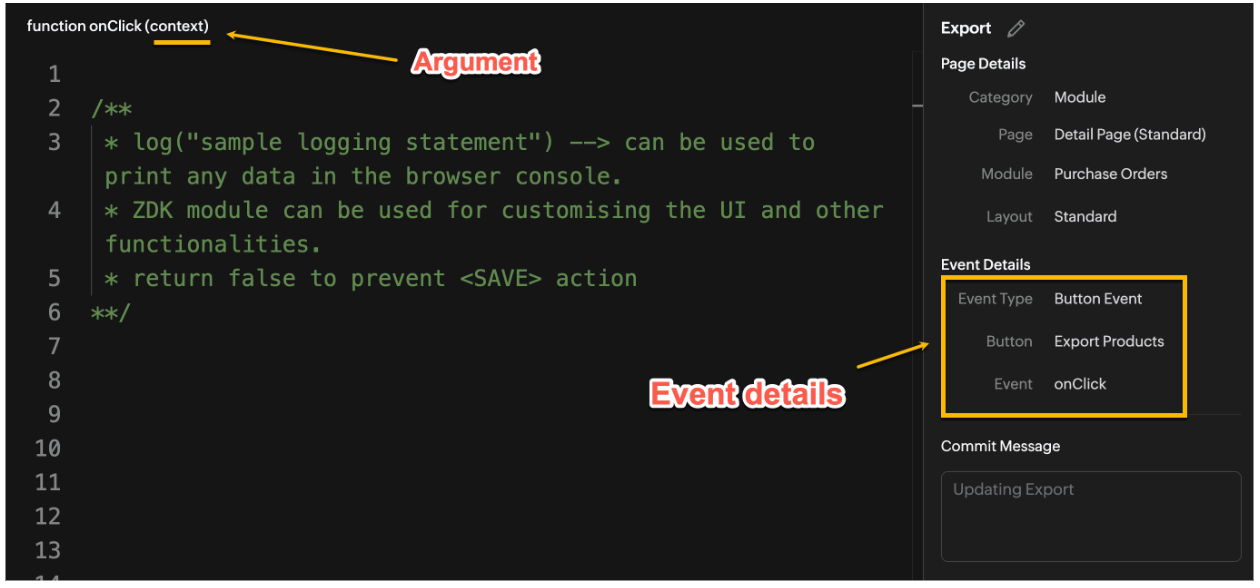
Click here to know more about Client Script Events.
2. Supported Pages
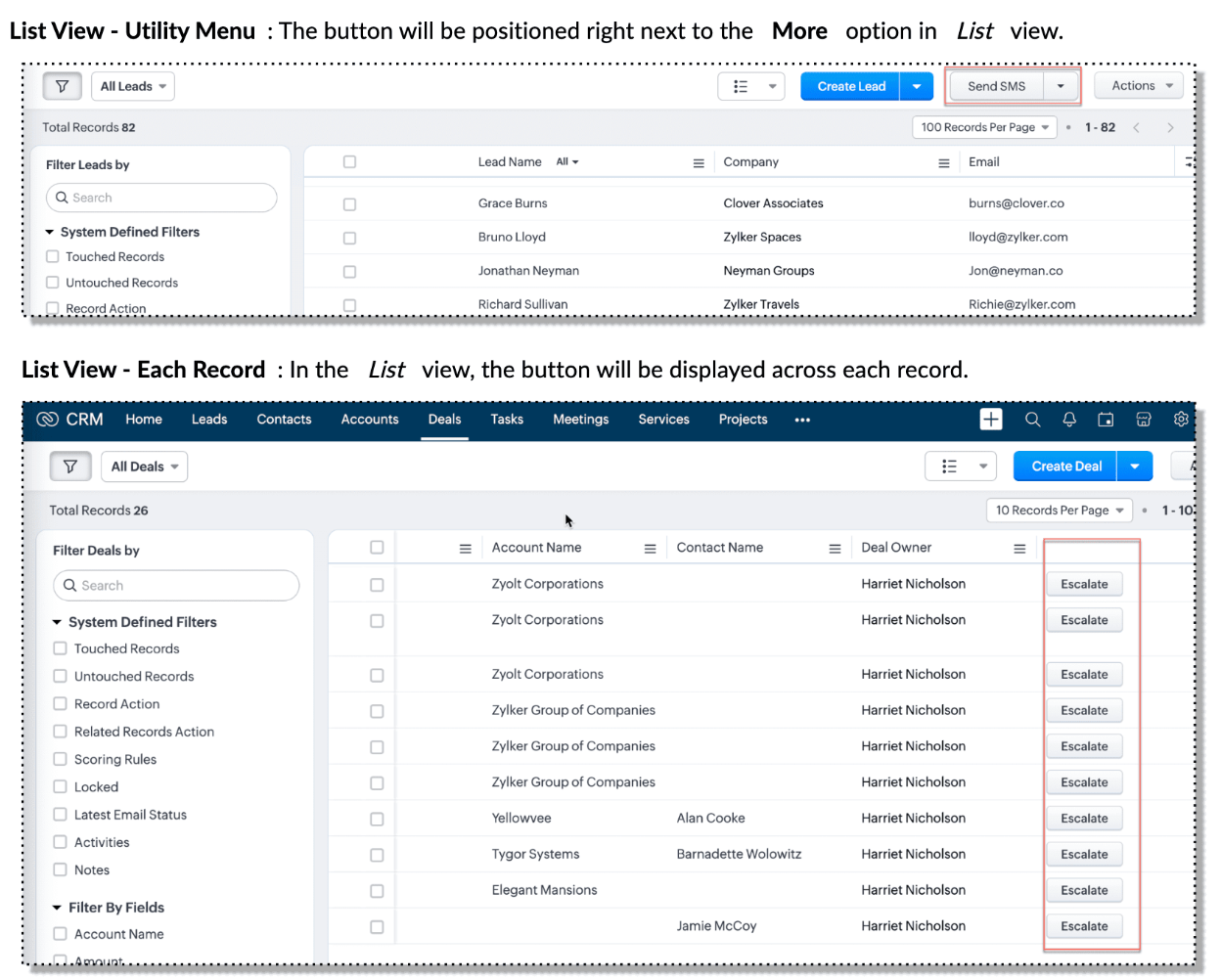
A Custom Button can be placed in different positions based on the Page.
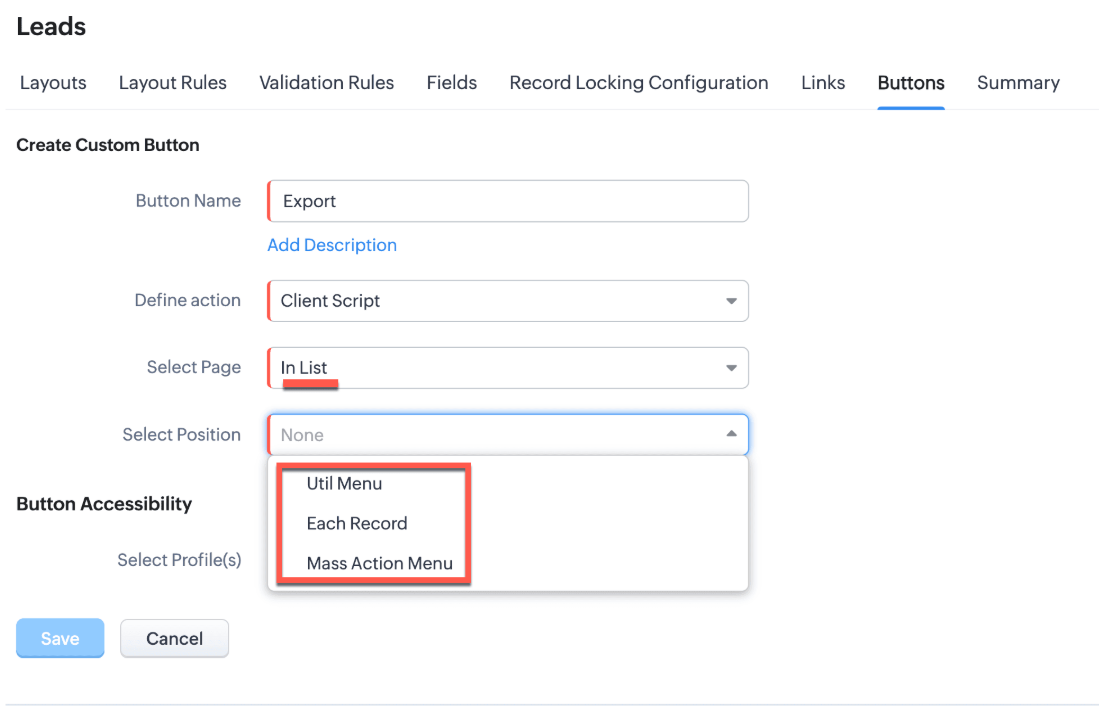
You can add a custom button in the Util Menu, in Each Record or in the Mass Action Menu of the List Page.

Also, a Detail Page can have a custom button either In Record or in the Related List. Click here for more details about the different possible positions of a custom button.
The following table lists the supported pages and the corresponding context argument, which provides different details based on the page type.

To create a Client Script and make it trigger when a custom button is clicked, first create a Custom button and associate it with a Client Script as shown in the following image.

Click here to view the steps to create a custom button and configure a Client Script.
Note:
You can configure the Client Script only from the Buttons page to trigger it when a user clicks a custom button, and not the usual way of Creating Client Script via setup page. Once a script is created, it can be edited and updated from the Client Script setup page
3. Use Case - Export Subform Rows to Zoho Sheet in a Single Click!
Zylker manufactures medical instruments, and its sales representatives frequently need to share bulk order details with distributors and hospital partners using Zoho Sheets. These details such as product names, quantities, and prices are captured in a Subform on the Purchase Order Detail(Standard) Page.
To simplify this, the admin wants to add a custom button called "Export Products" on the Purchase Order Detail Page. When clicked, it should export the Purchase Items from the Subform and move the content to the specified sheet.
4. Solution
To export subform rows to Zoho Sheet with a single click, you can add a custom button to the Detail Page of the record. When clicked, a Client Script will be triggered to fetch the subform data from the Detail Page and pass it to a Function that uses zoho.sheet.createRecords() to insert data into Zoho Sheet.
Here’s how to implement this:
- Add “Export Products” custom button on the Detail Page.
- Add the script to collect subform rows which invokes the Function.
- Write a Function to create entry in Zoho Sheets
A. Add “Export Products” custom button on the Detail Page.
- Go to Setup → Modules and Fields under Customization.
- Select a Module as Purchase Order.
- Click on Buttons → Then click + New Button.
- Enter Button Name and select Action Type as "Client Script"
- Choose Button Position and Layout details as shown in the following image.
- Click Create in Configured Client Script, enter the script, and click Add.
- Select the profiles for which these buttons should be visible.
- Click Save.

B. Add the Script to collect subform rows and invoke the Function
Use the following Client Script when you configure the custom button.
- var casesheetid = ZDK.Client.getInput([{ type: 'text', label: 'Enter the Sheet ID' }], 'Sheet details', 'OK', 'Cancel');
- if (casesheetid == null) {
- ZDK.Client.showAlert("Enter the *Case Sheet ID - Import* to import data");
- }
- var purchase_items = ZDK.Page.getField('Purchase_items).getValue();
- ZDK.Client.showLoader({type: 'page', template:'spinner', message: 'Export in progress, please wait'});
- var c=1;
- if (sheetid == null) {
- ZDK.Client.hideLoader();
- ZDK.Client.showAlert("Enter the *Case Sheet - Export* ID to export data");
- }
- purchase_items.forEach((r,i) => {
- try {
- resp = ZDK.Apps.CRM.Functions.execute("csvWrite", { "Product_Name": r.Product_Name.name, "List_Price": r.List_Price, "Discount": r.Discount, "Total": r.Total,"Sheetid":casesheetid }); }
- catch (error) {
- c = 0;
- ZDK.Client.hideLoader();
- ZDK.Client.showAlert("Unexpected issue occured while adding data in row number "); }
- });
- ZDK.Client.hideLoader();
- if (c) {
- ZDK.Client.showMessage("Export completed. Please check the Sheet");
- }
- else
- {
- ZDK.Client.showMessage("Unexpected error "); }}
In this code, several ZDKs are used for various purposes. Click on the ZDK hyperlinks to learn more.
- User Input: The code uses ZDK.Client.getInput() to fetch a "Sheet ID" from the user. This input is crucial for further operations.
- Input Validation: If the user cancels or doesn't enter a sheet ID, the code checks for null and prompts the user to enter the ID using ZDK.Client.showAlert().
- Function Invocation: The entries of Purchase Order subform are fetched using ZDK.Page.getField('Purchase_items).getValue() and written to Zoho Sheet using the Function csvWrite(), which internally calls zoho.sheet.createRecords().
- Loader Display: To indicate that a process is running, a loader is displayed using ZDK.Client.showLoader().
- Show Message: ZDK.Client.showMessage() displays that the Export is completed.
Note
The Client Script you intend to link with the button will be saved only after the custom button is saved.
C. Write a Function to create entry in Zoho Sheets
- Go to Setup > Developer Hub > Functions.
- In the Functions page, click + Create New Function.
- Choose the category as Button.
- Click Create.
- In the Create Function page, enter a name as csvWrite and description for your function.
- Enter the following function code and click Save.
- string standalone.csvWrite(String product,String qty,String up,String amt, String Sheetid){
- queryData = Map();
- writeData = Map();
- header = Map();
- writeData.put("Product",product);
- writeData.put("Quantity",qty);
- writeData.put("Unit_Price",up);
- writeData.put("Amount",amt);
- SheetData = zoho.sheet.createRecords("Sheetid","Sheet1",writeData,queryData,"sheetconnection");
- return SheetData;
- }
In the code above:
- sheetconnection refers to the name of the Zoho Sheet connection, which must have the scopes: ZohoSheet.dataAPI.UPDATE and ZohoSheet.dataAPI.READ.
- Click here to know how to create a Connection with the required scopes.
- sheetid is the unique identifier of the Zoho Sheet, available in the sheet’s URL.
- Sheet1 represents the name of the worksheet (i.e., the tab name shown at the bottom of the Zoho Sheet).
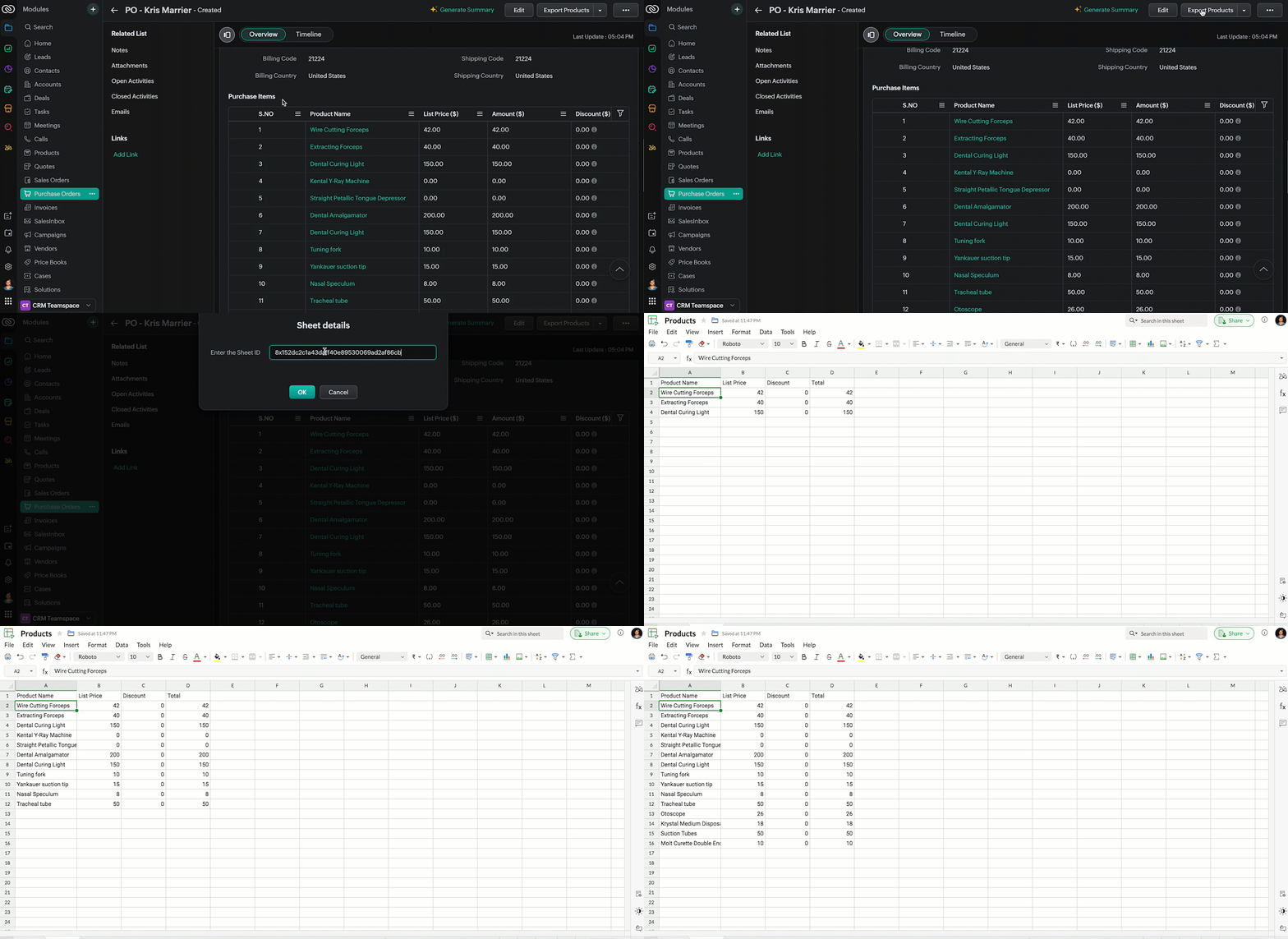
- Now, when the custom button is clicked, the Client Script is triggered. It prompts for the Sheet ID, fetches the contents of the Purchase Order subform, and invokes a function that writes the content to the Sheet.
Here's how the Client Script works.
5. Summary
In this post we have seen,
- What is a Button event?
- How to configure Client Script for a custom button
- How to write data into Zoho Sheets from Client Script
- How to create a Function and call it from Client Script
6. Related Links
- Customize Buttons using Client Script
- Automating Data Transfer from Zoho Sheets to Zoho CRM Subforms
- Update - Client Script Support For Custom Buttons
We are thrilled to be nearing the 200th post in our Kaizen series. As we approach this exciting milestone, we would love to hear from you. Do you have any questions, suggestions, or topics you would like us to cover in future posts? Your input helps us improve and shape the series to serve you better.
Previous Kaizen Post : Kaizen #193: Creating different fields in Zoho CRM through API | Kaizen Directory
We hope you found this post useful!
Happy Client Scripting! 😊
Topic Participants
Maadhari M
Rakesh Kumar
Gray
Sticky Posts
Kaizen #222 - Client Script Support for Notes Related List
Hello everyone! Welcome to another week of Kaizen. The final Kaizen post of the year 2025 is here! With the new Client Script support for the Notes Related List, you can validate, enrich, and manage notes across modules. In this post, we’ll explore howKaizen #217 - Actions APIs : Tasks
Welcome to another week of Kaizen! In last week's post we discussed Email Notifications APIs which act as the link between your Workflow automations and you. We have discussed how Zylker Cloud Services uses Email Notifications API in their custom dashboard.Kaizen #216 - Actions APIs : Email Notifications
Welcome to another week of Kaizen! For the last three weeks, we have been discussing Zylker's workflows. We successfully updated a dormant workflow, built a new one from the ground up and more. But our work is not finished—these automated processes areKaizen #152 - Client Script Support for the new Canvas Record Forms
Hello everyone! Have you ever wanted to trigger actions on click of a canvas button, icon, or text mandatory forms in Create/Edit and Clone Pages? Have you ever wanted to control how elements behave on the new Canvas Record Forms? This can be achievedKaizen #142: How to Navigate to Another Page in Zoho CRM using Client Script
Hello everyone! Welcome back to another exciting Kaizen post. In this post, let us see how you can you navigate to different Pages using Client Script. In this Kaizen post, Need to Navigate to different Pages Client Script ZDKs related to navigation A.
Recent Topics
Zoho Not Working
Today Zoho not wokringDynamically autofill fields with URL parameters
I have a zoho form embedded in my organization's WP website. Our users find their account with a search tool, and then can select to open this page with the embedded form. The URL of the page holds the parameter that I need, but I cannot figure out howIntegrate Projects for Desk KB article release tasks
Could you please look into the possibility of integrating project tasks for Zoho Desk article release processes? We are looking for an internal integration between Zoho Projects and Zoho Desk's KB article drafting, reviewing and releasing tasks. We couldIssue in Annual Leave
We created a policy to credit 21 days at the Start of the Year An employee has taken 16 days of leaves thought the year, so we expect to see 5 Leaves remaining right? But Zoho People is Showing 12 Days of Leave Balance Available If we check the LeaveUse the searchBy parameter to find user by email address
I'm trying to find a user is Zoho Desk via the Api. In the documentation I see that there is the possibility to add a searchBy parameter in the request. But I can't find how the search values should be formatted. I've tried multiple things and get eitherZoho CRM Community Digest - September 2025 | Part 2
Hello Everyone! Mid-September vibes: fresh tips, smart hacks, and practical Zoho CRM updates all in one place. Let’s dive in. Product Updates: The All-New Address Field! The new Address field type makes it easier to capture complete addresses in one structuredZoho Vault API: Create new Secrets
Hello, I attempt to Post Secrets to the vault, since the encrypted entries are almost impossible to decrypt, since there is no documentation on how to decrypt them. Like with the lack of documentation on how to descrypt, there are missing information regarding on how to create new secrets/post secrets. Source: https://www.zoho.com/vault/api/#create-a-new-secret When I try to send JSON Informationen as a POST-Request I only receive the error message: { "operation": { "result": { "error_code": "",CRM and Finance Tab - Add Invoice "Subject " Column
When On a contact in CRM, and you click the Zoho Finace tab, how can I put in the invoice subject line? Or even a custom field for this. We need to see what that invoice is for, without opening it. If we have tons of invoices we need a way to quickCollections Management: #4 Before, During & After Payment Processing
"Mark, I think the payment link isn't working. Can you send it again?" Staring at a message, Mark got on his phone. This was the third time the same customer had asked him that week. A few minutes later, another message came, "Hey, the invoice total seemsAccount name not populating when importing contacts
When importing a csv file to add contacts the account name is blank? Every other filed gets mapped and imported correctly, i.e contact name, phone number. However not the account name which I have mapped to "company" field in my csv fileSuggestion to improve zoho writer
I am using your product, I believe it is very useful, however, i was writing a note and I needed to draw an arrow in different angles to explain a point and I couldn't. it would be helpful, to add draw functions to the zoho writer. thankswebhook basic authentication
II want to use a webhook to send out a SMS. Unfortunately Twilio does not use an authToken but basic authentication. I created the webhook as POST and get this url: https://{username}:{password}@api.twilio.com/2010-04-01/Accounts/{account}/Messages?body=<BODY>&to=+155555555&from=+1555555555Custom function return type
Hi, How do I create a custom deluge function in Zoho CRM that returns a string? e.g. Setup->Workflow->Custom Functions->Configure->Write own During create or edit of the function I don't see a way to change the default 'void' to anything else. AddingIssue with Hour Calculation in Zoho People Attendance Module
I have noticed an issue in the attendance regularization feature of Zoho People. When trying to regularize past dates, the total working hours are not calculated correctly. For example, if I enter a check-in and check-out time for a previous day, thePush Notification for New Bookings in Zoho Bookings App
when a someone schedules an appointment through the booking page, is there any option to receive a push notification in the mobile app?Automation in Zoho Sprints
Hi. I have a Sprints board with the following statuses: ToDo, InProgress, CodeReview, Testing, Preprod, Live When a ticket is moved from e.g. Testing to Preprod, the following tags should be modified: remove 'tested OK' remove 'ready for Preprod' addExport Purchase orders as Excel
Is it possible to export purchase orders as excel rather than PDF? Our suppliers don't want orders made in PDF, they need it to be excelDraft & Schedule Emails Directly in Bigin
Greetings, I hope all of you are doing well. We're happy to announce a few recent enhancements we've made to email in Bigin. We'll go over each one in detail, but here's a quick overview: Previously, you couldn't draft or schedule emails in Bigin, butTDS Filing
Is there any option for automatic 26Q and 24Q filing in Zoho books. Even Tally has this option. Why don't Zoho has this ? Is there any customisation available for this ?Create CRM Deal from Books Quote and Auto Update Deal Stage
I want to set up an automation where, whenever a Quote is created in Zoho Books, a Deal is automatically created in Zoho CRM with the Quote amount, customer details, and some custom fields from Zoho Books. Additionally, when the Sales Order is convertedZia’s AI Assist now helps you write clearer notes — in seconds
After helping recruiters craft job descriptions, emails, and assessments, Zia’s AI Assist is now stepping in to make note-taking effortless too. Whether you’re recording feedback after an interview or sharing quick updates with your team, you can nowShortcut to fill a range of cells
Good evening: I'm writing because I haven't been able to find a feature that allows you to select a range of cells, type in one of them, and then use a key combination to type in all of them. In Excel, the keyboard shortcut is Ctrl+Enter. I haven't foundObject required error
Hi, I am getting an 'Object required' error on the line Call HideColumnsOutsideRange(ws, startOfWeek, endOfWeek) when I run the ShowCurrentWeek macro but not when I run the ShowCurrentMonth macro. Any ideas? Regards, GW Option Explicit Sub HideColumnsOutsideRange(wsZoho CRM - Rename "Estimates" in CRM Finance Suite Integration to "Quotes"
I'm not sure if it's been 2 or 3 years now since Zoho Books renamed Estimates to Quotes. I still see "Estimates" in the Zoho CRM integration. Could this be added to Translation settings so that some customisation could be made on an account by accountIts 2022, can our customers log into CRM on their mobiles? Zoho Response: Maybe Later
I am a long time Zoho CRM user. I have just started using the client portal feature. On the plus side I have found it very fast and very easy (for someone used to the CRM config) to set up a subset of module views that make a potentially extremely usefulNew Series Announcement - Ecommerce Marketing Tips
Running an online business is more than just having a website. It’s about getting the right customers to discover you, trust you, and keep coming back. To support your growth journey, we’re launching a weekly Marketing Tips series right here on Zoho CommerceMarketing Tip #7: Add a blog to your online store
A blog is more than content. It’s a magnet for new customers. Sharing product guides, styling tips, or industry insights through blog posts builds trust and helps you rank higher on search engines. Try this today: Write one blog post answering a commonKanban view on Zoho CRM mobile app!
What is Kanban? The name doesn't sound English, right? Yes, Kanban is a Japanese word which means 'Card you can see'. As per the meaning, Kanban in CRM is a type of list view in which the records will be displayed in cards and categorized under the givenAllow Regular Users to Directly Transfer Ownership of Files & Folders
Hi Zoho WorkDrive Team, Hope you are doing well. We would like to request an important enhancement related to file and folder ownership management in Zoho WorkDrive. At the moment, a regular user cannot directly transfer ownership of their files or foldersTriggering rules on lead conversion
There is no field on the Rule list for rule conversion to trigger an alert on liead conversion to a potential. I assigned a rule to file on any creation or update of a lead. The lead was changed a lead to a potential but no rule was fired. Rajesh BhadraCustomised Funnel
We are running the standard plan for our ZOHO CRM. I have been asked if there is a way to combine data from the Calls module, Deals module and Contact Module into 1 funnel, similar to the view you can get when viewing Deals By Stages, you can see theTrigger Zapier on Deluge Insert Into Function?
Hello, To get around the limitation of not being able to trigger a Zapier Zap on Record Update(this would be extremely useful to be able to do btw), I have created a Deluge script to copy the data from Form A to a Trigger Form B using the Insert Into expression from a Custom Action button on a Report from Form A. This action does not trigger the Zapier Zap whereas manually adding a record or duplicating an existing record does trigger the Zap. Is Insert Into not the same as a manual Add in the contextCan you inject JS in an HML+CSS+Deluge Page?
I have an HTML + CSS + Deluge page and need just a little vanilla JS functionality. However, it seems like Zoho Creator does not allow that. I'm required to create a JS widget. Is this correct? If so: 1. Won't this quickly consume my API limit if thereDisplay Client Name in Zoho Creator Client Portal Dashboard
Hello Zoho Creator Team, We hope you are doing well. Zoho Creator recently introduced the option to set a client’s display name in the Client Portal settings, which is very helpful for providing a personalized portal experience. However, there is currentlyZoho unified inbox
The new changes have definitely improved things for switching between accounts. But zoho still desperately needs a unified inbox. It sucks to have to enter filters and folders for each and every inbox. This seems like such a simple thing, i wonder why Zoho hasn't done it?Best Practice for Penny Rounding & FX Adjustments in Zoho Books
Hi everyone, I’m just looking for some clarity on the correct way to handle very small rounding differences in Zoho Books when dealing with foreign-currency payments. What I’m currently doing: • I enter the supplier bill exactly as shown. • When payingIs there a problem with sharing workdrive files with links since last night?
As per title, we can't access folders/files through share links since last night. I created ticket but we need quick solution and didn't hear back from the support yet. The files are still accessible by the main account but all zoho files that we areEnable Screen Recording in Zoho WorkDrive Mobile Apps (Android & iOS)
Hi Zoho WorkDrive Team, How are you? We are enthusiastic Zoho One users and rely heavily on Zoho WorkDrive for internal collaboration and content sharing. The screen-recording feature in the WorkDrive web app (similar to Loom) is extremely useful- however,Production Management Tool (MRP / BOM)
Hi Guys, is there any recommended App available that works with zoho and covers the needed applications for a production? What we need is a system that covers the BOM (bill of materials), MRP (material ressources planning), MRP II (manufacturing ressourcesBug in Zoho Cliq Signup Flow – "%s" Placeholder Visible Instead of Product Name
Hi Zoho Team, I would like to report a UI bug in the Zoho Cliq signup/enable flow. During the step where Cliq asks to enable the product for the company, the following text appears: Great! Your company is already available in Zoho, so you just have toNext Page