Actions API - Webhooks APIs - Part 1

Webhooks in Zoho CRM
Use case
Configuring Webhooks for Zylker’s Use Case - UI Method
- Go to Setup
- Navigate to Automation
- Choose Actions -> Webhooks
- Click Configure Webhook
 Webhook - UI view
- Basic fields to configure Webhook.
- Configuring Headers
- Configuring Body
Filling the basic Webhook details via UI
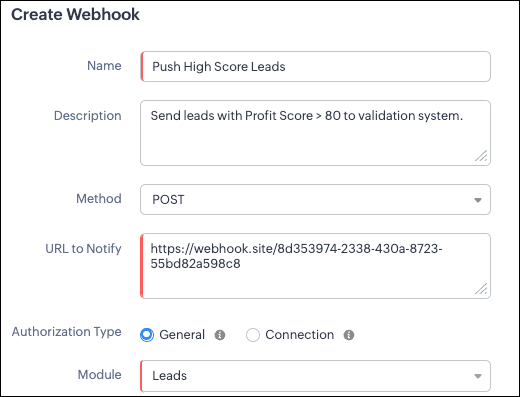
Filling the basic Webhook details via Create Webhook API
{ "webhooks": [ { "name": "Push High Score Leads", "description": "Send leads with Profit Score > 80 to validation system.", "module": { "api_name": "Leads", "id": "5725767000000002175" }, "authentication": { "type": "general" }, "http_method": "POST" } ] } |
Keys explanation
- name (mandatory): Name of your webhook.
- description: Add a short note about what this webhook does.
- module (mandatory): Select the module from where the external application listens the changes. In our case, select Leads module to push high-score leads.
- url (mandatory): Specify the external endpoint where CRM will send the data. This lets the external application see what CRM sends.
- Note: In this post, we have used an endpoint from Webhook.site
- authentication (mandatory): Specify authentication type for the webhook endpoint.
- Possible types:
- general: The receiving system does not require OAuth. You can pass OAuth tokens manually in headers.
- connections:
- OAuth-based integrations: Systems that use Zoho’s Connections.
- For our Zylker use case, we select General.
- http_method (mandatory): Select a HTTP method that allows you to send structured data.
HTTP Method | Headers | Body | URL Parameters |
POST |
| Type: form-data | Not Supported |
PUT |
| Type: form-data | Not Supported |
GET | Not Supported | Not Supported |
|
DELETE | Not Supported | Not Supported |
|
Creating a Webhook with Headers, Body, and URL Parameters
- Headers
- Body (Form-Data or Raw)
- URL Parameters
Configuring Headers
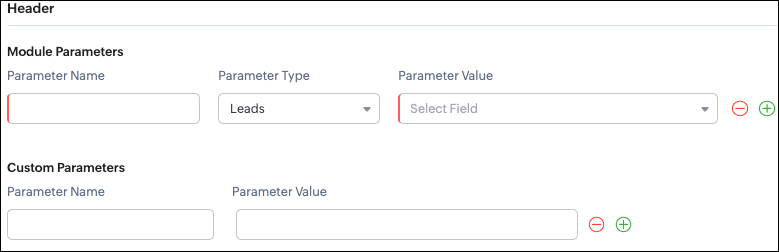
Headers allow you to send extra information along with your webhook request. These help when the external app needs extra data like auth tokens or CRM field values.
- Module Parameters - Dynamic values from CRM fields
- Custom Parameters - Static values you define
- Parameter Name - A unique header key that you define. It does not have to match the CRM field API name.
- Parameter Type - Defines the source of the data you are mapping. It can come from the selected CRM module such as Leads and Contacts, lookup fields, User fields such as Lead Owner, or Organization fields.
- Parameter Value - The merge field value. Example, ${!Leads.Created_By.id}
Parameter Name | Parameter Type | Parameter Value |
Lead_Email | Leads | |
Annual_Revenue | Leads | Annual Revenue |
Profit_Score | Leads | Profit Score |
Created_By | Created By | User Id |
- API version
- Tags like “zylker-crm”
Name | Value |
source | zylker-crm |
version | v1
|
Configuring Headers via Create Webhook API
{ "webhooks": [ { . . . "http_method": "POST", "headers": { "module_parameters": [ { "name": "Lead_Email", "value": "${!Leads.Email}" }, { "name": "Annual_Revenue", "value": "${!Leads.Annual_Revenue}" }, { "name": "Profit_Score", "value": "${!Leads.Profit_Score}" }, { "name": "Created_By", "value": "${!Leads.Created_By.id}" } ], "custom_parameters": [ { "name": "source", "value": "zylker-crm" }, { "name": "version", "value": "v1" } ] } } ] } |
Configuring the Body of a Webhook - form-data & raw formats
- Form-Data:
- Module parameter
- Custom parameter
- User-defined format.
- Raw:
- Text - plain messages
- JSON - structured API payload
- HTML - formatted messages
- XML - traditional enterprise systems
Form-Data Body: key-value
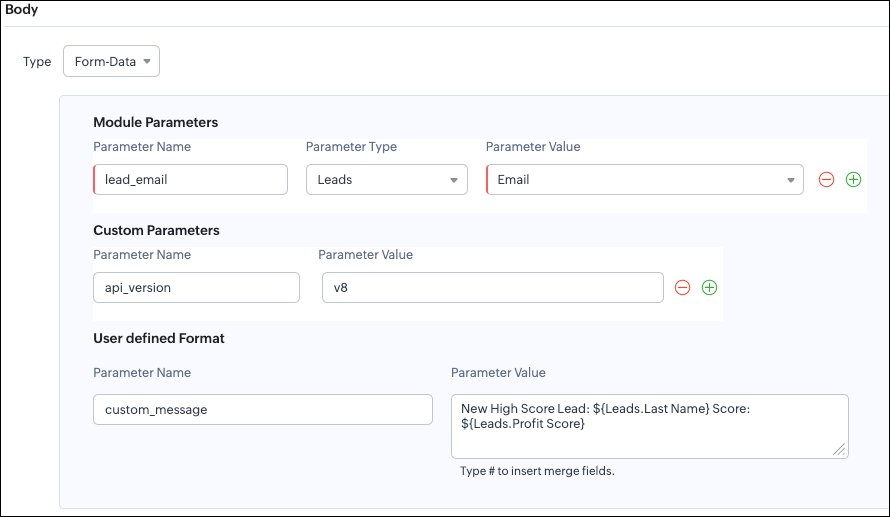
- Module Parameters
- Custom Parameters
- User Defined Parameters
- Headers are for sending supporting information that helps the external system understand the request - this can include auth details, source identifiers, or key CRM fields like email or score that help with quick categorization or filtering.
- Headers - Provide supporting details such as identifiers or quick-check values. For example, Lead ID, or source tags that help the external system check and route the request.
- Body - Contains the complete lead information that the external validation system needs to process.
Where parameters are used | Purpose | Example |
Headers | Metadata - OAuth,tags, and context | source: zylker-crm |
Form-Data (Body) | Main record data - actual lead details sent to the app.
| lead_email=patricia@zylker.com |
Parameter Name | Parameter Value |
custom_message | New high-score lead: ${Leads.First Name}${Leads.Last Name} (Score: ${Leads.Profit Score}) |
Configuring the Body of a Webhook - form-data via Create Webhook API
{ "webhooks": [ { . . . "body": { "form_data_content": { "module_parameters": [ { "name": "Lead_Email", "value": "${!Leads.Email}" }, { "name": "Annual_Revenue", "value": "${!Leads.Annual_Revenue}" }, { "name": "Profit_Score", "value": "${!Leads.Profit_Score}" }, { "name": "Created_By", "value": "${!Leads.Created_By.id}" } ], "custom_parameters": [ { "name": "source", "value": "zylker-crm" }, { "name": "version", "value": "v1" } ], "user_defined_parameters": { "name": "custom_message", "value": "New high-score lead: ${!Leads.First_Name}${!Leads.Last_Name} (Score: ${!Leads.Profit_Score})" } }, "type": "form_data" }, . . . } ] } |
Raw Body - JSON / XML / HTML / Text
- Raw + Text
- Raw + JSON
- Raw + HTML
- Raw + XML
Raw + Text:

- When sending a simple message.
- When the external app only expects plain text.
Configuring the Body of a Webhook - Raw - "Text" via Create Webhook API
{ "webhooks": [ { . . . "body": { "raw_data_content": "New high score lead: ${!Leads.First_Name} ${!Leads.Last_Name}, ${!Leads.Email}, ${!Leads.Annual_Revenue}, ${!Leads.Phone}, ${!Leads.Industry}, ${!Leads.Owner}", "format": "Text", "type": "raw" }, . . . } ] } |
Raw + JSON:
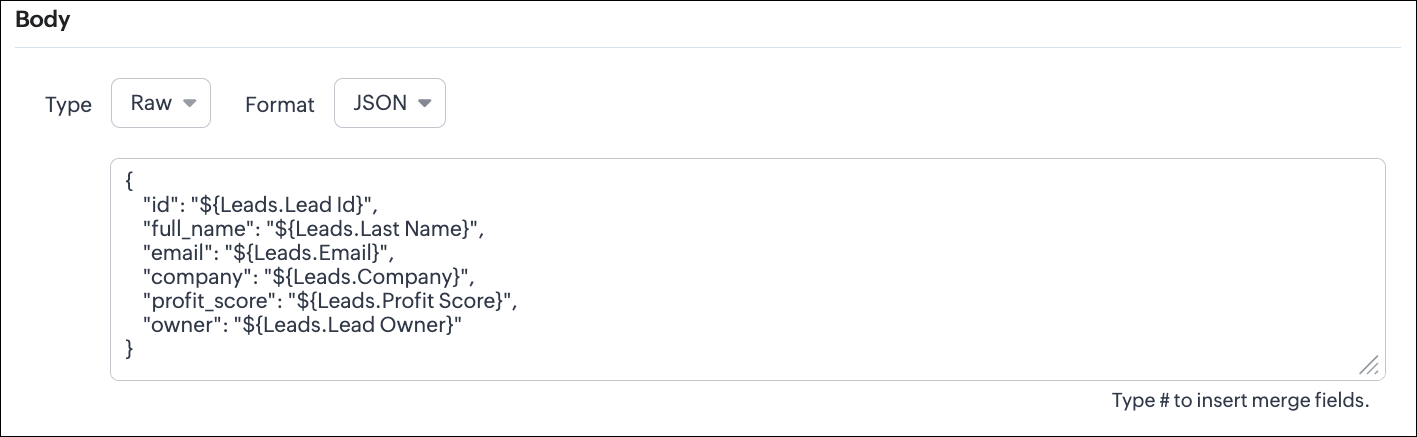
Configuring the Body of a Webhook - Raw - "JSON" via Create Webhook API
{ "webhooks": [ { . . . "body": { "raw_data_content": "{\n \"id\": \"${!Leads.id}\",\n \"full_name\": \"${!Leads.Last_Name}\",\n \"email\": \"${!Leads.Email}\",\n \"company\": \"${!Leads.Company}\",\n \"profit_score\": \"${!Leads.Profit_Score}\",\n \"owner\": \"${!Leads.Owner}\"\n}", "format": "JSON", "type": "raw" }, . . . } ] } |
- When the external system expects structured data
- Easier validation
Raw + HTML:
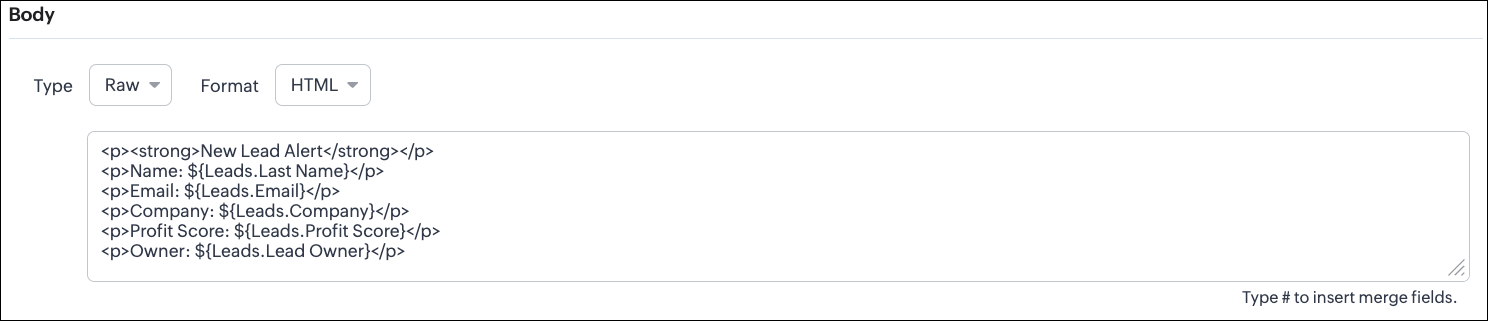
Configuring the Body of a Webhook - Raw - "HTML" via Create Webhook API
{ "webhooks": [ { . . . "body": { "raw_data_content": "<p><strong>New Lead Alert</strong></p>\n<p>Name: ${!Leads.Last_Name}</p>\n<p>Email: ${!Leads.Email}</p>\n<p>Company: ${!Leads.Company}</p>\n<p>Profit Score: ${!Leads.Profit_Score}</p>\n<p>Owner: ${!Leads.Owner}</p>", "format": "HTML", "type": "raw" }, . . . } ] } |
- If the external system displays formatted output
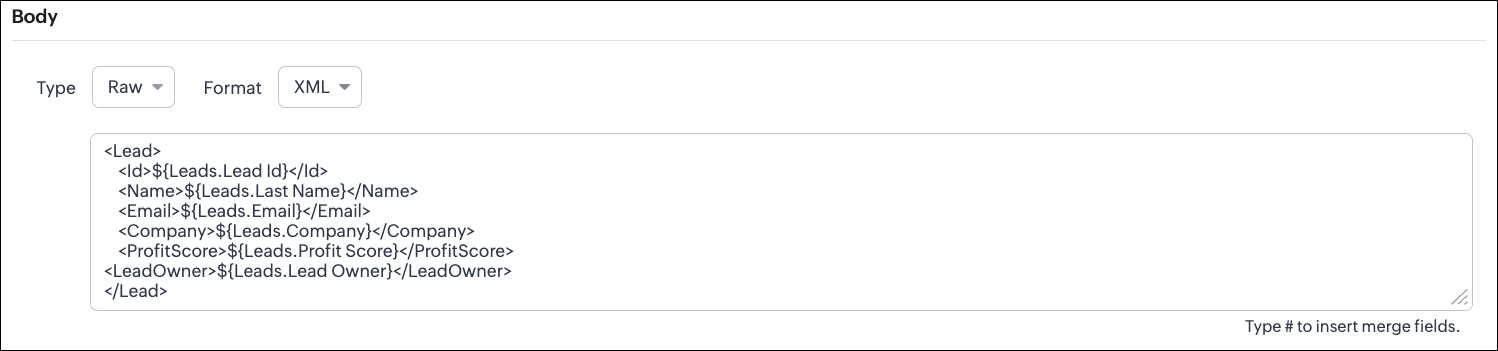
Configuring the Body of a Webhook - Raw - "XML" via Create Webhook API
{ "webhooks": [ { . . . "raw_data_content": "<Lead>\n <Id>${!Leads.id}</Id>\n <Name>${!Leads.Last_Name}</Name>\n <Email>${!Leads.Email}</Email>\n <Company>${!Leads.Company}</Company>\n <ProfitScore>${!Leads.Profit_Score}</ProfitScore>\n<LeadOwner>${!Leads.Owner}</LeadOwner>\n</Lead>", "format": "XML", "type": "raw" }, . . . } ] } |
- With older systems
- When the receiving system only supports XML
- When you switch the webhook method in the UI, Zoho CRM changes the options you can configure:
- Only URL Parameters are available
- Headers are hidden
- Body is hidden
- Because GET requests always send data through the URL and cannot carry a body.
- Headers are available
- URL Parameters are available
- Body is still not supported
- DELETE requests can include headers, but Zoho CRM does not allow sending a body for DELETE webhooks.
- Date-time format:
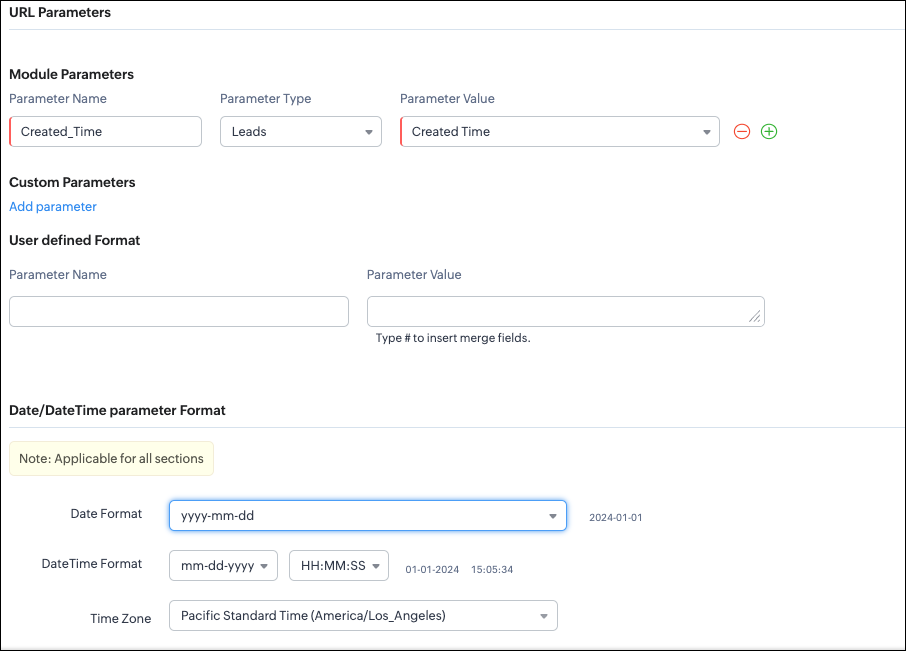
{ "webhooks": [ { "module": { "api_name": "Leads", "id": "5725767000000002175" }, "url_parameters": { "module_parameters": [ { "name": "Created_Time", "value": "${!Leads.Created_Time}" } ] }, "description": "Send leads with Profit Score > 80 to validation system.", "http_method": "GET", "name": "Push High Score Leads", "date_time_format": { "datetime_format": "mm-dd-yyyy HH:MM:SS", "date_format": "yyyy-mm-dd", "time_zone": "America/Los_Angeles" }, "authentication": { "connection_name": null, "type": "general" } } ] } |
- How to manage Webhooks using the GET, PUT, and DELETE Webhook APIs
- How to associate a Webhook with a Workflow
- How to perform real-time testing by creating records
- How an external application receives data from Zoho CRM via Webhook.
- Kaizen #213 - Workflow APIs - Part 1
- Kaizen #214 - Workflow APIs - Part 2
- Kaizen #215 - Workflow APIs - Part 3 - Create and Update Workflow Rules
- Kaizen #216 - Actions APIs : Email Notifications
- Kaizen #217 - Actions APIs : Tasks
- Kaizen #218 - Actions APIs: Field Update
Topic Participants
Subramanian K
Sticky Posts
Kaizen #217 - Actions APIs : Tasks
Welcome to another week of Kaizen! In last week's post we discussed Email Notifications APIs which act as the link between your Workflow automations and you. We have discussed how Zylker Cloud Services uses Email Notifications API in their custom dashboard.Kaizen #216 - Actions APIs : Email Notifications
Welcome to another week of Kaizen! For the last three weeks, we have been discussing Zylker's workflows. We successfully updated a dormant workflow, built a new one from the ground up and more. But our work is not finished—these automated processes areKaizen #152 - Client Script Support for the new Canvas Record Forms
Hello everyone! Have you ever wanted to trigger actions on click of a canvas button, icon, or text mandatory forms in Create/Edit and Clone Pages? Have you ever wanted to control how elements behave on the new Canvas Record Forms? This can be achievedKaizen #142: How to Navigate to Another Page in Zoho CRM using Client Script
Hello everyone! Welcome back to another exciting Kaizen post. In this post, let us see how you can you navigate to different Pages using Client Script. In this Kaizen post, Need to Navigate to different Pages Client Script ZDKs related to navigation A.Kaizen #210 - Answering your Questions | Event Management System using ZDK CLI
Hello Everyone, Welcome back to yet another post in the Kaizen Series! As you already may know, for the Kaizen #200 milestone, we asked for your feedback and many of you suggested topics for us to discuss. We have been writing on these topics over the
Recent Topics
How use
Good morning sir I tried Zoho MailZoho Mail Desktop App Not Loading + Can’t Manage Multiple Accounts
Hi everyone, I’ve been having ongoing issues with the Zoho Mail desktop app for the past few weeks. The app starts to load but gives up midway and never actually opens — there’s no error message, it just stops loading. The main reason I use the desktopError when sending emails from Zoho
Hello, When trying to send an email from Zoho CRM I keep getting the below error: javax.mail.AuthenticationFailedException: 535 5.7.139 Authentication unsuccessful, the user credentials were incorrect. Any support on this will be much appreciated. Thanks,Zoho Tables is now live in Australia & New Zealand!
Hey everyone! We’ve got some great news to share — Zoho Tables is now officially available in the Australian Data Center serving users across Australia and New Zealand regions! Yes, it took us a bit longer to get here, but this version of Zoho TablesNot all emails from outlook365 migrated to my new zoho account
I recently setup a new email address hosted by zoho. I migrated all my folders and email from my Outlook365 account to my new zoho account, but not all my emails migrated. Looks like only the past 12 months, or so, made the move. How do I get the restMax numbr of IMAP Accounts in Zoho Mail?
In Zoho mail, you can manage the inboxes of other accounts using IMAP (and POP, actually) https://www.zoho.com/mail/help/external-imap-accounts.html Is there a max to the number of inboxes we can add?Formula Fields Trouble
Hi, I can't get even a simple formula field to work and must be doing something dumb. This formula: If(Len(Trim(${Quotes.Subject}))=0,1,2) Gives the error: You used the wrong type of data in an argument. Check what you entered between the parentheses of your functions to make sure you put the right kind of data in the right place. This formula: Len(Trim(${Quotes.Subject}))=0 Gives the error: Syntax Error. Check the examples for any functions you're using to see if you formatted them correctly. MakeOPTED FOR STORAGE BY DESCRIPTIVE MISGUIDANCE
We've opened a domain with three mail ids and payment has also been processed now the bill raised is for single use ID with additional storage capacity. Kindly request you to modify the purchase.How can I add a new organization on Zoho Campaign
I want to create a new organization with my Zoho CampaignWhite Label certificate
Hi all, About 72 hours ago, we fulfilled all steps for white labeling (CNAME to point to mail.cs.zohohost.eu), but since then the configuration page is now stuck at "generating certificate" since 3 days. When I execute an NSLOOKUP mail.webfoundry.be itwww.abc.com is working but abc.com is not
I have my domain in godaddy. I have created a website using zoho sites and now I want to publish it and I tried doing it. Mapped the domain www.abc.com, abc.com. In godaddy changed the CNAME values. A, @ was parked and updated with zoho's IP address.Split my account
Hello, I recently bought an email service for a friend. But, looks like I used my personal account to buy the plan. Please split the account so that the email service stays in a different account than my personal account.Have Mail Lite, wish to add/purchase 2nd domain and use email
Hello, I have recently created two new businesses. I have successfully used Zoho to create a domain for one business and have set up two email addresses / users on that domain. I am trying to figure out how to create a second domain, just like I did theNeed support in setting up the company email and few other setups
Need support in setting up the company email and few other setupsThis mobile number has been marked spam.
Dear zoho team, I am very happy to use zoho,because it india 🇮🇳 own app, but when we login into zoho account we facing some issue, please solve below issue ASAP. Add your mobile number As an added security measure for Accounts, you need to verify andAdd an external email to the allowed list
I need to allow an external email to raise a ticket on Manage Engine ServiceDesk Plus. The external email is a outside of our domain and is not a domain user. The email address that needs to be allowed to raise a ticket request is noreply@formsatack.com.Display name & account type change
I made a mistake and subscribed with an individual account instead of business, how can I change the account type and enter the details of the business. The other question, if I can't, then I want the display name of our email to be 'Business name' insteadRequest to change display name in Zoho mail
Hello Zoho Mail Support, I am experiencing an issue with changing the display name on my Zoho Mail account. My email address is: info@witchcraftproduction.rs . I have already updated the display name in Settings > Mail Accounts, where it now shows asOutbound IP address SPAM problem.
Hello Zoho Support, We noticed that one of your outbound IP addresses (136.143.188.12), which delivers our domain’s mail, is currently listed on the UCEProtect blacklist. Because of this, our messages are sometimes flagged as spam by recipient servers.Answer Bot and Personalized Questions
Hi there, I have the same problem using the SalesIQ Answer Bot and the Zoho Desk Answer Bot (which really need different names, to be honest, in order to avoid confusion...) Customers that visit our website ask questions in the form of "What do you do?"Forwarding
How can I forward my Zoho account to my gmail account? NoëlAdd a Way to Duplicate Cards in the Same Canvas (Retain All Settings)
Dear Zoho SalesIQ Team, We would like to request a new feature in Zoho SalesIQ: the ability to duplicate an existing card within the same canvas while retaining all of its information and settings, including conditions, configurations, and display preferences.Zoho Mail CC and BCC not working
Zoho Mail CC and BCC not working. I have tried multiple combinations amongst my domain aliases but emails sent as CC or BCC never arrive, not even to Spam. I have checked that the DNS is set up correctly in Cloudflare and have even received a DMARC reportZoho Autoplay Issue
Currently, we run our graphics on a playlist with youtube videos interspersed in our office -- however, when we go to update the playlist (since last Thursday at around 8-9am EST) it no longer saves the autoplay function. We have tried making a new account, manually saving with cntrl+s, making a new show, etc but nothing seems to work. Even with our old program, we can't change it off of autoplay for ones that were created in the past. Another issue is that if we change a slide transition to anythingCritical Issue: Tickets Opened for Zoho Support via the Zoho Help Portal Were Not Processed
Hi everyone, We want to bring to your attention a serious issue we’ve experienced with the Zoho support Help Portal. For more than a week, tickets submitted directly via the Help Portal were not being handled at all. At the same time no alert was postedAdding hyperlinks in CRM emails time automatically
It may just be me, but when I am writing an email to a lead, I find inserting a hyperlink very time consuming. Granted, I can use templates but there are a ton of scenarios where I might want to put a link in to an website that wouldnt require me to go though the effort of creating a template. Ideally, the crm would identify that I that a string of text is a URL and insert the hyperlink automatically, just like microsoft outlook or gmail. Has anyone else had this same experience and found a wayEnhance "Applications Usage" with Date Filters, Historical Analytics & App-Level Breakdown
Hello Zoho Creator Team, We are writing to request a critical enhancement to the Applications Usage section to improve our ability to monitor, analyze, and manage our platform consumption over time. While the current view of today’s usage is helpful forExternal File Share - Allow delete
Hi Team, when I share an external link and give it edit rights the external user can add but not delete files and folders. what am i doing wrong?How to notify all members on any updates to zoho crm?
Hi, I am using the free version of zoho CRM and currently seeing this will work for our company. We are a small company and wanted to be more informed about all the changes in zoho. 1. How do I s et notifications that go to the team for any and all changesHow to change the format for phone numbers?
Mobile phone numbers are currently formatted (###) ###-####. How can I change this to a more appropriate forms for Australia being either #### ### ### or (#)### ### ###?Unattended Access on Android without Play Store
I'm testing Zoho Assist for remote config and maintenance of our IoT devices. The devices are running Android 8.1 and do NOT have Google Play Store installed, nor can it be installed. I've been able to install Zoho Assist on the devices and load the enrollmentOpen Sans Font in Zoho Books is not Open Sans.
Font choice in customising PDF Templates is very limited, we cannot upload custom fonts, and to make things worse, the font names are not accurate. I selected Open Sans, and thought the system was bugging, but no, Open Sans is not Open Sans. The realIs it possible to embed Zoho Bookmarks in the Cliq sidebar?
Is there any way that each Zoho user can access their bookmarks (that live in https://bookmarks.zoho.eu/ which is technically a part of Zoho Mail) directly within Cliq? As a widget, or an item in the sidebar? My team does not use Mail, it uses Cliq allShow Attachments in the customer portal
Hi, is it possible to show the Attachments list in the portal for the particular module? Bests.Kaizen #142: How to Navigate to Another Page in Zoho CRM using Client Script
Hello everyone! Welcome back to another exciting Kaizen post. In this post, let us see how you can you navigate to different Pages using Client Script. In this Kaizen post, Need to Navigate to different Pages Client Script ZDKs related to navigation A.Navigate with Ease: Announcing Improvements to Your Zoho CRM for Everyone's Setup Experience
Hello Everyone, We’re thrilled to announce new enhancements to the Setup Menu in our Zoho CRM for Everyone system, designed to simplify your workday and streamline your overall experience. What's New? Addition of a Setup Homepage Faster Search in SetupZoho Projects Webhook fails with HTTP Error 0
Hello Zoho Community, I am pulling my hair out over this one. I have setup a very basic http(s) server that always responds "ok" and code 200 to incoming GET requests. It will accept any parameters, and any path. Really, all it does is say "ok," and logZOHO Campaignで表のカラムの幅を調整したい。
表を作成した際、個々のカラムの幅を調整したいのですが、方法が分かりません。 どなたかご存じの方ご教示ください。Kaizen #129 : Client Script Support for Blueprints
Hello everyone! Welcome to another week of Kaizen. Today, let us discuss about how you can use Client Script during a Blueprint transtion to meet your requirements. This Kaizen post will provide solution for the post - Need non-mandatory fields in blueprintSearch Bar Improvement for Zoho Commerce
Hey everyone, I've been using Zoho Commerce for a bit now, and I think the search bar could really use an upgrade. Right now, it doesn't show products in a dropdown as you type, which would make finding items a lot faster. On Shopify, for example, youNext Page