Kaizen #91: Dynamic Lookup filters using Client Script
Hello everyone!
Welcome back to another captivating Kaizen post. In this post, we will explore the process of implementing lookup filters using Client Script.
What is a dynamic lookup filter?
A dynamic lookup filter is a feature that allows you to specify conditions or rules for filtering the options displayed in a lookup field based on the values of other fields or related data . It dynamically adjusts the available lookup options to provide a more targeted and relevant selection for users. It enables a more intuitive user experience by presenting only relevant choices based on the user's selections. Not by just using the field value on that page, you can also filter the results of the lookup with current date/time, logged-in user, or any custom condition that you can handle using Client Script. You can achieve this in Create, Edit, Detail (Standard) and Clone pages.
You can apply dynamic filters to the following fields using Client Script.
- lookup fields
- sub-form lookup fields
Use Case 1 -Lookup field filter in a form
Consider a Manufacturing company, ABC. The Admin wants to get the list of accounts that have the Account Type as Vendor for the lookup field name "Linked Account" in the Leads module only for standard layout.
Solution
- Go to Setup > Developer Space > Client Script. Click +New Script.
- Specify the details to create a script and click Next
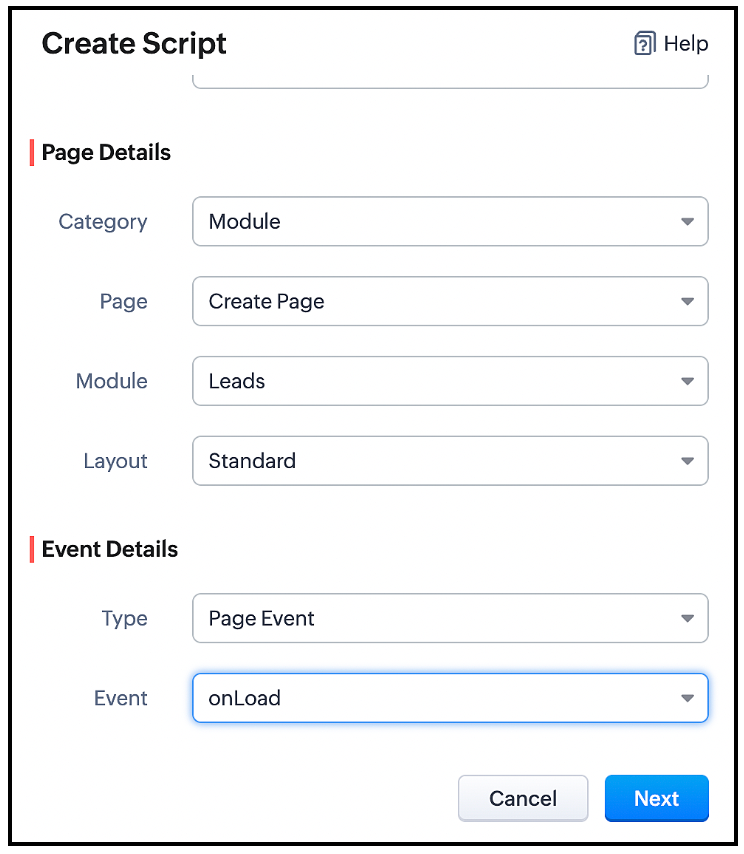
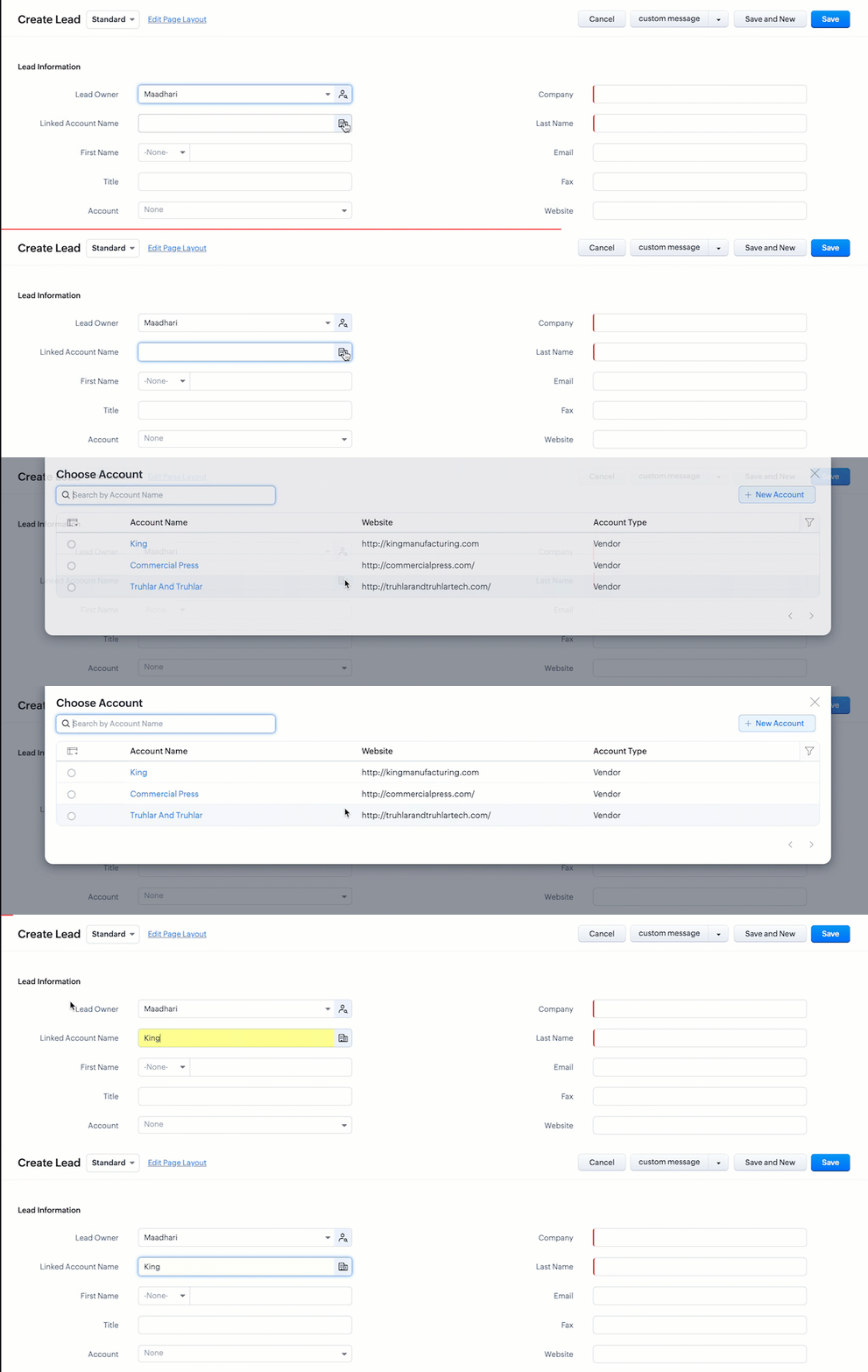
You can filter the list of Accounts visible in the lookup field using the ZDK setcriteria() , so that only the accounts of Account Type Vendor will be visible when the user clicks the lookup icon.
- Go to Setup > Developer Space > Client Script. Click +New Script.
- Specify the details to create a script and click Next .
- Enter the following script in the Client Script IDE and click save.
var field_obj = ZDK.Page.getField('Linked_Account'); field_obj.setCriteria("(Account_Type:equals:Vendor)", { filterOnSearch: true }); |
You should use the ZDK setCriteria along with the filter condition, in order to apply filters.
setCriteria() ZDK
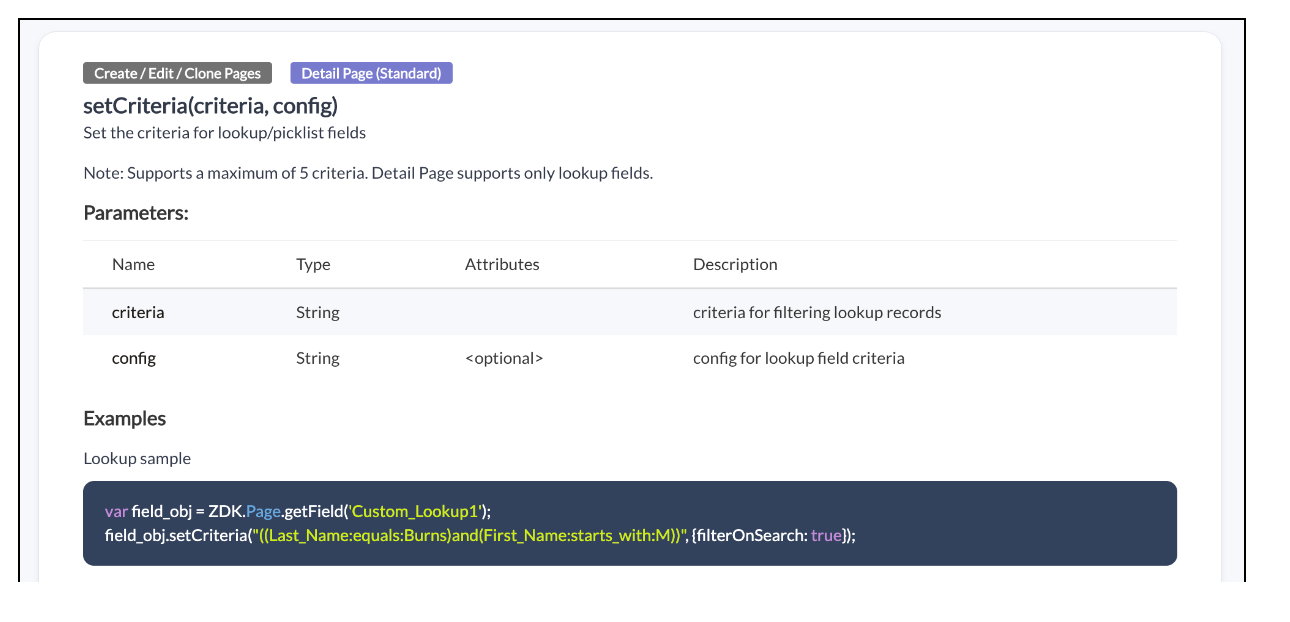
You can view the ZDK Documentations in the Library section of Client Script IDE
Here is how the Client Script works.
Use Case 2 - Dynamic lookup filter in a sub-form
Zylker is a health care company. The Admin wants to list the available instruments in the lookup field " Instrument Name " based on the type of Instrument that a service agent selects in the field "Type" only for standard layout. For example, if the service agent selects the Type as "Surgical Instruments", then he should be allowed to choose only instruments of such type in the subform.
Solution:
- Go to Setup > Developer Space > Client Script. Click +New Script.
- Specify the details to create a script and click Next .

- Enter the following script in the Client Script IDE and click save .
var Product = ZDK.Page.getSubform("Product_list").getField("Product_Name"); Product.setCriteria("(Product_Category:equals:"+value+")", { filterOnSearch: true }); |
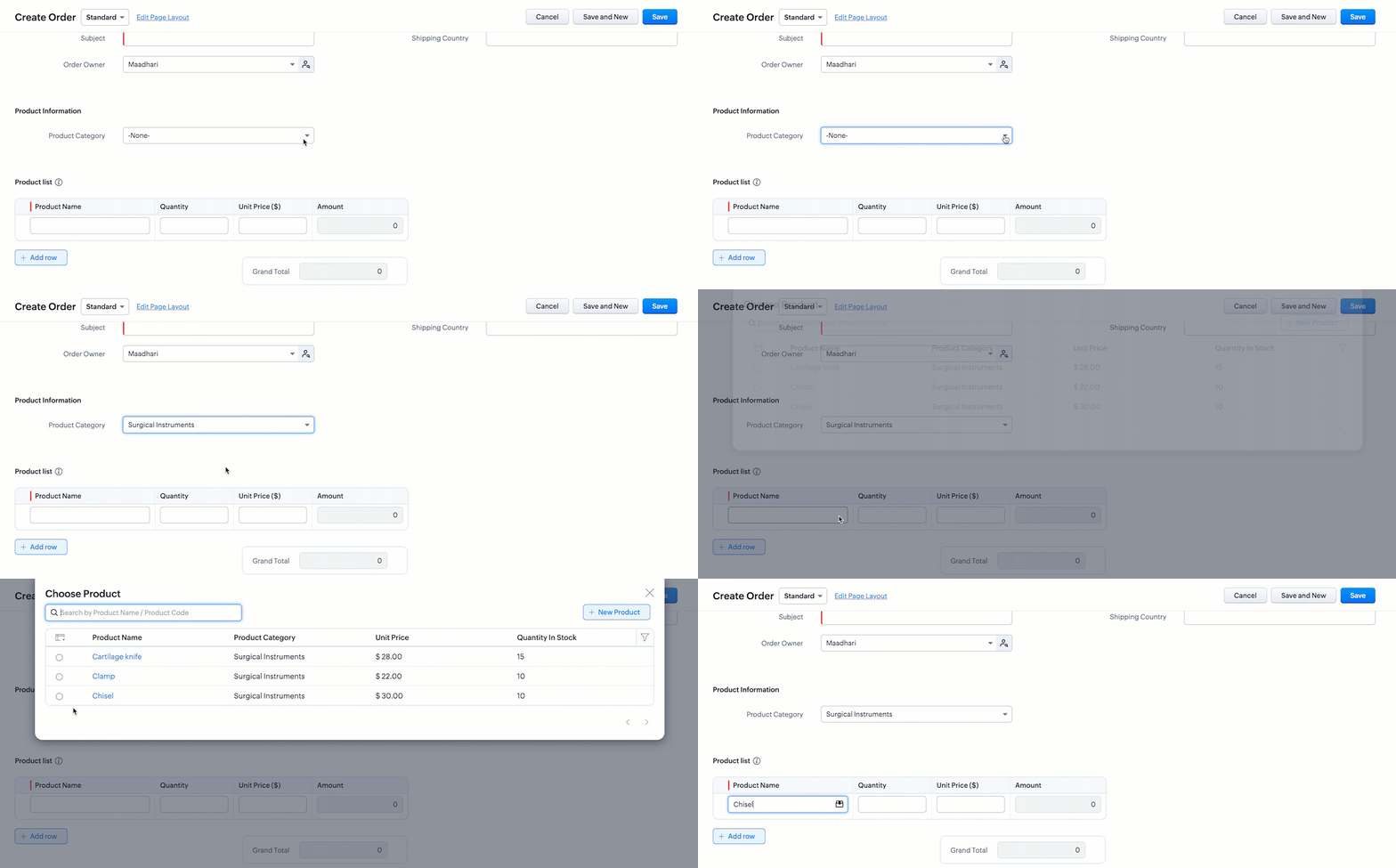
- Here, based on the value the user selects in the "Product Category" , the Product Name will be displayed by picking the Instruments from Product module where the category is equal to the user selection.
- Here is how the Client Script works.
You should use setCriteria ZDK in order to apply filters for lookup fields in Client Script.
Now, you may wonder what about Lookup filters of the field properties in layouts, when to use them and what is the difference.
Here is the comparison which shows when to use lookup filters in Client Script!
( Please note that this comparison holds good as on June 2023, there may be updates made to below features )
( Please note that this comparison holds good as on June 2023, there may be updates made to below features )
Lookup filters in field properties | Lookup filters in Client Script |
Use this when you want to apply filters based on entity criteria. | Use this when you want to apply filter based on user selected field value. |
The filter criteria is specific to the module . i.e The lookup filter will be the same for all the layouts of the module. | The filter criteria is specific to the layout. i.e The lookup filter will be not be the same for all the layouts of the module. |
Sample use case You can use this when you want to apply filters where you know the values involved in the criteria like Created Date is Today, List the Accounts where the account Type is 'Supplier', Modified by Logged in user. | Sample use case You can use Client Script when the criteria depends on user selection like to list the available instruments in the lookup field "Instrument Name" based on the type of Instrument that user selects in the field "Type". |
We hope you found this post useful. We will meet you next week with another interesting topic!
If you have any questions let us know in the comment section.
Cheers!
Topic Participants
Maadhari M
Sruly Friedman
Ashika Suresh
Shippy140
jason
Sticky Posts
Kaizen #198: Using Client Script for Custom Validation in Blueprint
Nearing 200th Kaizen Post – 1 More to the Big Two-Oh-Oh! Do you have any questions, suggestions, or topics you would like us to cover in future posts? Your insights and suggestions help us shape future content and make this series better for everyone.Kaizen #226: Using ZRC in Client Script
Hello everyone! Welcome to another week of Kaizen. In today's post, lets see what is ZRC (Zoho Request Client) and how we can use ZRC methods in Client Script to get inputs from a Salesperson and update the Lead status with a single button click. In thisKaizen #222 - Client Script Support for Notes Related List
Hello everyone! Welcome to another week of Kaizen. The final Kaizen post of the year 2025 is here! With the new Client Script support for the Notes Related List, you can validate, enrich, and manage notes across modules. In this post, we’ll explore howKaizen #217 - Actions APIs : Tasks
Welcome to another week of Kaizen! In last week's post we discussed Email Notifications APIs which act as the link between your Workflow automations and you. We have discussed how Zylker Cloud Services uses Email Notifications API in their custom dashboard.Kaizen #216 - Actions APIs : Email Notifications
Welcome to another week of Kaizen! For the last three weeks, we have been discussing Zylker's workflows. We successfully updated a dormant workflow, built a new one from the ground up and more. But our work is not finished—these automated processes are
Recent Topics
[Webinar] Solving business challenges- Handling the challenge of transitioning to Zoho Writer from legacy tools
Moving to Zoho Writer is a great way to consolidate your business tools and become more agile. With multiple accessibility modes, no-code automation, and extensive integration with business apps and content platforms, Zoho Writer helps solve your organization'sHow can I effectively manage a website with your help?
I’m wondering if it’s possible to develop a custom website with specific features using Zoho as an alternative platform. My goal is to create a website similar to https://tmsim.ph, with the same kind of functionality and user experience. I would trulyIntroducing the Yes/No field: Binary decisions made beautiful
Greetings, form architects! What would you do when you need a simple yes/no answer on your form? Normally, you add a Radio field. Type Yes. Type No. Until now. The new Yes/No field is purpose-built for binary decisions. It is preconfigured, visually consistent,Move email between inboxes?
Is it possible to move emails from one team inbox to another? We would like to be able to have a single "catch-all" inbox for incoming requests, and then move the email to the appropriate department inbox. I was hoping we would be able to accomplish thisThe power of workflows in Zoho Marketing Automation - Video Webinar
In this Zoho Marketing Automation video webinar, our experts walk you through: Why you may want to create marketing workflows How to create marketing workflows Use Zoho CRM data and apply workflows to automate your marketing strategy How workflows canOffer already made- but I withdrew it
I made an offer letter, but made a mistake on it. I withdrew the offer but now I can't recreate the correct offer. Zoho keeps saying that "A same offer has already been made". I look in the "offers" and there are NO offers (this is the first time I'veZoho CRM's sales trend and sales follow-up trend dashboards are now customizable
Dear Customers, We're here with good news! Sales trend and sales follow-up trend are two system-defined dashboards that help you understand trends and anomalies in your sales outreach and conversion efforts. They use Zia's intelligence to identify patternsTask list flag Internal/External for all phases
Phases are commonly used in projects to note milestones in the progression of a project, while task lists can be used to group different types of tasks together. It makes sense to be able to define a task list as either internal or external however theIntroducing Rule-Based AI Coding Assistants for Zoho Finance Widgets
Hello customers, We’ve introduced rule-based AI coding assistants to speed up Zoho Finance widget development. You can try them out in Cursor AI and GitHub Copilot. This helps you build widgets quickly using simple prompts, while ensuring the generatedMarketing Tip #21: Create an About Us page
People don’t just buy products, they buy from brands they trust. An About Us page helps customers understand who you are, what you stand for, and why your business exists. It adds a human touch to your store and reassures shoppers that there’s a realZobot to handle single choice menu when dynamic list content is more than 10 items
Whatsapp supports maximum of only 10 items for its single choice menu. When we need to show a dynamic list with content more than 10, this could be challenging. We essentially need to add a next and previous buton here in order to make it functional.Add the ability to Hide Pages in Page Rules
Hi, We have Field Rules to show and hide fields and we have page Rules, but we can't hide a page in Page Rules so it isn't completed before the previous page (And then have the Deny Rules to prevent submitting without both pages completed), we can onlyColumn letter from number
Hello, I am trying to select a cell and i have the column number. How do i do this or is there a way of getting the letter from the number? Thank you【Zoho CRM】商談タブへのデータインポート
Zoho使用前にエクセルで管理していた商談情報を、Zoho一括管理のため、商談タブにインポートしたいのですが、お客さまの氏名だけが紐づけられませんでした。 「Zoho CRMにインポートする項目を関連付ける」のところが画像のようになっています。 (弊社では、「姓」を「★個人データ名」という項目名に変更し、フルネームを入れて使用しています。) どのようにしたら氏名をインポートできるかご存じの方がいらっしゃいましたら、ご教示いただきたく、よろしくお願いいたします。 (投稿先が間違っていましたらご指Composite Product (kit) - Dynamic Pricing
I am setting up Composite Products for item kits that I sell. I also sell the items from the kit individually. Problem is when pricing changes on an individual part, the Composite Product price does not change meaning when the cost of item # 2 in theView Answer Bot conversations?
We are trialing Zia and are experimenting with Answer Bot on our knowledge base. So far so good! Management asks me if it is possible to view Answer Bot conversations, the purpose being to look over its shoulder and confirm that it is working as desTrain Zia answer bot on only part of Knowledge Base?
We are trialing Zia answer bot and hope to use it on the knowledge base to help our users find the information they are looking for. I have found how to train Zia on the entirety of our knowledge base. But is there a way to train it on only certain categoriesSmarter holiday planning with yearly-specific Holiday Lists
Hello everyone! Managing holidays and business hours is now easier and more efficient. Holiday Lists now support holidays that fall on different dates every year, while business hours now supports more than one holiday list. This helps businesses manageTemporary Outage in Zoho Cliq Affecting US Users – July 23, 2025
We experienced a service disruption in Zoho Cliq that impacted core functionality for users in the US region. The issue occurred between Jul 23, 2025, 06:54:00 PM IST and 07:13:13 PM IST, lasting approximately 19 minutes. To restore service stability,ERROR CODE :550 - 550 5.1.1 Invalid email recipients
This message was created automatically by mail delivery software. A message that you sent could not be delivered to one or more of its recipients. This is a permanent error. mustafa.ashraf@techlink-eg.net, ERROR CODE :550 - 550 5.1.1 Invalid email recipientsFunction #20: Custom calculation in item table of invoices
When you create an invoice in Zoho Books, the 'Amount' of a line item is typically calculated as the product of the "Quantity" and the "Rate" of the item. For instance, if an item has a sales rate of $50 and a quantity of 5 is sold, then the amount wouldImpossible to import Journal from Freshbooks
I have been trying to import journals from Freshbooks since August 30th. Every time I try to import, I get an error message. I have already made sure every row has a date. First it was saying the account and notes had unexpected input and that every debit/creditHow to Create a Fixed Sliding Time Window (D-45 to D-15) in Zoho Analytics ?
Hello, I would like to create a report in Zoho Analytics based on a sliding time window between D-45 and D-15, with a fixed snapshot of that specific period. The data displayed should strictly reflect activity recorded between D-45 and D-15 only, withoutWie veröffentliche ich ein PDF Datei?
Hallo! Wie veröffentliche ich PDF Datein ich habe ein PDF Datei und den sieht ihr im Upload ich möchte ihn veröffentlichen wie? Mit Freundlichen Grüßen, Herr Bahaa Addin Chkirid🚀 WorkDrive 6.0 (Phase 1): Empowering Teams with Content Intelligence, Automation, Accessibility, and Control
Hello, everyone! WorkDrive continues to evolve from a robust file management solution into an intelligent, secure, and connected content collaboration platform for modern businesses. Our goal remains unchanged: to simplify teamwork, strengthen data security,Zoho Campaigns: An Outstanding Email Marketing Tool
Introducing Zoho Campaigns! A product designed by Zoho, the Zoho Campaigns is made to create, deliver, and manage integrated email campaigns that can help in boosting the sales of a company and its customer base. Zoho Campaigns is actually an email marketingZoho Creator Developer Console | Improved Distribution and Lifecycle Management for apps
Hello everyone, We're excited to introduce new enhancements now in the Zoho Creator Developer Console. These updates strengthen private app distribution through licensing controls and extend environment support across all installed apps, helping teamsAnchor Links in Dashboards
Hello, Our dashboards frequently have multiple sections that would be more easily skipped between using anchor links. Please consider adding an anchor link feature to the text widget? This could be done by adding an anchor link option to the text widget next to the "remove" option (see screenshot). The option would assign an ID to the <div> containing the text widget in the live dashboard. Then, the chosen ID could be linked using a traditional <a href="#link_id"> in the html section of the textZoho Books emails suddenly going to Spam since 11 Nov 2025 (Gmail + now Outlook) — anyone else?
Hi everyone, We migrated to Zoho Books in July 2025 and everything worked fine until 11 Nov 2025. Since then, Zoho Books system emails are landing in customers’ Spam (first Gmail, and now we’re seeing Outlook/Office 365 also starting to spam them). ImpactedSync images with Shopify/Cart
Hello, sync images with shopify or other cart, it cuts out the double work of having to upload to shopify/cart and zoho. ThanksIs it Possible to Modify Standard Report Urls
Is there a way to permanently modify standard report Urls? Use case: Suppose I have a Products report. Showing list as timeline, calendar, or kanban doesn't make sense. Want to hide that from users by adding #Report:Products?zc_ShowAs=false&zc_Print=falsePrice List
II want to restrict the items to display in sales, quote, etc for which custom rates are added in price list. How I can do the same in Zoho booksExternal User onboarding for zoho connect is not really intuitive.
So the external user is sent an invite, which has a button that directs them to login to zoho to view the invite, but if they don't have a zoho account, they cannot access that invite, which seems kinda silly, as there is not real way on for them to createHaving trouble fetching contents of Zoho Connect Feeds using the API, requesting alternative API documentation.
I'm trying to retrieve feed/post data from Zoho Connect using the API but facing challenges with the current documentation. What I've tried: OAuth authentication is working correctly (getting 200 OK responses) Tested multiple endpoints: /pulse/nativeapi/v2/feeds,How to upload file to Connect using API?
Hi there. I looked at the API documentation and nowhere did it mention how to use the API method to upload a file even though it is mentioned that it is possible to be done so. Please help.Select the task view on the board in the Zoho Connect iPhone app
Hello. How do I select the task view on the board in the Zoho Connect iPhone app? The Android app has this functionality.Auto tagging
Some of the articles I enter into Notebook get there when I enter them in Raindrop.io and IFTTT copies the articles in Notebook. When this happens the notes are tagged but instead of useful one word tags with topic the tag pertains to the specific articleZoho Sheet for Desktop
Does Zoho plans to develop a Desktop version of Sheet that installs on the computer like was done with Writer?WebDAV support
I need WebDAV support so that I can upload/download (and modify) documents from my local file system. Is anything planned in his direction?Constant refresh required in lots of Zoho tabs
"Hey Zoho, if you can sync my notification bell across 15 tabs using a BroadcastChannel, why can't you send a 'Data Refresh' signal the same way? We don't need a browser reload—we just need the data to sync without us clicking F5 like it's 1999." "PS:Next Page