Project management is all about processes, data flow, and maintaining order. But communicating appropriate information at crucial times to stakeholders is as important as the moving parts of a project. Zoho Cliq can facilitate effective communication among project members. Not just that. It can allow creating and updating tasks, issues inside Zoho Projects right from the very conversations that drive execution. If you are struggling to balance between streamlined communication and driving execution, then this post is for you.
Right signal to the right channel
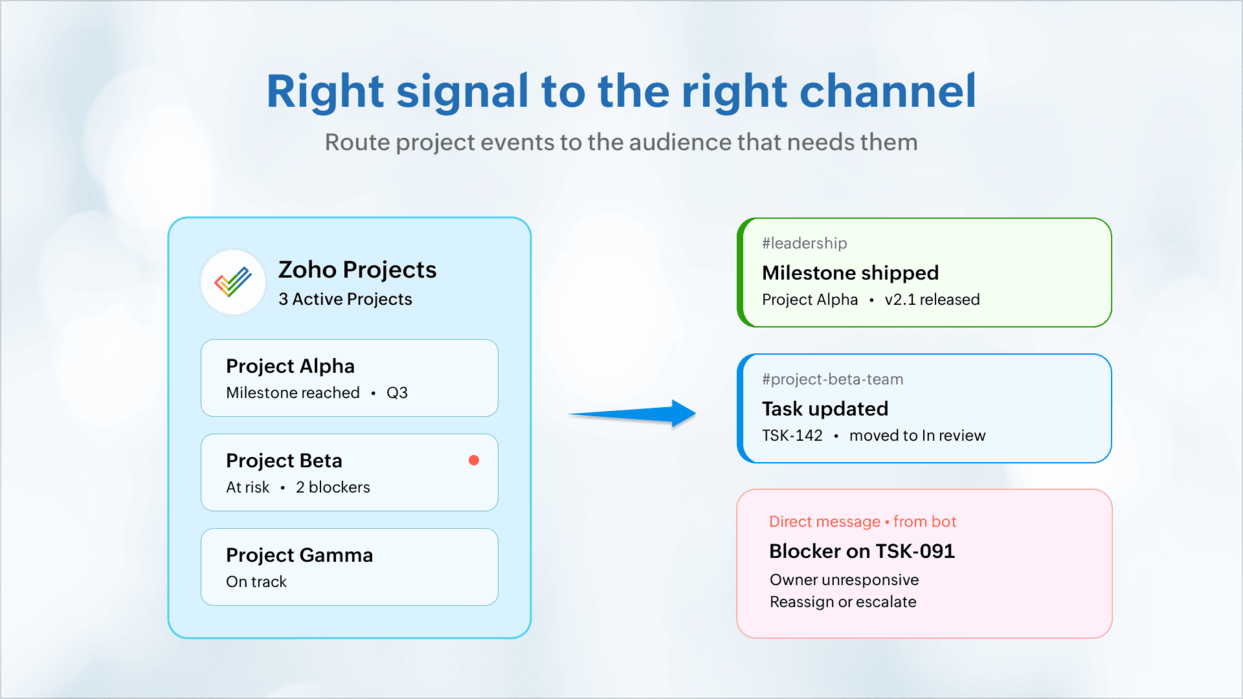
Project activity is logged inside modules. But the real work happens inside everyday exchanges and in keeping relevant stakeholders informed. Post periodic digests or milestone completions to leadership on channels, and blockers on individual DMs. Group chats can handle tasks, issues, or related discussions separately. Bots can send DMs for critical bugs, milestone slips, and blocked tasks. This way, everyone is kept in the know.
Meeting-free teams
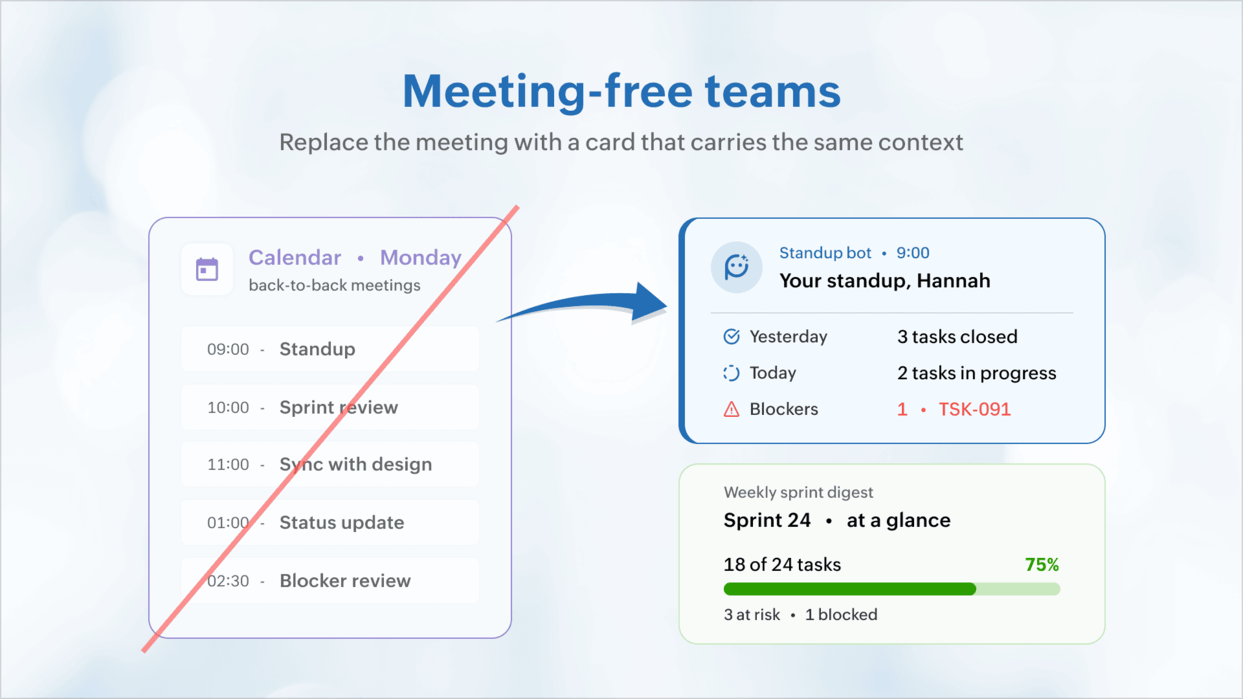
Save your teams hours of precious time lost in meetings. Use a personalized stand-up card and schedule it to know what's on your plate rather than get on meetings that stretch forever. A carefully designed message card summing up the week's tasks or sprint schedule can provide more context than an hour of a team stand-up.
No promises made in the air
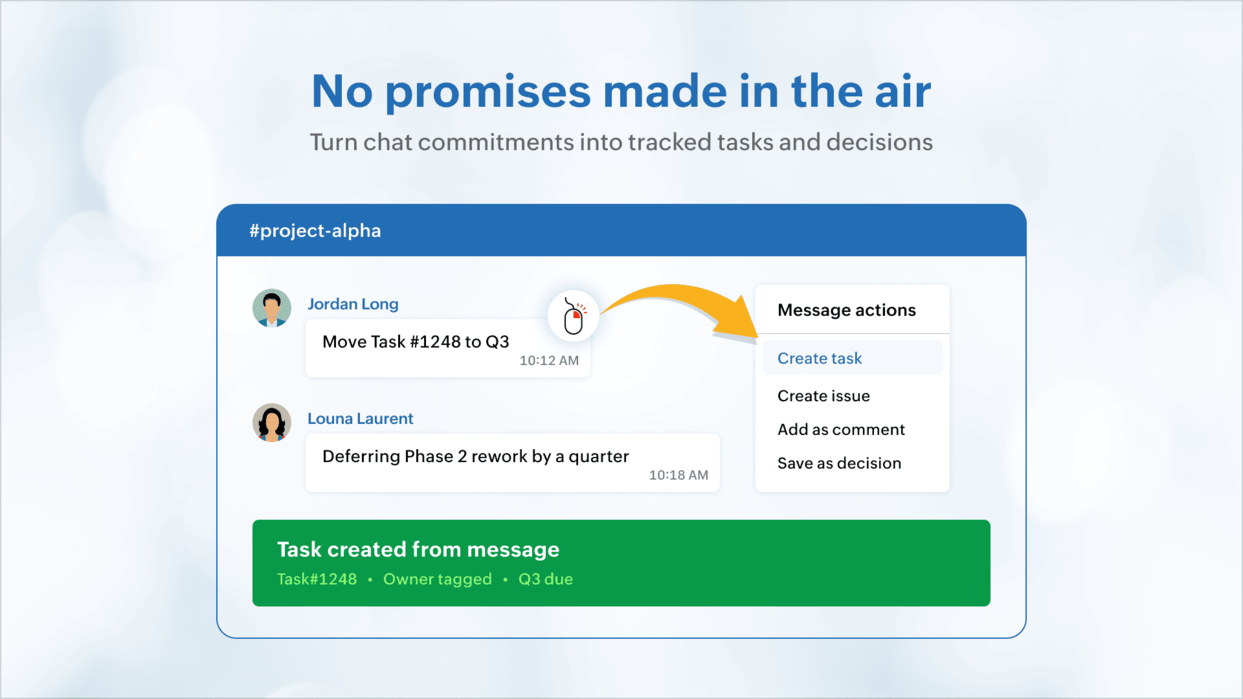
Most ideas, commitments, suggestions, updates are shared loosely over chat and are handled based on verbal affirmations. With Zoho Cliq, users can convert chats into work items, share design feedback, add bug triage as issues, and record the discussions around them too. Tasks now have complete context and managers do not need intensive follow-ups.
Activate reviews and approvals
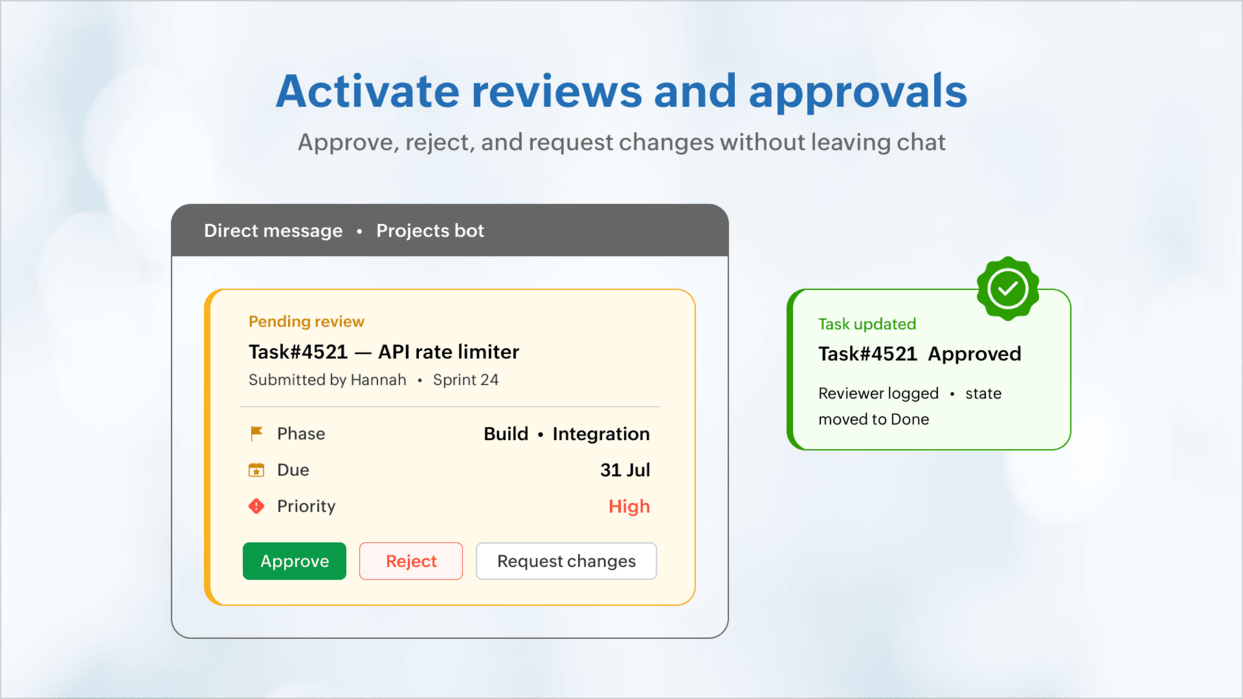
While project managers grapple with ensuring reviews and approvals happen on time, they miss the time lost silently during waiting.
The reviewer is unaware of the submission until they open their task lists. And the author does not know when their review is complete. Message cards with the item details like status, the sprint or phase it is part of, the due date, and other relevant details can be sent over DMs to approvers.
The message cards can feature buttons inline to approve or reject or request changes. You can facilitate task updates, approve time-logs, and much more with a single click–all inside Zoho Cliq.
Cross-project dependencies
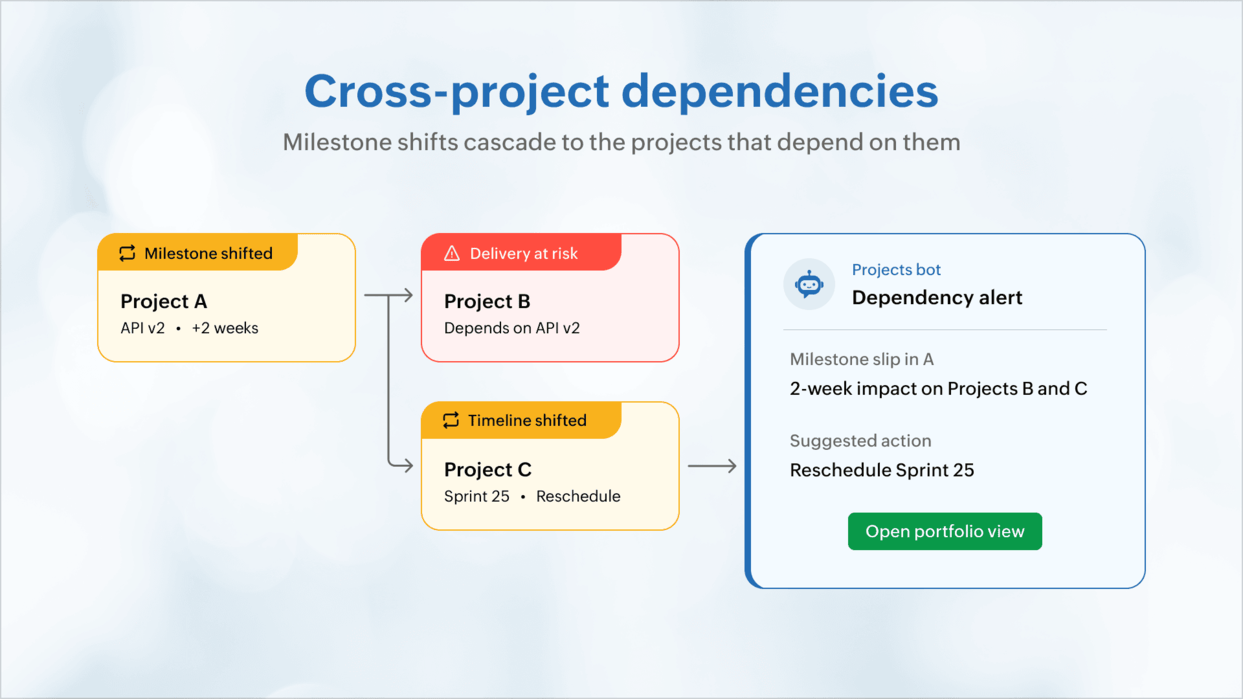
Milestone slips in one project can cascade on to others. Teams working on their items might find out about the extension from a customer or a status meeting after it happens. A Cliq bot can pre-emptively listen across projects, and inform dependent teams about prospective delays the moment things shift. This can make project portfolio delivery proactive instead of reactive.
All you have to do is ask
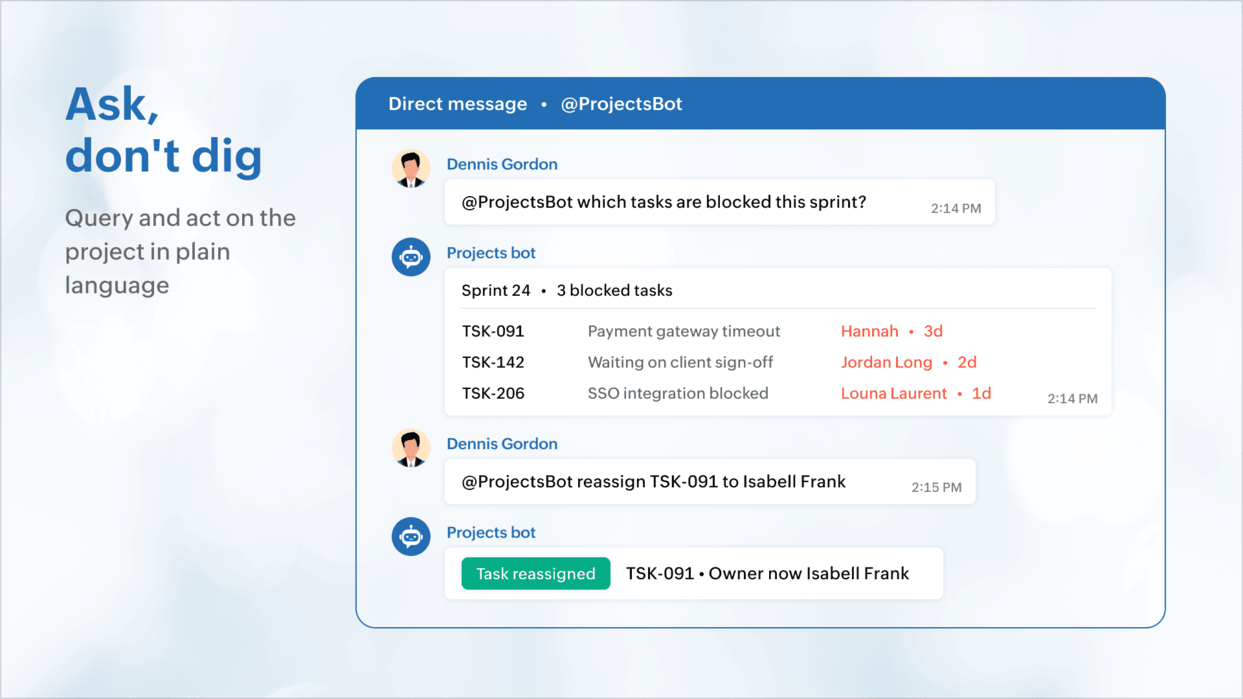
Zoho Cliq has a chat interface that can facilitate project-related exchanges. All you have to do is wire your favourite LLM or Zoho Projects MCP and simply ask in natural language like "What tasks are blocked for this sprint?" or "What's the capacity for the next week?" — and get a response inline. The chat window we're so used to seeing display alerts also queries the project on your bidding.
Pro tip: Zoho Cliq has bots that can orchestrate notifications and streamline decision-making for IT services, or software delivery teams running concurrent projects. /slash commands can highlight project blockers, show timesheets pending approval, tasks or reviews that need approval, and also effect changes with the click of a button. Zoho Cliq can help you achieve all these through voice commands or natural language processing capabilities.The Zoho Projects-Zoho Cliq integration
The
Zoho Projects integration for Zoho Cliq lets you map channels to projects, create tasks and issues from any message, receive notifications for the events that matter, and use the Projects Bot to stay ahead of deadlines. Beyond the defaults, the Cliq platform offers slash commands, bots, message cards, schedulers, webhooks, etc. to model the exact flow your delivery team runs on.
Let us know if you're interested in knowing more. If you'd like to work with one of our partners, write to us at
support@zohoprojects.com and we'll take it forward for you.
Check out our previous editions:
#4 Bridging the gap between support and project delivery#3 Powering up Zoho CRM and project intelligence#2 Build an approval management system with custom modules#1 Effective project and task customization with CodeXBest,
Zoho Projects Team
Recent Topics
All new Address Field in Zoho CRM: maintain structured and accurate address inputs
Availability Update: 29 September 2025: It's currently available for all new sign-ups and for existing Zoho CRM orgs which are in the Professional edition exclusively for IN DC users. 2 March 2026: Available to users in all DCs except US and EU DC. 24
Zoho books and venmo
Hi, Is there a way to hook Venmo into zoho books? I have a Venmo business account and want to be able to sync that. I know you can do it with the paypal integration but I dont want to use paypal for the fees and that doesnt allow me use/integrate my current
Updating Unit Code for New Item Creation, Quote and Invoicing is so inconvenient
The Zoho Team has implemented many updates, but these updates should be optional. Before rolling out any new feature, they should already have a solution in place that allows users to remove or disable it if they choose not to use it. Just yesterday,
Cliq iOS can't see shared screen
Hello, I had this morning a video call with a colleague. She is using Cliq Desktop MacOS and wanted to share her screen with me. I'm on iPad. I noticed, while she shared her screen, I could only see her video, but not the shared screen... Does Cliq iOS is able to display shared screen, or is it somewhere else to be found ? Regards
Payroll needs to automatically remit taxes, not just give me the calculations
Wagepoint, PayEvo, Waveapps, etc... All your competitors deposit employee payroll, but they ALSO remit taxes automatically. Get with the program, your Payroll app is extremely sparse.
Creating new Teams meeting from CRM doesn't enable Team functions in the meeting
Hi I'm trying to set up the meeting integration and I've seen that when I create a Meeting in the CRM and set the location to Online and the Provider to Teams, and complete the boxes, add a participant etc, whilst the meeting is created in Teams, the
Approval Process configuration is now more flexible and fully customizable
The Approval Process is back with an improved user experience designed to make it easier to build structured, flexible, and intuitive approval workflows. Here’s a look at some of the key enhancements: Name Your Rules & Stages You can now give each approval
👍 Zoho CRM's Notes now gets Reactions and a new look
Available in SA and JP DCs. Rolling out to other DCs in phases. Hello everyone, Notes help users capture important updates, collaborate with teammates, and maintain context for records. Now with Note Reactions, users can quickly acknowledge updates, express
Admin Logging in as another User
How can a Super Admin login as another user. For example, I have a sales rep that is having issues with their Accounts and I want to view their Zoho Account with out having to do a GTM and sharing screens. Latest Update (27th April 2026): With the early
Introducing Approval SLA for Approval Processes
Approvals can sometimes be delayed when approvers do not respond within the expected timeframe, which can slow down your recruitment processes. With the new Approval SLA in Zoho Recruit, you can set deadlines for approval requests and define automated
Introducing Microsoft Word Integration in Zoho Contracts
We are excited to announce a new feature that brings contract authoring and negotiation in your familiar environment — the Microsoft Word Integration. What This Integration Brings The Microsoft Word Integration connects Zoho Contracts with the Microsoft
Map My Client Locations for Zoho CRM Extension: Turn CRM Addresses Into Action
Hello everyone, Your CRM knows who your customers are. Now, see where they are on the interactive map directly from Zoho CRM. Introducing Map My Client Locations for Zoho CRM, an extension built for businesses that rely on sales visits, field service,
Scheduled and Automated Report Delivery from Zoho Projects
Zoho Projects has useful reports including task reports, timesheet summaries, and workload charts. However, there is currently no way to schedule these reports to be automatically delivered to stakeholders on a recurring basis. This means: Project managers
How can I filter inactive/disable agent tickets?
Hello, We have an user-agent that left the company and we inactive/disabled his agent. So, now I can no longer filter or search tickets that he is the current owner, or even create a rule to reassign tickets to another person when the ticket is reopen.
Add Reauthentication Option for Zoho Bug Tracker Integration in Zoho Desk
Hello Zoho Desk Team, We hope you're doing well. We would like to request an enhancement to the Zoho Bug Tracker integration within Zoho Desk. Current Limitation: At the moment, there is no option to reauthenticate the Zoho Bug Tracker integration in
Dashboards for Customers
Is it possible to build dashboards for each customers in the community for their tickets?
Collaborate Visually with Whiteboard in Zoho Projects
Whiteboard in Zoho Projects allows you to collaborate visually by creating diagrams, annotating designs, and sketching project workflows using shapes, text, and images within project modules. Team members can work simultaneously, improving productivity
Fields in MS-Word Template
With the new MS-Word integration, how does one create fields in an imported MS-Word document which can then automatically be populated with an Intake Form?
Displaying only unread tickets in ticket view
Hello, I was wondering if someone might be able to help me with this one. We use filters to display our ticket list, typically using a saved filter which displays the tickets which are overdue or due today. What I'd really like is another filter that
Zoho Bookings Flow Step not Triggering on Appointment booked
I noticed yesterday that my appointment booked flows were not triggering when we had booked appointments in Zoho Bookings. I checked the trigger and noticed the trigger values updated to be defined to a workspace and service event rather than our whole
UCP: Why We Killed the Multi-Portal Mess and Simplified Customer Self-Service
Let's talk about the multi-portal mess nobody wants to admit that it exists. Your customer needs an invoice from one app, wants a ticket update from another, and has a project waiting in a third, each behind its own login, its own UI, its own "was it
Zoho Tables is now available in Zoho One!
Hello Zoho One users, We’re excited to announce that Zoho Tables is now included as a part of Zoho One suite! As teams grow, managing projects, approvals, inventories, campaign trackers, and operational workflows across multiple spreadsheets become difficult.
Zoho Publish is now available in Zoho One!
Hello Zoho One users, We’re excited to announce that Zoho Publish is now included as part of the Zoho One suite! As businesses grow, managing Google Business Profiles across many locations becomes challenging. Business information needs to stay accurate,
📣 Ask the team behind Zoho SalesIQ: Summer '26 Q&A
Hi everyone! Following our recent webinars, Summer '26 Release: What's New in Zoho SalesIQ—where we walked you through all the new features, what they do, and how they work—and Driving the AI Evolution: Building Smarter Customer Experiences with Zoho
Virtual Option for Fields
Hi, I would like to be able to choose another option other than Read-Only or Disabled, such as Virtual. And with Virtual, the field is shown on the form and avilable in rules, but NOT saved to the Database. A use case is having multiple Large Lists of
Upcoming update to field values in Zoho Books - Zoho Analytics integration
Hello Users, We'd like to inform you of an upcoming update to the tax_category values in the Zoho Books integration for Zoho Analytics from October 20, 2026. What's Changing? tax_category field values are being renamed to align with the conventions already
Prefix & Suffix on Single Line, Number, etc.
Hi, I would like to have the same Prefix and Suffix that was added to the Unique ID on Text and Number Fields. Use case could be as basic as temperature, as per another Idea I have to use Single Line (Text) for a number that might have leading zeros today,
Announcing the new SKILL.md for Zoho CRM and the updated OAS repository!
We are introducing a new zoho-crm skill to make working with Zoho CRM Developer tools (like APIs, functions, widgets, client scripts, queries etc) easier and faster, with the help of AI in your preferred AI harness like Claude Code, Codex, Cursor, VSCode
Handle Leading Zeros in a Number Field
Hi, If I use a Number Field, set with Min 7 Digits and Max 7 Digits, and enter 0000001, it will result in 1 and an error as it removes the leading zeros, the same with entering 0012340 will result in 12340 and error. So I have to use a Text Field and
Kaizen #259 - Working with Zoho CRM APIs using zoho-crm skill
In the previous Kaizen, we introduced the zoho-crm skill and discussed how it can work with different CRM developer capabilities. The zoho-crm skill makes it easier to work with Zoho CRM without having to remember every API endpoint, request structure,
How can I populate dropdown data with information from another source or app?
I want to maintain a list of items in another app (say in excel or another database) and sync those as items in a drop down menu, instead of copy pasting to import. Is this kind of a feature available?
Zoho Community Digest - September 2026 | Part 1
Hi everyone, and welcome back! September opens with a strong set of updates. Zoho CRM brings workflow automation down to the subform row level and ships a new SKILL.md for AI-assisted development, Zoho Desk introduces conditional branching with Automation
Tip #88 – Manage Incoming Support Requests Efficiently with the Service Queue – 'Insider Insights'
Hello Zoho Assist Community! Not every team has a dedicated IT department or a fully built-out sysadmin setup. For smaller teams, when something breaks, there's no internal ticket system to log into, no helpdesk queue to route through, and no clear way
Delete CRM Portal
How do I delete portals from my CRM? I created one just to test, it is not in use and is disabled but it's existence is preventing me from marking fields in modules as "required" unless I make it 'read/write' in the portal first. I'd rather just delete
Zoho Books | Product updates | July 2026
Hello users, We’re excited to bring you the latest updates in Zoho Books for July 2026! This month's release introduces Terminal Payments, CMP-08 filing for composition taxpayers, SEPA Credit Transfer support, and Self-Billed Credit Notes and Debit Notes
Calendar invites from Contacts not being assigned to Account in CRM
Hi all It's that time of year again when I try to get calendar and meetings sorted in CRM. I have two way sync enabled. I have the option set to check for customer meeting invitation mail and to add them as meetings. However, whilst those meetings show
Kaizen #258 - Getting Started with zoho-crm SKILL.md
Howdy tech wizards, Welcome to a fresh week of Kaizen. This week, we are taking a look at the zoho-crm SKILL.md, an Agent Skill designed to help AI coding agents work with Zoho CRM’s developer capabilities. What is zoho-crm SKILL.md? The zoho-crm skill
Zoho Tables is now live in Australia & New Zealand!
Hey everyone! We’ve got some great news to share — Zoho Tables is now officially available in the Australian Data Center serving users across Australia and New Zealand regions! Yes, it took us a bit longer to get here, but this version of Zoho Tables
Dashboard/Component filter by probability
Hi all Can I request the ability to add a Component or Dashboard filter for Deal Probability? Would be useful to be able to see data of deals more than 60% probable. Olly
Stock (on-hand) Items not updated after using Composite items
Hi there, I created a Composite item (consist of 3 items). After I created the Composite item, I invoiced it and shipped the items. However the actual stock on hand of the 3items didn't change at all. Have you guys encountered this? Thank you Regards,
Next Page