Building extensions #1: Creating and testing extensions for Zoho Finance Suite applications
Hello developers!
We're excited to announce a new series called "Building extensions" to assist developers in creating efficient extensions for Zoho Finance Suite products. We'll support and guide you through the process of creating an extension and using the features offered in the developer portal.
What are extensions?
Extensions are installable plugins or add-ons that help enhance the existing functionality of your Zoho product or seamlessly integrate and interact with third-party applications for data transmission.
How can you build extensions?
Zoho offers a developer platform called Zoho Developer that allows you to build different types of applications. Sigma is a platform offered within Zoho Developer that is specifically designed for creating extensions for various Zoho products. Throughout this series, we'll look at how to create and develop extensions for the Zoho Finance Suite applications using Sigma.
Get to know all about extensions and building them further in detail.
Sigma extension support
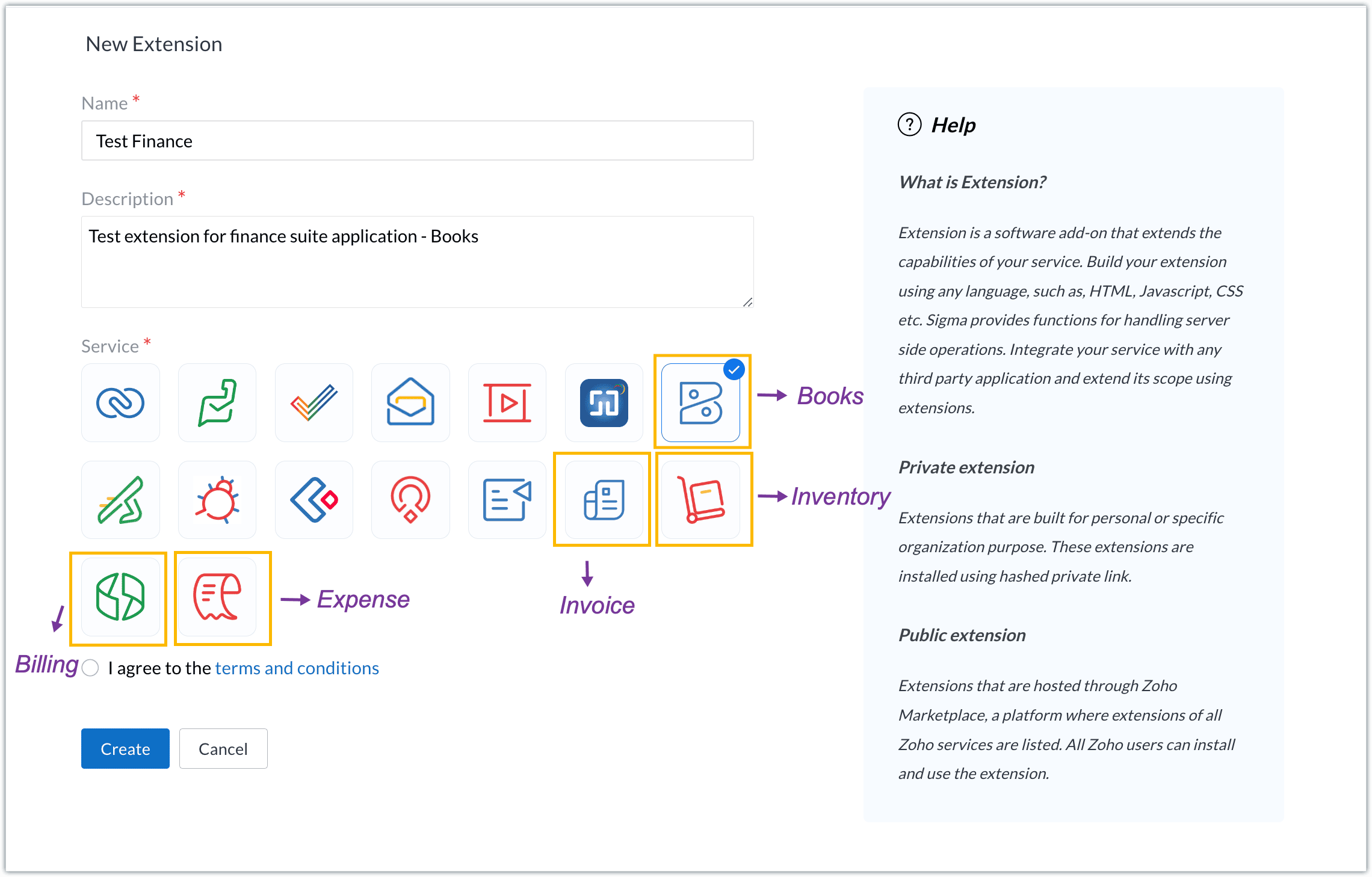
The Zoho Finance Suite consists of seven applications: Zoho Books, Zoho Inventory, Zoho Expense, Zoho Invoice, Zoho Billing, Zoho Checkout, and Zoho Payroll. Currently, the Sigma platform supports creating and building extensions for these five Zoho Finance applications:
- Zoho Books
- Zoho Inventory
- Zoho Expense
- Zoho Invoice
- Zoho Billing
Creating an extension
- Log in or sign up at developer.zoho.com.
- Go to Sigma and access your workspace.
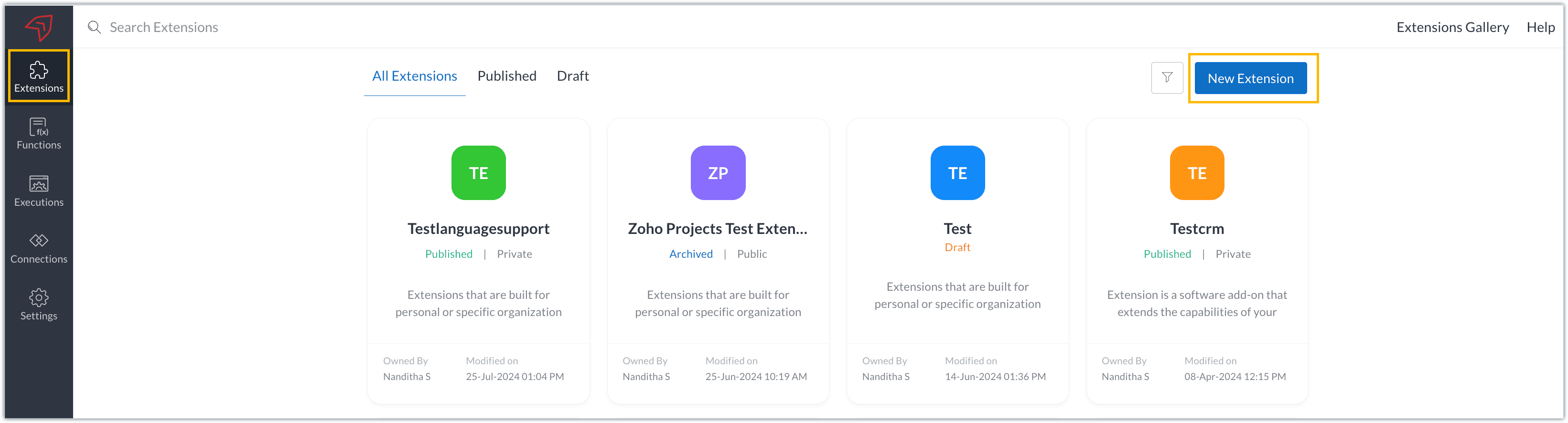
- Once you enter your workspace, you'll be taken to the Extensions section in Sigma.
- Click the New Extension button to start building an extension.
- Enter a name and description for the extension and choose the service you want to build the extension for. As mentioned earlier, Sigma offers support for Zoho Books, Zoho Invoice, Zoho Inventory, Zoho Billing, and Zoho Expense.
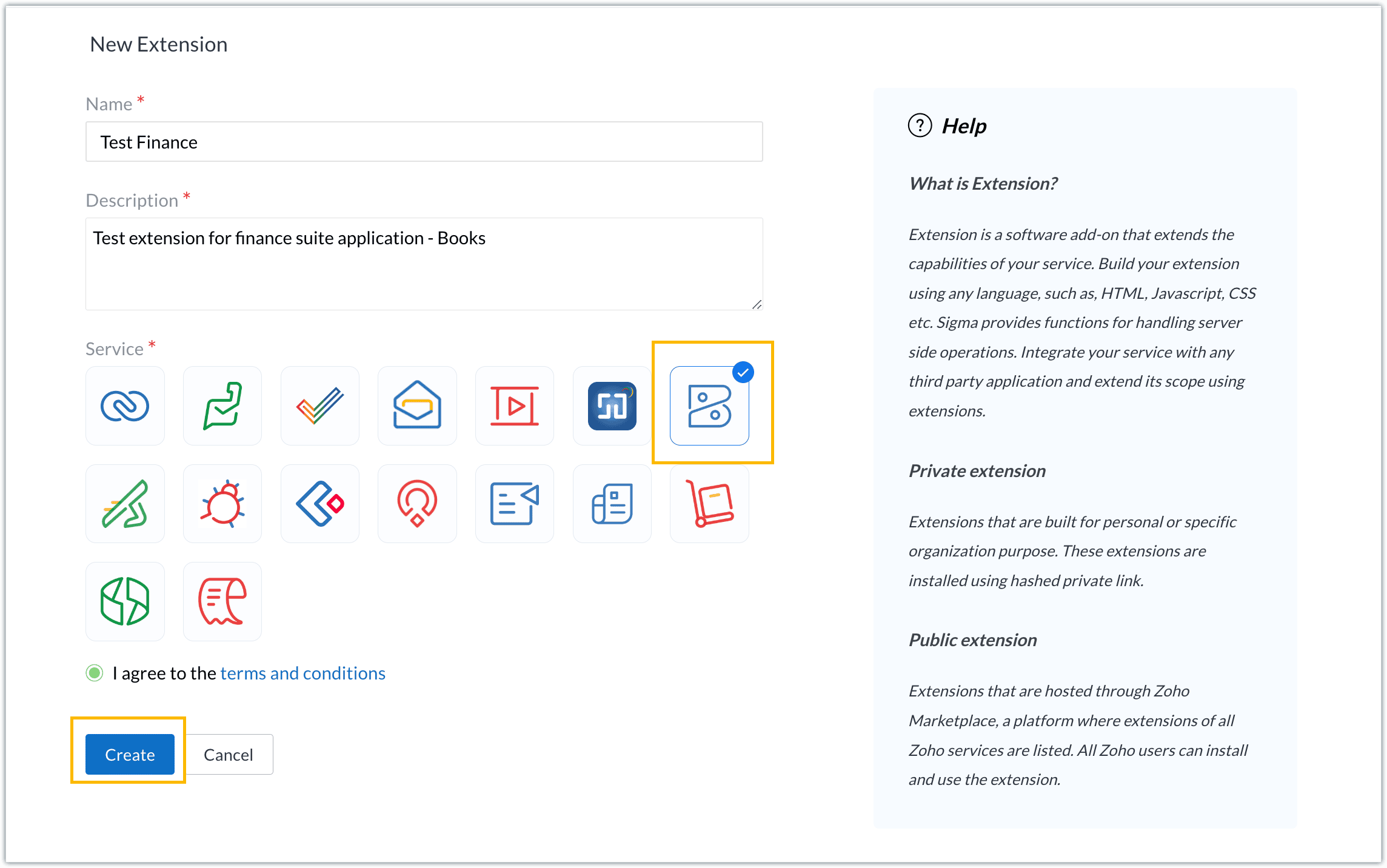
- For our demo, let's choose the service as Zoho Books. Accept the terms and conditions, and then click Create.
- The extension is successfully created. You can click the Extension Details icon to see an overview of the extension.
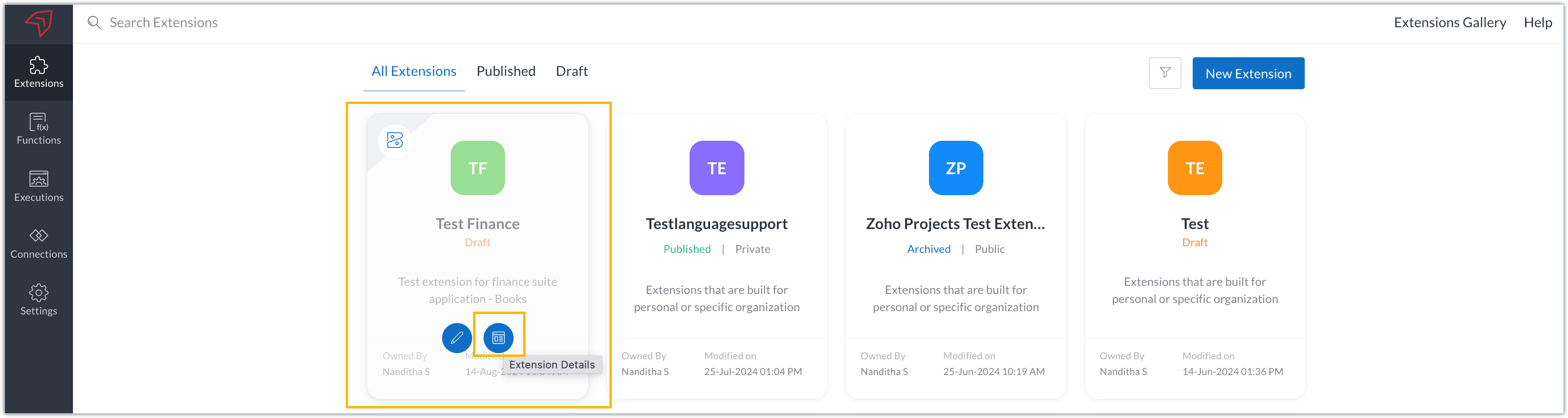
The extension details page shows the general details of the extension, such as creation date, creation time, and version, and allows you to associate developers with the extension.
- Click the Edit Extension icon to start developing the extension.
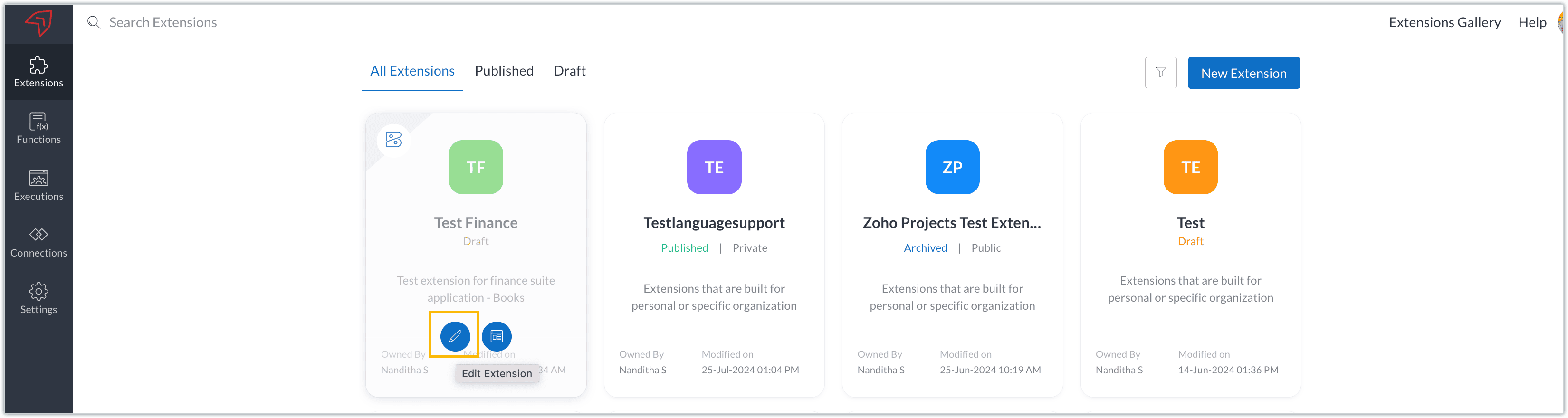
- The Zoho Books Developer Portal opens with the options and native features available to customize, curate, and develop your extension.
Zoho Books Developer Portal sections
The developer portal has four different sections to help customize and build your extension.
Learn: This section lists the native Zoho Books capabilities that can be used to create and develop extensions. Clicking the Set up Now button next to each feature will take you to the feature's development setup page.

Build: This is the development setup section, which includes customization, automation, and components like connections, widgets, schedules, webhooks, and signals. You can customize your extension preferences, establish connections to integrate with other applications, and design custom interfaces to enhance user experience.

Configure: This section assists with handling your extension's required configurations, whether they are generic settings or customizations required from the user. You can add global fields, which can be incorporated as either variables that store static data or through custom widgets that retrieve user inputs. You can also define functionalities that happen during installation and uninstallation.

Publish: Once the extension has been built and configured, you can use this section to publish it for either private or public use. In both cases, the Zoho Books team will review the extension; for public extensions listed on Zoho Marketplace, the Zoho Marketplace approval team will also review them. You can share your privately published extension with other users using the Shared List option.

We will explore more about each of these sections and their features in upcoming posts.
Testing an extension
The Zoho Books Developer Portal offers a dedicated testing environment for each extension, allowing you to test and validate it before publishing.
As a developer, you can use the Test Your Extension option in the top right corner of the portal to access your extension's sandbox environment.

This will redirect you to the sandbox testing environment for the extension you're developing, which is similar to Zoho Books and contains relevant modules to test with.

You can populate necessary data and test your extension functionality. Once everything is validated, you can go ahead and publish your extension for private or public use.
For support or questions related to Zoho Finance Suite extension development, you can email developer@zohofinance.com.
We hope you found this guide useful. Keep following this space for more information!
Topic Participants
Nanditha Somasundaram Somasundaram
Sticky Posts
Building extensions #5: Creating custom connections for extensions
In our previous post, we discussed the significance of connections, identified their types, developed a predefined connection, and demonstrated how it can be integrated with Zoho Books using an example. In this post, we'll walk through the process ofBuilding extensions #4: Integrating Zoho Books with applications using connections
In our last post, we looked at an overview of the key features available for creating a Zoho Books extension, including connections. In this post, we'll go over connections in depth, including their types and applications. What are connections? "Connections"Building extensions #3: Fundamental features of a Zoho Books extension
In our earlier posts, we covered how to create, test, and publish an extension for Zoho Finance suite applications. Moving forward, we'll look specifically at instances relating to one of the products from the Zoho Finance suite: Zoho Books. In this post,Building extensions #2: Publishing an extension
Hello developers, Welcome to our next post about building extensions for Zoho Finance Suite applications. In our previous post, we looked at extensions, their purpose, and how to create and test them. To recap, extensions are installable plugins or add-onsBuilding extensions #1: Creating and testing extensions for Zoho Finance Suite applications
Hello developers! We're excited to announce a new series called "Building extensions" to assist developers in creating efficient extensions for Zoho Finance Suite products. We'll support and guide you through the process of creating an extension and using
Recent Topics
Power of Automation : Enhancing custom date field calculations by excluding Weekends and Holidays
Hello Everyone, A Custom function is a user-written set of code to achieve a specific requirement. Set the required conditions needed as when to trigger using the Workflow rules (be it Tasks / Project) and associate the custom function to it. Requirement:portal.assignUserInProfile - Não esta adicionando
Estou encontrando problema com este comando portal.assignUserInProfile Não esta incluindo o usuário no portal Alguém pode me dizer o que pode ser thisapp.portal.assignUserInProfile("teste@gmail.com","Customer");CRM emails vs Campaigns
Please help me understand this. I am having a difficult understanding of "Campaigns" sent through CRM (real emails) or Zoho One (blast "potentially junk" emails) This is what I currently think emails sent via CRM are "real" emails sent through linked real personal email accounts and therefore are more likely to get delivered. We use this for critical updates for our "Approved " accounts and certain other preferred statuses emails via Campaigns are sent through the Zoho server (like MailChimp, CampaignReverse proxy
We have a web application in the creator platform. When I launch a particular DNS, I would like that DNS to redirect to the web page of the application in creator app. Has anyone achieved it and if yes, please share how to do it.Still client need to download .exe?
Hello, the client for use zoho assist need everytime download .exe file and launch it?Splitting a ticket's entire thread
Hi, When you split a ticket it only splits the individual reply that you clicked "Split as new ticket" on. Is it not possible to split the entire ticket thread from that point into the new ticket (every reply from the split point forward)? Or is thereEditing the text on the Help Center home page
Is it possible to edit the "Welcome to Help Center" message anywhere? This one: We'd like to be able to tailor it a little more ourselves.WHMCS for Zoho Flow
Can we use WHMCS for Zoho flow?Online meetings through Calendar Booking form with options
This is great to see and particularly for those users who don't have Zoho BOOKINGS. The shame of it all though is that it could have been better. Why do we have to set up separate booking forms for each type of meeting and for each online conferencingAgents permission per department
Hi Team, can I setup permission for each agent what they can do in each department, for example I want account department agents to only have view access to support department tickets and not allowed to assign or reply to clients. I am sure this wouldAlternative / optional Position
How do you create an alternative position or an optional position (article) in offers?جمود في الصفحة عند حفظ عمل
عندما اقوم باضافة ايقونة الى صفحة النموذج تجمد الصفحة ولا تعمل وتصبح مثل المظلة احدث الصفحة لا تعمل انتظر قليلا لا تعمل اقوم بنسخ رابط الصفحة والصقه في الرابط فيعملZOHO Books Canadian payroll Integration
Hello, I know ZOHO books doesn't have Canadian payroll and I dont believe its coming anytime soon. My question is there a Canadian payroll software that could be integrated with Zoho Books? Thank you HDZoho Desk Time Tracking and the Salary Privacy Issue
Hello colleagues, Just wondering if anyone did hit the same wall? In the Desk, when the agent-specific hourly rates are enabled (Zoho Desk → Setup → Time Tracking → Billing Preferences), these Time Entries are being displayed in the Ticket History tab.How to Delete, Disable, or Remove Streams from the Mail App?
Is there a way to remove Streams from the mail app sidebar? I get too many notifications, it doesn't add any value to Zoho's functionality (especially since you can just make comments inside an email), and is distracting. I do not want notifications/alertsDelay in MX updates
Hi, I set MX Records 12 hours ago, and I am receiving email normally, but I still get notification MX record is not pointing correctly. Error: The MX records of your domain is not yet pointed to Zoho Mail. Why there is a delay in detecting MX records,make.com integration
Just wondering if anyone on Zoho One account connecting apps to Make.com We're on Canadian server (.com) and when connecting to Make.com, it keeps having error of Invalid Client ID. I have contacted both Zoho and Make and both sides said it's not an errorArticle Numbers for KB articles
Hello, I was wondering if it's possible to turn on article numbers/ part numbering for KB articles. If this is not already a feature, we'd like to request it. Frequently a solution will require multiple articles so tracking which articles are referencedRefund Request ,Zoho Mail Subscription (zoho suport is not replying)
Hi Zoho Team, I recently subscribed to the Zoho Mail yearly plan, but after evaluating it, I found that the interface does not suit my workflow. I’ve already canceled the subscription from my end. As I’m well within your 30-day refund window, I’m requestingFile Encryption - Zoho Desk iOS app update
Hello, Everyone! We have now introduced the 'File Encryption' option within the Zoho Desk app as part of the HIPAA Compliance. This option allows the user to encrypt the attachments within the Desk mobile app, which acts as an additional layer of security.Data encryption - Zoho Desk iOS
Hello, Everyone! In the recent iOS version(v2.8.23) of the Zoho Desk app, we have supported data encryption. As a part of HIPAA Compliance, the Zoho Desk mobile app now allow users to encrypt the Desk mobile database as an additional layer of security.Notify Admin when a user forgets to check-in or check-out at the designated time.
Hello, I would like notify the Admin via email when a user forgets to check-in or check-out at the designated time. What is the best way to setup this email notification?Assistance Needed with Prospect Conversion Issue
Hi, I attempted to convert a prospect to an account, but received a pop-up notification indicating that the contact information matches an existing contact. I selected the option to add it to the existing contact, but it appears the prospect was not successfullyMail Merge - unable to send more than 50 email
Hi, I've subscribed to the pay email service because of the Mail Merge feature. However, I've found that this feature only allow to send up to 50 emails. I've to attach a screenshot for your reference. This limitation is not mentioned anywhere in service.Zoholics Europe 2025: Your Ultimate Data Analysis (Zoho Analytics) Workshop Experience
Why should you attend? This year, Zoholics Europe 2025 is putting data analysis centre stage. With a dedicated workshop designed to answer all your data-related questions, you’ll gain practical skills, real-time solutions, and expert insights that youReverse Charge Services (Non-EU) Showing Correctly in 84/85 and 67, But Missing in Box 46 - Germany
Hi, I'm located in Germany and I’ve set up my expenses for non-EU services (e.g., OpenAI, DeepSeek) under the reverse charge mechanism (§ 13b UStG) in Zoho Books, and I noticed some discrepancies in the VAT Summary Report. What’s Correct: Reverse ChargeZoho Live Chat/Support
What is going on with Zoho support lately? I've tried to use the live chat feature 4 different times and it refuses to connect to any (despite waiting over 30 minutes one of the tries). I finally gave up and emailed my question nearly a week ago and stillCan we have a module to records Certificate No and TDS rates for Lower TDS Certificates by the vendors ?
Can we have a module to records Certificate No and TDS rates for Lower TDS Certificates by the vendors ?Tip #38- Track Organizational Changes: A Guide to Using Action Log Viewer- 'Insider Insights'
Hello Zoho Assist Community! Ever needed to trace who did what and when within your remote support operations? Let’s say your support team is growing, and you want to monitor key activities like settings updates, user invites, module changes, or permissionAnswer Bot - Issues with language recognization
When a user enters the phrase "gift vouchers" into the chatbot as their first message, the bot responds in French, even though: The default bot language is set to English The user's browser language settings are set to English All translate settings inTip of the Week #67– Avoid confusion – Mark duplicate threads.
When customers send the same message to multiple email addresses, such as support@ and sales@, your team may end up seeing the same message in different inboxes. This creates confusion, risks double replies, and clutters your workspace. Use the Mark asFinal Reminder: Discontinuation of Older ASAP Widgets and Mobile SDK Support
We launched the new ASAP Help Widget last year, introducing a unified and enhanced experience. Since then, older configurations have been placed in read-only mode, with all major updates and improvements built exclusively on the new version. As part ofWebsite show Blank white screen
Customer called me to tell me my website is currently down upon review it shows a white screen however I can access everything via editor. JITCADCAM.comHow manufacturing analytics can transform your enterprise with Zoho Projects Plus
Did you know that every single car is made up of 30,000 to 40,000 individual parts? All of these are manufactured meticulously in various facilities before being assembled into one. The global manufacturing industry spans a wide range from deliveringCustomize your SalesIQ live chat with Custom CSS and blend it with your website design
Hi everyone. Hope you all are having a great day! SalesIQ offers various inbuilt customization choices for your chat widget and window like changes in colour, theme, font etc. Although these choices are many, sometimes they may not match with the designFrom Email Address When Replaying to Missed Chats
One of the most common things we do is follow up on every missed chat. Missed chats are like money in the bank, people just waiting for your response and to start a relationship with our companies. However, SalesIQ only lets you respond from 1 email address from your entire account?! We have happily paid for 4 subscriptions, but our users cannot reply from their own email address? How are we supposed to build customer relationships? The fix to this issue is so simple, just load in the logged inNarrative 6 - The impact of rebranding
Behind the scenes of a successful ticketing system - BTS Series Narrative 6 - The impact of rebranding Every organization has invested in branding to set itself apart, and that should be reflected in the help desk. Zoho Desk enables organizations to applycustom color palette for picklist in Sheet
Migrating over from Google Sheets and missing the ability to customize the individual item colors of my picklist/dropdown menus. Is this something that is possible? A search showed me creating a custom color palette in Analytics is possible but I am notWhat's New - July 2025 | Zoho Backstage
Start smart, end strong. From knowing who’s coming to celebrating who showed up, July’s updates help you run events that feel organized from the first invite to the final thank you. Planning an event used to be like writing a choose-your-own-adventureImage Upload Field API get encrypted ID and sequence number
Hello is there a way to extract the encrypted id and sequence number from image upload fields through the Zoho CRM API? I created a custom script with javascript within Zoho CRM, but I want to extract the encrypted id and sequence number for all my imagesNext Page