Building extensions #1: Creating and testing extensions for Zoho Finance Suite applications
Hello developers!
We're excited to announce a new series called "Building extensions" to assist developers in creating efficient extensions for Zoho Finance Suite products. We'll support and guide you through the process of creating an extension and using the features offered in the developer portal.
What are extensions?
Extensions are installable plugins or add-ons that help enhance the existing functionality of your Zoho product or seamlessly integrate and interact with third-party applications for data transmission.
How can you build extensions?
Zoho offers a developer platform called Zoho Developer that allows you to build different types of applications. Sigma is a platform offered within Zoho Developer that is specifically designed for creating extensions for various Zoho products. Throughout this series, we'll look at how to create and develop extensions for the Zoho Finance Suite applications using Sigma.
Get to know all about extensions and building them further in detail.
Sigma extension support
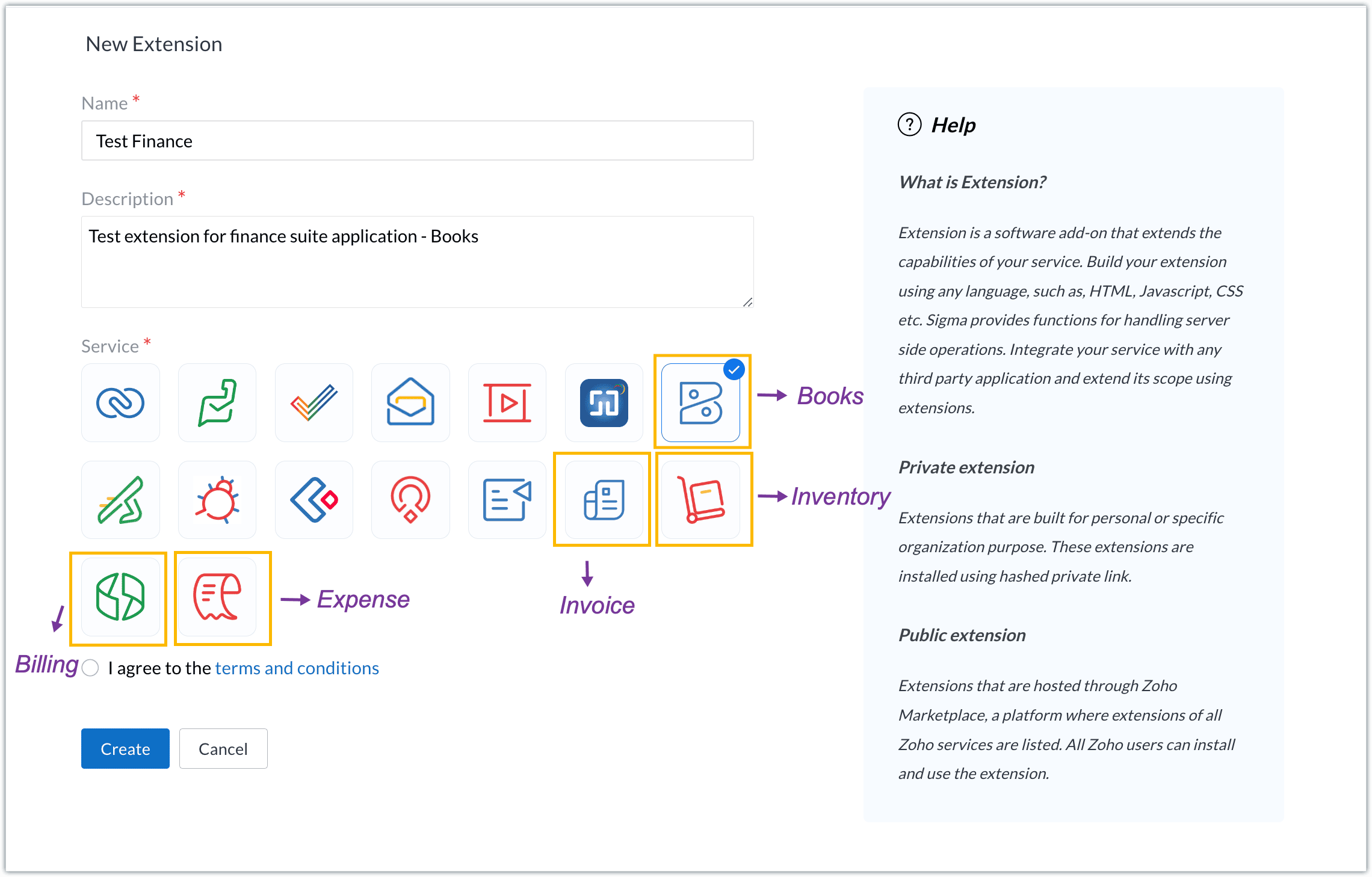
The Zoho Finance Suite consists of seven applications: Zoho Books, Zoho Inventory, Zoho Expense, Zoho Invoice, Zoho Billing, Zoho Checkout, and Zoho Payroll. Currently, the Sigma platform supports creating and building extensions for these five Zoho Finance applications:
- Zoho Books
- Zoho Inventory
- Zoho Expense
- Zoho Invoice
- Zoho Billing
Creating an extension
- Log in or sign up at developer.zoho.com.
- Go to Sigma and access your workspace.
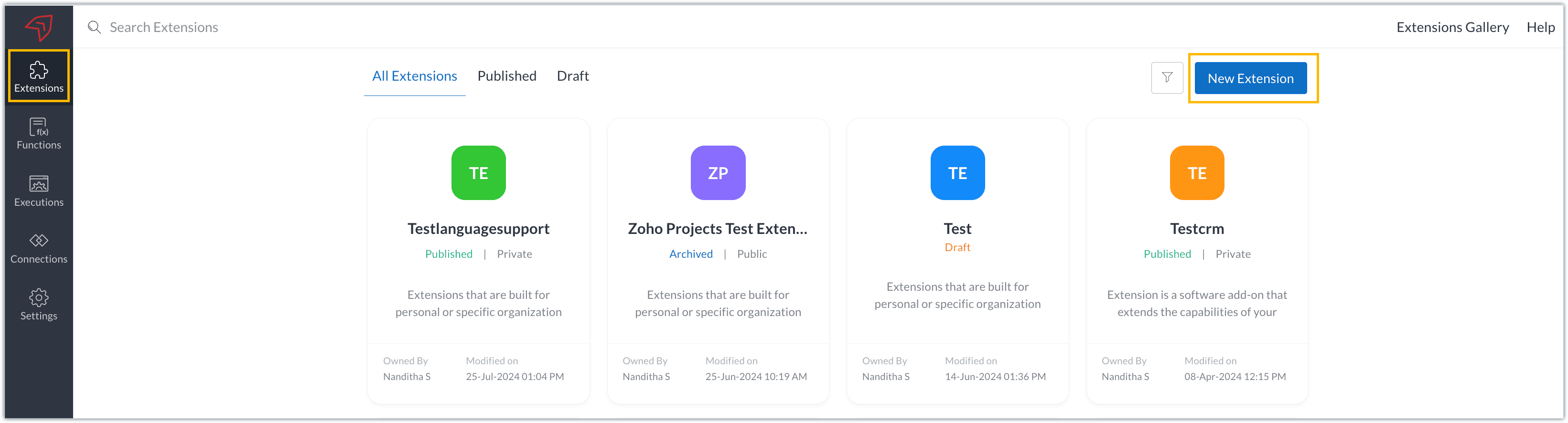
- Once you enter your workspace, you'll be taken to the Extensions section in Sigma.
- Click the New Extension button to start building an extension.
- Enter a name and description for the extension and choose the service you want to build the extension for. As mentioned earlier, Sigma offers support for Zoho Books, Zoho Invoice, Zoho Inventory, Zoho Billing, and Zoho Expense.
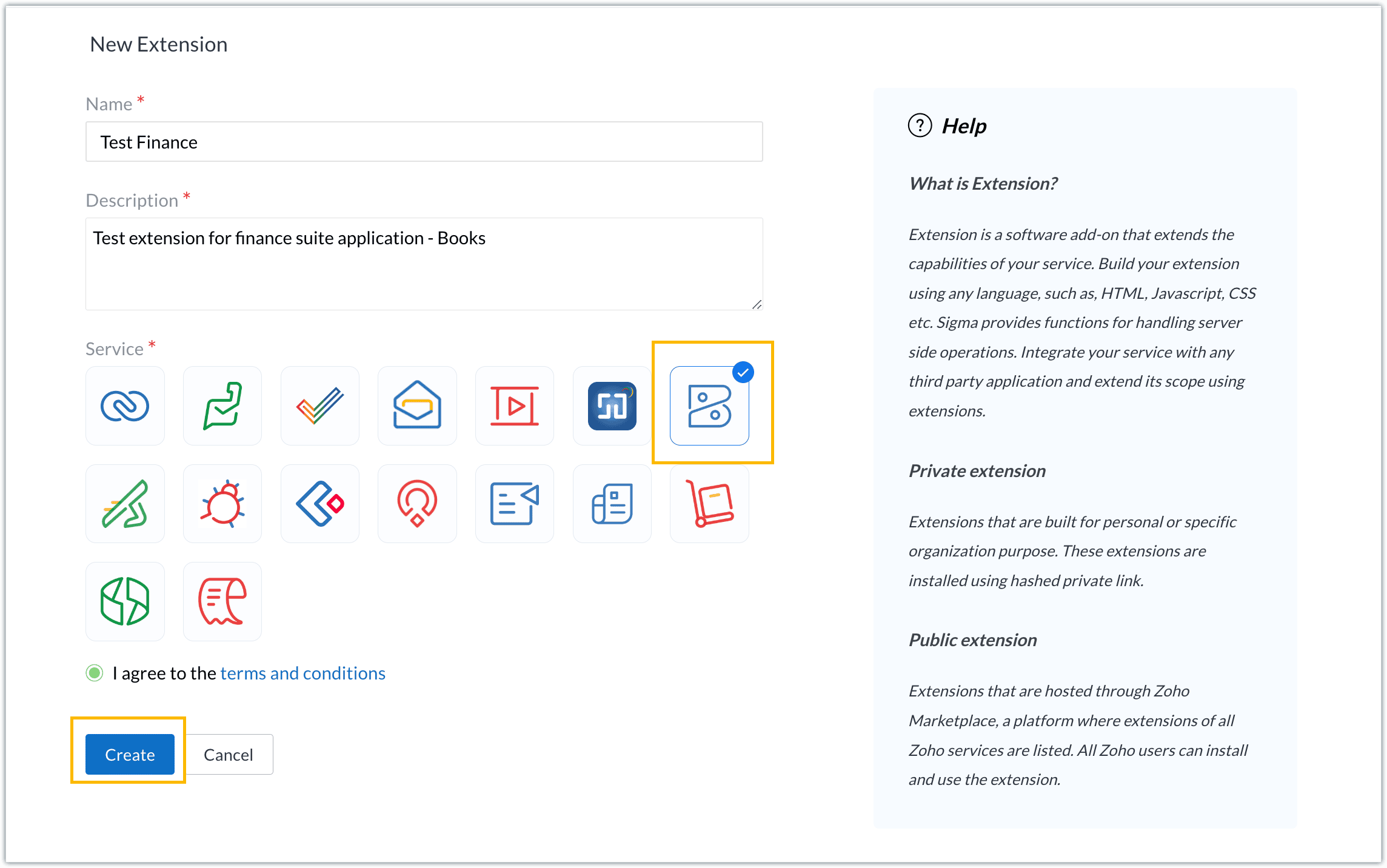
- For our demo, let's choose the service as Zoho Books. Accept the terms and conditions, and then click Create.
- The extension is successfully created. You can click the Extension Details icon to see an overview of the extension.
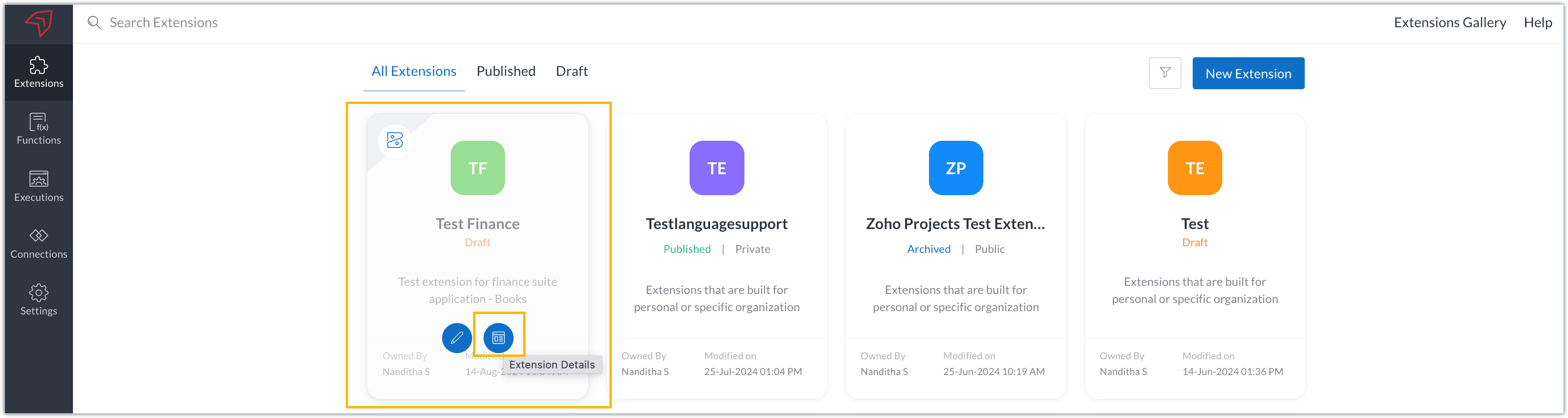
The extension details page shows the general details of the extension, such as creation date, creation time, and version, and allows you to associate developers with the extension.
- Click the Edit Extension icon to start developing the extension.
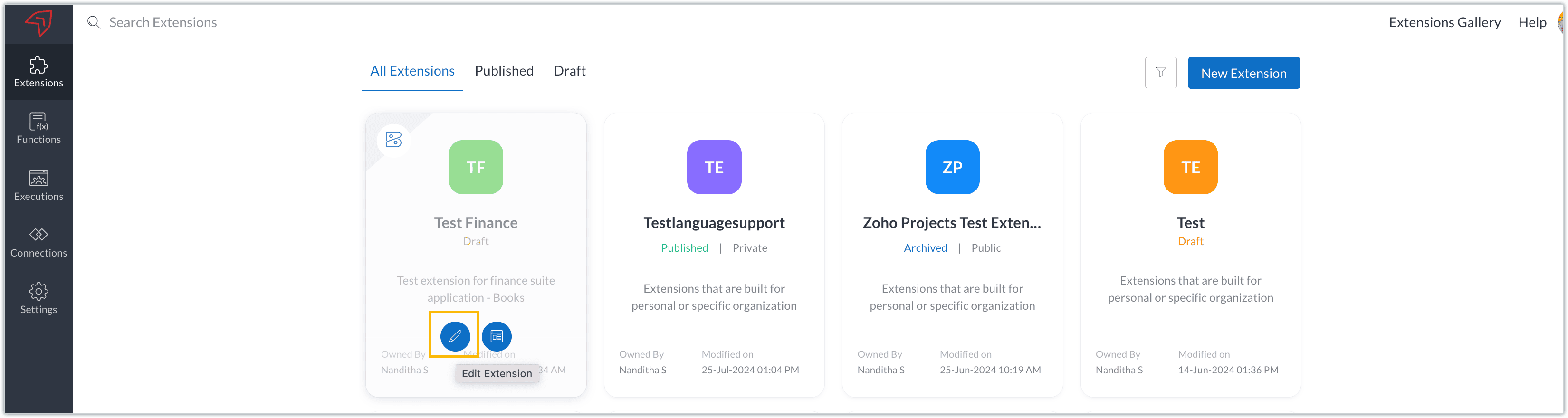
- The Zoho Books Developer Portal opens with the options and native features available to customize, curate, and develop your extension.
Zoho Books Developer Portal sections
The developer portal has four different sections to help customize and build your extension.
Learn: This section lists the native Zoho Books capabilities that can be used to create and develop extensions. Clicking the Set up Now button next to each feature will take you to the feature's development setup page.

Build: This is the development setup section, which includes customization, automation, and components like connections, widgets, schedules, webhooks, and signals. You can customize your extension preferences, establish connections to integrate with other applications, and design custom interfaces to enhance user experience.

Configure: This section assists with handling your extension's required configurations, whether they are generic settings or customizations required from the user. You can add global fields, which can be incorporated as either variables that store static data or through custom widgets that retrieve user inputs. You can also define functionalities that happen during installation and uninstallation.

Publish: Once the extension has been built and configured, you can use this section to publish it for either private or public use. In both cases, the Zoho Books team will review the extension; for public extensions listed on Zoho Marketplace, the Zoho Marketplace approval team will also review them. You can share your privately published extension with other users using the Shared List option.

We will explore more about each of these sections and their features in upcoming posts.
Testing an extension
The Zoho Books Developer Portal offers a dedicated testing environment for each extension, allowing you to test and validate it before publishing.
As a developer, you can use the Test Your Extension option in the top right corner of the portal to access your extension's sandbox environment.

This will redirect you to the sandbox testing environment for the extension you're developing, which is similar to Zoho Books and contains relevant modules to test with.

You can populate necessary data and test your extension functionality. Once everything is validated, you can go ahead and publish your extension for private or public use.
For support or questions related to Zoho Finance Suite extension development, you can email developer@zohofinance.com.
We hope you found this guide useful. Keep following this space for more information!
Topic Participants
Nanditha Somasundaram Somasundaram
Sticky Posts
Building extensions #5: Creating custom connections for extensions
In our previous post, we discussed the significance of connections, identified their types, developed a predefined connection, and demonstrated how it can be integrated with Zoho Books using an example. In this post, we'll walk through the process ofBuilding extensions #4: Integrating Zoho Books with applications using connections
In our last post, we looked at an overview of the key features available for creating a Zoho Books extension, including connections. In this post, we'll go over connections in depth, including their types and applications. What are connections? "Connections"Building extensions #3: Fundamental features of a Zoho Books extension
In our earlier posts, we covered how to create, test, and publish an extension for Zoho Finance suite applications. Moving forward, we'll look specifically at instances relating to one of the products from the Zoho Finance suite: Zoho Books. In this post,Building extensions #2: Publishing an extension
Hello developers, Welcome to our next post about building extensions for Zoho Finance Suite applications. In our previous post, we looked at extensions, their purpose, and how to create and test them. To recap, extensions are installable plugins or add-onsBuilding extensions #1: Creating and testing extensions for Zoho Finance Suite applications
Hello developers! We're excited to announce a new series called "Building extensions" to assist developers in creating efficient extensions for Zoho Finance Suite products. We'll support and guide you through the process of creating an extension and using
Recent Topics
Vendor Assignment issue for staff in User Roales
there is a limitation in software that we can't assing Vendors to our staff - we can only assign Customers on staff wise!! There is a limitation of this software that in case i want to assign limited vendors to my staff - it's not possible. Either i willZoho Desk Community Portal Not Displaying Custom Styling Correctly
Hi Zoho Community, I’m struggling to get a custom community portal in Zoho Desk to display my branding and styling correctly, and I’d love some help troubleshooting this for a client’s support portal. Details: Setup: Zoho Desk (Professional plan, latestRemove or hide default views
I'm looking to only have the views pertinent to my organization. Is there a way to show only my custom views (or separate them to a different area or something)? If not, this should be a feature as switching from Zendesk we had this option...Wie kann ich einen Nutzer löschen?
Wir haben Zoho one. Es handelt sich um einen ehemaligen Mitarbeiter.Function #46: Auto generate list of lapsed customers using Custom Button
Hello everyone, and welcome back to our series! Customer retention is one of the key factors that impact the long-term success and sustainability of a business. High customer retention rates indicate satisfied customers, quality products or services,Before Going To The Qc stage , site ready ness file upload mandtoty how to achive this in the blue print transition
Before Going To The Qc stage , site ready ness file upload mandtoty how to achive this in the blue print transition Is it possible on click of the predelivery Transition show the alert message if site ready ness file upload empty also not move the stageAnnouncing new features in Trident for Windows (v.1.28.5.0)
Hello Community, Trident for Windows is here with exciting new features to help you stay productive and make collaboration simpler. Let’s dive into what’s new! Slash commands are now supported in the Cliq module. You can now use slash commands from theConvert time to string and remove second
Hello everyone, I have a question that I can't figure out on my own. How to convert time into string (singleline) and remove second. Like HH:mm. If I convert it as below, the result becomes null. Thank you very much. input.Time.tostring("HH:mm") result:Has anyone imported items and included the storage bin?
We have a large amount of Inventory Items. We would like to import these into Zoho Inventory but while we can import the majority of data, the storage bin refuses to map. Has anyone successfully imported the data and mapped the bin?Terms & Conditions add a rule.
Hi I'd like to format my T&C's to auto format a Deposit amount based on the Total. "Quotation is valid for 7 days from the date of issue. A 75% deposit ( R .00 )is required to confirm the booking. The remaining balance ( R .00)is due upon project completion.Zoho Inventory Feature Roadmap Visible To All
Hello, please consider making your feature roadmap visible to us users so that we know what to expect in future. This may appease current users who are seeking clarification on feature implementation dates, so that they can make an informed decision whethersend file to ftp or another external service
i'v created a zoho creator application for take a picture and rename it by phone. Now i need to send Each renamed pictures to my ftp or to specific folder on google drive...then, delete it from creator. (every picture recived it will processed by another program and stored on my Erp) HOW CAN I DO ??Feature Request - Improved booking layouts, specifically for individual booking links
I would like to see more layout options and specifically to have the meeting description beside the calendar booking function, when sharing booking links to specific consultations/meetings. Below is a screenshot from Calendly. I love this layout and itSet Conditional and Dependent Rules for Issues in Zoho Projects
An Issue Layout is a customizable form to add and update information about a specific issue. The fields in the issue layout can be changed dynamically based on user requirement using the issue layout rules. Consider a scenario where an electrical fluctuationAccounting on the Go Series-56: e-Way Bill Module in the Mobile App – A Handy Solution for Indian Businesses
Hello everyone, Managing e-Way bills just got more convenient with the Zoho Books mobile app! For businesses operating under the GST regime, e-Way bills are essential for tracking the movement of goods. Previously, you had to log in to the web app toCopying records from a Custom Module into Deals
Hello, I recently created a custom module to handle a particular type of order/transaction in our business. Having got this up and running I've realised that it would be much better to use the Deals module with a different layout instead. We've enteredCreator App on Mobile - Workflow "On Create / Edit - On Load" not triggered ?
Hi Everyone, I built an application to track assets, which is used both at the office (desktop) an in the field by technicians (mobile app). In the field, technicians open an existing form and add rows to a subform at some point. One field they have toHOW TO VIEW INDIVIDUAL COST OF NEWLY PURCHASED GOODS AFTER ALLOCATING LANDED COSTS
Hello, I have been able to allocate landed costs to the purchase cost of the new products. however, what i need to see now is the actual cost price (original cost plus landed cost), of only my newly purchased products to enable me set a selling priceCustom Function to get custom field of lookup type in Books
Hi, Here's the situation. In Purchase Order, there is a custom field (lookup) to SO. The requirement is to update to the related SO if PO get updated Right now facing challenge to get the id of custom field (lookup) in PO. Please find below the sampleCustom From Address is now Organizational Email
We're introducing a small yet meaningful change in Zoho Recruit, one that sets the foundation for bigger improvements coming your way. What’s changed? We’ve renamed the Custom From Address to Organizational Email. The new name was chosen to better reflectWhat's New in Zoho Billing Q2 2025
Hello everyone, We are excited to share the latest set of updates and enhancements made to Zoho Billing in Q2 2025, ranging from image custom fields to support for new languages. Keep reading to learn more. Upload Images From Your Desktop to Email NotificationsMap dependency on Multiselect picklist
I need help in Zoho CRM. I have 2 multi-select picklists. For example, Picklist A has country names. Picklist B has state names. Now I want to show states on the basis of the selected country from Picklist A. Both are multi-select fields, so the standardTip of the Week #63 – Keep personal emails out of team view.
Shared inboxes are great for teamwork—they let everyone stay on the same page, respond faster, and avoid duplicate replies. But not every message needs to be shared with the entire team. Think about those one-on-one chats with a manager, a quick internalEpisode III : Powering Automation: Custom Functions in Action
Hello Everyone, In our previous episodes, we explored custom functions and the Deluge programming language. If you’ve been wondering why the Episode series have been quiet, here’s the reveal! On our community, we've been showcasing custom functions integratedNarrative 2 - Understanding Organizational Departments
Behind the scenes of a successful ticketing system - BTS Series Narrative 2 - Understanding Organizational Departments A ticketing system's departments are essential because they provide an organized and practical framework for handling and addressingZoho Projects Plus for the healthcare industry
The global healthcare industry is complex and diverse; from patient record maintenance, healthcare supply chain, to manufacturing complex medical equipment, the industry functions on many layers. Managing all these layers requires tested out techniquesMissing Outlook calendar option in Calendar
Hi all I don't have an Outlook Calendar option in the Settings > Synchronise settings of Calendar. Any ideas why not?Whats App Automation
It would be nice to be able to send out an automated whats app message template on moving stages or creation of a ticket (same as you can do for automated emails). Currently only automated emails can be sent. Also, if whats app could be used more effectivelyZoho Projects Android app update: Enhanced Documents module within the projects.
Hello everyone! In the latest Android version(v3.9.35) of the Zoho Projects app update, we have enhanced the documents module within the projects. Now, you can view all the attachments that you have added across the project in tasks, bugs, comments, etc,Lead Source Disappears
When adding a new lead and saving the page, the page refreshes itself and the lead source field becomes blank. We set the "Lead source" as a required field to see if it would help, but the problem persists and we always have to re-enter the lead souInquiry Regarding Monitoring ZOHO CRM API Credit Usage
Hello ZOHO Community, I hope this message finds you well. I have a question regarding monitoring the usage and remaining credits of the ZOHO CRM API. I recently discovered that within ZOHO CRM, by navigating to Settings ⇒ Developer Hub ⇒ APIs & SDKs,Payment Gateways - A unified hub to manage all your payment integrations in Zoho Creator
Hello everyone, We're thrilled to announce that we've completely reimagined the way payment gateways are handled in Creator. The result is a centralized Payment Gateways section that provides a clean, user-friendly interface to configure and manage allCommunity Digest Julio 2025 - Todas las novedades en Español Zoho Community
¡Hola, Español Zoho Community! Ha pasado un tiempo desde el último Digest pero, ¡ya estamos de vuelta con las novedades más relevantes en las aplicaciones de Zoho y su universo! Si no te quieres perder ninguna de las novedades que vamos publicando, teTip #35- How to use Notifications in Zoho Assist to stay on top of session activities- 'Insider Insights'
Hello Zoho Assist Community! This week, we’re exploring Zoho Assist’s built-in notification system for improved visibility and accountability. Keeping track of session activity is crucial, especially when you're managing multiple remote devices and technicians.Assistance with Exporting Specific Data from Zoho CRM
Hi, Could you please guide me on how to export specific information, such as the model number and serial number, from the Accounts module in Zoho CRM? Thank you in advance for your assistance.Coming Soon in Zoho Invoice: Send Invoices Instantly via WhatsApp
We're working on bringing a new level of convenience to your invoicing experience. Introducing a much-requested feature in Zoho Invoice: You can now share invoices directly to your customers via WhatsApp! With this new option, you can: Share invoicesfield update from the value of another field
Hello, I need to do a field update from the value of another field, but i don´t know how can i do it. In the mass update option it is not possible... I need to put the last name value form the leads module to other custom field that i have created. thanks for your helpIs there any way to prevent the row cloning feature(on edit page)
My initial requirement is to prevent some users from adding new rows in the subform. For that, I have implemented the client script, and the script is working fine. But users are able to clone the row and make changes. For that, I was unable to find anyHow Do I Change Business Location
Ive just shifted my business to a new country and would like to update my address and Business location in the "Organisation Profile" page but it is locked in the previous country. How do I unlock it / change it? ThanksVerify details pop-up windows
Hi, Is it possible to turn-off the anoying "Verify details" window that ask for closing date, "Reason for Lost" or other concepts. If I would like the user to enter such data, I will implement a rule .... How can I turn-off such pop-up? it's not necessaryNext Page