Zoho Sign: Product Updates - Mid-2022
Hello, everyone!
As we cross the halfway point in 2022, Zoho Sign is about to turn five years old! So, allow us to catch you up on what we have been up to lately.
We mentioned in our last update that much of our recent focus has been on broadening Zoho Sign's legal applicability and it is no different this time. As you will learn in this post, we have been actively identifying suitable regional authorities, trust service providers, and integrating with their services to keep up with evolving regulations.
We are also happy to share that Zoho Sign has once again been named a Gold Medalist and a Leader in the 2022 Electronic Signature Data Quadrant Awards by SoftwareReviews. We have now managed to earn this recognition for the second year running.
Here's an outline of all the additions we have made to Zoho Sign over the past six months, and also a quick peek at what's in our release pipeline for the rest of the year.
What's new?
- Aadhaar eSign for India
- Qualified Electronic Signatures for the European Union
- via EU eID
- via InfoCert
- Sign with Singpass for Singapore
- Payment integration with Zoho Checkout
- Send documents for signatures/approval via SMS
- Zoho Writer editor integration via Zoho WorkDrive
- Bulk sign for documents with identical fields
- New third-party integrations
- HubSpot
- Vtiger
- Integrately
- Organization activity logs
- Export option for signer field data from signed documents in bulk send
- Enhanced options for downloading documents
- Enhancements to setting up webhooks
- Option to unsubscribe from recipient reminders
- New fonts for signer field data in documents
- Launch of service in the Japan datacenter
- Support for migration to other datacenters
- Enhancements to the Zoho Writer integration
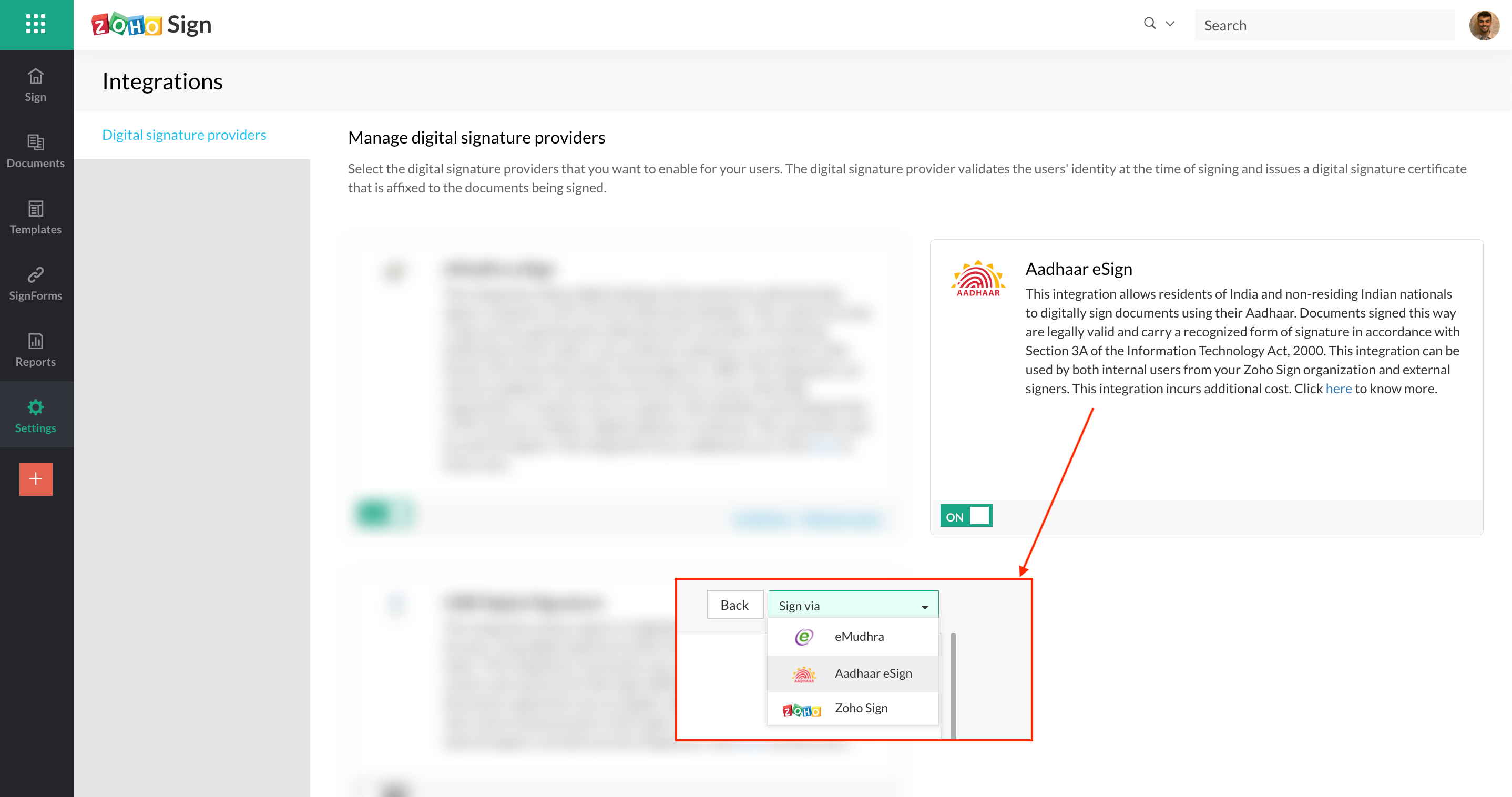
Aadhaar eSign for India
Organizations subscribed to the Enterprise plan and based in our Indian datacenter can now get documents signed via Aadhaar eSign. This integration allows residents of India and non-residing Indian nationals to digitally sign documents using their Aadhaar. Documents signed this way are legally valid and carry a recognized form of signature under Section 3A of the Information Technology Act, 2000. The signed documents also carry an embedded timestamp. This integration can be used by both users of Zoho Sign and external signers. Learn more
Qualified Electronic Signatures for the European Union
Organizations subscribed to the Enterprise plan and based in our EU datacenter now have more options and providers to choose from to sign their documents with Qualified Electronic Signatures (QES). QES carries the legal equivalence of wet signatures or signing documents with pen and paper.
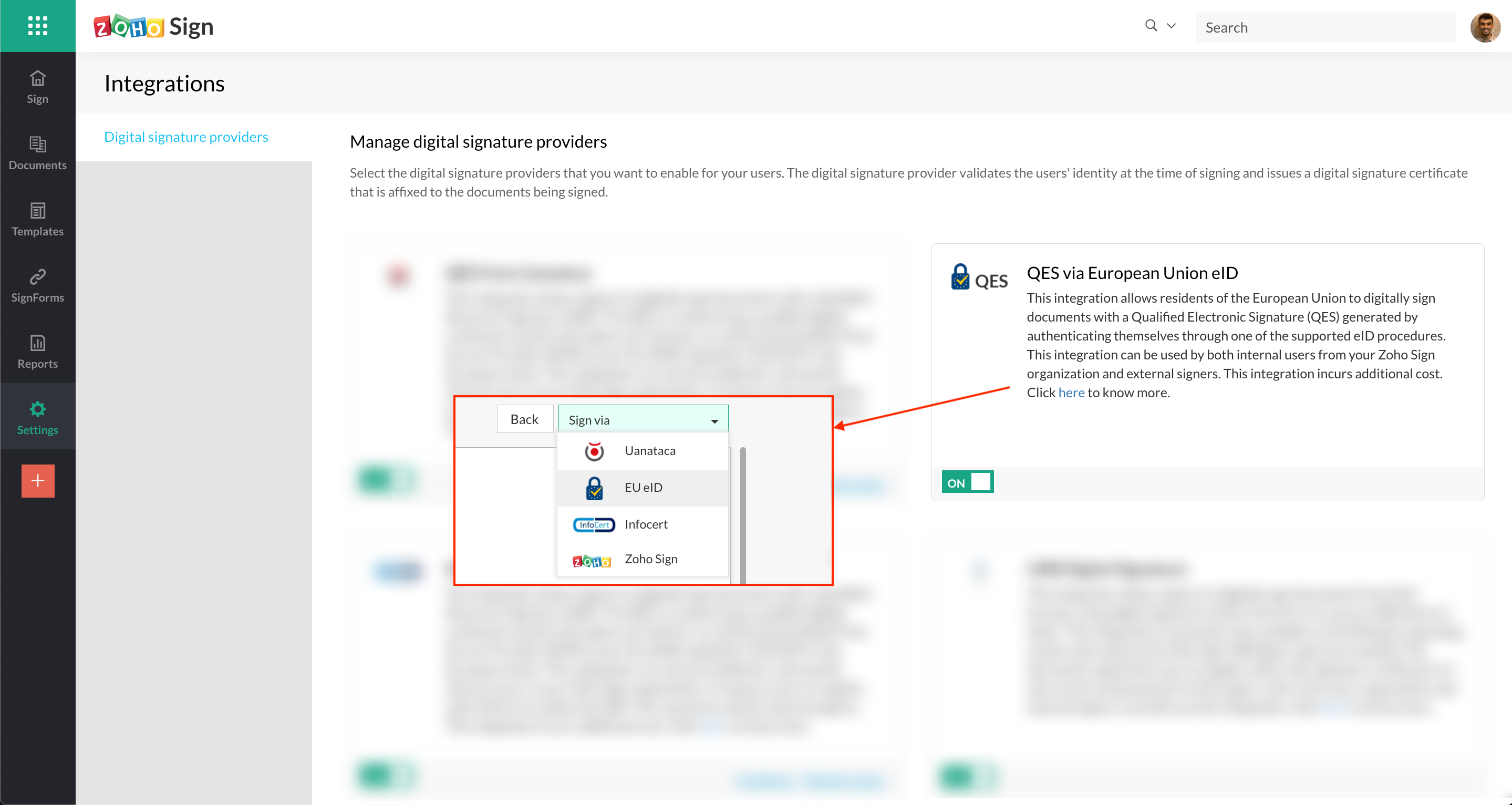
- via EU eID
This allows residents of the European Union to digitally sign documents with a Qualified Electronic Signature (QES) generated by authenticating themselves through one of the supported European ID or eID procedures. Zoho Sign has integrated with an electronic signature aggregator called eID Easy to offer this service. The signed documents also carry an embedded timestamp. This integration can be used by both users of Zoho Sign and external signers. Learn more
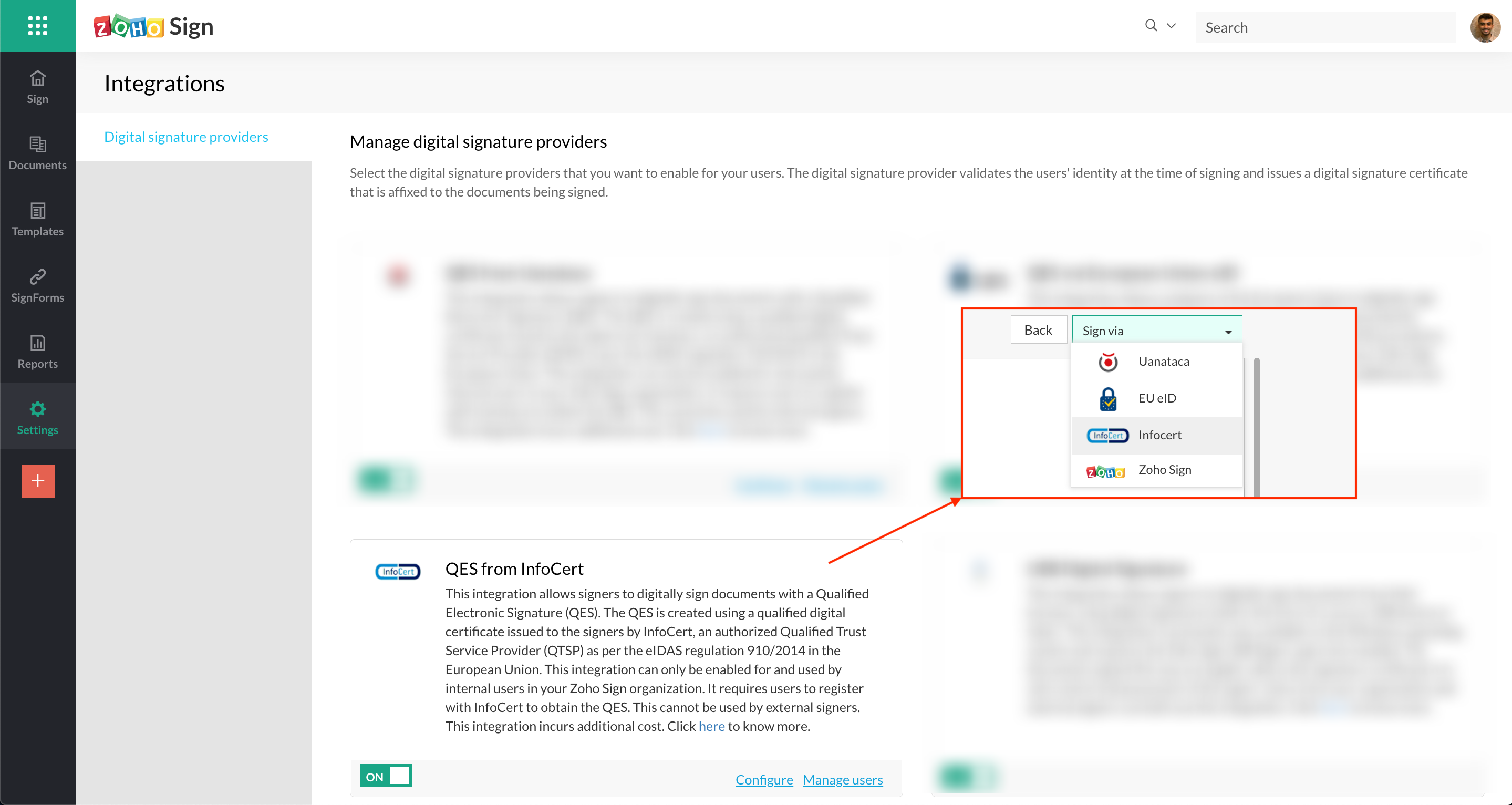
- via InfoCert
Zoho Sign has also partnered with InfoCert, an authorized Qualified Trust Service Provider (QTSP) as per the eIDAS regulation 910/2014, and integrated with their services to offer QES. This integration can only be enabled for and used by users who have a Zoho account and are part of a Zoho Sign organization. It requires users to register with InfoCert to obtain the QES. The signed documents also carry an embedded timestamp. Learn more
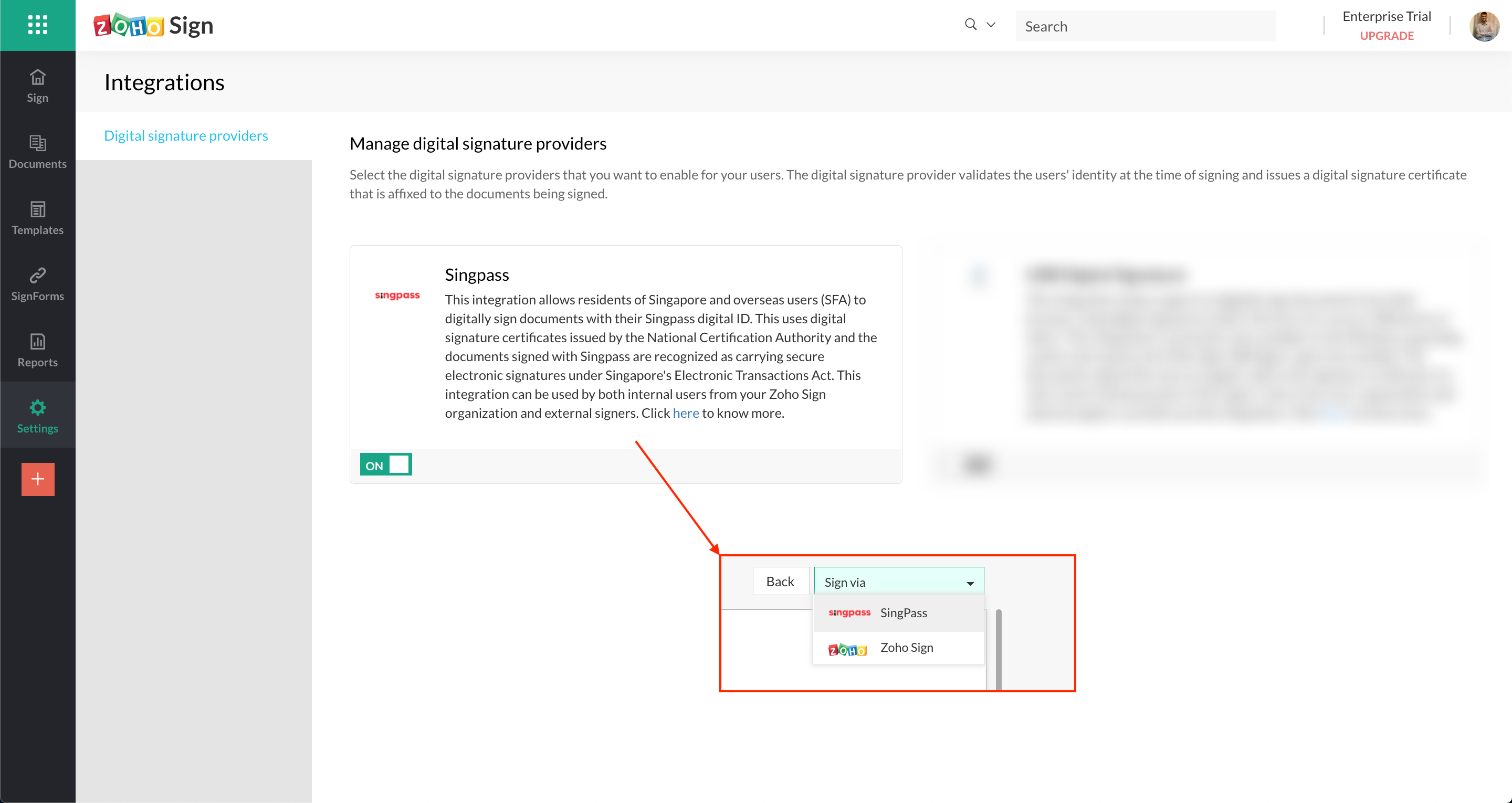
Sign with Singpass for Singapore
Organizations subscribed to the Enterprise plan and based in our US datacenter can enable the Sign with Singpass service. This integration allows residents of Singapore and overseas users (SFA) to digitally sign documents with their Singpass digital ID, and it uses digital signature certificates issued by the National Certification Authority. Documents signed with Singpass are recognized as carrying secure electronic signatures under Singapore's Electronic Transactions Act. This integration can be used by both users of Zoho Sign and external signers. Learn more
Payment integration with Zoho Checkout
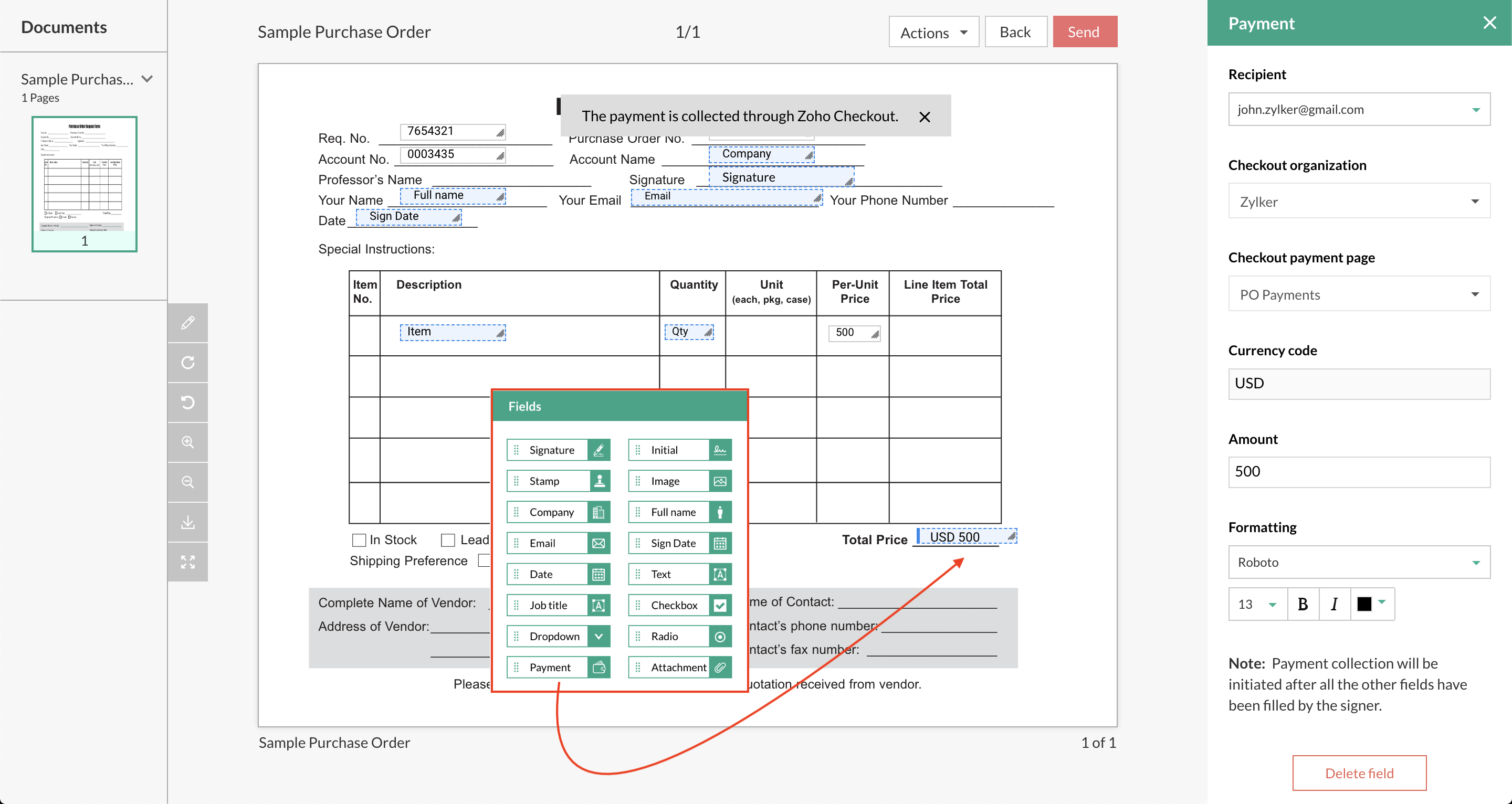
Users can now collect signatures in documents and any associated payments in a single workflow through Zoho Sign's integration with Zoho Checkout. Users can add a Payment field for signers in documents and integrate it with a payment page that they have set up on Zoho Checkout. This enables them to collect payments at the same time as signatures and thus helps organizations do business even more efficiently. This integration is available in our Enterprise plan. Learn more
Send documents for signatures/approval via SMS
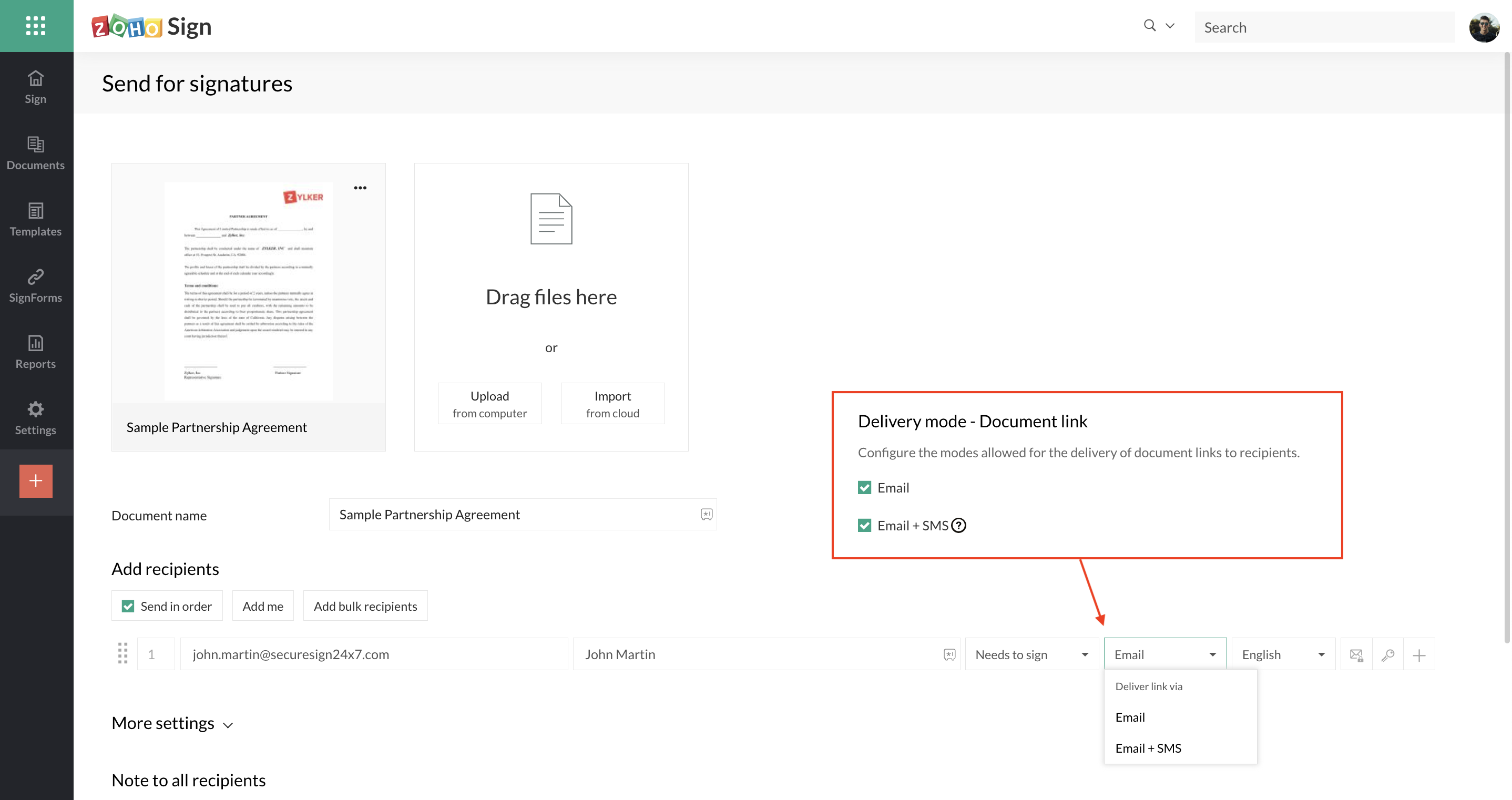
Users can now send documents for signatures and approval not just via email but also SMS. Users can choose the option to deliver document signature requests via SMS for each recipient when setting up a sign workflow and enter the recipients' phone number(s). The SMS sent to the recipient(s) will contain a secure link for them to access the document and sign/approve/view it. This is available in all paid plans of Zoho Sign. Learn more
Zoho Writer editor integration via Zoho WorkDrive
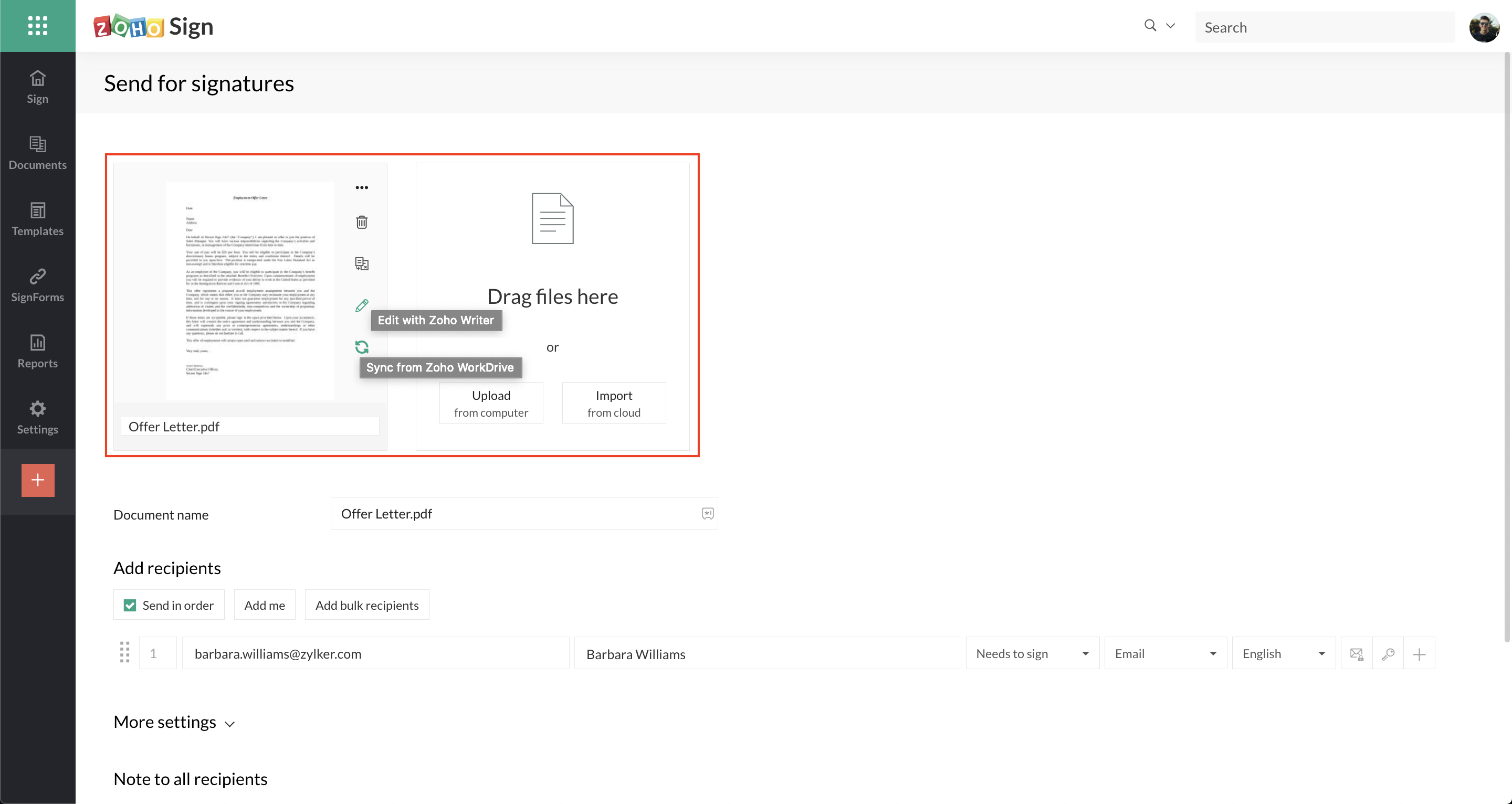
Users can now edit documents directly from Zoho Sign while building sign workflows, if the documents have been imported from Zoho WorkDrive and their file format is supported by Zoho Writer. Clicking on the edit option opens the documents in a separate window to make the required changes. Once edited, users can sync the updated files back to the sign workflow using the sync option and send them out for signatures.
Bulk sign for documents with identical fields
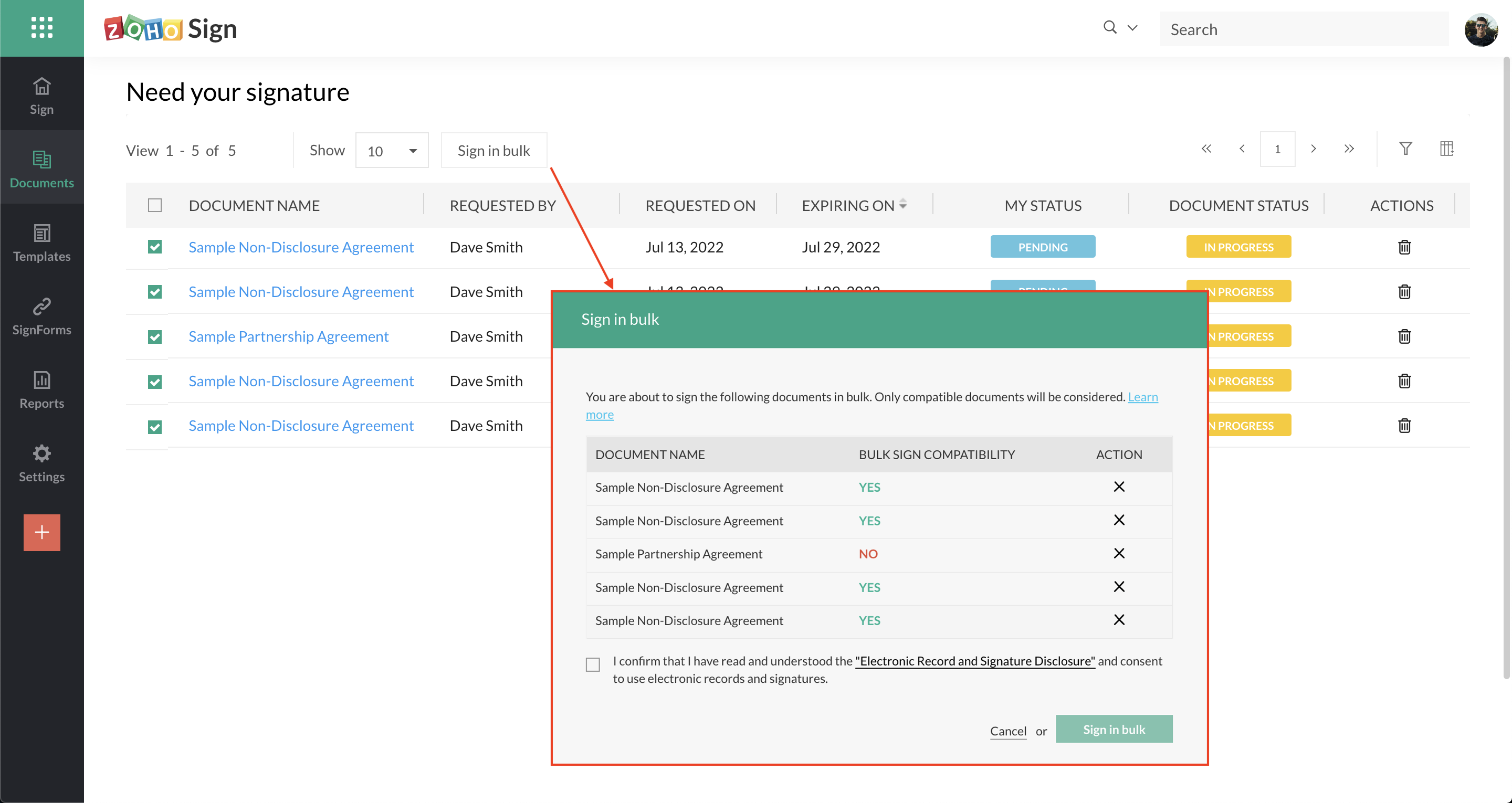
Users can now sign multiple documents in bulk when they all have identical fields or just fields that can be auto-filled from the signers' Zoho Sign profile data. This is commonly sought when a user has to sign/approve many documents within an organization, and these documents are typically generated using bulk send, templates, or via integrations with other Zoho apps like Zoho People and Zoho Writer. Users can use this feature only to sign documents internally within their Zoho Sign organization i.e. only when the documents they have to sign originate from their own Zoho Sign organization. This is available in our Enterprise plan. Learn more
New third-party integrations
- HubSpot
Users can now create and send documents for signatures using Zoho Sign and track them directly from their sales hub on HubSpot. Users need to install the Zoho Sign app from the HubSpot marketplace to make use of this integration. Learn more - Vtiger
Users can now create e-signature workflows to send documents for signing and track them in real time directly from Vtiger CRM. Users need to enable the eSign add-on in Vtiger and integrate it with Zoho Sign by creating a client on Zoho API console for use. Learn more - Integrately
Users can now connect Zoho Sign with 725+ online applications via Integrately to build advanced and automated workflows that are triggered by e-sign actions. Learn more
Organization activity logs
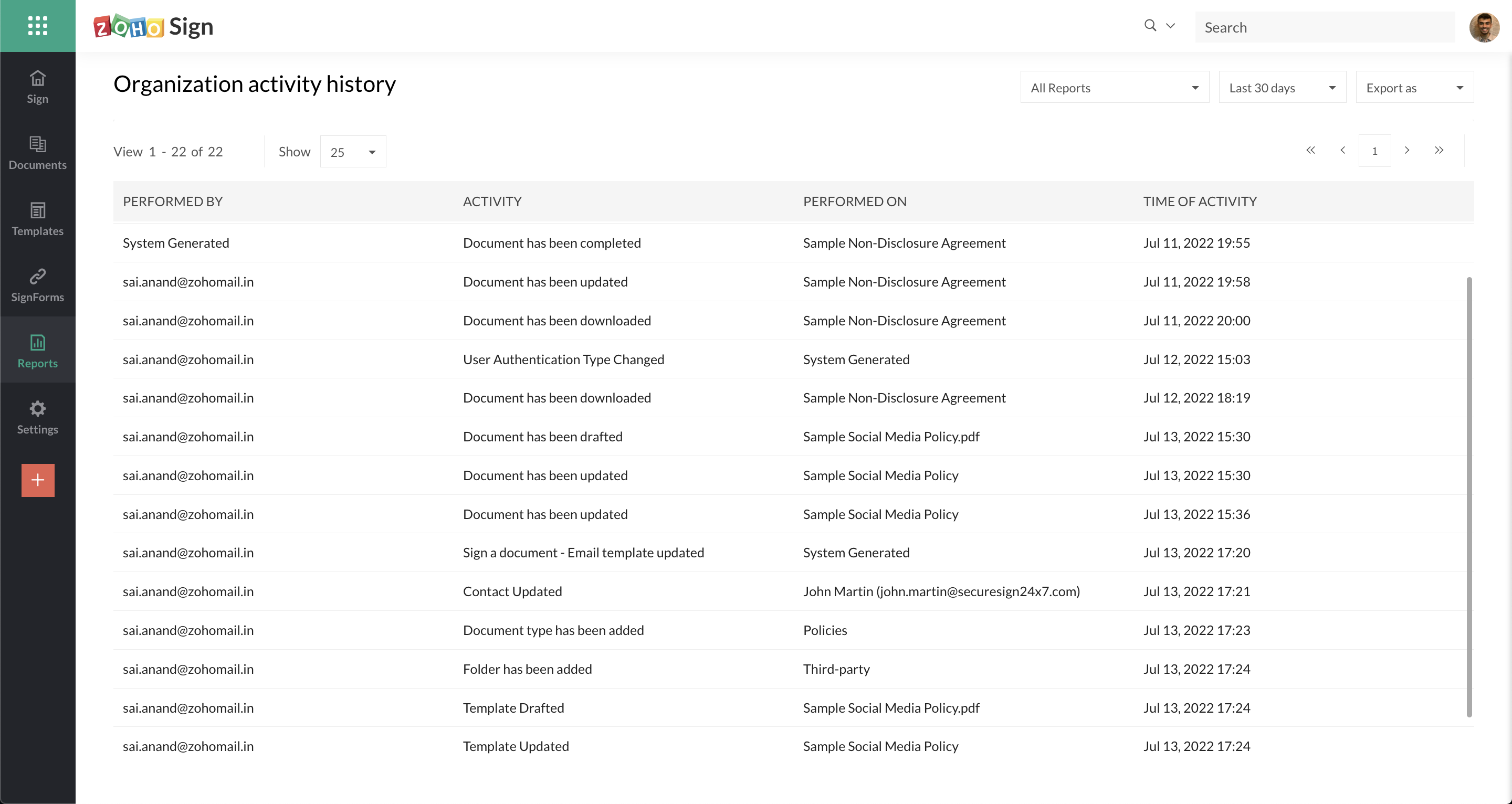
Administrators can now view a more detailed history of activity across users within a Zoho Sign organization. In addition to sender and recipient activity in documents, many other administrative actions such as addition and removal of users, creation of templates and SignForms, sharing of documents and templates, changes to contacts, folders, and document types, and changes to document signature requests and some general settings and account configurations are now audited within Zoho Sign. These activities can be monitored by administrators by visiting Reports >> Activity log from the Zoho Sign dashboard.
Export option for signer field data from signed documents in bulk send
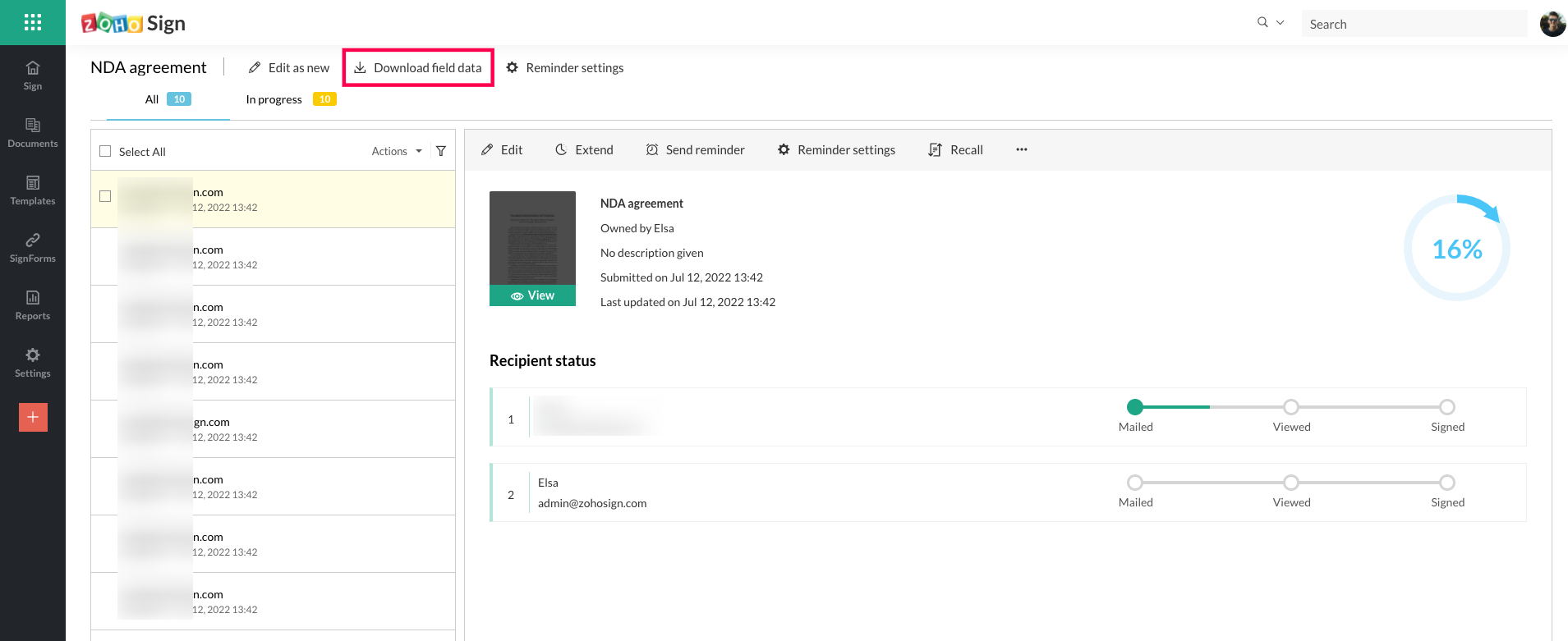
In the case where documents have been sent to many recipients in bulk, users can now export the document field data entered by signers at the time of signing in a CSV file. Users can access this option by visiting Documents >> Sent >> Bulk send and opening the desired bulk send request.
Enhanced options for downloading documents
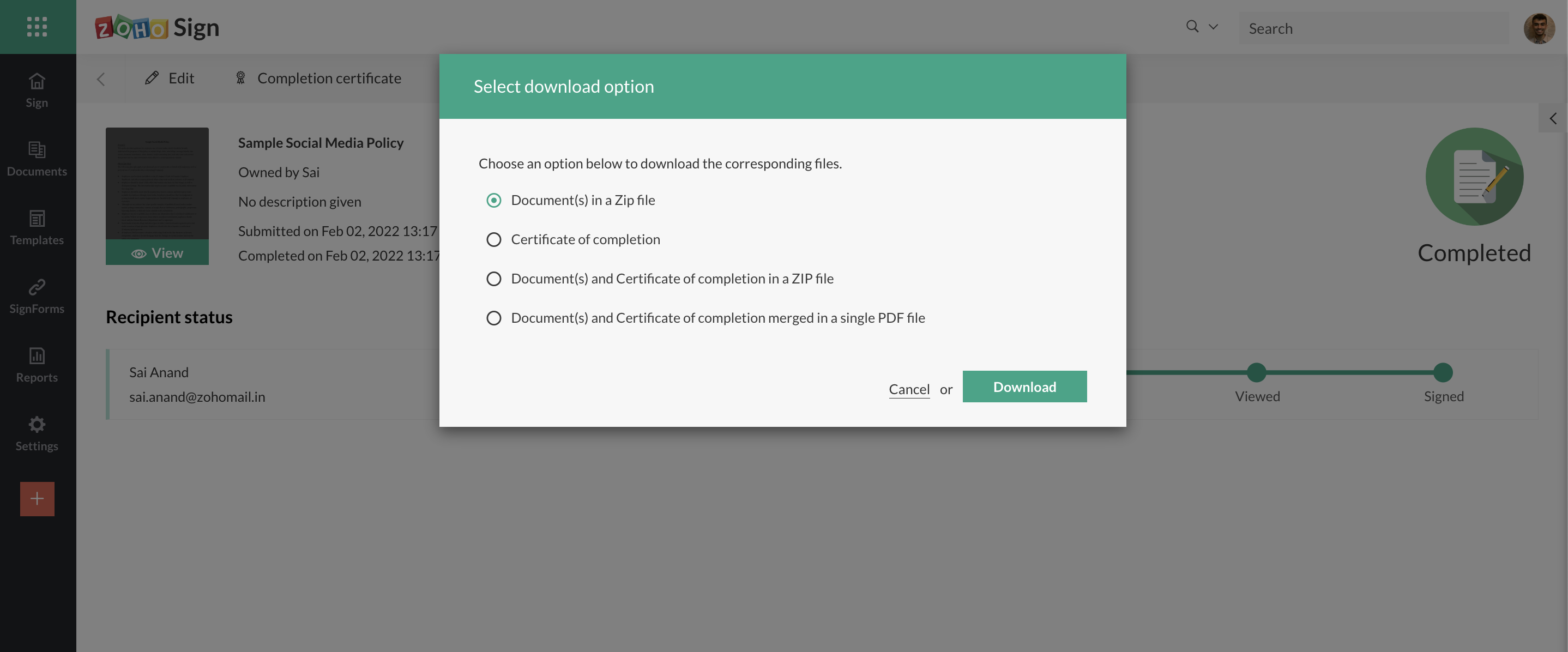
Users now have multiple options to choose from when downloading documents from Zoho Sign. Users may choose to download just the documents in a request (in a ZIP file if more than one), or just the completion certificate, or all of them in a ZIP file, or all of them merged into a single PDF file. In the case of the merged PDF file, the file will only contain the common digital signature certificate issued to Zoho Sign and the signatures of the individual signers will be captured merely as visible signatures.
Enhancements to setting up webhooks
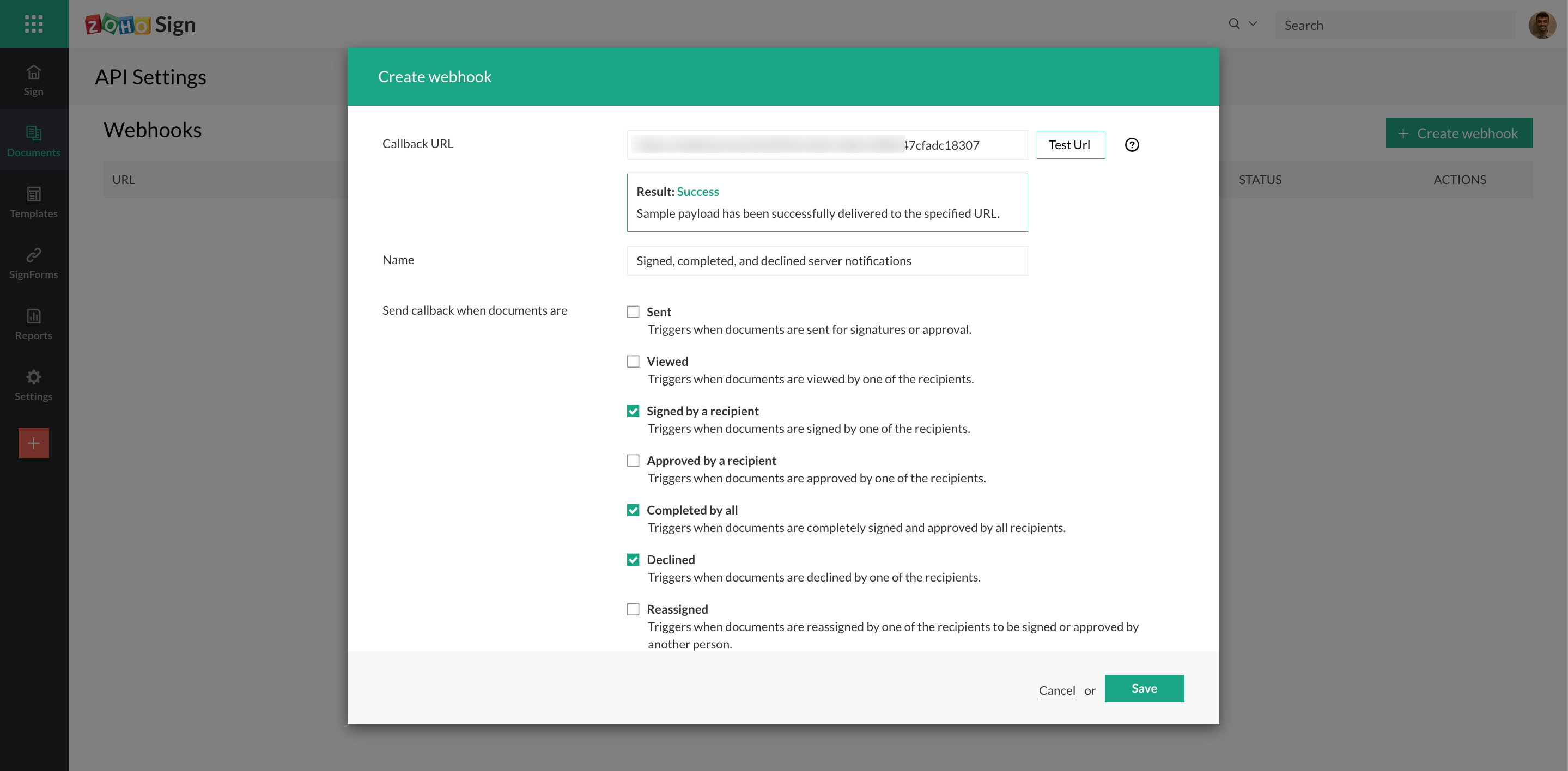
Users now have the option to send a sample payload to the callback URL when setting up a webhook. This can be used to test the payload delivery and verify the webhook's configuration and connectivity. Learn more
Option to unsubscribe from recipient reminders
Recipients now have the option to unsubscribe from further reminders for documents awaiting their signatures or approval. This can prevent recipients from receiving too many emails during the paperwork turnaround period and also serves as a minor anti-spam measure. This is available to both users of Zoho Sign and external signers when they receive document signature requests.
New fonts for signer field data in documents
Zoho Sign now supports two new additional fonts—Lato and Poppins—in the Document Viewer screen for signer fields. Senders can set these fonts for text-based fields from the formatting options available when adding them to documents.
Launch of service in the Japan datacenter
Zoho Sign has now launched services from our Japanese data centers. Previously, Japanese customers were served from our US data centers, but now the ability to store and manage their paperwork digitally within Japan will help them comply better with the strict domestic security requirements. The service in the Japanese data center also includes digital document timestamping via SEIKO Cyber Time, an officially certified timestamping authority (TSA) in Japan. Zoho Sign is available in Japan both as a standalone subscription or as a part of the Zoho One bundle. Learn more
Support for migration to other datacenters
Zoho Sign now supports migration of organizations from one data center to another. Typically, when users create a Zoho account, and a Zoho Sign account by extension, all their information is stored in one of our data centers automatically assigned to them, corresponding to their location and based on their IP address. All user data is strictly stored in the assigned datacenter and restricted from being moved to other geographical locations. However, due to evolving regional regulations and geopolitical developments, scenarios may arise where users will want to migrate their accounts and data from one datacenter to another. In these cases, users can write to migrations@zohoaccounts.com and our team will guide them through the process. Learn more
Enhancements to the Zoho Writer integration
Our integration with Zoho Writer now provides users with additional options when setting up Sign templates. In addition to being able to send the documents out for signatures, users can also self-sign them now and track the signing progress for documents sent out by simply clicking on the document status pane. Users also have the options to set the email language, add a private message, and enable authentication for recipients directly from Writer when setting up a sign workflow now. Additionally, users can also have a copy of the signed document automatically emailed to their associates upon completion.
Please give these new updates a try and let us know your thoughts and feedback!
What's coming?
- Control measures for FDA Title 21 CFR Part 11 compliance
- Recipient authentication for the EU via eID
- Integrations with more regional trust service providers
- Advanced Electronic Signatures for SouthAfrica
- Qualified Electronic Signatures in Switzerland for ZertES compliance
- Signing with personal AATL certificates from a US-based certification authority
- Knowledge Based Authentication (KBA) for the United States
- Options for visible signature in signed documents
- Automatic field detection in uploaded documents
- Support for multiple organizations/portals
- Support for additional languages - Czech, Slovakian, Hungarian (and more)
- Enterprise add-ons for popular Zoho bundles
- Zoho PeoplePlus
- Zoho Contracts
- Third-party integrations
- Microsoft PowerAutomate
- Pipedrive
Some of these upcoming features are already in the release-ready state awaiting confirmation from both internal and external stakeholders for their launch. Several others are in an advanced development stage and we hope to release them before 2022 ends.
Do keep tracking this space and follow us for the official announcements when we introduce these features. If you seek any clarification on the information presented in this announcement, or if you have any other queries or feedback, feel free to comment below. For all other support and assistance, please write to support@zohosign.com.
Happy Zoho Signing!
Cheers.
Sai
Topic Participants
Sai Anand N
20067733248@zohoclosedAccount.com
Saravanakumar V
thomas.zwicker
Rajkiran RV
Sticky Posts
Free webinar! Build smarter apps with Zoho Sign and Zoho Creator
Hello, Bring the power of digital signatures to the apps you build in Zoho Creator! Connect Zoho Sign as a microservice and enable seamless e-signature workflows in your applications. This integration allows you to automate signing tasks using Deluge.
Recent Topics
Let’s Talk Recruit: LinkedIn Cheatsheet
Welcome to the first edition of Let’s Talk Recruit for 2026. We are kicking off the year by revisiting one of the most asked about topics in Zoho Recruit. How our LinkedIn integrations actually work and how recruiters can get the most value from them.Zoho Forms API
Is there any way to get all form entry list using API? Looking forward to hear from youCreating a Chart from a Report
In Zoho Analytics, is it possible to create a chart from a Pivot View report? We are looking to use Zoho Analytics to replace Excel for Sales reports and would like to be able to show both the table and the chart together.Ability to Set Client Name During Portal Invitation
Hi Zoho Team, We would like to suggest an important enhancement to the Zoho Creator Client Portal functionality. Zoho Creator recently introduced the option to set a client’s display name in the Client Portal settings, which is very helpful for creatingMove email between inboxes?
Is it possible to move emails from one team inbox to another? We would like to be able to have a single "catch-all" inbox for incoming requests, and then move the email to the appropriate department inbox. I was hoping we would be able to accomplish thisPDF Attachment Option for Service Reports
Hello Team, I would like to check with you all if there is an option to attach PDF documents to the service reports. When I try to attach a file, the system only allows the following formats: JPEG, JPG, and PNG. Could you please confirm whether PDF attachments【Zoho CRM】データ一覧画面でのメモのバッジ機能リリースのお知らせ
ユーザーの皆さま、こんにちは。コミュニティチームの藤澤です。2026年度もゾーホーユーザーコミュニティをどうぞよろしくお願いいたします! 今回は「Zoho CRM アップデート情報」の中から、新機能のデータ一覧画面でのメモのバッジ機能をご紹介します。 目次 概要 メモのバッジ機能について メモの作成について メモに関する様々な処理について 最近追加したメモについて メモのバッジの非表示について クライアントスクリプトの対応 概要 メモのバッジ機能について 既存の活動バッジに加えて、すべてのタブのデータ一覧表示画面に、各データごとに利用できる「メモのバッジ」(キャプチャ内の赤枠部分)が新たに導入されました。is it possible to add more than one Whatsapp Phone Number to be integrated to Zoho CRM?
so I have successfully added one Whatsapp number like this from this User Interface it seems I can't add a new Whatsapp Number. I need to add a new Whatsapp Number so I can control the lead assignment if a chat sent to Whatsapp Phone Number 1 then assignCan’t find fsm in zoho one
Every other app is available to me in Zoho one except fsmPosibility to add Emoticons on the Email Subject of Templates
Hi I´ve tried to add Emoticons on the Subject line of Email templates, the emoticon image does show up before saving the template or if I add the Emoticon while sending an Individual email and placing it manually on the subject line. Emoticons also showTask Deletion Restriction & Strict Stage Control
Hello Zoho Community, We have the following two issues currently pending and under testing, for which we require a workable and reliable solution: 1. Task Deletion Restriction We are testing ways to ensure that staff users are not able to delete tasksUnable to mass update a picklist field
Hello, I have the records within our Accounts module divided between two account types: Parent Accounts & Member Accounts. I am attempting to mass update accounts from one picklist value to the other (within other specific criteria in our custom fields)Process checklist in CRM
Hi We've created a new sales process that I'm mapping into the CRM - issue I have is that some of the tasks / milestones I would like to capture require very simple tick box responses but there are quite a few under a variety of sub categories so I don'tCRM project association via deluge
I have created a workflow in my Zoho CRM for closing a deal. Part of this workflow leverages a deluge script to create a project for our delivery team. Creating the project works great however, after or during the project creation, I would like to associateHolidays - Cannot Enter Two Holidays on Same Day
I have a fairly common setup, where part-time employees receive 1/2 day's pay on a holiday and full-time employees receive a full day's pay. Historically, I've been able to accommodate this by entering two separate holidays, one that covers full-timeWhere is the settings option in zoho writer?
hi, my zoho writer on windows has menu fonts too large. where do i find the settings to change this option? my screen resolution is correct and other apps/softwares in windows have no issues. regardsFile emails in Shared email folder
Hi, I am unable to allow users to collaborate in Shared email folders: User 1 shares a folder let's say "SharedTopic" with full permissions Users 2 and 3 can see this folder but are unable to add emails to this folder or search in this folder. For example,How create a draft via workflow?
I wish to create a workflow rule for specific emails that creates a draft response - not an automatic email reply, but just a draft with a set response ready to be verified by an agent who can then manually select recipients. Alternatively, the workflowThis user is not allowed to add in Zoho. Please contact support-as@zohocorp.com for further details
Hi Team, when I,m trying to create a email account (imagixmidia.com.br) it's showing this error >> This user is not allowed to add in Zoho. Please contact support-as@zohocorp.com for further details plz help me thanksHow to manage task lists in Zoho Desk?
Hello, I use Zoho Desk for IT customer support. I have a list of standard operating procedures (SOPs), including SOPs for onboarding new users, offboarding users, losing a device, etc. These are lists of tasks to be performed depending on the situation.Zoho → ShipStation Integration – Sales Order–Driven Fulfilment Workflow
Hello All, I’m reaching out to explore the best way to integrate a shipping tool into our inventory which will speed our process up. We are looking to integrate ShipStation into our existing order-to-fulfilment workflow, as we’re keen to standardise onBusiness Day Logic Update: More Accurate Scheduling for Your Workflows
Hello everyone, We’re improving how business-day calculations work in workflows, especially when triggers happen on weekends. This update ensures that offsets like +0, +1, and +2 business days behave exactly as intended, giving you clearer and more predictableConvert Lead Automation Trigger
Currently, there is only a convert lead action available in workflow rules and blueprints. Also, there is a Convert Lead button available but it doesn't trigger any automations. Once the lead is converted to a Contact/Account the dataset that can be fetchedDefault Tagging on API-generated Transactions
If one assigns tags to an Item or Customer, those tags get auto-populated in each line item of an Invoice or Sales Order when one creates those documents. However, if one creates the Sales Order or Invoice via the API (either directly coding or usingUser
If user is already part of manage engine endpoint central , what hapens when i try to add them to another Zoho org / directory? Are these users added as external users?Adding a new section to the related details sidebar when creating a new ticket.
Hello, I was wondering if you can add a new section to the related details sidebar when creating a new ticket. I was wanting to have it to where it also shows the account information related to the contact chosen as well. This is the section I am referringDisplaying only unread tickets in ticket view
Hello, I was wondering if someone might be able to help me with this one. We use filters to display our ticket list, typically using a saved filter which displays the tickets which are overdue or due today. What I'd really like is another filter thatHow to compare a subform lookup field that allows multiple entries when edited
I have a form with a subform with multiple fields. One of the fields is a lookup field that allows a multi select. On edit validation, I want a workflow to execute only when the entries in that subform field has changed. The old. function is not workingIs Zoho Shifts included in the Zoho One plan?
In case the answer is no: there's any plan to make it available via One? Thank youZoho Tracking Image location
So we've been having an issue with tracking email opens. Specifically in Gmail. Our emails are not that long either, maybe 4 sections of image/250 characters of text/button per section. But all my test accounts I used via Gmail we're showing opens. But then come to find out the tracking image is at the very bottom of the email. So If the message is clipped (It always just clips our social icons on the bottom) and the user doesn't click the show more button it never tracks the open. Looking at otherIs there a plan to integrate zoho voice with zoho books?
Hello, Is there a plan to integrate zoho voice with zoho books? Right now we are using the Twilio SMS integration into zoho books, but have recently decided to switch to zoho voice for calls and sms. Is there a plan to integrate zoho voice natively intoZoho Tables is now live in Australia & New Zealand!
Hey everyone! We’ve got some great news to share — Zoho Tables is now officially available in the Australian Data Center serving users across Australia and New Zealand regions! Yes, it took us a bit longer to get here, but this version of Zoho TablesDelivery and handling of documents e-stamped using Zoho Sign
Hello everyone! Zoho Sign makes it easy to pay non judicial stamp duty online and automatically attach the digitally generated e-stamp challan to electronic documents. We also manage the delivery of physical e-stamped papers. We periodically receive theseIntroducing Dedicated Modules for Plans, Addons, and Coupons in Zoho Billing
We’ve enhanced the way you manage Plans, Addons, and Coupons in Zoho Billing. Previously, all three grouped together under Subscription Items. Now, each one has its own dedicated module, giving you a cleaner and more intuitive experience. This updateSortie de Zoho TABLE ??
Bonjour, Depuis bientôt 2 ans l'application zoho table est sortie en dehors de l'UE ? Depuis un an elle est annoncée en Europe Mais en vrai, c'est pour quand exactement ??Issue with WhatsApp Template Approval and Marketing Message Limit in Zoho Bigin
We are facing issues while creating and using WhatsApp message templates through Zoho Bigin, and we request your clarification and support regarding the same. 1. Utility Template Approval Issue Until December, we were able to create WhatsApp templatesHow to install Widget in inventory module
Hi, I am trying to install a app into Sales Order Module related list, however there is no button allow me to do that. May I ask how to install widget to inventory module related list?Zoho Social - Feature Request - Non-US Date Format
Hi Social Team, I have noticed that there is no option to change the date format from US mm/dd/yyyy to others like dd/mm/yyyy. It would be great to see this added as the platform matures. Thanks for considering this feedback.Drop Down Value
Hi, May I know why Zoho Flow treat this drop down as number and not as string. If so, how can I fetch the right value for filtering. This field is from Creator, in Creator upon checking by default it is a string since it's not a lookup field.Zoho CRM's mobile apps: A 2025 Recap
2025 marked a year of steady progress for Zoho CRM's mobile apps. We rolled out several updates and features to improve usability and make everyday CRM work a lot easier to manage. Here’s a look back at some of the key releases from 2025. Android releasesNext Page