Announcing Early Access to "Zoho CRM for Everyone" — A new and exciting update to Zoho CRM
Update : Zoho CRM For Everyone's Nextgen Interface gets an upgrade!
Hello everyone,
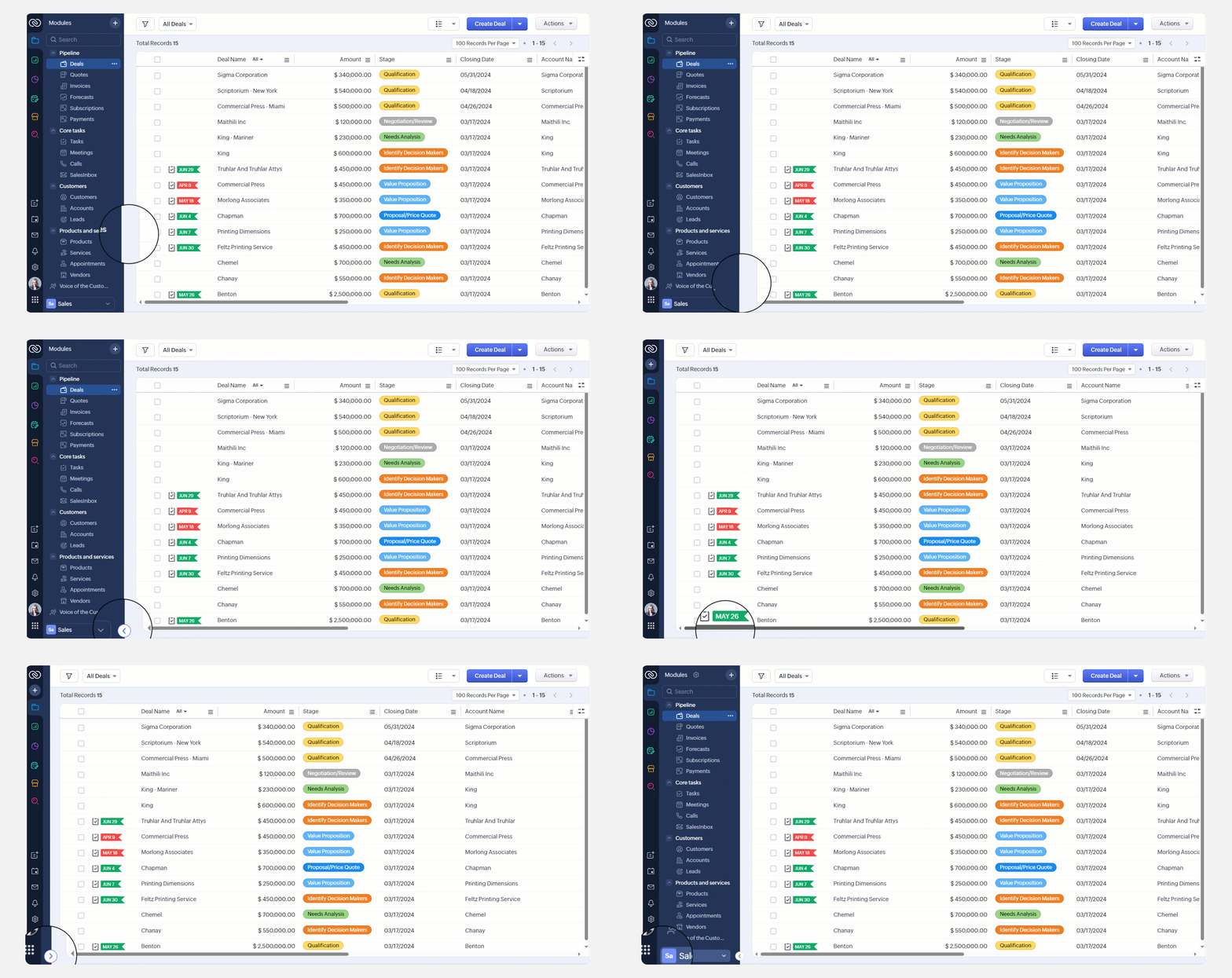
We’ve updated the Zoho CRM for Everyone Nextgen interface based on your feedback. The UI is now simpler with a unified sidebar, a more visible global search and features that are easier to find. Everything you need is now just one click away.

Zoho CRM For Everyone is now officially available to all customers, and the Early Access Program has come to a close.
We want to extend our sincere thanks to everyone who participated in the program. Your valuable feedback played a key role in shaping the product into a CRM solution that teams across all functions and industries can rely on.
- PR announcement: Zoho Deepens Customer Experience Platform, Adding Generative AI and Workflow Orchestration Capabilities Powered by Zia
- Forum announcment : Introducing Zoho CRM for Everyone: A reimagined UI, next-gen Ask Zia, timeline view, and more
- Blog post about the release : Zoho CRM for Everyone - No More Missed Customers
We are delighted to announce an Early Access to Zoho CRM for Everyone— a truly democratic approach to managing a CRM, gift-wrapped in an exciting and intuitive user interface. Here, multiple teams across an organization can coordinate among each other towards a singular objective —to delight their customers everyday.

Summary of this post: Zoho CRM for Everyone is a progressive and fundamental shift towards making the CRM a truly democratic system for every stakeholder that needs it in an organization. Zoho CRM for Everyone is not a new product, rather it is a new and visionary approach that tackles the challenge of disconnected processes by imbibing the philosophies of CRM democratization, team empowerment and coordination right into the DNA of a CRM. This is very much an updated version of the existing version of Zoho CRM. The key features in this release include Teamspaces, Team Module and Requests, all of which are presented in a reimagined user interface.
Why do you need Zoho CRM for Everyone?
Challenges of any current-day CRM
While CRM is indeed a powerful system that houses every piece of customer data, in most cases, it continues to be a system that is largely accessible by ONE primary section of an organization — Sales. While sales teams are indeed the champions that lead customer conversations and make the tough negotiations with prospects, the ultimate clinching of a business deal is the result of cumulative efforts of multiple minds.
Consider a deal convergence process. You are likely to have various stakeholders responsible for different parts of the process, where they come in, play their part, and pass the baton to the next team. For example, in a typical SaaS company, once the sales team starts pursuing a prospect, they may need the help of the marketing team to provide them with sales collateral to pique the prospect's initial interest. Then, they may need to work with the Presales team to showcase a well-tailored demo of the application to convey the value of the software. After negotiation, the salesperson will need the help of the legal team to draw up a deal contract and process it further.
So, as you can see, various stakeholders have an important role to play in the convergence of a single deal. However, when the CRM as a system is made accessible ONLY to the larger majority, that is the sales teams, there are quite a few undeniable challenges. Sales often has to spend time translating context and coordinating with these multiple teams offline— simply because these various customer operations teams do not have a place in the CRM system.
Think of the time and efforts that the sales teams have to put into:
- Establishing customer context (which is already present in the CRM) to the other teams.
- Coordinating and following up with each stakeholder for the convergence of a single deal.
In the following screenshots, the sales agent coordinates with marketing and pre-sales teams via communication platforms including say, email and chat.

Now at the receiving end of these emails and chat conversations, each of those customer ops teams may have their own separate gamut of apps and systems to process these deliverables. Once they understand the requirement from the sales teams, they swing into action using their own separate system or application, such as spreadsheets or project boards.

So in the end, the same customer context originally available in the CRM is now translated across different applications, in different ways by multiple stakeholders — in other words, this is a very disconnected process.
This way of working presents the following key challenges
- All stakeholders work in silos. Different communication tools are used to achieve coordination, which could ultimately lead to a disconnected process.
- The processes of stakeholders and related follow-ups are extremely fragmented.
- There is a potential lack of customer context and communication gaps when teams have to coordinate with each other, but they are doing so across different apps and platforms.
These challenges lead to internal delays and poor coordination, which could ultimately impact the customer experience that the organization provides.
Here is where Zoho CRM for Everyone presents an all-new refreshing direction and exciting possibilities.
Zoho CRM for Everyone is a progressive and fundamental shift towards making the CRM a truly democratic system for every stakeholder that needs it in an organization. This new and visionary approach tackles the challenges of current-day CRM by imbibing the following philosophies right into the DNA of a CRM.
- Democratization of CRM
- Empowerment of teams
- Achieving coordination as part of the CRM's process flows.
1. Democratization of CRM powered by Teamspaces
The ultimate goal of every business is to achieve customer delight—and as we noted above, achieving customer delight cannot happen with the effort of a single person or function. In such a case, why not empower all of these customer operations teams and processes with rich CRM capabilities?
Zoho CRM for Everyone effectively democratizes the CRM system by allowing a platform for all key stakeholders involved in an organization's customer-facing processes to get onboard the CRM system and have their dedicated, clutter-free space to organize their data and orchestrate their work.
This democratization of CRM is powered by what we call Teamspaces— which is quite simply a dedicated work area for every team that gets onboard the CRM system. Every team could have their own set of modules that are relevant to them. Teamspaces effectively offer this unique setup in which the teams are very much now part of the same CRM system where sales operates and which is rich with customer context—and at the same time, they are not overwhelmed with a hundred modules irrelevant to them. They are connected to CRM — at the same time, have their own private, clutter-free work area.
For example here are two Teamspaces — one for the Marketing team and one for Legal. Each team member will log into CRM and find that they are part of THEIR OWN Teamspace, with modules and data only relevant to them.

2. Empowerment of teams powered by Team Module.
Once you bring multiple teams onboard the CRM system, what next? Well, they need to set up and manage their own processes. Each team comes with accurate knowledge of their day-to-day activities and processes, and so they could be the best people to set up their workflows. So, in Zoho CRM for Everyone, teams are empowered to capture every unique process via what we call Team Modules.
Team Module is a bespoke module that, by design, is accessible only to a specific team and not across the organization.
Examples of Team Modules in the Marketing Teamspace for instance, could be "Sales Documents", "Win-loss analysis", "Beta-launch program" and more. Essentially every process of a team in question that needs to be systematically managed, can be set up using Team Modules.
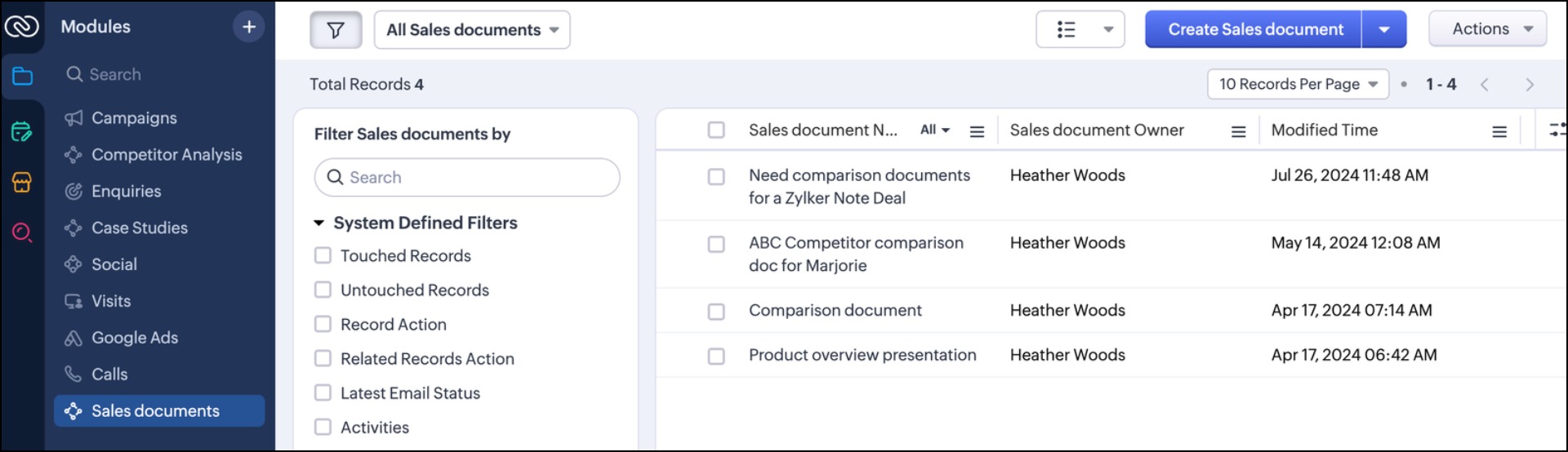 Sales Documents Team Module (From Marketing Team)
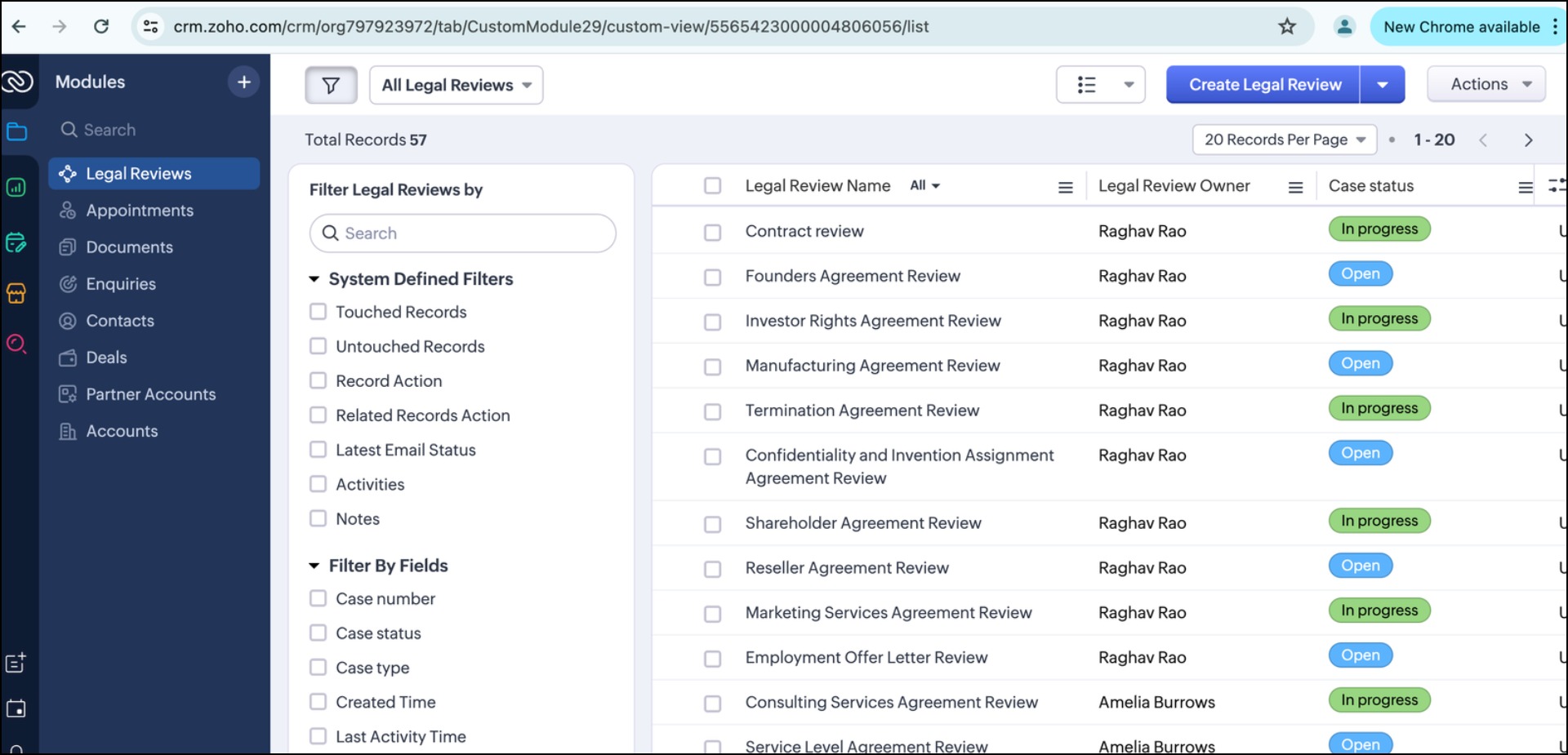 Legal Reviews Team Module (Legal Team)
The unique attribute of Team Module is that it could have its own Team Module Admin. One of the main challenges of current-day CRM could be attributed to the fact that there is a huge dependency on central admins (with good reason). You don't want a chaotic setup, and you want the right people in control of the system's security and data.

However, consider this new proposition where an additional 50 teams will get on board the CRM system. If the central admins have to configure each and every aspect of each of those 50 teams, there is going to be a significant setback — an overall dependency on central admins not just by Sales but by a few other hundred members.
Therefore Zoho CRM for Everyone includes a possibility where the administrative activities of a Team Module, that is a module specific to a team's process, could be taken care by the senior leaders of that team themselves.

This is akin to delegating routine administrative tasks and entrusting responsibility to those teams. Not to forget that the central org admins continue to retain the highest authority across CRM— they can revoke a Team Module admin's access at any time. In fact this Team Module admin will be supervised and work with the central admins — it is just that the team need not wait on central admins now for minor admin tasks such as adding a new picklist field or a quick workflow. They are empowered in the system to organize their process flows the way they feel is needed, under the close supervision and guidance of the central admins.
Say hello to Team Modules, where every team's process can be captured via bespoke modules, complete with automation, process management and customization capabilities.
3. Achieving coordination among teams via Requests
Now that multiple teams are on board the CRM and able to setup and manage their own processes— the next thing to do is ensure a seamless coordination between them which is rich with context, and easy to execute without relying on third party platforms. "Requests" in Zoho CRM achieve exactly that.
A request is simply a record added by Team A directly in Team B's module so that their requirement is recorded in their module and ready to be processed. Instead of conveying a message to a colleague via phone, chat or email which could be fragmented, you now coordinate with them by directly leaving a record in their Team Module. This saves time in translating context and the fellow team in processing your requirement.
For example, Heather Woods, a salesperson can create a "Request" in the Marketing team's Team Module called "Sales Collateral". She can directly add a record which captures details of the particulars such as what she needs, the customer or deal that the document is for, by when it is needed and other important details. Then the marketing agent, say Tai Chang, can process the request directly from this Team Module and need not spend time in again organizing the requirement in a separate system.
Sales team adding a request to the marketing team
Marketing team processing the request and handing the deliverable back to Sales
As you can see, the placing of a Request and the processing of the same are done in CRM. What's more, the "Requesters", that is the members who have placed the request can track them all in a consolidated manner via their My Requests tab.
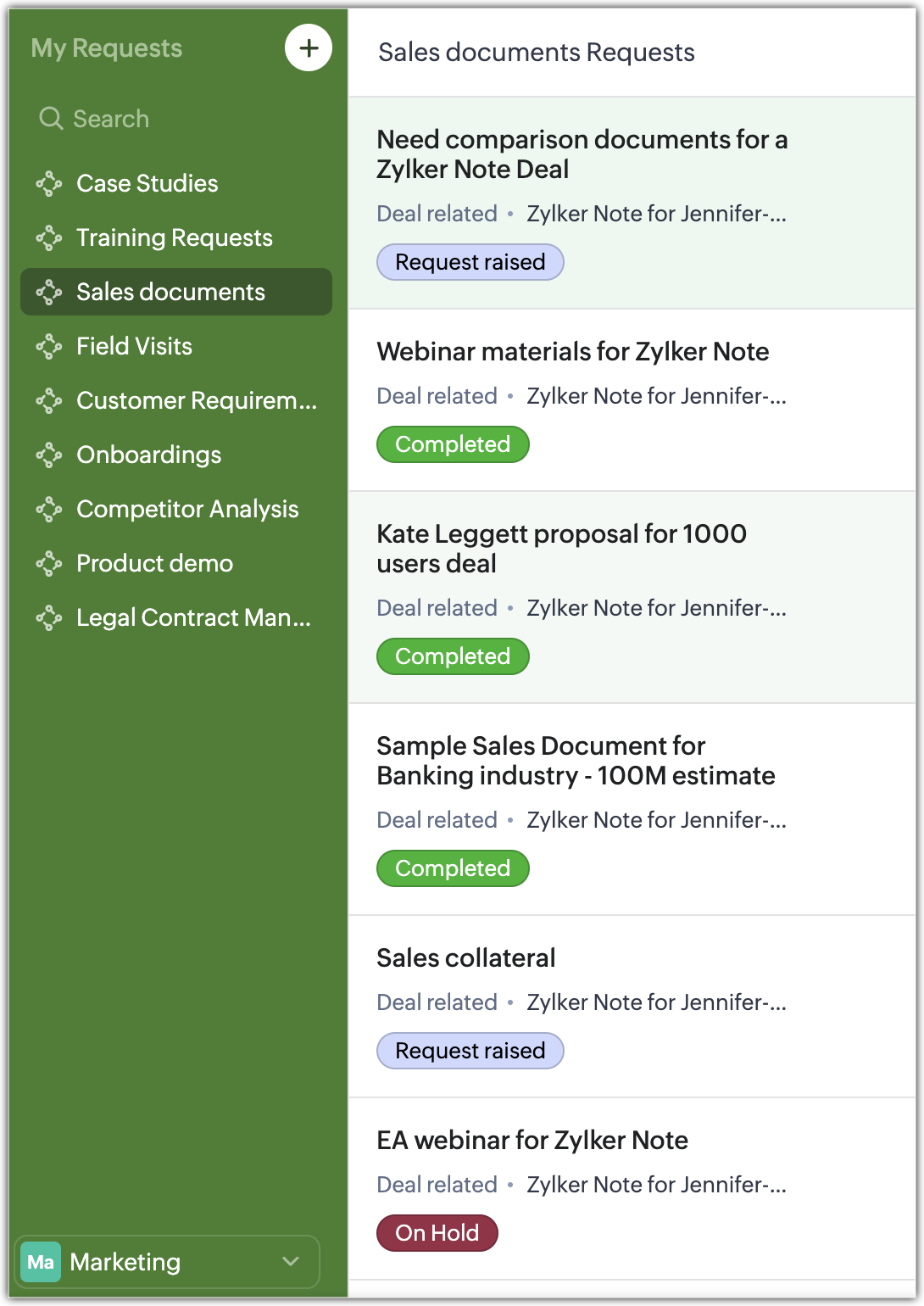 My Requests
This way, follow-ups are far from fragmented, they are neatly consolidated and you can track various key aspects of your Requests such as the status, the stakeholders, the deal associated and so on.
So with these three pillars— that is democratization of CRM with Teamspaces, empowerment of teams via Team Modules and achieving coordination between teams via Requests, you essentially ensure a seamless experience AKA a CRM for Everyone!
Team Module — Quick information on Availability and Limits
Team Modules are available from the Standard Edition onwards, including all Free Trial editions.

For detailed Availability and Limits: Learn more
Now what's the incentive to bringing all of your team members on board the CRM?
Well, great news! You do not have to pay full price for using only a small portion of the CRM system. Introducing Team User Licenses, which acts a limited access to CRM at a subsidized rate. This is introduced in order to encourage more and more users to get onboard CRM, and leverage this powerful system for their specific processes at a nominal rate.
The fundamental difference between a Team User and an Org User is that a Team User by default will have access to only the Team Modules they are added into. They will not own any organization modules, nor be able to share them. They can view certain org modules as that may be needed as a reference point for their work, but they will not be able to modify org module data.
For example, while the sales team members in an organizaiton will use the full CRM license, the Presales team or the Legal team members could be added under the "Team User License". Here, they will have access only to their respective Team Modules. They could view Leads, Contacts and Accounts if their tasks call for it— however they won't be able to own or modify any of these org module data.
Here is the price breakdown for Team User licenses.
— $9 / user / month if billed annually.
— $11 / user /month if billed monthly.
As part of this announcement, we are thrilled to offer 100 free team user licenses for 100 days as a trial for all early access customers of Zoho CRM for Everyone. Post this 100 day period, the above prices will apply.
Public Fields:
In a different scenario, you may want to further restrict a Team User's access to the org modules. You don't want them to view the entire record but only a handful of fields. For example, you don't want to expose the contact details of a customer or their deal amounts, but you only want a legal executive or presales engineer to view the customer's industry and employee size to further understand how to tailor their work. In such a case you can mark these specific fields — such as Account Name, Industry, Employee Size etc as Public Fields. Public fields are those specific fields which you can make visibile to anyone across an organization on a read-only mode, while the rest of the fields in the record except for those public fields, remain hidden.

Introducing the Next Gen UI of Zoho CRM
The CRM user interface has been re-designed to accommodate the needs of multiple teams in an organization and support easier configuration of key settings such as modules, reports, and dashboards, apart from several other visually pleasing surprises!
Primary and Secondary sidebar:
The menu options from the top band menu bar have been moved to the left-hand side vertical sidebar. The sidebar is now an extremely functional piece of the UI with contextual shortcuts for quick settings, neat folders for better organization of modules and more. The sidebar now has two divisions— Primary Sidebar and the Secondary Sidebar.
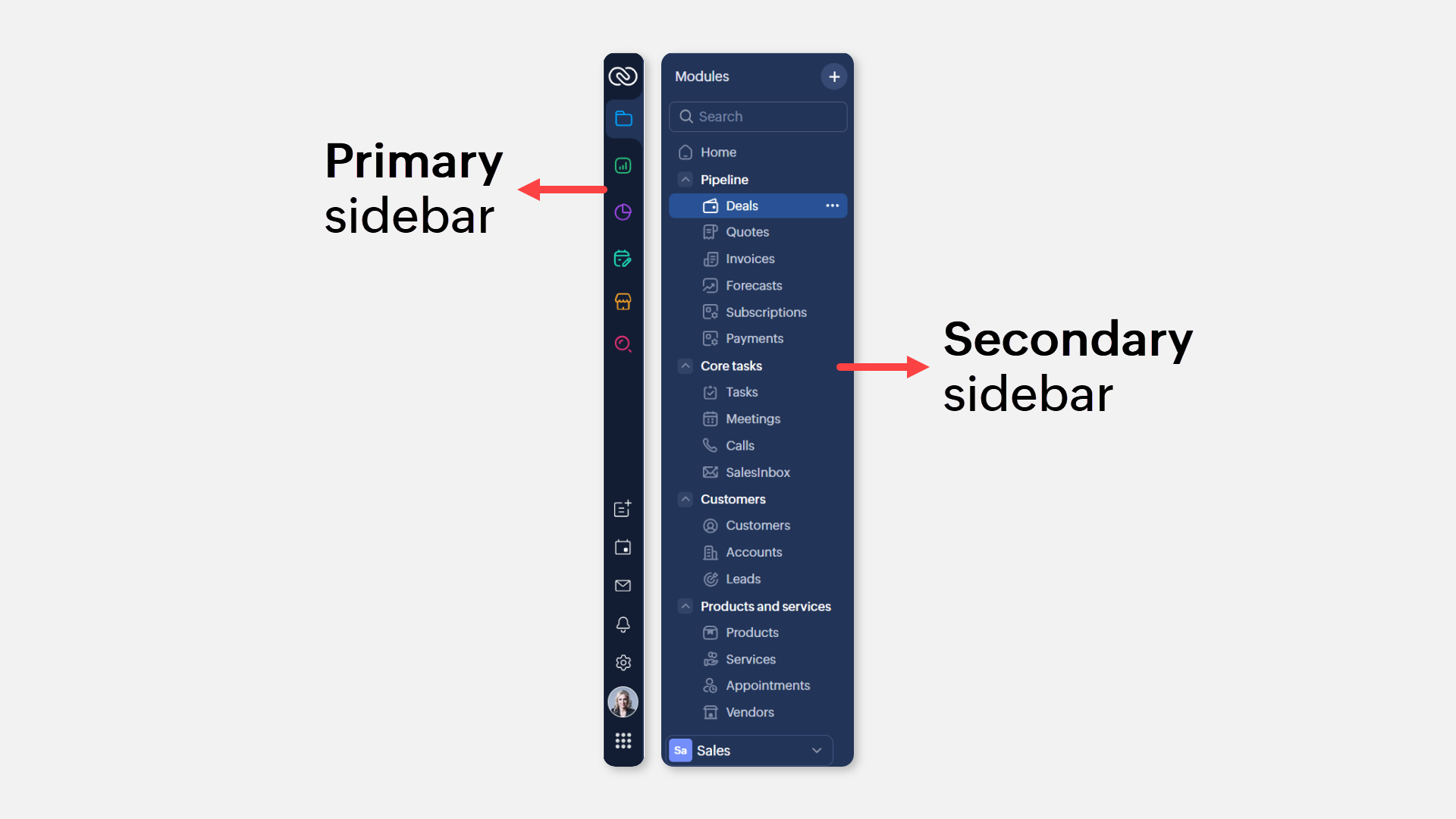
- The Primary Sidebar is for first-level navigation of the product. The top portion of the Primary Sidebar houses icons to view and work with Modules, Reports, Dashboards, Requests, Marketplace, and Global Search. The bottom portion of the Primary sidebar now contains intuitive utility icons such as Quick create record, Mail magnet, Calendar and more. (originally located on the top right corner of the UI).
- The Secondary sidebar opens up quick-controls contextual to what you choose in the Primary sidebar. This is collapsible in order to allow you to maximize your right-hand side work area.
You have contextual shortcuts to Setup options on the Secondary sidebar. Ex: You can create a module, a report or a dashboard right from this location without having to navigate to the backend Setup. (While the backend Setup is still intact, the Secondary sidebar options offer a quick shortcut).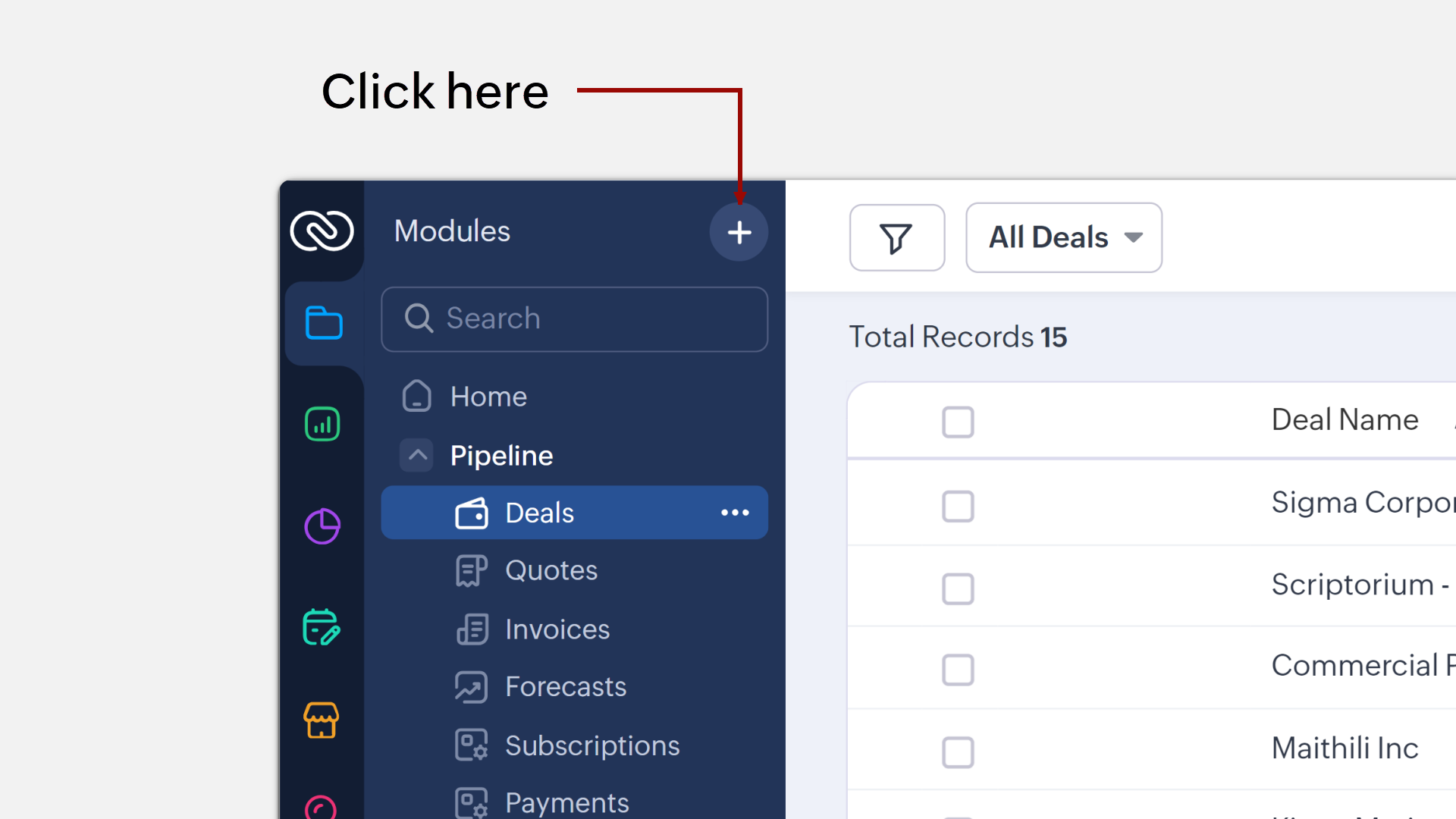
You can also directly create layouts, webforms, wizards, canvas pages, etc from the Secondary sidebar.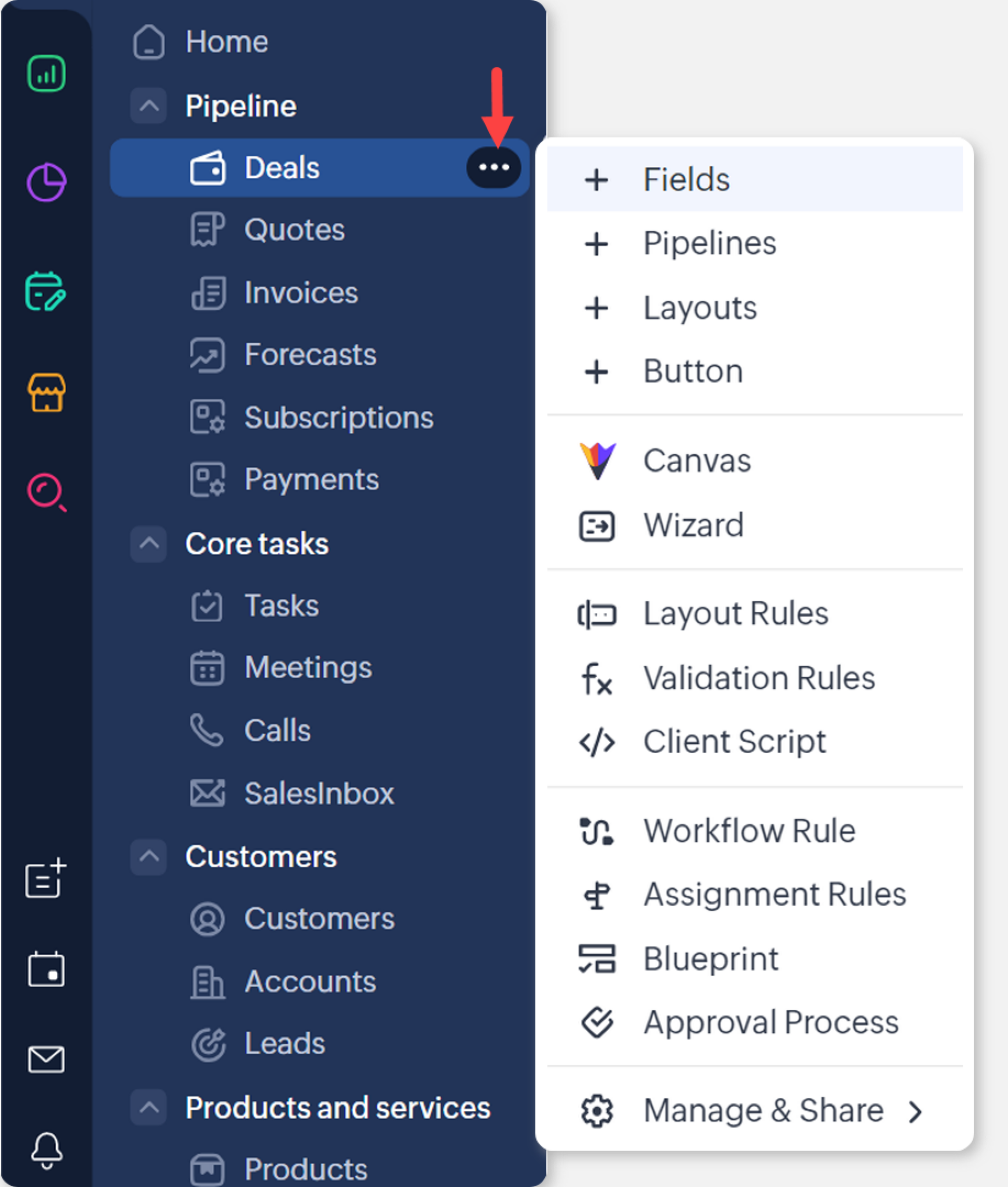
Besides, the Secondary sidebar houses folders for better sorting modules, reports, etc.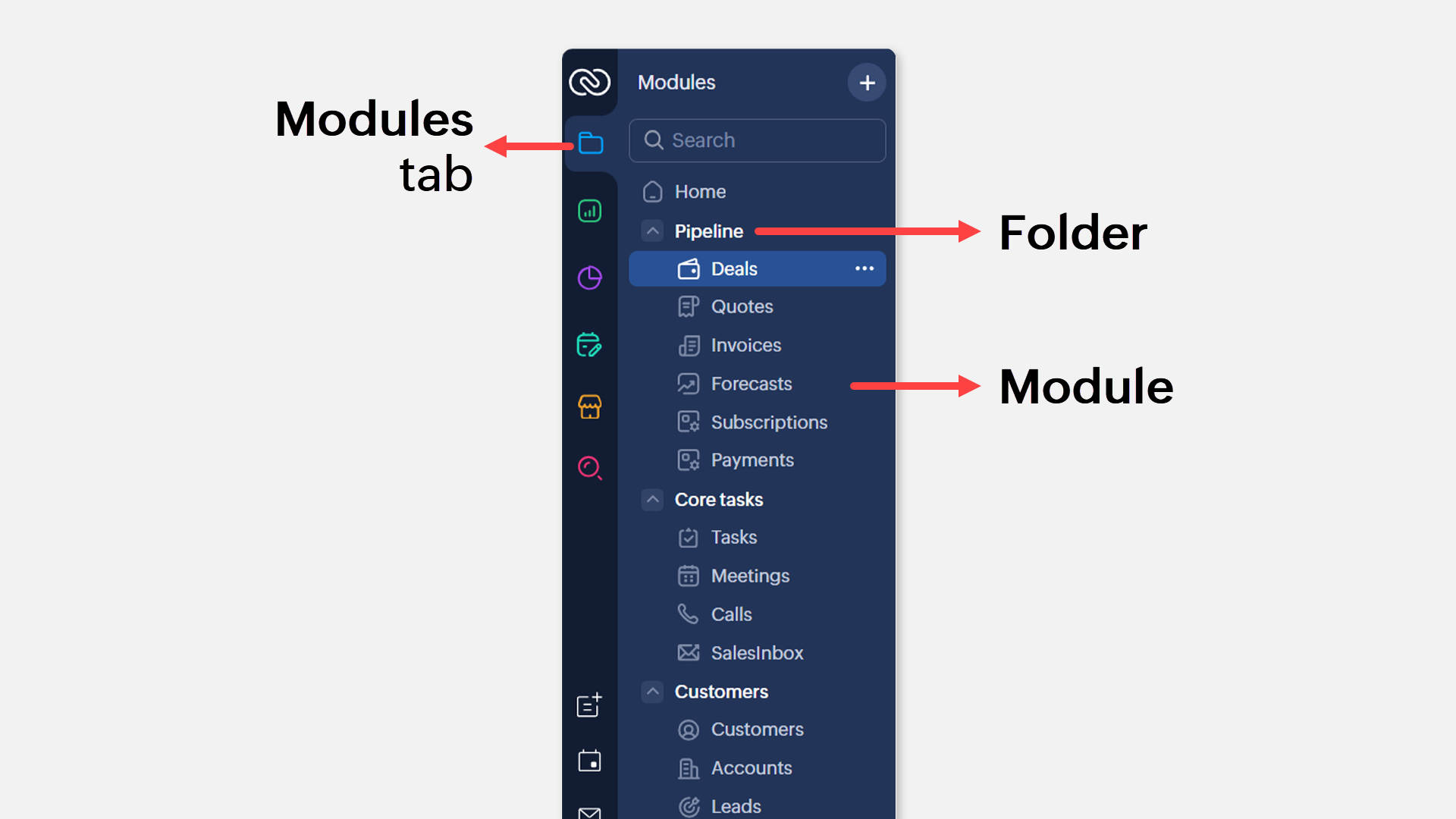 Folders
Chart view alongside list views — where the records in a module can be organized in the list view space as a chart component. Learn more.
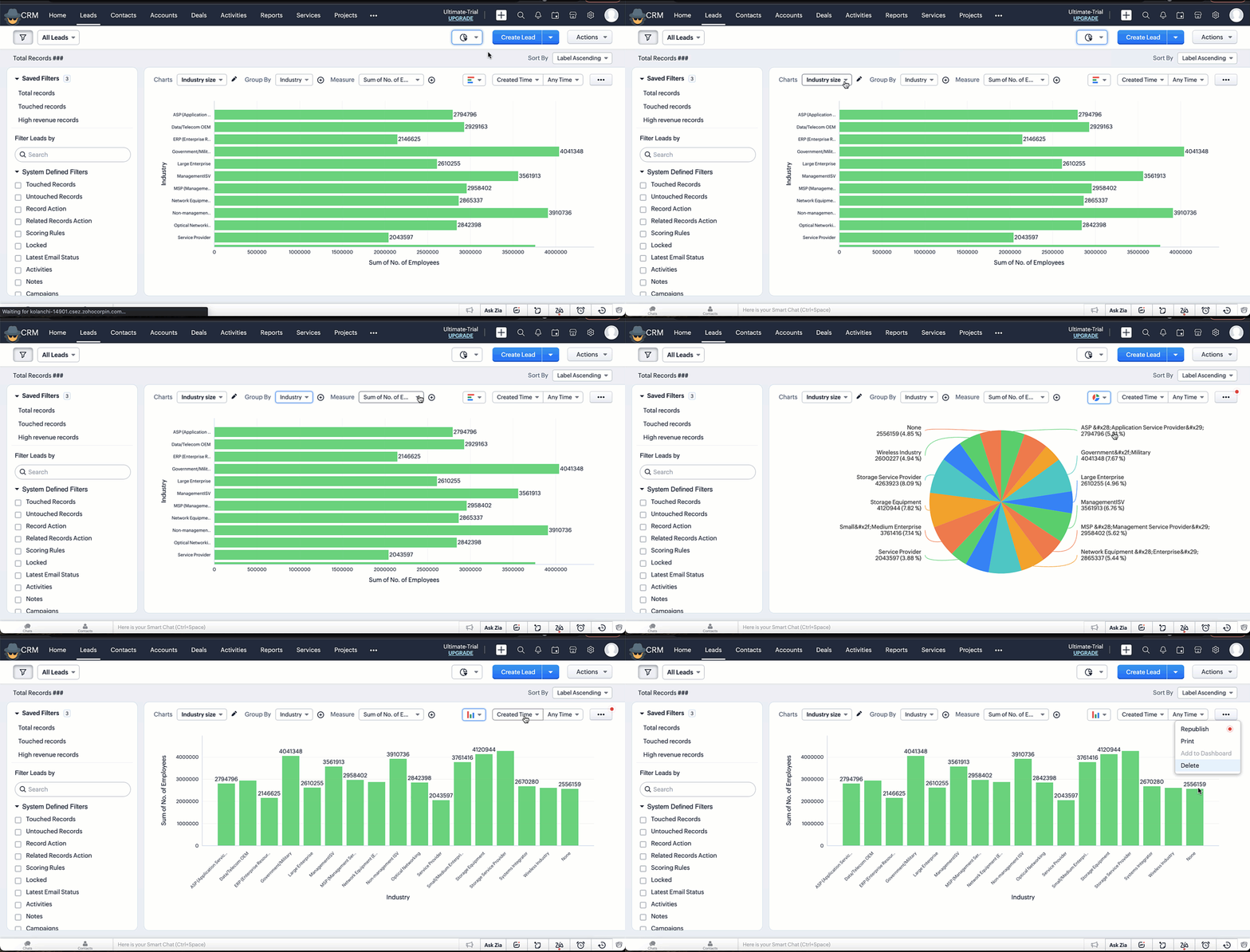 Chart ViewAn omni-channel Interactions tab — where you will be able to see the complete timeline of communication via multiple channels with a customer. Learn more
Chart View Interactions Tab
Well, what are you waiting for? We hope that this detailed elaboration gives you a fair idea of our directional progressive improvements with Zoho CRM for Everyone.

NOTE:
- "Zoho CRM for Everyone" is NOT a new product from Zoho. This is the name of this latest release, which promises a host of features and possibilities that makes Zoho CRM a system that is easily accessible for "everyone" in an organization. Hence the name. Rest assured, these releases are part of the Zoho CRM product.
- Early Access to Zoho CRM for Everyone including Team Module and Next Gen UI has been closed as the product is now open to all.
We are continuously innovating and adding feature sets to substantiate our claims as part of this release. We appreciate any suggestions, criticism and feedback on this direction.
Useful Links
Start your journey with Zoho CRM for Everyone by bookmarking the following useful links.
- Learn more about how CRM for Everyone works here: CRM4E Resources
- Watch Recorded Webinar