Connect - Messages et flux
Zoho Connect vous permet de créer des messages à deux niveaux : celui de l'organisation et celui du groupe.
Le mur de l'entreprise ou du réseau est un endroit idéal pour découvrir toutes les activités pertinentes qui se font. Tenez tous les membres de votre réseau au courant de ce qui se passe dans l'entreprise en partageant des mises à jour sur le mur du réseau. Tous les messages publiés sont accessibles à tous les membres du réseau. Les messages peuvent également être consultés sur la page Mon fil d'actualité de chaque membre.
Le mur du groupe est un espace de communication au sein du groupe. Le mur du groupe est réservé aux membres des groupes privés, alors que dans un groupe public, les personnes extérieures au groupe peuvent également consulter le mur du groupe et y publier des messages.
Mon Flux
La page Mon flux vous donne un aperçu de toutes les conversations et mises à jour qui vous concernent. Cette page vous permet de voir les mises à jour des groupes auxquels vous appartenez, des membres que vous suivez, des messages et des commentaires qui vous @mentionnent et des messages publiés sur le mur du réseau.
Publier une annonce
Les annonces sur le mur de l'entreprise ou du groupe de Zoho Connect permettent aux équipes de ne rater aucune mise à jour importante. Vous pouvez fixer une date jusqu'à laquelle l'annonce s'affichera au-dessus de tous les autres messages sur le mur en question. Dès qu'une annonce est faite, une notification par e-mail est envoyée à tous les membres du réseau (pour les annonces sur le mur de l'entreprise) ou aux membres du groupe (pour les annonces sur le mur du groupe).
À partir de l'onglet "Permissions" sous la page paramètres, les administrateurs du réseau et du groupe peuvent décider qui peut publier des annonces sur leurs murs respectifs.
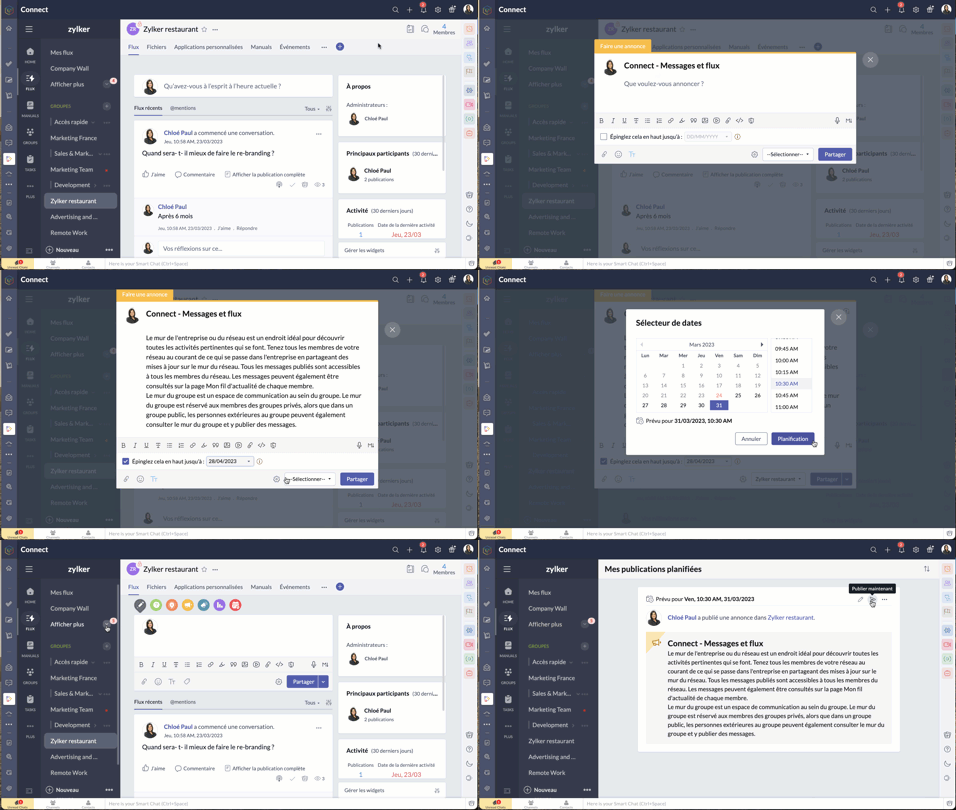
- Passez par l'icone "+" en haut à droite de votre portail Zoho Connect.
- À partir de la liste déroulante, sélectionnez "Faire une annonce".
- Saisissez votre annonce, joindre des documents si nécessaire à partir de l'icône du trombone. La limite de taille par fichier est de 30 Mo.
- Vous pouvez épingler l'annonce en haut jusqu'à une date précise. Après avoir défini la date, l'annonce s'affichera en haut de tous les autres messages publiés sur ce mur particulier jusqu'à la date définie. Cela permet de s'assurer que personne ne rate les annonces.
- Sélectionnez le mur du groupe ou de l'entreprise sur lequel vous souhaitez publier.
- Cliquez sur la flèche à côté du bouton de partage pour programmer une publication à un moment précis et partagez.
- Pour connaître la liste des membres qui ont consulté votre annonce, cliquez sur l'icône en forme d'œil dans le coin en bas à droite de l'annonce.
Poser votre question dans Zoho Connect
Pour trouver des réponses à vos questions, il vous suffit de les poster dans votre réseau. Les réponses sont ajoutées sous forme de commentaires et vous pouvez choisir la meilleure réponse à votre question.
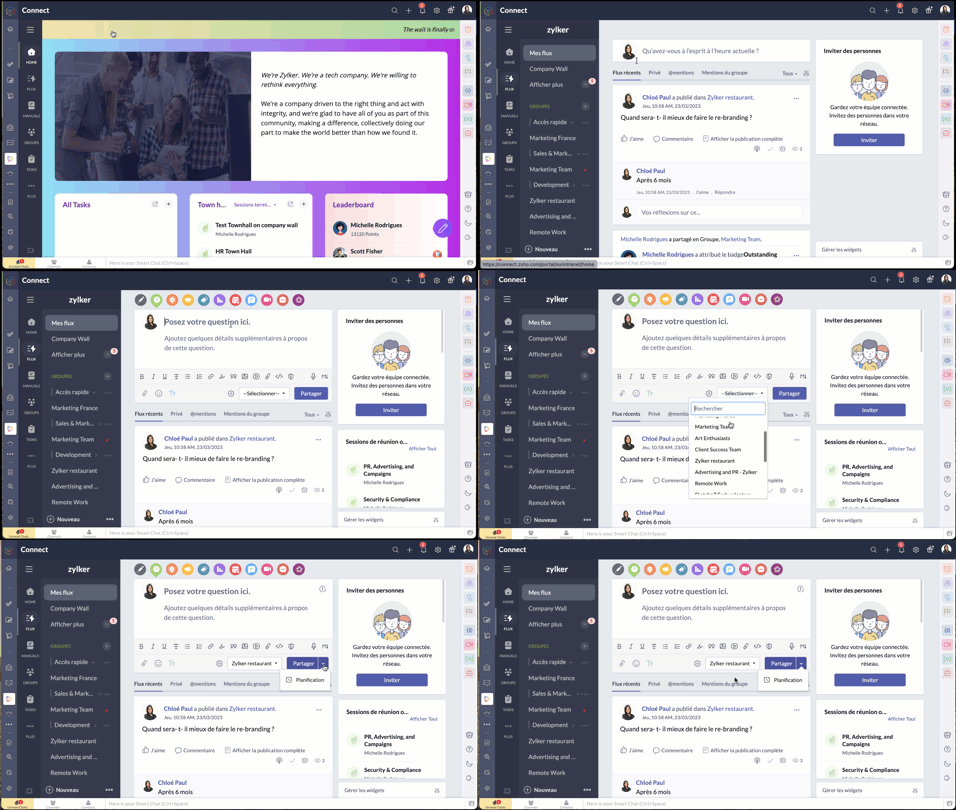
- Passez par l'onglet "flux" depuis le panneau à gauche.
- Cliquez sur l'icône de question dans l'éditeur de message en haut de la page. Les réponses partagées sont ajoutées en tant que commentaires.
Démarrer un sondage
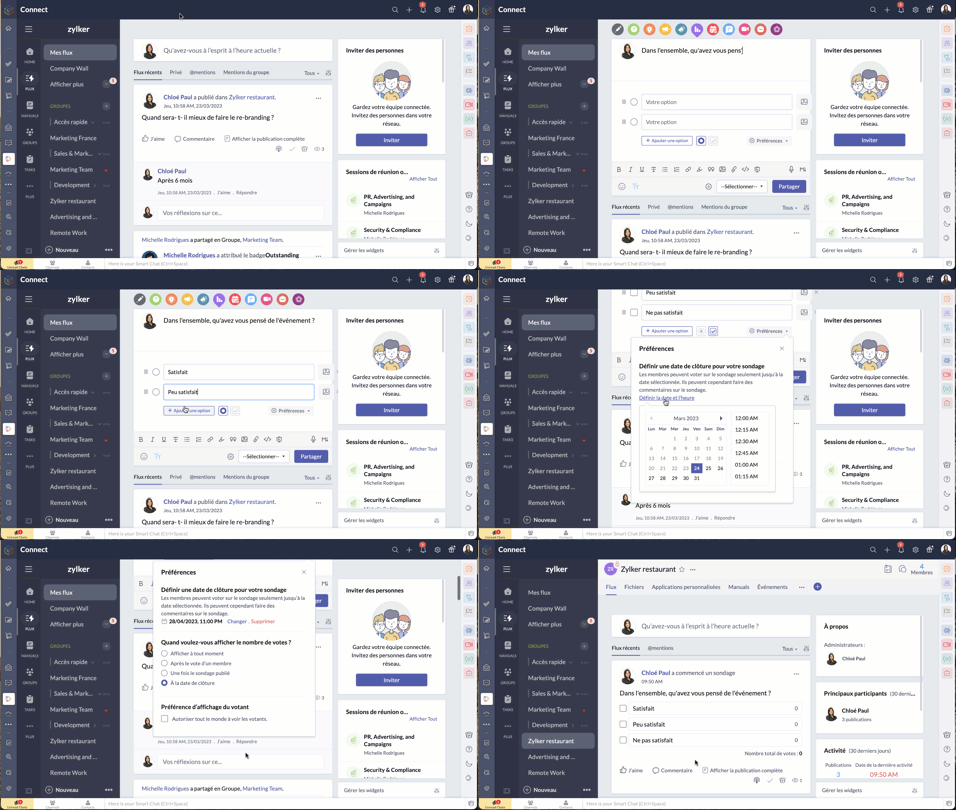
- Organisez un sondage et demandez aux membres de votre réseau de voter pour la meilleure idée ou solution.
- Comme expliqué ci-dessus, à partir de l'éditeur de message, sélectionnez l'icône de sondage.
- Saisissez la question et les options.
- Le bouton "Preferences" vous permet de définir la date et l'heure de la clôture, préférences d'affichage du votant et plus encore.
- Choisissez le groupe à qui s'adresser, et partagez.
Bon à savoir
- La limite de caractères pour la question du sondage est de 10 000, et celle pour les options du sondage est de 200. Il est possible d'ajouter jusqu'à 25 options à un sondage.
- Si vous n'avez pas fixé de date de clôture pour le sondage, vous pouvez le cesser à tout moment.
- Zoho Connect vous permet de prolonger la date de clôture du sondage.
- Vous pouvez choisir d'afficher en permanence le nombre de votes reçus pour chaque option ou de ne pas afficher le nombre de votes jusqu'à la clôture du sondage.
- Si vous souhaitez permettre aux membres de modifier leur choix après avoir voté pour une option, utilisez la case à cocher dans la section "Préférences" du sondage.
Partager des commentaires et des messages par e-mail
Les messages par e-mail
Vous pouvez ajouter des messages sur Zoho Connect par e-mail à l'adresse indiquée dans la page de configuration d'un groupe.
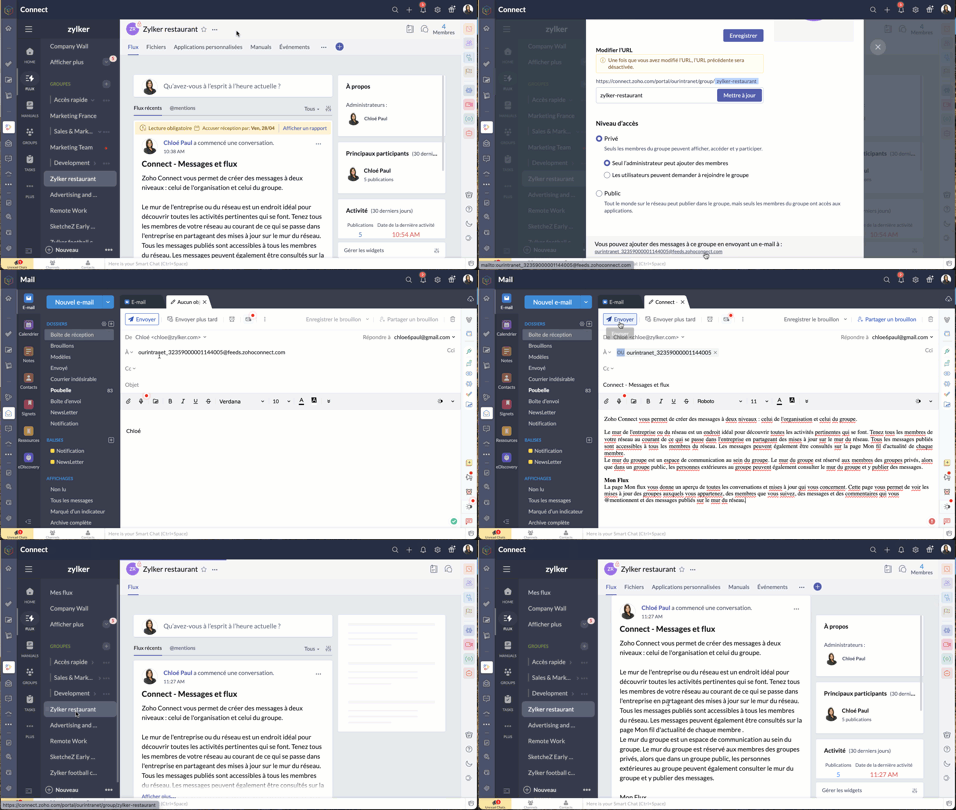
Les commentaires par e-mail
Vous pouvez ajouter des commentaires dans les messages et les forums en répondant à la notification par e-mail que vous avez reçue. Cette option est disponible par défaut si les notifications par e-mail est activée dans le réseau, si bien qu'il n'est pas nécessaire que les administrateurs la configurent séparément pour leur réseau.
Bien à savoir
- Bien que cette fonctionnalité soit disponible par défaut, les réseaux qui utilisent des adresses e-mail avec le domaine de leur entreprise (exemple : user@zylker.com) doivent ajouter un enregistrement SPF et un signe DKIM dans le gestionnaire de domaine pour s'assurer que cette fonctionnalité fonctionne.
- Cette option n'est pas prise en charge pour la réponse automatique et la redirection d'e-mail.
Messages à lire obligatoires
Comme son nom l'indique, un message marqué comme obligatoire doit être lu par les membres. Cela permet aux organisations de tenir leurs employés informés de certaines annonces essentielles. Il est également possible pour les administrateurs de savoir qui a lu ce message et d'envoyer des rappels aux membres qui ne l'ont pas encore lu.
Il n'y a que les administrateurs de réseau qui peuvent marquer un message comme lecture obligatoire dans le mur du réseau, tandis que les administrateurs de groupe peuvent marquer un message en lecture obligatoire dans leurs groupes respectifs.
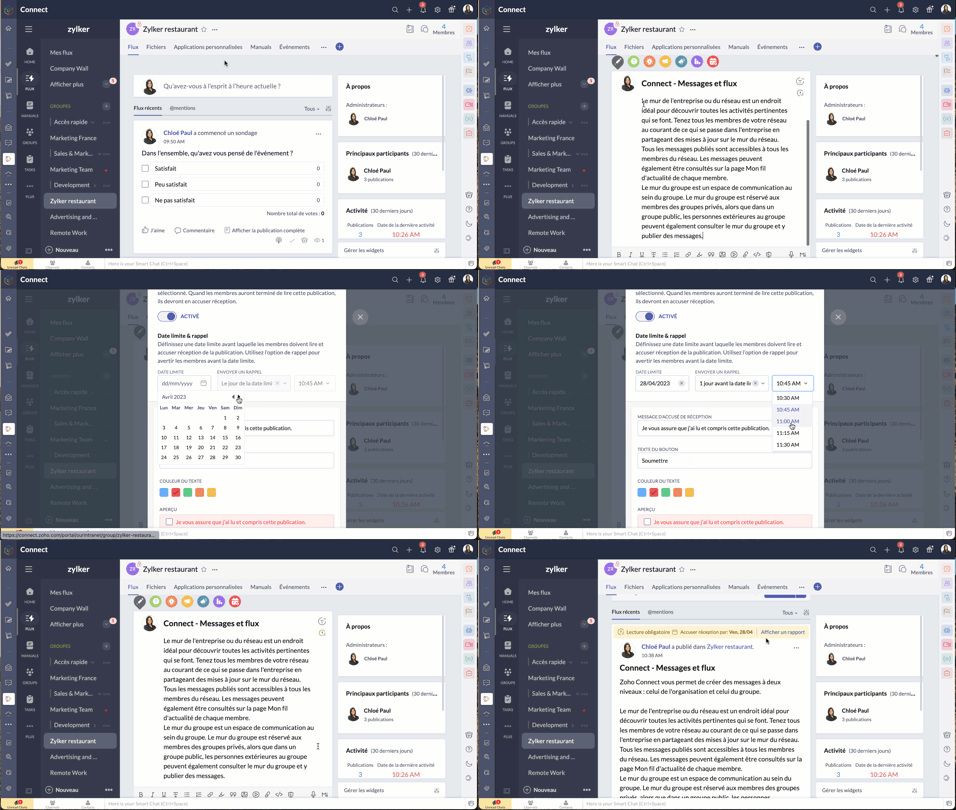
- À partir de l'éditeur de message, passez par le bouton "Lecture obligatoire", activez-le.
- Configurez la date limite et le message de rappel.
- Choisissez le thème de couleur que vous souhaitez utiliser pour les accusés de réception et enregistrez.
- Le message aura une étiquette obligatoire pour aider les utilisateurs à le distinguer des autres messages. Les membres recevront une notification concernant le message. Après avoir lu le message, ils devront compléter l'action d'accusé de réception. Celle-ci ne s'applique pas à l'utilisateur qui a créé ou marqué le message à lecture obligatoire.
N'hésitez pas à nous faire part de la fonctionnalité de Zoho Connect que vous utilisez le plus dans votre organisation et de quelle manière.
L'équipe Zoho France
Topic Participants
Kinjal Lodaya
Stéphanie
Sticky Posts
Collaboration sans faille avec Zoho One
Bonjour à tous, Dans cet article nous allons voir comment Zoho One permet une collaboration à différents niveaux . La façon dont nous travaillons évolue. À mesure que les entreprises se mondialisent, la plupart des activités sont menées en équipe.
Recent Topics
Warehouse fast processing
Hey guys, would anyone be interested in something like the attached image ? If there's any interest I'd be willing to develop it further for others to use, it's much faster than using Zohos native solutions, it can part pack, pack in full, part ship,Can I create a CODE 128 custom field for my items in Zoho Inventory and then use it for generating Sales Orders?
Can anyone helps me, I don't want to use the SKU code for scanning my products. Because all my products have a CODE-128 label attached.Start/Stop Timmer in Chrome Extension
The chrome extension is great and allows you to do allot however one of the most common things employees working on projects need to do is track their time. Having an easy start/stop timer to track time would be great.Invalid collection string
I haven't changed anything in one of my functions. I'm trying to run it manually and suddenly "Invalid collection string" appears. My code has 6 lines and the error says that the error is on 7th line. Why? What does this error mean? Nothing has been changedZoho Directory 2025: New Features | Security Enhancements | Enriched UI
Hello everyone, Greetings from the Zoho Directory team! 2025 has been a highly successful year for Zoho Directory. We are delighted to introduce a fresh set of features, an enriched UI, and major product enhancements. These updates aim to deliver a smootherzoho people 5 report
How do I customize my report in Zoho People Report? I understand that I can get the results of multi-table queries through SQL join statements, but I don't know the relationship between each table. I tried to create a report using Attendance User ReportLeave Report Emailed Weekly
I am wondering if someone knows how to have a report generated either weekly or monthly or both for department heads and ownership of upcoming employee leave. For instance, it would be nice to get an emailed report on Friday for the upcoming week of whoZoho Flow Decision Continuing Despite Not Meeting Conditions
I have a picklist field called Lead Status in the leads module, with the following lead Statuses: New Lead Attempted Contact - 1 Attempted Contact - 2 Attempted Contact - 3 Attempted Contact - 4 Attempted Contact - 5 Attempted Contact - 6 Attempted ContactTip #55- Accessibility Controls in Zoho Assist: Exploring Vision Settings- 'Insider Insights'
As we approach the end of the year, it’s a good moment to reflect on how we can make our tools more inclusive and easier to use for everyone. Remote support often involves long hours in front of screens, varied lighting conditions, and users with differentZoho Recruit Slow and Freezing on all screens
We have had an issue with Zoho Recruit for weeks being extremely slow and at times freezing. We have 100 mega internet, and I went into each computer and updated the virtual memory so there is more available. Also restarted all computers daily. Still having the issues. Almost unable to work.Credit Management: #2 Configuring Right Payment Terms for Credit Control
Think about the last time you ordered something online and saw that little note at the checkout, "Pay on Delivery" or "Pay later". It's simple, but it actually sets the tone. As a business owner, you know exactly when payment is expected. Now, imagineDependent (Conditional) Fields in Zoho Bookings Forms
Hello Zoho Bookings Team, Greetings, We would like to request the ability to create dependent (conditional) fields in Zoho Bookings registration forms. Current Limitation: There is currently no way to make one field’s available options depend on the valueBug Report: Search fails to find existing notes after Evernote import
Hello, I recently migrated from Evernote (~2600 notes across 23 notebooks), but the search functionality is currently broken. The Issue: I can manually browse to a specific note and see it exists. However, when I type the exact or partial title of thatMarketing Tip #13: Win repeat customers with post-purchase emails
The relationship with your customer doesn’t end after the sale; that’s when it begins. A thoughtful post-purchase message shows customers you appreciate them, keeps your brand top of mind, and can even lead to another sale. You can thank them, ask forZoho Form
I have problem with Zoho Form. One of form i don't received the PDF version. Others okay except this one. W904533Create & Update Zoho Vault Passwords via Zoho Flow
Hi Zoho Flow / Zoho Vault Team, We’d like to request an enhancement to the Zoho Vault integration in Zoho Flow. Current Limitation: At the moment, Zoho Flow supports only the following selected Zoho Vault actions, such as: Fetch passwords, Share passwordsCustom Related List Inside Zoho Books
Hello, We can create the Related list inside the zoho books by the deluge code, I am sharing the reference code Please have a look may be it will help you. //..........Get Org Details organizationID = organization.get("organization_id"); Recordid = cm_g_a_data.get("module_record_id");Migrate different zoho subscription to zoho one
Dear We have different zoho subscription we need to migrate it to zoho one. Currently we are paying for zoho email, zoho expense, zoho payroll etc under different admin We need to move it too zoho one flexlible plan for all my employeesFeatures, Feedback and Votes
We’re launching the Feedback Forum for our customers. This is 'THE' place where you can add everything you’d like to see in Zoho Books. If you don't find the specific feature you need, simply add it so others can also vote for it. While we cannot promisePayment system for donations management
I manage an organization where we receive donations from payers. Hence, there is no need to first create invoices and then create payments received against the invoices. What are the recommended best practices to do this in ZohoBooks?There Might Be A Glitch in Determining If A String Represents A URL
I suspect there might be a glitch in determining if a string represents a URL or not. For example, I cannot embed the following URL. Perhaps the exclamation mark or parentheses are the culprit? https://en.wikipedia.org/wiki/How_the_Grinch_Stole_ChriCustomer Management: #4 Enhance Customer Journey
When Neha started DefineOps, a growing IT support and consulting firm, most of her work was straightforward. A client would sign up for a free version, decide whether the service works for them, and then either continue or discontinue. Billing was simple,Android app sync problem - multiple devices have same problem
Hello, I am having a problem with synchronization in the Android app. When I create a drawing, the data does not sync correctly—only a blank note is created without the drawing. I tested this on multiple devices, including phones and tablets, and theMarketing Tip #1: Optimize item titles for SEO
Your item title is the first thing both Google and shoppers notice. Instead of a generic “Leather Bag,” go for something detailed like “Handcrafted Leather Laptop Bag – Durable & Stylish.” This helps your items rank better in search results and instantlyTerritory Assignment Issues (Lead to Account + Contact)
1. Lead → Account & Contact Territory Assignment on Conversion A Lead is automatically assigned one or more territories using a workflow and Lead Assignment Rules. This works as expected, and we are able to assign multiple territories to a Lead automatically.Marketer's Space: Proven tips to improve open rates – Part II
Hello Marketers! Welcome back to another post in Marketer's Space! We're continuing from where we left off a fortnight ago. We ended the previous post discussing the subject line, and we'll continue from there. Let's dive right in. Pre-header Pre-headerSQL Table slowed to a crawl
Hi all - I seem to have noticed an update. Now whenever I am typing in the script field for the SQL tables there is a huge delay and it is all very slow. This has never been the case for me in over 5 years of using Analytics - I really hope it's fixedDeluge Events/search API works in user environment but not in sandbox – why?
I am creating an Extension for Zoho CRM using Zoho Sigma Platform I’m using the following Deluge code to search Events in Zoho CRM based on Start_DateTime: criteria = "(Start_DateTime:greater_than:2025-12-20T00:00:00+00:00)"; url = "crm/v8/Events/search?criteria="Ensure Consistent Service Delivery with Comprehensive Job Sheets
We are elated to announce that one of the most requested features is now live: Job Sheets. They are customizable, reusable forms that serve as a checklist for the services that technicians need to carry out and as a tool for data collection. While onWhat are Zoho Meeting capabilities included in Zoho Workplace Standard?
I am evaluating using Zoho Meeting for my organization, but it is not clear what Zoho Meeting capabilities are already included in Zoho Workplace Standard. - Are meeting recordings included in Workplace Standard? - Can we invite external meeting participantsHow can I get the participant list of a reoccurring meeting afterwards?
I'm trying to use the Meeting Participant Report from the API docs but when I call it on a reoccurring meeting it returns that there are no participants because it thinks I'm talking about the meeting in the future. Is there a way to use webhooks or someFunction #50: Send Mass emails to your customers
Hello everyone, and welcome back to our series! We have reached a milestone of 50 Functions, which means that we have automated 50 different tasks in Zoho Books. Every Friday, we have shared a nifty function aimed at either automating a task or streamliningFull Hebrew Language Support for Client-Side Zoho Assist Interface
Dear Zoho Assist Team, We would like to request an enhancement to Zoho Assist's client-side interface to support full Hebrew language customization, including all popups, notifications, and session-related messages. Current Limitation The Join page allowsAdd Hebrew & RTL Support to Feedback Widget
Hello Zoho Desk Team, How are you? We are using Zoho Desk and would like to utilize the Feedback Widget. While Zoho Desk itself supports Hebrew and RTL, the Feedback Widget unfortunately does not. We kindly request that Hebrew and full RTL support beMerge Tickets Directly from Contact Page in Zoho Desk
Dear Zoho Desk Support Team, We are writing to request a new feature that would allow users to easily merge tickets directly from the contact page in Zoho Desk. Currently, the only option to merge tickets is from the Tickets list view page, which canDifferent languages for users
Hello, Do you plan to enable individual users to select their languages for interface? Currently language can be changed for everyone - it looks like a settings for a whole portal, which is not good when you are working internationally. Best regards,Kaizen #222 - Client Script Support for Notes Related List
Hello everyone! Welcome to another week of Kaizen. The final Kaizen post of the year 2025 is here! With the new Client Script support for the Notes Related List, you can validate, enrich, and manage notes across modules. In this post, we’ll explore how2025年 Zoho コミュニティ 活動の振り返り 🎉
ユーザーの皆さん、こんにちは!コミュニティチームの中野です。 2025年も多くの学びと出会いがあったZoho コミュニティ。 本記事では今年の活動を振り返りながら、フォーラムの投稿・参加者の皆さん・イベントのハイライトをご紹介していきます。 目次 フォーラム:注目の投稿 フォーラム:多くの貢献をしてくださった方々 ユーザー交流会振り返り ワークアウト振り返り その他のトピックス 1. フォーラム:注目の投稿 本フォーラムでは様々な議論と知識の共有が行われました。 ユーザーの皆さんが日々の業務で直面する課題を投稿し、経験豊富なユーザーさん達が実践的な解決策を提供してくださいました。Customer Management: #3 Giving Customers Control & Privilege
Rio, the founder of RenoTech Solutions, a fast-growing digital service company, found itself juggling a dozen different services for its clients. They handled one-time setup fees, recurring monthly invoices, and custom milestone-based billing for projects.Can I use a Standalone CRM Function as the Callback URL For Async Export Data API?
I am creating an export job using this API https://www.zoho.com/analytics/api/v2/bulk-api/export-data-async/create-export/view-id.html There is a "callbackUrl" key in the CONFIG object. I tried copying the URL for a standalone function in CRM which canNext Page