Enhancements to the formula field in Zoho CRM: Auto-refresh formulas with the "Now" function, stop formula executions based on criteria, and include formulas within formulas
Dear Customers,
We hope you're well!
By their nature, modern businesses rely every day on computations, whether it's to calculate the price of a product, assess ROI, evaluate the lifetime value of a customer, or even determine the age of a record.
With Zoho CRM, you can include such calculations within records using the formula field. Today, we're introducing some new enhancements that aim to improve the accuracy and usability of formulas in your business processes.
Let's look at them!
Enhancement 1: Auto-refresh time-based formulas to view real-time values.
Businesses rely on time-based computations to conduct various analyses. Some computations measure time like a stopwatch. For example:
- To ascertain the possibility a customer might churn, you would compute the age of their deals.
- To validate an applicant's eligibility for an insurance policy, you would calculate the age of the applicant as of the current date.
The above examples are ongoing calculations that show the age of the record or of the customers. For these types of computations, you might expect that the formula is constantly ticking and rendering an accurate time measurement whenever you view the record. However, formula fields in fact compute and render the latest result only when the record is edited manually or updated via automation. By simply viewing a record, an agent may not be seeing accurate results. This enhancement addresses this.
Though formulas that provide the latest values include a "now" function in their syntax, computing all of these formulas continually and concurrently across all records poses a significant technical constraint. To address this constraint, we've introduced a checkbox to the formula field property labeled, Automatically refresh formula fields containing the Now function in real time.
If checked, the auto-refresh checkbox makes the relevant formula run every time the user visits or edits the record. This means users will always see the correct time measurements.

Limitation:
- You can apply the auto-refresh only for two fields with the Now function per module.
- Formulas with date/ date time return types cannot be used in workflows that are based on date/time -based triggers.
- Fields enabled with auto-refresh will have updated values every time you view them. But, this doesn't qualify for record edit. If you have automations based on edit of a record, this record will not be used unless the record is really "edited".
- Also, creating custom views and filters using these fields cannot be done.
Enhancement 2: Stop formula executions based on criteria
In contrast to the case above—where you'd expect the formula to run constantly—there are scenarios wherein you may want to stop a computation from executing. Let's say a customer has churned, and you want to calculate the time it took them to churn. In that case, you might want the formula to stop computing under certain conditions.
Accordingly, you can use this new function to:
- Calculate the number of days the deal was under negotiation
- Calculate the number of days spent in trial before conversion
- Calculate the number of days taken to ship a product
You may want to stop ongoing computations whenever there are events acting upon a given record. By doing so, you can determine the amount of time the record spent in a particular stage.
Previously, there hasn't been any functionality in Zoho CRM that effectively stops a formula from computing. Even when a cutoff date has passed, formulas continued to compute durations. With this enhancement, you can stop computations or freeze values based on specific criteria.
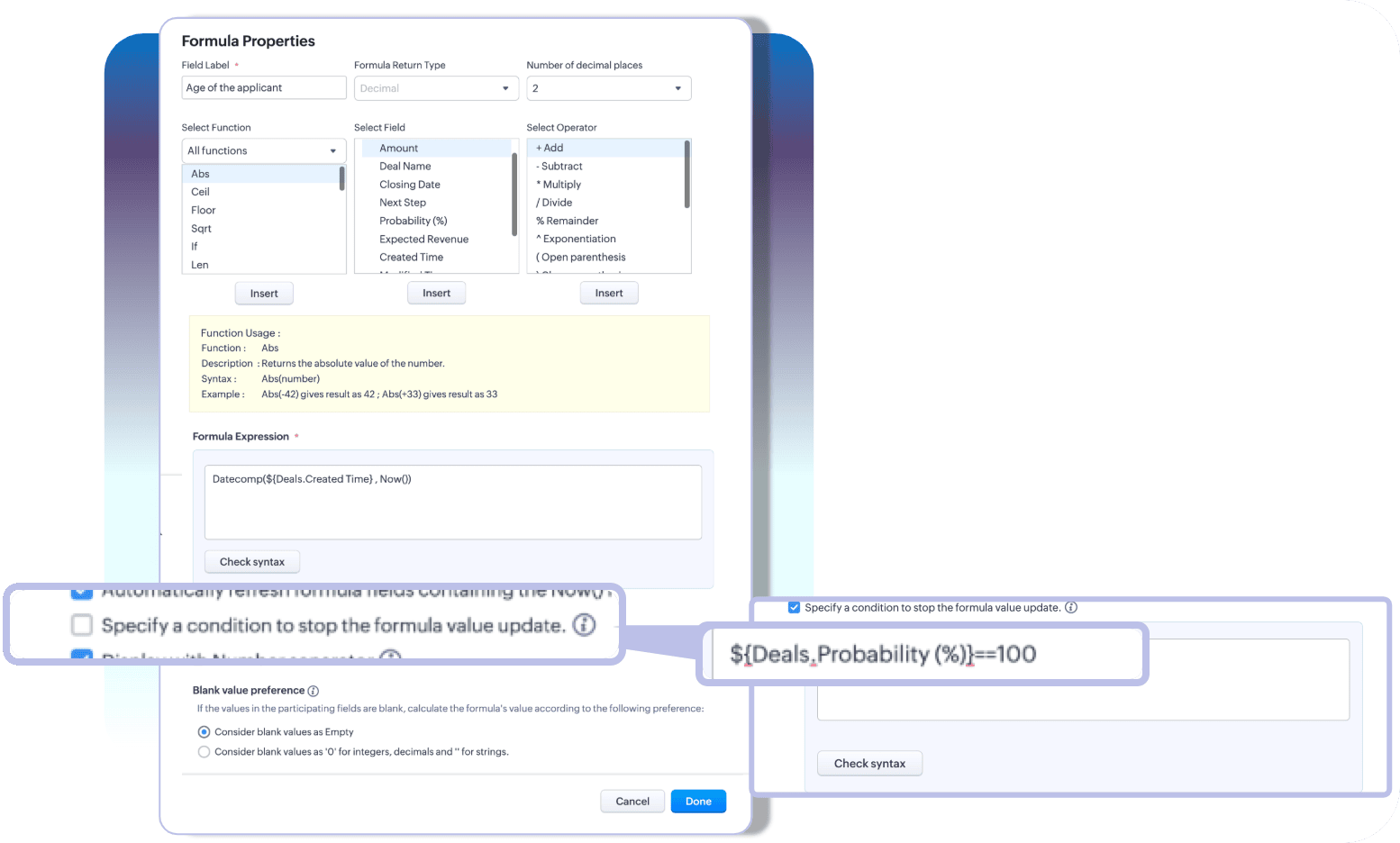
With these two enhancements, you can choose how you want your time-based formulas to be computed—to keep them running or to stop at a given time.
Limitation:
A formula field that has auto-refresh and stop criteria enabled, then those fields cannot have multiline fields, picklists, and lookup fields as participating fields.
Enhancement 3: Include an existing formula as part of another formula's component
A formula is only as powerful as its components. Zoho CRM enables you to construct various complex formulas, but one missing piece has been the inability to include an existing formula field to construct a new one.
Thus far, you could do this by building a long and linear syntax.
For example, let's say you want to determine the discounted value and overall discount percentage for your finalized quotes. Firstly, to determine the discount value, you'd write a formula.

Next, to find the discount percentage, you'd write another formula that looks something like this:

As you can see, the structure of the formula involves an existing computation. In Zoho CRM, to achieve this, you'd first formulate the discount value, and then—to find the percentage—you have to repeat the discount formula to get the percentage.

For a simple formula like this, the syntax is fairly easy to understand. But imagine calculating commissions, which would involve several smaller formulas—in which case, you have to repeat the entire formula structure even if you already have them computed in your record layout.
This is complex, redundant, and time-consuming—problems that this latest enhancement addresses.
A formula field looks like any other field in Zoho CRM. Thus, in addition to the list of fields available under the fields part of the formula configuration, all the existing formula fields will also be listed. Admins can construct new formulas using the existing formulas without having to repeat syntax.

That's all for the updates. If you have any feedback or questions, please drop them in the comments section. Let's connect!
Help document: Creating Formula fields in Zoho CRM
 Release plan: These enhancements are lined up for release DC by DC, gradually. We will keep you posted on the comments accordingly.
Thanks and have a good one!
Kind regards,
Saranya Balasubramanian
Topic Participants
Saranya Balasubramanian
Zohoboy
Haiku Technical Support
Toca Travel
Sravani
Sticky Posts
Presenting ABM for Zoho CRM: Expand and retain your customers with precision
Picture this scenario: You're a growing SaaS company ready to launch a powerful business suite, and are looking to gain traction and momentum. But as a business with a tight budget, you know acquiring new customers is slow, expensive, and often deliversGood news! Calendar in Zoho CRM gets a face lift
Dear Customers, We are delighted to unveil the revamped calendar UI in Zoho CRM. With a complete visual overhaul aligned with CRM for Everyone, the calendar now offers a more intuitive and flexible scheduling experience. What’s new? Distinguish activitiesCreate and populate a record in an instant: Introducing zero-shot field prompting to Zia's ICR
A couple of months ago, we upgraded our in-house AI image detection and validation tool, Zia Vision, with intelligent character recognition (ICR). By training Zia with sample images, you could create and enrich CRM records with data extracted from standardIn-person ZUG Meetups for Real Estate Professionals - US Q1 2026
The Real Estate Zoho User Group is going on a multi-city, in-person meetup tour across the US, and we’d love to see you there! These meetups are a great opportunity to: Connect with fellow real estate professionals using Zoho Share challenges and discoverNimble enhancements to WhatsApp for Business integration in Zoho CRM: Enjoy context and clarity in business messaging
Dear Customers, We hope you're well! WhatsApp for business is a renowned business messaging platform that takes your business closer to your customers; it gives your business the power of personalized outreach. Using the WhatsApp for Business integration
Recent Topics
[solved] #original_sender trick not working for us
Hello community ! We really like DESK.. it's working like a charm for us but I have a request. Some users are sending emails personnaly to me (instead of using the support adress).. and I saw there was a possibilty to use : #original_sender {mail@mail.com}SalesIQ Chat Notifications
I am the admin of our salesIQ implementation. About two weeks ago, I started hearing/seeing notification for ALL chats messages from monitored agents/chat participants. I don't need to see these, we have a manager who deals with this. I can't stop theCorrelated subqueries not supported in Zoho Analytics. This creates huge limitations
Running into a major limitation in Zoho Analytics: correlated subqueries simply don’t work, even in completely standard SQL patterns inside a JOIN. Example: LEFT JOIN "Bills" b ON d."Id" = b."Deal ID" AND EXISTS ( SELECT 1 FROM "BillUnknown table or alias 'A1'
I would like to create a subquery but i am getting the following error: Unknown table or alias 'A1' used in select query. This is the sql statement: SELECT A1.active_paying_customers, A1.active_trial_customers, A1.new_paying_signup, date(A1.date_active_customers),Batch Emails in CRM Plus without using a template?
Hi guys. Is it possible to send the same email to multiple people at the same time within CRM Plus without using an email template? At the moment we create a custom view in Contacts to display the people that we need. We then click the boxes on the left, and click 'Send Mail', but always need to select a template. Sometimes its better to write a quick one off message, without needing to set up a template first. Thanks.bank charge
a charge to my account was made that I did not authorize, of $16.46, for something that looks like "computer maintenance or something to that matter". please refund.[Free Webinar] Product Updates: Quick Catch-Up Session - Part II - Creator Tech Connect
Hello Everyone! We welcome you all to the upcoming free webinar on the Creator Tech Connect Series. The Creator Tech Connect series is a free monthly webinar featuring deep-dive technical sessions designed for developers, administrators, and app builders.Introducing Liquid Glass UI on the Zoho Mail iOS app
Hello everyone! We're excited to announce that the Zoho Mail app is now fully optimised for iOS 26's Liquid Glass design on both iPhone and iPad! The updated interface features transparent layers, smooth animations, and refined visual elements that enhancePlan change from Zoho One to Zoho Workplace
Hello Zoho, Following the recent pricing update for Zoho One, we are interested in transitioning to Zoho Workplace products. Please inform us about the necessary steps for this process so we can proceed promptly. Kind regards,Partner with HDFC And Sbi Bank.
Hdfc and sbi both are very popular bank if zoho books become partner with this banks then many of the zoho books users will benefit premium features of partnered banks.Links in Instagram
Hi there, I have been using Later for a while now but keen to come back to Zoho Social as Later doesn't offer tagging of pages on Facebook but they offer something Zoho doesn't. You can add a link to your bio which opens up your profile feed where imagesSpotlight #7 - Automatic Transitions in Blueprint
Previously, records could not be moved from one state to another without user intervention. With automatic transitions, move records from one state to another automatically, when it elapses its pre-defined time. This Spotlight discusses how automaticSub Folders
It would be great if there could be sub-folders in reports. We have a ton of individual reports and folders that would be easier to navigate this wayZoho CRM Community Digest - November 2025 | Part 2
Hello Everyone! Second half of November brought several exciting updates, especially around Zia, making AI assistance smarter, faster, and more context-aware. We also feature engaging community snippets highlighting members who went the extra mile toZoho CRM - Writing Assistant Tone
Hi Zoho CRM Team, Text in my emails often gets underlined in yellow because I tend to use a more informal tone with my client's, like using "I'm" instead of "I am". Is there some way for me to tell the system that this is my preferred writing tone, soHide Contact Number for Field Users & Agents
Is it possible to hide the contact number in both the Service Appointment and Work Order modules for field users and agents? The agents are using the Zoho FSM mobile app, and we want to restrict them from viewing the contact number.Zoho Flow Credits
Hi , I would like to ask the reason why every time I added plus credit but few days later I will return back to default? (as below I add credit to 3000 but today It change back to 1000) Most important is, when the credit fully used, not any reminder toForm Submission Emails
Is there a current delay with submission emails being sent? We've had 10-20 forms completed today but only a handful of emails.What is the simplest way to import PST to Yahoo Mail?
The simplest way to import PST file into Yahoo Mail is to use a third-party tool that supports direct PST-to-Yahoo migration. Software like Aryson PST Converter lets you upload emails, contacts, attachments, and folders from a PST file straight into yourSubform edits don't appear in parent record timeline?
Is it possible to have subform edits (like add row/delete row) appear in the Timeline for parent records? A user can edit a record, only edit the subform, and it doesn't appear in the timeline. Is there a workaround or way that we can show when a user【Zoho CRM for Everyone】設定画面のアップデート
ユーザーの皆さま、こんにちは。コミュニティチームの藤澤です。 今回は「Zoho CRM アップデート情報」の中から、Zoho CRM for Everyone の設定画面のアップデート情報をご紹介します。 目次 設定ホーム画面の追加 設定画面での検索結果の表示形式の変更 設定画面でのよく使用する機能の表示 設定メニューの展開/折りたたみ状態の保持 1. 設定ホーム画面の追加 ホーム画面の設定項目は、直感的に分類できるように"カテゴリごと"で分けられています。 このような一元化された表示により、各ツールが1つの画面に集約され、必要な機能をより簡単に見つけられるようになりました。What's New - November 2025 | Zoho Backstage
A new month, a new set of updates. With a mix of new features and thoughtful improvements, you get smoother workflows and better control across registrations, exhibitors, and communications. Let's take a look at what's new and enhanced in Zoho BackstageZoho Checkout - Duplicate Customer record created for each payment received
Hi All. We are using Zoho Checkout to capture online payments for a club membership form (in Zoho Forms). We've noticed that each new payment seems to create a new customer record, regardless of whether the customer already exists in the Zoho FinanceTemplates for Zoho Desk - Knowledge Base
We are looking at migrating our Knowledge base into Zoho Desk. Is there a way of creating templates for article in Knowledge base. We want to be able to set templates for certain types of content. Is this possibleImport KB template OR Export template for zoho desk?
Greetings. Can you tell me if there is a way to get an EXPORT of my KB articles? OR is there a template you supply for importing KB articles into my zoho desk? I am looking for a method of understanding what fields can be imported, and what their possibleWhat KPIs Do You Use to Measure Your Support Team’s Performance in Zoho Desk?
Hi everyone, We hope you’re all doing well. We are trying to improve how we measure the performance and effectiveness of our support department, and we would really appreciate learning from the community. We assume there are several common and widely-usedBackorder quantity change
New Purchase Order × Almost there, but... Quantity of items in this purchase order is greater than the quantity that can be backordered from that sales order. Why can't I change the quantity of a backorder purchase? It looks like a normal order form and I would like to use it as one because I increased the amount and added some items.How to Associate multiple contacts with deal in Sales Inbox
Hello, I have many deals that have multiple potential customers associated with a single deal, for example an engineer and a manager. The manager is the Deal's primary contact in CRM and the Engineer is added to the deal in the "Contact Roles" AssociatedWorkDrive and CRM not in sync
1/ There is a CRM file upload field with WorkDrive file set as the source: 2/ Then the file is renamed in WorkDrive (outside CRM): 3/ The File in CRM is not synced after the change in WorkDrive; the file name (reference) in CRM record is not updated (here"code": "500","description": "Account not exists", mail api
I have been through all the steps and have a functioning Oath access_token etc etc... I then GET https://mail.zoho.com/api/organization And get my zoid then GET http://mail.zoho.com/api/organization/<hidden>/accounts and get the account details, whichRTL Support for Webforms in Zoho CRM
Dear Zoho CRM Support Team, We are writing to request an enhancement to the webform builder functionality within Zoho CRM. Currently, to create a webform in a right-to-left (RTL) language, the entire CRM instance must be set to RTL, which can be inconvenientImported contacts succesful but contacts do not show up in Contacts
I imported +300 contacts. I can see them in import history. When clicking on a contact in import history I see all the imported contact details for any given contact. So import seems to be successful. However the imported contacts do not show up in the contacts tab. Not in All contacts, and not in a filtered view where they absolutely should show up. The search function also does not find any imported contact. Help?Rich Text For Notes in Zoho CRM
Hello everyone, As you know, notes are essential for recording information and ensuring smooth communication across your records. With our latest update, you can now use Rich Text formatting to organize and structure your notes more efficiently. By usingSaving sent email campaign as PDF
I'm looking to add all campaigns sent to an archive folder in sharepoint. Is there anyway to accomplish this in Zoho Flow ? I'm falling at the first hurdle ... can I automatically save a sent campaign as a PDF to a folder location ?Zoho Voice lance BYOC (Bring Your Own Carrier) : intégrez votre opérateur
Pour accompagner sa croissance, une entreprise a besoin d’une infrastructure téléphonique flexible et évolutive. Les solutions de téléphonie s’adaptent aux exigences du centre de contact, tout en intégrant aisément les opérateurs locaux de votre choix.Zoho Social API for generating draft posts from a third-party app ?
Hello everyone, I hope you are all well. I have a question regarding Zoho Social. I am developing an application that generates social media posts, and I would like to be able to incorporate a feature that allows saving these posts as drafts in Zoho Social.Digest Novembre - Un résumé de ce qui s'est passé le mois dernier sur Community
Bonjour chers utilisateurs, Avec l'arrivée du dernier mois de l'année, il est temps de résumer les activités de novembre dans la communauté Zoho France. Ce mois-ci, Zoho Webinar se dote de deux nouvelles intégrations ! La première est avec Zapier : connectezHow do I create an update to the Cost Price from landed costs?
Hi fellow Zoho Inventory battlers, I am new to Zoho inventory and was completely baffled to find that the cost price of products does not update when a new purchase order is received. The cost price is just made up numbers I start with when the productE-Invoicing in Belgium with Zoho Books
Starting January 1, 2026, Belgium is introducing mandatory electronic invoices (e-invoicing) for all B2B transactions between VAT-registered businesses. This means that invoices and credits notes must be exchanged in a prescribed digital format. How E-InvoicingLead Blueprint transition in custom list view
Hi, Is It possible to insert the Blueprint transition label in a custom Canvas list view? I am using Lead module. I see the status, but it would be great if our users could execute the Blueprint right from the list view without having to enter the detailedNext Page