Gestion des clients et des fournisseurs
Chaque entreprise accorde une grande importance à ses données clients et fournisseurs et il est désormais essential d'enregistrer les coordonnées de ces derniers pour créer des transactions rapidement et conclure des affaires.
Le module "Clients/ Fournisseurs"de Zoho Inventory vous permet d'enregistrer des détails tels que le nom, l'adresse e-mail, le numéro de téléphone, ládresse de facturation et d'expédition, les informations sur le site web. En complément de ces informations, vous pouvez envoyer des e-mails, consulter les relevés des clients et créer des transactions de vente pour le client dans la page de coordonnées elle-même.
Créer un client/ fournisseur
Il existe plusieurs façons d'ajouter de nouveaux clients/fournisseurs dans Zoho Inventory :
À partir du module "Clients"
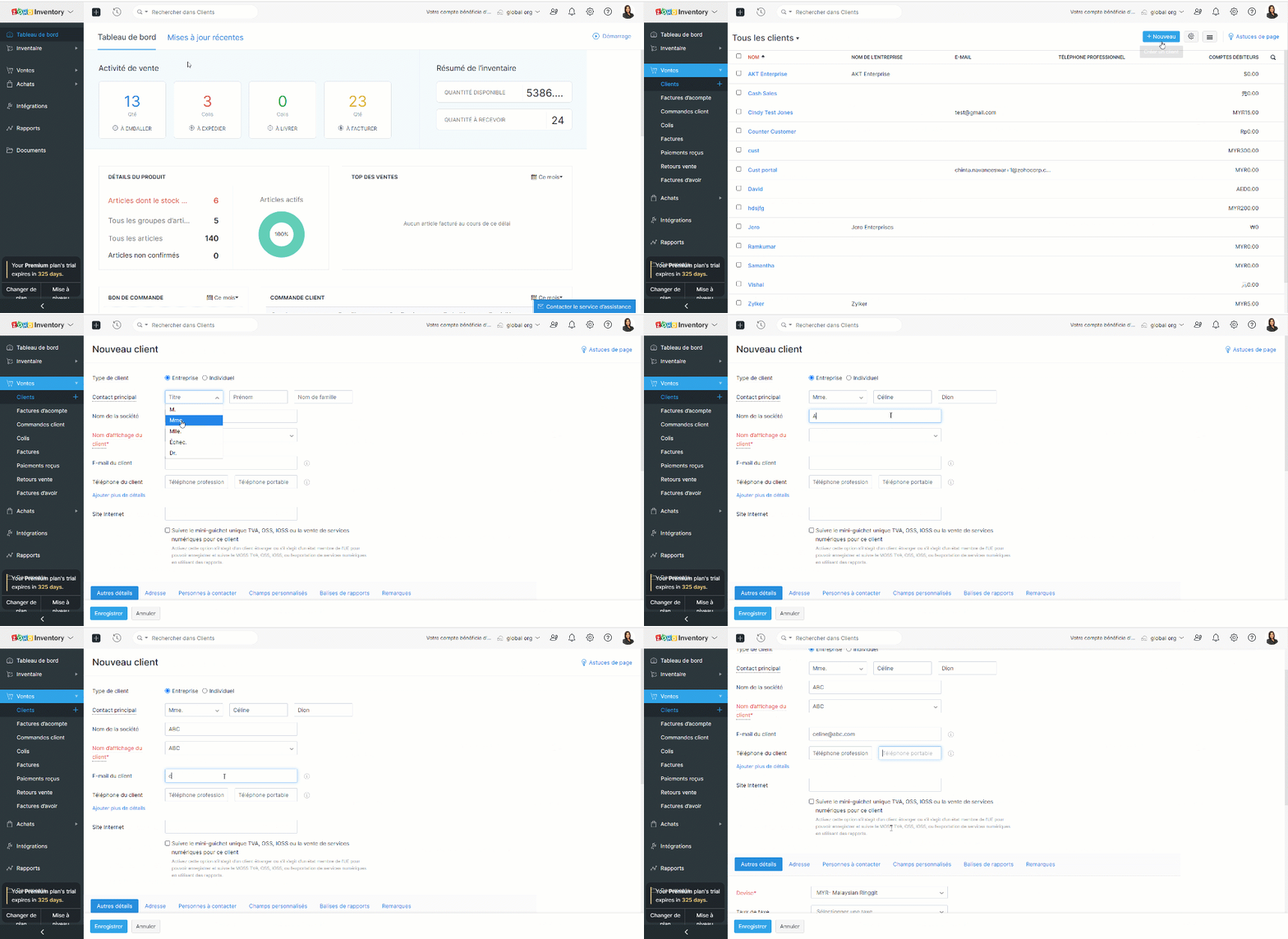
- Sélectionnez le module "Clients" dans le panneau de gauche.
- Cliquez sur "+ nouveau".
- Saisissez les informations du client.
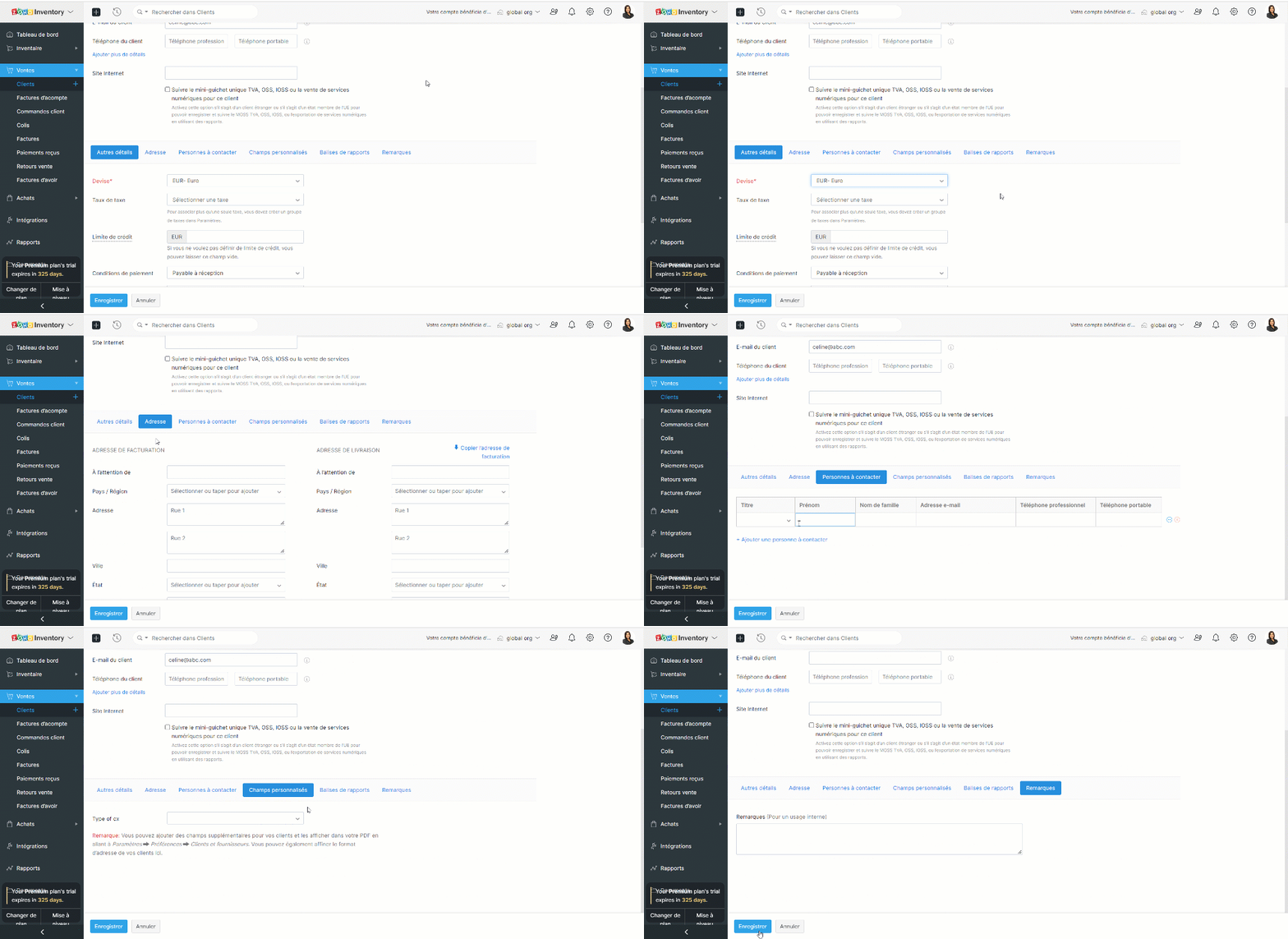
- Sous la section "Autres détails", vous pouvez saisir la devise et les conditions de paiement du client. Cette section comprend également des éléments permettant de saisir les détails des taxes et les liens vers les médias sociaux officiels de votre client.
- L'onglet "Adresse" vous permet de saisir les adresses de facturation et d'expédition de votre contact. Si l'adresse d'expédition est la même que l'adresse de facturation, cliquez sur "Copier l'adresse".
- L'onglet "Personnes à contacter" vous permet d'ajouter des coordonnées supplémentaires de votre client.
- Sous l'onglet "Champs personnalisés", vous pouvez afficher les champs que vous avez ajoutés dans votre préférence de contact. Les champs personnalisés sont des champs supplémentaires que vous ajoutez pour inclure des informations complémentaires concernant votre client. Avant de pouvoir ajouter ces informations ici, vous devez créer des champs personnalisés dans la section "Préférences".
- Sous l'onglet "Remarques", vous pouvez ajouter des notes sur ce client donné pour votre référence interne.
À partir du module "Fournisseur"
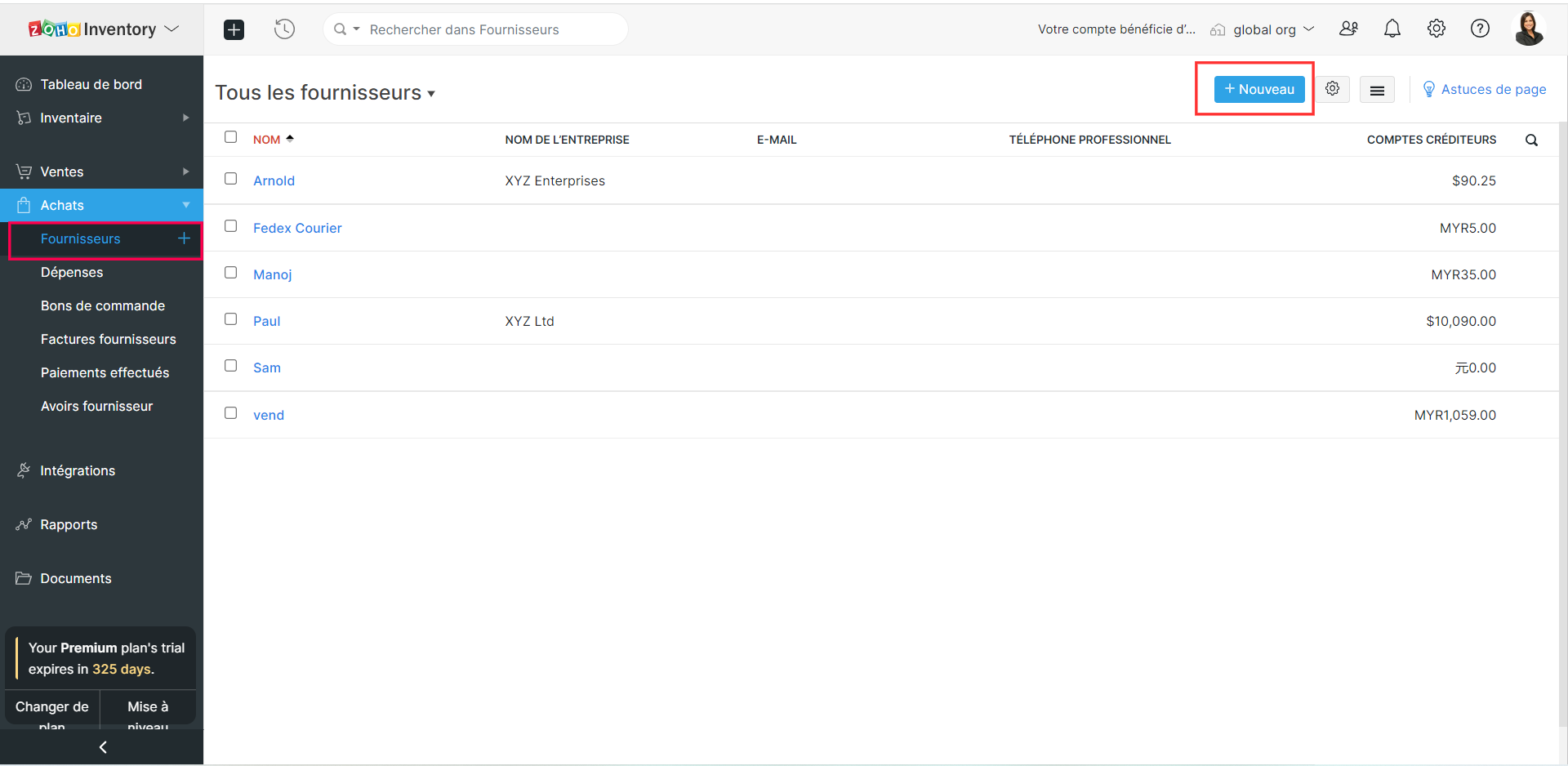
- Sélectionnez le module "Fournisseur" depuis le panneau de gauche.
- Suivez les étapes comme indiqué ci-dessus et enregistrez.
Créer des clients/ fournisseurs à partir d'une transaction
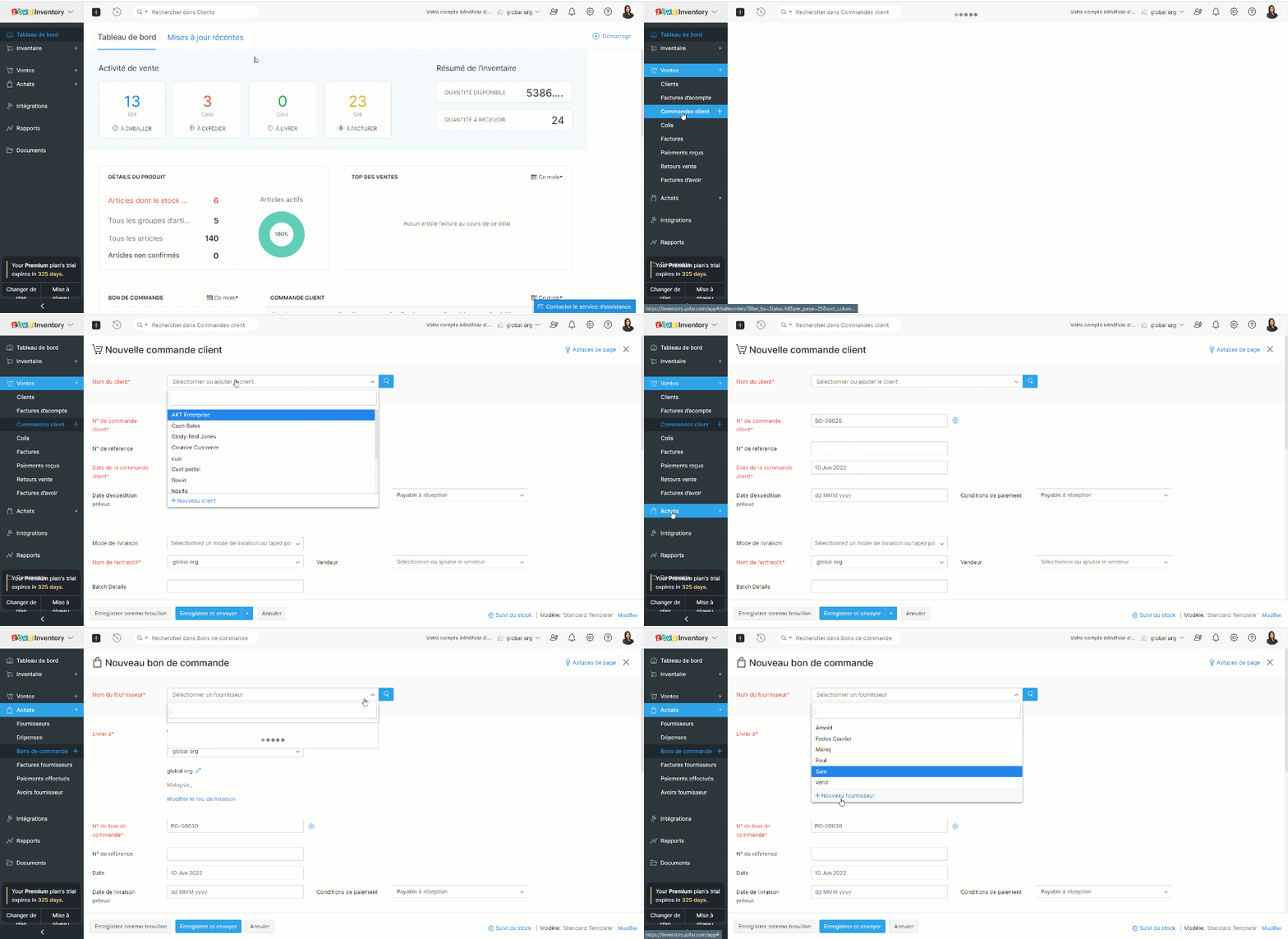
- Prenons un exemple, vous avez rempli les informations de la commande mais vous n'avez pas créé un client/fournisseur plus tôt.
- Créez une nouvelle transaction depuis l'onglet "Commande Client"/ "Bons de commande".
- Cliquez sur la liste déroulante dans le champs "Nom du client" / "Nom du fournisseur".
- Sélectionnez l'option "+ Nouveau client" / "+ Nouveau fournisseur".
- Suivez les étapes comme indiqué ci-dessus et enregistrez.
Importer des clients et des vendeurs
Si vous migrez d'un système existant vers Zoho Inventory, vous pouvez importer tous vos contacts sous la forme d'un fichier .CSV ou .TSV. La limite de fichier est de 1 MB.
Importer depuis Zoho Books
Les applications Zoho Inventory et Zoho Books sont parfaitement intégrées : toutes vos données seront synchronisées, c'est-à-dire que lorsque vous ajoutez un nouveau contact dans Zoho Books, le contact sera disponible dans Zoho Inventory et vice-versa.
Importer depuis Zoho CRM
Zoho Inventory peut être intégré avec votre compte Zoho CRM. En utilisant cette intégration, vous serez en mesure de synchroniser vos comptes, contacts et fournisseurs dans Zoho CRM, avec le module de contacts dans Zoho Inventory. Il s'agit d'une intégration bidirectionnelle. Ainsi, lorsque vous convertissez un prospect en client dans Zoho CRM, il est automatiquement ajouté comme client dans Zoho Inventory lors de la prochaine synchronisation. De même, lorsque vous obtenez un nouveau client dans Zoho Inventory, ce client est ajouté à votre base de données Zoho CRM.
Page de détails des clients et des vendeurs
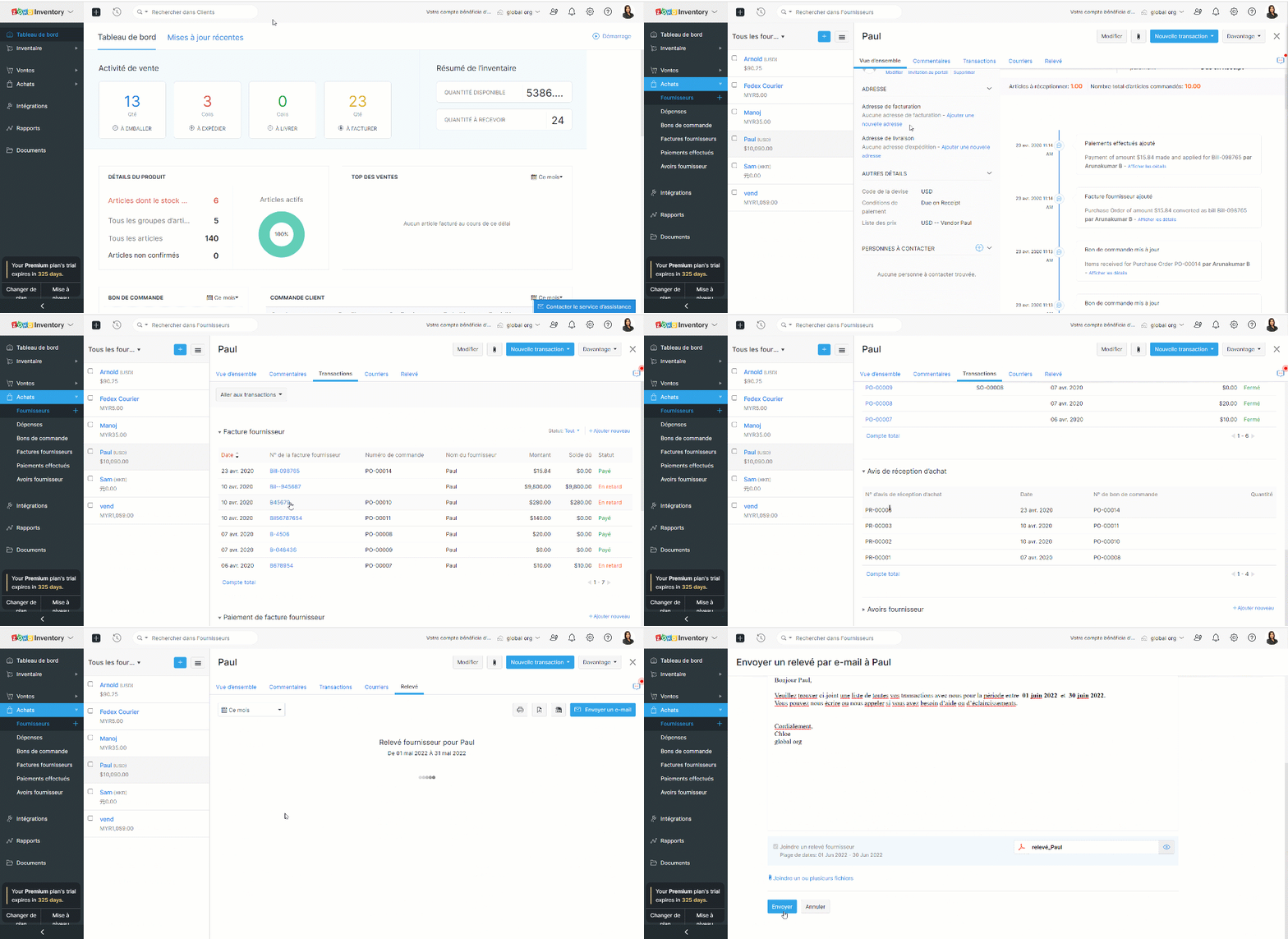
Cette page donne un aperçu des détails essentiels d'un client/fournisseur tels que le nom, l'adresse e-mail, le numéro de téléphone, l'adresse, les personnes de contact, le résumé de la transaction et les activités récentes. Vous pouvez également créer des transactions, enregistrer des paiements, envoyer des e-mails et des relevés à partir de cette page.
L'équipe Zoho France
Topic Participants
Kinjal Lodaya
admin sebban
Ramona Gheorghiu - MOBIXSAS
Horth
Stéphanie
Sticky Posts
Collaboration sans faille avec Zoho One
Bonjour à tous, Dans cet article nous allons voir comment Zoho One permet une collaboration à différents niveaux . La façon dont nous travaillons évolue. À mesure que les entreprises se mondialisent, la plupart des activités sont menées en équipe.
Recent Topics
Items Landed Cost and Profit?
Hello, we recently went live with Zoho Inventory, and I have a question about the Landed Cost feature. The FAQ reads: "Tracking the landed cost helps determine the overall cost incurred in procuring the product. This, in turn, helps you to decide theCC and/or BCC users in email templates
I would like the ability to automatically assign a CC and BCC "User (company employee)" into email templates. Specifically, I would like to be able to add the "User who owns the client" as a CC automatically on any interview scheduled or candidate submittedCreate Contract API Endpoint Unclear "inputfields" Requirements
Hello, I'm trying to create a Deluge function that accepts inputs from a form in Zoho Creator and creates a barebones contract of a given type. See below for the current code, cleaned of authentication information. // Fetch form data // Hidden field client_nameKaizen #46 - Handling Notes through Zoho CRM API (Part 1/2)
Hello everyone! Welcome back to another week of Kaizen! This week, we will discuss Handling Notes through Zoho CRM API. What will you learn from this post? Notes in Zoho CRM Working with Notes through Notes APIs 1. Notes in Zoho CRM 1a. Why add Notes to records? Notes are a great way to summarize your observations on customer and prospect interactions and outcomes. By saving notes as CRM data, a sales rep will always be able to keep track of how a sale is progressing. To know more about notes inMarketer's Space - Why email marketing matters in ecommerce (and how to get started with Zoho Campaigns)
Hello Marketers, Welcome to this week's Marketer's space post. Today, we'll discus why email marketing matters in ecommerce businesses. Running an online store is exciting but challenging. If you're running an online store, you've probably experiencedZoho Campaigns Event timestamps do not propagate to Zoho CRM
We have integrated Zoho CRM and Zoho Campaigns. But when looking at Contact records, the Campaign event data is missing the actual timestamps: especially when a particular email was sent. They're not in the Campaigns related list, and the cannot be foundKaizen #121 : Customize List Views using Client Script
Hello everyone! Welcome back to another interesting Kaizen post. In this post, we can discuss how to customize List Views using Client Script. This post will answer the questions Ability to remove public views by the super admin in the Zoho CRM and IsSetting default From address when replying to request
At the moment, if I want to reply to a request, the From field has three options, company@zohosupport.com, support@company.zohosupport.com, and support@company.com. The first two are really internal address that should never be seen by the customer andTip #45 - Explore Your Support Reach with Zoho Assist’s Geo Insights - 'Insider Insights'
Understanding where your remote support sessions are happening can help you make smarter decisions, allocate resources effectively, and improve overall customer satisfaction. In this week's Zoho Assist's community post we will be exploring Geo InsightsFormatting of text pasted into Zoho documents
Howdy, I'm a newbie and finding Zoho an improvement to MS Word. Consider yourself hugged. High on my wish list would be plain text cut-and-paste. When pasting text from the web to Zoho, presently Zoho imports the formatting along with the text. This means that every cut-and-paste operation brings in text in a different font, size, or style. Can we have at least the option of importing plain text without formatting (or better yet, is this option already out there?) ... Thanks HelenAdd additional features to Zoho Tables
Zoho Tables is a really great tool, why not add features like diagramming capability into the tool from applications like Draw.io which I believe is open source, you should be able to do wireframes, process flow diagrams, network design, etc. Please noteThe Social Wall: August 2025
Hello everyone, As summer ends, Zoho Social is gearing up for some exciting, bigger updates lined up for the months ahead. While those are in the works, we rolled out a few handy feature updates in August to keep your social media management running smoothly.The Social Wall: July 2025
Hello everyone! July has brought some exciting new updates to Zoho Social. From powerful enhancements in the Social Toolkit to new capabilities in the mobile app, we’ve packed this month with features designed to help you level up your social media presence.Use Zoho Creator as a source for merge templates in Zoho Writer
Hello all! We're excited to share that we've enhanced Zoho Creator's integration with Zoho Writer to make this combination even more powerful. You can now use Zoho Creator as a data source for mail merge templates in Zoho Writer. Making more data fromTagged problem !!!
Damn it, we're one of dozens of construction companies in Africa, but we can't link purchasing invoices to projects. Why isn't this feature available?Syntax for URLs in HTML Snippets
What are some best practices for inserting a URL in an HTML snippet? I've looked at Zoho Help articles on navigation-based and functional-based URLs, but I'm still unclear on how to incorporate them in an HTML snippet. For example, 1. How do I link toThe Social Wall: June 2025
Hello everyone, We’re back with June Zoho Social highlights. This month brought some exciting feature updates—especially within the Social Toolkit—to enhance your social media presence. We engaged with several MSME companies through community meet-upsTip 7: How to fetch data from another application?
Hi everyone, Following our Zoho Creator - Tips and Tricks series every fortnight, we are back today with a tip based on one of the most popular questions asked in our forum. This tip would help you fetch data from another application(App B) and use itThe Social Wall: May 2025
Hey everyone, We're excited to share some powerful updates for the month of May! Let's take a look! Reply to your Instagram and Facebook comments privately through direct messages Are you tired of cluttered comment threads or exposing customer queriesSub-Form Fields as Filters for Reports
Hi, I would like to use the Sub-Form Fields as Filters in Reports just like we do for Main Page Fields. Thanks DanZoho CRM Formula - Current Time minus Date/Time field
Hello, I am trying to prevent duplicate emails going to clients when more than 1 deal is being updated. To do this, I would like to create a formula to identify if a date/time field is >= 2 hours ago. Can someone please help me write this formula? Example:Billing Management: #7 Usage Billing in Telecom & Internet Service Provider
Telecom and Internet Service Providers operate in markets where usage varies drastically from one customer to another. While flexible, usage-based models align revenue directly with consumption, they also introduce operational challenges like real-timeZoho Sprints - Q3 updates for 2025
The updates for the third quarter of 2025 are out. A few significant features and enhancements have been rolled out to improve user experience and product capabilities. The following are the updates: Manage tags and cluster tags Record and maintain projectKaizen #208 - Answering your Questions | Functions, AI and Extensions
Hello Developers! Welcome back to a fresh week of Kaizen! We are grateful for your active participation in sharing feedback and queries for our 200th milestone. This week, we will answer the queries related to Functions and Extensions in Zoho CRM. 1.Zoho CRM still doesn't let you manage timezones (yearly reminder)
This is something I have asked repeatedly. I'll ask once again. Suppose that you work in France. Next month you have a trip to Guatemala. You call a contact there, close a meeting, record that meeting in CRM. On the phone, your contact said: "meet meCreating Restaurant Inventory Management on Zoho
Hi, We run a small cloud kitchen and are interested to use Zoho for Inventory and Composite Item tracking for our food served and supplied procured to make food items. Our model is basically like subway where the customer can choose breads, veggies,To Zoho customers and partners: how do you use Linked Workspaces?
Hello, I'm exploring how we can set up and use Linked Workspaces and would like to hear from customers and partners about your use cases and experience with them. I have a Zoho ticket open, because my workspace creation fails. In the meantime, how isZoho Forms to Zoho CRM : First/Last Name to just Name ?
When integrating a Zoho Form into the Accounts menu of the CRM I'm having trouble with how names are formatted ; In Forms the data is available as First Name or Last Name In the CRM there is only one field called Name How can I ensure that "John" "Smith"This festive season, offer discounts with coupon code support in Stripe Checkout
Hello form builders! It’s the festive season, the perfect time to spread joy and great deals! Now, with Zoho Forms’ latest enhancement for Stripe Checkout, you can do exactly that with coupon codes! Your payment forms integrated with Stripe Checkout canCómo creo una factura negativa o de abono?
NEcesito anular una factura y crear una nueva igual pero en negativo. El sistema no me lo permitePower of Automation::Streamline log hours to work hours upon task completion.
Hello Everyone, A Custom Function is a user-written set of code to achieve a specific requirement. Set the required conditions needed as to when to trigger using the Workflow rules (be it Tasks / Project) and associate the custom function to it. Requirement:-CRM : Function to add user name to text field
I have a lookup field in a module that is linked to the CRM users so we can assign a Project Lead to the customer. Sadly Zoho Marketing Automation doesn't sync Lookup fields so I need to extract information from the lookup to text fields: Lookup fieldZoho CRM - Restrict Login based on work hours
Hi there, I'm wondering if we can restrict users to login during works - For example the users would be able to login from 8am to 5pm. I have seen the IP address restriction - the only downfall is what if the customer has dynamic IP. thanks JiriTips and Tricks #46: Customize themes and templates using Show's Master View
Hi All! Let's say you want to revamp your presentation and make changes to its visual design. You can do this easily using the Master Slide and its associated layouts. The Master Slide stores information about all the layouts used in the presentation.Sheet View in CRM portal
Hi, When will it be possible for my CRM portal users to edit/add records with Sheet View? GeorgeWhat's New in Zoho Invoice | July - September 2025
Hello everyone! We’re back with the latest updates and enhancements we’ve rolled out in Zoho Invoice from July to September 2025. Here’s what’s new this quarter: Introducing the Singapore Edition in Zoho Invoice Share Invoices through WhatsApp GST 2.0Alert: Audio Call Support to be discontinued for Old Live Chat Widget from December 31, 2025
Action Required: Upgrade to the New SalesIQ Live Chat Widget We're reaching out with an important update regarding the SalesIQ Live Chat Widget that requires your immediate attention. Effective December 31, 2025, audio call functionality will no longermultiple contacts for one account
We currently use Zoho CRM where each Account represents a club or organization, and each Contact represents a manager or owner. However, some of our managers own or manage multiple clubs, and Zoho only allows a contact to be linked to one account at aRich text Merge field - Not using font specified in HTML
I have a rich text merge field in a writer template which is creating a table. I have chosen to use this method instead of a repeat region because I need to specify specific cell background colours which change every time the document is created. Theヒートマップ詳細設定について
はじめまして マーケティング担当の浅田です。 PageSenceのヒートマップ設定について質問です。 単一ページ毎の設定は上手くできるのですが 詳細設定にて、トップページのURLを含ませ全体のヒートマップを計測できないか試したところ お知らせ:データを受信していません。と表示されてしまいます。 トップページURLで始まるページの条件も試しております。 全頁を反映させたいと思い、詳細設定を上手く設定できたらと考えております。 どなたか詳しい方がいらっしゃいましたら、教えて頂けませんでしょうか 宜Next Page