Important updates to Zoho CRM's email deliverability

Last modified on: Jul 24, 2024
These enhancements are released for all users across all data centers.
Modified on: Oct 30, 2023
Organisations that are in the Enterprise and above editions of Zoho CRM, and have not authenticated their email-sending domains will have their newly created mass emails and other email notifications associated with newly created or edited automated processes (like workflows, blueprints, etc.) sent from email addresses connected to Zoho's own authenticated domains. This change has been rolled out to accounts across all data centres. Upon authenticating their domains, the emails tied to these processes will be sent from their own email addresses automatically.
Modified on: Oct 4, 2023
Organisations who are in the Free, Standard, and Professional editions of Zoho CRM, and have not authenticated their email-sending domains will have all their emails sent from email addresses connected to Zoho's own authenticated domains. This change has now been applied to accounts in all data centres. Once these accounts authenticate their domains, the emails will automatically be sent from their own email addresses.
Dear All,
We're thrilled to talk about the enhancements that are coming up to improve Zoho CRM's email deliverability, as well as the systems we have in place today to support our customers' email communications.
As you might know, our current systems help users send nearly 100 million emails every month via Zoho CRM, be it through features like workflow rules, mass emails, emails sent for meetings, 1-to-1 sales communication purposes and so on. We're looking to update these systems and make some in-product changes to ensure that customer emails have the best possible delivery rate without any bounces and that our email-sending IPs and domains have the best sender reputations.
We believe this is a crucial update to our email features, as improving sender reputation results in higher deliverability of our customers' emails, which in turn gives them high conversion rates in their business communications and sales pipelines. To help us achieve this, we're working to ensure that all emails that go out from Zoho CRM only do so from email addresses connected to authenticated domains.
What is domain authentication?
Our systems have to recognize that users actually own the domains connected to the email addresses from which they send emails. When users add the necessary SPF and DKIM files to their domain's DNS settings, their email-sending domains will be successfully authenticated.
Zoho CRM then provides this authentication information to recipients' inbox providers every time we send an email. By doing so, inbox providers like Gmail, and Outlook, can be confident that the emails they receive from Zoho CRM are really from whom the senders claim to be, and this improves our system's sender reputation. Conversely, by sending emails connected to non-authenticated domains, we fail to provide inbox providers with this confidence, which brings down our sender reputation.
How are these updates going to ensure domain authentication?
- Email addresses from public domains will automatically be re-formatted: Email addresses from public domains like Gmail, Yahoo, and Outlook will be automatically updated to Zoho CRM's own authenticated domains. For example, when a user sends emails using emailaddress@gmail.com via Zoho CRM, the email's recipients will see the emails in their inboxes as being sent from emailaddress.gmail.com@zohocrm-2380248-sdus09.com.
We're making this change and disallowing the use of public email providers, as they are prone to the extreme scrutiny of inbox providers and have poor deliverability rates—thereby affecting our sender reputation. For instance, when rogue users sign up for Zoho CRM free trials using addresses from public email providers just to send spam emails through our systems, we will be able to act faster and stop these users, as the emails they send are routed from our authenticated domains and we can easily identify any bad actors damaging our sender reputation. - Email addresses from non-authenticated domains will also be automatically re-formatted: We are mandating domain authentication for all email-sending domains. This means that even if users have been sending emails through non-authenticated email addresses so far, after this enhancement, their email addresses will automatically be re-formatted similarly to email addresses from public email providers—unless their domains are authenticated.
For example, if users send emails from sales@zylker.com, recipients will see the emails in their inboxes as being sent from sales.zylker.com@zohocrm-2380248-sdus09.com, assuming zylker.com has not been authenticated.
This mandate is to improve Zoho CRM's sender reputation and to meet the highest industry standards. As Zoho CRM uses a shared back-end infrastructure to send all of our user's emails, it's essential that customers with authenticated domains and healthy email-sending practices are protected from the damage to our infrastructure caused by accounts using non-authenticated domains to send emails.
This is important to note unless all domains that are used to send emails from your Zoho CRM accounts are authenticated, this will affect your existing emails, workflows, and business communication that you may have currently set up.
Points to be noted:
- The Email Authentication page (Setup > Channels > Email > Email Deliverability > Email Authentication) will display all the domains that are accessible within your account, determined by the email addresses found in both your active user's list and organizational email addresses under Available domains. Users should ensure that they have authenticated their email-sending domains from the list of available domains.
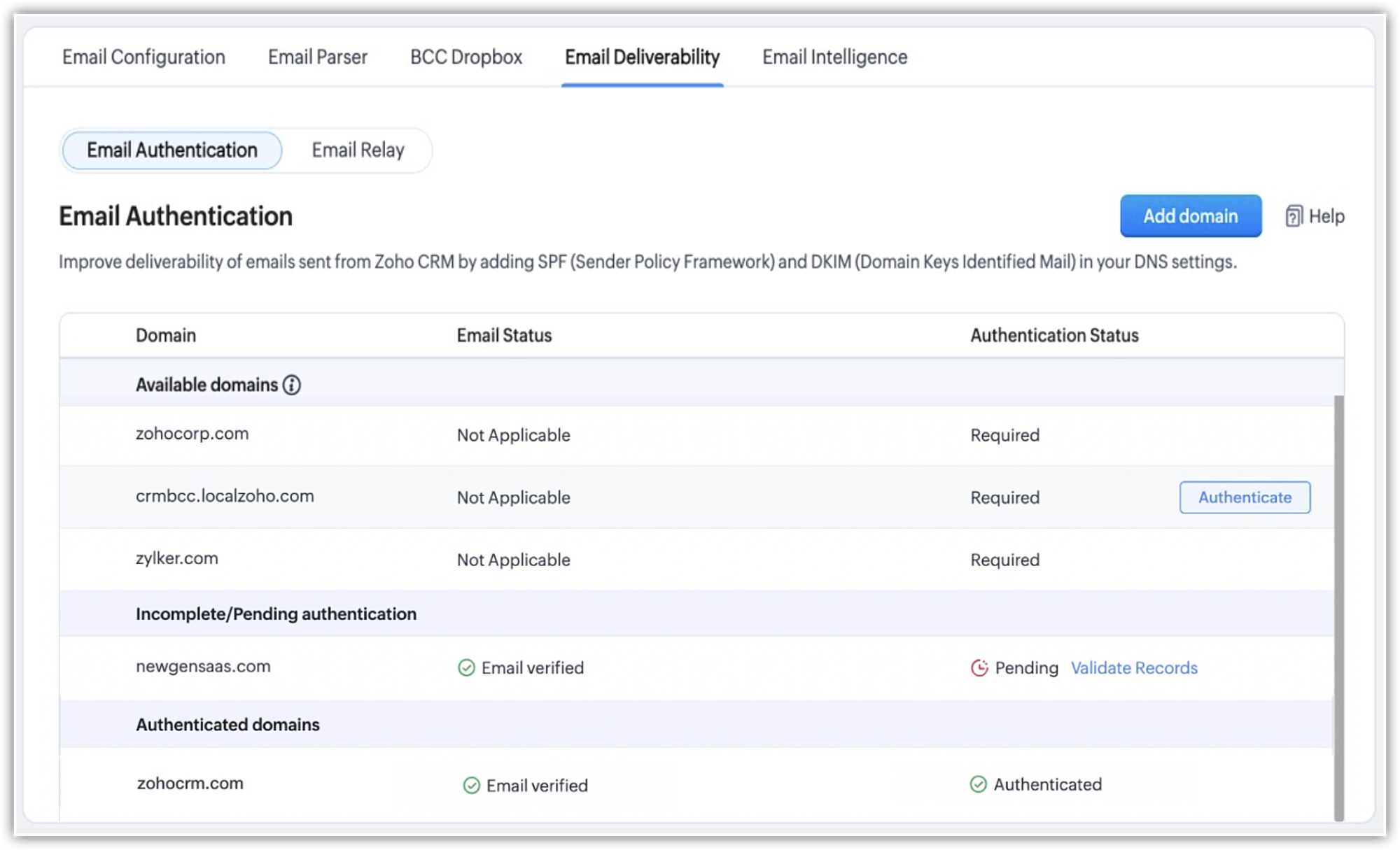
- The mentioned email deliverability changes do not apply when users send emails through their configured mailbox or when an email relay server is set up for an account.
Release plan:
- Recommended domain authentication and sender address change for non-authenticated domains have now been released for all new organizations who sign up for Zoho CRM.
- For existing users who send or configure email notifications from inside Zoho CRM, we will soon have in-product reminders and alerts informing about these changes.
That's all about the enhancements. Let us know your thoughts and feedback in the comments below.
Resources: Email Authentication | Zoho CRM Help, Email Deliverability and Best Practices | Adding SPF and DKIM records to DNS Settings
Thanks!
Sohel
Topic Participants
Nizamuddin Sohel SK
carlosnvelez
Ishwarya SG
Michael Trow
Victoria
Sticky Posts
VoC in Zoho CRM is now data savvy: Explore response drilldown, summary components and participation in CRM criteria
VoC has all the goods when it comes to customer intelligence—which is why we're constantly enhancing it. We recently added the following: A customer drilldown component that shows you the list of prospects and customers behind a chart's attribute ExpandedWrapping up 2025 on a high note: CRM Release Highlights of the year
Dear Customers, 2025 was an eventful year for us at Zoho CRM. We’ve had releases of all sizes and impact, and we are excited to look back, break it down, and rediscover them with you! Before we rewind—we’d like to take a minute and sincerely thank youGood news! Calendar in Zoho CRM gets a face lift
Dear Customers, We are delighted to unveil the revamped calendar UI in Zoho CRM. With a complete visual overhaul aligned with CRM for Everyone, the calendar now offers a more intuitive and flexible scheduling experience. What’s new? Distinguish activitiesPresenting ABM for Zoho CRM: Expand and retain your customers with precision
Picture this scenario: You're a growing SaaS company ready to launch a powerful business suite, and are looking to gain traction and momentum. But as a business with a tight budget, you know acquiring new customers is slow, expensive, and often deliversCreate and populate a record in an instant: Introducing zero-shot field prompting to Zia's ICR
A couple of months ago, we upgraded our in-house AI image detection and validation tool, Zia Vision, with intelligent character recognition (ICR). By training Zia with sample images, you could create and enrich CRM records with data extracted from standard
Recent Topics
Getting Project Template List using the REST API
I am trying to confirm that I can use the REST API to create a project using a project template. The API documentation indicates this is possible by providing the Template ID, but it is not clear at all how to get a list of available Project TemplatesHow to display the CONTACT ID in the Contact page
Hi, I've seen this conversation below and it is exactly the same question I'm raising now, but unfortunately the last message is not solved https://help.zoho.com/portal/community/topic/show-contact-id-while-editing-contact-form I need to show the ContactId and I don't know how to do this. The last message included in the conversaton shows the way but not it is not completed. "I am sorry by default we do not have the option to show the record ID for the contacts in the field in a record. When youHow to change margins in templates
Hi, I'm new to Zoho Campaigns, and am trying to figure out how to adjust the margins within an email template. The default margins make the text go all the way to the edges of the page. Please advise.Create Canvas list view templates from images powered by Zia
Currently available for all paid editions of Zoho CRM in the US, EU, IN, JP & CN DCs. Designing a personalized CRM interface just got even easier. In today’s fast-evolving digital landscape, AI is transforming the way we work by automating complex tasksPainfully Slow Zoho mail
Since yesterday Zoho Mail seems to have starting functioning very slowly and having a few bugs. It's slow to open mails, slow to send, slow to change between email accounts. Sometimes clicking on a particular folder (eg Sent folder) stops working and"Wrong password or login" Problem to configure Zoho on MAIL App on my Macbook
Hi, I'm having problems to configure my e-mail on my MAIL App(Macbook pro). My e-mail is hari@trespontoum.net Actually was working perfectly, and still working on my Iphone. My MAIL App prompt me that my login or password is wrong. I tried to change 3"User already exist in your org"
Hello, I've just read a discussion about this issue, which didn't solve my problem. I'm trying to add the following emails: sales@kiss-my-boutique.co.uk returns@kiss-my-boutique.co.uk orders@kiss-my-boutique.co.uk I'm getting an error message each time I try and add them. None of them are primary or secondary emails and none of them have been created as users before. I know this as when I try and login and do 'forgot my password' all I get is an error message saying 'user invalid'. Please advise.Operation Not Permitted
Hi, I have problem in adding user after verifying the domain but it seems like error appeared which is "operation not permitted". For your information, I had delete other domain before did it.Email forwarding setup fails
I'm trying to set up email forwarding from my Zoho email to my gmail address. I followed the directions to set up email forwarding here: https://www.zoho.com/mail/help/email-forwarding.html. I did only steps 1-6. After doing this, rather than settingShopify store email issues- Not getting emails
Hi We have migrated from Microsoft outlook to Zoho back in March, we have a shopify store, the domain is hosted on namesilo, not shopify, I have seen some people here complaining about not getting emails from customers who fill out the contact form onHow do I fix this? Unable to send message; Reason:554 5.1.8 Email Outgoing Blocked.
How do I fix this? Unable to send message; Reason:554 5.1.8 Email Outgoing Blocked.Invoice Discount Account
Is there a way to change the account used for Discounts applied to an invoice? The current Discount account (ZB native account) type is an "Income" type. I would like to change it to "Other Income", but that is not possible, I am assuming because it containsNeed Inactive accounts to be visible in Reports in Zoho Books
I N=need Inactive accounts to be visible in Reports in Zoho Books to do recons of the accounts but when i see the same they are not visible in the Accountant - Account Transactions reportAPI Support for Creating Invoices with Batch-Tracked Items
Hi Zoho Community, I am working on an integration where we create invoices in ERPNext and push them to Zoho Books. I need to send batch-tracked items (batch numbers) when creating invoices. I could not find any reference in the Zoho Books API documentation.javax.mail.authenticationfailedexception 535 authentication failed
Hi, I am facing 535 authentication failed error when trying to send email from zoho desktop as well as in webmail. Can you suggest to fix this issue,. Regards, RekhaPhantom Opening Balance
While experimenting w/ creating a composite item, Zoho added funds to Petty Cash and added Bank Account equal to previous day's balance. I'm unable to undo the adding of funds. Attaching screenshots of both bank account and petty cash transactions.Importing customer comments and multiple shipto addresses
I am evaluating Zoho Books and have most of my data imported with two exceptions: (1) Import customer comments - in my current system I have several comments of different types, and I need to bring these into Zoho. Preferably Books customer records, butDetailed Account Reports - Add Running Balance
When one clicks into an account from a report (say P/L or Balance Sheet), the default reports have the Debit, Credit, and then the Amount. The Amount column (last one) is duplicate information. It would be far better and fit more peoples' use cases ifHow to Billed from two different GST Numbers
How to Billed from two different GST Numbers. Suppose ABC & Co had GST registration in Delhi and Haryana and Zoho account is created with Delhi GST Registration number. Now i also want to issue invoice from Haryana GST Registration number. How can i proceed ?Payment system for donations management
I manage an organization where we receive donations from payers. Hence, there is no need to first create invoices and then create payments received against the invoices. What are the recommended best practices to do this in ZohoBooks?Zoho IP blocked by SpamHaus
ERROR CODE :550 - 5.7.0 Your server IP address is in the SpamHaus SBL-XBL database, byeIMAP Communication Problems - IMAP Down Again
We are experiencing the same problems over the last week or so that were supposedly 'solved' according to this thread. Zoho Imap Down Again This is affecting attempts to use IMAP on multiple ISPs and users so is definitely narrowed down to Zoho problems.Can't login to Zoho mail
I'm logged into Zoho but when I try to go in zoho mail I get: Invalid request! The input passed is invalid or the URL is invoked without valid parameters. Please check your input and try again. I just set up my mx records and stuff with namecheap a fewHotmail is STILL blocking the zoho mail IP
Greetings, as I already mentioned in my last message, my Zoho IP has been blocked by Hotmail for more than 15 days. Although someone said that the issue was "solved," it still isn't, and this amount of time seems neither normal for a "serious" company,Keyboard shortcut M key
I'm trying to customize my keyboard shortcuts and assign the "m" key. But it says the key is already assigned. I've looked through all my shortcuts and can't see any assigned "m". When I select an email and press the M key, nothing happens. What is theManage customer access across multi-brand help centers
Hello everyone! Managing customer's access across multiple brands has been streamlined with the ability to invite, reinvite, approve, reject, and deactivate contacts individually for each help center brand . This enhancement gives administrators preciseWhite Label certificate
Hi all, About 72 hours ago, we fulfilled all steps for white labeling (CNAME to point to mail.cs.zohohost.eu), but since then the configuration page is now stuck at "generating certificate" since 3 days. When I execute an NSLOOKUP mail.webfoundry.be itUnusual activity detected from this IP. Please try again after some time
When i try to create new addresses on my account i am getting this error, it has been 24 hours now and i am still getting this error can anyone helpHow to add a new domain in my account?
Probably zoho has the worst UI in the market. Cannot add a new domain to manage a new email address.Ability for admin to access or make changes in zoho form without asking for ownership
Currently in zoho form only form owner can make the changes in the form and if someone else has to make changes then we have to transfer the ownership to them and even admin also cant access it . So i think admin must have the ability or option to accessReport sorting not working
I make extensive use of Summary reports and Pivot Tables. Most of these reports are structured such that I have several columns of "information" data that I want displayed, followed by one or more "Data" summarizations. For example, I have the followingNew Enhancements in Wizards
Dear All, Wizards help you break a long form into a series of smaller forms on different screens, making it less overwhelming. We are thrilled to introduce a couple of enhancements to wizards in Zoho CRM: Enhancements for conditional rules in WizardsMicrosoft Teams now available as an online meeting provider
Hello everyone, We're pleased to announce that Zoho CRM now supports Microsoft Teams as an online meeting provider—alongside the other providers already available. Admins can enable Microsoft Teams directly from the Preferences tab under the MeetingsFind and Merge Duplicates to trigger webhook
My sales team uses the Find and Merge Duplicates feature often to cleanup records in the CRM. We use webhooks to signal to our internal tools database when new Contacts are created, updated, or deleted, in order to keep our DB in sync with Zoho CRM. However,Charting the 2025 Voyage: Zoho Invoice's Year in Review
2025 has been a year of progress, productivity, and purposeful growth for Zoho Invoice. From expanding into new regions to refining everyday workflows, each update was designed to help businesses stay compliant, get paid faster, and work with confidence.How to Hide System-DefinedTemplates in Service Report
Is there any option available to hide system-defined templates? these templates are causing confusion for field users.WhatsApp Report in Bigin CRM
Reporting feature for Bigin CRM’s integrated WhatsApp that provides insights such as: Number of WhatsApp conversations closed Number of messages sent and received Number of conversations replied to Response and closure metrics for WhatsApp chats MoreIssue with Azure DevOps Integration in Zoho Flow
Hello, All workflows between Zoho Flow and Azure DevOps have stopped working for several days now. Upon further investigation, it seems that the connection to Azure DevOps is no longer directly supported. Indeed, Microsoft has deprecated the Azure DevOpsNarrative 16: Simplify with workflows
Behind the scenes of a successful ticketing system: BTS Series Narrative 16: Simplify with workflows What is a workflow? A workflow organizes business tasks in a defined sequence that makes each step clear to all participants. This ensures work is completedZoho Invoice Customer Login Portal
Are there any plans for a customer portal to Zoho Invoice, ala Freshbooks? I would like customers that I invoice to be able to login to review invoices and invoice history. I have not switched from Freshbooks for this very reason.Next Page