Tip #18: Organize a group workshop in a few steps
It's the season for workshops—they're everywhere, catering to diverse interests and needs. Whether for more professional goals like leadership development or creative endeavors like painting, there's an abundance of workshops offered every day.
A scheduler is indispensable for workshop providers, as it handles the nitty-gritty of scheduling and streamlines the registration process. It provides smoother experiences for both attendees and organizers. It also relieves administrative burdens by allowing organizers to track registrations, manage attendee information, send automated confirmations and reminders, collect payments, share video conferencing links, and much more.
If you're a workshop provider seeking an efficient scheduler, then Zoho Bookings is the right place for you. With just a few simple steps, you can set up your workshop, and Zoho Bookings will seamlessly handle the scheduling aspect for you.
Steps to organize a group workshop
Create a group booking service
Share the booking page link
1. Create a group booking service
Add the details of the workshop that you'll be offering by following the below steps.
Navigate to the Services tab, click the Add icon
 , and choose Group Booking.
In the pop-up that appears:
Enter the name of the workshop that you'll be conducting in Name of the Service.
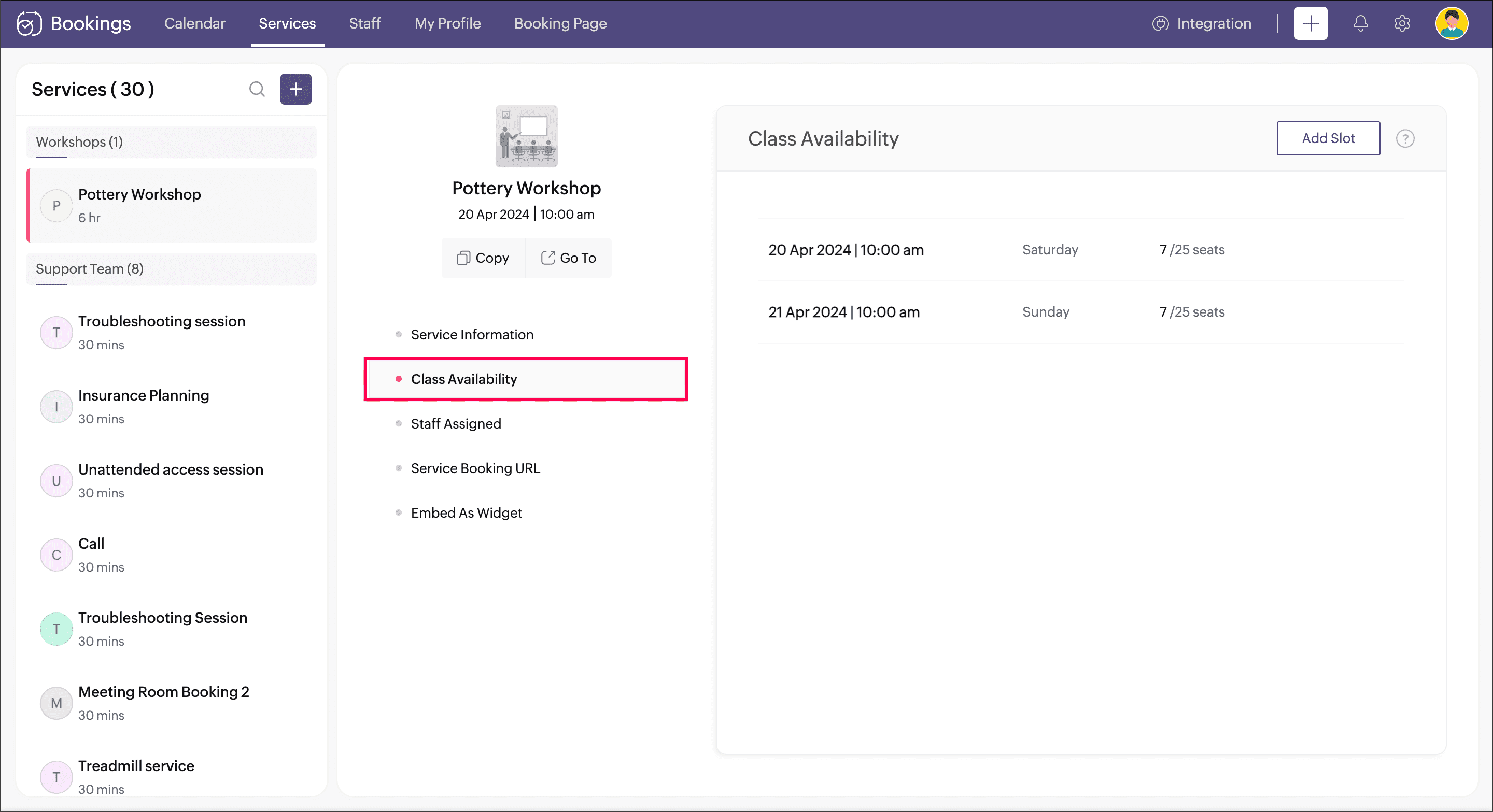
Enter the date and time that the workshop starts in Date & Time.
Specify the duration that the workshop will happen in Duration.
Mention the number of seats that are available for the workshop in No. of Seats.
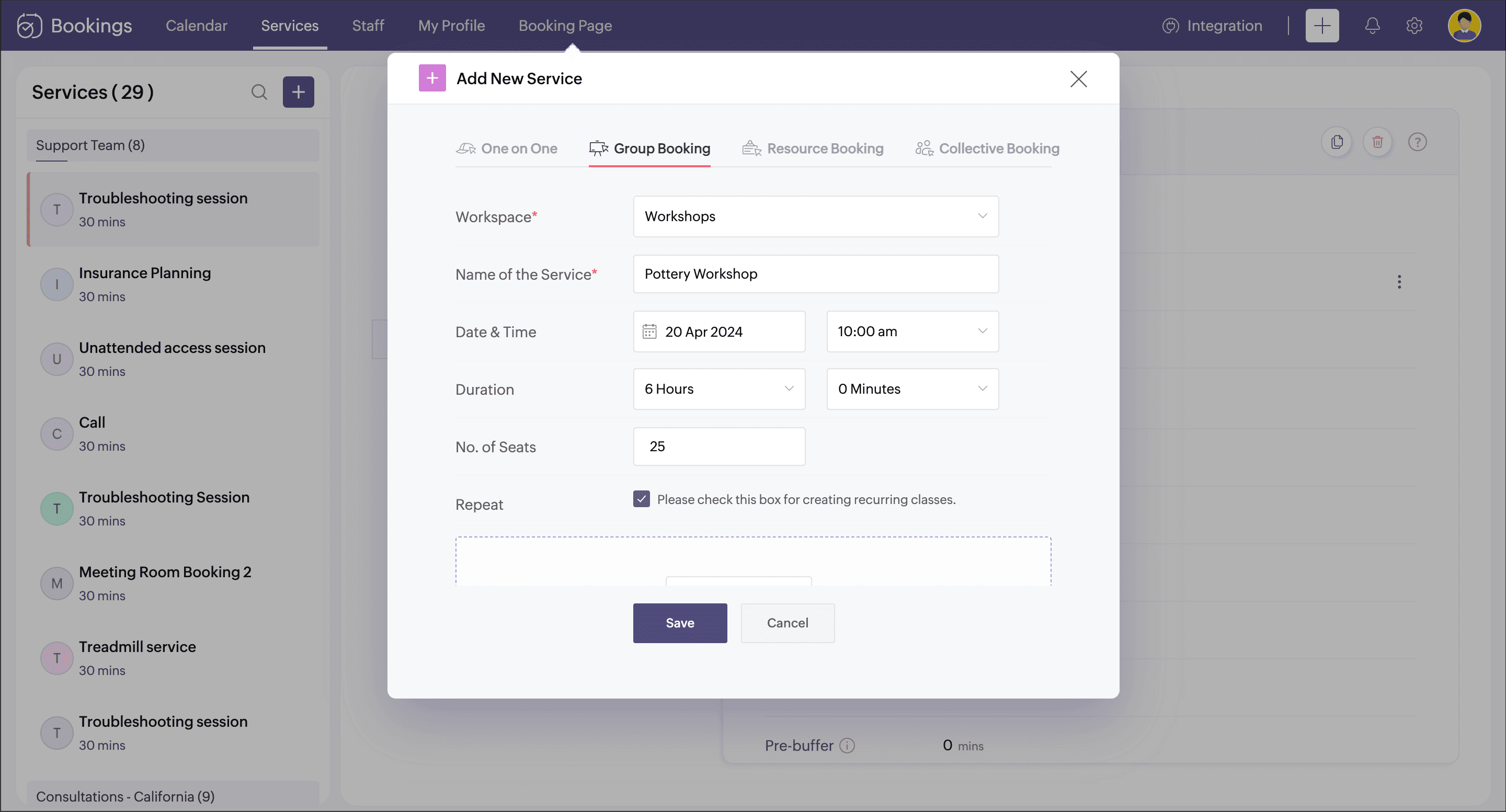
If this workshop happens for a day, you can skip this step. Otherwise, you can select the checkbox for the Repeat option. A pop-up appears to define the days that the workshop will span.
Under Booking Type, choose Series if the workshop is a continuous session that has to be booked as a whole. Or choose Drop-in if the workshop happens for a few days, but each day can be booked separately.
Under Repeat, choose the frequency if it is Daily, Weekly, or Monthly.
Under Repeat Until, you can set any of the two options
Set Date: Specify the last date of the workshop.
No. of Classes: Specify the no.of days the workshop happens.
Click Add.
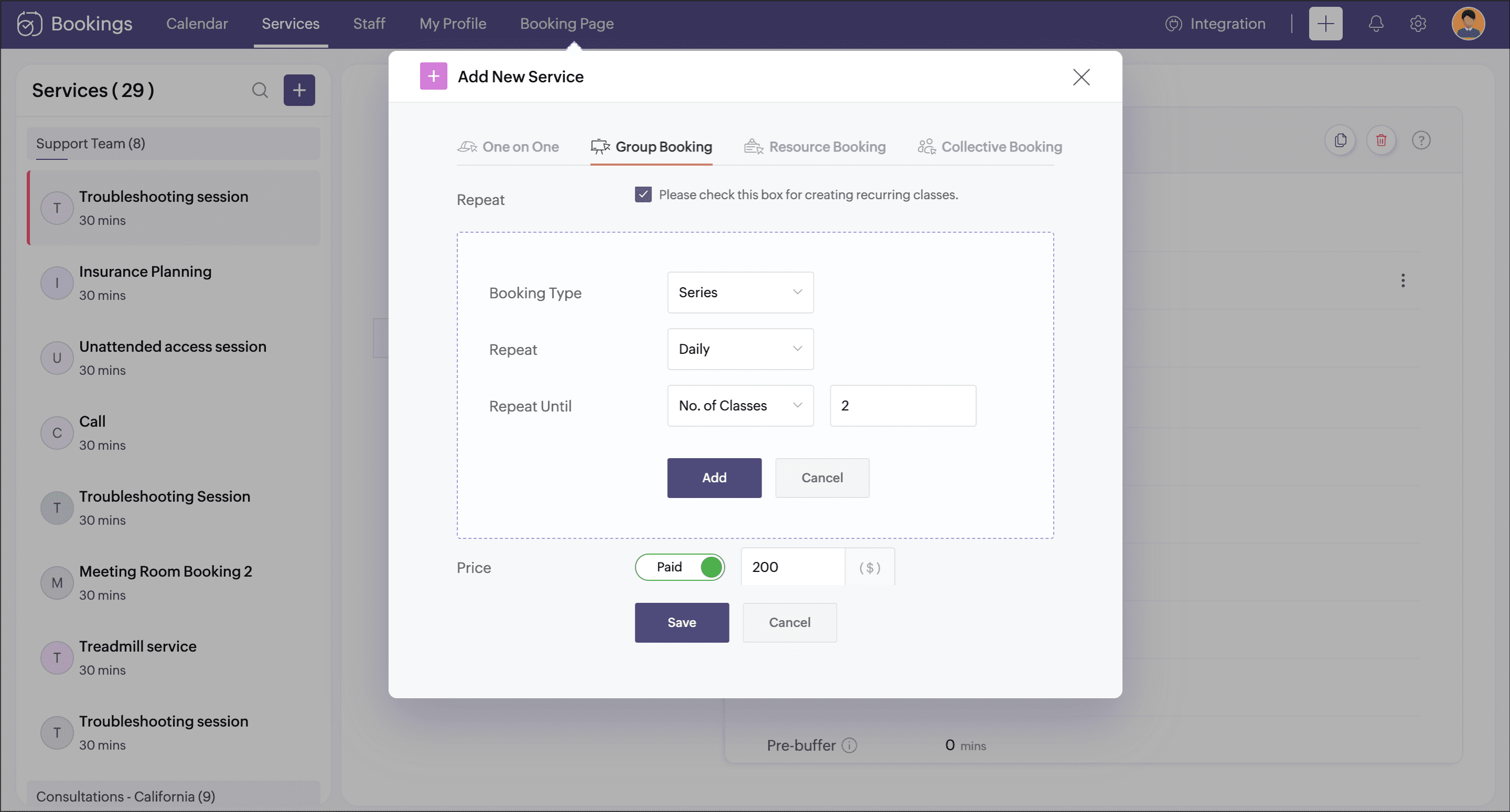
Enter the cost of the workshop under Price.
Add the staff who will be conducting this workshop under Staff Assigned.
Click Save.
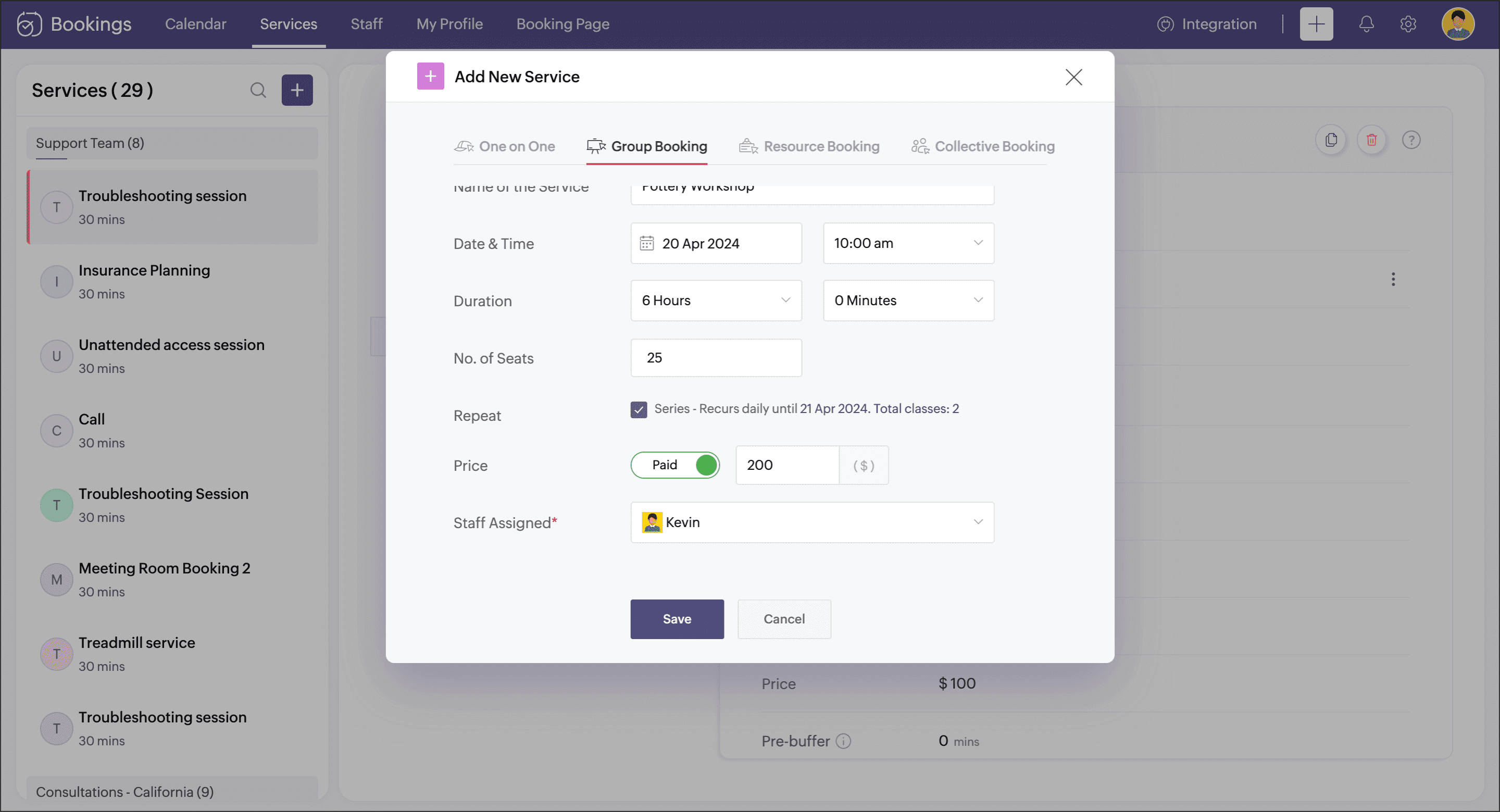
Your group booking workshop is now set up.
2. Share the booking page link
You can now share this workshop's booking page link with your customers. The booking page link can be accessed by navigating to Booking Page in the menu bar and selecting the Service tab, then clicking the Copy option near the respective group booking service.

 Note : Be sure to include this link wherever you promote your workshop across channels like social media, email marketing, referral programs, podcasts, and any other relevant platforms.
Learn how to customize this booking page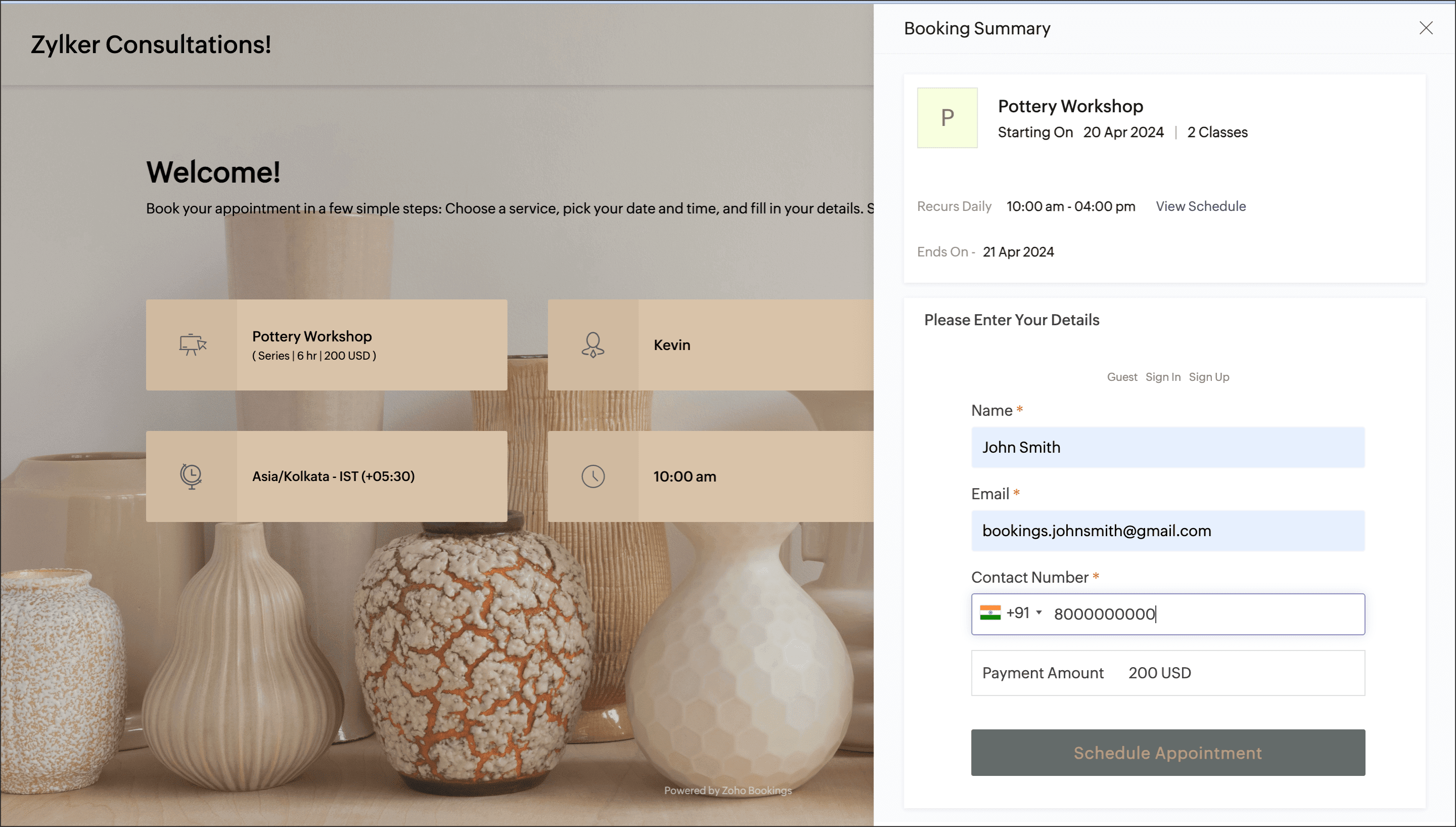
Other options to explore
Configure email and SMS notifications and modify the contents that goes into them.
Collect payment during the booking process. You can set if you want to collect a partial or full amount.
Customize the booking page for a better branding feel.
Thanks for reading this post. Please share your suggestions in comments or write to us at support@zohobookings.com.
Related articles
Topic Participants
Praveena Chandran
Sticky Posts
Tip #13: Identify where your bookings come from with Source Tracking
Source tracking is the practice of identifying where your bookings originated. This is important, because online bookings come from a wide variety of sources like social media platforms, your website, email and ad campaigns, partner websites, organicTip #17: How to mandate partial payment for your appointments
When you require partial payments during the booking process, customers can only schedule with you after paying a certain amount in advance. This deposit acts as a commitment between both parties. Apart from that, it has many more advantages. BenefitsTip #18: Organize a group workshop in a few steps
It's the season for workshops—they're everywhere, catering to diverse interests and needs. Whether for more professional goals like leadership development or creative endeavors like painting, there's an abundance of workshops offered every day. A schedulerTip #16: Custom labels for staff, service, and resources
Every industry uses its own jargon. Take healthcare, for example; when you visit a doctor, it's not just an appointment, it's a consultation. The people who provide consultations are the providers. Similarly, in the tranquil world of a spa, a massageTip #15: Customize service prices for each staff member
It's common practice for a service to be priced differently based on the staff member providing it. For example, an experienced hair stylist may charge more for a haircut compared to the other stylists. This pricing strategy allows businesses to charge
Recent Topics
Error: Invalid Element tax_override_preference
In both Books and Inventory, we're getting the following error whenever we try to enter any Bill: I think this is a bug. Even cloning an old bill (that obviously was entered just fine), this error occurs.Assign Income to Project Without Invoice
Hello, Fairly new user here so apologies if there is a really obvious solution here that I am just missing... I have hundreds of small deposits into a bank account that I want to assign to a project but do not want to have to create an invoice every timeHow to Print the Data Model Zoho CRM
I have created the data model in Zoho CRM and I want the ability to Print this. How do we do this please? I want the diagram exported to a PDF. There doesnt appear to be an option to do this. Thanks Andrewour customers have difficult to understand the Statements
our costumers have big problems to understand Zohos Statements. we need a text box after the payment number to explain what the payments are for. Is it possible to develop a version of the Statement with that kind of box and if so whu can do itHow to track a list of ALL the items that ONE customer bought?
Hello, I am interested in getting a list of all the items that only ONE of my customers bought, and the invoices are what show up instead. It's very tedious to go through every single invoice when we sell a lot of items to this customer. Surely thereExchange Rate Updates
Hi, It would be great that when you work with multiple currencies, the exchange rate updates automagically every day (as seen on Zoho Books) or at least that when you create/update an opportunity the exchange rate could be manually updated, or maybe both!Locked Out of Super Admin Account
I'm locked out of my Super Admin account and the external e-mail is no longer associated with it. There seems to be a problem during set up, the system ought to ask to assign a new password instead of using Google accounts. Please help me get back access.Emails are going to notification folder and not in inbox
emails are going to notification folder and not into inbox550 5.4.6 Unusual sending activity detected. Please try after sometime
Hi, I am receiving this error message when trying to send my emails. The only reason I can think why this is happening is my previous two emails were bounced back to me due to a non working mailbox error. I have followed the online links for unblockingProjects Home Customization
Hello! We've been in Zoho One since July of last year, and my team has started providing feedback on what they'd like to do. Their latest wish is that they could have more control over the Projects Home content. For example, they want a card that showsIMAP search support
Does Zoho Mail support IMAP search? https://www.rfc-editor.org/rfc/rfc9051.html#name-search-command TEXT <string> Messages that contain the specified string in the header (including MIME header fields) or body of the message. Servers are allowed to implementPerformance is degrading
We have used Mail and Cliq for about three years now. I used to use both on the browser. Both have, over the past 6 months, had a severe degradation in performance. I switched to desktop email, which appeared to improve things somewhat, although initialCannot reorder fields in Page Layout in Expenses and Purchase Requests
It is very inconvenient that the custom fields in Page Layout cannot be re-ordered. The only way is to remove the fields and re-create them; however, it is impractical. This would affect the reports and dashboards we are having. Not able to re-order thebouncing emails
My recurring invoices have bounced backProbable Scam / Phising attempt from email pretending to be Zoho
I think this is a scam email right? It says "zohCworkplace.com". I'm on the Mail Free plan The link in the CTA button seems to go to a redirect. Just wanted to bring it up to the security team.Feature Request: Ability to set Default Custom Filters and apply them via URL/Deluge
I've discovered a significant gap in how Zoho Creator handles Custom Filters for reports, and I'm hoping the Zoho team can address this in a future update. This limitation has been raised before and continues to be requested, but remains unresolved. TheEmail Address Search in "To" Field Search is broken, Zoho refuses to fix it
Typing a part of the email address string other than the beginning of the string does NOT work, I kindly urge Zoho to fix this. Let's say you remember writing an email so someone called "smith" from company "corp.com", but can't remember their first name,Emails not being received by @hotmail.com, @outlook.com and a few others
When I try to send emails from zoho mail to people with email addresses ending @outlook.com and @hotmail.com (and a few others), I get a 'delayed' automatic email and then a few hours later, an 'undelivered' automatic email. This has started a few monthsscroll bar for far left of screen
I am unable to even see the scroll bar to the right of "inbox" etc on the left; it is stuck at "streams" and I can't get to inbox or anything else. It would help if it could be made a lighter color as the black or dark grey can't bee seen.OUt of office every friday
Hi, I tryed to configure my out of office, because i'm not working or emailing on fridays. But when i select only friday as unavailable day, the out of office still sets for the whole week. What am I doing wrong?Signature line
How do I set signature line in emailZoho email
I cannot send email to mail.ru【参加無料】東京 Zoho ユーザ交流会 NEXUS ー CRMで始めるマーケティング事例 / AI活用法(Zia Agents)
ユーザーの皆さま、こんにちは。コミュニティチームの藤澤です。 3月27日(金)に東京、新橋で東京 Zoho ユーザー交流会 NEXUS を開催します! 昨年度までより、さらにパワーアップして戻ってきました! ユーザー活用事例は、2人のユーザーさんからお話しいただきます。Zoho サービスの活用の幅を広げたい方や、他のユーザーの利用法を気軽に知りたい方など、多くの方にとって学びのあるセッションになること間違いなしです✨ また今年は、これまで以上に、AI機能にも焦点を当てて行く予定です。 初回として、Zoho社員からZohoIssue Exporting Data – CSRF Token Invalid Error
Dear Zoho Team, We are experiencing an issue when exporting data from our Analytics workspace. Whenever we attempt to export data from our analytical pool, the system displays the following alert message: Alert Message: The CSRF token is invalid. It couldDeluge Learning Series – Client functions in Deluge | January 2026
We’re excited to kick-start the first session of the 2026 Deluge Learning Series (DLS) with Client functions in Deluge. For those who are new to DLS, here’s a quick overview of what the series is all about: The Deluge Learning Series takes place on theZoho Mail 505 error I can not send email
Hi, I’m having issues sending emails from my custom domain email address. When I send emails to Outlook addresses, I receive an “Undeliverable 505” error. However, emails send and receive correctly when I use Gmail. This is important for my business,Multiple MFA Methods
With SMS-based MFA methods being discontinued, there is now no way to have mutliple MFA methods. I'd like to add my zoho account on two seperate phones using the Google Authenticator app. In the https://accounts.zoho.com/home#multiTFA/modes you can onlyReuse Standalone Function
I noticed that there's a missing information in documentation to reuse a standalone function and it is because the parameters require an argument. Here is my code and it is working. response = invokeurl [ url: "https://people.zoho.com/api/v3/function/sample/execute"Domain renewals
Need to know how hoe to renew the domainMX shopify problem
hello, i added all MX values in my shopify DNS - it shows those values on the shopify panel + your toolkit. I tried to send some email and it works, however on my gmail it says they cant verify this email. When i try to answer into my domain's email -im facing issue on generate the Estimate price
i couldn't understand what is the issue , i cant generate Estimate price where is the issueBest Way to Manage Email Notifications While Running a Strategy Website
I am currently managing a content-based website, and I use Zoho Mail for handling contact forms, user queries, and collaboration emails. One challenge I am facing is organizing incoming emails efficiently, especially when messages come from differentWhat is the maximum email domains ?
I help manage about 20 associations and I'm looking for a way to centralize them in one place. Does Zoho Mail pro or enterprise support 20-30 domains for 3-5 users each?Add to Workdrive filter
I'm trying to create a filter that will upload attachments in emails and the e-mail body to a folder in workdrive. I am able to do one or the other (attachment, or e-mail content), but not both. I first tried it using the "Email (EML) + attachment" option.Forgot my admin Panel Id and password
Sir, I have an account , where a domain mycityestate.in is added for Zoho email , now it is hard for me to manage email because i have forgotten the Email account and password registered with Admin Panel of Zoho. Just need email name which is registeredMCP no longer works with Claude
Anyone else notice Zoho MCP no longer works with Claude? I'm unable to turn this on in the claude chat. When I try to toggle it on, it just does nothing at all. I've tried in incognito, new browsers, etc. - nothing seems to work.Knowledgebase SEO
We have a custom-domain mapped help center that is not restricted via login. I have some questions: a) will a robots.txt file still allow us to control indexing? b) do we have the ability to edit the sitemap? c) do category URLs get indexed by searchPartial payments for retainer invoices
When a customer does not pay the entire retainer invoice there is no way to apply a partial payment. PLEASE add this function.Problem with CRM Connection not Refreshing Token
I've setup a connection with Zoom in the CRM. I'm using this connection to automate some registrations, so my team doesn't have to manually create them in both the CRM and Zoom. Connection works great in my function until the token expires. It does not refresh and I have to manually revoke the connection and connect it again. I've chatted with Zoho about this and after emailing me that it couldn't be done I asked for specifics on why and they responded. "The connection is CRM is not a feature toNew Features: Repeat Last Action, Insert Cut/Copied Rows/Columns and Hyperlink
You might have noticed the constant updates to Zoho Sheet of late. Here are 3 more features that have been added to Zoho Sheet recently: F4 - Repeat Last Action Insert Cut/Copied Rows and Columns Insert Hyperlink Here is a screen cast demonstrating each of these features. Read further below to learn more about these new features. F4 - Repeat Last Action: You can now repeat the last action you made on your spreadsheet by using the keyboard shortcut, F4. It is quite handy and helps you get your workNext Page