Tip #8: Cómo integrar Whatsapp con Zoho Desk
 Este artículo es una adaptación de la versión en inglés
Hace unas semanas presentamos las novedades de Zoho Desk para 2023. Ahora queríamos entrar más en detalle de una de las actualizaciones más esperadas por todos los usuarios de Zoho Desk. Se trata de la integración con Whatsapp business.
WhatsApp es la aplicación de mensajería instantánea más utilizada del mundo, con aproximadamente 2.000 millones de usuarios. La presencia de esta aplicación es razón suficiente para que empresas de todos los tamaños la consideren un canal de atención al cliente. Si tus clientes contactan con frecuencia con tu empresa a través de WhatsApp, te resultará muy beneficioso integrar tu cuenta de WhatsApp Business con tu portal de Zoho Desk.
Algunos requisitos previos
Los siguientes son los requisitos previos para integrar WhatsApp con tu cuenta de Zoho Desk:
- Una cuenta de Facebook Business Manager
- Un negocio verificado
- Una cuenta de WhatsApp Business
- Una línea de crédito de prepago para tu cuenta de WhatsApp Business
- Un número de teléfono registrado para acceder a la API de WhatsApp Business
Notas:
- Después de verificar tu negocio, se revisará para comprobar que cumple las Condiciones de servicio de WhatsApp y la Política de comercio de WhatsApp.
- Si has cambiado la marca de tu dominio, debes habilitar las cookies de terceros en tu navegador antes de iniciar la integración.
- No puedes utilizar números de teléfono de WhatsApp que se estén utilizando actualmente en otros productos. Sólo se pueden utilizar para la integración números de teléfono no utilizados y registrados.
- Aún no es posible migrar los números de teléfono existentes.
El proceso de incorporación
El flujo de incorporación e integración de WhatsApp consta de cuatro pasos. Consistirá en vincular tus cuentas de Facebook y WhatsApp Business, crear tu perfil de WhatsApp Business, verificar tu número de WhatsApp Business y configurar WhatsApp como canal. Asegúrate de haber iniciado sesión en tu cuenta de Facebook en el mismo navegador.
1. Accede a tu cuenta de Zoho Desk con privilegios de administrador.
2. Haz clic en el icono Configuración de la barra superior.
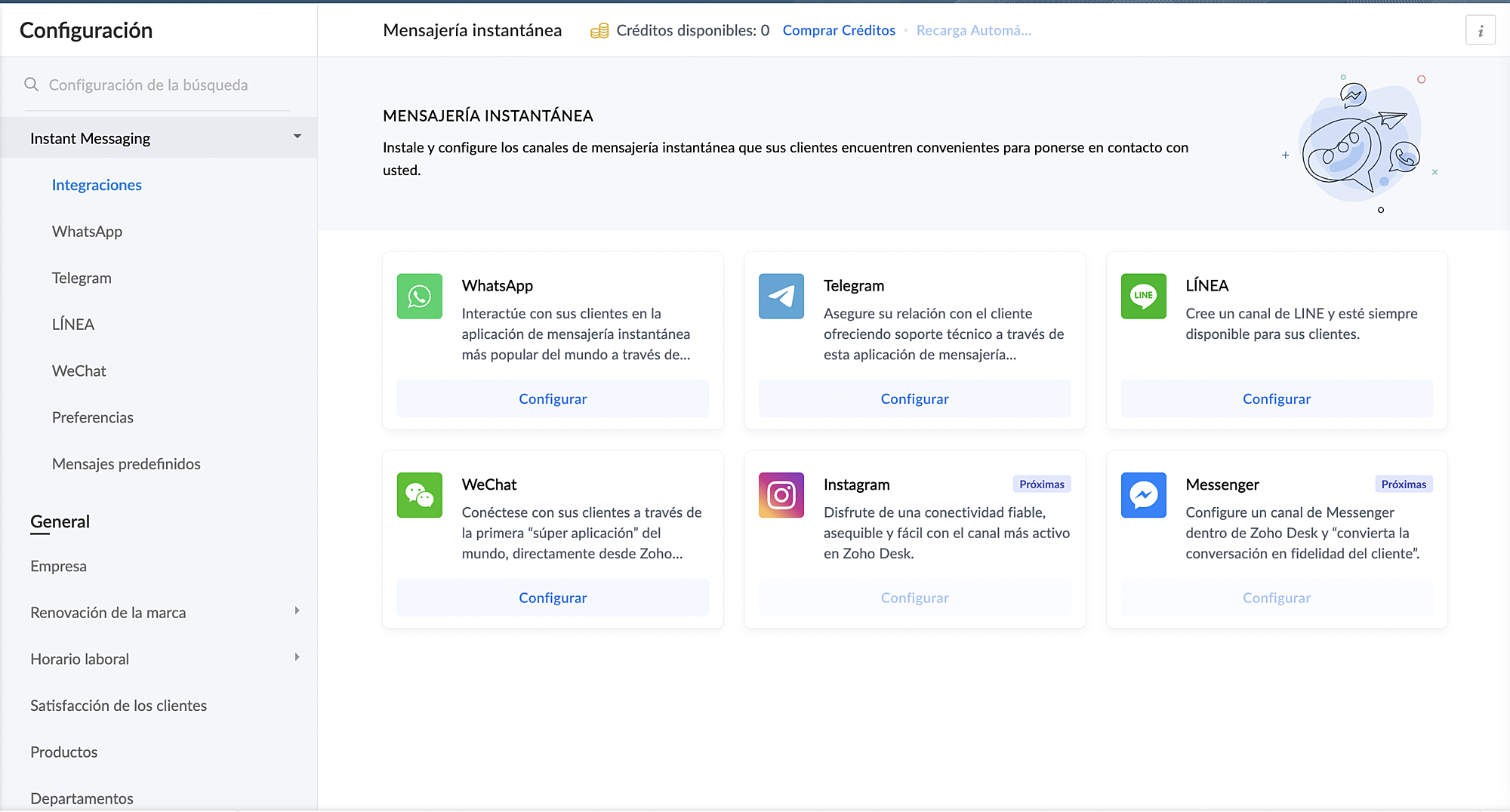
3. En Canales, haz clic en Mensajería instantánea.
4. Haz clic en Configurar correspondiente a WhatsApp en la página Mensajería instantánea.
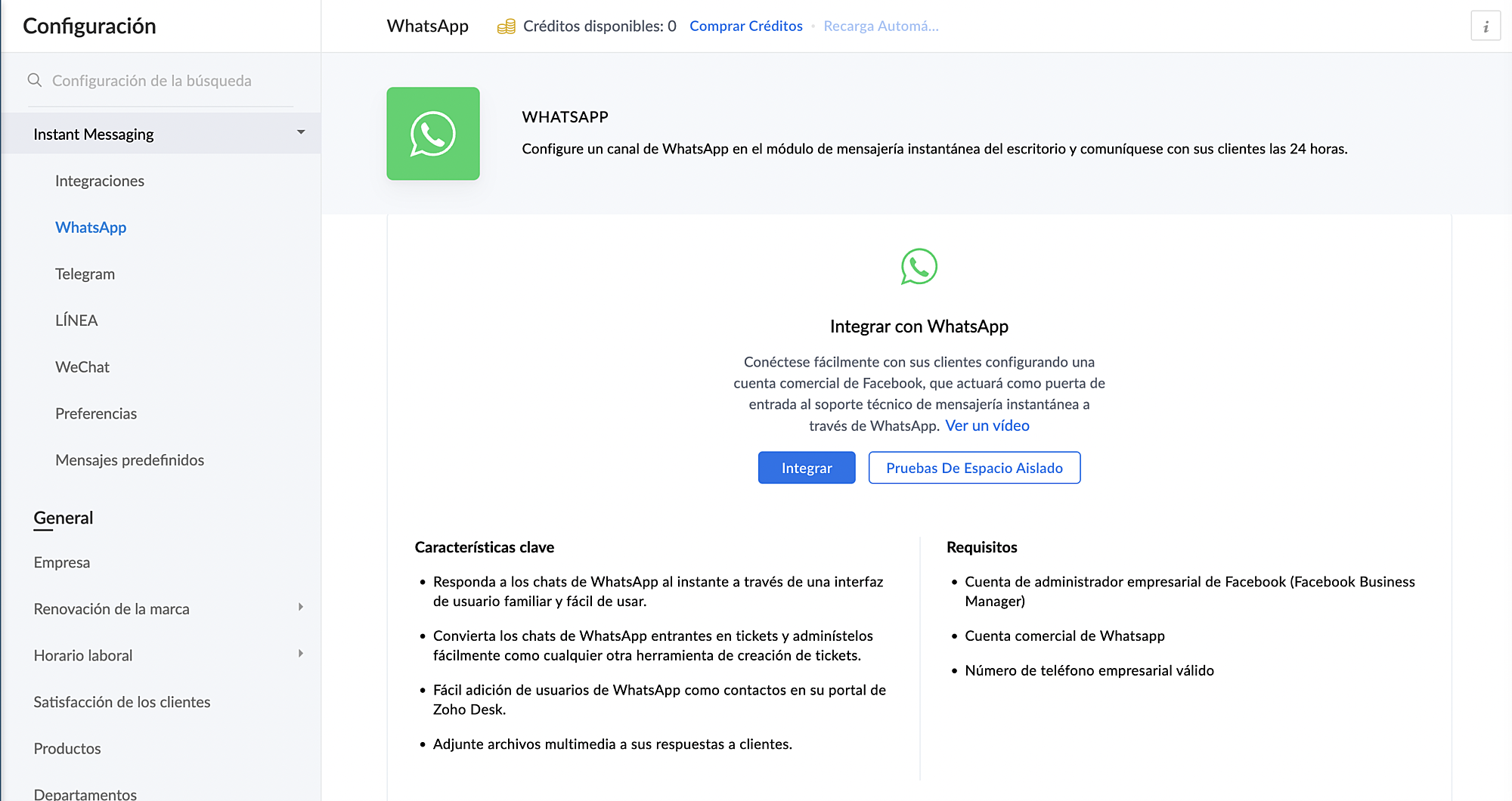
5. Haz clic en Integrar en la página de WhatsApp.
Se abrirá el cuadro emergente de autenticación de Facebook.
6. Vincula tu cuenta de Facebook y WhatsApp Business:
a. Haz clic en Continuar para vincular tu cuenta de Facebook con Zoho Desk.
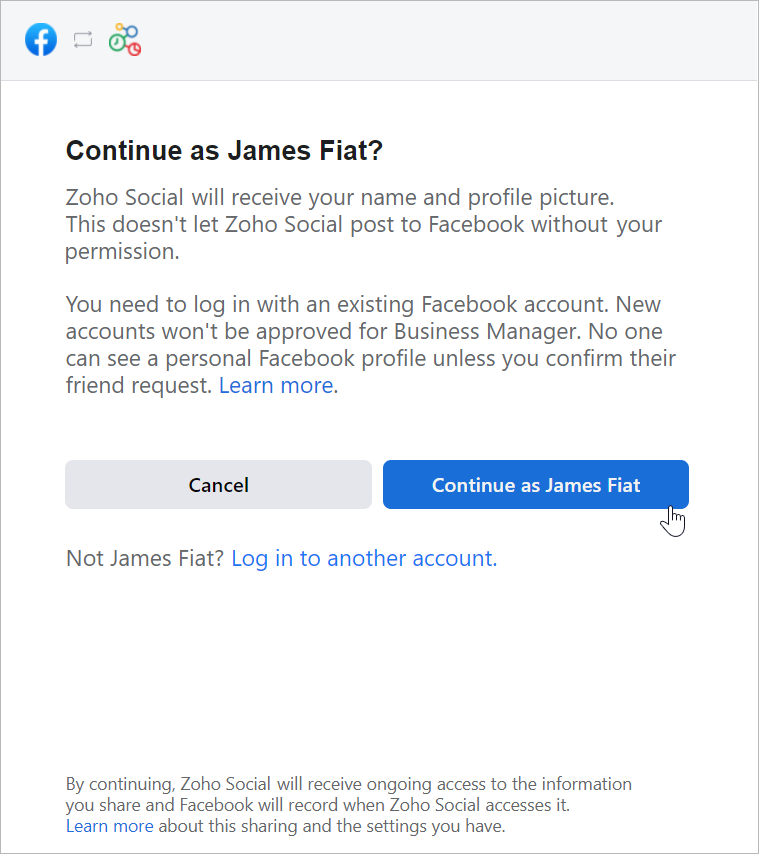
b. Haz clic en Empezar en la ventana Chat para usuarios de WhatsApp.
c. Haz clic en Continuar en la ventana Conectar tu cuenta a Zoho Corporation.
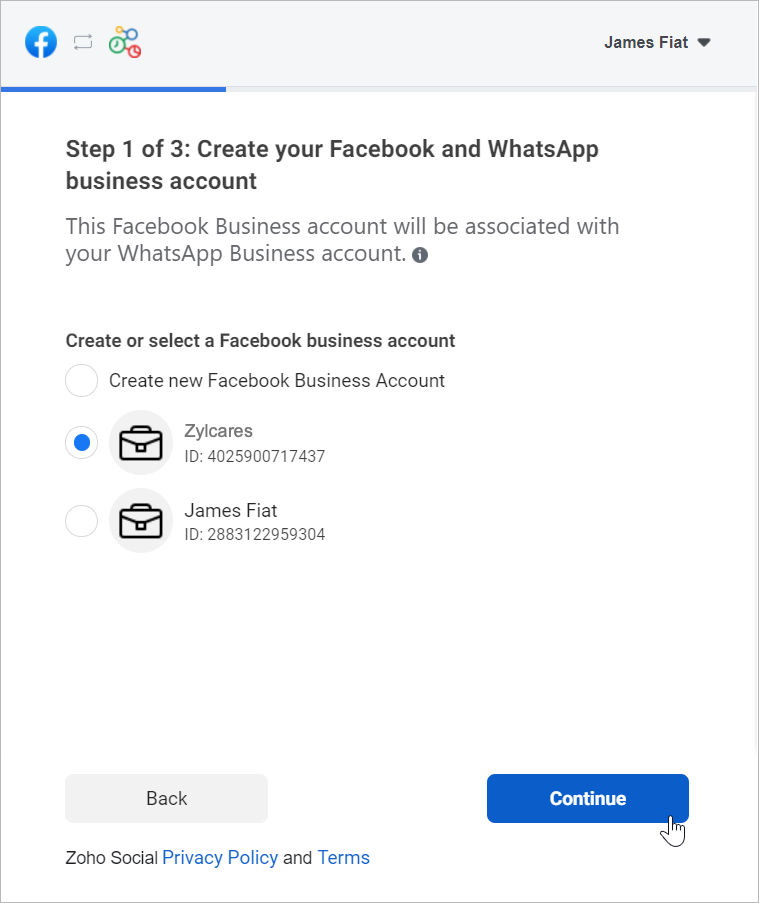
d. Selecciona la cuenta de Facebook Business que deseas vincular y, a continuación, haz clic en Continuar.
e. Selecciona la cuenta de WhatsApp Business vinculada a tu cuenta de Facebook Business y, a continuación, haz clic en Continuar en la siguiente pantalla.
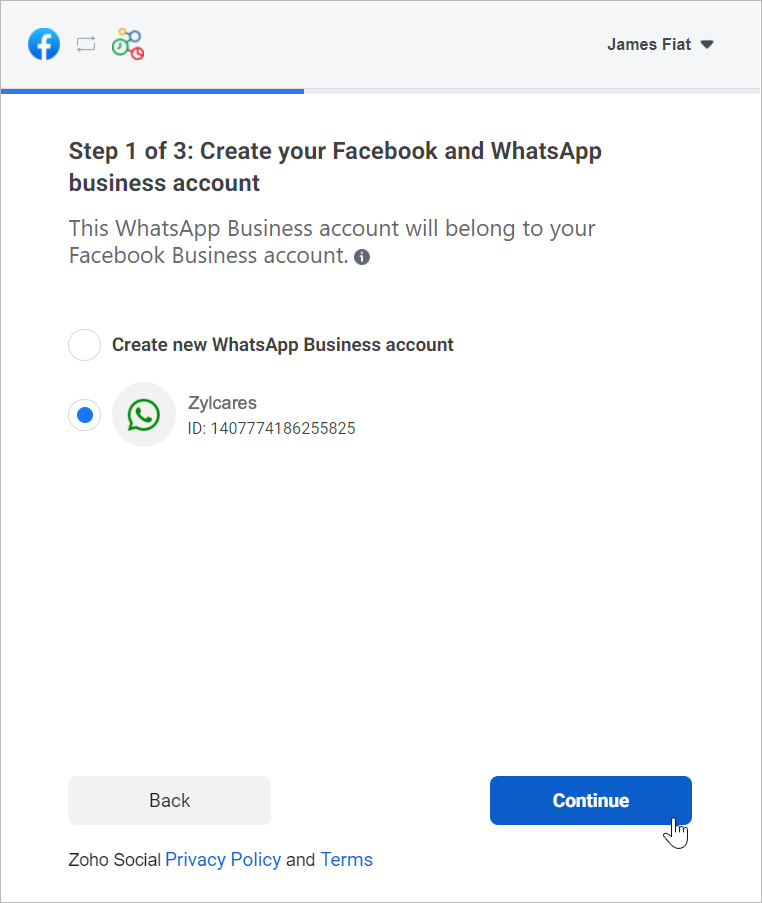
f. Haz clic en Continuar con el paso 2.
1. Crea tu perfil de WhatsApp Business:
a. Introduce el nombre para mostrar de WhatsApp Business que utilizaras para enviar mensajes a los clientes y haz clic en Continuar.
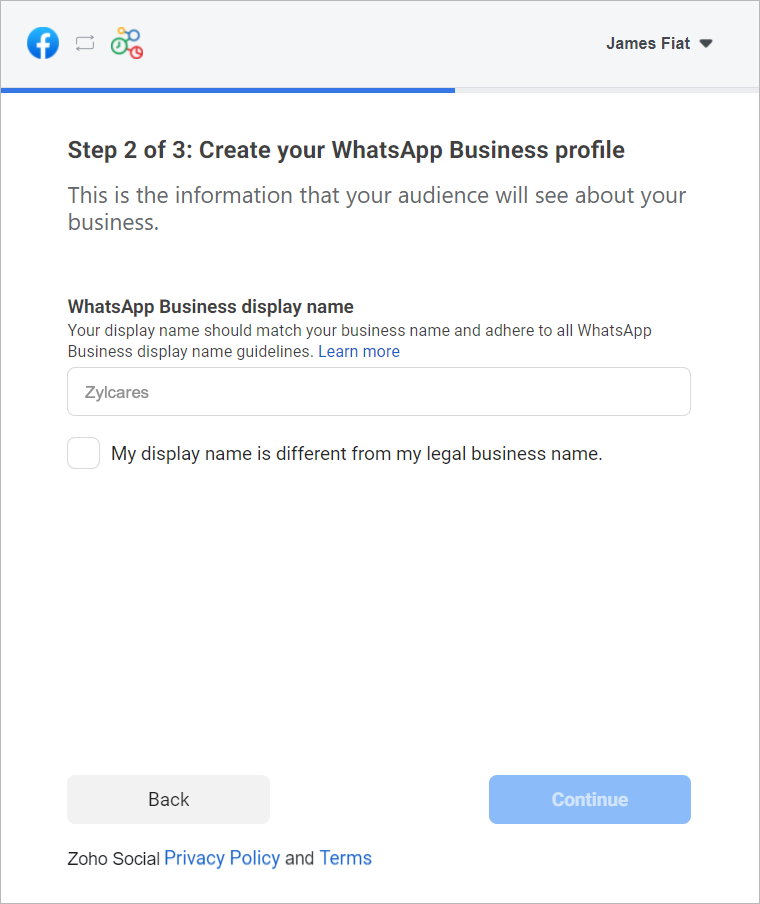
Asegúrate de que el nombre para mostrar cumple las directrices mencionadas aquí.
b. Selecciona la categoría de tu negocio en el menú desplegable.
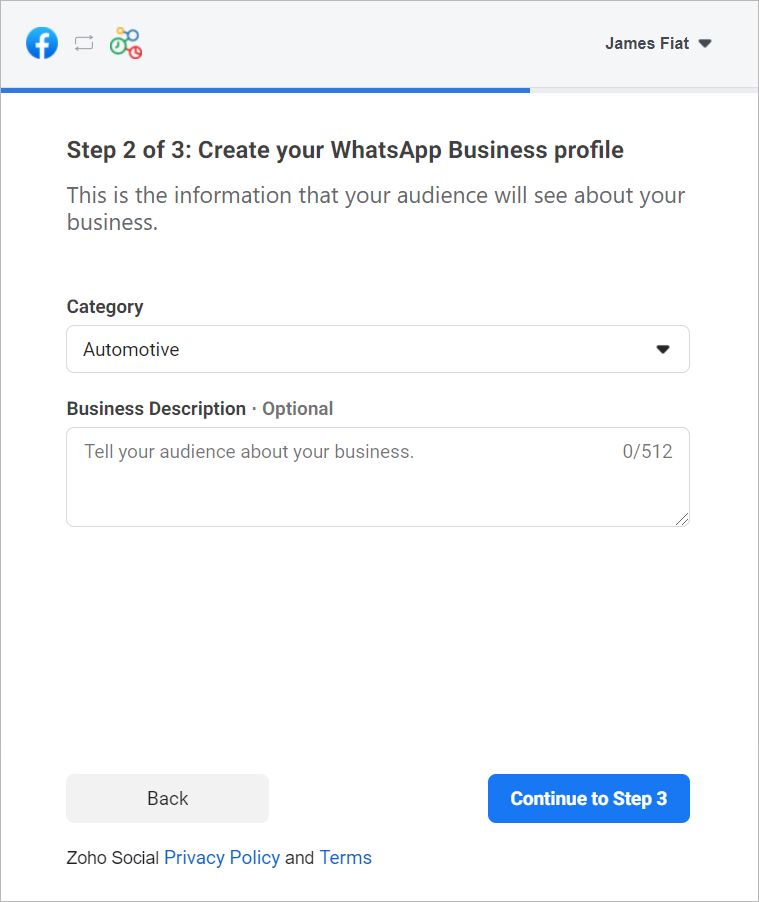
c. Introduce una breve descripción de tu empresa.
Tanto la categoría como la descripción de la empresa serán visibles para los clientes que envíen mensajes a tu empresa.
d. Haz clic en Continuar con el paso 3.
2. Verifica tu número de WhatsApp Business:
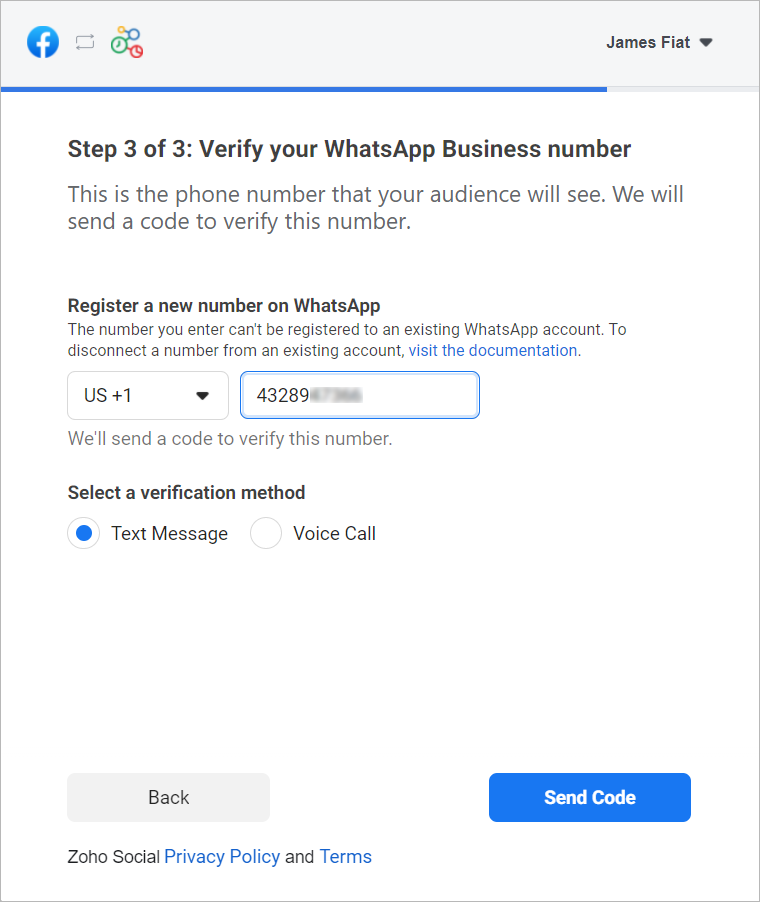
a. Selecciona un número de WhatApp Business existente o introduce un número nuevo para registrarlo.
Nota: No puedes registrar un número que ya esté registrado en WhatsApp Messenger o en la aplicación WhatsApp Business.
b. Selecciona el método de verificación que prefieras. Puedes elegir entre Mensaje de texto o Llamada de voz.
c. Haz clic en Enviar código.
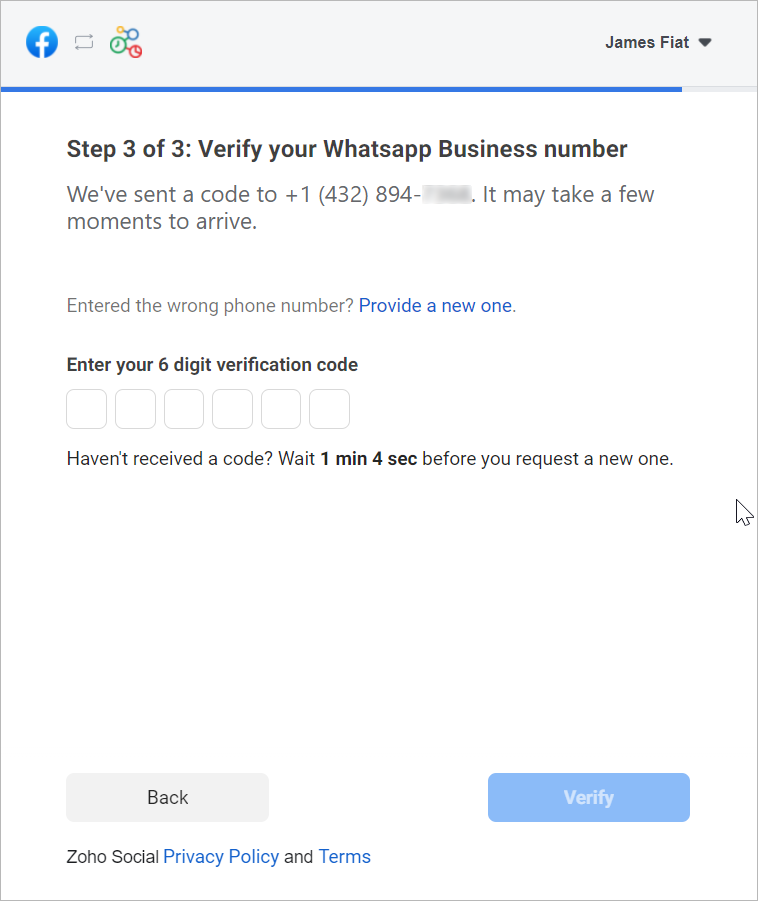
d. En la siguiente ventana, introduce el código de verificación de 6 dígitos recibido en tu número de teléfono de Whatsapp Business.
e. Haz clic en Verificar.
3. Configurar canal de WhatsApp:
a. De vuelta en la página de ajustes de WhatsApp, haz clic en Crear canal.
Nota: El número de canales que crees no puede superar los departamentos de tu cuenta.
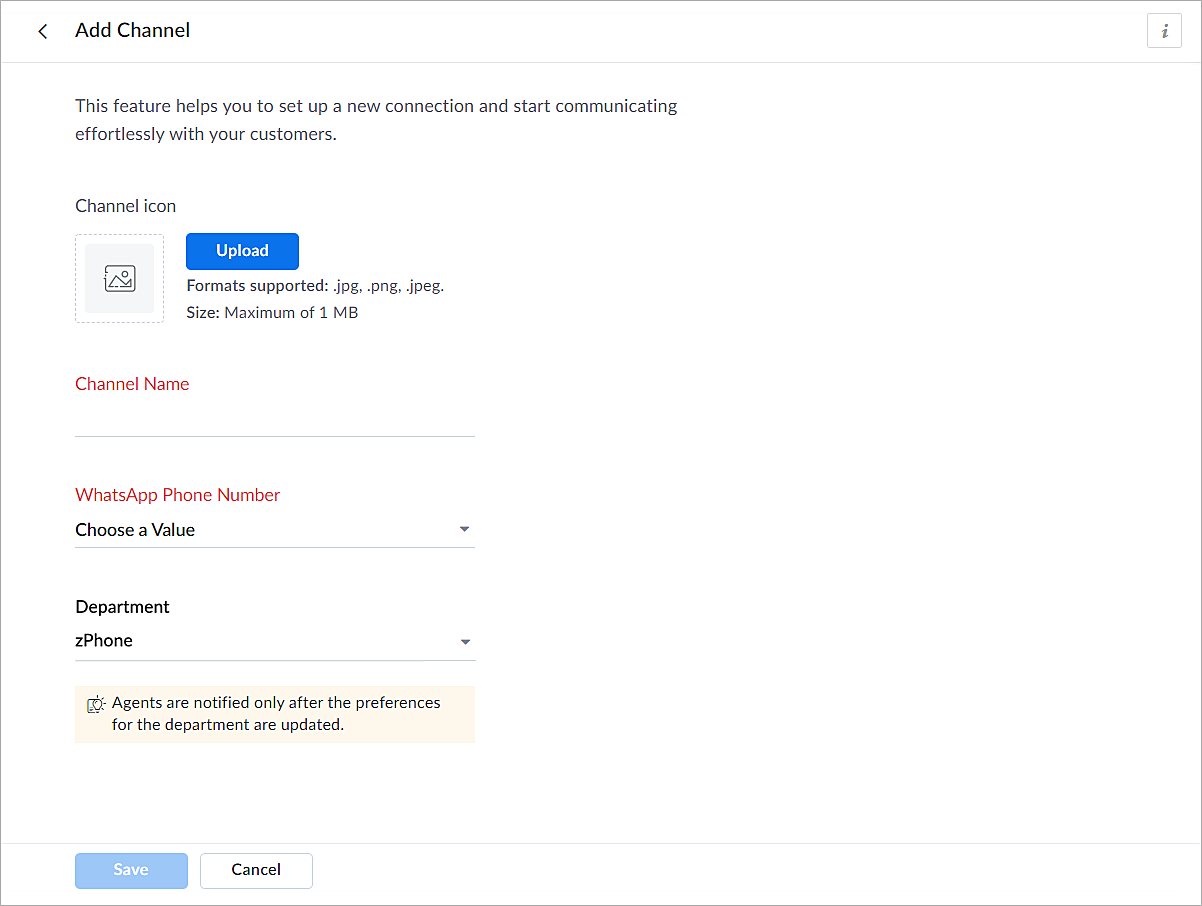
b. En la página Añadir canal, sigue los pasos que se indican a continuación:
i. Carga un icono para el canal.
Nota: El tamaño del icono no puede superar 1 MB y debe estar en formato .jpg, .png o .jpeg.
ii. Introduce un nombre para el canal.
iii. Selecciona el número de teléfono de Whatsapp añadido en el paso 3.
iv. Selecciona el departamento en el que desea recibir los mensajes.
v. Haz clic en Guardar.
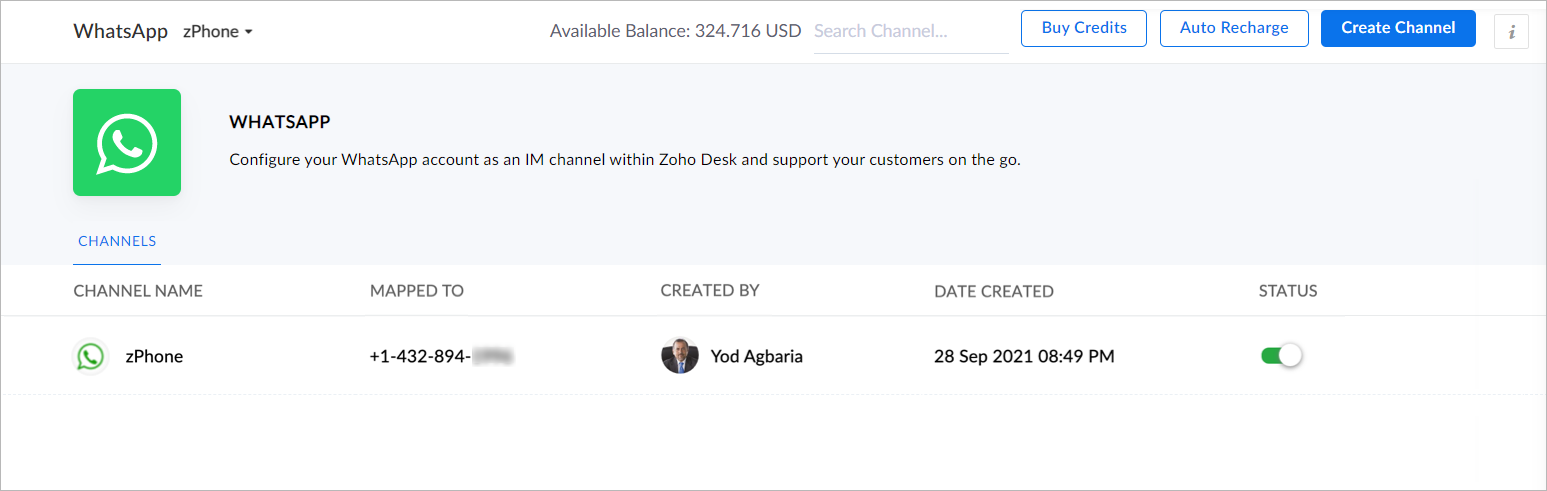
4. Ya has completado el proceso de configuración y estás listo para utilizar la experiencia de prueba.
Verificación empresarial
Durante la experiencia de prueba no verificada, solo podrás enviar mensajes iniciados por la empresa a dos números de teléfono y mantener hasta diez conversaciones iniciadas por clientes durante los primeros 30 días. Transcurridos 30 días, ya no podrás enviar mensajes hasta que completes la verificación de empresa y superes todas las comprobaciones de Whatsapp.
Para establecer una plataforma de conversación en directo de mensajería instantánea de pleno derecho, debes verificar tu cuenta de Facebook Business Manager proporcionando todos los documentos necesarios, incluida la prueba de entidad jurídica y la prueba de acceso a la empresa. Sólo entonces se habilitará tu versión de prueba ampliada, que permite una conversación bidireccional entre tú y un cliente con 1500 mensajes iniciados por el cliente. Recuerda que una conversación es una sesión de 24 horas de mensajería ilimitada con un número de teléfono determinado.
Para desactivar un canal
- Haz clic en el icono Configuración de la barra superior.
- En Canales, haz clic en Mensajería instantánea.
- Haz clic en WhatsApp en la página Mensajería instantánea.
Aparecerán los canales creados en su cuenta.
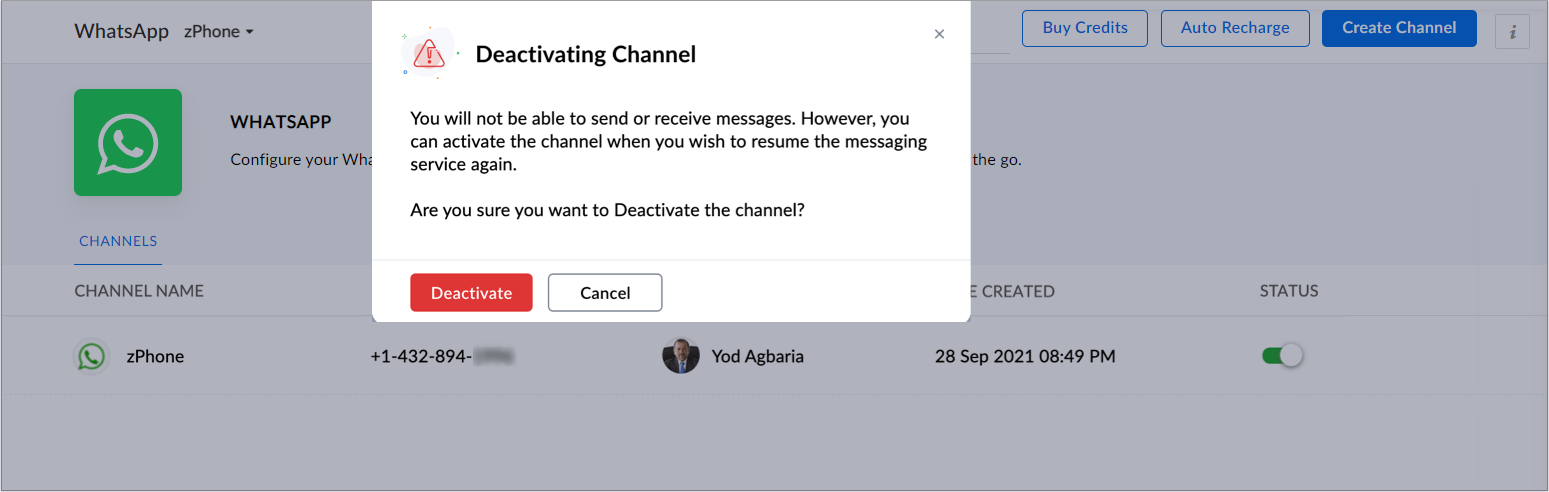
4. Desactiva el botón correspondiente al canal que deseas desactivar.
5. Haz clic en Desactivar en el cuadro de diálogo de confirmación.
El canal quedará desactivado.
Si te ha gustado este pequeño truco y te interesa conocer más trucos sobre el uso de Zoho Desk puedes encontrar más en nuestro foro y puedes darle a seguir en el apartado de Trip and Tricks de Zoho Desk.
¡Nos vemos a la próxima en el foro de Español Zoho Community!
Topic Participants
Lorenza Pasca
Angélica Barrera
Recent Topics
Zoho removed ability to see all Scheduled Reports!
If you are not the owner of a scheduled report, Zoho recently removed the capability to see each scheduled report. As an admin who relies on seeing all scheduled reports being sent, this is a terrible update. Now I cannot see ANY scheduled reports...even the ones I am being sent!! This should be a setting for admins to control. This is a bad update.This user is not allowed to add in Zoho. Please contact support-as@zohocorp.com for further details
Hi Team, when I,m trying to create a email account (imagixmidia.com.br) it's showing this error >> This user is not allowed to add in Zoho. Please contact support-as@zohocorp.com for further details plz help me thanksEdit default "We are here to help you" text in chat SalesIQ widget
Does anyone know how this text can be edited? I can't find it anywhere in settings. Thanks!Can't change form's original name in URL
Hi all, I have been duplicating + editing forms for jobs regarding the same department to maintain formatting + styling. The issue I've not run into is because I've duplicated it from an existing form, the URL doesn't seem to want to update with the newFeature Request: Sync Leave Tracker to Zoho Mail / Calendar or provide option to download information
Zoho Leave Tracker offers the option to sync the leave Calendar to Microsoft 365 and Google Calendar. Adding an option to sync to Zoho-Mail Calendar would avoid duplication and add significant value for users. An alternative would be to allow users toCompensation | Salary Packages - Hourly Wage Needed
The US Bureau of Labor Statistics says 55.7% of all workers in the US are paid by the hour. I don't know how that compares to the rest of the world, but I would think that this alone would justify the need for having an hourly-based salary package option.Multiple currencies - doesn’t seem to work for site visitors / customers
I am trying to understand how the multiple currency feature works from the perspective of the website visitor who is shopping on my Zoho Commerce site. My site’s base currency is US Dollars (USD) but my store is for customers in Costa Rica and I wouldArchiving Contacts
How do I archive a list of contacts, or individual contacts?How do people handle using Outlook and Zoho Project calendar at the same time?
We have an ongoing problem in our organisation where we use Zoho Projects to plan all of our projects tasks and that also allows us to look forward using the workload report to see which of our consultants are overstretched etc and which are available.10GB Email Storage Limits in Zoho CRM
We’ve had Zoho One for almost 5 years and have always synced our emails from Gmail via IMAP… As of late, we’ve run into issues with our emails not syncing, due to being over the 10GB storage cap… What’s very odd is that we haven’t changed a thing? I knowPerformance is degrading
We have used Mail and Cliq for about three years now. I used to use both on the browser. Both have, over the past 6 months, had a severe degradation in performance. I switched to desktop email, which appeared to improve things somewhat, although initialHow to set page defaults in zoho writer?
hi, everytime i open the zoho writer i have to change the default page settings to - A4 from letter, margins to narrow and header and footer to 0. I cannot set this as default as that option is grayed out! so I am unable to click it. I saved the documentAdd Israel & Jewish Holidays to Zoho People Holidays Gallery
Greetings, We hope you are doing well. We are writing to request an enhancement to the Holidays Gallery in Zoho People. Currently, there are several holidays available, but none for Israel and none for Jewish holidays (which are not necessarily the sameUnable to Send Different Email Templates for Different Documents in Zoho Sign
Hello Zoho Community, I am facing a limitation with Zoho Sign regarding email notifications sent to customers when a document is sent for signing. Currently, whenever I send any template/document for signing, the email notification that goes to the customerEnable History Tracking for Picklist Values Not Available
When I create a custom picklist field in Deals, the "Enable History Tracking for Picklist Values" option is not available in the Edit Properties area of the picklist. When I create a picklist in any other Module, that option is available. Is there a specific reason why this isn't available for fields in the Deals Module?ZO25: The refreshed, more unified, and intelligent OS for business
Hello all, Greetings from Zoho One! 2025 has been a remarkable year, packed with new features that will take your Zoho One experience to the next level! From sleek, customizable dashboards to an all-new action panel for instant task management, we’veVault crashes on Android Devices
Vault is continuously closing after entering the master password on my Android device. After several attempts I get a system message that says there is a bug in the app. I've uninstalled and reinstalled the app, and cleared the app cache, but nothing¿Cómo puedo configurar las contraseñas creadas bajo una directiva para que nunca caduquen y no aparezcan como caducadas en los informes?
¿Cómo puedo configurar las contraseñas creadas bajo una directiva para que nunca caduquen y no aparezcan como caducadas en los informes? La razón por la cual contraseña estas no deben caducar es porque su actualización depende de mi cliente y no de mí.Camera access
My picture doesn't appear in a group discussion. (The audio is fine.) The guide says "Click the lock icon on address bar," but I can't find it. Advise, pleaseAre static links available
I'm still using Zoho Meeting in trial mode. My previous webinar software provided a static link, and I made the mistaken assumption that I could send out my link and start a meeting later. Mass confusion, but my fault. With a paid version do you get aWhy is Zoho Meeting quality so poor?
I've just moved from Office 365 to Zoho Workplace and have been generally really positive about the new platform -- nicely integrated, nice GUI, good and easy-to-understand control and customisation, and at a reasonable price. However, what is going onHow to print a label from zoho creator app?
Hello, I would like to print a label from zoho creator app record similar to attached one. Size 74mm x 102mm. I tried record template. It leaves plenty of space around the content and also I couldn't set the height of the page. So it is not printing properly. Could someone please direct me to right direction for this requirement?Integration between "Zoho Sprints Stories" and "Zoho Projects Tasks/Subtasks"
We have two separate teams in our organization using Zoho for project management: The Development team uses Zoho Sprints and follows Agile/Scrum methodology. The Infrastructure team uses Zoho Projects for traditional task-based project management. InWhere can we specify custom CSS in Zoho Forms custom theme ?
I'm using a form with a dark theme. The OTP popup window is unreadable, because for some reason, the OTP popup background fixes color to white, but still takes the font color specified in the custom theme. This ends up as white on white for me, renderingTeam Gamification
Would love to motivate, engage and encourage our team with our social media posts. Would like to include Gamification features of Social Media in Zoho Social or Marketing Automation. And also bring in Social Advocacy tools/tracking/management to these,Sync Data from MA to CRM
Currently, it's a one-way sync of data from the CRM to MA. I believe we should have the ability to select fields to sync from MA to the CRM. The lead score is a perfect example of this. In an ideal world we would be able to impact the lead score of aUpdate CRM record action
Currently, MA only offers a "Push Data" action to push data to a CRM module. This action is built to cover the need to both create a new record and update an existing record. Because it has been implemented this way all required fields on the CRM modulePro Lite Upgrade - Quick Access Tray
Hello, I was going to upgrade to Pro Lite but the Quick Access Tray feature isn't available for Windows. Of the four features not available for Windows, the QAT is what I'm most interested in. Are there plans to add this feature for Windows anytime soon?Boost your CRM communication with new font types, sizes, and default reply-to options while composing emails
Hello Everyone, We’re excited to introduce a series of impactful enhancements to the email composer settings in Zoho CRM. These updates enable you to personalize and optimize your customer interactions with greater efficiency. So what's new? Add custom3 year sick leave cycle
How do you set up a sick leave cycle for South Africa? In SA the sick works like this for the first 6 months you get 0.83 paid sick days a month, then after 6 months you sick leave balance is reset to 30 days that can be used over a 36 month cycle. ThisWorkDrive and CRM not in sync
1/ There is a CRM file upload field with WorkDrive file set as the source: 2/ Then the file is renamed in WorkDrive (outside CRM): 3/ The File in CRM is not synced after the change in WorkDrive; the file name (reference) in CRM record is not updated (hereIs Zoho Communityspaces now part of Zoho One?
Is Zoho Communityspaces now part of Zoho One?How to update "Lead Status" to more than 100 records
Hello Zoho CRM, How do I update "Lead Status" to more than 100 records at once? To give you a background, these leads were uploaded or Imported at once but the lead status record was incorrectly chosen. So since there was a way to quickly add records in the system no matter how many they are, we are also wondering if there is a quicker way to update these records to the correct "Lead Status". I hope our concern makes sense and that there will be a fix for it. All the best, JonathanBigin’s 2025 Evolution: Highlights from 2025 and What’s Ahead in 2026
Dear Biginners, Wishing you a very happy New Year! As we stand at the cusp of endless possibilities in 2026, we would like to take a moment to reflect on what we achieved together in 2025. Your continued support, thoughtful feedback, and kind words ofSend Supervisor Rule Emails Within Ticket Context in Zoho Desk
Dear Zoho Desk Team, I hope this message finds you well. Currently, emails sent via Supervisor Rules in Zoho Desk are sent outside of the ticket context. As a result, if a client replies to such emails, their response creates a new ticket instead of appendingZoho Desk - Change Time Zone for all users and set default for new user
Hi, Is there a way to set a default time zone so that when user creates an account via the Zoho Desk invitation, they don't need to select the time zone via the hundreds of choice? And, for already created users, can we edit the incorrect time zone selected by the user at the account creation ? Thanks ! FredIntroducing WhatsApp integration in Bigin
Greetings! In today's business landscape, messaging apps play a significant role in customer operations. Customers can engage with businesses, seek support, ask questions, receive personalized recommendations, read reviews, and even make purchases—allAllow Manual Popup Canvas Size Control
Hello Zoho PageSense Team, We hope you're doing well. We would like to request an enhancement to the PageSense popup editor regarding popup sizing. Current Limitation: Currently, the size (width and height) of a popup is strictly controlled by the selectedWhy does Zoho’s diff viewer highlight parts of unchanged lines?
Hi everyone, I’ve noticed something odd in the Zoho editor’s diff view. When I delete a single line, the diff doesn’t just mark that line as removed. Instead, it highlights parts of the next line as if they changed, even though they are identical. Example:CRM x WorkDrive: File storage for new CRM signups is now powered by WorkDrive
Availability Editions: All DCs: All Release plan: Released for new signups in all DCs. It will be enabled for existing users in a phased manner in the upcoming months. Help documentation: Documents in Zoho CRM Manage folders in Documents tab Manage filesNext Page