What's New in Zoho Inventory | January - March 2025
Hello users,
We are back with exciting new enhancements in Zoho Inventory to make managing your inventory smoother than ever! Check out the latest features for the first quarter of 2025. Watch out for this space for even more updates.
Email Insights for Sales Orders
We have introduced the Email Insights feature for Sales Orders in Zoho Inventory. With this feature, you can track emails sent for Sales Orders and view when the email was opened. The 'Client Viewed' filter allows you to find Sales Orders that have been viewed via email by the recipient.

Stock Availability Filter in Stock Counts
We have added a Stock Availability Filter to Stock Counts. This filter allows you to filter and add items to a stock count based on their stock availability, making the counting process more efficient.
View and Customize Stock Status in Transactions
When creating a transaction, you can now see both the Stock on Hand and the Available for Sale quantity for each item. The displayed quantity will depend on the selected View option.

Export Bin Locations Report
You can now export the Bin Locations Details Report and Bin Location Transaction Summary Report in your preferred format such as PDF, XLS, or XLSX. This enhancement makes it easier to analyze your bin-level inventory data.
To export a bin locations report, go to Reports > Bin Locations Details Report under Inventory
Add Dropshipping Address in Sales Orders
You can now add a dropship address in your Sales Orders. This address is used exclusively for the specific transaction and will not be saved to the customer's additional address list. You can also view and copy addresses from existing customers when setting the dropship address.
To add a dropshipping address, go to Sales > Sales Orders, edit/create a sales order, and click + Dropshipping Address.

New & Improved Zoho Inventory Reports
Introducing enhancements to Inventory reports for better control and visibility. The Stock Summary Report now supports custom reports, amount columns, and a stock tracking mode filter. Bulk export is available for up to 500,000 records (based on your plan) for key reports like Inventory Summary and FIFO Cost Lot Tracking. Purchase Order Reports now offer detailed columns such as Quantity Ordered, Received, In Transit, and Late By Date. Custom reports, Show/Hide Columns, and advanced filters are now supported across various reports including Inventory Aging, ABC Classification, Committed Stock, Product Sales, Valuation, Landed Cost, and Active Purchase Orders. The Sales by Item Report adds a Report Basis filter, while the Sales Return History Report gets a complete revamp with status tracking, return reasons, grouping, customizations, and scheduled exports. The Inventory Valuation Summary includes a new Stock Account column with filters, and you can now exclude transfer orders in Inventory and Stock Summary reports. These changes will provide a more flexible and insightful reporting experience.
Display Type for Lookup Custom Fields
We now support different display types for lookup custom fields. You can choose between a List view and a Dropdown view. This feature is currently available for specific lookup modules, like items, vendors, purchase orders, and customers.
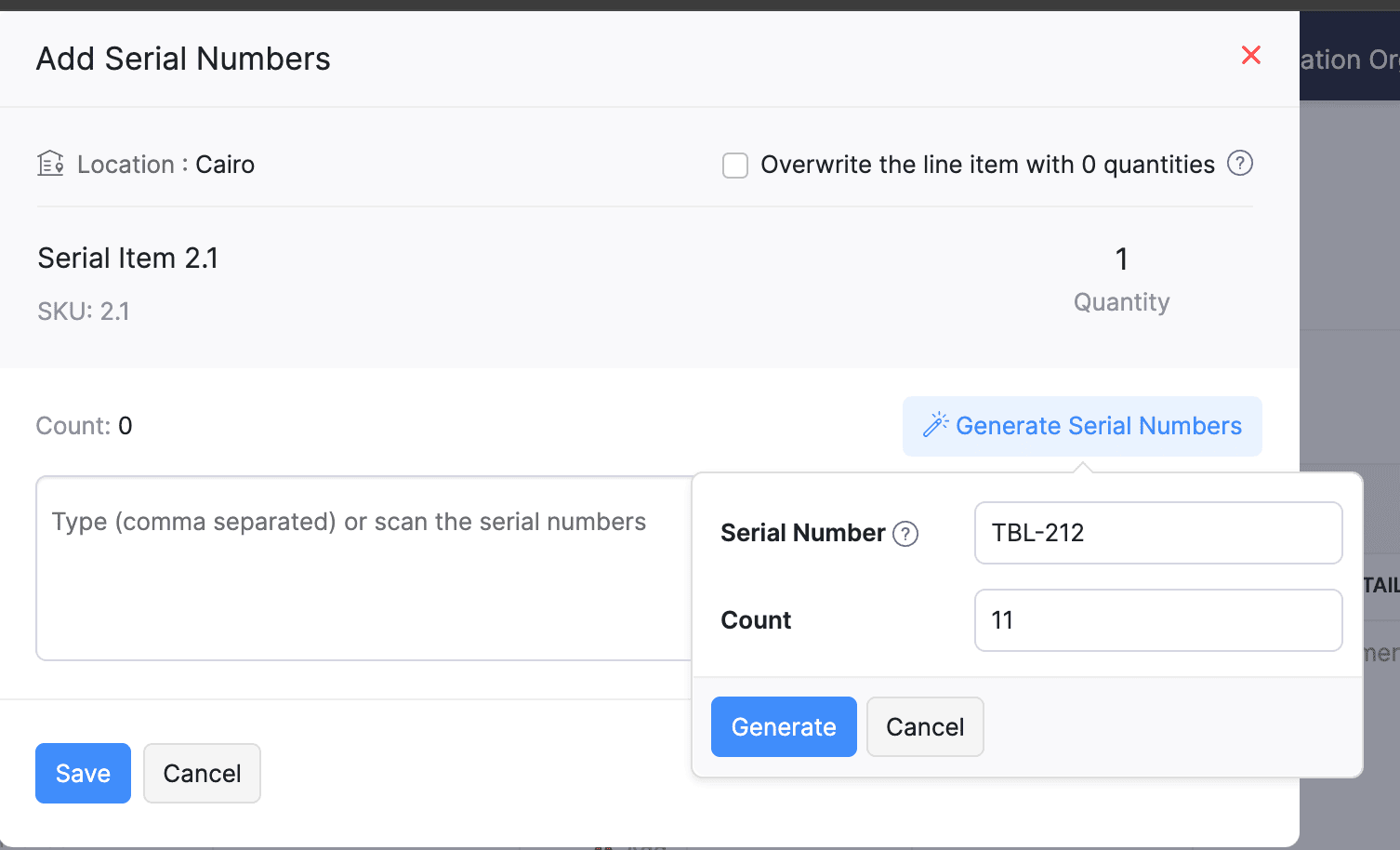
Generate Serial Numbers in Inward Transactions
Introducing support serial number generation for inward transactions. You can set a starting serial number and specify the required count to ensure precise inventory tracking and save time.
Note: The starting serial number must always end with a numeric value.
To generate serial numbers, select an item from the item table, click Add Serial Numbers, then select Generate Serial Numbers. Enter the starting value and count, then click Generate.
Note: The starting serial number must always end with a numeric value.
To generate serial numbers, select an item from the item table, click Add Serial Numbers, then select Generate Serial Numbers. Enter the starting value and count, then click Generate.
Batch Tracking Enhancements
Batch Tracking just got more powerful and flexible with some major enhancements. You can now create and edit batches directly from the item details page, making management easier. A new return option allows items to be returned to the same sold batch, improving stock accuracy. You can also use the same batch across multiple line items in purchase transactions. Batch status control lets you mark batches as Inactive, keeping them out of transactions while retaining them for reports. Plus, all batch activity including creation, edits, restocks, and transfers is now visible in the Audit Trail report.
Item Description for UPS Line Items
We have improved the UPS Paperless Invoice feature by introducing the ability to add and edit item descriptions and unit prices individually for each line item within a package. Previously, a single description was applied to all items in a package, limiting the level of detail you could provide. With this update, you now have more control and flexibility.

Enhanced Shopify Integration
We have improved the shopify integration. You can now set sync frequency and mapping options for each store separately. Item sync runs every 24 hours by default, but you can also set it up manually if needed. Non-taxable items are now created with the correct tax exemption. When setting up Sales Order sync, you’ll pick a start date and can set how often it runs. Each store can now sync independently. You can also decide if sales orders should be fetched to Zoho Inventory under a single customer or create new customers using fields like email or name. Now, sync history includes filters for sync type and status, making it easier to show both successful and failed sync.
To integrate Shopify with Zoho Inventory, go to Settings > Integrations & Marketplaces > Shopify
Pin Columns in Transaction List Page
You can now pin up to two columns in the transaction list page in both default and custom views to keep key information visible while scrolling. This feature is available when a view contains more than eight columns.
To pin columns, go to any module, click the Customize Columns icon, hover over the fields, click the Pin icon, and then click Save.

Edit Etsy Orders
You can now edit orders fetched from Etsy with ease. Previously, Etsy orders were imported with non-editable details and tax. Now, you can edit these orders and override the tax applied based on the tax rate configured at your organization level.
To integrate Etsy, go to Settings > Integrations & Marketplaces > Etsy
Clone Delivery Challans
You can now duplicate delivery challans by cloning the existing ones, thereby saving time.
To clone a delivery challan, go to Delivery Challans, select a challan, click the More icon, and select Clone from the dropdown.

Enhanced Export and Print Preferences for Reports
We have added new customization options for report exports and print preferences. You can now set custom file names for exported reports, display column headers on each PDF page, and organize report data into separate pages based on the group by field.
Multi-Factor Authentication (MFA) for Portals
We are improving security by adding Multi-Factor Authentication (MFA) to both Customer and Vendor Portals. This extra security step requires users to enter a Time-Based One-Time Password (TOTP) along with their login credentials.
Admins can turn on MFA in the Customer Portal settings, making it mandatory for customers and vendors to set it up using an authenticator app. Once enabled, users will need to enter a TOTP code each time they log in. If needed, admins can reset MFA for users.
Note that even if MFA is disabled later, users that have already set it up will still need to enter the TOTP code. If they lose access to their authenticator app, they should contact an admin for a reset.
To enable multi-factor authentication for your customers and vendors, go to Settings > Preferences > Customer Portal. Check the Enable multi-factor authentication (MFA) option.

Import Move Orders and Putaways
We have introduced import option for the Move Orders and PutAway modules. You can now seamlessly import data for these, making bulk updates and record creation faster and more efficient.
To import move orders and putaways, go to Transfer Orders/Putaways under Inventory > Click More in the top right corner > Import Transfer Orders/Putaways.
Attach Documents in Purchase Receives
You can now upload, attach, and manage documents directly from the Purchase Receive creation and edit page.
To attach a document in purchase receive, go to Purchases > Purchase Receives > + New > Upload File.

Print & PDF Support for Purchase Receives
You can now generate and print or download your purchase receives. We have also supported a standard template with which you can view the PDF of your purchase receives to simplify record-keeping.
To print or download a purchase receive, go to Purchases > Purchase Receives. Select the purchase receive and click PDF/Print.
To view the PDF of a purchase receive, go to Purchases > Purchase Receives. Select the purchase receive and enable the Show PDF View option on its details page.

Filter Lookup Custom Fields
You can now filter your lookup custom fields by using custom views and setting criteria. The records will be shown based on the chosen custom view and the rules set by you, making sure all the conditions are met.

Leave Organization Option
We have introduced the option to leave an organization from the Manage Organizations page. However, if you are the admin who created the organization or the only admin, you will need to delete the organization instead. Additionally, before you leave, ensure the integrations are disabled, if any.

That's all for now, folks! Try these new features and share your feedback. If you need assistance, reach out to us at support@zohoinventory.com.
Best Regards,
The Zoho Inventory Team
Topic Participants
Akshin Eniyavel S
Jahmonesalmon
Roshin Uchakavil
Marie Sharps Canada
Tocayah
Recent Topics
Has anyone built a ticket export that allows Help Center users to export the tickets shown in the My Area list they are looking at?
Hi, We are moving to Zoho Desk soon. Our current support system displays an option in our help center allowing customers to export their Open, Closed, or all tickets based on which list they are looking at. We need to offer the same in Zoho Desk helpZoho Desk: Q2 2025 | What's New
Hello everyone, We are excited to announce Zoho Desk's 2025 Autumn updates. This release brings new features and enhancements that improve work management and enable businesses to provide a better overall support experience. Spanning from Zia Agents toCheckboxes not adhering to any policy in mail merge - data from CRM
I want checkboxes to appear depending on whether the checkbox in the CRM module is ticked or not. However, the tickboxes that appear are either ticked or not, but don't correlate to the actual selections in the CRM module. This is is despite updatingItems Landed Cost and Profit?
Hello, we recently went live with Zoho Inventory, and I have a question about the Landed Cost feature. The FAQ reads: "Tracking the landed cost helps determine the overall cost incurred in procuring the product. This, in turn, helps you to decide theCC and/or BCC users in email templates
I would like the ability to automatically assign a CC and BCC "User (company employee)" into email templates. Specifically, I would like to be able to add the "User who owns the client" as a CC automatically on any interview scheduled or candidate submittedCreate Contract API Endpoint Unclear "inputfields" Requirements
Hello, I'm trying to create a Deluge function that accepts inputs from a form in Zoho Creator and creates a barebones contract of a given type. See below for the current code, cleaned of authentication information. // Fetch form data // Hidden field client_nameKaizen #46 - Handling Notes through Zoho CRM API (Part 1/2)
Hello everyone! Welcome back to another week of Kaizen! This week, we will discuss Handling Notes through Zoho CRM API. What will you learn from this post? Notes in Zoho CRM Working with Notes through Notes APIs 1. Notes in Zoho CRM 1a. Why add Notes to records? Notes are a great way to summarize your observations on customer and prospect interactions and outcomes. By saving notes as CRM data, a sales rep will always be able to keep track of how a sale is progressing. To know more about notes inMarketer's Space - Why email marketing matters in ecommerce (and how to get started with Zoho Campaigns)
Hello Marketers, Welcome to this week's Marketer's space post. Today, we'll discus why email marketing matters in ecommerce businesses. Running an online store is exciting but challenging. If you're running an online store, you've probably experiencedZoho Campaigns Event timestamps do not propagate to Zoho CRM
We have integrated Zoho CRM and Zoho Campaigns. But when looking at Contact records, the Campaign event data is missing the actual timestamps: especially when a particular email was sent. They're not in the Campaigns related list, and the cannot be foundKaizen #121 : Customize List Views using Client Script
Hello everyone! Welcome back to another interesting Kaizen post. In this post, we can discuss how to customize List Views using Client Script. This post will answer the questions Ability to remove public views by the super admin in the Zoho CRM and IsSetting default From address when replying to request
At the moment, if I want to reply to a request, the From field has three options, company@zohosupport.com, support@company.zohosupport.com, and support@company.com. The first two are really internal address that should never be seen by the customer andTip #45 - Explore Your Support Reach with Zoho Assist’s Geo Insights - 'Insider Insights'
Understanding where your remote support sessions are happening can help you make smarter decisions, allocate resources effectively, and improve overall customer satisfaction. In this week's Zoho Assist's community post we will be exploring Geo InsightsFormatting of text pasted into Zoho documents
Howdy, I'm a newbie and finding Zoho an improvement to MS Word. Consider yourself hugged. High on my wish list would be plain text cut-and-paste. When pasting text from the web to Zoho, presently Zoho imports the formatting along with the text. This means that every cut-and-paste operation brings in text in a different font, size, or style. Can we have at least the option of importing plain text without formatting (or better yet, is this option already out there?) ... Thanks HelenAdd additional features to Zoho Tables
Zoho Tables is a really great tool, why not add features like diagramming capability into the tool from applications like Draw.io which I believe is open source, you should be able to do wireframes, process flow diagrams, network design, etc. Please noteThe Social Wall: August 2025
Hello everyone, As summer ends, Zoho Social is gearing up for some exciting, bigger updates lined up for the months ahead. While those are in the works, we rolled out a few handy feature updates in August to keep your social media management running smoothly.The Social Wall: July 2025
Hello everyone! July has brought some exciting new updates to Zoho Social. From powerful enhancements in the Social Toolkit to new capabilities in the mobile app, we’ve packed this month with features designed to help you level up your social media presence.Use Zoho Creator as a source for merge templates in Zoho Writer
Hello all! We're excited to share that we've enhanced Zoho Creator's integration with Zoho Writer to make this combination even more powerful. You can now use Zoho Creator as a data source for mail merge templates in Zoho Writer. Making more data fromTagged problem !!!
Damn it, we're one of dozens of construction companies in Africa, but we can't link purchasing invoices to projects. Why isn't this feature available?Syntax for URLs in HTML Snippets
What are some best practices for inserting a URL in an HTML snippet? I've looked at Zoho Help articles on navigation-based and functional-based URLs, but I'm still unclear on how to incorporate them in an HTML snippet. For example, 1. How do I link toThe Social Wall: June 2025
Hello everyone, We’re back with June Zoho Social highlights. This month brought some exciting feature updates—especially within the Social Toolkit—to enhance your social media presence. We engaged with several MSME companies through community meet-upsTip 7: How to fetch data from another application?
Hi everyone, Following our Zoho Creator - Tips and Tricks series every fortnight, we are back today with a tip based on one of the most popular questions asked in our forum. This tip would help you fetch data from another application(App B) and use itThe Social Wall: May 2025
Hey everyone, We're excited to share some powerful updates for the month of May! Let's take a look! Reply to your Instagram and Facebook comments privately through direct messages Are you tired of cluttered comment threads or exposing customer queriesSub-Form Fields as Filters for Reports
Hi, I would like to use the Sub-Form Fields as Filters in Reports just like we do for Main Page Fields. Thanks DanZoho CRM Formula - Current Time minus Date/Time field
Hello, I am trying to prevent duplicate emails going to clients when more than 1 deal is being updated. To do this, I would like to create a formula to identify if a date/time field is >= 2 hours ago. Can someone please help me write this formula? Example:Billing Management: #7 Usage Billing in Telecom & Internet Service Provider
Telecom and Internet Service Providers operate in markets where usage varies drastically from one customer to another. While flexible, usage-based models align revenue directly with consumption, they also introduce operational challenges like real-timeZoho Sprints - Q3 updates for 2025
The updates for the third quarter of 2025 are out. A few significant features and enhancements have been rolled out to improve user experience and product capabilities. The following are the updates: Manage tags and cluster tags Record and maintain projectKaizen #208 - Answering your Questions | Functions, AI and Extensions
Hello Developers! Welcome back to a fresh week of Kaizen! We are grateful for your active participation in sharing feedback and queries for our 200th milestone. This week, we will answer the queries related to Functions and Extensions in Zoho CRM. 1.Zoho CRM still doesn't let you manage timezones (yearly reminder)
This is something I have asked repeatedly. I'll ask once again. Suppose that you work in France. Next month you have a trip to Guatemala. You call a contact there, close a meeting, record that meeting in CRM. On the phone, your contact said: "meet meCreating Restaurant Inventory Management on Zoho
Hi, We run a small cloud kitchen and are interested to use Zoho for Inventory and Composite Item tracking for our food served and supplied procured to make food items. Our model is basically like subway where the customer can choose breads, veggies,To Zoho customers and partners: how do you use Linked Workspaces?
Hello, I'm exploring how we can set up and use Linked Workspaces and would like to hear from customers and partners about your use cases and experience with them. I have a Zoho ticket open, because my workspace creation fails. In the meantime, how isZoho Forms to Zoho CRM : First/Last Name to just Name ?
When integrating a Zoho Form into the Accounts menu of the CRM I'm having trouble with how names are formatted ; In Forms the data is available as First Name or Last Name In the CRM there is only one field called Name How can I ensure that "John" "Smith"This festive season, offer discounts with coupon code support in Stripe Checkout
Hello form builders! It’s the festive season, the perfect time to spread joy and great deals! Now, with Zoho Forms’ latest enhancement for Stripe Checkout, you can do exactly that with coupon codes! Your payment forms integrated with Stripe Checkout canCómo creo una factura negativa o de abono?
NEcesito anular una factura y crear una nueva igual pero en negativo. El sistema no me lo permitePower of Automation::Streamline log hours to work hours upon task completion.
Hello Everyone, A Custom Function is a user-written set of code to achieve a specific requirement. Set the required conditions needed as to when to trigger using the Workflow rules (be it Tasks / Project) and associate the custom function to it. Requirement:-CRM : Function to add user name to text field
I have a lookup field in a module that is linked to the CRM users so we can assign a Project Lead to the customer. Sadly Zoho Marketing Automation doesn't sync Lookup fields so I need to extract information from the lookup to text fields: Lookup fieldZoho CRM - Restrict Login based on work hours
Hi there, I'm wondering if we can restrict users to login during works - For example the users would be able to login from 8am to 5pm. I have seen the IP address restriction - the only downfall is what if the customer has dynamic IP. thanks JiriTips and Tricks #46: Customize themes and templates using Show's Master View
Hi All! Let's say you want to revamp your presentation and make changes to its visual design. You can do this easily using the Master Slide and its associated layouts. The Master Slide stores information about all the layouts used in the presentation.Sheet View in CRM portal
Hi, When will it be possible for my CRM portal users to edit/add records with Sheet View? GeorgeWhat's New in Zoho Invoice | July - September 2025
Hello everyone! We’re back with the latest updates and enhancements we’ve rolled out in Zoho Invoice from July to September 2025. Here’s what’s new this quarter: Introducing the Singapore Edition in Zoho Invoice Share Invoices through WhatsApp GST 2.0Alert: Audio Call Support to be discontinued for Old Live Chat Widget from December 31, 2025
Action Required: Upgrade to the New SalesIQ Live Chat Widget We're reaching out with an important update regarding the SalesIQ Live Chat Widget that requires your immediate attention. Effective December 31, 2025, audio call functionality will no longerNext Page