Zoho Desk - Nouveautés 2023

Bonjour à tous,
Comme vous le savez, Zoho cherche en permanence à vous proposer des logiciels complets et au plus proche de vos attentes. C'est pourquoi toute l'équipe Zoho Desk est fière de vous présenter la nouvelle version de votre logiciel de service client, pleine d'améliorations et de nouveautés pour vous permettre de proposer le meilleur suivi client possible ! Découvrez ci dessous la liste de nos nouveautés :
Messagerie instantanée
La plateforme de messagerie instantanée de Zoho Desk permet aux clients de joindre votre entreprise via WhatsApp, Telegram, LINE et WeChat.
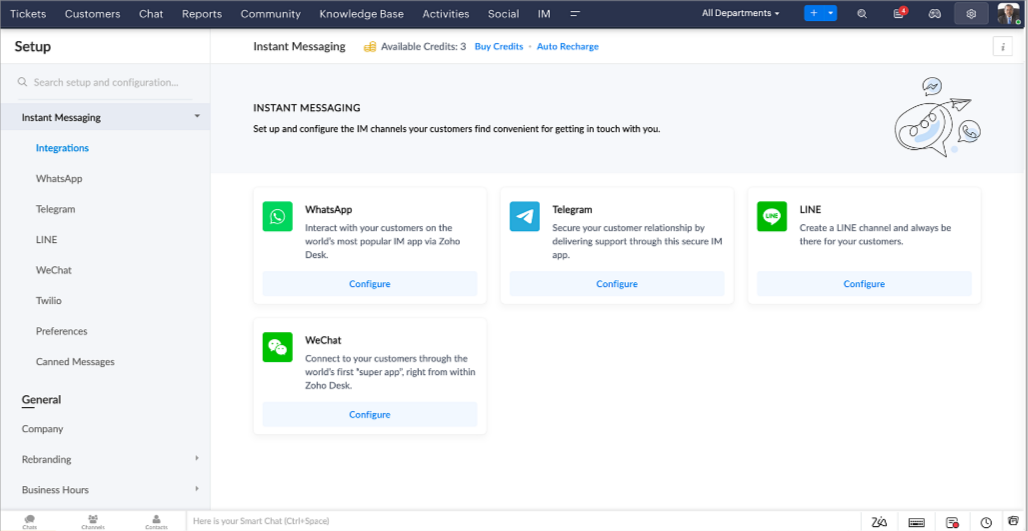
Zoho Desk vous avertit des chats entrants en temps réel afin que vous puissiez vous connecter avec les clients à partir de l'interface. Dans ce même temps, vous pouvez :
- Suivre le contact du client, les informations du ticket, l'historique des conversations inter-canaux et les détails de la pièce jointe dans la fenêtre de chat du client pour un contexte immédiat.
- Accéder et joindre des articles de la base de connaissances directement depuis la section de saisie, utiliser des réponses prédéfinies et ajouter des émojis.
- Participez à plusieurs chats simultanément sur plusieurs canaux sans changer d'onglet.
- Attribuez des conversations à vos coéquipiers.
- Convertissez les conversations en tickets pour un suivi simplifié
Et pour les fans d'automatisation, pas de panique ! Les flux de travail, les Blueprints, les règles d'affectation et les accords sur le niveau de service, sont aussi applicables pour les tickets créés à partir de la messagerie instantanée. Il est également possible de définir des réponses automatiques lorsque vous êtes absent.
Vous pouvez faire en sorte que les clients puissent vous contacter facilement en installant des QR codes dans vos magasins ou en intégrant notre bouton "Contactez-nous", sur votre site web. Ils peuvent même vous joindre par le biais d'une recherche directe d'entreprise sur une plateforme de messagerie instantanée comme Telegram.
Conversations guidées et mixtes
Comme vous le savez, la plupart des questions n'ont pas de réponses simples. Elles nécessitent souvent un suivi, et beaucoup de contexte, avant de trouver une solution. C'est là que les conversations guidées interviennent : une plateforme de libre-service proactive, en low code, qui simplifie la résolution des questions complexes de vos clients.
Choisissez parmi une série de questions ou de réponses prédéfinies pour créer un flux et guider les clients, et à tout moment, vous pouvez les diriger vers une interaction humaine. Cette mixité entre les bots et agents du service client permet une grande flexibilité et augmente le nombre de tickets résolus.
Voici comment nous avons utilisé les conversations guidées pour Zoholics (notre conférence annuelle d'utilisateurs) :
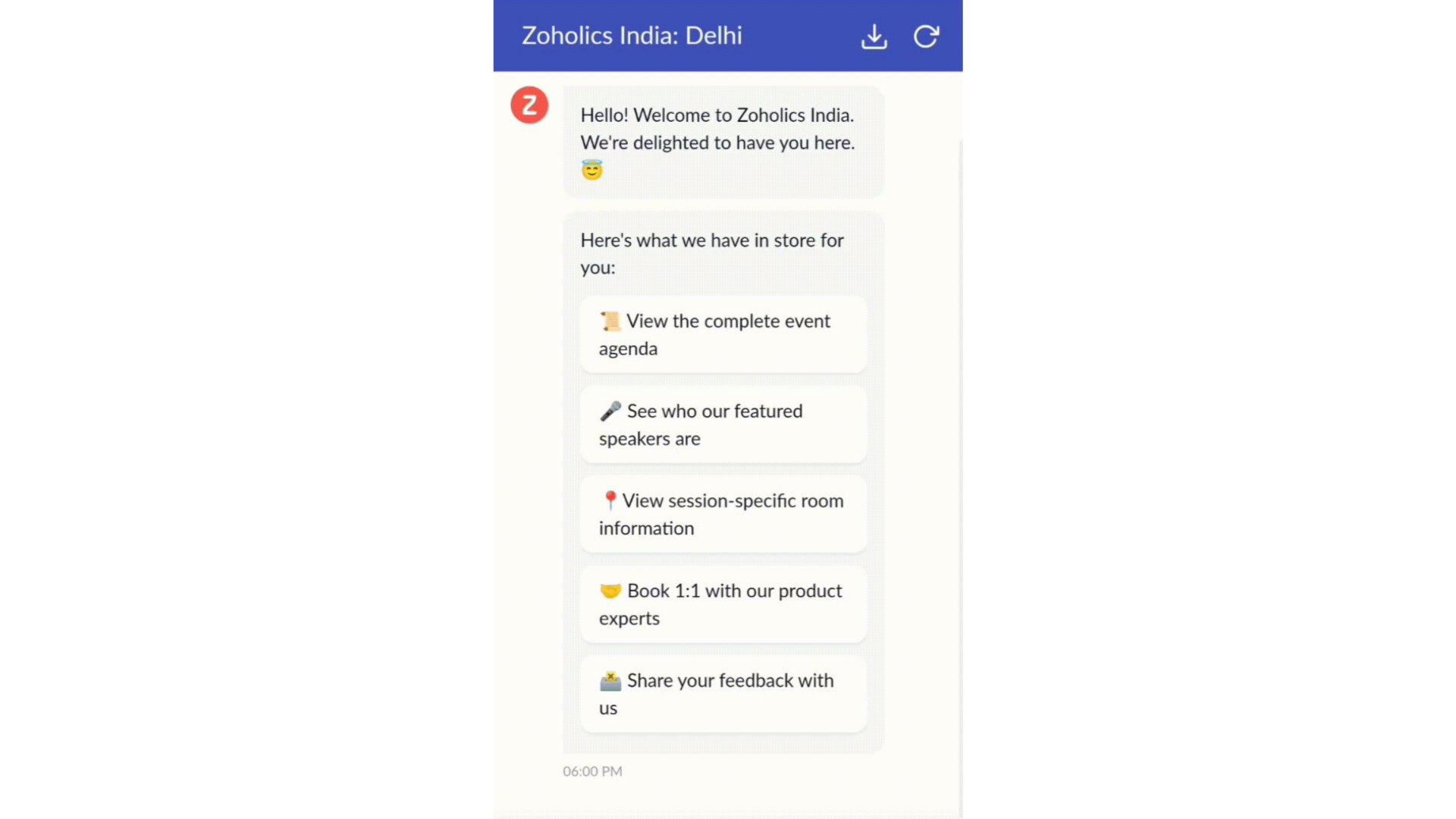
- Constructeur par glisser-déposer
Construisez votre flux de conversations guidées à l'aide de blocs de réponse, tels que du texte, des images, une devise, une date et une heure ... Pour construire ce flux, il suffit de glisser-déposer des blocs, d'ajouter des variables ou des espaces dynamiques, et de connecter ces blocs pour créer un chemin d'étapes.
- Des Webhooks pour une intégration transparente
En configurant les blocs de Webhooks, vous pouvez construire votre flux de conversation pour interagir avec les processus de Zoho Desk, mais aussi d'autres services Zoho ou des applications tierces. Par exemple, si l'utilisateur est déjà votre contact, le bloc Webhook récupérera ses informations directement dans votre CRM, plutôt que de lui demander de les fournir à chaque fois.
Vous pouvez enfin prévisualiser et mettre en œuvre votre flux final en l'associant à votre centre d'aide ASAP sur votre site web, vos pages de renvoi et vos applications mobiles.
Une expérience améliorée
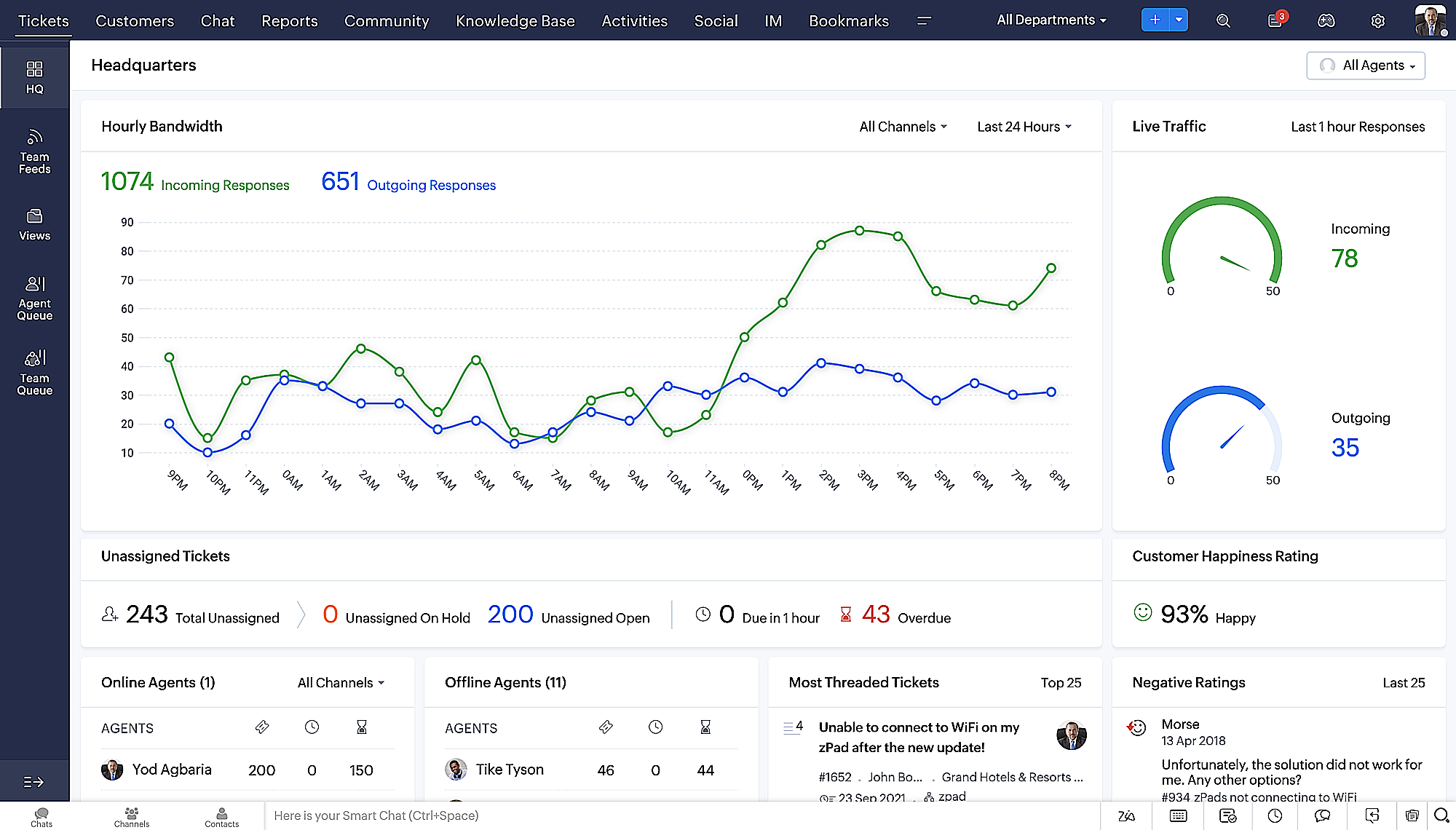
On ne saurait trop insister sur l'importance pour les équipes de support client d'avoir un accès rapide aux informations clients. Nous avons donc optimisé notre interface utilisateur et facilité la navigation entre les différents écrans pour faciliter cette recherche. Nous avons également revu certaines mises en page pour vous donner une image globale de vos clients et de vos tickets sur une interface unique.
- Une vue d'ensemble, avec une disposition des données plus poussée et une apparence générale remaniée
- Vue détaillée des tickets avec des fils de discussion par code couleur pour une navigation plus facile entre les conversations et les commentaires

- Vue détaillée des contacts avec boutons d'ajout rapide, section des tickets en attente et aperçu des tickets

- Vue de la file d'attente des tickets avec des options de menu déroulant, pour donner des mises à jour sans ouvrir la vue détaillée des tickets
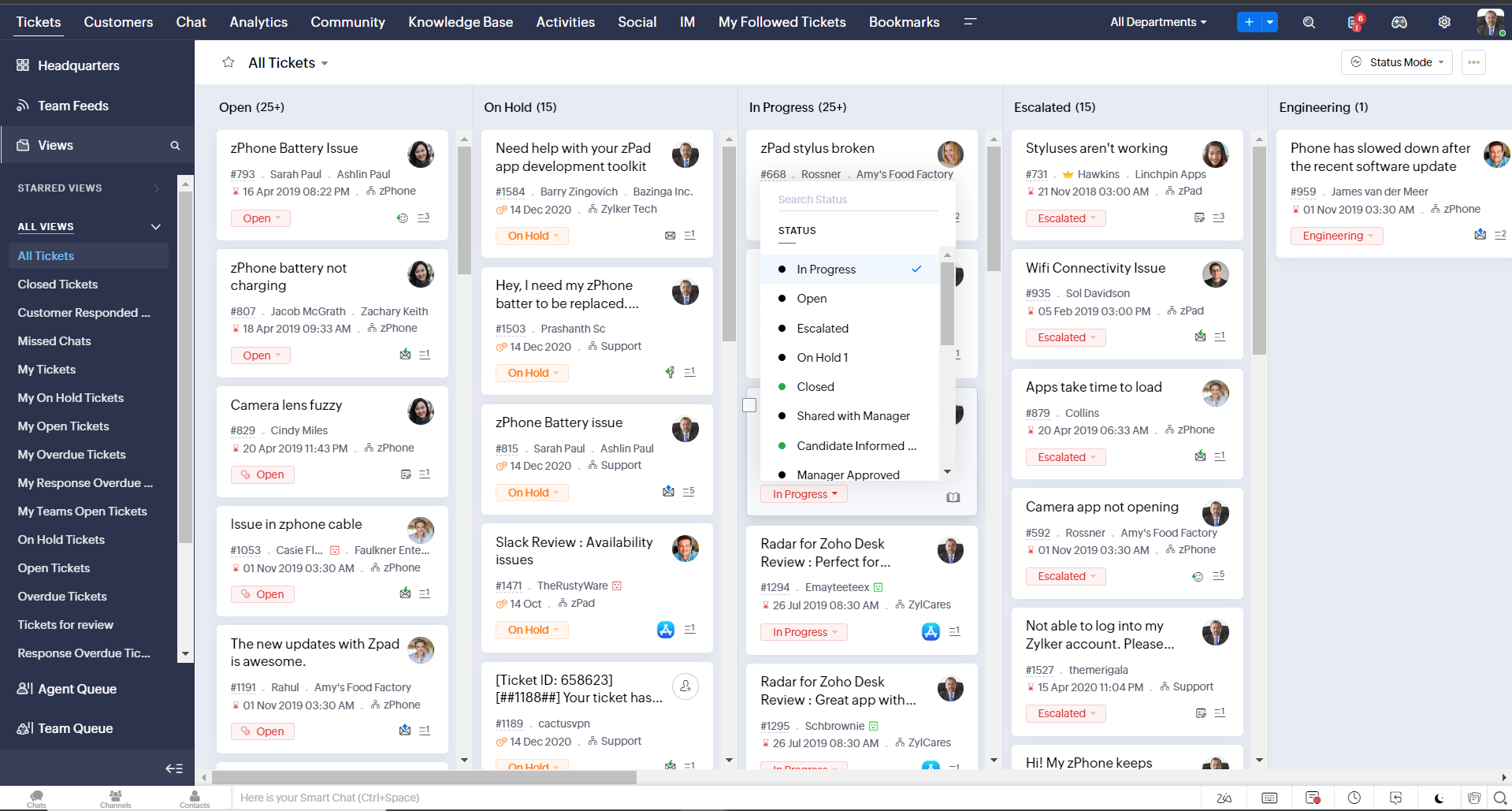
- Une nouvelle option "marquer comme lu/non lu" dans la vue de la liste des tickets, et une liste déroulante consolidée des modes de travail dans le module des tickets
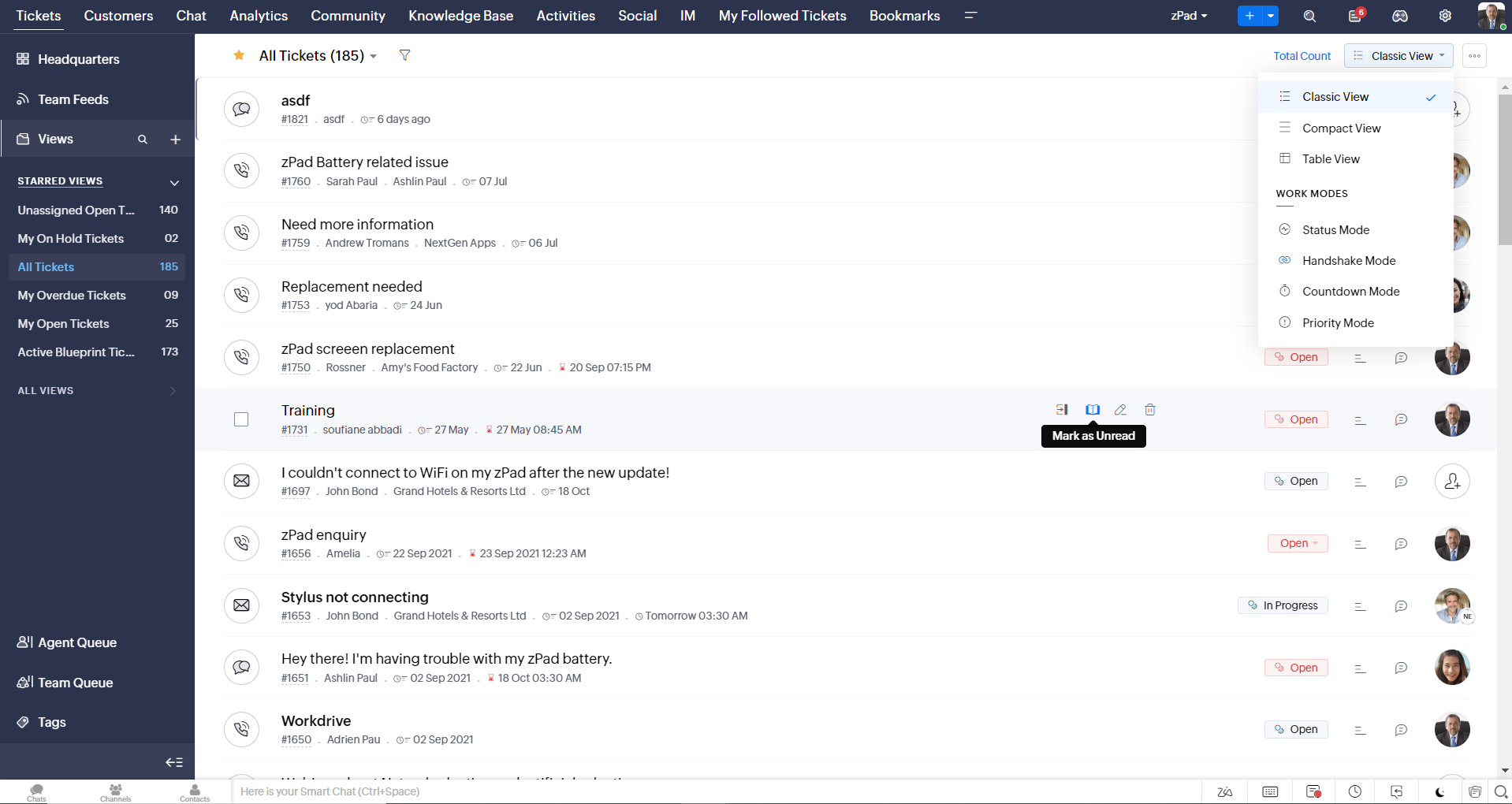
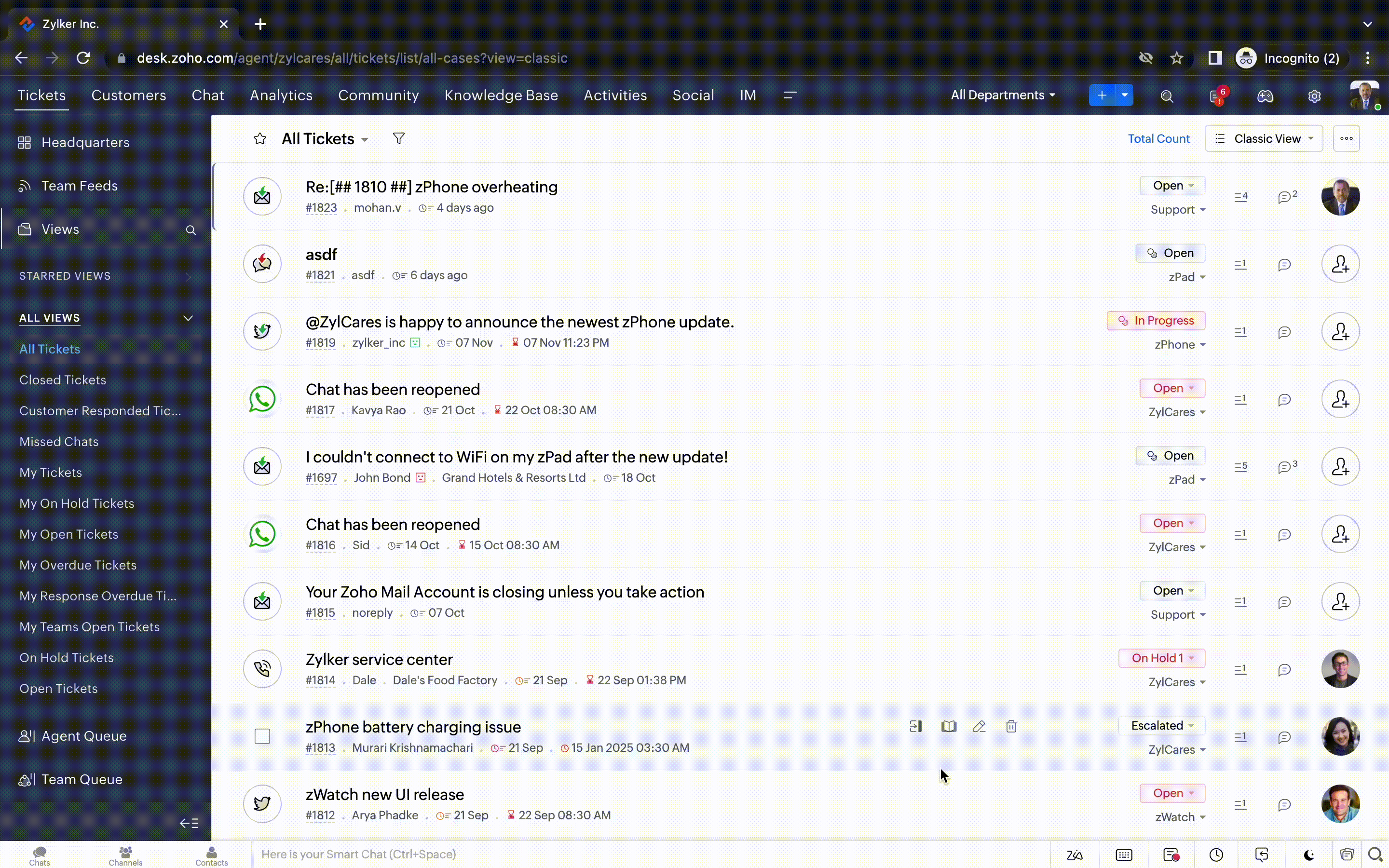
- Défilement infini pour un repérage plus rapide des tickets et ne pas se perdre entre des dizaines de pages
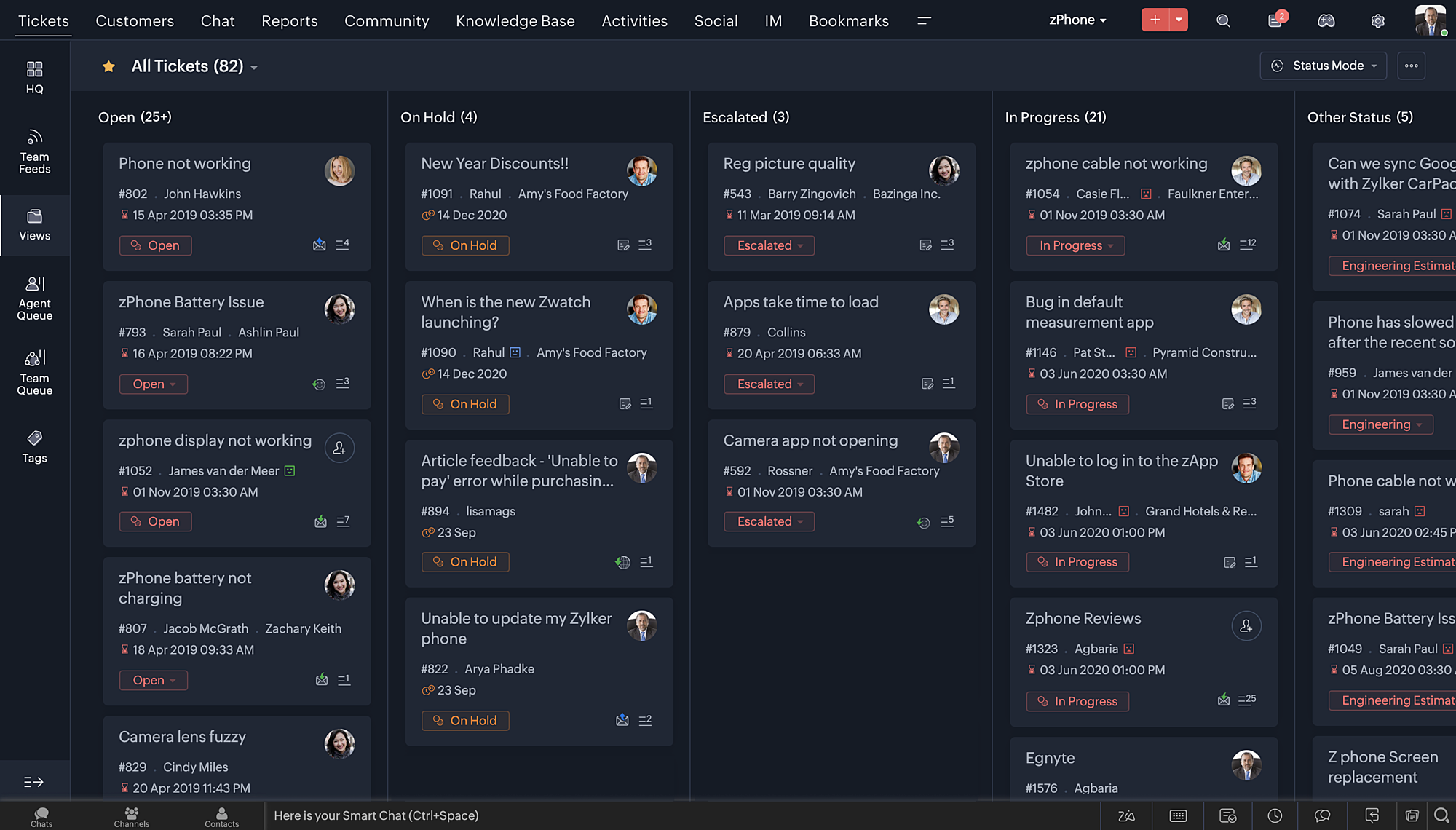
Nouvelles options de personnalisation pour les utilisateurs :
- Mode sombre pour une expérience de visualisation et de lecture confortable
- De nouveaux thèmes pour visualiser votre bureau dans votre couleur préférée
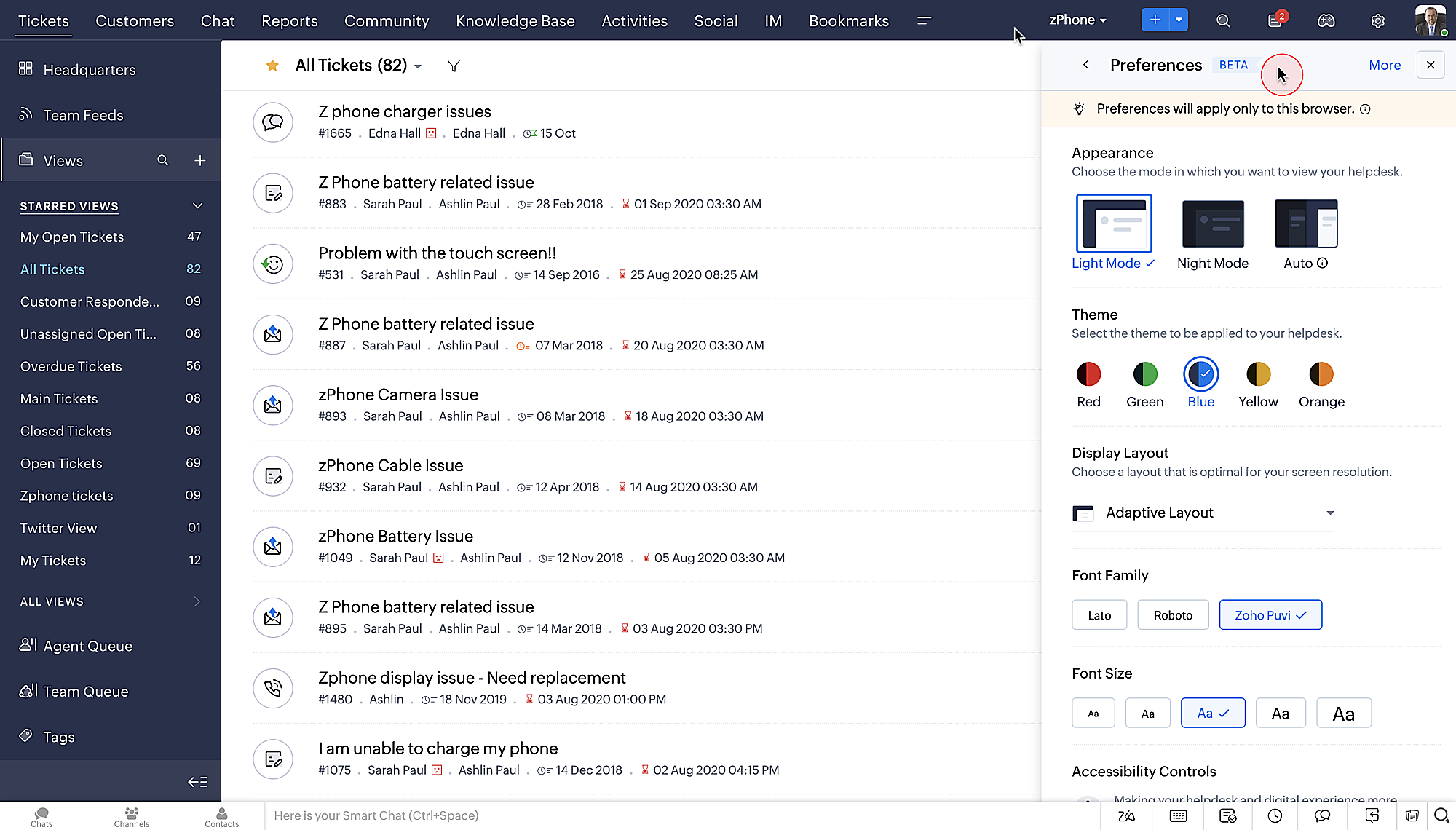
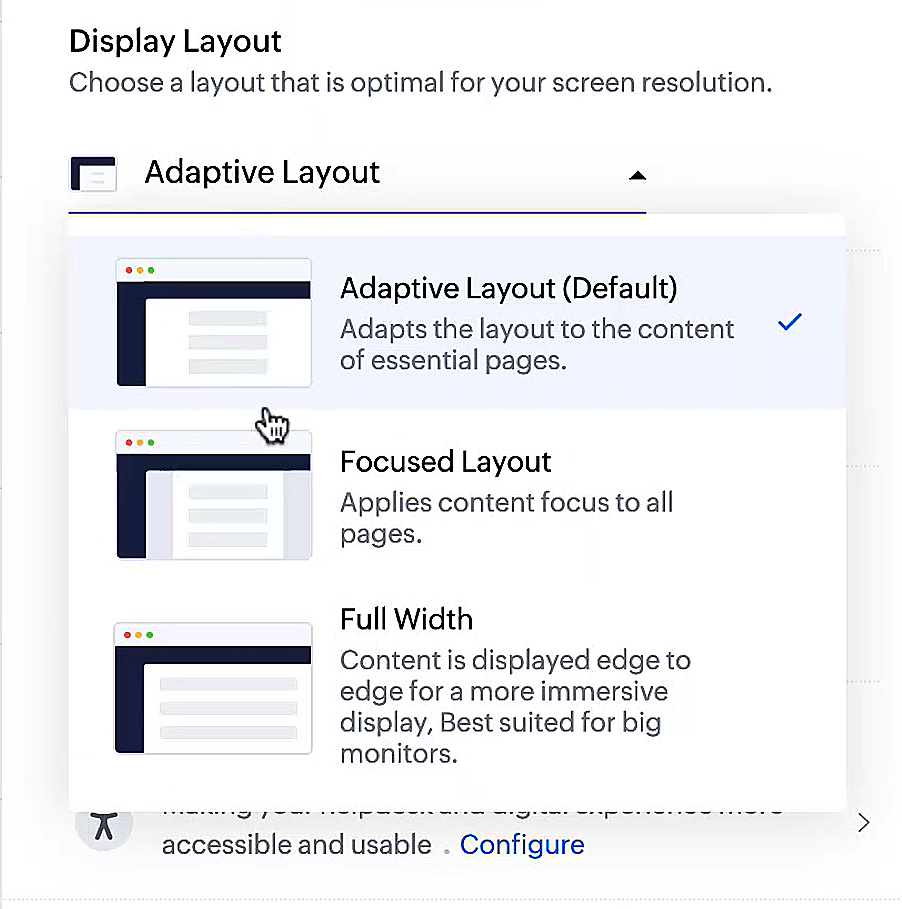
- Des mises en page d'affichage qui vous permettent de choisir la façon dont votre contenu vous est présenté.
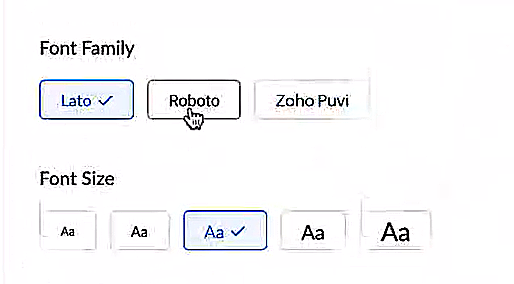
- De nouveaux types et tailles de police pour que votre texte corresponde exactement à vos préférences.
Une plus grande accessibilité
Nous avons ajouté plusieurs options pour répondre à vos besoins en matière de vision, de motricité et d'apprentissage pour proposer un outil adapté à tous. Mettre en évidence les informations essentielles comme l'ID et/ou le propriétaire du ticket et les détails de contact dans une couleur différente.
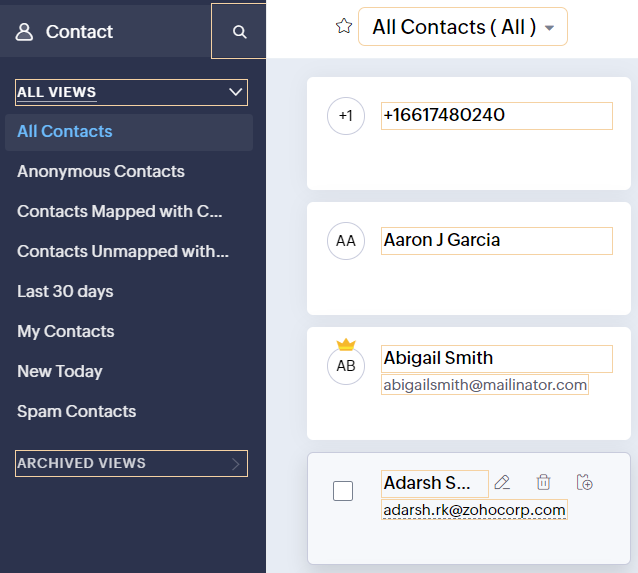
- Souligner les liens pour augmenter la visibilité de ceux qui sont cliquables.
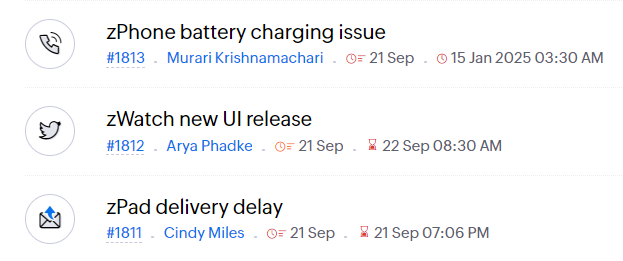
- Souligner la zone d'intérêt et le lien pour les mettre en avant
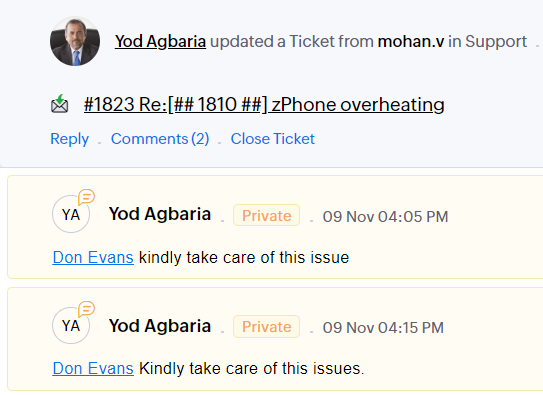
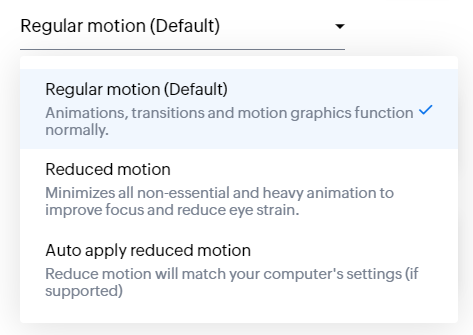
- Les "contrôles d'animation" optimisent les animations et les transitions dans l'ensemble de votre service d'assistance
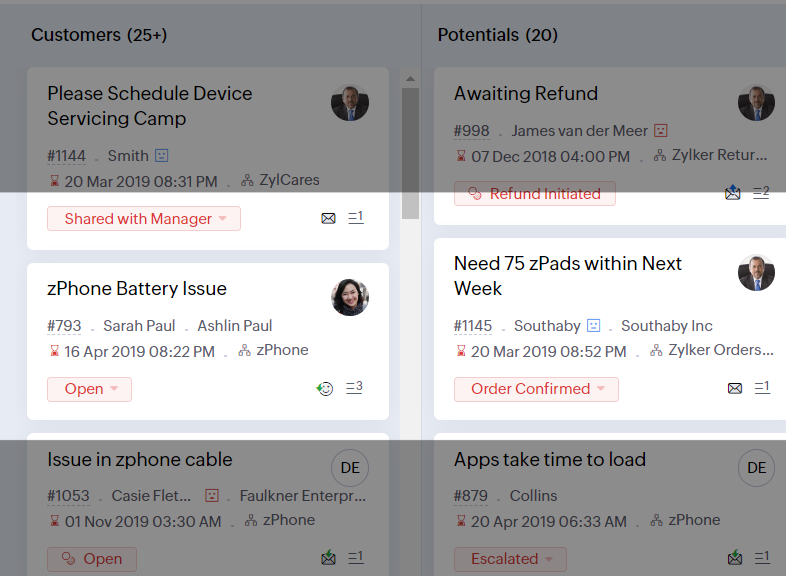
- Reading Mask élimine les distractions en masquant le texte que vous n'êtes pas en train de lire
- Il est également possible de zoomer sur un contenu et d'ajuster la taille de la police pour que la page soit facile à lire
Avec toutes les nouvelles fonctionnalités de l'édition Zoho Desk 2023, les entreprises ont maintenant plus de pouvoir pour rendre à la fois leurs agents et clients plus heureux.
Nous aimerions savoir ce que vous pensez de ces nouvelles fonctionnalités ! Partagez vos réactions dans nos commentaires ou sur les réseaux sociaux. Nouveau sur Zoho Desk ? Vous pouvez vous inscrire à l'essai gratuit ici.
Topic Participants
Florence Barbier
Didier Pare
Kinjal Lodaya
Sticky Posts
Desk - Astuce #5 : Déplacer les tickets entre les départements
Bonjour à tous, Il n'est pas rare que vos clients créent des tickets dans un département qui n'a pas l'expertise requise pour les traiter. Vous devez transférer ces tickets vers le département concerné, afin qu'ils ne passent pas à travers les maillesZoho Desk - Nouveautés 2023
Bonjour à tous, Comme vous le savez, Zoho cherche en permanence à vous proposer des logiciels complets et au plus proche de vos attentes. C'est pourquoi toute l'équipe Zoho Desk est fière de vous présenter la nouvelle version de votre logiciel de serviceDesk : Le cycle de vie d'un ticket - Introduction
Voici une nouvelle série en 3 chapitres, dans laquelle nous allons vous dévoiler comment Zoho gère l'intégralité de son service client sur Zoho Desk. Zoho compte plus de 60 millions d'utilisateurs à travers le monde et offre plus de 50 différentes solutions.Zoho Desk - Chapitre 1 : Anticipez vos besoins
Bonjour à tous, Continuons notre série de la rentrée et découvrons comment Zoho gère 60 millions de clients grâce à Zoho Desk. Contrairement à ce que l'on peut penser le cycle de vie d'un ticket commence bien avant qu'il arrive dans notre logiciel client.Desk Astuce #6 : Ajouter plusieurs comptes réseaux sociaux
Bonjour à tous, Découvrons dans cet article comment vous pouvez ajouter plusieurs pages d'un meme réseau social dans Zoho Desk. Pour cela suivez les étapes suivantes : Connectez-vous à Zoho Desk avec les privilèges d'administrateur. Cliquez sur les paramètres
Recent Topics
How to add a new domain in my account?
Probably zoho has the worst UI in the market. Cannot add a new domain to manage a new email address.Report sorting not working
I make extensive use of Summary reports and Pivot Tables. Most of these reports are structured such that I have several columns of "information" data that I want displayed, followed by one or more "Data" summarizations. For example, I have the followingNew Enhancements in Wizards
Dear All, Wizards help you break a long form into a series of smaller forms on different screens, making it less overwhelming. We are thrilled to introduce a couple of enhancements to wizards in Zoho CRM: Enhancements for conditional rules in WizardsFind and Merge Duplicates to trigger webhook
My sales team uses the Find and Merge Duplicates feature often to cleanup records in the CRM. We use webhooks to signal to our internal tools database when new Contacts are created, updated, or deleted, in order to keep our DB in sync with Zoho CRM. However,Charting the 2025 Voyage: Zoho Invoice's Year in Review
2025 has been a year of progress, productivity, and purposeful growth for Zoho Invoice. From expanding into new regions to refining everyday workflows, each update was designed to help businesses stay compliant, get paid faster, and work with confidence.How to Hide System-DefinedTemplates in Service Report
Is there any option available to hide system-defined templates? these templates are causing confusion for field users.WhatsApp Report in Bigin CRM
Reporting feature for Bigin CRM’s integrated WhatsApp that provides insights such as: Number of WhatsApp conversations closed Number of messages sent and received Number of conversations replied to Response and closure metrics for WhatsApp chats MoreIssue with Azure DevOps Integration in Zoho Flow
Hello, All workflows between Zoho Flow and Azure DevOps have stopped working for several days now. Upon further investigation, it seems that the connection to Azure DevOps is no longer directly supported. Indeed, Microsoft has deprecated the Azure DevOpsNarrative 16: Simplify with workflows
Behind the scenes of a successful ticketing system: BTS Series Narrative 16: Simplify with workflows What is a workflow? A workflow organizes business tasks in a defined sequence that makes each step clear to all participants. This ensures work is completedZoho Invoice Customer Login Portal
Are there any plans for a customer portal to Zoho Invoice, ala Freshbooks? I would like customers that I invoice to be able to login to review invoices and invoice history. I have not switched from Freshbooks for this very reason.Random Leads are being created
Hi, Every few days I am getting random leads that are being created with no form interactions at all. The email addresses are from obvious spam, such as 'Easymerchantsx'. When I look at the timeline, there is a Visit record and then a Lead Created record,Print a price list or price book
Hi Community. Am I right in concluding that Zoho has no functionality to print a price list from either Zoho CRM, Zoho Inventory or Zoho Books? I won't get stuck on the fact that Zoho doesn't sync price books between Zoho CRM and Books/Inventory (moreBar Chart -- sort X-axis
Hi! I created a bar chart ("Top 10 Products by Revenue") X-axis: Product Name Y-axis: Revenue Filter: Revenue - Top 10 Here's a picture: http://screencast.com/t/ZTJlZTdkNz The x-axis is sorted alphabetically by Product Name. How can I force it to sort numerically by Revenue?ZoHo Flow Custom Function not Processing JSON
JSON is being escaped and converting all the quotes in the JSON to '"' Here's the Code: void InsertRowInE123EligibitySheet(map input) { rawData = get("data",""); decodedData = rawData.htmlDecode(); data = decodedData.toMap(); sheet_id = "ID GOESManaging functions
Can someone let me know if there are any plans to improve the features for managing functions in CRM? I have lots of functions and finding them is hard. The search only works on the function name and the filter only works on function type. I have createdZoho FSM - Service Appointment Trouble Adding Field Agent
Hello, I just started using Zoho FSM and I'm currently adding older work orders from prior Field Service application I use. The work order that im trying to add is from an earlier date, and when I try to add a field agent to a service appointment it does年内最後のユーザー向けイベント:5名限定! 課題解決型ワークショップイベント Zoho ワークアウト開催のお知らせ (12/18)
ユーザーの皆さま、こんにちは。コミュニティチームの中野です。 12月開催のZoho ワークアウトについてお知らせします。 今回はZoomにて、オンライン開催します。 参加登録はこちら(無料) https://us02web.zoom.us/meeting/register/QHn6kJAcRs-znJ1l5jk0ww ━━━━━━━━━━━━━━━━━━━━━━━━ Zoho ワークアウトとは? Zoho ユーザー同士で交流しながら、サービスに関する疑問や不明点の解消を目的とした「Zoho ワークアウト」を開催します。How do I get my account id?
Hello, I followed the instructions to get a list of accounts of the currently authenticated user (which is me, and I am logged in). But when I follow the below instructions I get the following error: ERROR: {"data":{"errorCode":"INVALID_TICKET","moreInfo":"Invalid ticket"},"status":{"code":400,"description":"Invalid Input"}} Instructions that I am following: GET - User account details Purpose The API retrieves the list of accounts of the currently authenticated user. Request URL http://mail.zoho.com/api/accountsThis domain is not allowed to add. Please contact support-as@zohocorp.com for further details
I am trying to setup the free version of Zoho Mail. When I tried to add my domain, theselfreunion.com I got the error message that is the subject of this Topic. I've read your other community forum topics, and this is NOT a free domain. So what is theZoho Quartz Screen Recording
Hello, can we get access to Quartz, please, as a standalone solution? It would be great for creating training videos for current and future staff on how to use Zoho software according to our company requirements. Thank youauto close automated alert tickets which are similar
Hello ZOHO Community, we are using ZOHO Desk to process automated monitoring alerts. Scenario: Our monitoring system creates a ticket when a threshold is exceeded, e.g. Subject: Computer 1 – CPU usage 100% – Error A few minutes later, once the issue resolvesMaintain knowledge base integrity by moderating article comments
Hello everyone, A knowledge base provides a self-service platform where customers can refer to articles, user manuals, and other resources to learn about the company's products or services and troubleshoot problems. Often, readers leave a comment on theMaking another calendar your default calendar
I am trying to make another calendar my default calendar when I add events to it. It keep going to a single calendar, I need it to go to my google calendar by default, as this is linked to other services / websites. I cannot find an option to make itOption to Delete Chats in IM
Currently, there is no option to delete any chats in IM, regardless of their source.Referencing a cell from another sheet
My workbook has multiple sheets. Each sheet has some calcluated totals in certain cells. The front master sheet has a list of everything that is detailed on the other sheets, with the totals. These could change at any time, so the totals need to be references to the other cell's value, not a fixed number. So on the master sheet, I put in =, then go the other sheet and choose the cell and hit Enter. In regular Excel, this works. But in the Zoho sheet, it doesn't work. I have to edit the result byGroup mail for external email addresses
Hello, I was just wondering if the Group mail feature works with external email addresses - e.g. gmail.com or a completely different domain? it seems only internal addresses (hosted with Zoho) receive the mail. Thanks, OliverThe email address you have entered belongs to a different deployment/region.
Hi, I am trying to create the user - mprust@crombiecomputers.co.uk but keep getting the message below - The email address you have entered belongs to a different deployment/region. Please contact support@zohoaccounts.com for assistance. Look forwardUse Zoho Flow Credits for CRM ‘Actions by Zoho Flow’
Hello Team, We would like to submit a feature request regarding credit usage for “Actions by Zoho Flow” in Zoho CRM. Use Case: We are Zoho One users and actively use Zoho Flow, where our organization has 52,000 Flow tasks per month. In Zoho CRM, we useUnusual activity detected from this IP. Please try again after some time.
Hello Zoho admin and IT team We are a registered website in Eloctronic services and we been trying to add our users to the zoho system but this issue faced us ,, hope you unlocked us please.Alert if a field is ticked.
Hi There, We have two modules named Opportunities (Deals) and End Users (CustomModule1), as per the image below. Within Opportunities, we have a lookup field that looks up from the End Users Module. We are looking to get an alert either via email or anotherZoho CRM Analytics - Allow To Reorder Dashboards
I would like to suggest that you add the ability to reorder dashboards in the Analytics Module. I can see that this has been requested some time ago, the latest 9 years ago. I am not sure if this is a big or small endeavor, but such a small fix can goSending a Template to Sign
hi, trying to send a template to be signed using this as a test: $accessToken = "1000.xxx" $templateId = "1234" $uri = "https://sign.zoho.eu/api/v1/templates/$templateId/createdocument" $payload = @{ templates = @( @{ template_id = $templateId request_nameAdding Choices in a Sub-Form Dropdown
Hi, Has anybody tried Adding Choices to a Dropdown in a Zoho Creator Sub-Form programmatically? My Deluge code adds rows to a subform with 2 fields A and B. A - text field. B - dropdown. My Deluge script adds the row and displays A successfully. For theZoho CRM Email Templates 100% Width No Background How?
Hi, On the Zoho CRM Email Templates in setup > customization > templates > new templates > I choose blank template, but still it puts in a gray background and a max width for the email. I just want to make an email that looks like an email I would send from gmail that has no background or max width. How do you do this?Checking client unsubscribe details
Hi team, Can you please let me know where we can check if a client has unsubscribed, along with the date and time it was done? If this information is not available at our end, please help confirm the unsubscribe date for the below email ID from the backend:Optimum CRM setup for new B2B business
Can some advise the most common way to setup Zoho CRM to handle sales for a B2B company? Specifically in how to handle inbound/outbound emails. I have spent hours researching online and can't seem to find an accepted approach, or even a tutorial. I haveScan and Fill CRM Lookup Field
Not sure if there is a reason why this isn't possible or if I'm just missing it. But I would like to be able to use the scan and fill feature on the mobile app to prefill the CRM lookup field and fetch the rest of the data in the form.Customer Management: #2 Organize Customers to Enhance Efficiency
When Ankit started his digital services firm, things felt simple. A client would call, ask for a website or a one-time consultation, Ankit would send an invoice, get paid, and move on. "Just one client, one invoice. Easy.", he thought. Fast forward aZoho Mail and Zoho Flow integration to automatically create ToDo tasks from outbound emails
How do i setup Zoho Mail and Zoho Flow integration to automatically create ToDo tasks from outbound emailsAttachments between Zoho and Clickup, using Flow.
Olá suporte Flow, tudo bem ? Estamos usando o flow para integrar Zoho Desk com o clickup. Não localizamos a opção de integrar anexos entre do zoho Desk para o clickup. Gostaríamos de saber se migrando para o plano pago, teremos suporte para fazer a integraçãoNext Page