Kaizen #188 - Building a Timer and Worklog Widget (Part 2)

Welcome back, Tech Wizards!
In Part 1, we developed a Timer Widget that logs active work sessions into the Timer Entries module.
Now, let's enhance this functionality by transferring these entries into the Work Log subform within the Cases module using a workflow with Deluge function and APIs. We will also explore how to generate insightful reports from the Timer Entries module data.
Here is a consolidated view of the outcomes we aim to achieve through these sequential posts.

The following data model illustrates the modules and subforms involved in this use case to help you understand the structure more clearly.

Learn more about the Data Model and how it helps to simplify the understanding of complex processes.
Auto-Syncing Timer Entries to Case Work Logs
For automating the data transfer from the Timer Entries module to the Work Log subforms within Cases module, we will create a workflow rule with an instant action defined in Deluge function.
Prerequisites
Create a subform named Work Log in the Cases module with the following fields.
Field Name | Data Type |
Actual Time Taken(in mins.) | Aggregate (sum of Total Duration (in mins.) field in related case ) |
End Time | DateTime |
Related to Case | Lookup to Cases |
Related to Current Case | Checkbox |
Start Time | DateTime |
Timer Entry | Lookup to Timer Entries |
Total Duration | Aggregate (sum of all the Total Duration (in mins.) field ) |
Total Duration (in mins.) | Number |
Work Description | Multi Line |
Follow the Building a Subform and Working with Custom Fields help pages for creating the subform and fields in Zoho CRM UI, or you can also make Post Custom Fields API calls to create the custom fields in the subform.
Step 1: Create a Workflow
- Login to your Zoho CRM and go to Setup > Automation > Workflow Rules and click Create Rule.
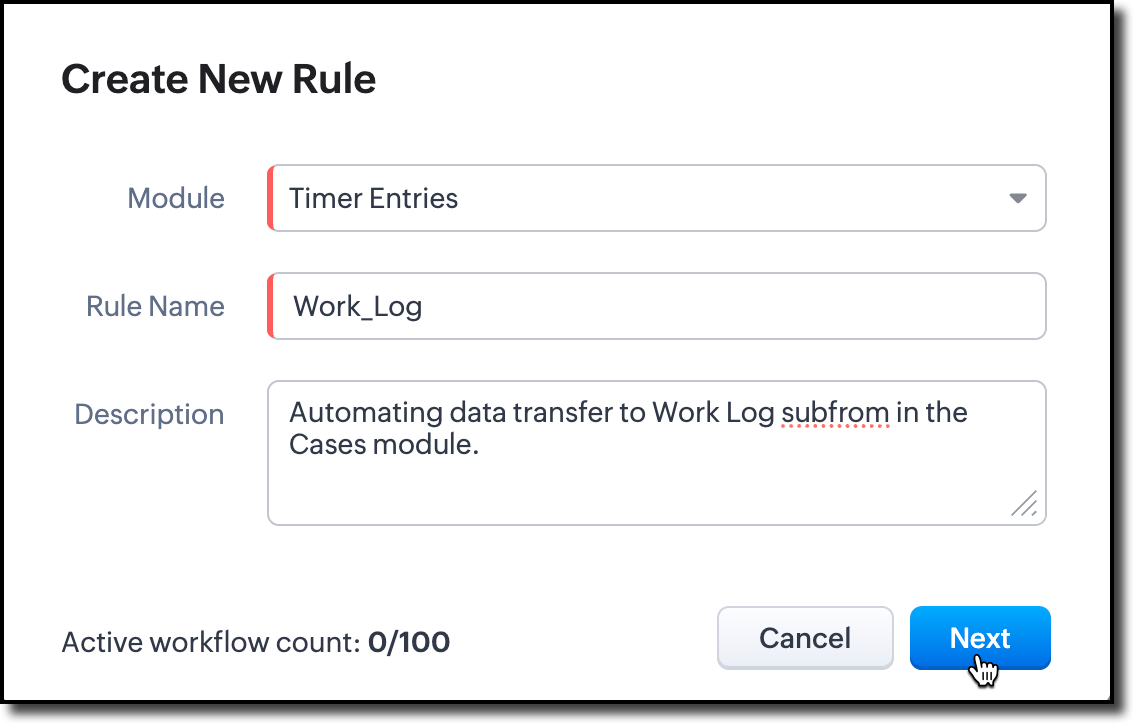
- Choose the Timer Entries module from the dropdown. Provide name and description for the workflow rule.
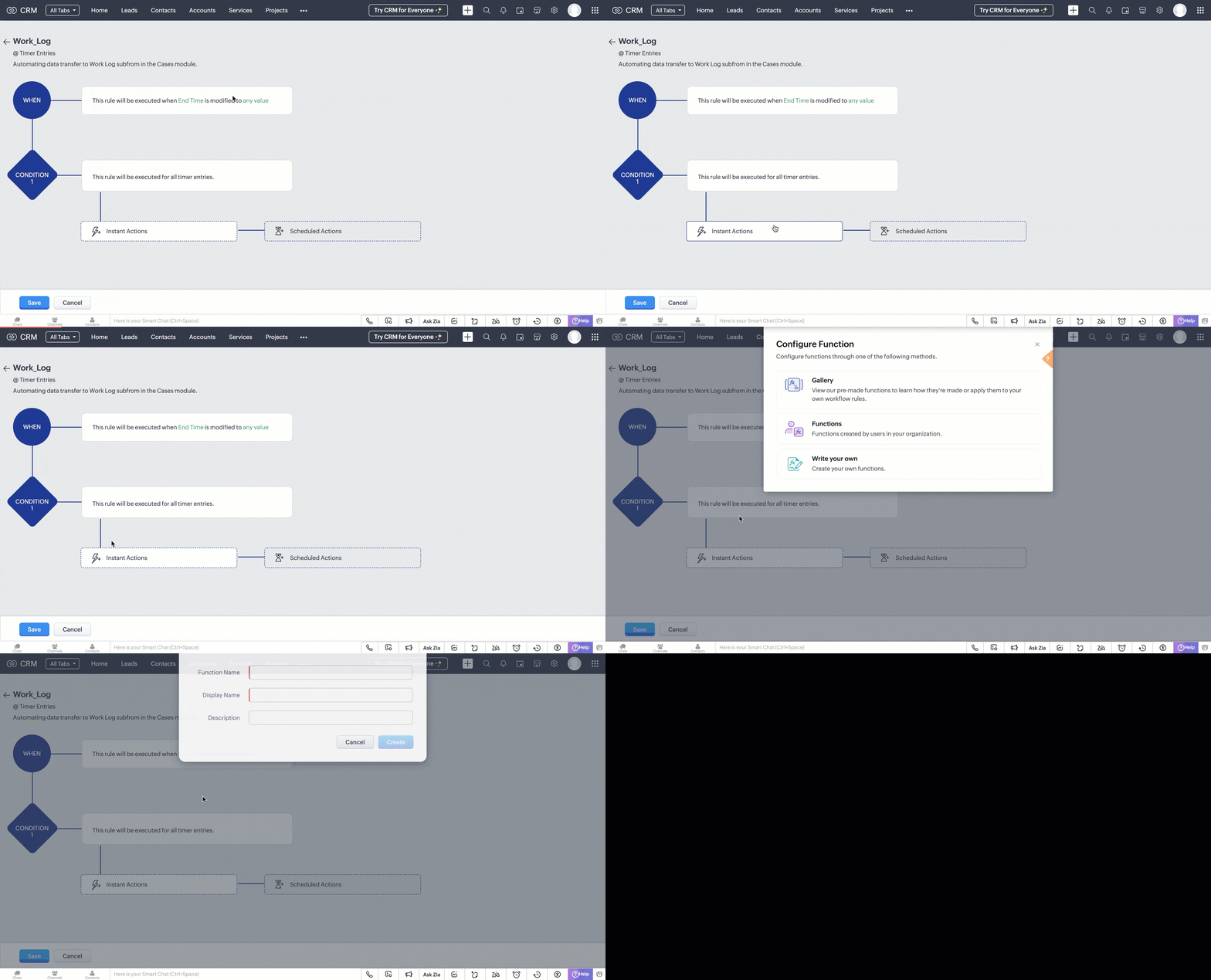
- In the 'When' section of the workflow, choose the trigger as Record Action. In record action, define the trigger as when the End Time field is modified to any value.
- In the 'Condition' section, choose all timer entries. In the 'Instant Actions' section, select Function and choose Write your own.
Step 2: Create a Deluge Function
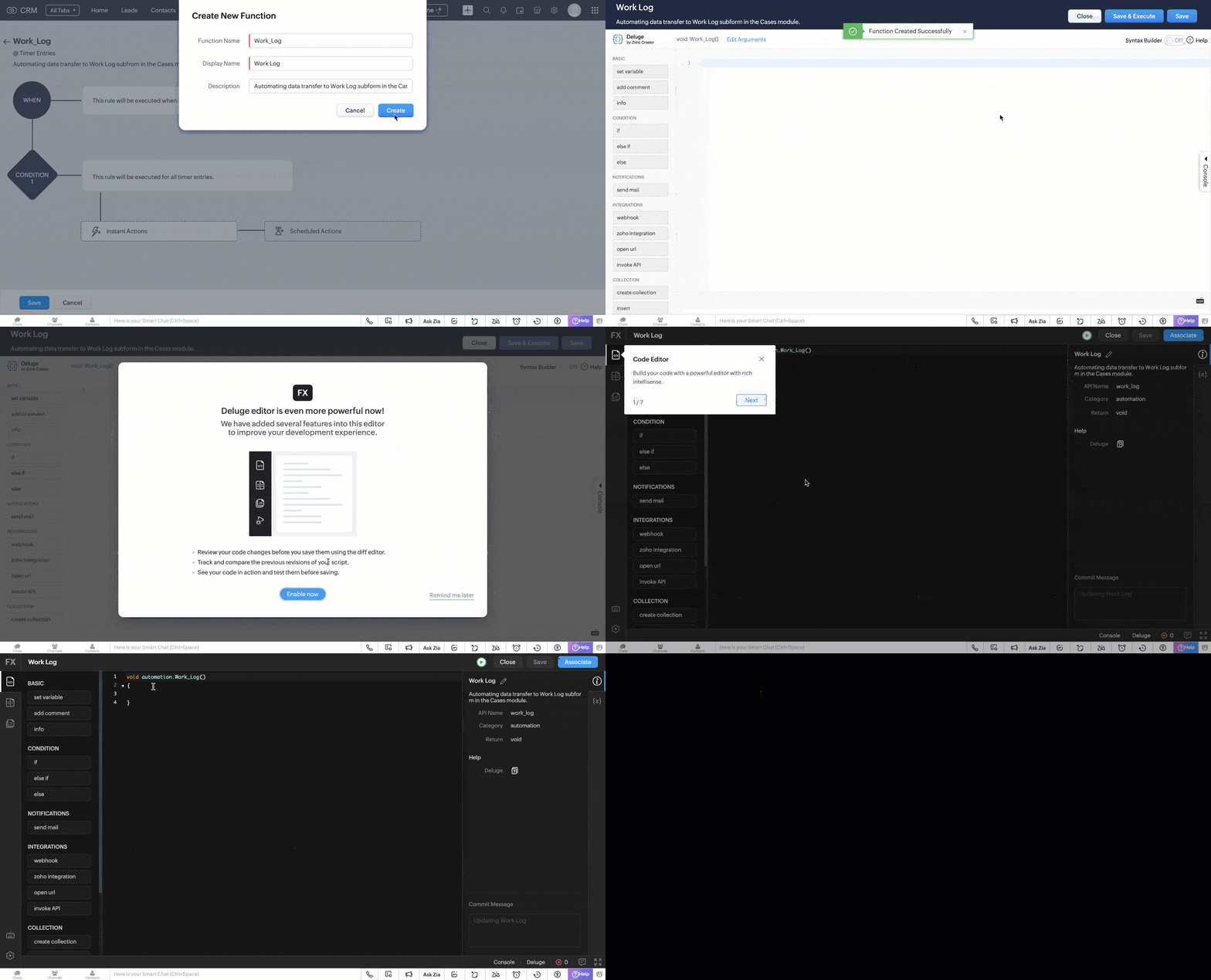
- In the pop box that appeared after choosing to write your own function. Fill in the following details as shown in the image and click Create.
- A code editor will open, where you have to define the data transfer logic in Deluge.
Code logic
The UpdateDataInWorkLog function automates the process of syncing a completed Timer Entry with its associated Cases in Zoho CRM by populating the Work_Log subform for each case.
Fetches Target Case Records
The function uses a predefined custom view (cvid) that we created in Part I of this post to retrieve a list of Case records that are eligible for update. It extracts their record IDs and prepares them for bulk processing.
paramMap = Map(); paramMap.put("cvid","5545974000011183885"); getRecordsResponse = invokeurl [ type :GET parameters:paramMap connection:"crm_oauth_connection" ]; responseDataArray = getRecordsResponse.get("data"); idList = List(); for each item in responseDataArray { idList.add(item.get("id")); } caseRecordsToUpdate = idList; |
Retrieves Timer Entry Details
The selected Timer Entry (identified by recordId received through workflow trigger) is fetched to extract its key details like, Start and end times, Total time spent (duration), Work description, the Case it’s directly related to (if any).
record = zoho.crm.getRecordById("Timer_Entries",recordId,Map(),"crm_oauth_connection"); startTime = record.get("Start_Time"); endTime = record.get("End_Time"); totalTime = record.get("Total_Duration"); workDescription = record.get("Work_Description"); relatedToCaseId = ""; if(record.get("Related_to_Case") != null) { relatedToCaseId = record.get("Related_to_Case").get("id"); } |
Prepares Work_Log Subform Entries
For each retrieved Case, a new subform entry is created in the Work_Log subform. This entry contains the time details, work description, and a reference to the Timer Entry. A flag (Related_to_Current_Case) marks whether the Timer Entry is directly associated with the Case.
caseRecordIds = caseRecordsToUpdate; if(!caseRecordIds.isEmpty()) { recordUpdateArray = List(); for each caseRecordId in caseRecordIds { TimerArray = List(); TimerObj = Map(); TimerObj.put("Work_Description",workDescription); TimerObj.put("Timer_Entry",recordId); TimerObj.put("Related_to_Case",relatedToCaseId); TimerObj.put("Start_Time",startTime); TimerObj.put("End_Time",endTime); TimerObj.put("Actual_Duration_in_mins",totalTime.toNumber()); info totalTime; TimerObj.put("Related_to_Current_Case",caseRecordId == relatedToCaseId); TimerArray.add(TimerObj); recordUpdateObj = Map(); recordUpdateObj.put("id",caseRecordId); recordUpdateObj.put("Work_Log",TimerArray); recordUpdateArray.add(recordUpdateObj); } |
Bulk Updates Case Records
All Case records are updated in bulk via the Update Records API. Each gets its Work_Log subform updated or appended with the latest Timer Entry details.
updateRequestBody = {"data":recordUpdateArray}; updateResponse = invokeurl [ type :PUT parameters:updateRequestBody + "" connection:"crm_oauth_connection" ]; } |
Once done, click Save and associate the merge field (Timer Entry ID) with the function.

This workflow is triggered when the timer widget is stopped and the end time is updated in the corresponding timer entry record.
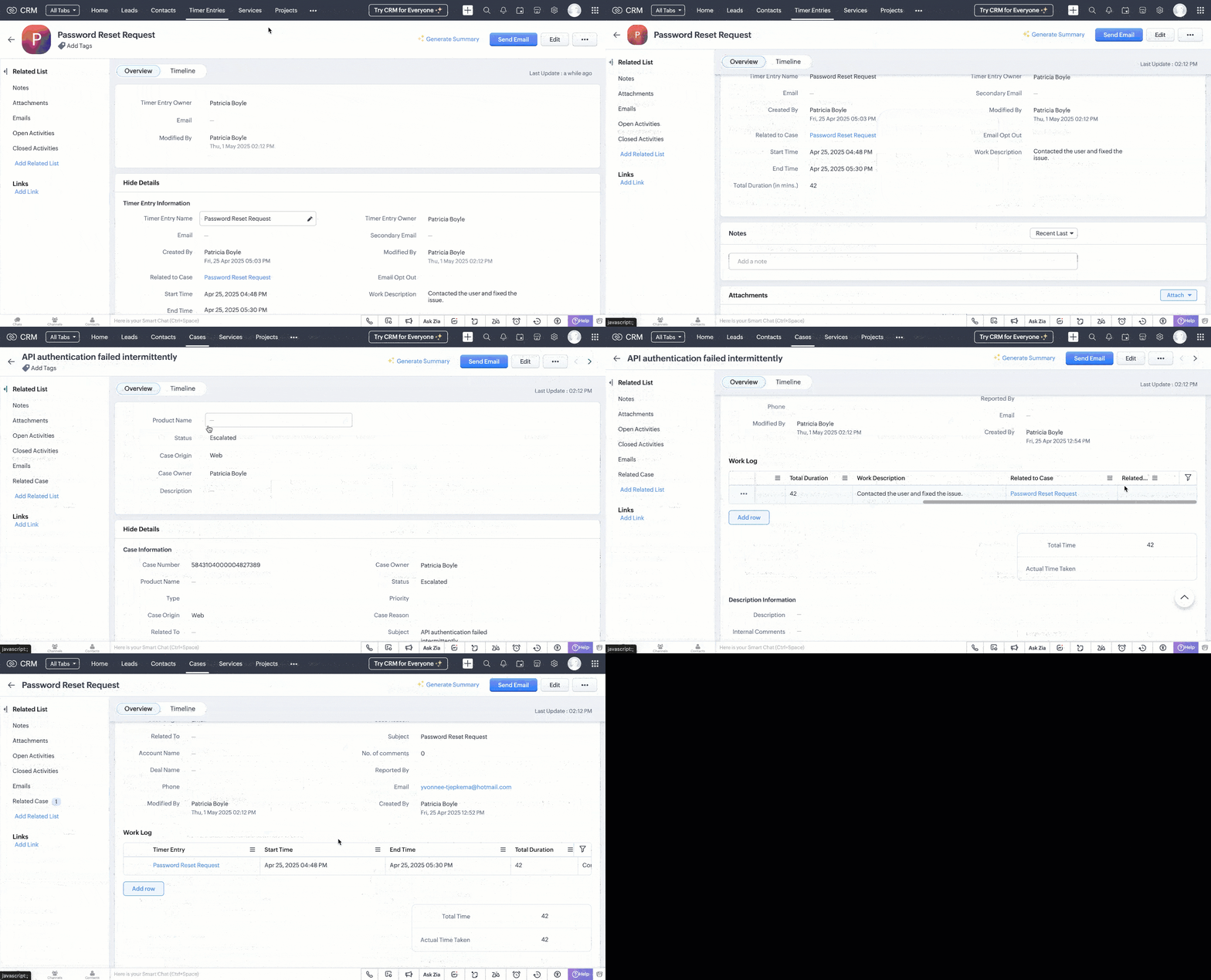
Following is a GIF that illustrates how the data sync reflects in the case records.
Generating Reports from Timer Entries
With the Timer Entries and Work Log data in place, you can create comprehensive reports to analyze work patterns, SLA adherence, and productivity trends.
- Navigate to the Reports module and click Create Report.
- Choose Cases as the primary module and include the Work Log subform.
- Select the desired fields like Case Subject, Start Time, End Time, Total Duration, and Work Description.
- Group data by fields like Case Owner or Status to gain insights into workload distribution and case progress.
- Apply filters as needed, such as date ranges or specific case statuses.

Refer to the Understanding and Building Report help page for more details.
With the Timer Widget, automated data transfer to Work Logs, and insightful reporting, we have established a robust system to track and analyze multiple active work times within Zoho CRM.
If you have specific scenarios or challenges you'd like us to address in future Kaizen posts, feel free to share them in the comments or reach out to us at support@zohocrm.com.
Cheers!
------------------------------------------------------------------------------------------------------------------
Additional Reading
- Subforms and Fields - Building Subforms and Working with Custom Fields
- Core APIs - POST Custom Fields, GET Records, POST Records and UPDATE Records
- Workflow - An Overview and Configuring Workflow Rules
- Functions - An Overview, Setting Up Functions, Functions IDE, FAQs
- Deluge - An Introduction
------------------------------------------------------------------------------------------------------------------

Previous Post: Kaizen #187 - Building a Timer and Worklog Widget (Part 1) | Kaizen Collection: Directory
Topic Participants
Kiruthiga G
Sticky Posts
Kaizen #198: Using Client Script for Custom Validation in Blueprint
Nearing 200th Kaizen Post – 1 More to the Big Two-Oh-Oh! Do you have any questions, suggestions, or topics you would like us to cover in future posts? Your insights and suggestions help us shape future content and make this series better for everyone.Kaizen #226: Using ZRC in Client Script
Hello everyone! Welcome to another week of Kaizen. In today's post, lets see what is ZRC (Zoho Request Client) and how we can use ZRC methods in Client Script to get inputs from a Salesperson and update the Lead status with a single button click. In thisKaizen #222 - Client Script Support for Notes Related List
Hello everyone! Welcome to another week of Kaizen. The final Kaizen post of the year 2025 is here! With the new Client Script support for the Notes Related List, you can validate, enrich, and manage notes across modules. In this post, we’ll explore howKaizen #217 - Actions APIs : Tasks
Welcome to another week of Kaizen! In last week's post we discussed Email Notifications APIs which act as the link between your Workflow automations and you. We have discussed how Zylker Cloud Services uses Email Notifications API in their custom dashboard.Kaizen #216 - Actions APIs : Email Notifications
Welcome to another week of Kaizen! For the last three weeks, we have been discussing Zylker's workflows. We successfully updated a dormant workflow, built a new one from the ground up and more. But our work is not finished—these automated processes are
Recent Topics
Zoho Books X Zoho Expense
Hello there, Please can you tell me if it is possible to sync from Books to Expense? I much prefer the Expense reports to that of Books and the Credit Card feeds work via expense and not Books for me. However I find books is much better to deal with theABILITY TO LOG INTO CUSTOMER PORTAL
I think it would be very helpful to have a button in Zoho Books to be able to see the customer portal so we can see what they see to help them navigate through the portal. Many times, the customer will call about the portal, but without visibility intoSort, filter & save views for BOOKS PROJECTS
Thanks for all the updates. Our firm uses the module for simple internal project accountancy. This means we do everything from the Projects Section but this isn't user friendly at all. You can't do anything with customized your own fields which basicallyedit input format in custom field - sales order
hi, I want to integrate a custom field (multi line text box) in our sales order. It needs to show upper case and lower case letters, numbers, spaces, hyphens and "/". What do I need to put in the custom format to configure these signs? Thanks, TinaThis transaction type cannot be matched with a line on the statement.
When using the books API https://www.zohoapis.com/books/v3/banktransactions/uncategorized/${transaction.transaction_id}/match I get this error "This transaction type cannot be matched with a line on the statement." What I'm doing is for the uncategorizedTimesheets
I wanted to create the timesheets remainder for our team mates who miss out the weekly timesheet entries. While creating the email templates, I couldn't see anything related to timesheets. Since it shows projects Can you help me find and build a oneCan we embed a Kanban Type of report using iframe too?
I tried embedding a report as iFrame but it only appear as List View. It would be helpful if can also embed a Kanban Type of report.Hidden Fields with Data Pre-Population and Notification Integration in Zoho Bookings Forms
Dear Zoho Bookings Support Team, We'd like to propose a feature enhancement for Zoho Bookings forms that would improve data management and workflow efficiency: the ability to create hidden fields with pre-populated data. Current Functionality: Zoho BookingsTip #37 – How to ensure compliance and accountability using Advanced Session Audit – ‘Insider Insights’
Hello Zoho Assist Community! This week we will be discussing how to strengthen your remote support operations with better visibility and control. Let’s say your support team handles a growing number of remote sessions each day. At the end of the week,Replace an existing zoho show file with an uploaded one.
For Zoho WorkDrive Upload API method, I have override-name-exist option, which I can use like this: curl https://www.zohoapis.eu/workdrive/api/v1/upload \ -F "filename=mypres.pptx" \ -F "parent_id=j3tzq1ae09c0cd91540df8d01670af05b657e" \ -F "override-name-exist=true"Tip of the Week #66– Use internal comments to collaborate and resolve issues faster!
Ever found yourself stuck on a customer query because you needed inputs from your teammate? Or sent a reply too soon and realized later that someone else on your team had a better context? When you rely on back-and-forth messages in external chats orUsing Zoho One to manage two (or more) businesses
We are one company that operates two business, a scenario that Zoho One doesn't really seem to handle very well, and one which I can't imagine is at all unique to us! (It is basically designed to facilitate branding and use for one business only per subscription).Skip order confirmation step in commerce?
We have a store to sell products that are not shipped to a customer. Right now, when the order is placed, we have to manually 'confirm' the order so the sales order can convert to an invoice and charge the customer. Is there a way to skip the manualFree Shipping Coupon - Zoho Commerce
I love the Zoho platform. Zoho Commerce is no exception; however, I'm struggling with a few common features I cannot find or are missing that I hope someone can help me with. Is there a way to create a coupon code for free shipping?Is there a way to link an item to a liability account?
I collect customer deposits for certain services and hold them in a liability account. However, Zoho Books doesn't let you create an item and assign it to a liability account so how do I create an invoice with an item that records it as a deposit intoSelect a balance sheet account when creating an invoice
Hi, it would be very helpfull to be able to select a balance sheet account when invoicing clients. We bill 30% of the job at signing and we would like to add to deferred revenues. I have to create a transit revenue account and then tranfer to the rightHow to work out commission in zoho commerce based on coupons
HI There Is there any way to produce report based on coupon name in zoho commerce We need to pay commission to various channels who are helping us to increase the online sales so we have number dedicated coupons assigned to the above mentioned channelsRequest for Subform Styling Feature in Zoho CRM Canvas
Dear Zoho CRM Team, We have observed that in the Zoho CRM Canvas view, it is currently not possible to set presets or manage the styles of subform fields. Additionally, the ability to edit subform data directly within the Canvas view appears to be limitedHow to Delete Old Tasks/Streams Assigned by Deactivated Users? 'Operation Not Permitted' Error
Hello, I’m using Zoho Mail and have several old tasks assigned to me in Tasks and Streams. These tasks were created by former employees whose accounts are now deactivated. When I try to delete these tasks, I get an "Operation Not Permitted" error. TheseZoho Books - Sales Person Contact Details on Quotes
Hi Zoho Books Team, I've had various clients ask me about showing the phone number and email of the sales person on Quotes to help eliminate any barriers to closing sales. When I tell them that it is not possible they are always surprised and say somethingRelated products category instead recommended products.
Hi there, It is possible to show related products of the same category (as it works in the rest of the ecommerce) instead of showing recommended products.Uploading PDF files
How do I upload a PDF file to my ZOHO site?How to send invoices to 2 emails?
Hi! We are sending invoices to the "Customer email" field that is defined Zoho Books and is obtained/synced from a custom email field in Zoho CRM. But in some clientes, the invoices have to be sent to 2 emails and we are wondering how this could be accomplished.It returns 1 record
Var1= Tools_Request[Liability_Receipt == input.Liability_No]; for each rec in Var1.Tool_Request_Description { Var2= (ET_Inventory[SKU == rec.Tools_SKU].SKU).getAll(); } info call for Var2 It only fetch 1 record On record fileNarrative 5: The essential role of SLAs
Behind the scenes of a successful ticketing system - BTS Series Narrative 5: The essential role of SLAs Every organization that interacts with customers establishes a timeframe within which agents should respond to queries as part of a service level agreementNextdoor Integration
Does Zoho social work with Nextdoor? www.nextdoor.com? Are there any plans for an integration?My email sending has beed blocked due to high bounce rate. NEED HELP
User ID: 886739811 Dear Zoho Team, I hope this message finds you well. My account (User ID: 886739811) was blocked from sending emails last week due to an unusually high bounce rate. This spike was caused by a bot attack on our platform, which led toCan Zoho CRM Emails be used in Zoho Analytics in any capacity?
We're wanting to display details about Lead Activity in regular reports through Zoho Analytics but we're having difficulty integrating Emails at all. We'd like to be able to note when an email is received and when it is sent somewhere other than justScheduled Maintenances
Hi, Why is adding scheduled maintenance so arduous. It should be a simple process and take very little time for basically a recurring job. Creating 3 records with similar data seems crazy to me. Is there a easy way to do this? I have to create hundredsSubform Fields for Form Rules & Subform Fields as a Condition with Form Fields as the Action
Hi, The Subform in Field Rules is great, but it is missing completley from Form Rules and it lacks being able to have Subform Fields in the Condition while having Form Fields in the Action, it works the other way around. Thanks DanPower of Automation :: Implementing Deadline-Based Task Scoring with Custom Fields
Hello Everyone, A custom function is a software code that can be used to automate a process and this allows you to automate a notification, call a webhook, or perform logic immediately after a workflow rule is triggered. This feature helps to automateZoho Forms - Subform Integration with Zoho CRM?
I created a form in Zoho Forms that includes a sub-form for information that I want to integrate with the CONTACTS module. I am unable to find a way integrate/map the fields in the sub-form with the Contacts module in Zoho CRM. Is there a way to do thisFilter by user in Pivot Chart
I have a Pivot chart where the data should be filtered by user. The user enters the system and should see only the data that correspond to it. Can anyone help me?Is ZeptoMail Still Supported? No Response to API Query in Over a Week
Is ZeptoMail Still Supported? No Response to API Query in Over a Week I’m posting here to express my growing frustration and concern over the lack of professionalism I’ve experienced with Zoho's ZeptoMail support. On July 21st, I received a response askingAdd ID to the recycling bin page
Feature request to add the ID to the recycling bin page. This would be helpful for reference when trying to recover things. This is the long zoho ID for each item. - ticket ID - contact ID - account ID - etc.Remove System Defined Ticket Layout
Hi ZohoDesk, I have created a new Ticket Layout and made it the default and I want to remove the original default one so there is only one to choose from. It won't allow me to do this, or go into the options and take the tick out of the show in Help Center.ZOHOLICS Japan 2025 開催のお知らせ
ユーザーの皆さま こんにちは、Zoho コミュニティチームの中野です。 年に一度の自社最大イベント、「ZOHOLICS Japan 2025」(ゾーホリクス)の開催が決定しましたので、こちらでお知らせします。 今年の開催回は、特別ゲストやZoho のエキスパートが、 最新のDX事情や皆さまのビジネスプロセス改善、業績アップのヒントとなる情報をお届けします。 Zoho コミュニティからは、Zoho Championの西尾さん(@西尾 真言)、 コミュニティアンバサダープログラム(ZCAP)メンバーの箕輪さんにご登壇いただき、Unable to connect Zoho Learn to other Zoho Tools
Hello Zoho, Can you work on Zoho Learn. I am unable to connect it with other Zoho tools like Zoho people or even Zoho SalesiQ. This is needed, especially if I am connect Ai to my systems. Please work on connecting your applications better, especiallyChatbot for Urdu language
Hello, I have successfully set up Zoho Desk and integrated it with Moodle using ASAP. I am now looking for a chatbot that supports the Urdu language to enhance student support. My goal is to enable the chatbot within ASAP so that students can ask questions,Multi Level Hierarchical Query
Hi guys I have a situation where i am trying to extract the descendants of a particular entry. So long story short, i have the Account table with Agency (A) id = 1, and that has child Agency (B) id = 2. This child agency (B) has a child agency (C) idNext Page