Spreading Love, One Ticket at a Time
At Zylker Techfix, customer service wasn't just about solving issues, it was about creating meaningful human connections. The team believed that every interaction was an opportunity to understand their customers better and offer solutions that truly made a difference.
Understanding the Customer
Customer service is about showing love for customers and loving what you do. Every ticket is an opportunity to connect, solve problems, and make customers feel valued. Zoho Desk became the heart of Zylker Techfix operations to help them do just that.
The Ticket Module: A Treasure Trove of Insights
The Tickets Module records every interaction with the customer. This place helped establish relationships with customers.
The team discovered the Ticket tabs as a wealth of features to understand their customers better:
- Conversation Module held records of the ticket conversations and private comments, helping them keep an eye on interactions with the customer, ensuring no detail was missed.
- Under the Resolution Tab, they mandated recording resolution to track customer actions, ensuring every issue was resolved with care.
- The Parent-Child ticket feature linked related tickets, making it easier to see the bigger picture and provide consistent support.
- Time Entry Module kept them in track with billable hours and time spent on tickets, ensuring efficiency and transparency.
- The History Tab offered insights into past interactions, allowing agents to filter by incoming responses, outgoing replies, comments, and attachments. This was crucial for tracking ticket progress and ensuring timely resolutions.
- The Geo-Location Module is another powerful tool that works well with the Zoho Desk App. This enables to track the location of field service representatives, ensuring real-time updates and better service coordination.
- The Activity Tab helped filter activities based on specific criteria, providing a detailed view of customer interactions.
- Approval Tab facilitated streamlined approval processes, ensuring that responses requiring managerial review were promptly addressed.
- The Attachment Module helped in organizing and accessing customer-related documents easily.
 Note: For early access to the Parent-child ticket feature, request here. This applies to Professional and Enterprise users only.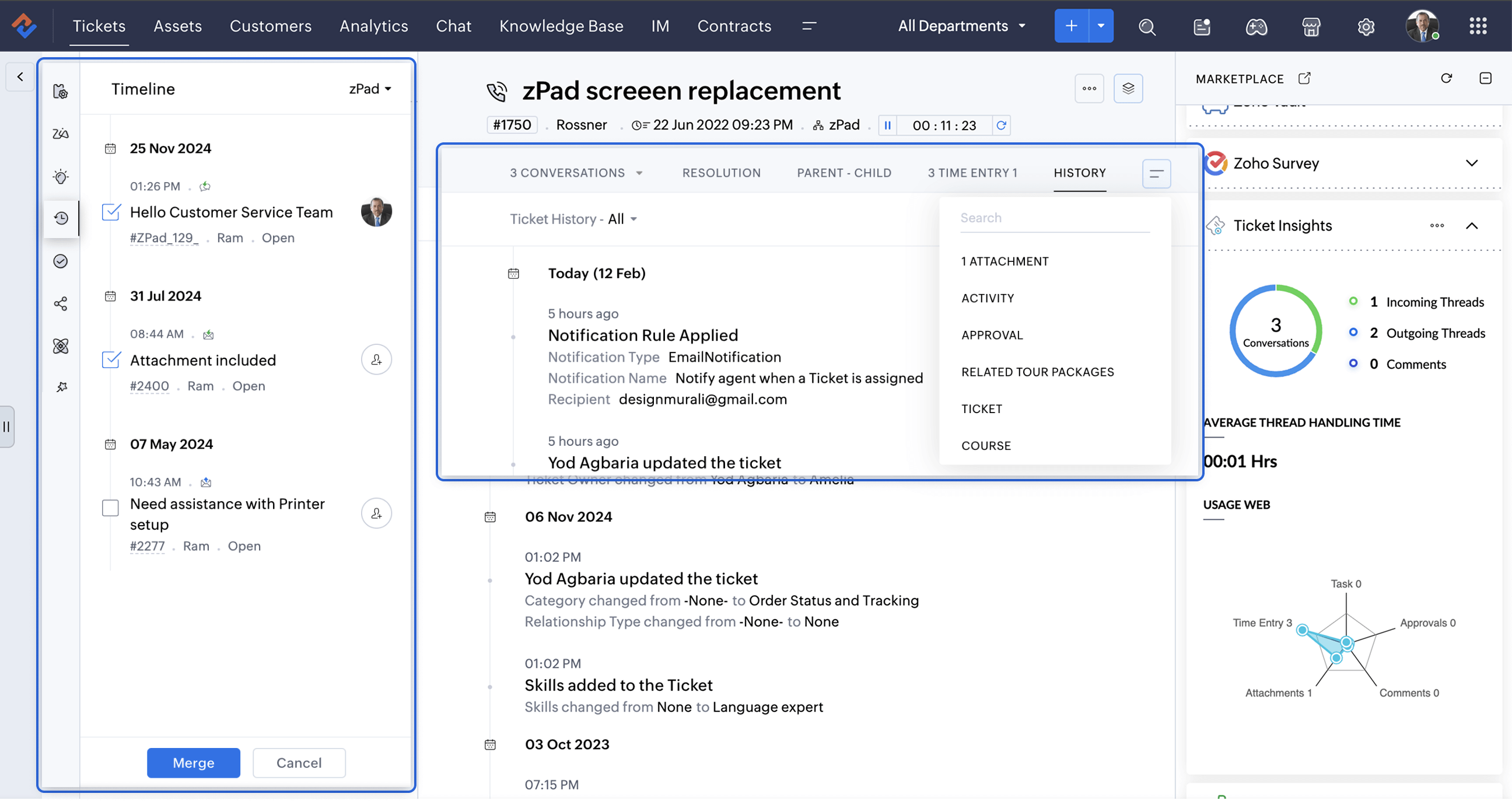
A Smarter Approach to Ticket Management
At times, when Zylker Techfix experienced a surge in tickets, the Ticket Detail banner on the left provided the following details on the ready-to-use extensions:
- Ticket Properties showed the customer and ticket information
- Field Predictions auto-filled customer details, saving time.
- Zoho's AI, Zia leveraged the Answer Bot to provide solutions based on the knowledge base created by the user within Zoho Desk.
- The Ticket Follower option let them keep a track of the tickets handled by them or other agents.
- The Ticket Timeline let them keep an eye on the previous cases handled for the client in the specific Department or All Department. Within a specific department, agents could also merge tickets for efficient handling.
- To ensure visibility across departments, the Share Ticket Option allowed teams to share tickets with different departments while maintaining appropriate access controls such as Full Access, Restricted Access, or Read-Only Access.
Presenting three essential extensions to stay on the go with customer service:
1. Customer Insights for Zoho Desk: Know Your Customers Better
The value of customer service grows as you gain deeper insights into your customers by understanding their experiences, emotions, and the journeys they have taken with your brand.
How well do you know your customers?
How well do you know your customers?
With Customer Insights for Zoho Desk located on the Ticket Detail panel on the left, you can access key interaction details, including response times, resolutions, the number of tickets handled, and happiness ratings. These insights help build stronger relationships and enhance service quality.
In customer service, care is more than just providing solutions.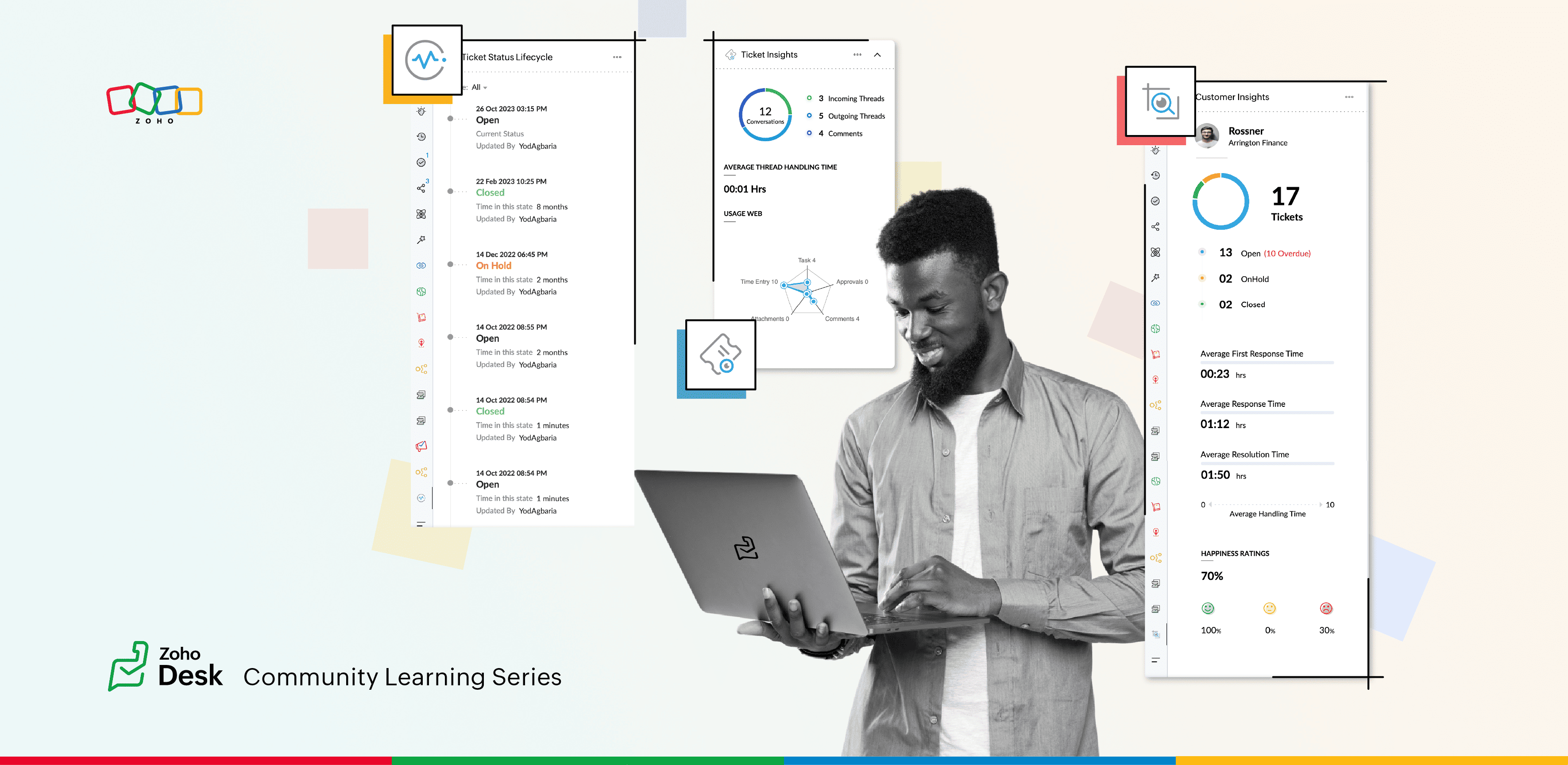
2. Ticket Insights for Zoho Desk: A One-Shot View
Install Ticket Insights for Zoho Desk from the Marketplace Extensions to enhance your ticketing experience.
Where can you view the insights?
- Open a ticket in Zoho Desk.
- Click on the Marketplace
 icon next to the Ticket Subject.
 - Maximize Ticket Insights for a detailed overview.
This tool gave them a one-shot view of:
- Threads: The number of incoming and outgoing threads within a ticket.
- Average Thread Handling Time: How quickly they were resolving issues.
- Ticket Module Usage: A detailed web of how each module was being utilized.
3. Ticket Status Lifecycle for Zoho Desk : At a Glance
Install this extension from Marketplace  icon on the top right. You can view the Ticket Status Lifecycle on the Ticket Detail panel on the left.
icon on the top right. You can view the Ticket Status Lifecycle on the Ticket Detail panel on the left.The Ticket Status Lifecycle provides detailed insights into ticket status changes, including the exact time of each update and the agent responsible for the modification. These insights help identify bottlenecks and assess the efficiency of support processes.
For example, tracking the duration a ticket remaining in a particular status can highlight areas that need improvement. Additionally, the extension allows users to filter the timeline to focus on specific statuses, such as "Open", "On hold", or "Waiting on Customer", or "Pending Approval."
This level of detail ensures that support teams gain a clear and chronological understanding of each ticket’s progression, enabling more informed decision-making and process optimization.
Wrap Up
This helped Zylker Techfix capture critical information in a short time, enabling them to stay on top of their game and offer proactive support.
Zylker Techfix realized that customer service is an act of love. With Zoho Desk and its extensions like Customer Insights, Ticket Insights, and Ticket Status Lifecycle, they understood their customers better, engaged with them meaningfully, and delivered solutions that brought joy.
And so, they continued to spread love, one ticket at a time.
Topic Participants
Lydia | Zoho Desk
Sticky Posts
Register for Zoho Desk Beta Community
With the start of the year, we have decided to take a small step in making the life of our customers a little easier. We now have easy access to all our upcoming features and a faster way to request for beta access. We open betas for some of our featuresShare your Zoho Desk story with us!
Tell us how you use Zoho Desk for your business and inspire others with your story. Be it a simple workflow rule that helps you navigate complex processes or a macro that saves your team a lot of time; share it here and help the community learn and grow with shared knowledge.Tip #1: Learn to pick the right channels
Mail, live chat, telephony, social media, web forms—there are so many support channels out there. Trying to pick the right channels to offer your customers can get pretty confusing. Emails are most useful when the customer wants to put things on record. However, escalated or complicated issues should not be resolved over email because it's slow and impersonal. When you need immediate responses, live chat is more suitable. It's also quick and convenient, so it's the go-to channel for small issues.Welcome to Zoho Desk Community - Say hello here!
Hello everyone! Though we have been here for a while, it’s time to formally establish the Zoho Desk Community; we’re really happy to have you all here! This can be the place where you take a moment to introduce yourself to the rest of the community. We’d love to hear all about you, what you do, what company or industry you work for, how you use Zoho Desk and anything else that you will like to share! Here’s a little about me. I am Chinmayee. I have been associated with Zoho since 2014. I joined hereWebinar 1: Blueprint for Customer Service
With the launch of a host of new features in Zoho Desk, we thought it’ll be great to have a few webinars to help our customers make the most of them. We’re starting off with our most talked about feature, Blueprint in Zoho Desk. You can register for the Blueprint webinar here: The webinar will be delivered by our in-house product experts. This is a good opportunity to ask questions to our experts and understand how Blueprint can help you automate your service processes. We look forward to seeing
Recent Topics
Feature Request - Gift Cards or Gift Voucher Capability in Zoho Commerce
Hi Zoho Commerce team, I'm comming accross more and more retail businesses who sell gift cards. As there is currently no way to manage this in Zoho Commerce, it is a blocker to addoption. This is particularly popular in Europe and North America. I recentlyHighlight a candidate who is "off limits"
Hello: Is there a way to highlight a candidate who is "off limits"? I would like to have the ability to make certain candidate and / or Client records highlighted in RED or something like that. This would be used for example when we may have placed a candidate somewhere and we want everyone in our company to quickly and easily see that they are off limits. The same would apply when we want to put a client or former client off limits so no one recruits out of there. How can this be done? Cheers,Closing off tasks automatically based on project status
Is there a way to close off all open tasks when a project is set as Cancelled?[Free webinar] Understanding connections and datasources in Zoho Creator - Creator Tech Connect
Hello everyone, We’re excited to invite you to another edition of the Creator Tech Connect webinar. About Creator Tech Connect The Creator Tech Connect series is a free monthly webinar featuring in-depth technical sessions designed for developers, administrators,Bridge the Gap Between your Service and Finance Teams
In field service, the most expensive distance isn’t the drive to a customer’s home—it’s the gap between a finished job and a paid invoice. Zoho FSM leverages the power of Zoho Invoice to handle and manage billing operations. It enables you to: InstantlyDirect URL to "View Record"
I would like to create a button (Deluge Script) to jump to the "view record" without passing by the record menu, but I can not aford to find the right url. I don't want the "view record" as a single page. I want the "view record" in the application like the picture below: Thanks in advance for your helpLive Chat for user
Hi everyone, I’m new to Zoho Creator and wanted to ask if it’s possible to add a live chat option for all logged-in portal users so they can chat internally. I’m trying to create a customer portal similar to a service desk, but for vehicle breakdowns,SalesIQ Chat Owner to CRM Lead Owner Mapping
There is no proper mapping between the SalesIQ chat owner and the CRM lead owner. When a chat is assigned to an agent, the lead created in CRM is often assigned to a different user, forcing admins to manually change ownership every time. This createsProduct line search in quotes
Is there a way to change the search setting when you add a product line to a quote. We have created a field in products called 'Part Number' and I would like when I'm adding a product line to the quote that I can search on that field. At the moment it only searches on product description. In products I can search on the 'Part Number' field Any help welcome.Searching for an item from within an invoice should show any item containing the string, not just those that begin with the string.
Hello, I've found myself becoming increasingly frustrated with the limited line-item seach when adding new items to an invoice. The problem is that the characters being typed are only being matched from the beginning of the item name. This might be usableStorage Limits
Hello, What is the storage limitations for each user on professional edition? Thanks, MekkiZoho Recruit Community Meetup - London 🇬🇧
Hello Recruiters! We’re excited to announce that the Zoho Recruit team is coming to the UK for an in-person Zoho User Group (ZUG) Meetup in London! This is your chance to connect with fellow Zoho users, learn from experts, and walk away with actionablePower Pivot and Data Modeling functionality in Zoho Sheet
When will MS Excel functionalities like Power Pivot and Data Modeling functionalities be available in Zoho Sheet?Global Search placement in the new UI
Having a hard time with the global search placement in the UI redesign. Surely I can't be the only one. Previously global search placement was perfect. A bar at the top/center of the page. Exactly where you would expect it to be. Since the new UI hasWhat's New - January 2026 | Zoho Backstage
Welcome to 2026! If you thought last year was big, buckle up. We’re stepping into this year with a singular focus: unimaginable growth, elite scalability, and performance benchmarks that leave the old ways of event management in the rearview mirror. AsCliq on your mobile phone
Some of the employees in my company get their cliq on their mobile phones but it will not let them answer the call. The employee has to go to their laptop to access it.Bulk Delete Messages in Cliq
Isn't it possible to bulk delete messages in Cliq? I have them delivered to me as notifications from another service but most of them need to be deleted as not of value. I get dozens of them per day, and deleting them is already difficult is the "Delete"stock movement report by each transaction for each item
Dear Sir we are using zoho inventory for foodstuff and we lack the transaction report which clearly shows movement of an item from Opening balance of the month to Goods received in, Supplier return out, Invoice out, Sales return In, Transfer out and TransferUnable to change Company Logo
Hi Guys, I have an issue where I've uploaded a Company image in Gif format and the logo has now got a black background whereas the logo is supposed to be black not the background. I didn't think it would be an issue so I created a PNG version to uploadMetadata API Access to Functions
I think it would be incredibly helpful to have api access to every function's code. Our team primarily uses deluge functions to update fields across modules according to business logic. I would like to create a visual dependancy model for our CRM, butHistorical Sales Info - Blend with Finance Invoice Line Items, Access in CRM and Desk
My company has been using Zoho One since 2021, with sales data going back through 2020. However, we have been in business much longer, and we have historical sales information that we want to have at our fingertips when talking with customers (usuallyIntroducing Record Category in CRM: Group options to see record status at a glance.
Release update: Currently available for CN, JP, and AU, CA, Sa, and UAE DCs (all editions); EU, US, and IN (Standard and Professional editions). It will be made available to other DCs by mid-March. Hello everyone, We are pleased to introduce Record CategoryService disruption in Zoho Cliq (EU Region) – February 9, 2026
Hello everyone, We’d like to inform you about a brief service disruption that affected Zoho Cliq users in the EU region earlier today. The issue has been resolved, and all services are now operating normally. Summary On February 9, 2026, Zoho Cliq experiencedSpotlight series #26 - Build slides with visual clarity using Diagram
Hello all! The feature in the spotlight this month is Diagram. Let's say you are a part of a project kickoff meeting and your teammate starts explaining the project life cycle like this: "First we ideate, then we create an initial prototype and shareClient scripts for Zoho Books ?
Good day everyone, I am looking for a way to be able to interact with the Quotes and Invoices as they are being created. Think of it like Zoho client script in Zoho CRM. But for the life of me I dont see a way to do this. The issue with having functionUplifted homepage experience
Editions: All editions. Release Note: Available in CA and SA DCs (Standard, Professional). Availability update (17th February 2026): The feature has been enabled for the following DCs: All editions in the CA and SA DC | Free, Standard and ProfessionalAbility to move emails between different Shared Mailboxes
Hi Zoho Team and Community, I would like to suggest a feature that would greatly improve the workflow for teams managing multiple Shared Mailboxes. Currently, we often receive emails in the wrong shared mailbox. While we can forward them to the correctCrossbeam
Does anyone use Crossbeam with their Zoho CRM? I'm looking for a way to import Crossbeam partner leads into Zoho CRM. If so: - What's your experience been like? - Are you able to automatically import Crossbeam leads > Zoho CRM? How? - What doesn't workAccess forms within a form
I have multiple forms that I would like to create access to for users within one form. Example: I have forms A, B, C, D. I would like to create a form with the links to forms A, B, C, & D. That way we can send one link and then the user can select theWorkDrive issues with Windows Explorer Not Responding
We are using WorkDrive to collaborate on editing video content. We have a lot of files and quite a few are a few gigs. Recently anytime I try and work with the files Explorer freezes for a couple minutes whether it's dragging the files into Premiere orIssues with Actions By Zoho Flow
Hi, I have a workflow that fires when a deal reaches a stage. This then sends out a contract for the client to sign. I have connected this up through Actions by Zoho Flow. Unfortunately this fails to send out. I have tracked it down to the date fields.Fill Mail Merge document up with subform fields of an Inventory module record being in the Related List
Hi, I try to insert subform fields from an inventory module record being on the Related List of another inventory module record into a Mail Merge template without success. For example: we use ratecards in licensing and this ratecard items are availableEnhancements for Currencies in Zoho CRM: Automatic exchange rate updates, options to update record exchange rates, and more
The multi-currency feature helps you track currencies region-wise. This can apply to Sales, CTC, or any other currency-related data. You can record amounts in a customer’s local currency, while the CRM automatically converts them to your home currencyBetter use of contacts
Zoho inventory has the ability to add multiple contacts to customers. However Zoho inventory doesn't currently provide a way to link a contact to objects like sales orders. This means that while you can tell what company has placed a sales order you can'tHow can we add products using a Wizard?
We want to create a Wizard to add products. Why is there no possibility to use the products module when creating a wizard?Orphan email alias blocking user creation – backend cleanup required
Hello Zoho Mail Support, I´m unable to assign or create the address xx@iezzimatica.ar in my organization. Current situation: Alias cannot be assigned to any user (system says it is already in use) New user with this address cannot be created Address doesEnsure Consistent Service Delivery with Comprehensive Job Sheets
We are elated to announce that one of the most requested features is now live: Job Sheets. They are customizable, reusable forms that serve as a checklist for the services that technicians need to carry out and as a tool for data collection. While onSomething wrong with client script??
Someone have the same feeling? Client script behavior become very strange..API 500 Error
Hello amazing ZOHO Projects Community, I get this message. How can we solve this? { "error": { "status_code": "500", "method": "GET", "instance": "/api/v3/portal/2010147XXXX/projects/2679160000003XXXX/timesheet", "title": "INTERNAL_SERVER_ERROR", "error_type":Polish signer experience to compete with docusign
I would like to suggest that someone spend the little bit of time to polish the signer experience, and the email templates to more of a modern professional feel. They are currently very early 2000s and with some simple changes could vastly improve theNext Page