Spreading Love, One Ticket at a Time
At Zylker Techfix, customer service wasn't just about solving issues, it was about creating meaningful human connections. The team believed that every interaction was an opportunity to understand their customers better and offer solutions that truly made a difference.
Understanding the Customer
Customer service is about showing love for customers and loving what you do. Every ticket is an opportunity to connect, solve problems, and make customers feel valued. Zoho Desk became the heart of Zylker Techfix operations to help them do just that.
The Ticket Module: A Treasure Trove of Insights
The Tickets Module records every interaction with the customer. This place helped establish relationships with customers.
The team discovered the Ticket tabs as a wealth of features to understand their customers better:
- Conversation Module held records of the ticket conversations and private comments, helping them keep an eye on interactions with the customer, ensuring no detail was missed.
- Under the Resolution Tab, they mandated recording resolution to track customer actions, ensuring every issue was resolved with care.
- The Parent-Child ticket feature linked related tickets, making it easier to see the bigger picture and provide consistent support.
- Time Entry Module kept them in track with billable hours and time spent on tickets, ensuring efficiency and transparency.
- The History Tab offered insights into past interactions, allowing agents to filter by incoming responses, outgoing replies, comments, and attachments. This was crucial for tracking ticket progress and ensuring timely resolutions.
- The Geo-Location Module is another powerful tool that works well with the Zoho Desk App. This enables to track the location of field service representatives, ensuring real-time updates and better service coordination.
- The Activity Tab helped filter activities based on specific criteria, providing a detailed view of customer interactions.
- Approval Tab facilitated streamlined approval processes, ensuring that responses requiring managerial review were promptly addressed.
- The Attachment Module helped in organizing and accessing customer-related documents easily.
 Note: For early access to the Parent-child ticket feature, request here. This applies to Professional and Enterprise users only.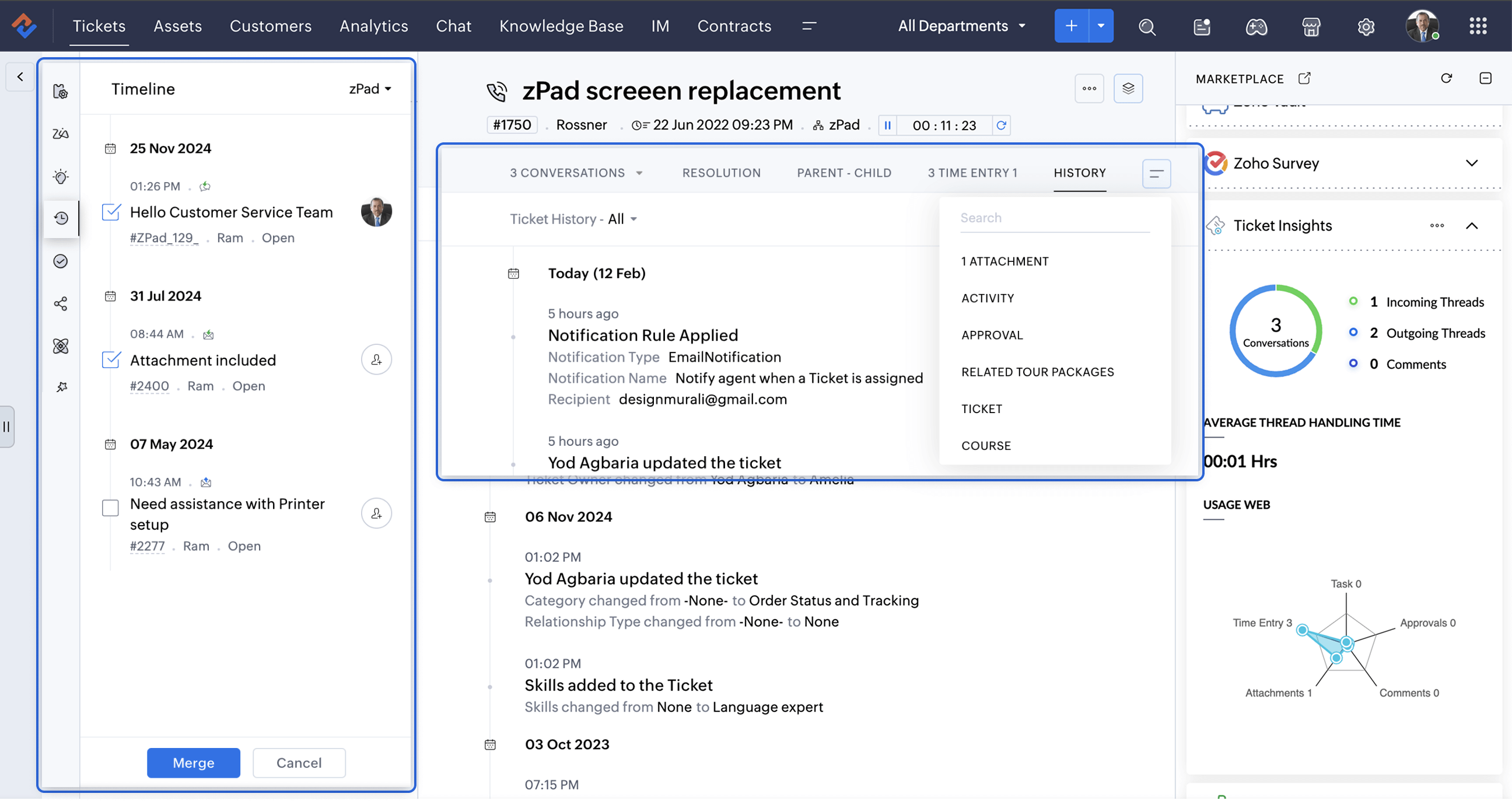
A Smarter Approach to Ticket Management
At times, when Zylker Techfix experienced a surge in tickets, the Ticket Detail banner on the left provided the following details on the ready-to-use extensions:
- Ticket Properties showed the customer and ticket information
- Field Predictions auto-filled customer details, saving time.
- Zoho's AI, Zia leveraged the Answer Bot to provide solutions based on the knowledge base created by the user within Zoho Desk.
- The Ticket Follower option let them keep a track of the tickets handled by them or other agents.
- The Ticket Timeline let them keep an eye on the previous cases handled for the client in the specific Department or All Department. Within a specific department, agents could also merge tickets for efficient handling.
- To ensure visibility across departments, the Share Ticket Option allowed teams to share tickets with different departments while maintaining appropriate access controls such as Full Access, Restricted Access, or Read-Only Access.
Presenting three essential extensions to stay on the go with customer service:
1. Customer Insights for Zoho Desk: Know Your Customers Better
The value of customer service grows as you gain deeper insights into your customers by understanding their experiences, emotions, and the journeys they have taken with your brand.
How well do you know your customers?
How well do you know your customers?
With Customer Insights for Zoho Desk located on the Ticket Detail panel on the left, you can access key interaction details, including response times, resolutions, the number of tickets handled, and happiness ratings. These insights help build stronger relationships and enhance service quality.
In customer service, care is more than just providing solutions.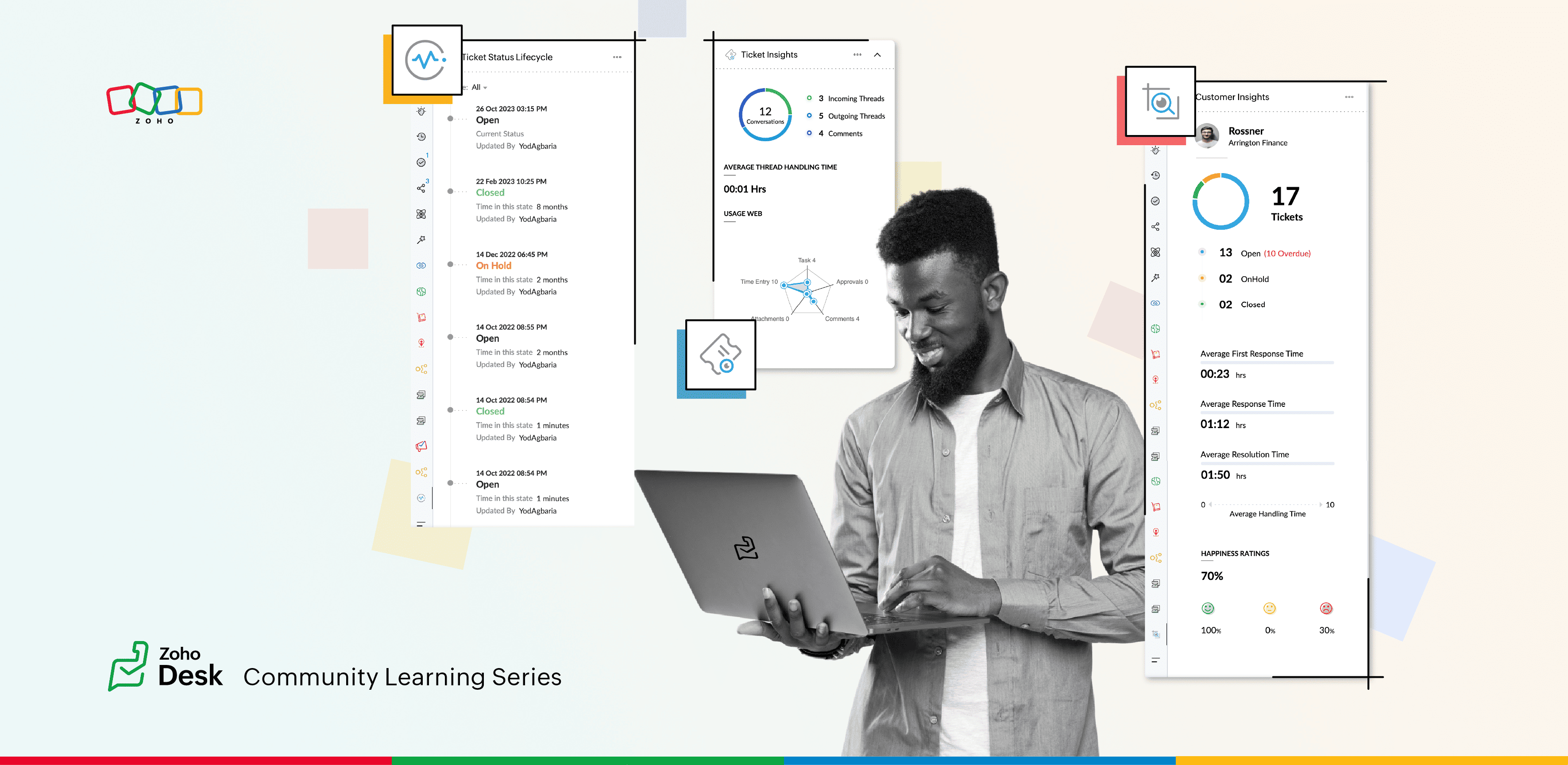
2. Ticket Insights for Zoho Desk: A One-Shot View
Install Ticket Insights for Zoho Desk from the Marketplace Extensions to enhance your ticketing experience.
Where can you view the insights?
- Open a ticket in Zoho Desk.
- Click on the Marketplace
 icon next to the Ticket Subject.
 - Maximize Ticket Insights for a detailed overview.
This tool gave them a one-shot view of:
- Threads: The number of incoming and outgoing threads within a ticket.
- Average Thread Handling Time: How quickly they were resolving issues.
- Ticket Module Usage: A detailed web of how each module was being utilized.
3. Ticket Status Lifecycle for Zoho Desk : At a Glance
Install this extension from Marketplace  icon on the top right. You can view the Ticket Status Lifecycle on the Ticket Detail panel on the left.
icon on the top right. You can view the Ticket Status Lifecycle on the Ticket Detail panel on the left.The Ticket Status Lifecycle provides detailed insights into ticket status changes, including the exact time of each update and the agent responsible for the modification. These insights help identify bottlenecks and assess the efficiency of support processes.
For example, tracking the duration a ticket remaining in a particular status can highlight areas that need improvement. Additionally, the extension allows users to filter the timeline to focus on specific statuses, such as "Open", "On hold", or "Waiting on Customer", or "Pending Approval."
This level of detail ensures that support teams gain a clear and chronological understanding of each ticket’s progression, enabling more informed decision-making and process optimization.
Wrap Up
This helped Zylker Techfix capture critical information in a short time, enabling them to stay on top of their game and offer proactive support.
Zylker Techfix realized that customer service is an act of love. With Zoho Desk and its extensions like Customer Insights, Ticket Insights, and Ticket Status Lifecycle, they understood their customers better, engaged with them meaningfully, and delivered solutions that brought joy.
And so, they continued to spread love, one ticket at a time.
Topic Participants
Lydia | Zoho Desk
Sticky Posts
Register for Zoho Desk Beta Community
With the start of the year, we have decided to take a small step in making the life of our customers a little easier. We now have easy access to all our upcoming features and a faster way to request for beta access. We open betas for some of our featuresShare your Zoho Desk story with us!
Tell us how you use Zoho Desk for your business and inspire others with your story. Be it a simple workflow rule that helps you navigate complex processes or a macro that saves your team a lot of time; share it here and help the community learn and grow with shared knowledge.Tip #1: Learn to pick the right channels
Mail, live chat, telephony, social media, web forms—there are so many support channels out there. Trying to pick the right channels to offer your customers can get pretty confusing. Emails are most useful when the customer wants to put things on record. However, escalated or complicated issues should not be resolved over email because it's slow and impersonal. When you need immediate responses, live chat is more suitable. It's also quick and convenient, so it's the go-to channel for small issues.Welcome to Zoho Desk Community - Say hello here!
Hello everyone! Though we have been here for a while, it’s time to formally establish the Zoho Desk Community; we’re really happy to have you all here! This can be the place where you take a moment to introduce yourself to the rest of the community. We’d love to hear all about you, what you do, what company or industry you work for, how you use Zoho Desk and anything else that you will like to share! Here’s a little about me. I am Chinmayee. I have been associated with Zoho since 2014. I joined hereWebinar 1: Blueprint for Customer Service
With the launch of a host of new features in Zoho Desk, we thought it’ll be great to have a few webinars to help our customers make the most of them. We’re starting off with our most talked about feature, Blueprint in Zoho Desk. You can register for the Blueprint webinar here: The webinar will be delivered by our in-house product experts. This is a good opportunity to ask questions to our experts and understand how Blueprint can help you automate your service processes. We look forward to seeing
Recent Topics
Interview booked through Invite but no Notifications
We have a workflow that was developed through a developer/partner that was tested and worked. Today, we pushed a candidate through the process and invited them to an in-office interview. They were sent the booking link (as usual and as tested before successfully)Automatiser la gestion des SLA dans Zoho Desk avec Zoho Contracts
Les équipes du service client s’efforcent d’assurer un support rapide, régulier et fiable pour garantir la satisfaction de chaque client. Les accords de niveau de service (SLA) permettent de clarifier les engagements en définissant les termes et conditionsiOS App doesn't refresh for Document Creation
Hello Zoho team, I have created a workflow to be used on a mobile iOS device which starts in Zoho Creater and ends with a murge and store function that then opens the newly created document within the Zoho Writer app. This process is working great howeverUploading a signed template from Sign to Creator
Good day, Please help me on how to load a signed document back into Creator after the process has been completed in Sign. Below is the code that I am trying, pdfFile = response.toFile("SignedDocument_4901354000000372029.pdf"); info pdfFile; // AttachZoho DataPrep and File Pattern configuration
I'm using Zoho data prep to ingest data from One Drive into Zoho Analytics... The pipeline is super simple but I can't any way to get all the files that I need. Basically I need to bring all the files with a certain pattern and for that I'm using a regexAssistance needed: Activation of a domain
Hello Zoho Support, I purchased the .com domain "primesolva.com" via Zoho 6 days ago. The domain is still pending, and I cannot access the DNS panel to add the TXT verification for domain ownership. Please confirm the registration status and help me activateOperation not permitted
I am trying to add an email address to the list of user but I am getting error Operation not permittedRequest to Permanently Delete Email User (info@mehbobgulf.com ) from Old Organization
Please permanently delete the user email info@mehbobgulf.com It is still associated with my old Zoho organization. I cannot delete it because it shows ‘You cannot delete email. Zoho host’. I need to use this email in a new Zoho account.”Client host [89.36.170.5] blocked using Spamhaus
Hello please make make actions for delist ..... "Client host [89.36.170.5] blocked using Spamhaus"Suggestion: Option to Re-run a migration
As I'm going through a migration process, I like the IMAP migration tool, but it would be better if there were an option to re-run the same migration as configured. There's not even an option to copy/edit one that's already there. Just run if it hasn'tIssue with "Add Your Mobile Number"
Hello, I am trying to sign up for email service for a domain name, and I cannot finish the authentication. When I enter my mobile number, I receive the message "We’re unable to send OTP to this mobile number. Please contact support-as@zohocorp.com". Izoho mail non vérifié
Bonjour, Il y'a un jour que j'ai acheté un domaine et toute les tentatives pour l'associé a mon compte shopify son vaine. j'ai essayé TXT sans suite après, j'ai essayer avec CNAME sans suite. j'aurais besoin de votre assistance pour associé mon mail.Unable to send message;Reason:553 Relaying disallowed. Invalid Domain
i have facing the issue "Unable to send message;Reason:553 Relaying disallowed. Invalid Domain" if i verify domain evertthing i did but still face the same error.ZohoMail is so close to being Perfect BUT
Why don’t you have HILIGHTING???!! I've been trying to find a substitute for Edison Mail but I want & need hilighting (preferably in more than just yellow)! Is this even on your To Do list? I’m so disappointed. 🙄Override Auto Number field?
We are preparing to migrate from Salesforce. In Salesforce, we auto-generate a unique number on our Opportunities (Potentials). If the Opportunity results in a contract, we use that unique number as the Contract number. There are some situations whereUsing a third party service provider want to move directly with Zoho
Hi good day I’m currently using Zoho but I’m using a third party service provider I want to move directly with you guys I’m using Zoho email and invoices and my domain please let me know if it’s possible to move away from the third party provider my emailRequest for Assistance Regarding Email Sending Issue (554 5.1.8 - Email Outgoing Blocked)
Dear Zoho Support Team, I hope this message finds you well. I am writing to request assistance with an issue we are currently facing regarding our Zoho Mail account. Our email account, admin@tuyensinhcanuoc.com, is encountering the following error whenZoho Mail API returns empty inbox (0 messages) but webmail shows 37 unread emails
Hello, I'm experiencing a discrepancy between Zoho Webmail and the Mail API (EU region). **Setup:** - Account: EU datacenter (mail.zoho.eu) - API: Self Client OAuth2 via api-console.zoho.eu - Scopes: ZohoMail.messages.READ, ZohoMail.messages.UPDATE, ZohoMail.folders.READ,ShipStation and Zoho Inventory
Hello, I am looking to sync zoho inventory with shipstation ZOHO INVENTORY SHIP STATION Sales Order ==> create ORDERS INVOICE <== Shipments What exactly does BETA mean on the Shipstation connector? This is required for me to sign-on in the next month. Thanks in advance for your effortsE
We are trying to add our Zoho Form embed in our Elementor Page Builder. After adding Zoho Forms widget in elementor page builder it’s displaying in backend page builder but it’s giving 403 error while trying to save, as it’s not reflecting in front end.Connecting Zoho Inventory to ShipStation
we are looking for someone to help connect via API shipStation with Zoho inventory. Any ideas? Thanks. Uricustom module import.
Is there a way to import data into a custom module? Thanks RudyHEIC File Type Viewer
Hi, It would be nice to be able to click on the images in the All Entries/Reports Tables which are HEIC the same as JPG, PNG, etc. so they open in a viewer from Zoho or the Attachment Service, today HEIC requires you to download each image and open itHow to dynamically pass IDs from one API response to a second API call in Zoho DataPrep?
Hi Team, I am setting up a global consolidated reporting pipeline in Zoho Analytics (India) using Zoho DataPrep as the ETL engine. I am pulling data from multiple Zoho Books Data Centers (US, Singapore, India) thats why i used the URL Source (OAuth 2.0)Building Toppings #4 - Setting up and using connections in Bigin toppings
When building a topping to extend Bigin's functionality and connect it with third-party applications, creating and handling connections is an important step. Connections provide a secure way for your topping to authenticate and communicate with otherNeed code format to specify default values
Can someone please direct me to the code syntax or the proper translation per the instructions circled below. These instructions don't seem correct.AI Interview Insights: Turn Recorded Interviews into Quick Transcripts & Summaries
Evaluating interviews shouldn’t require replaying long recordings or taking manual notes. With AI Interview Insights, you can now review complete transcripts and AI-generated summaries of your One-way (Recorded) interviews right inside Zoho Recruit. ThisRecord payment: Payment Mode vs. Deposit To and how to "connect" them!?
How do we set up that when we choose: "Payment Mode"= Cash, then "Deposit to" is automatically set to Petty Cash, and if we choose "Payment Mode"= Check, then "Deposit to" is automatically set to Undeposited Checks, and if we choose "Payment Mode"=Grouping Undeposited Funds to Move to other accounts
In the bank option it would be nice to check what transactions in undeposited funds I want to move to other accounts. Then while checking this it can accumulate totals and created whats essentially a deposit slip. Once the transaction is moved it shouldDepositing funds to account
Hello, I have been using Quickbooks for many years but am considering moving to Zoho Books so I am currently running through various workflows and am working on the Invoicing aspect. In QB, the process is to create an invoice, receive payment and thenFacing email delivery issues? Verify your domain's DNS records
Have you ever wondered why your legitimate emails are landing in the recipient’s spam folder? Or been surprised to see emails sent from your registered domain getting rejected by recipient email servers? Why does this happen? In most cases, this happensOrder of Departments in Help Desk
In the end user portal, , the departments are sorted by the date of creation of the department (or perhaps their id). Is there a way to choose the display order of the departments or at least to be able to sort them alphabetically?COGS - Account showing negetive
I have multiple COGS account and in these all there is one account is negetive so suggest why it is showing negetive value.?Create CRM Deal from Books Quote and Auto Update Deal Stage
I want to set up an automation where, whenever a Quote is created in Zoho Books, a Deal is automatically created in Zoho CRM with the Quote amount, customer details, and some custom fields from Zoho Books. Additionally, when the Sales Order is converted%PaymentLink%
Does not work. Software creates a BAD link. ....and yes payment options are turned on. Link on the invoice pdf once opened will work but this template is a joke.Google Photos
I am hoping that my question already has a fix. I current have Google synced accounts that I want to get away from. One in particular on is Google photos. Is there any software, or 3rd parties that I can join to back my photos up straight to specifically designated file in the ZOHO cloud that's tied to Docs? Please advise... MikeZoho Books Items Categorisation/Grouping/Folder
Is there a way to do items categorisation? a folder structure? Product Type A - Option 1/2/3 Product Type B - Option 1/2/3 Current problem : I have more than 50 items on the list, its hard for team to navigate.Cash payments before invoice date
We have been using zoho books for our hospitality business for some time and have been very happy with the system. However in 2025 an update was pushed through and we are now not able to record payments for invoices before the invoice date. the case scenarioCopy / Duplicate Workflow
I have workflows setup that are very similar to each other. We have a monitoring system watching servers, and all notifications - no matter what client it is about - will come from a noreply@ address which is not very helpful in having it auto assigned to the right account. I have setup a workflow that will change the contact name of the ticket (currently it would say noreply@) to the correct customer which is based on the subject line, as that mentions which server the alert it is about. I needTransfer between two customers (Peters Rental account to Peters Private account)
we are a Property Management company. Our customers have to accounts (registered as two customers - Peter Rental and Peter Private On the rental account all income and costs fron rental activities are noted. On the private account all private are notedNext Page