Tips & Tricks #10 Automatiseren met Zoho Desk Deel 2

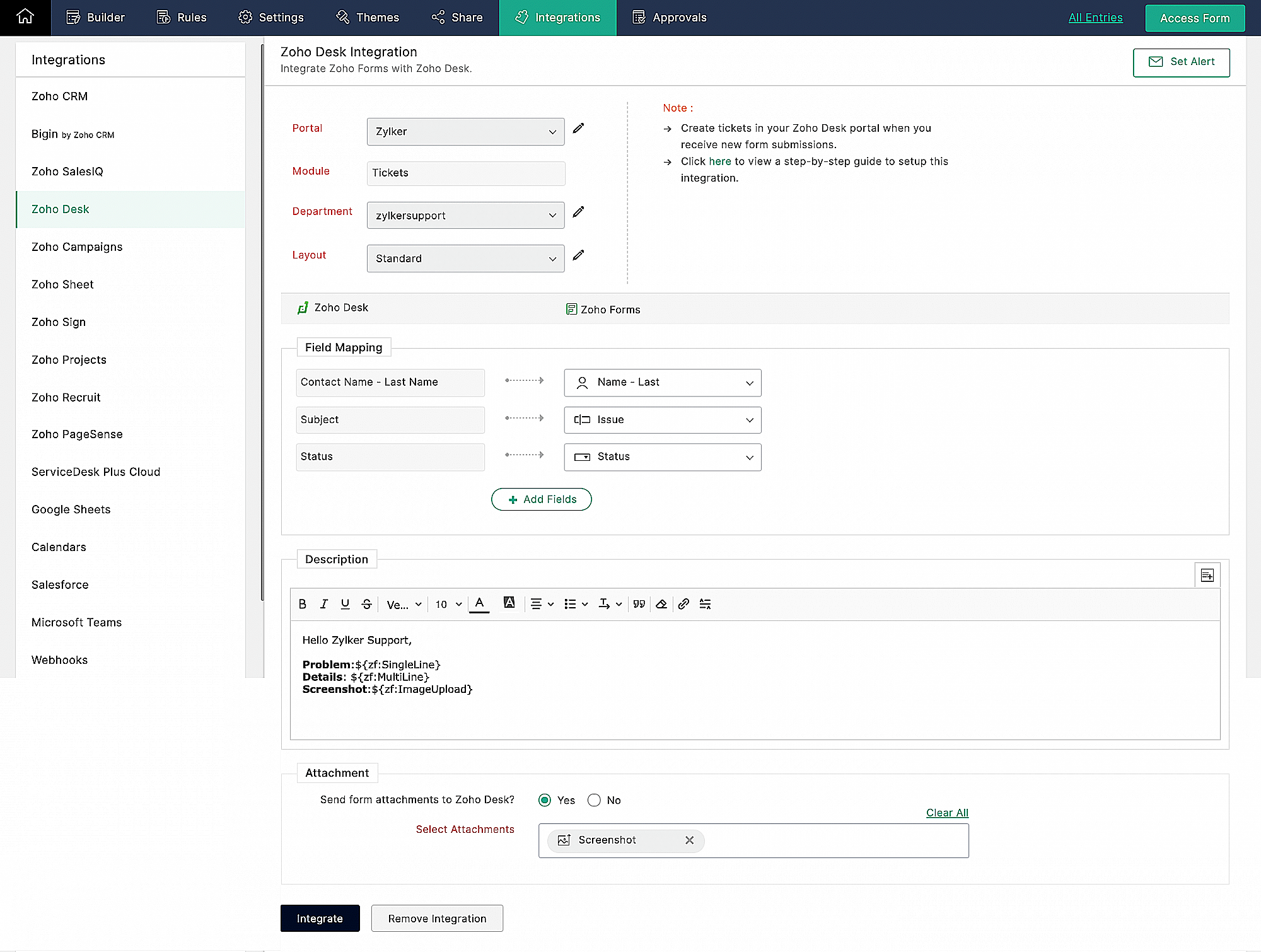
Zoho Forms integreren met Zoho Desk
Wanneer je meerdere klantvragen en support verzoeken van huurders ontvangt, kan het handmatig aanmaken van support tickets in de helpdesk vervelend worden en veel tijd kosten, die anders gebruikt kan worden om je huurders te helpen. Als Zoho Desk wordt gebruikt om support tickets te beheren, kun je de Zoho Forms - Zoho Desk integratie gebruiken om de ingevoerde formulieren automatisch als support tickets naar je Desk portal te pushen. Je kunt een beschrijving toevoegen en door de huurders geüploade bestanden en afbeeldingen toevoegen aan de tickets die via deze integratie zijn aangemaakt.
Klachtenmanagement
Zoho Desk, een Omnichannel Customer Service Software, is de eerste contextbewuste helpdesk software die bedrijven helpt zich te focussen op de klant. Met Zoho Desk kun je eenvoudig helpdesk tickets toewijzen, volgen en meldingen instellen. Je kunt Zoho Desk aanpassen aan je behoeften en zorgen voor tevredenheid bij de support van je huurders.
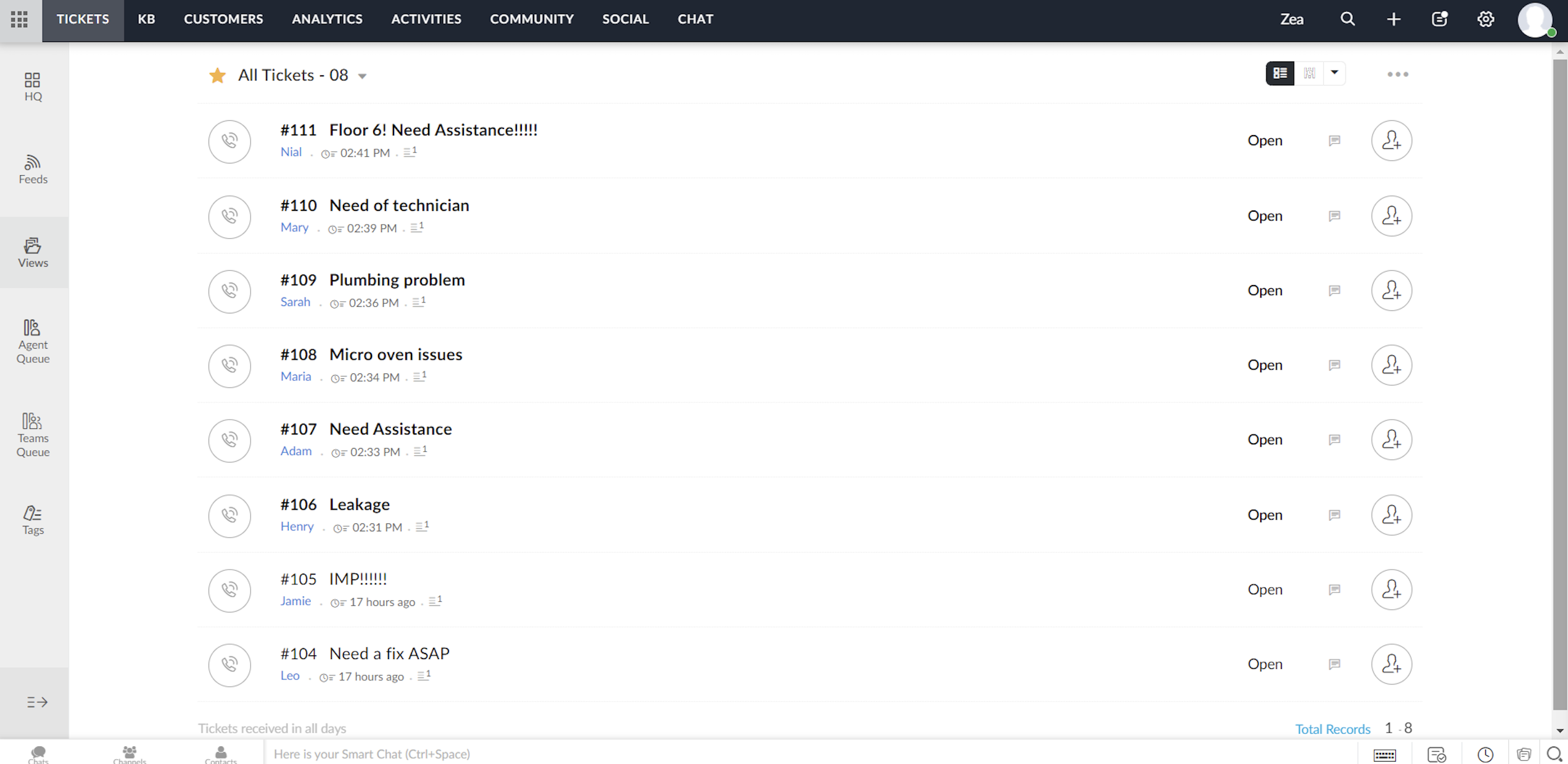
Elk ticket dat wordt ingediend door huurders die het klachtenformulier invullen, wordt toegewezen aan één van de agenten in Zoho Desk, waar het probleem wordt aangepakt en de nodige acties voor het probleem worden ondernomen.
Toewijzingsregel
Ga tot in de fijnste details van ticketbeheer door, via het instellen van toewijzingsregels. Op deze manier hoef je niet elke keer dat er tickets binnenkomen handmatig tickets/klachten toe te wijzen aan agents. Het geeft je meer controle, en je team meer autonomie. Met behulp van toewijzingsregels wijs je automatisch de Tickets/Klachten toe die via Zoho Desk binnenkomen.
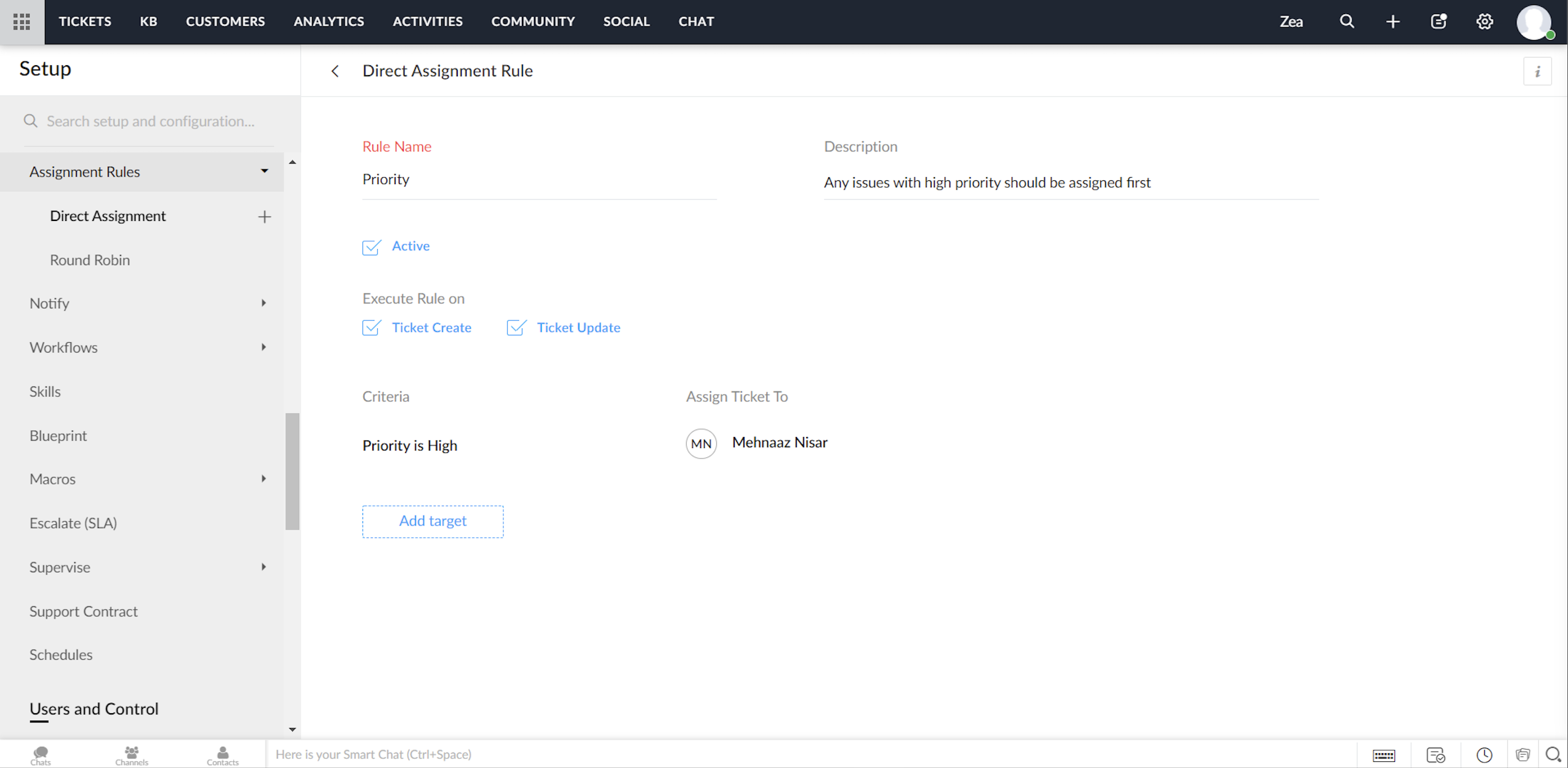
Directe toewijzing
De regel op basis van bepaalde gespecificeerde voorwaarden kan Tickets / Klachten naar de juiste afdeling leiden en er verder eigendomsrechten aan toekennen. Hoewel dit zinvol is voor nieuwe Tickets / Klachten, kun je ook een toewijzingsregel activeren wanneer Tickets / Klachten worden bijgewerkt in je helpdesk.
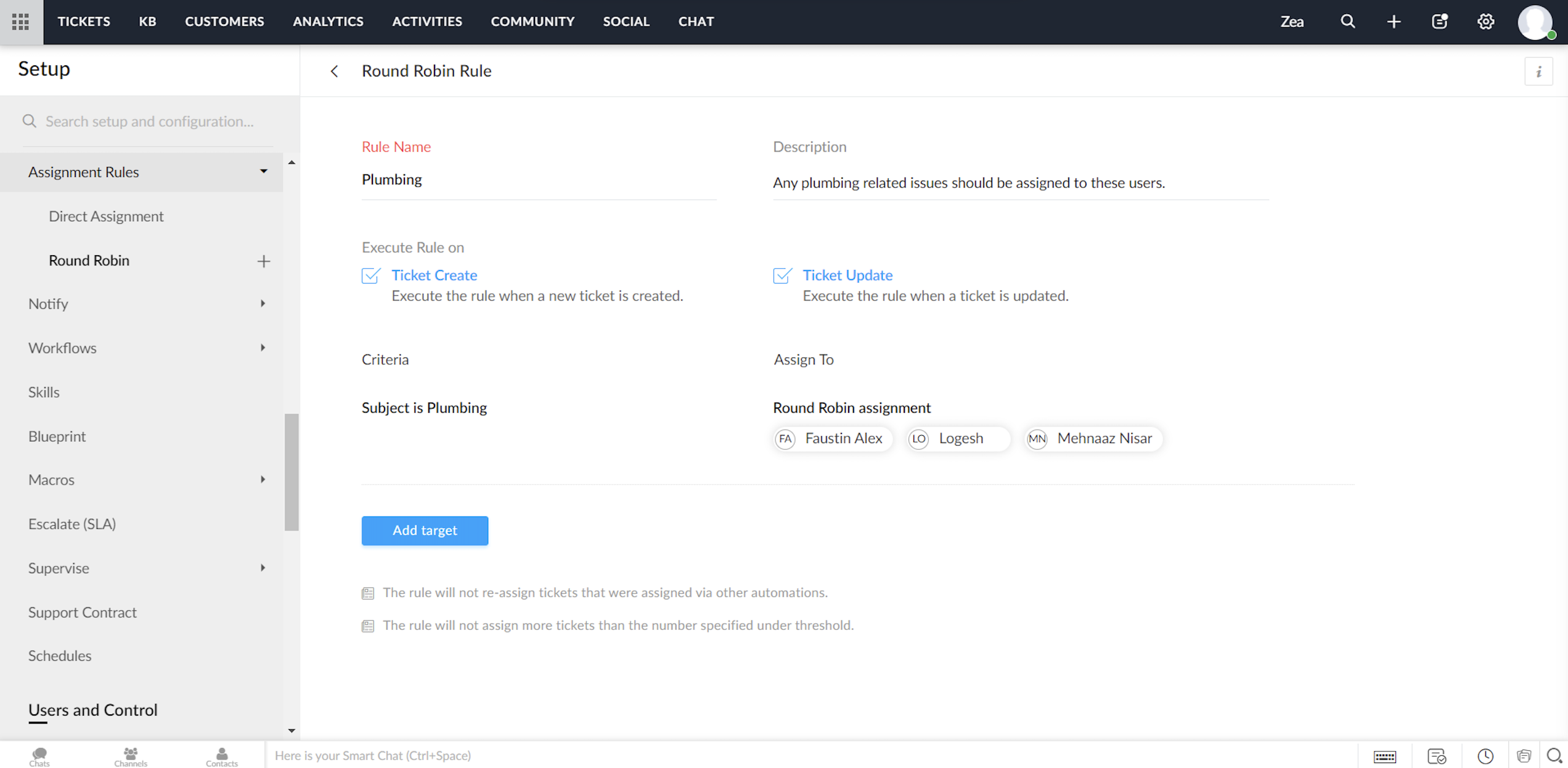
Round Robin
Round Robin is de eenvoudigste vorm van het automatisch toewijzen van tickets. Het verdeelt tickets/klachten gelijkmatig over al je agents op basis van het limiet dat je instelt. Met een minimale tussenkomst zorgt Round Robin ervoor dat geen enkel ticket niet wordt toegewezen. Ook zorgt de Round Robin regel ervoor dat de werkdruk van je agents in Zoho Desk in balans is. Dat wil zeggen, dat Tickets / Klachten eerst worden toegewezen aan de minst belaste agent.
Service Level Agreement (SLA)
Een Service Level Agreement, of SLA, is de servicestandaard die je hebt afgesproken om aan je klanten te leveren. De serviceovereenkomst geeft de responstijden en de oplostijden weer die door je medewerkers worden aangeboden. Meestal bevat een SLA de uitvoeringscriteria en een reeks vooraf bepaalde voorwaarden of doelstellingen. Terwijl de uitvoeringscriteria bepalen wanneer een SLA moet worden geactiveerd, bevat het doel de acties die zullen worden uitgevoerd op de trigger. Je kunt acties configureren zoals reactietijd, oplostijd, het sturen van escalaties, het opnieuw toewijzen van Tickets/Klachten en het bijwerken van de prioriteit.
Om te beginnen kunt je met Zoho Desk twee modellen van service level agreements volgen:
Je kunt SLA's maken voor individuele accounts in Zoho Desk
Je kunt een aantal SLA's maken (zoals Standard Support en Priority Support etc.) en deze delen over meerdere accounts.
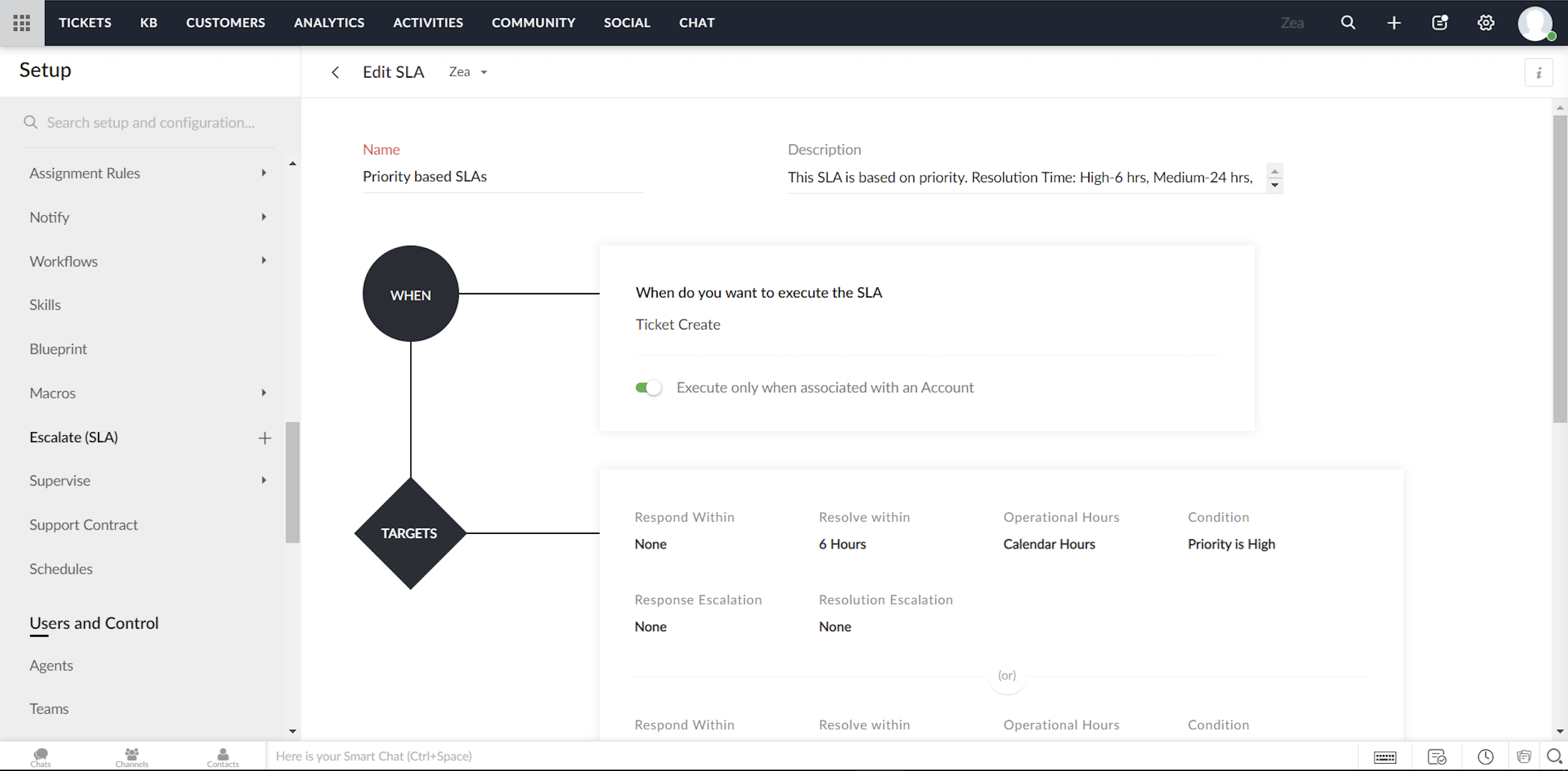
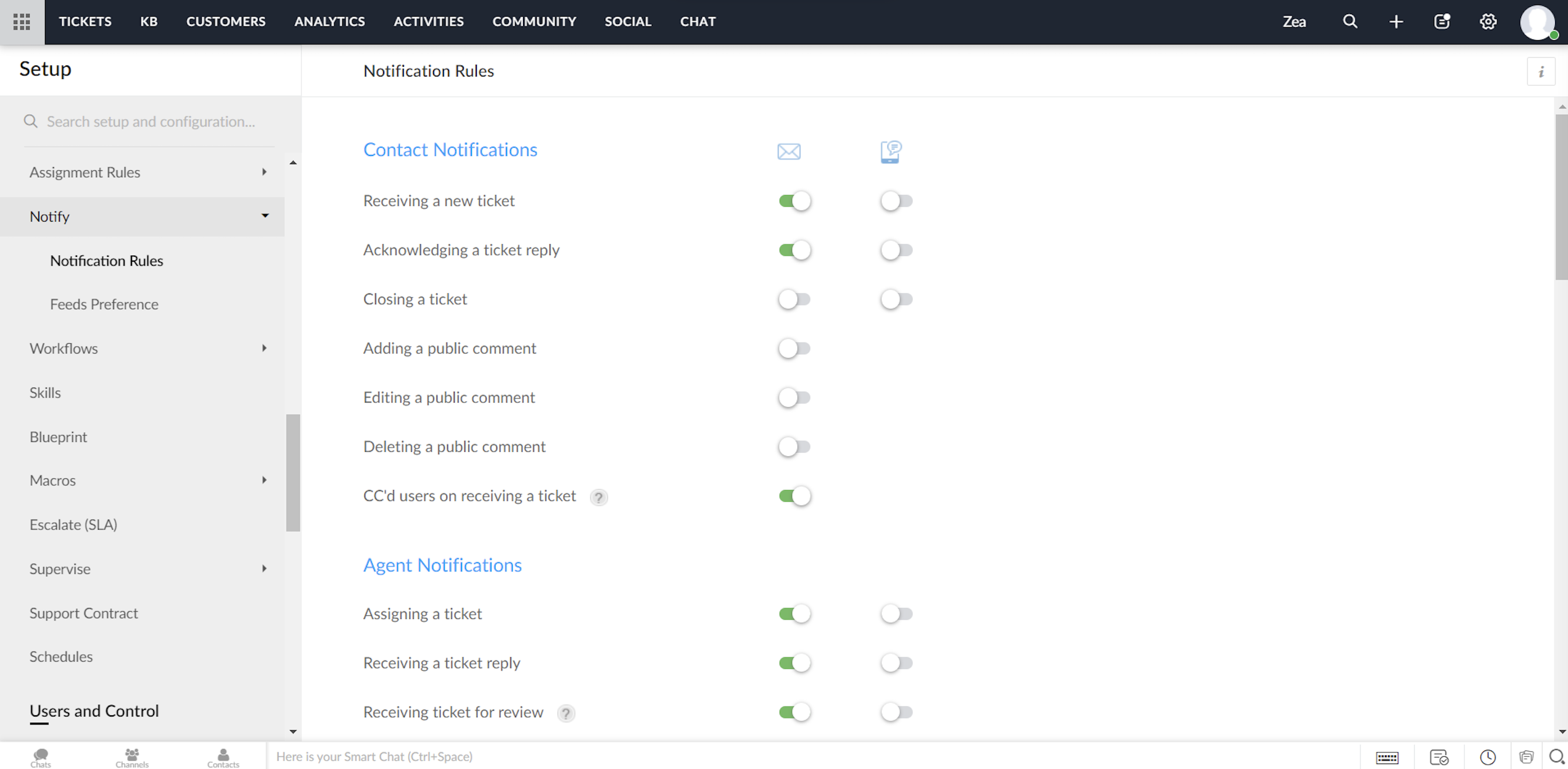
Zoho Desk biedt een standaardset meldingsregels die kunnen worden gebruikt om je klanten en agents te notificeren. Je kunt deze regels indien nodig activeren of deactiveren. Ook kunnen meldingen via e-mail of SMS worden verzonden.
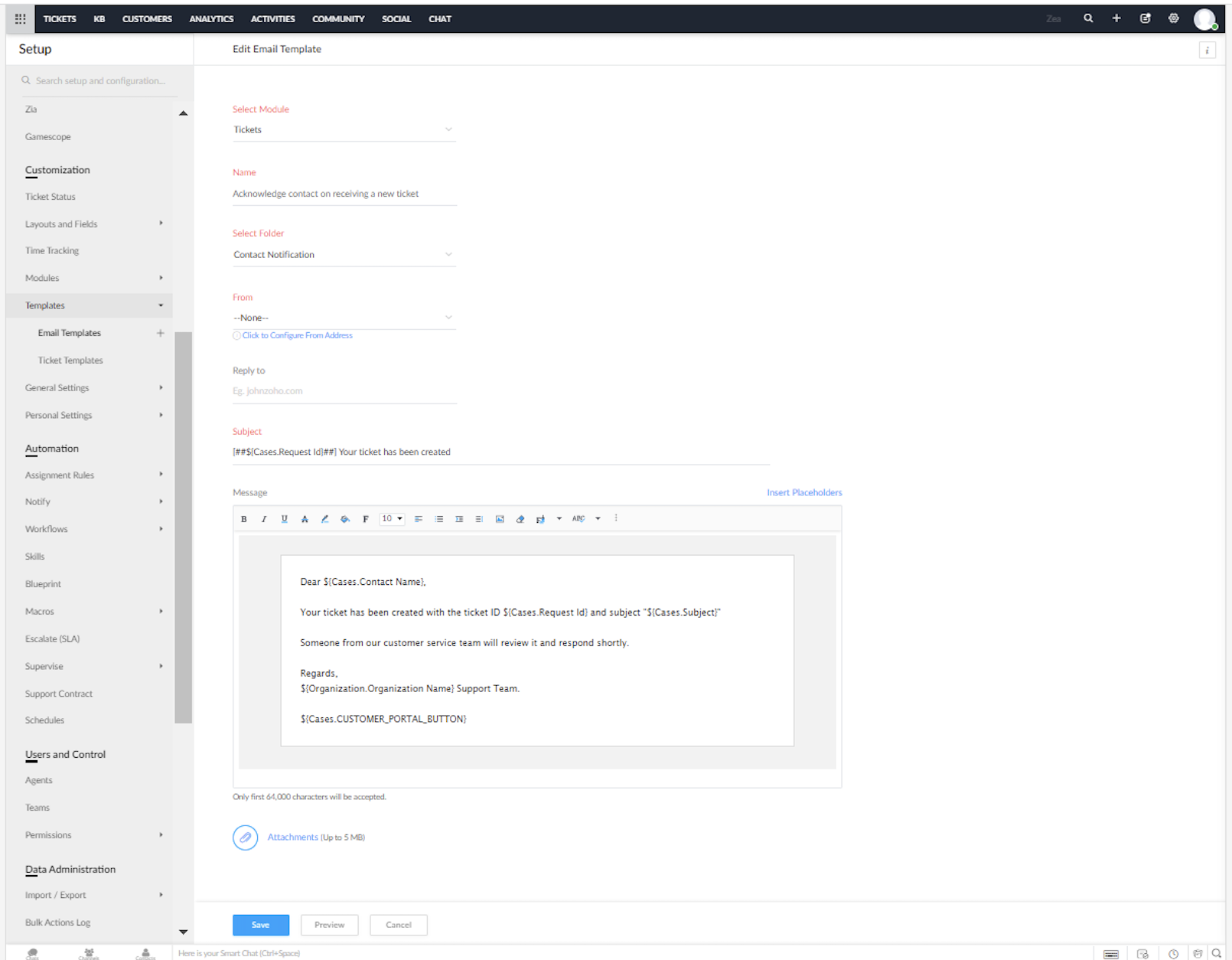
Je kunt de vooraf opgestelde e-mail en SMS sjablonen voor de meldingen in Zoho Desk aanpassen.
Heeft dit jou ook een beter beeld gegeven van het inzetten van Zoho Desk in combinatie met Zoho Forms? We lezen het graag in de opmerkingen hieronder.
Met vriendelijke groet,
Topic Participants
Sukhpreet Singh
Sticky Posts
Doe mee aan de Zoho Desk Meetup op 7 maart in Antwerpen
Beste Community leden, Wij nodigen jullie graag uit voor de Community Meetup van Zoho Desk! Op 7 maart komen we bij elkaar in Antwerpen, samen met een klant en de Zoho Experts van Brainsolutions. Onze experts zullen een live demo presenteren en jouw vragenDoe mee aan de Zoho Desk Meetup op 16 Februari in Utrecht
Beste Community leden, Wij nodigen jullie graag uit voor de Community Meetup voor Zoho Desk! Op 16 februari komen we bij elkaar in Utrecht, samen met Fleetkennis en de Zoho Expert van Mobile XL. Onze experts zullen een live demo presenteren en jouw vragenWat is er nieuw in Zoho Desk 2023
Beste Community leden, Hoeveel je ook van je klanten en je werk houdt, als klantenservice medewerker zul je zeker een aantal zware dagen tegenkomen. We hebben het dan over de dagen dat je een paar keer op de snooze-knop drukt, koffie morst op je favorieteTips & Tricks #10 Automatiseren met Zoho Desk Deel 2
In deel 1 van het automatiseren met Zoho Desk las je een use case over een probleem in een appartementencomplex en hoe dit door gebruik te maken van Zoho Forms en Zoho Desk kan worden opgelost. In deel 2 lees je meer over het integreren van Zoho FormsTips & Tricks #09 Automatiseren met Zoho Desk Deel 1
Beste Community leden, Zoals jullie weten hebben we in Nederland een woningtekort. Een oplossing hiervoor is de hoogbouw. Echter, om de de hoogte in te gaan moet er ook voor de juiste faciliteiten in flats worden gezorgd. Problemen kunnen we allemaal
Recent Topics
New UI in Zoho One CRM
Hello, Just switched to the new UI for Zoho One CRM, do not like it, especially the search functions. What are the steps to backstep to the previous UI? UPDATE: I found it.App like Miro
Hi all, is there a way to have a interactive whiteboard like in Miro? We want to visualize our processes and workflows in an easy way.Important updates to your connectors
Hello everyone, Greeting from Zoho Creator! We're excited to announce that we'll be rolling out significant backend updates to Zoho Creator's built-in connectors to enhance security by following the latest frameworks. The existing version of some of theProduct Request: Send email to Secondary email
Guys, we should be able to send the campaign to the secondary email too. Is this on the plans for Zoho Campaign? It looks like I can map the secondary email from the CRM to the Campaigs, but can not send the message.Logic for sending to a non-primary email address
Hi, I have a scenario where contacts are able to sign up for emails with 2 different email addresses (example: work, personal). I've mapped both to Campaigns from Zoho CRM, but when I go to target an email only the primary email addresses are pulling in. How can I update this to look at both of the email addresses - or specifically the secondary email address in Campaigns? Thanks, JennyHow Do Mutliple Sales People Prospect in the "LEADS" module without calling the same leads?
We have 4 sales reps and the Leads module does not have real time intuitive knowlodge to make the sales rteps dont call the same people at the same time. How can we crate a fluent prospecting sytem where the salres reps can go out bound without callingKeeping track of project expenses
I have talked to a few support techs and it is very hard for me to believe that Zoho's project accounting software can't keep accounts for my projects. I must not understand what they're saying. We get a contract to build something. So the project revenueMailbox delegation - A secure way to enable collaboration
Admins often encounter scenarios where a user needs another team member to access and manage their mailbox during extended leave, role transitions, or while handling high email volumes. In such situations, ensuring business continuity without sharingCanvas View bug
I would like to report a bug. When clone a canvas view from an existing canvas view, if the original canvas view have canvas button with client script. Then the new create canvas view will have canvas button, it is make sense. But when I try to deleteExport blueprint as a high-resolution PDF or image file
This would be a good feature for organizations that want to share the blueprint process with their employees but don't want them to have access to the blueprint in the system settings. At the moment all that users can do is screenshot the blueprint orZoho Recruit Community Meetup - London 🇬🇧 (Venue Finalised)
Hello Recruiters! We’re excited to announce that the Zoho Recruit team is coming to the UK for an in-person Zoho User Group (ZUG) Meetup in London! This is your chance to connect with fellow Zoho users, learn from experts, and walk away with actionableUsers may not pick the fields to be shown as columns in the Choose Account window when creating a new Deal record
Hi there, by talking with other users I found out that I, as an Admin, am the only one who can pick fields to be shown as columns in the Choose Account window when creating a new Deal record. In fact, if other users click on the "Add Column" symbol onCreate custom rollup summary fields in Zoho CRM
Hello everyone, In Zoho CRM, rollup summary fields have been essential tools for summarizing data across related records and enabling users to gain quick insights without having to jump across modules. Previously, only predefined summary functions were【参加無料】東京 Zoho ユーザ交流会 NEXUS ー AI エージェント (Zia Agents)の活用事例 / CRMで実現するマーケティング業務効率化
ユーザーの皆さま、こんにちは。コミュニティチームの藤澤です。 3月27日(金)に東京、新橋で「東京 Zoho ユーザー交流会 NEXUS」を開催します! ーーーーーーーーーーーーーーーーーーーーーーーーーーーーーーーーーーーー ✒️申し込みはこちらから:https://www.zohomeetups.com/tokyo2026vol1#/?affl=communityforumpost2 ーーーーーーーーーーーーーーーーーーーーーーーーーーーーーーーーーーーー ★参加のおすすめポイント ✅ AIエージェント(Zia)のリアルに使える実例を知るOne Support Email Managed By Multiple Departments
Hello, We use one support email (support@company.com). Incoming emails come to the "Support Department" and based on what the customer is asking, we route that ticket to different departments (billing, technical support, etc.). When users in these differentError AS101 when adding new email alias
Hi, I am trying to add apple@(mydomain).com The error AS101 is shown while I try to add the alias.ZOHO.CRM.UI.Record.open not working properly
I have a Zoho CRM Widget and in it I have a block where it will open the blocks Meeting like below block.addEventListener("click", () => { ZOHO.CRM.UI.Record.open({ Entity: "Events", RecordID: meeting.id }).catch(err => { console.error("Open record failed:",Python - code studio
Hi, I see the code studio is "coming soon". We have some files that will require some more complex transformation, is this feature far off? It appears to have been released in Zoho Analytics already🚀 WorkDrive 6.0 (Phase 1): Empowering Teams with Content Intelligence, Automation, Accessibility, and Control
Hello, everyone! WorkDrive continues to evolve from a robust file management solution into an intelligent, secure, and connected content collaboration platform for modern businesses. Our goal remains unchanged: to simplify teamwork, strengthen data security,Introducing Workqueue: your all-in-one view to manage daily work
Hello all, We’re excited to introduce a major productivity boost to your CRM experience: Workqueue, a dynamic, all-in-one workspace that brings every important sales activity, approval, and follow-up right to your fingertips. What is Workqueue? SalesZoho Commerce
Hi, I have zoho one and use Zoho Books. I am very interested in Zoho Commerce , especially with how all is integrated but have a question. I do not want my store to show prices for customers that are not log in. Is there a way to hide the prices if notSupport Custom Background in Zoho Cliq Video Calls and Meetings
Hello Zoho Cliq Team, We hope you are doing well. We would like to request an enhancement to the video background capabilities in Zoho Cliq, specifically the ability to upload and use custom backgrounds. Current Limitation At present, Zoho Cliq allowsUpload own Background Image and set Camera to 16:9
Hi, in all known online meeting tools, I can set up a background image reflecting our corporate design. This doesn't work in Cliq. Additionally, Cliq detects our cameras as 4:3, showing black bars on the right and left sides during the meeting. WhereISO 27001 Compliance
What are people doing to ensure ISO 27001 compliance for their Zoho environments? It would make sense for Log360 Cloud to integrate natively with the Zoho suite, but that is not the case. It requires a gateway cluster, which is not an option for a fullyZoho People - Retrieve the Leave Details - get("LeaveCount")
Hi, Zoho People I need to collect all of an employee's leave requests for the calendar year and check how many half-days they have taken. If I run the script on the query he just modified, I can retrieve the information related to that query and use theWhat's new in Zoho Sheet: Simplify data entry and collaboration
Hello, Zoho Sheet community! Last year, our team was focused on research and development so we could deliver updates that enhance your spreadsheet experience. This year, we’re excited to deliver those enhancements—but we'll be rolling them out incrementallyMarketer's Space: New to Campaigns? Some common early mistakes that might occur
Hello Marketers, Welcome back to another post in Marketer's Space. If you're just getting started with Zoho Campaigns, things can feel exciting and slightly confusing at the same time. You're not alone. Most early frustrations come from setup gaps ratherThis user is not allowed to add in Zoho. Please contact support-as@zohocorp.com for further details
Hello, Just signed up to ZOHO on a friend's recommendation. Got the TXT part (verified my domain), but whenever I try to add ANY user, I get the error: This user is not allowed to add in Zoho. Please contact support-as@zohocorp.com for further details I have emailed as well and writing here as well because when I searched, I saw many people faced the same issue and instead of email, they got a faster response here. My domain is: raisingreaderspk . com Hope this can be resolved. Thank youWorkflow Rule - Field Updates: Ability to use Placeholders
It will be great if you can use placeholder tags to update fields. For example if we want to update a custom field with the client name we can use ${CONTACT.CONTACT_FIRSTNAME}${CONTACT.CONTACT_LASTNAME}, etcNeed a Universal Search Option in Zohobooks
Hello Zoho, Need a Universal Search Option in Zohobooks to search across all transactions in our books of accounts. Please do the needful ThanksImplement Date-Time-Based Triggers in Zoho Desk
Dear Zoho Desk Support Team, We are writing to request a new feature that would allow for the creation of workflows triggered by specific date-time conditions. Currently, Zoho Desk does not provide native support for date-time-based triggers, limitingWhy is my Lookup field not being set through Desk's API?
Hello, I'm having trouble setting a custom field when creating a Ticket in Zoho Desk. The endpoint I'm consulting is "https://desk.zoho.com/api/v1/tickets" and even though my payload has the right format, with a "cf" key dedicated to all custom fields,How exactly does "Reply assistance" work in Zoho Desk? What context is sent to the LLM?
Hi, Im trying to better understand the technical behavior of the feature "Reply assistance" in Zoho Desk, and I couldn’t find detailed information in the current documentation. Specifically, I have questions about what data is actually being sent to theDeletion Workflows
Hello, Unless I missed it, we can't create deletion workflows. My usecase is to auto-delete junk leads. We have field called lead status, and an agent qualify all our new leads. When it's a junk lead she chose the correspondant value in the picklist. My goal is that the system delete them automatically. Is that possible? Planed ?URGENTImpossible to book an appointement
J'essaie plusieurs fois mais aucun créneau n''est disponible Message d'erreur lorsque j'essaie de sélectionner une dateSendpulse SMTP/IMAP Issues
It’s possible Zoho made some changes on their side. Sometimes, even if your regular password works, Zoho requires an app-specific password for external apps like SendPulse to connect via IMAP. You can create this in Zoho’s security settings and use itInsane mail security
I cannot access my email... anywhere. For some reason the password for the Mail app on my Mac is being rejected, it worked yesterday but now it doesn't? Ok let's try the web interface. I can access my general Zoho login with the password but if I wantUI issue with Organize Tabs
When looking at the organize Tabs window (bellow) you can see that some tabs are grayed out. there is also a "Add Module/Web Tab" button. When looking at this screen it's clear that the grayed out tabs can not be removed from the portal user's screenTask list flag Internal/External for all phases
Phases are commonly used in projects to note milestones in the progression of a project, while task lists can be used to group different types of tasks together. It makes sense to be able to define a task list as either internal or external however theHAVING PROBLEM WITH SENDING EMAIL
Hi all, I'm unable to receive emails on info@germanforgirls.eu. I'm getting an error code 550. 5.1.1. invalid email recipients. Moreso, I would like info@germanforgirls.eu to be the default "send from" email and not solomon@germanforgirls.eu. Kindly seeNext Page