Zoho Creator Upcoming Updates — May 2023
Hello everyone!
We're back with more monthly updates after a short hiatus. During that time, we've been hard at work improving the user experience and adding new features to our platform. Today, we're pleased to announce a wide range of fascinating new features.
-
Portal session timeout
-
Advanced email analytics
-
Double-check before form submission
-
Import huge CSV files
- Logged-in user connections
-
Cancel button in the edit record
-
Composite fields—link names of subfields
- - - - - - - - - -
Portal session timeout
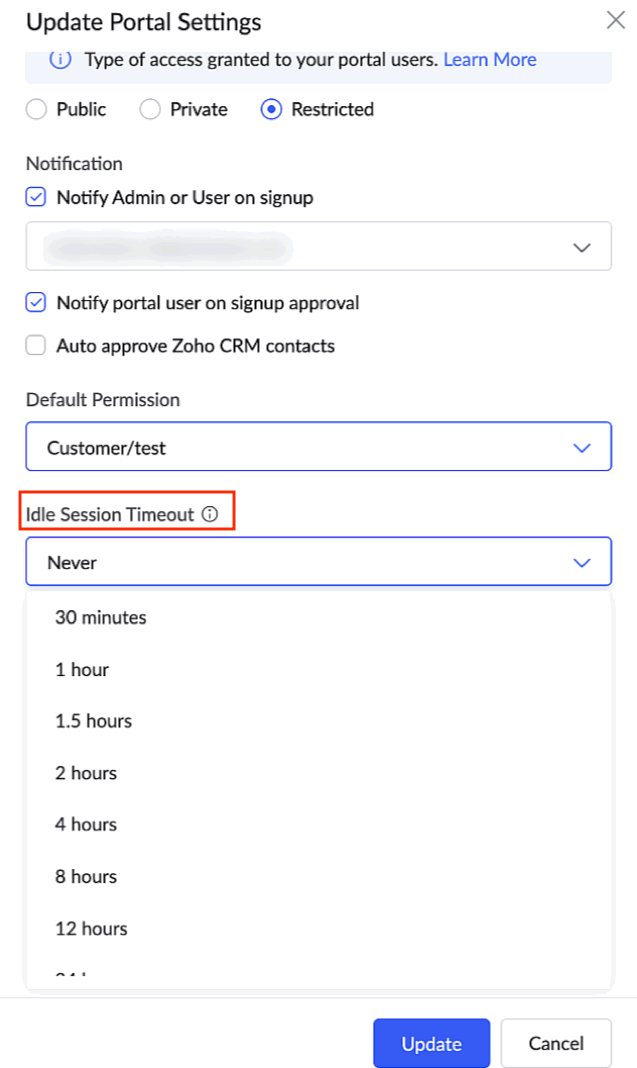
Idle session timeout is the amount of time a portal user can remain idle before the session is ended. Until now, there wasn't an option to manage session timeouts in your portals.
Now, with the aim to safeguard your portal users' accounts from potential misuse and security threats, we're giving you an option to set your own custom time out, which will determine when a session should be terminated after detecting users' portal inactivity.
Currently, portal users aren't signed off even if they stay inactive over time. Going forward, you can choose the portal timeout to be 30 minutes, 1 hour, 2 hours, 4 hours, 8 hours, 12 hours, 24 hours, or Never, which will be the default option.
What should I do?
For C6:
-
Navigate to
Portal > [Required portal] > Settings.
-
Under the Idle session timeout dropdown, choose the time from the available options.
For C5:
-
Navigate to Application Settings > Customer Portal > Settings.
- Under the Idle session timeout dropdown, choose the time from the available options.
How do I benefit?
The portal session timeout helps you augment the security of your portal users and your organization. As a portal administrator, you can take responsibility for enhancing your portals' security by preventing unauthorized access and reducing exposure to data breaches.
Applicable for:
C5, C6
Availability:
All DCs
Released on: 30-May-2023
Reference: Manage Portal Settings
- - - - - - - - - -
Advanced email analytics
In Zoho Creator, emails are sent using workflows for different transactional purposes. These advanced email analytics, provided by Zoho's own email analytic platform, ZeptoMail, will allow you track the performance of the emails that were triggered from your Creator account. You'll gain valuable insights and key metrics, such as detailed email logs, recipient activity tracking, real-time notifications, and more.
You can also view detailed reports on engagement, behavior, and email performance over time. Real-time tracking will help you stay up to date on how well your emails are performing.
Further, you can quickly identify and resolve any issues with your emails. Using the insights gathered, you can improve your email practices, optimize overall email management strategy, and ensure superior email deliverability.
What should I do?
-
Navigate to
Operations > Email Management > Email Analytics.
- Connect your ZeptoMail account to view the email analytics.
How do I benefit?
Stay informed about emails sent from your Creator account with across-the-board information on valuable email metrics, and drive better results for your business.
Applicable for:
C6
- - - - - - - - - -
Double check before form submission
One drawback with forms is that hitting the Enter key triggers the submission of the form. However, this behaviour isn't desirable in numerous scenarios, especially when there are a large number of fields in the form. The user may have intended to move to the next field, but when they click the Enter key, the partially filled form would be submitted.
Now, with the purpose of reducing errors, increasing accuracy, saving time, and providing you peace of mind, we've come up with a solution to this long-running problem. Going forward, we'll be displaying a pop-up asking for confirmation when the enter key is clicked.
What should I do?
Nothing! With this new update, Creator Forms will be smart enough to analyze your usage patterns and display the confirmation pop-up only when you use your keyboard to navigate within the form. Users who use a mouse or touch-pad to navigate will not be shown the pop-up. This ensures a win-win proposition for all.
How do I benefit?
This double check before submission is a simple, yet effective solution that not only prevents accidental submissions, it also adds an additional layer of security for your users, and ensures a smoother user experience.
Applicable for:
C5, C6
Availability:
All DCs
Released on: 07-Jun-2023
- - - - - - - - - -
Import huge CSV files
Enhancing Zoho Creator's ability to handle large datasets, we'll soon be rolling out support to import huge CSV files (up to 2GB) while creating an application, creating a form, or importing data to reports. We believe this new capability will help improve productivity and, more importantly, save time because you won't have to split your data into smaller files.
It's important to note that importing such large CSV files can be resource-intensive, and because it may take a significant amount of time we recommend that you don't edit the application while the import process is underway. Consequently, we'll also be launching a new "Recent imports" section, from where you can track the import progress.
What should I do?
Simply upload your (huge) CSV file like you normally would, and Creator will take care of the rest. It's that easy!
How do I benefit?
Support for large CSV files can help users work more efficiently, accurately, and flexibly with data, providing you with the ability to process that data to extract relevant and valuable information for your business.
Applicable for:
C5, C6
Availability:
All DCs
Released on: 23-Jun-2023
Reference: Create application by importing data, Create form by importing data and Import data to reports
- - - - - - - - - -
Logged-in user connections
Connections in Creator help you build bridges with different applications or services. However, as of this time, the connections can only be authorized by those with administrative privileges (super admins, admins, and developers). Now, with aim of empowering users, compartmentalizing information, and enhancing governance, we'll be allowing both live users or logged-in users to authenticate connections with third-party services from within the live applications they're accessing. We believe this will offer improved potential and additional rights to users over Creator App modules.
Going forward, during the process of creating a connection, we'll introduce a new option called "Who can authorize?" with two choices: Administrators only and Logged-in users.
How do I benefit?
The new logged-in user connections will result in increased security, better privacy control, and an improved user experience while working with connections with various third-party services.
Applicable for:
C6
Availability:
All DCs
Released on: 17-Jul-2023
Released on: 17-Jul-2023
Reference: Understand logged-in user connections
- - - - - - - - - -
Cancel button behavior change
A known limitation while editing records in Creator forms was that the "Cancel" button becomes non-functional in some scenarios—such as when they were opened in a new or the same window and when they were opened using a i-frame. This limitation was a minor blemish on an otherwise seamless user experience while working with Creator forms.
Now, we've managed to overcome this restriction, and soon the cancel button will be fully functional in all circumstances. While editing a record from the same window, if you click cancel, you'll be taken to the calling page. While editing a record from a new window, clicking the cancel button will close the tab.
How do I benefit?
The new behavior will provide an improved user experience as they help your users avoid being stuck in a stale position or losing their progress.
Applicable for:
C5, C6
Availability:
All DCs
- - - - - - - - - -
Composite fields: Link names of subfields
Currently, the link names of the subfields of composite fields, such as name and address, are appended with an incrementing number as we keep adding multiple fields of the same type in a form. For example, if you've added two address fields in the same form, then the link names for the subfields of the second field will be address_line_12, address_line_22, and so on.
We're fixing this now, so that the link names remain the same for all of the subfields, irrespective of the number of fields of the same type. In other words, if you have more than one address field in the same form, then the link names for the subfields of the remaining address fields will be address_line_1, address_line_2, and so on. This fix is aimed at improving the readability and subsequent usage of link names in these fields.
Notes
-
DC migration will be done from our end to update the subfields' link names, and we'll keep you updated about the progress (migration date and its status).
- Common link names will be used for the subfields of any newly added composite field and also for new Creator signups.
We request that users who have used custom link names make note of the following changes:
-
After migration, API requests that contain custom link names for subfields will not work. Instead, you can use their common link names. If you're using Creator Meta APIs to get the subfield link names, then the link name will be automatically changed once the migration is completed.
- If you've used custom link names for subfields anywhere in your app (manually), they won't work post-migration. In such cases, the custom link name should be replaced with the common link name. For example, consider the below cases:
- Using a composite subfield as a query parameter in:
- Form access URL
- Redirect to (website URL)
- OpenURL (Deluge)
- Using a composite subfield in ZML snippets: The existing ZML snippet component will break, because we don't process a ZML snippet unless it's accessed live.
Applicable for:
C5, C6
Availability:
All DCs
- - - - - - - - - -
That's it from us for the month of May 2023. We'll notify you as these new features are rolled out. In the meantime, let us know what you think about these updates in the comments below!
And finally, thank you for your continued support, and we look forward to bringing you more updates soon.
Regards,
The Zoho Creator Team
Topic Participants
Ashwin Vishal R
Piyush Goyal
Maeco - Davide
CyberNX Communications
Faruk Remane
Sticky Posts
Introducing Zoho Creator's 2025 Release Projection 2
Hello Creators! I'm Prakash, from the Creator product management team, and today I'm delighted to unveil our next set of features as part of Release Projection 2 for 2025. With thoughtful analysis and planning, we've curated powerful new capabilitiesZoho Creator - 2023 Release Projection 1
Hello everyone! A very Happy New Year to you and your family. Hope you're all good and having a great time using Zoho Creator to make your lives easier and your businesses prosper. 2022 was an action-packed year for us at Creator, and we hope to continueZoho Creator User Group meetups in a city near you! - Oct - Nov, 2023
Greetings from the Zoho Creator team! We're hosting a series of Zoho Creator meetups in various cities across the globe, and we'd love to meet you there! Our meetups are a great opportunity to network with industry peers, exchange ideas and best practices,Zoho Creator - 2023 Release Projection 2
Hello everyone! Time truly flies when you're having an incredible journey, and today we mark the completion of an eventful and action-packed six months. It feels like just yesterday when we embarked on this adventure together with the launch of our newUpcoming Updates - August 2022
Hi all, Greetings from the Zoho Creator team! Today we've got news for you on some exciting updates. And rest assured— there’s more to come! In this post, we'll be going over the upcoming features and improvements for this month as mentioned below. A
Recent Topics
The Social Playbook - January edition: Getting started with content creation
Social media isn’t just about posting some random content. It’s about why certain content works, how brands stand out, and what makes people pause mid-scroll. The Social Playbook is a monthly community series where we break all of that down. Through realSupport for Custom Fonts in Zoho Recruit Career Site and Candidate Portal
Dear Zoho Recruit Team, I hope you're doing well. We would like to request the ability to use custom fonts in the Zoho Recruit Career Site and Candidate Portal. Currently only the default fonts (Roboto, Lato, and Montserrat) are available. While theseAdding bank details to the contact through API
How to add bank-related information to the contact while creating it using API? The account number needs to be encrypted before sending it through API but not sure how to encrypt and get those values. Please guide me in this.CRM x WorkDrive: We're rolling out the WorkDrive-powered file storage experience for existing users
Release plan: Gradual rollout to customers without file storage add-ons, in this order: 1. Standalone CRM 2. CRM Plus and Zoho One DCs: All | Editions: All Available now for: - Standalone CRM accounts in Free and Standard editions without file storageFont breakage in Zoho Mail Desktop Lite application for Mac
Dear Zoho Mail and Workplace Community, With the latest update of macOS Sequoia and macOS Tahoe, there has been font breakages in the email preview of Zoho Mail Desktop Lite application for Mac. This breakage is due to the corruption of the System fontsFeature request - image resizing on sales orders
I need to be able to show the items on the sales orders, currently the item image shows really small and no way to resize it, need the ability to make the image larger to showcase the product on the pdfsMail Merge is not working properly as far as the AUTOMATE section is concerned
Hi there, I created a Mail Merge template for the Deal module. I would like Deal owners to mail merge their Deal records, download the Mail Merge document as a Word doc and make a few changes before sending it to the customer. Thing is, neither the "MergeWhat's new in Zoho Sheet: Simplify data entry and collaboration
Hello, Zoho Sheet community! Last year, our team was focused on research and development so we could deliver updates that enhance your spreadsheet experience. This year, we’re excited to deliver those enhancements—but we'll be rolling them out incrementallyNueva edición de "Ask The Expert" en Español Zoho Community
¡Hola Comunidad! ¿Te gustaría obtener respuestas en directo sobre Zoho CRM, Zoho Desk u otra solución dentro de nuestro paquete de CX (Experiencia del Cliente? Uno de nuestros expertos estará disponible para responder a todas tus preguntas durante nuestraAutomation Series: Auto-Notify External Users on Issue Closure
Hello Folks! In Zoho Projects, you can notify external issue reporters via email when an issue is marked as Closed. This helps the users avoid manual follow-ups and keeps the reporter updated. In this post, we’ll walk through a simple setup using a WebIssue with open-rate reporting in Zoho Campaigns
Hello, Since yesterday I’ve been experiencing an issue with the open-rate reports in Zoho Campaigns. The campaigns I send appear in the reports as if none of the emails have been opened, even though I know they have. To verify this, I replicated the campaignTurn chat conversations into real action with Integration Blocks in Guided Conversations
When a Guided Conversation fails, it's usually not because the logic is wrong. They fail because the conversation stops moving. A customer starts a chat with a clear goal: report an issue, check a status, or confirm something. At first, the flow doesBasic Mass Update deluge schedule not working
I'm trying to create a schedule that will 'reset' a single field to 0 every morning - so that another schedule can repopulate with the day's calculation. I thought this would be fairly simple but I can't work out why this is failing : 1) I'm based inclick to call feature
I've Zoho CRM and in that i want click to call feature.We Asked, Zoho Delivered: The New Early Access Program is Here
For years, the Zoho Creator community has requested a more transparent and participatory approach to beta testing and feature previews. Today, I'm thrilled to highlight that Zoho has delivered exactly what we asked for with the launch of the Early AccessFrom Zoho CRM to Paper : Design & Print Data Directly using Canvas Print View
Hello Everyone, We are excited to announce a new addition to your Canvas in Zoho CRM - Print View. Canvas print view helps you transform your custom CRM layouts into print-ready documents, so you can bring your digital data to the physical world withCan the Product Image on the Quote Template be enlarged
Hello, I am editing the Quote Template and added ${Products.Product Image} to the line item and the image comes up but it is very tiny. Is there anyway that you can resize this to be larger? Any help would be great! ThanksCreating Parent Child relationship in Accounts
We have customers with multiple locations, I setup the HQ as an account, then I setup the different sites marking the HQ as the parent to that location. If I then do a Deal for one of the locations, is there a way to show by looking at the parent accountLearner transcript Challenges.
Currently i am working on a Learner Transcript app for my employer using Zoho Creator. The app is expected to accept assessment inputs from tutors, go through an approval process and upon call up, displays all assessments associated with a learner inClient and Vendor Portal
Some clients like keeping tabs on the developments and hence would like to be notified of the progress. Continuous updates can be tedious and time-consuming. Zoho Sprints has now introduced a Client and Vendor Portal where you can add client users and#7 Tip of the week: Delegating approvals in Zoho People
With Zoho People, absences need not keep employees waiting with their approval requests. When you are not available at work, you can delegate approvals that come your way to your fellow workmate and let them take care of your approvals temporarily. Learn more!Admin Tip: Manage sub-domain emails using sub-domain stripping
As an admin, you may need separate domains for different departments such as sales, support, and marketing. While this approach offers flexibility, creating and managing multiple domains can quickly become overwhelming, especially since each domain requiresQuick Copy Column Name
Please add the ability to quickly copy the name of a column in a Table or Query View. When you right-click the column there should be an option to copy the name, or if you left-click the column and use the Ctrl+C keyboard shortcut it should copy theAbility to Edit YouTube Video Title, Description & Thumbnail After Publishing
Hi Zoho Social Team, How are you? We would like to request an enhancement to Zoho Social that enables users to edit YouTube video details after the video has already been published. Your team confirmed that while Zoho Social currently allows editing theHow do I remove a data source from Zoho Analytics?
I am unable to find a delte option on a datasource that i put in the system as an error. On teh web it refers to a setup icon but I do not see that on my interface?Add Employee Availability Functionality to Zoho People Shift Module
Hello Zoho People Product Team, Greetings and hope you are doing well. We would like to submit a feature request to enhance the Zoho People Shift module by adding employee availability management, similar to the functionality available in Zoho Shifts.Bigin, more powerful than ever on iOS 26, iPadOS 26, macOS Tahoe, and watchOS 26.
Hot on the heels of Apple’s latest OS updates, we’ve rolled out several enhancements and features designed to help you get the most from your Apple devices. Enjoy a refined user experience with smoother navigation and a more content-focused Liquid GlassReally want the field "Company" in the activities module!
Hi team! Something we are really missing is able to see the field Company when working in the activities module. We have a lot of tasks and need to see what company it's related to. It's really annoying to not be able to see it.🙈 Thx!Delay in rendering Zoho Recruit - Careers in the ZappyWorks
I click on the Careers link (https://zappyworks.zohorecruit.com/jobs/Careers) on the ZappyWorks website expecting to see the job openings. The site redirects me to Zoho Recruit, but after the redirect, the page just stays blank for several seconds. I'mIs Desk Down?
Across department - always an error. [Status Mode] - error [Table View and the rest] - workingHow do I change the wording of the tile of SignForm?
When my user opens a SignForm url, the title that is presented is always "SignForm signer Information" and a form is displayed asking for the username and email address. This can be confusing to the end user. How can I change the title at least (Or atHow to link tickets to a Vendor/Vendor Contact (not Customer) for Accounting Department?
Hi all, We’re configuring our Accounting department to handle tickets from both customers and vendors (our independent contractors). Right now, ticket association seems to be built around linking a ticket to a Customer / Customer Contact, but for vendor-originatedProblem with CRM Connection not Refreshing Token
I've setup a connection with Zoom in the CRM. I'm using this connection to automate some registrations, so my team doesn't have to manually create them in both the CRM and Zoom. Connection works great in my function until the token expires. It does not refresh and I have to manually revoke the connection and connect it again. I've chatted with Zoho about this and after emailing me that it couldn't be done I asked for specifics on why and they responded. "The connection is CRM is not a feature toAutomatic Matching from Bank Statements / Feeds
Is it possible to have transactions from a feed or bank statement automatically match when certain criteria are met? My use case, which is pretty broadly applicable, is e-commerce transactions for merchant services accounts (clearing accounts). In theseClone Recurring Expenses
Our bookkeeping practices make extensive use of the "clone" feature for bills, expenses, invoices, etc. This cuts down significantly on both the amount of typing that needs to be done manually and, more importantly, the mental overhead of choosing theUnify Overlapping Functionalities Across Zoho Products
Hi Zoho One Team, We would like to raise a concern about the current overlap of core functionalities across various Zoho applications. While Zoho offers a rich suite of tools, many applications include similar or identical features—such as shift management,Automation #7 - Auto-update Email Content to a Ticket
This is a monthly series where we pick some common use cases that have been either discussed or most asked about in our community and explain how they can be achieved using one of the automation capabilities in Zoho Desk. Email is one of the most commonlyTicket to article and Ticket to template
Hello! I would like to know if it is possible (and how) to do the following actions: 1. To generate an article from a ticket (reply + original message) 2. Easy convert an answer to an email templateIs there API Doc for Zoho Survey?
Hi everyone, Is there API doc for Zoho Survey? Currently evaluating a solution - use case to automate survey administration especially for internal use. But after a brief search, I couldn't find API doc for this. So I thought I should ask here. ThanWindows Desktop App - request to add minimization/startup options
Support Team, Can you submit the following request to your development team? Here is what would be optimal in my opinion from UX perspective: 1) In the "Application Menu", add a menu item to Exit the app, as well as an alt-key shortcut for these menusNext Page