Actions API - Webhooks APIs - Part 1

Webhooks in Zoho CRM
Use case
Configuring Webhooks for Zylker’s Use Case - UI Method
- Go to Setup
- Navigate to Automation
- Choose Actions -> Webhooks
- Click Configure Webhook
 Webhook - UI view
- Basic fields to configure Webhook.
- Configuring Headers
- Configuring Body
Filling the basic Webhook details via UI
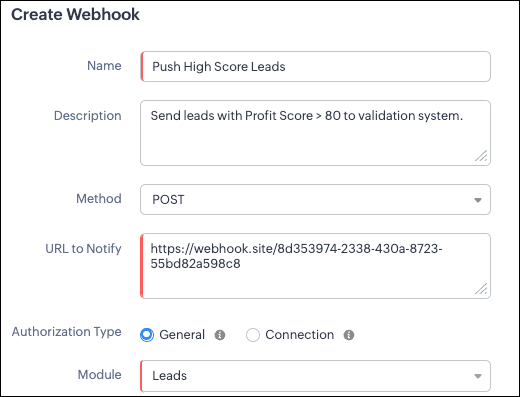
Filling the basic Webhook details via Create Webhook API
{ "webhooks": [ { "name": "Push High Score Leads", "description": "Send leads with Profit Score > 80 to validation system.", "module": { "api_name": "Leads", "id": "5725767000000002175" }, "authentication": { "type": "general" }, "http_method": "POST" } ] } |
Keys explanation
- name (mandatory): Name of your webhook.
- description: Add a short note about what this webhook does.
- module (mandatory): Select the module from where the external application listens the changes. In our case, select Leads module to push high-score leads.
- url (mandatory): Specify the external endpoint where CRM will send the data. This lets the external application see what CRM sends.
- Note: In this post, we have used an endpoint from Webhook.site
- authentication (mandatory): Specify authentication type for the webhook endpoint.
- Possible types:
- general: The receiving system does not require OAuth. You can pass OAuth tokens manually in headers.
- connections:
- OAuth-based integrations: Systems that use Zoho’s Connections.
- For our Zylker use case, we select General.
- http_method (mandatory): Select a HTTP method that allows you to send structured data.
HTTP Method | Headers | Body | URL Parameters |
POST |
| Type: form-data | Not Supported |
PUT |
| Type: form-data | Not Supported |
GET | Not Supported | Not Supported |
|
DELETE | Not Supported | Not Supported |
|
Creating a Webhook with Headers, Body, and URL Parameters
- Headers
- Body (Form-Data or Raw)
- URL Parameters
Configuring Headers
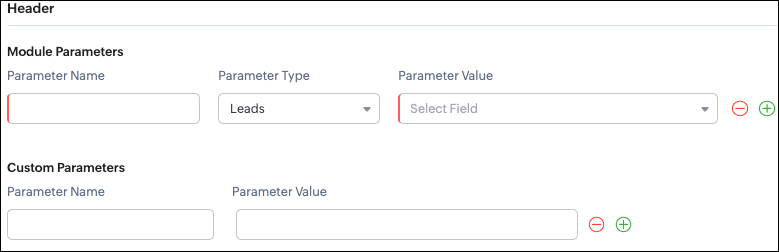
Headers allow you to send extra information along with your webhook request. These help when the external app needs extra data like auth tokens or CRM field values.
- Module Parameters - Dynamic values from CRM fields
- Custom Parameters - Static values you define
- Parameter Name - A unique header key that you define. It does not have to match the CRM field API name.
- Parameter Type - Defines the source of the data you are mapping. It can come from the selected CRM module such as Leads and Contacts, lookup fields, User fields such as Lead Owner, or Organization fields.
- Parameter Value - The merge field value. Example, ${!Leads.Created_By.id}
Parameter Name | Parameter Type | Parameter Value |
Lead_Email | Leads | |
Annual_Revenue | Leads | Annual Revenue |
Profit_Score | Leads | Profit Score |
Created_By | Created By | User Id |
- API version
- Tags like “zylker-crm”
Name | Value |
source | zylker-crm |
version | v1
|
Configuring Headers via Create Webhook API
{ "webhooks": [ { . . . "http_method": "POST", "headers": { "module_parameters": [ { "name": "Lead_Email", "value": "${!Leads.Email}" }, { "name": "Annual_Revenue", "value": "${!Leads.Annual_Revenue}" }, { "name": "Profit_Score", "value": "${!Leads.Profit_Score}" }, { "name": "Created_By", "value": "${!Leads.Created_By.id}" } ], "custom_parameters": [ { "name": "source", "value": "zylker-crm" }, { "name": "version", "value": "v1" } ] } } ] } |
Configuring the Body of a Webhook - form-data & raw formats
- Form-Data:
- Module parameter
- Custom parameter
- User-defined format.
- Raw:
- Text - plain messages
- JSON - structured API payload
- HTML - formatted messages
- XML - traditional enterprise systems
Form-Data Body: key-value
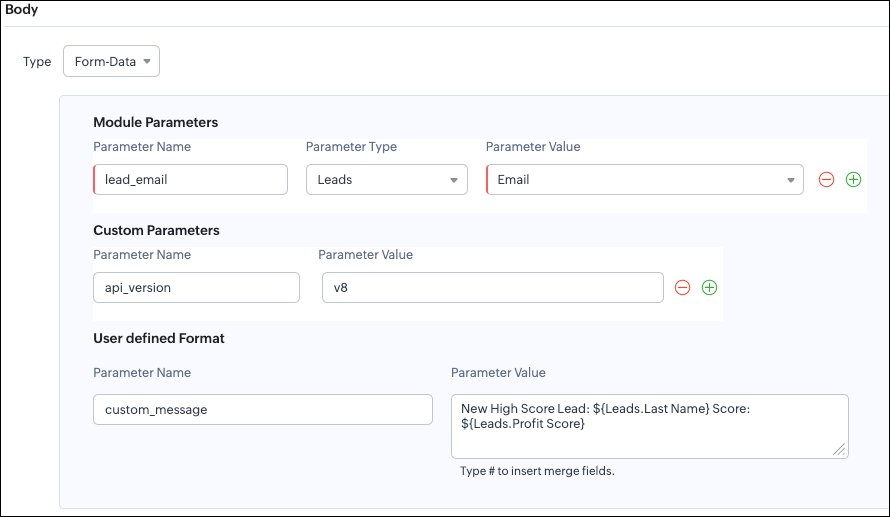
- Module Parameters
- Custom Parameters
- User Defined Parameters
- Headers are for sending supporting information that helps the external system understand the request - this can include auth details, source identifiers, or key CRM fields like email or score that help with quick categorization or filtering.
- Headers - Provide supporting details such as identifiers or quick-check values. For example, Lead ID, or source tags that help the external system check and route the request.
- Body - Contains the complete lead information that the external validation system needs to process.
Where parameters are used | Purpose | Example |
Headers | Metadata - OAuth,tags, and context | source: zylker-crm |
Form-Data (Body) | Main record data - actual lead details sent to the app.
| lead_email=patricia@zylker.com |
Parameter Name | Parameter Value |
custom_message | New high-score lead: ${Leads.First Name}${Leads.Last Name} (Score: ${Leads.Profit Score}) |
Configuring the Body of a Webhook - form-data via Create Webhook API
{ "webhooks": [ { . . . "body": { "form_data_content": { "module_parameters": [ { "name": "Lead_Email", "value": "${!Leads.Email}" }, { "name": "Annual_Revenue", "value": "${!Leads.Annual_Revenue}" }, { "name": "Profit_Score", "value": "${!Leads.Profit_Score}" }, { "name": "Created_By", "value": "${!Leads.Created_By.id}" } ], "custom_parameters": [ { "name": "source", "value": "zylker-crm" }, { "name": "version", "value": "v1" } ], "user_defined_parameters": { "name": "custom_message", "value": "New high-score lead: ${!Leads.First_Name}${!Leads.Last_Name} (Score: ${!Leads.Profit_Score})" } }, "type": "form_data" }, . . . } ] } |
Raw Body - JSON / XML / HTML / Text
- Raw + Text
- Raw + JSON
- Raw + HTML
- Raw + XML
Raw + Text:

- When sending a simple message.
- When the external app only expects plain text.
Configuring the Body of a Webhook - Raw - "Text" via Create Webhook API
{ "webhooks": [ { . . . "body": { "raw_data_content": "New high score lead: ${!Leads.First_Name} ${!Leads.Last_Name}, ${!Leads.Email}, ${!Leads.Annual_Revenue}, ${!Leads.Phone}, ${!Leads.Industry}, ${!Leads.Owner}", "format": "Text", "type": "raw" }, . . . } ] } |
Raw + JSON:
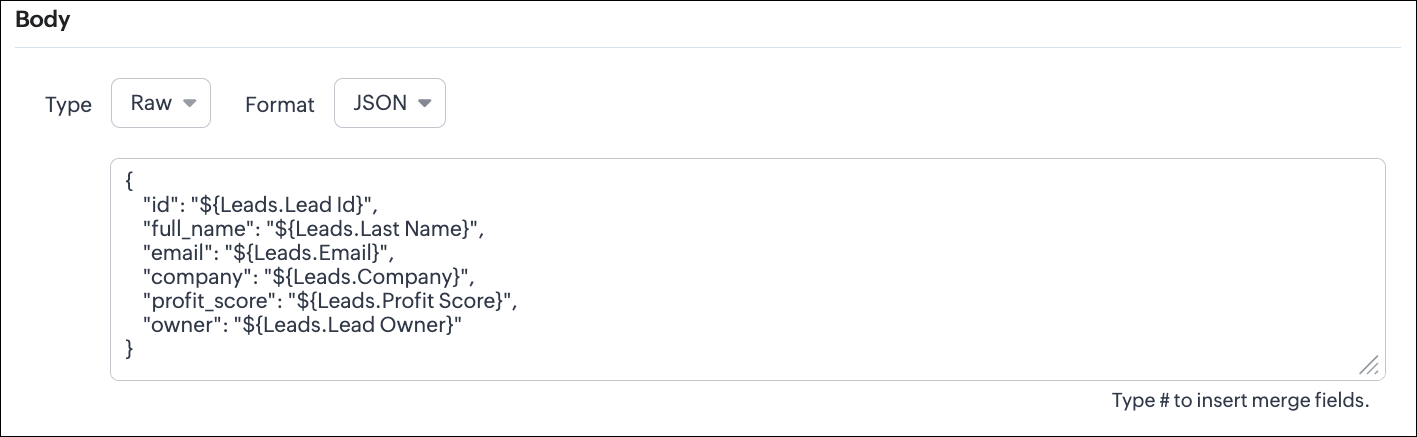
Configuring the Body of a Webhook - Raw - "JSON" via Create Webhook API
{ "webhooks": [ { . . . "body": { "raw_data_content": "{\n \"id\": \"${!Leads.id}\",\n \"full_name\": \"${!Leads.Last_Name}\",\n \"email\": \"${!Leads.Email}\",\n \"company\": \"${!Leads.Company}\",\n \"profit_score\": \"${!Leads.Profit_Score}\",\n \"owner\": \"${!Leads.Owner}\"\n}", "format": "JSON", "type": "raw" }, . . . } ] } |
- When the external system expects structured data
- Easier validation
Raw + HTML:
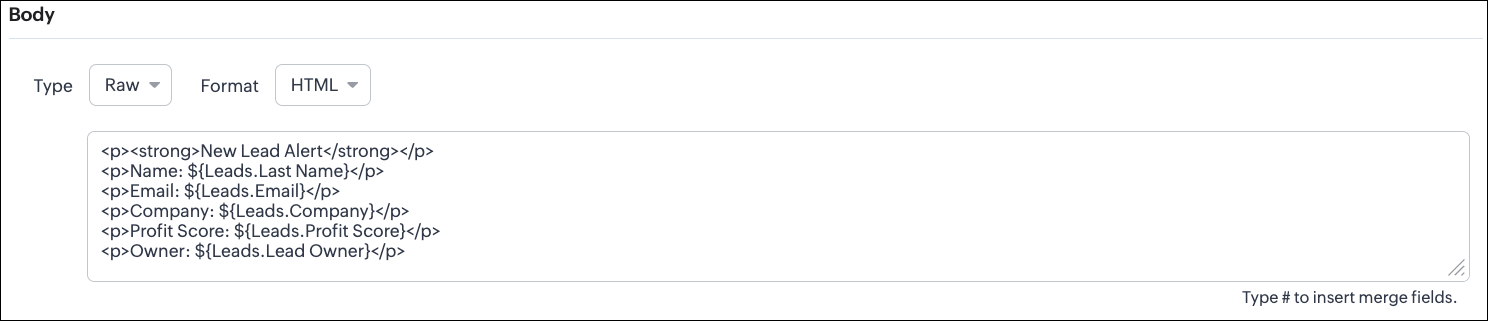
Configuring the Body of a Webhook - Raw - "HTML" via Create Webhook API
{ "webhooks": [ { . . . "body": { "raw_data_content": "<p><strong>New Lead Alert</strong></p>\n<p>Name: ${!Leads.Last_Name}</p>\n<p>Email: ${!Leads.Email}</p>\n<p>Company: ${!Leads.Company}</p>\n<p>Profit Score: ${!Leads.Profit_Score}</p>\n<p>Owner: ${!Leads.Owner}</p>", "format": "HTML", "type": "raw" }, . . . } ] } |
- If the external system displays formatted output
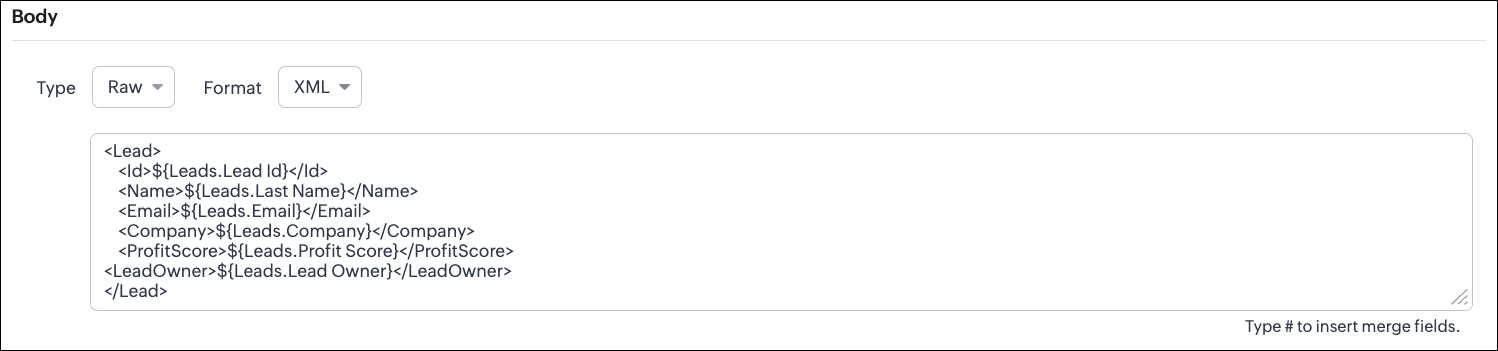
Configuring the Body of a Webhook - Raw - "XML" via Create Webhook API
{ "webhooks": [ { . . . "raw_data_content": "<Lead>\n <Id>${!Leads.id}</Id>\n <Name>${!Leads.Last_Name}</Name>\n <Email>${!Leads.Email}</Email>\n <Company>${!Leads.Company}</Company>\n <ProfitScore>${!Leads.Profit_Score}</ProfitScore>\n<LeadOwner>${!Leads.Owner}</LeadOwner>\n</Lead>", "format": "XML", "type": "raw" }, . . . } ] } |
- With older systems
- When the receiving system only supports XML
- When you switch the webhook method in the UI, Zoho CRM changes the options you can configure:
- Only URL Parameters are available
- Headers are hidden
- Body is hidden
- Because GET requests always send data through the URL and cannot carry a body.
- Headers are available
- URL Parameters are available
- Body is still not supported
- DELETE requests can include headers, but Zoho CRM does not allow sending a body for DELETE webhooks.
- Date-time format:
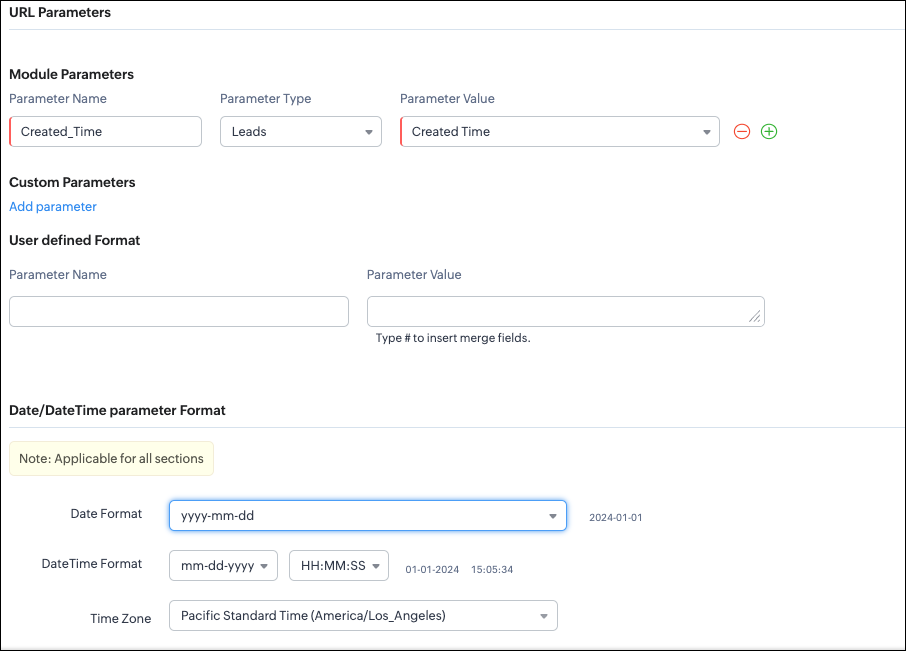
{ "webhooks": [ { "module": { "api_name": "Leads", "id": "5725767000000002175" }, "url_parameters": { "module_parameters": [ { "name": "Created_Time", "value": "${!Leads.Created_Time}" } ] }, "description": "Send leads with Profit Score > 80 to validation system.", "http_method": "GET", "name": "Push High Score Leads", "date_time_format": { "datetime_format": "mm-dd-yyyy HH:MM:SS", "date_format": "yyyy-mm-dd", "time_zone": "America/Los_Angeles" }, "authentication": { "connection_name": null, "type": "general" } } ] } |
- How to manage Webhooks using the GET, PUT, and DELETE Webhook APIs
- How to associate a Webhook with a Workflow
- How to perform real-time testing by creating records
- How an external application receives data from Zoho CRM via Webhook.
- Kaizen #213 - Workflow APIs - Part 1
- Kaizen #214 - Workflow APIs - Part 2
- Kaizen #215 - Workflow APIs - Part 3 - Create and Update Workflow Rules
- Kaizen #216 - Actions APIs : Email Notifications
- Kaizen #217 - Actions APIs : Tasks
- Kaizen #218 - Actions APIs: Field Update
Topic Participants
Subramanian K
Sticky Posts
Kaizen #198: Using Client Script for Custom Validation in Blueprint
Nearing 200th Kaizen Post – 1 More to the Big Two-Oh-Oh! Do you have any questions, suggestions, or topics you would like us to cover in future posts? Your insights and suggestions help us shape future content and make this series better for everyone.Kaizen #226: Using ZRC in Client Script
Hello everyone! Welcome to another week of Kaizen. In today's post, lets see what is ZRC (Zoho Request Client) and how we can use ZRC methods in Client Script to get inputs from a Salesperson and update the Lead status with a single button click. In thisKaizen #222 - Client Script Support for Notes Related List
Hello everyone! Welcome to another week of Kaizen. The final Kaizen post of the year 2025 is here! With the new Client Script support for the Notes Related List, you can validate, enrich, and manage notes across modules. In this post, we’ll explore howKaizen #217 - Actions APIs : Tasks
Welcome to another week of Kaizen! In last week's post we discussed Email Notifications APIs which act as the link between your Workflow automations and you. We have discussed how Zylker Cloud Services uses Email Notifications API in their custom dashboard.Kaizen #216 - Actions APIs : Email Notifications
Welcome to another week of Kaizen! For the last three weeks, we have been discussing Zylker's workflows. We successfully updated a dormant workflow, built a new one from the ground up and more. But our work is not finished—these automated processes are
Recent Topics
Multiple Cover Letters
We are using the staffing firm edition of Recruit and we have noticed that candidates cannot add more than one cover letter. This is a problem as they might be applying for multiple jobs on our career site and when we submit their application to a client,Fill Mail Merge document up with subform fields of an Inventory module record being in the Related List
Hi, I try to insert subform fields from an inventory module record being on the Related List of another inventory module record into a Mail Merge template without success. For example: we use ratecards in licensing and this ratecard items are availableHow can we add products using a Wizard?
We want to create a Wizard to add products. Why is there no possibility to use the products module when creating a wizard?How to block whole domain?
I am getting at least 50-75sometimes over 100 spams emails a day. I see a lot of the spam is coming from .eu domains. I would like to block /reject all email coming for the .eu domain. I do not have any need for email from .EU domains. Why won't the BlackListExciting Updates to the Kiosk Studio Feature in Zoho CRM!
Hello Everyone, We are here again with a series of new enhancements to Kiosk Studio, designed to elevate your experience and bring even greater efficiency to your business processes. These updates build upon our ongoing commitment to making Kiosk a powerfulImage field in custom module
Hi guy, Is there any hope of adding a custom image field in the custom module? We created a custom module to keep track of assets, and it would be helpful if we could attach an image to the record. Thanks RudyDeluge Function to Update Custom Field
I'm trying to get a Deluge function (which will run as part of a Schedule in Desk) that retrieves all tickets with the status "Recurring" and updates the custom field checkbox "cf_recurring" to "true". Here's what I have, which doesn't work: searchValue"View ticket" link is broken
The "View ticket" link in our Zoho ticketing system confirmation emails is broken (please see attached). Impacts ability to update/review details, and, refresh recollection at a later date. Any help would be much appreciated.import data from Apollo.ai into zoho crm via zoho flow
I might be asking this question in the wrong forum. We use Apollo.ai to find potential new leads for our business, there are around 10000 leads that we have initially found. We have an Apollo.ai account but just to do searches, we dont use it as a crm.Woocommerce Line Item Information
I'd like to add each line item from a Woocommerce order to a zoho creator form record. The line items are found within the line items array, but I'm not sure how to get each item out of the array? Any help would be much appreciated.Synching changes to Stripe when changes are made in Zoho Billing
We have a situation where we have merged customers in Zoho BIlling and then found out later that the payment in Stripe was not updated and still associated with the old customer record. The card gets updated and billed, but that payment is still associatedHow do I fix this? Unable to send message; Reason:554 5.1.8 Email Outgoing Blocked.
How do I fix this? Unable to send message; Reason:554 5.1.8 Email Outgoing Blocked.Disable Smart Filters By Default
The smart filters "feature" is causing confusion for Zoho Mail users. New emails should be delivered to the inbox unless they have specifically opted to redirect them somewhere else. People don't understand that new emails might be waiting in a randomME SALE ESTE ERROR: No fue posible enviar el mensaje;Motivo:554 5.1.8 Email Outgoing Blocked
Ayuda!! Me sale este error al intentar enviar mensajes desde mi correo electronico de Zoho! Tampoco recibo correos pues cuando me envia rebotan. Ayuda, Me urge enviar unos correo importantes!! Quedo atenta MAGDA HERNANDEZ +5731120888408Client Script | Update - Client Script Support For Custom Buttons
Hello everyone! We are excited to announce one of the most requested features - Client Script support for Custom Buttons. This enhancement lets you run custom logic on button actions, giving you greater flexibility and control over your user interactions.validation rules doesn't work in Blueprint when it is validated using function?
I have tried to create a validation rule in the deal module. it works if I try to create a deal manually or if I try to update the empty field inside a deal. but when I try to update the field via the blueprint mandatory field, it seems the validationZoho Mail not working
Zoho Mail not workingProduct line search in quotes
Is there a way to change the search setting when you add a product line to a quote. We have created a field in products called 'Part Number' and I would like when I'm adding a product line to the quote that I can search on that field. At the moment it only searches on product description. In products I can search on the 'Part Number' field Any help welcome.CRM x WorkDrive: File storage for new CRM signups is now powered by WorkDrive
Availability Editions: All DCs: All Release plan: Released for new signups in all DCs. It will be enabled for existing users in a phased manner in the upcoming months. Help documentation: Documents in Zoho CRM Manage folders in Documents tab Manage filesQueries on Project-Based Inventory Consumption and Proforma Invoice in Zoho ERP
We would appreciate your clarification on how Zoho ERP plans to handle the following: Project-based inventory consumption without itemized sales orders Accurate project cost tracking along with inventory reduction Proforma Invoice usage We look forwardI can't add a new customer in Zoho invoice? Anyone had this issue before?
Ive been using Zoho invoice for over 6 years. Today I wanted to add a new customer to send an invoice to but it doesn't save when I try to access it from the pulldown menu when you go to send a new invoice.Spreadsheet View click & focus issue in Arabic (RTL) localization
Hello Zoho Support Team, I am facing an issue in Zoho Creator Spreadsheet View when using Arabic localization (RTL). Scenario: My app supports English (LTR) and Arabic (RTL). I created a Spreadsheet View for a form. In English, everything works correctly.Customer address in Zoho Bookings
Hello, Is it possible to add customer address information to the Zoho bookings appointment screen? Or have it pull that information automatically from the CRM? We are wanting to use this as a field management software but it is difficult to pull the address from multiple sources when it would be ideal to have a clickable address on the appointment screen that opens up the user's maps. It would also be advantageous for the "list view" to show appointment times instead of just duration and bookingGhost email notification on a form
Hello, We have recently encountered an error where I can not see a email notification set up for a form which I am currently the owner, although neither the form nor the notification were created by me. However, neither can the Super Admin access theIntroducing Record Category in CRM: Group options to see record status at a glance.
Release update: Currently available for CN, JP, and AU DCs (all paid editions). It will be made available to other DCs by mid-March. Hello everyone, We are pleased to introduce Record Category in Zoho CRM - a new capability where the user can get an overviewbulk edit records and run internal logic
hi there is few logics in manner "it this than that" logics work well when i edit entry openning it one by one (via workflow "on add/edit - on success" , for custom field "on update/on user input") but when i try bulk edit records - logic does not work. how can i turn on logic to work as programmed - for mass editing records via bulk edit?Dheeraj Sudan and Meenu Hinduja-How do I customize Zoho apps to suit my needs?
Hi Everyone, I'm Meenu Hinduja and my husband Dheeraj Sudan, run a business. I’m looking to tweak a few things to fit my needs, and I’d love to hear what customizations others have done. Any tips or examples would be super helpful! Regards Dheeraj SudanBulk bank rule creatioin
Hi team, I am exploring Option to create a multiple bank rule. Could please suggest the option to implement this?Limitations on editing a message in Cliq
Hi I've checked the documentations and there's no mention of how many times a message can be edited. When trying with code, I get various numbers such as ~1000 edits or so. Please mention if there's a limit on how many times one can change a message viaemail address autocomplete
Is there a way to eliminate certain addresses from showing up in auto complete when entering an address? Many old and unused addresses currently show up, many of which I would like to get rid of. ThanksHow to use MAIL without Dashboard?
Whenever I open Mail, it opens Dashboard. This makes Mail area very small and also I cannot manage Folders (like delete/rename) etc. I want to know if there is any way to open only Mail apps and not the Dashboard.Introducing Radio Buttons and Numeric Range Sliders in Zoho CRM
Release update: Currently out for CN, JP, AU and CA DCs (Free and standard editions). For other DCs, this will be released by mid-March. Hello everyone, We are pleased to share with you that Zoho CRM's Layout Editor now includes two new field formats—How can i download and secure all my mails from the archive folders?
Hi, i would like to download all my mails from my archive folders and secure it on my external HDD. Is this possible? Thx. amirHow to open filtered report in popup using Zoho Creator Deluge?
First report: There is so many records in Report, If I click one record, pop up is occur. Second report (Pop up): there is also so many record data, and this pop up is also Report, not Form. First report: It has got "Sales Order" field. when I click anyMake panel configuration interface wider
Hi there, The same way you changed the custom function editor's interface wider, it would be nice to be able to edit panels in pages using the full width of the screen rather than the currently max-width: 1368px. Is there a reason for having the configuration panel not taking the full width? Its impossible at this width to edit panels that have a lot of elements. Please change it to 100% so we can better edit the layouts. Thanks! B.Can you default reports/charts to report the current week?
Our data table maintains two years of data. Management wants certain report to automatically filter the report to the latest calendar week. I know I can do this manually with filters but I want the report to automatically default to the latest calendarRendering PDF to view on page
My company upload lots of PDF files onto Zoho. But every time we open it, it downloads the file instead of viewing it on the web page. Does Zoho allow uploaded PDF files to be rendered to view on web page yet? I've been trying to use <embed> or <object> but it cannot be loaded. (similar thread: https://help.zoho.com/portal/community/topic/how-to-open-a-pdf-file-of-a-view-in-preview-mode)Overlapping Reports in Dashboards
It's rare, but occasionally it would be a good feature if I were able to overlap reports, either fully or partially in the Dashboards. Also, then having the ability to move objects to the front or rear, or make them transparent/translucent would be goodFeature request - pin or flag note
Hi, It would be great if you could either pin or flag one or more notes so that they remain visible when there are a bunch of notes and some get hidden in the list. Sometimes you are looking for a particular name that gets lost in a bunch of less importantAdmin guide: Handling Mailbox Settings for better user management
Managing day-to-day email scenarios, such as supporting users with multiple email addresses, ensuring uninterrupted email access during employee absences, enabling secure mailbox sharing, and enforcing organizational security and compliance, can be challengingNext Page