Présentation des pipelines connectés, pour une transition fluide des données entre les pipelines
Bonjour à tous !
Nous avons récemment présenté les Pipelines d'Équipes - la dernière mise à jour majeure de Bigin pour transformer et unifier les opérations clients pour les petites entreprises. L'un des retours que nous avons reçus de nos premiers utilisateurs est que lorsqu'un enregistrement atteint un certain stade dans un Team Pipeline, ils souhaitent qu'un nouvel enregistrement soit créé dans un autre Team Pipeline avec les informations reportées du pipeline précédent. Pour répondre à cette demande, nous introduisons les Pipelines connectés, une nouvelle fonctionnalité qui automatise le transfert transparent des enregistrements d'un pipeline à l'autre.
Comment les pipelines connectés peuvent-ils aider votre entreprise ?
Prenons l'exemple d'une entreprise de décoration d'intérieur - Zylker Interiors - qui propose des espaces de travail intérieurs pour les bureaux. Elle a mis en place 3 Team Pipelines différents à Bigin.
Pipeline de ventes | Pipeline de production | Pipeline d'installation |
L'équipe de vente de Zylker utilise ce pipeline pour entrer en contact avec des prospects à la recherche d'intérieurs de bureaux et les convertir en clients. | Une fois qu'un nouveau client a rejoint l'entreprise, l'unité de production de Zylker utilise ce pipeline pour gérer les ordres de production du client. | Après l'achèvement d'un ordre de production, l'expédition vers le site du client et le processus d'installation qui s'ensuit sont gérés dans ce pipeline. |
Dans le cas de Zylker, chaque fois que l'équipe de vente conclut une affaire dans le pipeline de vente, il serait idéal qu'une nouvelle commande soit instantanément créée dans le pipeline de production. De même, une fois la commande terminée dans le pipeline de production, l'idéal serait de créer automatiquement une demande d'installation correspondante dans le pipeline d'installation.
Les pipelines connectés peuvent vous aider à automatiser l'ensemble de ce processus, éliminant ainsi le travail manuel et les erreurs liées à l'intervention humaine.

Comment cela fonctionne-t-il ?
Pour réaliser des pipelines connectés, nous introduisons une nouvelle action dans les flux de travail : "Créer des enregistrements connectés".

1. Avec cette mise à jour, vous pouvez configurer un Workflow qui se déclenche chaque fois que l'étape d'une Offre est modifiée. Vous pouvez spécifier l'étape exacte dans la section Conditions.
2. Dans la section Actions, vous pouvez cliquer sur l'action "Créer des enregistrements connectés" et choisir le prochain pipeline d'équipe dans votre processus d'entreprise. Dans le cas de Zylker, il s'agira du pipeline de production après la conclusion d'une affaire dans le pipeline de vente.
3. Dans l'écran Créer un enregistrement connecté qui s'affiche, vous pouvez mapper les champs entre les deux pipelines afin que les informations de l'enregistrement de l'affaire soient correctement reportées dans l'enregistrement de la commande lorsqu'elle atteint le pipeline de production.
Désormais, chaque fois que l'équipe de vente conclut une affaire dans le pipeline de vente, une nouvelle commande est automatiquement créée dans le pipeline de production. Cela permet d'éviter les efforts manuels et de gagner du temps, car l'étape suivante du parcours du client démarre instantanément dès que l'équipe a terminé l'étape précédente.
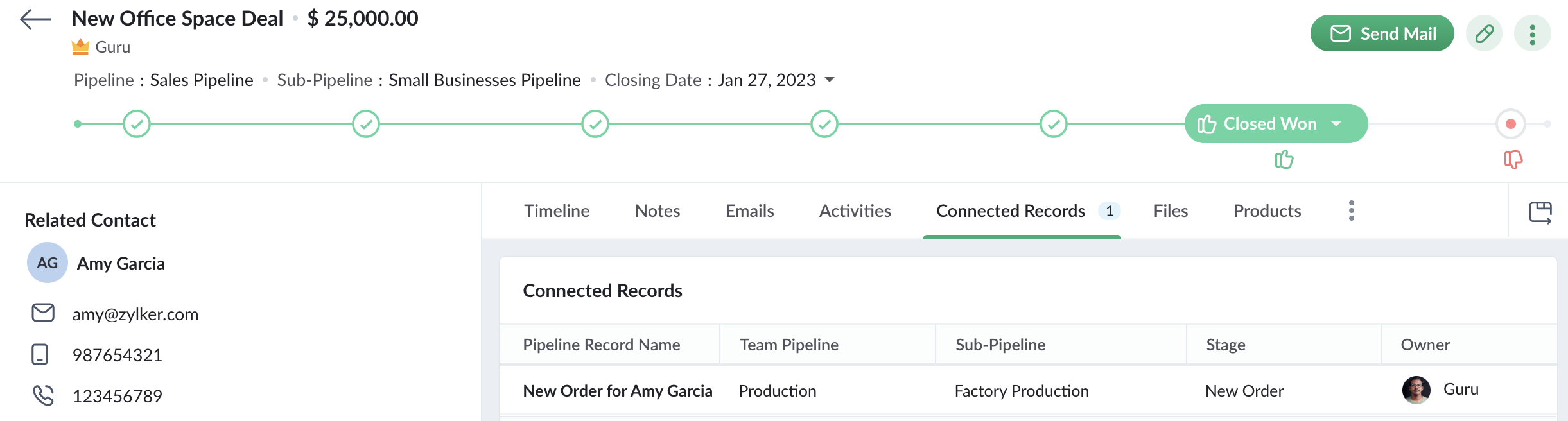
De plus, lorsqu'un commercial ouvre un enregistrement d'affaire qui a déclenché le workflow pour créer une nouvelle commande, il peut également voir l'enregistrement de la commande dans l'onglet Enregistrements connectés. Le commercial peut ainsi suivre l'état de la commande. Ainsi, Connected Pipelines permet à vos équipes de rester unies grâce à la boucle d'information connectée à travers Team Pipelines.
Disponibilité
Si vous utilisez déjà la version Team Pipelines de Bigin, alors Connected Pipelines sera déjà disponible pour vous. Vous pouvez vous en assurer en vérifiant si vous voyez l'action "Créer des enregistrements connectés" lorsque vous créez un flux de travail.
Nous avons publié un guide d'aide détaillé pour vous aider à démarrer avec Connected Pipelines.
Essayez cette nouvelle amélioration et faites-nous part de vos réactions dans les commentaires ci-dessous.
Pour ceux qui n'ont pas encore essayé Team Pipelines, nous vous suggérons de remplir ce formulaire et nous activerons Team Pipelines pour votre compte. Nous vous conseillons de passer à Team Pipelines le plus tôt possible car nous nous préparons à le déployer pour tous les utilisateurs de Bigin.
Sur quoi d'autre travaillons-nous ?
Nous avons écouté activement vos demandes de fonctionnalités et nous travaillons sur un grand nombre d'améliorations, notamment l'intégration de Whatsapp, l'affichage du calendrier pour les activités, les pages de réservation en ligne, les formulaires Web pour Team Pipelines et bien d'autres encore.
Restez à l'écoute pour de nouvelles mises à jour !
Topic Participants
Antoine Perrault
Sticky Posts
Bigin - Astuce #5 : Comment transférer le statut Super Admin ?
Bonjour Community France, Découvrons comment transférer le statut de Super Administrateur. Sachez que le statut de super administrateur ne peut être transféré à un autre utilisateur administrateur que par le super administrateur lui même. Pour transférerNouveau forfait Bigin Premier : Multi-devises, flux de travail avancés et plus encore !
Bonjour à tous, Nous sommes ravis d'annoncer une toute nouvelle édition de Bigin qui contient plusieurs nouvelles fonctionnalités comme la multidevise, des flux de travail avancés, des champs de recherche personnalisés et plus encore : l'édition Premier.Nouveauté Bigin : associez plusieurs contacts à une même affaire!
Bonjour à tous, Une transaction implique souvent plusieurs décideurs. Prenons l'exemple de l'entreprise Zylker qui utilise Bigin pour gérer ses pipelines de vente. Ils souhaitent acheter des meubles. Pour valider la vente, différents employés, de différentsPack débutant : vos premiers pas sur Zoho Bigin
Dans cet article nous verrons comment paramétrer votre CRM Bigin en 4 étapes : renseigner vos informations, gérer vos utilisateurs ainsi que leurs rôles et profils. Renseigner les informations de votre organisation Vous venez de vous inscrire à Zoho Bigin,Anniversaire Bigin : le CRM pour les petites entreprises évolue
Bonjour à tous ! Nous sommes de retour avec quelques annonces passionnantes. Mais d'abord, joyeux anniversaire à nous ! Bigin a eu un an récemment et nous avons un nouvel ensemble de fonctionnalités que nous sommes impatients de partager avec vous. Nous
Recent Topics
Possible to send Zoom AI Companion transcripts and summaries to contacts in CRM?
Title says it all. Is it possible to send Zoom AI Companion transcripts and summaries to contacts in Zoho CRM?How do I edit the Calendar Invite notifications for Interviews in Recruit?
I'm setting up the Zoho Recruit Interview Calendar system but there's some notifications I don't have any control over. I've turned off all Workflows and Automations related to the Calendar Scheduling and it seems that it's the notification that is sentClarity on extended contract status
Clarity on “extended” status- How does Zoho “extend” a contract? E.g. if client extends by 1 month, can the “end date” be adjusted accordingly in Zoho and tagged as “Extended” with a clear audit trail that also captures the client’s email? Note- EmailCustomizing contract status
Can we customize/add/remove status on Zoho contracts ourselves or does Zoho needs to do this? Context- There is a long list of status on Zoho but not all of them are relevant for us . There are few status which are missing and needs to be added. E.g-Set Custom Business Calendars and Holidays for Global Teams
Managing a project across diverse teams means accounting for more than just tasks and deadlines; it means acknowledging how and when each team actually works. Users might follow different working days or observe region-specific holidays that cannot be[Integration edition] Deluge learning series - Integrations between Zoho apps and Third-party services with Deluge | 28 August 2025
We’re excited to welcome you to the Deluge learning series: Integration edition! The Integration edition will run for three months: Session 1 – Integrating Zoho Apps with Deluge using inbuilt integration tasks Session 2 – Integrating Zoho Apps with DelugeCritical Vulnerability in all major password manager plugins - is Zoho Vault affected?
Hi Zoho, a security researcher found a critical clickjacking vulnerability in all major browser password managers: DOM-based Extension Clickjacking: Your Password Manager Data at Risk | Marek Tóth Is Zoho Vault affected as well? Apparently the Vault extensionIntroducing SecureForms in Zoho Vault
Hey everyone, Let’s face it—asking someone to send over a password or other sensitive data is rarely straightforward. You wait. You nudge. You follow up once, twice—maybe more. And when the information finally arrives, it shows up in the worst possibleTables from ZohoSheets remove images when updated from source
I have a few tables from a ZohoSheet in a ZohoWriter document that will remove the images in the cells when I refresh from the source. The source still has the images in the table when I go to refresh. After updating from the source, as you can see theChange eMail Template for Event-Invitations
Hello ZOHO-CRM Team How I can change the eMail Template for Event-Invitations? I work with the German Version of the Free Version. I know how I can modify eMail alerts or Signature Templates, but where I can other eMails modify you send out? Thank you for your answer. Regards, JuergNeed Your Insights
Hi Zoho, I'm confused why the flow only sends to one output. setVariable15 is from a list. It doesn't consider the 2nd entry. Any thoughts?Map Dependency Fields - How can can I limit picklist values from a multi-select Parent field?
I know the "Map Dependency Fields" feature doesn't allow a multi-select parent field. However, I need the functionality. Can I do it through a deluge function, and would it still support color coding picklists? We need the color coding for quick scanningDYK 1 - Color Palette for Enhanced Visual Identification of Status
Introducing the Did You Know series of posts. The goal of this series is to familiarize users with certain features or enhancements in Zoho Projects that may not be evident at first glance. The first post in this series deals with color palettes for indicatingInvalid field in the COQL query
Dear Zoho Support! I believe that you already helped me with a similar problem a few years ago. One of my clients has a custom field named "LOB" in the "Deals" Module (see the field's metadata below). The COQL query using this field: : "select id, Deal_Name,Automating Employee Birthday Notifications in Zoho Cliq
Have you ever missed a birthday and felt like the office Grinch? Fear not, the Cliq Developer Platform has got your back! With Zoho Cliq's Schedulers, you can be the office party-cipant who never forgets a single cake, balloon, or awkward rendition ofTransferring domain registration to new registrar and switching email hosting at the same time?
I need to transfer an existing domain uv cure adhesive that's currently with SiteGround to Porkbun. I also need to move the existing custom email addresses from SiteGround to Zoho Mail. I'm not sure if I should transfer the domain first and then tackleSplit deposits
Can Zoho do split deposits. One deposit, two checks for two separate invoices from different customers. This is one of the most common tasks I can imaging. When I mark the two invoices paid, there are two deposits in bank register. When I try to match,Deactivate Desk Contact without Deleting Contat
We have a client who has multiple tenants for regulatory purposes, and as such, has a few users that have email addresses in both tenants. They've then emailed into the ticketing system, so we have multiple contacts (no big deal, we want to keep theirDelete my store of Zoho commerce
Hi Team, I want to delete my stores of commerce. Please help me asap. Looking for the positive response soon. Thanks Shubham Chauhan Mob: +91-9761872650Ability to add VAT to Retainer Invoices
Hello, I've had a telephone conversation a month ago with Dinesh on this topic and my request to allow for the addition of VAT on Retainer Invoices. It's currently not possible to add VAT to Retainer Invoices and it was mutually agreed that there is absolutely no reason why there shouldn't be, especially as TAX LAW makes VAT mandatory on each invoice in Europe! So basically, what i'm saying is that if you don't allow us to add VAT to Retainer Invoices, than the whole Retainer Invoices becomes[Free Webinar] Learning Table Series - Zoho Creator for Asset Management with AI Enhancements
Hello Everyone! We’re excited to invite you to another edition of Learning Table Series, where we showcase how Zoho Creator empowers industries with innovative and automated solutions. Each month highlights a specific sector, and this time our focus isMenu Building is completely broken
I have been 3 hours, I have not been able to edit the menu. Either it is completely broken, very little intuitive or I do now know anything... There is no way to create a megamenu, no way to create a menu. Despite the fact I go to menu configurartionCan you sell Subscriptions using Zoho Commerce?
In addition to physical products and the apparently coming soon 'Digital Products', it is possible to sell Subscriptions using Zoho Commerce?Kaizen #197: Frequently Asked Questions on GraphQL APIs
🎊 Nearing 200th Kaizen Post – We want to hear from you! Do you have any questions, suggestions, or topics you would like us to cover in future posts? Your insights and suggestions help us shape future content and make this series better for everyone.Multiple Languages for Product Names
Hi, I use 2 languages: spanish and english. I want to have for every product a name in spanish and a name on english. I want to have to possibility of choosing one of these languages when making an invoice or a purchase order. Is there any way to doItem with name in different languate
Hello, is there a way to have an item with its name in different languages? For example: I sell an item in different markets and I'd like to have a Proposal and the Invoice with the Item Name in a specific language. Rino Bertolotto Zoho Specialist, STESA srlContacts with most tickets? Alarm for multiple tickets?
Is it possible to see through the analytics/reports which contacts are creating the most tickets (not the most discussed ones)? Also, is there a way to set up a notification if a contact creates multiple tickets within a certain time frame?Issue with Template Subject Line Format in Zoho CRM
Hi Team, I’ve noticed that when I update the subject line of an email template in Zoho CRM, it sometimes appears in an incorrect format when used. Please see the attached screenshot for reference. Kindly look into this issue and fix this issue from backendTwo Data Labels in Bar Chart
I need to create a bar chart that has both the SUM and COUNT. I've concatenated them into a formula but it converts it into a stacked bar / scattered chart. The bar chart is no longer accessible. Since i'm comparing YOY, it would be best to have it inDisable field on subform row
Hi, Is it currently possible to disable a row item on a subform? I was just trying to do something whereby until another value is entered the field is disable but for the deluge scripting interface threw up an error saying such a function is not supported on a subform. Thanks in advance for your help. ShaheedLeads - Kanban view fit to screen
Hey guys, I created a custom layout for my leads, staged by lead status. I have 10 types of status. In Kanban view I see only 4 columns/stages and need to scroll to the right to see the rest. Is there a way to make columns/stages be displayed all together?Request to Differentiate Auto-Closed WhatsApp Conversations in SalesIQ
Hi Zoho Support, I’d like to raise a request related to the way WhatsApp conversations are auto-closed in SalesIQ. Every Monday, our Sales team has to manually review each closed WhatsApp conversation from the weekend to identify which ones were automaticallyKanban View UI gets a revamp
Hello everyone, In the coming week you will notice design related enhancements in Kanban View. The UI has been changed and a new option is introduced under Kanban View Settings that allows to change the color of the category headers. Please, note that the functionality is not changed. These changes will not apply to the Activities and Visits modules. Here are the details of the changes: 1. The column widths have been fixed to 300 px. The records will have a box around them for clear distinction.Can you stop Custom View Cadences from un-enrolling leads?
I'm testing Cadences for lead nurture. I have set un-enroll properties to trigger on email bounce/unsubscribe, and do NOT have a view criteria un-enroll trigger. However, help documents say that emails are automatically un-enrolled from a Cadence whenIssue with Anchor Link on Zoho Landing Page (Mobile/Tablet View)
Hi Team, I have created a landing page using Zoho Landing Page and added an anchor link to it. The anchor link is working fine on desktop view; however, it does not work properly on mobile or tablet view. I’ve tried debugging this issue in multiple ways,Simplest way to convert XML to a map?
I've reviewed the help info and some great posts on the forum here by Stephen Rhyne (srhyne). At the moment I'm using XPath to generate a list of xml nodes, iterating through that to fetch the field name/value pairs and adding them to a map (one map for each record in the data). I then convert the row map to a string and add it to a list. Here's the function: list xml.getRecordListFromXML(string xml_data, string ele_name) { result = List(); // get list of record nodes rec_list = input.xml_data.toXML().executeXPath("//"Introducing Creator Simplified: An exclusive learning series to enhance your app development skills
Hey Creators! Welcome to Zoho Creator's new learning series, Creator Simplified. In this series, we'll dive into real-world business use cases and explore how to translate your requirements into solutions in your Creator application. You can also expect[Product update] Updated Data Synchronization Process for QuickBooks - Zoho Analytics Integration.
Dear QuickBooks integration users, We’re making an important update in the way data is currently synced in your QuickBooks integration within Analytics workspace. What’s changing: Previously, with every data synchronization, Zoho Analytics used to fetchZoho CRM new calander format cannot strikethrough completed task
Hi, Recently there is a new format for calendar within Zoho CRM However, found out that a completed task will not cross out or strikethrough like previous format. Without strikethrough, it will be difficult to identify which task is still in Open status.How to edit form layout for extension
I am working on extension development. I have created all the fields. I want to rearrange the layout in Sigma platform. But there is no layout module in Sigma. How can I achieve this for extensions other than Zet CLI and putting the fields into widgetNext Page