Building extensions #1: Creating and testing extensions for Zoho Finance Suite applications
Hello developers!
We're excited to announce a new series called "Building extensions" to assist developers in creating efficient extensions for Zoho Finance Suite products. We'll support and guide you through the process of creating an extension and using the features offered in the developer portal.
What are extensions?
Extensions are installable plugins or add-ons that help enhance the existing functionality of your Zoho product or seamlessly integrate and interact with third-party applications for data transmission.
How can you build extensions?
Zoho offers a developer platform called Zoho Developer that allows you to build different types of applications. Sigma is a platform offered within Zoho Developer that is specifically designed for creating extensions for various Zoho products. Throughout this series, we'll look at how to create and develop extensions for the Zoho Finance Suite applications using Sigma.
Get to know all about extensions and building them further in detail.
Sigma extension support
The Zoho Finance Suite consists of seven applications: Zoho Books, Zoho Inventory, Zoho Expense, Zoho Invoice, Zoho Billing, Zoho Checkout, and Zoho Payroll. Currently, the Sigma platform supports creating and building extensions for these five Zoho Finance applications:
- Zoho Books
- Zoho Inventory
- Zoho Expense
- Zoho Invoice
- Zoho Billing
Creating an extension
- Log in or sign up at developer.zoho.com.
- Go to Sigma and access your workspace.
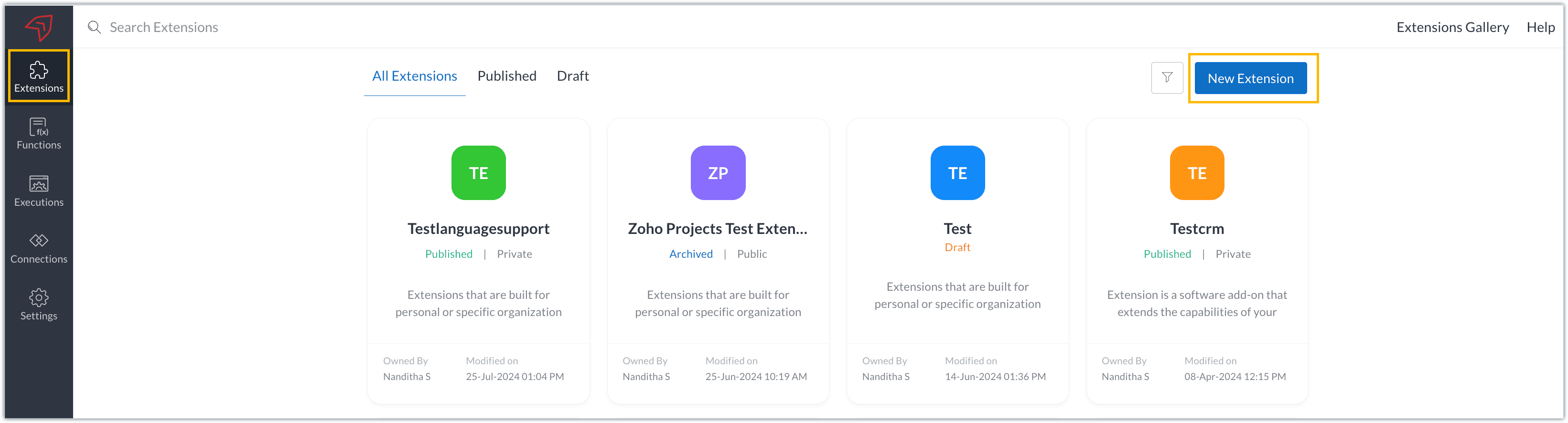
- Once you enter your workspace, you'll be taken to the Extensions section in Sigma.
- Click the New Extension button to start building an extension.
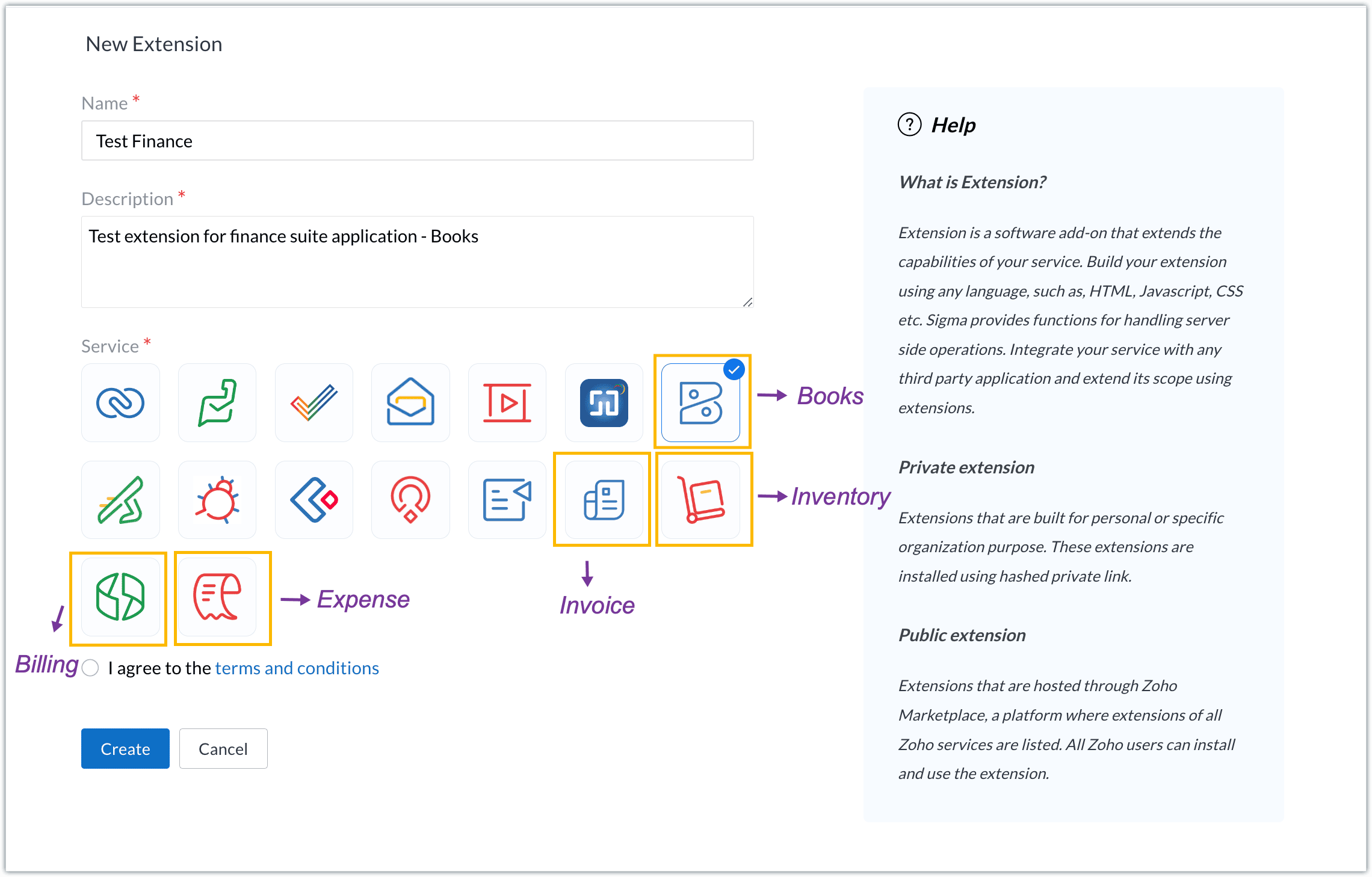
- Enter a name and description for the extension and choose the service you want to build the extension for. As mentioned earlier, Sigma offers support for Zoho Books, Zoho Invoice, Zoho Inventory, Zoho Billing, and Zoho Expense.
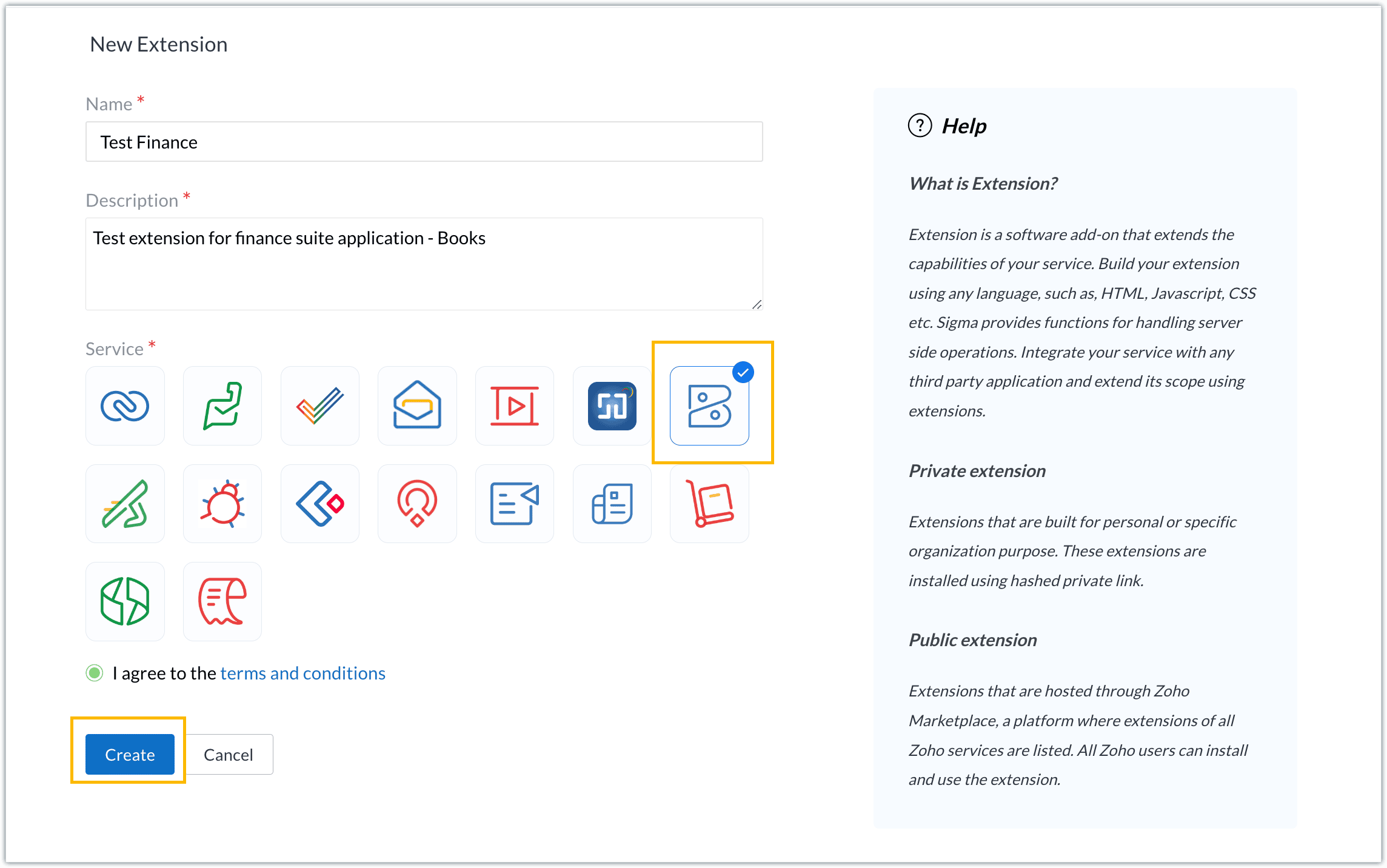
- For our demo, let's choose the service as Zoho Books. Accept the terms and conditions, and then click Create.
- The extension is successfully created. You can click the Extension Details icon to see an overview of the extension.
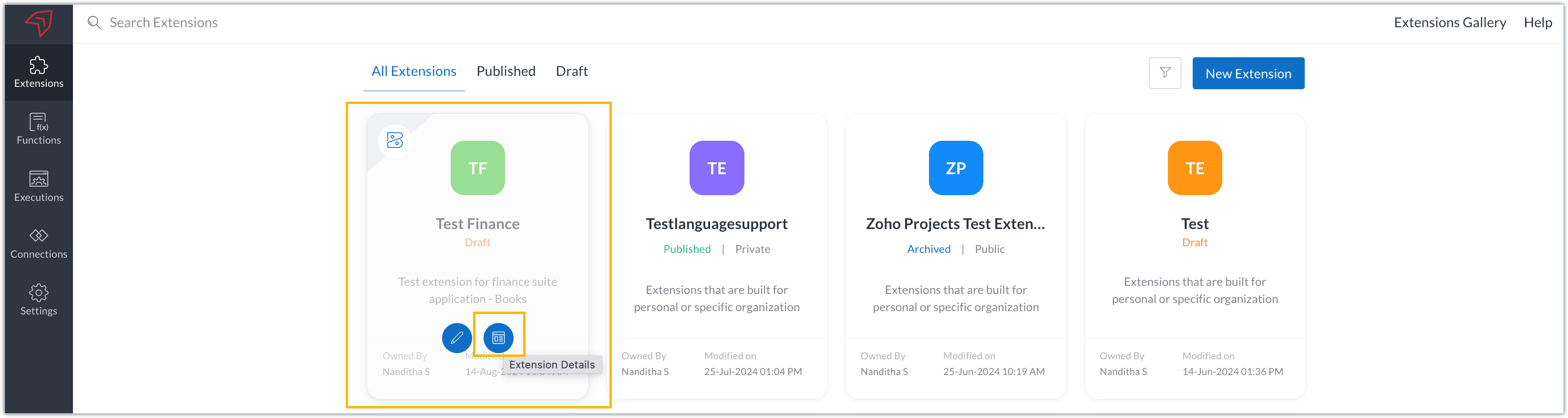
The extension details page shows the general details of the extension, such as creation date, creation time, and version, and allows you to associate developers with the extension.
- Click the Edit Extension icon to start developing the extension.
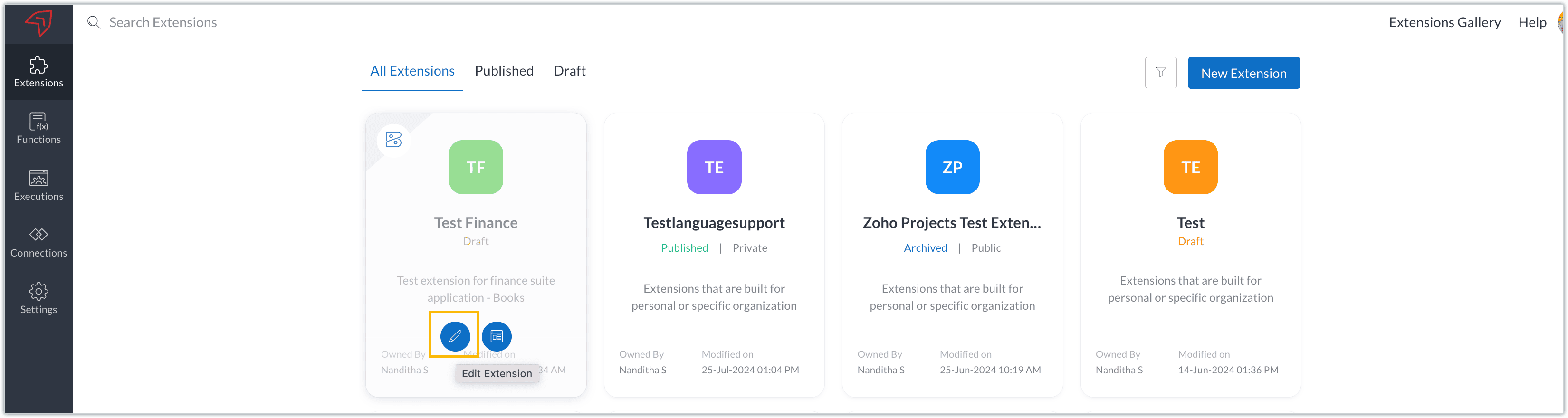
- The Zoho Books Developer Portal opens with the options and native features available to customize, curate, and develop your extension.
Zoho Books Developer Portal sections
The developer portal has four different sections to help customize and build your extension.
Learn: This section lists the native Zoho Books capabilities that can be used to create and develop extensions. Clicking the Set up Now button next to each feature will take you to the feature's development setup page.

Build: This is the development setup section, which includes customization, automation, and components like connections, widgets, schedules, webhooks, and signals. You can customize your extension preferences, establish connections to integrate with other applications, and design custom interfaces to enhance user experience.

Configure: This section assists with handling your extension's required configurations, whether they are generic settings or customizations required from the user. You can add global fields, which can be incorporated as either variables that store static data or through custom widgets that retrieve user inputs. You can also define functionalities that happen during installation and uninstallation.

Publish: Once the extension has been built and configured, you can use this section to publish it for either private or public use. In both cases, the Zoho Books team will review the extension; for public extensions listed on Zoho Marketplace, the Zoho Marketplace approval team will also review them. You can share your privately published extension with other users using the Shared List option.

We will explore more about each of these sections and their features in upcoming posts.
Testing an extension
The Zoho Books Developer Portal offers a dedicated testing environment for each extension, allowing you to test and validate it before publishing.
As a developer, you can use the Test Your Extension option in the top right corner of the portal to access your extension's sandbox environment.

This will redirect you to the sandbox testing environment for the extension you're developing, which is similar to Zoho Books and contains relevant modules to test with.

You can populate necessary data and test your extension functionality. Once everything is validated, you can go ahead and publish your extension for private or public use.
For support or questions related to Zoho Finance Suite extension development, you can email developer@zohofinance.com.
We hope you found this guide useful. Keep following this space for more information!
Topic Participants
Nanditha Somasundaram Somasundaram
Sticky Posts
Building extensions #5: Creating custom connections for extensions
In our previous post, we discussed the significance of connections, identified their types, developed a predefined connection, and demonstrated how it can be integrated with Zoho Books using an example. In this post, we'll walk through the process ofBuilding extensions #4: Integrating Zoho Books with applications using connections
In our last post, we looked at an overview of the key features available for creating a Zoho Books extension, including connections. In this post, we'll go over connections in depth, including their types and applications. What are connections? "Connections"Building extensions #3: Fundamental features of a Zoho Books extension
In our earlier posts, we covered how to create, test, and publish an extension for Zoho Finance suite applications. Moving forward, we'll look specifically at instances relating to one of the products from the Zoho Finance suite: Zoho Books. In this post,Building extensions #2: Publishing an extension
Hello developers, Welcome to our next post about building extensions for Zoho Finance Suite applications. In our previous post, we looked at extensions, their purpose, and how to create and test them. To recap, extensions are installable plugins or add-onsBuilding extensions #1: Creating and testing extensions for Zoho Finance Suite applications
Hello developers! We're excited to announce a new series called "Building extensions" to assist developers in creating efficient extensions for Zoho Finance Suite products. We'll support and guide you through the process of creating an extension and using
Recent Topics
Amazon FBA integration - Handle invoice reconciliation under different GSTINs,
Dear Zoho Community, Thank you for the clarification regarding the Amazon FBA integration, default warehouse, and GSTIN mapping in Zoho Inventory. I understand that Zoho currently supports only one warehouse for Amazon FBA, and that all FBA orders areWhatsapp Integration questions
Hi Questions: 1. Whatsapp messages are not reaching our CRM, is there a delay? 2. Is there any way to create a whatsapp catalog on a number that is integrated with ZOHO? 3. How do I configure my profile picture on a number that is integrated with ZOAllow Font Size 11 in Editors...
That is basic functionality...link mail.zoho.com/UnblockMe to unblock
Could you please unblock my account heloisa.bomfim@expansaodenegocios.comUnblocked me
Please can you help unblocked my account thanks materiauxjcbrunet2000@zohomail.comIntegrating External Portal Tickets Into Zoho Desk
A B2B travel company has a customer portal where clients can raise and submit tickets related to their bookings. These tickets need to be handled and managed in the backend through Zoho Desk. Ticket updates and replies from Zoho Desk should also be visibleSend WhatsApp voice messages from Bigin
Greetings, I hope all of you are doing well. We're happy to announce this enhancement we've made to Bigin. Bigin's WhatsApp integration now supports audio messages, so you can record and send voice messages. This makes it easier to handle customer questionsCUSTOM FUNCTION GIVE ERROR #EVAL!
CUSTEM FUNCTION CREATE KYA ZOHOSHEET ME US FUNCTION KO USE KIYA LEKIN DATA TO SAHI HAI LAKIN DATA SHEET ME NAHI LAG LAHA HAI KRUPYA SOLVE KARE MY CODE IS float ADDTWO_TWO(float NO1, float NO2) { ADD = NO1 + NO2; return ADD; }Samsung Keyboard Issues with Notebook
Dear Users, We're sorry to inform you that some of our users are experiencing certain issues like scrolling, delay/lag, cursor placement especially within the text notes. This occurs mainly due to Samsung Keyboard compatibility with Android 13 and someZoho Books | Product updates | September 2025
Hello users, We’ve rolled out new features and enhancements in Zoho Books. From PayNow payment method to applying journal credits to invoices and bills in other locations, explore the updates designed to enhance your bookkeeping experience. IntegrateZoho Workdrive for Office, "vsto runtime not found"
Hi all, I have been trying to get ZohoWorkdrive_MS-addin_1.4.exe installed, but I keep getting the error "VSTO Runtime Not Found!" - even though I have installed it ... Anyone else hear had problems with the MS addin? FYI, I am using O365 on A Dell laptop running Win 10 Home - fully patched and up-to-date. I have tried compatibility modes and running explicitly as Administrator - the usual steps. Any advice would be appreciated.Can no longer export as pdf
In NOTEBOOK I am no longer able to export notes to pdfs as I used to be able to. When I hit that command it asks where I want to send it, but no matter what I chose there is no pdf attachment that shows up in order to send. Nothing happens.How can I prevent the Zoho Vault extension from automatically logging me out?
Hi, I want the Zoho Vault Chrome extension to never log out. How can I do this? It only allows me to log out for 1 week, and the same applies to the Android app.Zoho CRM App - Links
Hi Is there are plan for making Custom Links available in the Zoho CRM Android App? I can't see them being added? Thanks GeneTemplates
Trying to sort out / get rid of unwanted invoice templates, the error msgs are not at all helpful. Surely it's easy to amend the error msg by including a list of the names of the customers / vendors that use it, denying deletion or making it inactiveContacts limit in basic vs standard - what counts? Are customers contacts?
I’ve been using books for a number years for my small business. I only ever work with 20 clients at any given time. I do purchase services from a number of vendors to run my business, so there are some comtacts there too. I used to use the basic package,Finding missing records
I have a challenge and I am not really sure where to start with it. I can't find any similar threads on here, can anyone help: I have two forms, FormA and FormB. Both forms have records that contain a field called Job_Number. What I am trying to achieveUpdates for Zoho Campaigns: Merge tag, footer, and autoresponder migration
Hello everyone, We'd like to inform you of some upcoming changes with regard to Zoho Campaigns. We understand that change can be difficult, but we're dedicated to ensuring a smooth transition while keeping you all informed and engaged throughout the process.What's New in Zoho Inventory | August – October 2025
Hello customers, The last quarter has been incredibly productive! We've released a powerful slate of new features and enhancements in Zoho Inventory designed to give you better control, greater efficiency, and expanded functionality across your inventoryLet's Talk Recruit: Meet Zia, your all-in-one AI assistant (Part-2)
Welcome back to Let’s Talk Recruit series. In Part 1, we introduced Zia and how AI is reshaping the way recruiters work. This time, we’re taking a closer look at how far Zia has come and how each update continues to simplify your everyday tasks. WhenZoho Developer - Feature Request Platform
Zoho Developer is one of the most underatted platform in zoho ecosystem, however, it may just be what zoho needs to welcome more people to use Zoho Services. The more developers you have creating zoho creator applications and zoho extensions the moreLast/Previous month in relative date filter
In the relative date filter, what is the difference between "Last 2 months" and "Previous 2 months"? So, if we are on 25-July, then is my understanding correct of the following: Last 2 months :=: 25-May~24 July Previous 2 months :=: 01-May~30-June Thanks.Tags get removed from notes on mobile
I don't know why this keeps happening even after all these app updates but if you log out and log back into the app or you reinstall it, all the tags you assigned to your notes get taken off, but if you go on the desktop version the tags are still there.Introducing Lead Capture: Empower exhibitors to capture leads effortlessly
Events provide a great opportunity for exhibitors to generate awareness and engage with potential customers. Efficiently distributing attendee information to exhibitors through a seamless and secure way is of paramount importance. Introducing Lead CaptureWork Order Creation Issue
Dear Team, I would like to inquire about the daily limit for Work Order creation in Zoho FSM. Yesterday (02/05/2025) at around 6:30 PM GST, I attempted to create a Work Order, but I have been unable to do so since then. Please find the attached imageConvert invoice from zoho to xml with all details
How to convert an Invoice to XML format with all detailsURGENT: ChatGPT Extension Failing With “gpt-3 Access Error” (Priority Support)
Appreciate support reviewing this urgently. I am a Priority Support member and need immediate clarification on a recurring issue involving the ChatGPT extensions inside Zoho Desk. Both extensions — including the version created and published by Zoho —Zoho Desk iOS update: Custom buttons, follow/ unfollow option on tickets
Hello everyone! In the most recent Zoho Desk iOS app update, we have brought in support to access the custom buttons configured on web app(desk.zoho.com). Using custom buttons you can seamlessly execute predefined actions directly from their mobile devices,Zoho pdf suit
Pl. design products with following feature: 1. Please add all features given in Ilovepdf website to work on pdf files. It is mandatory to use pdf in court work. 2. Courts have prescribed New Times Roman, pl. add this font as well 3. Indexing, signatureZoho Not Working
Today Zoho not wokringDynamically autofill fields with URL parameters
I have a zoho form embedded in my organization's WP website. Our users find their account with a search tool, and then can select to open this page with the embedded form. The URL of the page holds the parameter that I need, but I cannot figure out howIntegrate Projects for Desk KB article release tasks
Could you please look into the possibility of integrating project tasks for Zoho Desk article release processes? We are looking for an internal integration between Zoho Projects and Zoho Desk's KB article drafting, reviewing and releasing tasks. We couldIssue in Annual Leave
We created a policy to credit 21 days at the Start of the Year An employee has taken 16 days of leaves thought the year, so we expect to see 5 Leaves remaining right? But Zoho People is Showing 12 Days of Leave Balance Available If we check the LeaveUse the searchBy parameter to find user by email address
I'm trying to find a user is Zoho Desk via the Api. In the documentation I see that there is the possibility to add a searchBy parameter in the request. But I can't find how the search values should be formatted. I've tried multiple things and get eitherZoho CRM Community Digest - September 2025 | Part 2
Hello Everyone! Mid-September vibes: fresh tips, smart hacks, and practical Zoho CRM updates all in one place. Let’s dive in. Product Updates: The All-New Address Field! The new Address field type makes it easier to capture complete addresses in one structuredZoho Vault API: Create new Secrets
Hello, I attempt to Post Secrets to the vault, since the encrypted entries are almost impossible to decrypt, since there is no documentation on how to decrypt them. Like with the lack of documentation on how to descrypt, there are missing information regarding on how to create new secrets/post secrets. Source: https://www.zoho.com/vault/api/#create-a-new-secret When I try to send JSON Informationen as a POST-Request I only receive the error message: { "operation": { "result": { "error_code": "",CRM and Finance Tab - Add Invoice "Subject " Column
When On a contact in CRM, and you click the Zoho Finace tab, how can I put in the invoice subject line? Or even a custom field for this. We need to see what that invoice is for, without opening it. If we have tons of invoices we need a way to quickCollections Management: #4 Before, During & After Payment Processing
"Mark, I think the payment link isn't working. Can you send it again?" Staring at a message, Mark got on his phone. This was the third time the same customer had asked him that week. A few minutes later, another message came, "Hey, the invoice total seemsAccount name not populating when importing contacts
When importing a csv file to add contacts the account name is blank? Every other filed gets mapped and imported correctly, i.e contact name, phone number. However not the account name which I have mapped to "company" field in my csv fileSuggestion to improve zoho writer
I am using your product, I believe it is very useful, however, i was writing a note and I needed to draw an arrow in different angles to explain a point and I couldn't. it would be helpful, to add draw functions to the zoho writer. thanksNext Page