【開催報告】東京 ユーザー交流会 Vol.4 | Zoho CRM 自動化のコツ ・Bookings のビジネス活用シーンとおすすめ機能を紹介
ユーザーの皆さま、こんにちは。コミュニティチームの藤澤です。
11月28日(金)に新橋で「東京 ユーザー交流会 Vol.4」を開催しました。ご参加くださったユーザーの皆さま、ありがとうございました。ユーザー交流会の年内開催は、今回が最後でした。
この投稿では、当日のセッションの様子や使用した資料を紹介しています。残念ながら当日お越しいただけなかった方も、ぜひチェックしてみてください😊
ユーザー活用事例セッション:関数やクライアントスクリプトまで、CRMをもっと便利に


Zoho CRM には、ワークフローやブループリントなど、さまざまな自動化に役立つ標準機能が備わっています。さらに、関数(Deluge)のようにスクリプトを記述して高度な自動化を実現することもできます。
そのため「どの自動化機能や手法を、どの場面で使うべきか」迷われる方も多いのではないでしょうか。
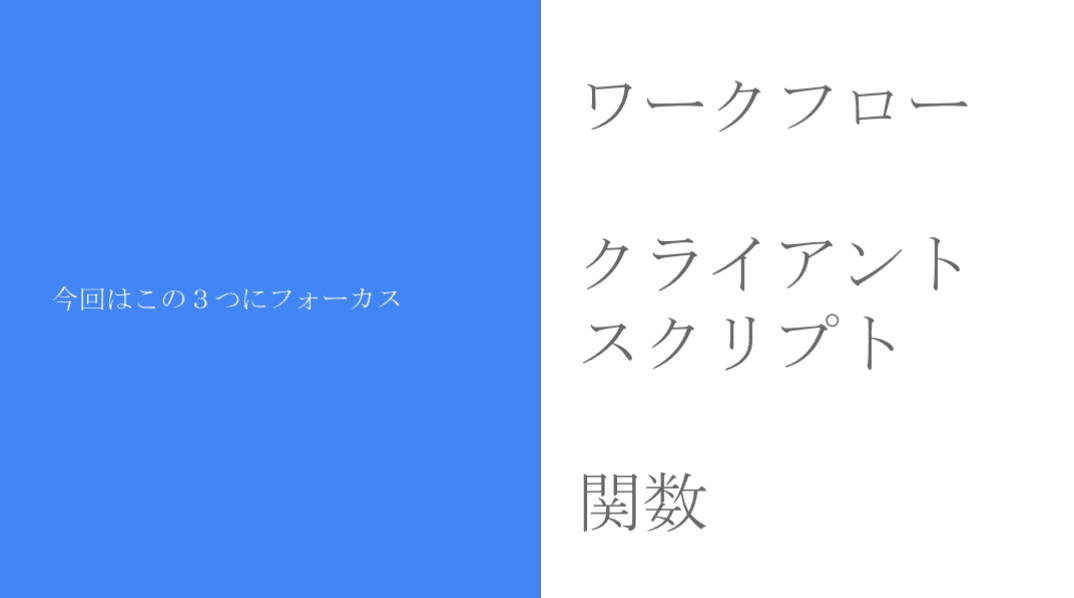
本セッションでは、私自身の経験をもとに、ワークフロー/クライアントスクリプト/関数の3つにフォーカスし、それぞれの特徴と活用シーンをご紹介しました。
今回取り上げる自動化機能 / 手法
それぞれの使用用途と場面
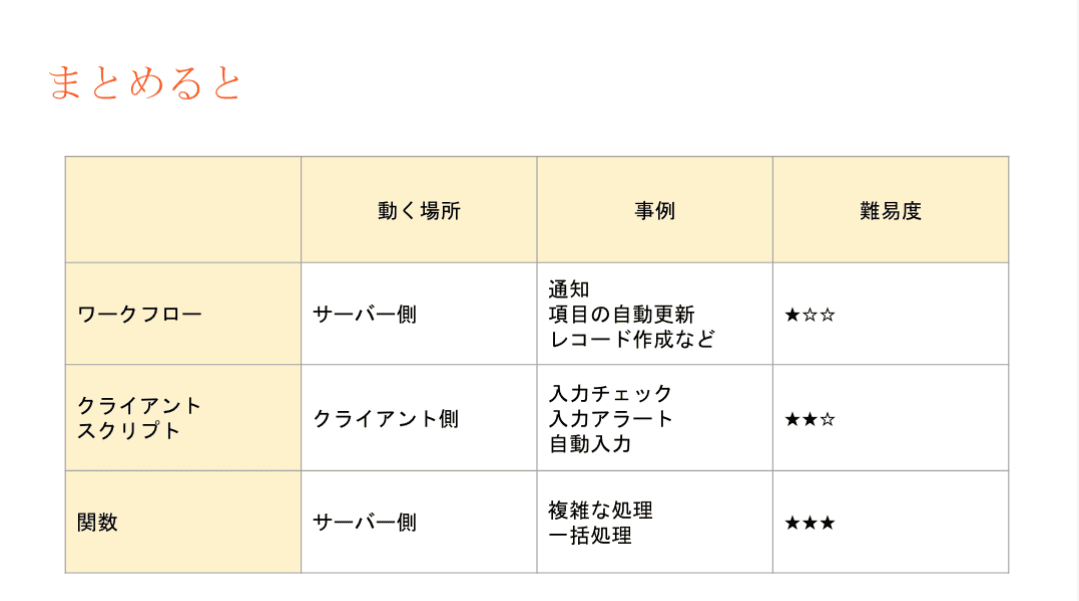
- ワークフロー:設定後も「設定担当者以外の人が見たとしても、直感的に理解しやすい」です。詳細な自動化の設定には最適では無いケースがあります。
- 設定例:CRMで取引先が作成されたら、メールが自動送信されるようにする。
- クライアントスクリプト:設定内容の要件が、画面操作だけで済む場合は本機能を利用します。
- 設定例:CRMの操作画面に、アラート表示を出すことで、記入漏れ等を防ぐ。
- 関数(Deluge):最終手段。ワークフローでも、クライアントスクリプトでも実装できない場合に本機能を活用することで、希望要件の内容で設定できる可能性が出てきます。
- 設定例:添付ファイルを一括アップロードできるようにする。(基本は1ファイルごと手動で添付操作が必要)
3点の違い
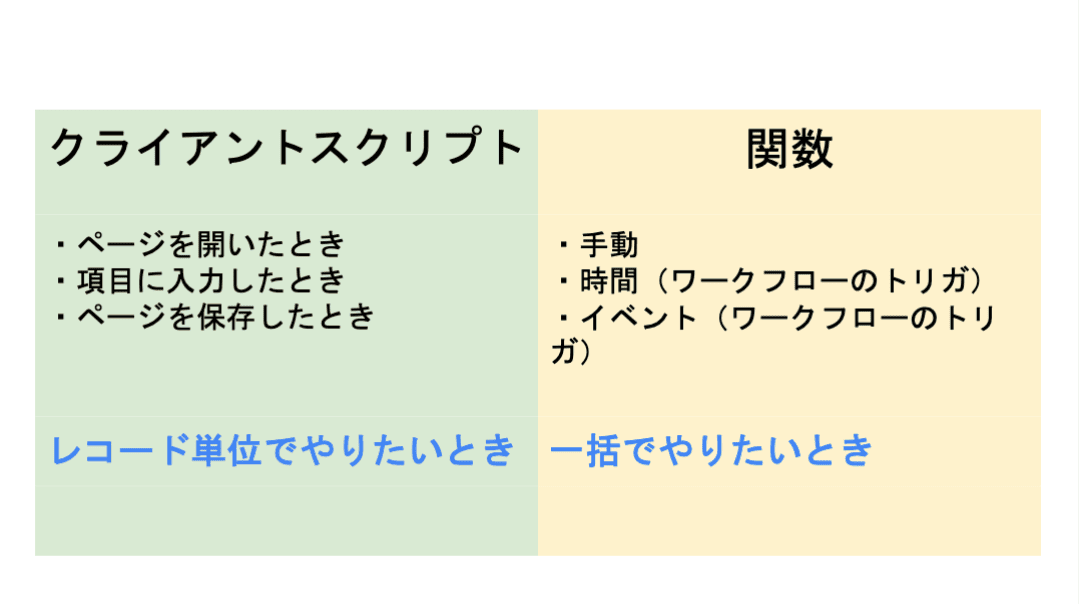
ワークフロー:設定後も「設定担当者以外の人が見たとしても、直感的に理解しやすい」です。詳細な自動化の設定には最適では無いケースがあります。
- 設定例:CRMで取引先が作成されたら、メールが自動送信されるようにする。
クライアントスクリプト:設定内容の要件が、画面操作だけで済む場合は本機能を利用します。
- 設定例:CRMの操作画面に、アラート表示を出すことで、記入漏れ等を防ぐ。
関数(Deluge):最終手段。ワークフローでも、クライアントスクリプトでも実装できない場合に本機能を活用することで、希望要件の内容で設定できる可能性が出てきます。
- 設定例:添付ファイルを一括アップロードできるようにする。(基本は1ファイルごと手動で添付操作が必要)
設定の際の気をつけるべきポイント
関数の設定でつまずきやすいポイントのひとつが、「ワークフローとの連携」です。
引数が間違っていると、ワークフロー自体の設定が正しくても、うまく動作しないという事象が発生します。「何度やってもなぜか動かない…」と感じたときは、ぜひ一度、引数を確認してみてください。
投影資料はこちら
グループワーク:Zoho で"見える化"した / したい、自社の数字
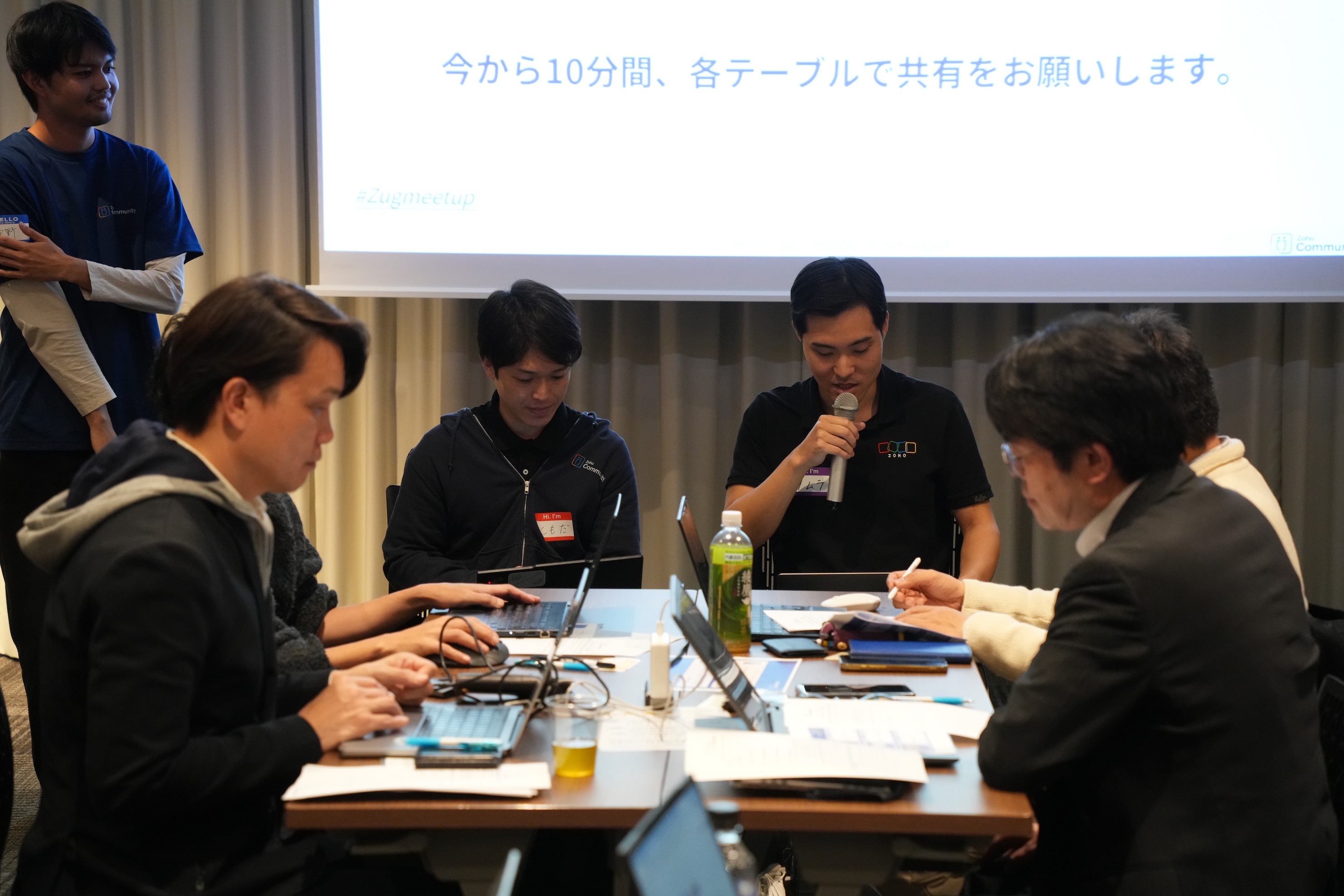
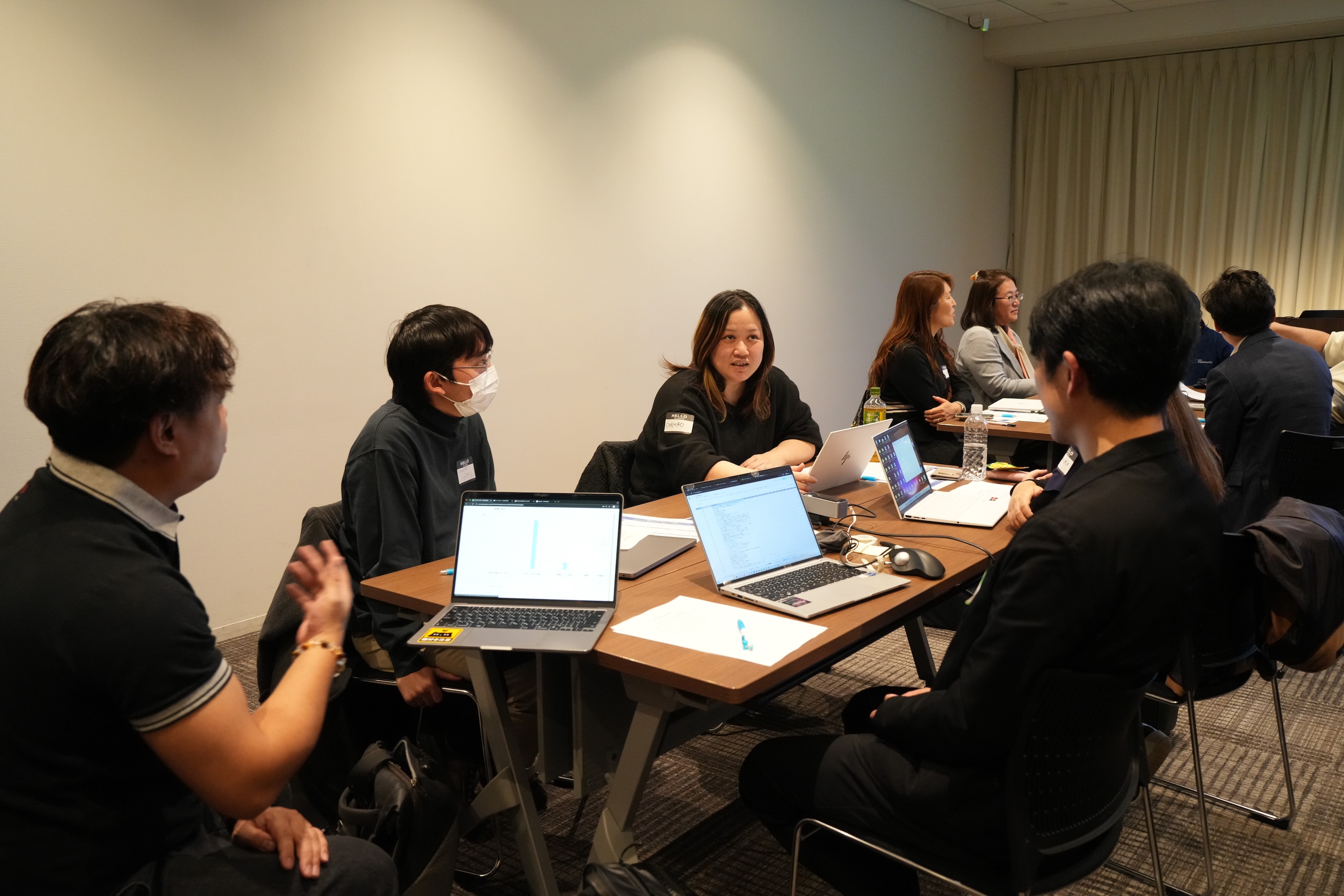
11月に3都市で本テーマのグループワークを実施し、いずれの回も大いに盛り上がりました。ここでは、当日ご参加の皆さまから共有された内容の一部をご紹介します。
- Campaigns や Forms から CRMへデータを取り込み、見込み客がどのような経路でコンタクトしてきたのかを、よりわかりやすく可視化した。
CRM上 で見積書や受注書を作成することで、朝礼の際にiPadなどで簡単に共有・確認ができるようにした。
オフサイトで開催したイベントにかかった費用(展示会など)の参加費・ブース設置費・人件費などをCRMのサブフォームで管理していた。1イベント=1レコードとしてイベントタブにデータを貯蓄することで、各イベントごとの売上や費用対効果を確認できるようになった。

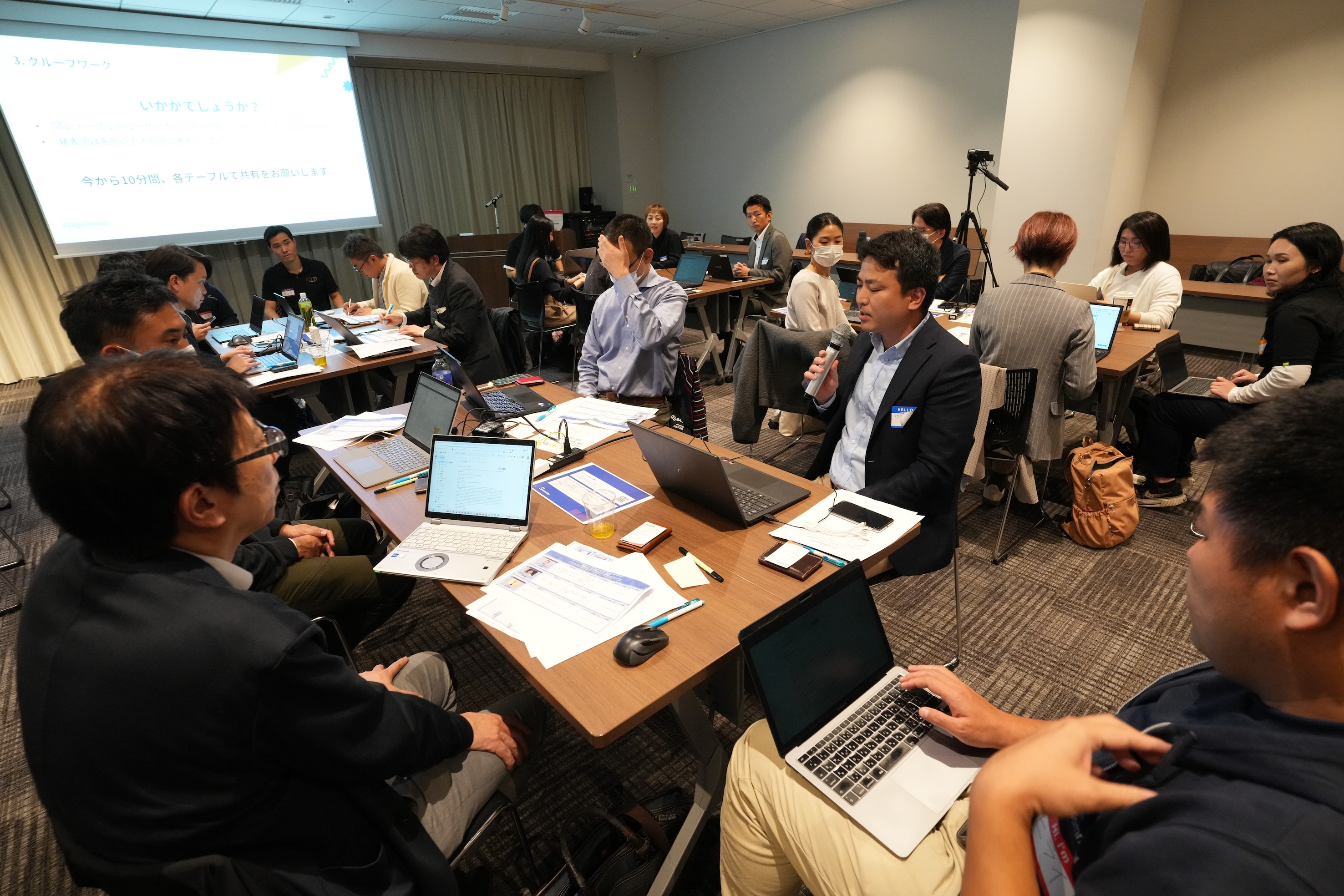
Zoho社員セッション:顧客との日程調整を自動化!Zoho Bookings で営業・サポート対応をスムーズに
11月に3都市で開催したユーザー交流会で本セッションを実施し、ゾーホージャパン技術部の田村より、Zoho Bookings の概要からデモによる活用例までご紹介しました。以下は当日の一部の様子です。


Zoho Bookingsについて
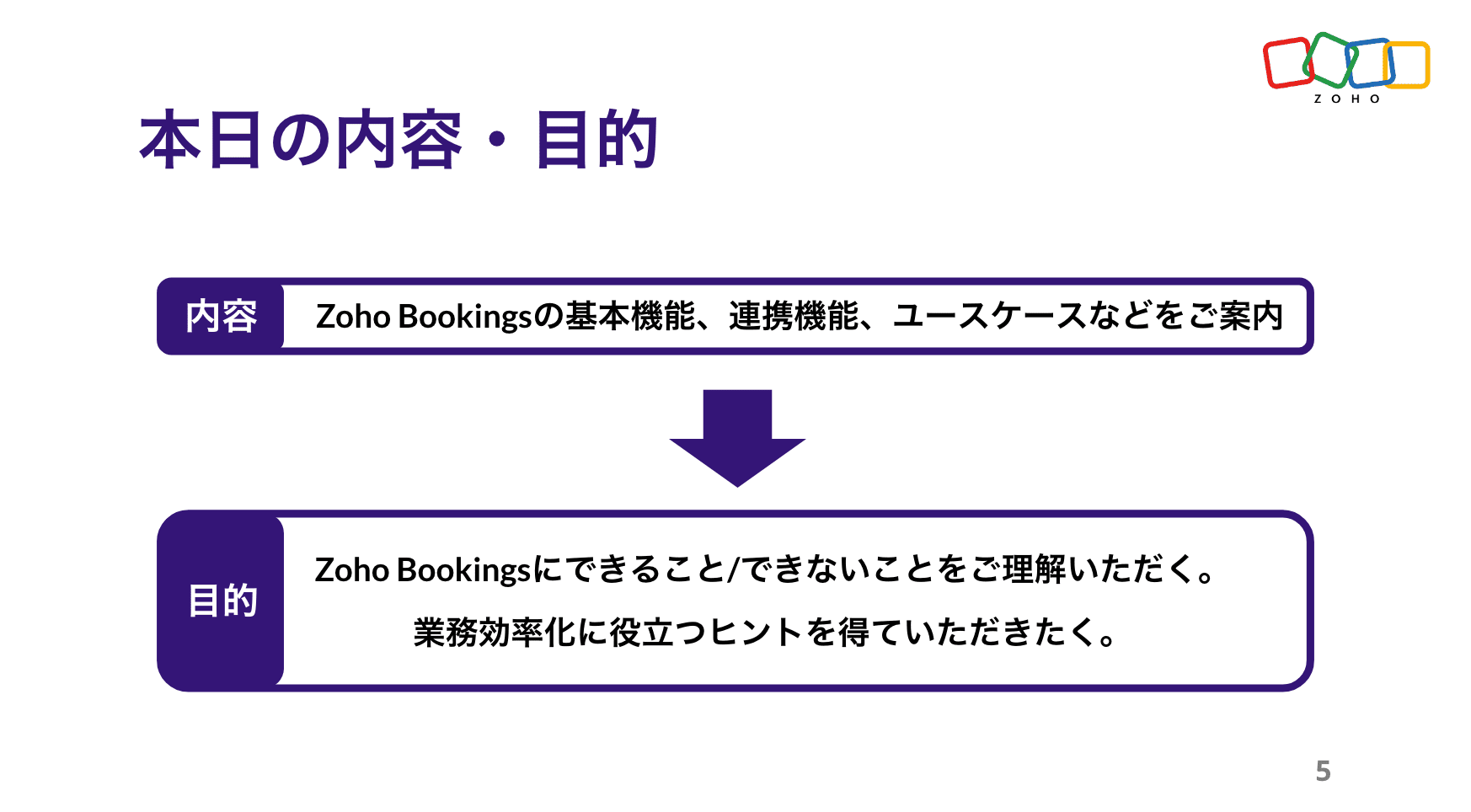


Zoho Bookings の設定について(資料の記載内容を一部抜粋)
Bookings の予約枠は、前後の間隔や時間・期間・営業日、1日あたりの上限などを柔軟に設定できます。
予約ページのデザインも、用途に応じて自由にカスタマイズ可能です。


予約の一覧/カレンダー表示、ステータスについて
※以降は主にデモ動画を投影して説明しました。詳細は、次ページ以降の投影資料をご覧ください。


Zoho Bookings まとめ
Bookingsでは人や物の予約は可能ですが、レストランや宿泊などの日付をまたぐ予約には対応していません。

投影資料はこちら
懇親会の様子
参加者同士で交流されたり、Zoho社員に日頃の悩みや仕様の質問をされたりと、いつも以上に大盛り上がりのイベントでした 😊


お知らせ
2025年度のユーザー交流会は今回で最後です!2026年度の開催予定は、オンラインフォーラムやメールでお知らせします!
※スマートフォンでは、下にスクロールすると「フォロー」ボタンが表示されます。
今後とも、Zoho ユーザーコミュニティをよろしくお願いいたします!
ゾーホージャパン コミュニティチーム


Topic Participants
Emiri Fujisawa
Fujikawa Katsuhiro
Tamura
Sticky Posts
【6/22〜6/24開催】Zoho CRM 管理者向けトレーニングのご案内
「Zoho CRMを導入したばかりで、初期設定や基本操作に不安がある」、「短期間で基礎から理解を深め、運用開始までをスムーズに行いたい」「Zoho CRMを基礎から再度学び直したい」といった課題や要望をお持ちの管理者に向け、Zoho CRM 管理者向けオンライントレーニングを実施します。 2022年6月の開催回よりトレーニング内容を刷新し、有償にて実施いたします。 ─────────────────────────────────── >詳細・お申し込みはこちら:https://www.zoho.com/jp/crm/crmtraining/【12/17(金)Meetup開催】参加者にはノベルティプレゼント!Zoho サービス相談会/情報交換会もあります
こんにちは、Zoho Japan コミュニティチームの今成です。 12月17日(金)16:00から、今年最後のMeetup(ユーザー交流会)を開催します! ●詳細はこちら:https://www.zohomeetups.com/ZohoJapanCommunityMeetup2021vol4/ 前半は今年9月にZoho サービスを導入したユーザー様のセッションとして、現状の利用状況とこれからどのようにZoho サービスを利用していくか、これからの構想談をお話いただきます。 後半では、Zoho CRM【6/29(火) 初心者向け】カスタム関数勉強会のご案内
先日のMeetupでも告知しましたが、以前より多くのユーザーさまからご要望いただいていたZoho の「カスタム関数」に関する基本の勉強会を6/29(火) 17:00に、開催します! 関数の基本的な書き方や、Zoho CRM で活用できる関数例のデモなどについて、Zoho の技術メンバーがわかりやすく解説します。 関数の基本を掴みたい方はぜひ、ご参加くださいませ。 >>申し込みはこちら:attend.zoho.com/luy0 以下詳細です。 ーーーーーーーーーーー 日時:6月29日(火) 17:00~【3/19(金)】Meetup(ユーザー交流会)開催のご案内。Zoho CRM ユーザー事例やZoho Sign の紹介、Zoho CRM 相談会など
こんにちは、Zoho Japan コミュニティチームの今成です。 2021年1回目となるMeetupを、3月19日(金)16:00~ 開催いたします! ●詳細はこちら:https://www.zohomeetups.com/ZohoJapanOnlineMeetup2021vol1 毎回好評のZoho ユーザーさまによる活用事例をはじめ、Zoho の電子署名ツール「Zoho Sign」の製品デモや、グループディスカッションをご用意しています。 前半/後半のみのご参加も可能ですので、お気軽にご参加ください!【12/17(木) 16:00-】ユーザー同士で情報交換を行う、グループディスカッションもあります。オンラインMeetup Vol.4 開催のお知らせ
Zoho コミュニティチームの今成です。最近寒くなってまいりましたが、みなさまいかがお過ごしですか? Zoho Japan Communityでは、今年最後のオンラインMeetup(ユーザー交流会)を開催いたします!以下、詳細のご案内です。 ーーーーーーーーーーーーーーーーーーーーー <日時>2020年12月17日(木) 16:00-18:00 <参加費>無料 <開催方法>オンライン <概要> 前半(16:00〜17:00) 自社活用事例「Zoho 社員は、1日の中でどのサービスをどれくらい使っているのか」(ゾーホージャパン株式会社 コミュニティチーム)
Recent Topics
Customization hacks in Zoho Writer - Part 2
Hey community, We're back with some more tricks to personalize your documents, save time, and get in the zone when you work in Writer. Check out part 1 of this post if you haven't already. Let's dive right in! Document ruler units Imagine you're creatingSimplify your tax calculations with Zoho Writer
Hello Zoho Writer Community! Tax season can be stressful, but with Zoho Writer, managing your income tax calculations becomes straightforward and efficient. Here’s an example of how you can use the tables and formulae of Zoho Writer to calculate incomeEnhance document navigation with headings and TOC
Hey Zoho Writer Community! We're back with some useful features in Zoho Writer that can simplify your document creation and navigation process. Let's dive right in! Check out our video on how to make the most of Zoho Writer's heading and table of contentsUse and download in PDF format of Zoho wirter Merge template using deluge
Hello Zoho Developers. Here is some information about Zoho Writer. Writer is not just another online word processor, it's a powerful tool for editing, collaboration, and publishing. Even with its wide range of features, Writer's pared-down user interfaceCustomization hacks in Zoho Writer - Part 3
Hello everyone, Welcome back to Part 3 of our customization tips in Zoho Writer! In this third installment, we'll be diving into some essential customization settings that can enhance your document creation experience. Sender email address in mail mergeDaytime saving timezones messing up writer pdf
Hi, I need help for something I can't figure out. I created a Form to collect data and it is set up with my current Daylight Saving Time (GMT-3). This form is used to generate a contract (pdf Writer) with dates from an event that is being held in 4 monthsIssue with locked content in Writer
Hi, I have seen the documentation which outlines how to lock specific content within a Writer document so that it can't be modified by collaborators, but I have come across an issue. When the editor locks a paragraph for example, then a collaborator can'tDeprecation of certain URL patterns for published Zoho Writer documents
Hi Zoho Writer users! We'd like to let you know that we have deprecated certain URL patterns for published and embedded documents in Zoho Writer due to security reasons. If the published or embedded documents are in any of these URL patterns, then theirUsing Mail Merge Template to Print Documents with One Subform Record's Fields per Document
Hello, We have a Mail Merge template created in Zoho Writer which is not able to perform the functionality which is currently required to automate the documentation task portion of our process. The CRM module we are primarily using is based on a "Loans"Problem with Writer and Workdrive
Hi team, I’m the super admin for our Zoho One org. WorkDrive is active, and Zoho Docs is deprecated for our org. However, Zoho Writer cannot connect to WorkDrive at all — we’ve cleared cache, tried incognito, and restarted several times. I was able toSet to Review for all
We are testing the use of Writer as part of an internal review process for statement of work documents and have found that when the document is changed from Compose to Review by one person, that is not reflected for all others who view the document. IsI’ve noticed that Zoho Sheet currently doesn’t have a feature similar to the QUERY formula in Google Sheets or Power Query in Microsoft Excel.
These tools are extremely helpful for: Filtering and extracting data using simple SQL-like queries Combining or transforming data from multiple sheets or tables Creating dynamic reports without using complex formulas Having a Query-like function in Zohostock
bom/bse : stock details or price =STOCK(C14;"price") not showing issue is #N/A! kindly resolve this problemSOME FEATURES ARE NOT IN THE ZOHO SHEET IN COMPARISION TO ZOHO SHEET
TO ZOHO sir/maam with due to respect i want to say that i am using ZOHO tool which is spreadsheet i want to say that some features are not there in zoho sheet as comparison to MS EXCEL like advance filter and other Features which should be there in ZOHOZoho sheet for desktop
Hi is zoho sheets available for desktop version for windowsTip #18: 6 Trendlines and when to use them in your spreadsheet data?
Charts are a great tool for visualizing and interpreting large chunks of data in spreadsheets. Zoho Sheet offers you 35+ chart options, along with AI-powered chart recommendations based on the data set you select. There are various chart elements thatPerform customized calculations with the new LAMBDA functions!
We released the LAMBDA function in Zoho Sheet in 2021, enabling customized calculations inside predefined functions. Now, we're extending LAMBDA's capabilities with six new functions. Each of these functions applies LAMBDA to the given input, performsTip #17: Easily share spreadsheets with non-Zoho account users
With efficient, collaboration-friendly options, Zoho Sheet is a popular choice among users. Sheet's external share links help you collaborate more effectively by sharing your spreadsheets with anyone outside your organization, including users who do notWork seamlessly with Sheet's shortcuts without affecting the browser
Navigating your worksheets and performing specific actions should be a quick and easy process. That's where keyboard shortcuts come in. Shortcut keys help you accomplish tasks more efficiently, eliminating the need to move away from the keyboard. WhatZoho Sheet for iPad: Improved UI, external keyboard support, and more!
The portability and capabilities of the iPad have made it an essential device in the business world. With this in mind, we had launched an exclusive Zoho Sheet app for iPad, with device-specific improvements and enhanced usability. Now, we're improvingThe new Zoho Sheet for Android: Seamless UI and advanced features
At Zoho Sheet, we know mobile apps have become the go-to platforms for creating, sharing, and storing information. And we understand the importance of an efficient and seamless app experience. We've been working hard on improving the overall user experienceZia in Zoho Sheet now makes suggestions on conditional formats, picklists, and checkboxes
Zia, Zoho's popular AI assistant, has been helping users succeed across Zoho applications since inception. In Zoho Sheet, Zia helps users efficiently build reports and analyze data with recommendations about data cleaning, charts, and pivot table. Also,VBA attached to button no longer works on external shared sheet
Hi - we have a Sheet that our clients use, which requires them to press a button once they've entered data. The button then triggers a flow via a webhook. The button works fine when editing within Zoho Sheet - however when shared externally it no longercan I use zoho sheet for survey?
Hi I wanna use zoho sheet for my ARY to know consumer better so i wanna have permission to do soHow to Avoid Impacting Other Users When Hiding Columns in Zoho Sheet
Hi Team, We’re experiencing a challenge with the column-hiding feature on Zoho Sheet during collaborative sessions. When one user hides a column, it becomes hidden for all users working on the file, which disrupts others' workflows. In comparison, ExcelWhat are the benefits of procurement software in a growing business setup?
I’ve been exploring tools that can help automate purchasing and vendor-related tasks. I keep hearing about the benefits of procurement software, especially for businesses that are scaling. I want to understand how it helps in streamlining operations,What formula to use in computing total hrs and decimal hrss
So , my data includes log im column , 2 breaks with 2 columns that says back and lunch and 1 column that says back and logged out. What formula should i use to be able to automatically have my total hours as I input time in each column? ThankyouReplacing email ID,
In zoho sheets If I am sending it as an email attachments can I replace sender email ID from notifications to my email ID.Latest Enhancements and Bug Fixes in Zoho Meeting
Hello there, We hope you're doing well. The latest updates from Zoho Meeting include enhancements like adding names for instant meetings, renaming participants, enabling text notifications for participant entry/exit, viewing details of bandwidth optimization,Multi-video feed in webinars, custom domain options, and our integration with MS Outlook
Hi there, We hope you're doing well. With your help, we have been able to release many useful features and enhancements in 2020. We, the Zoho Meeting team, would like to thank you all for the feedback, support, and encouragement you've given as we workedAdd co-hosts in meetings, manage webinar registration and other enhancements
Hello all, This month's updates allow you to add co-hosts while scheduling meetings. You can also control your webinar registrations better by allowing or blocking registrations from the domain or country of your choice. Read on to learn more. MeetingA new UI for distraction-free engagement in online meetings and webinars that scale up for 3000 attendees
Hello all, We're excited to share our new, refined UI for online meetings. Here's how the new UI will improve your experience during online meetings: We've re-designed Zoho Meeting's online meeting UI to enable users to fully engage in conversationsI Can't Clone Webinar that I Co-Organize
How do i get our account admin to give me permission to clone our webinars? I am a co-organizerLatest updates in Zoho Meeting | Calendar view, Zia integration with OpenAI, edit the recurring pattern in a recurring meeting, device error notifications revamp, and more.
Hello everyone, We’re glad to share a few updates and enhancements in Zoho Meeting, including the Calendar view, being able to edit the recurring pattern in a recurring meeting, revamped device error notifications, and other enhancements that you’ll findNew enhancements in the latest version of the Zoho Meeting Android mobile app.
Hello all, In the latest version of Zoho meeting Android mobile app (v2.2.6), we have brought in support for the below enhancements. Close account: Now users will be able to close their Zoho account directly from the app. Unmute toast message: If a userShare material, Lock Meeting and revamped feedback UI in the latest version of the Meeting iOS app.
Hello all, In the latest version of the Zoho Meeting iOS mobile app (v1.6), we have brought in the below enhancements. Share material in meeting: We have introduced share material during meeting that allows participants to view supported materials suchLatest updates in Zoho Meeting | New chat feature between an organizer and co-organizer in webinars, recording consent for webinar co-organizers and attendees in the Android app, and more.
Hello everyone, We’re excited to share a few updates for Zoho Meeting. Here's what we've been working on lately: A new chat feature between an organizer and co-organizer in webinars, recording consent for webinar co-organizers and attendees in the AndroidLatest updates in Zoho Meeting | A new Files tab to manage all your PDFs, PPTs, Video files and recordings, live transcription , ability to lock settings and adaptive echo cancellation.
Hello everyone, We’re excited to share a few updates for Zoho Meeting. Here's what we've been working on lately: A new Files tab to manage all your PDFs, PPTs, Video files and recordings, live transcription during sessions, ability to lock settings andLatest updates in Zoho Meeting | Meeting Rooms , Pin video feeds and customize from and reply-to email addresses
Hello everyone, We’re excited to share a few updates for Zoho Meeting. Here's what we've been working on lately: Introducing Zoho Meeting Rooms, an immersive solution for teams to connect over virtual meetings in video conference rooms. You can also pinLatest updates in Zoho Meeting | New top bar video layout, a revamp of our in-session settings and now import webinar registrations with a CSV file
Hello everyone, We’re excited to share a few updates for Zoho Meeting. Here's are some of them : We have moved audio, video, virtual background and preferences under a single settings pop-up for better user navigation. You can now upload a CSV file containingNext Page