Building Extensions #10: Creating widgets with the JS SDK bundle in Zoho Desk - Data Storage API
This series aims to equip developers with all they need to build extensions for Zoho Desk in Zoho Sigma and publish them in Zoho Marketplace.
In our previous post, we discussed Request APIs, what they're used for in extensions, and how to use them in your Zoho Desk extensions. In this post, we'll examine the next set of APIs in the JS SDK bundle—Data Storage APIs—and show you how to use them in the Zoho platform (Sigma) to build the Zoho Desk extensions.
Data Storage APIs
You may find that you require an extension that has data storage and retrieval capabilities. Zoho Desk allows you to store extension-related data in a database so that it can be retrieved and used when required. This can be data from a third-party application, or any other data related to the extension's functionality that needs to be preserved for future use. With the Data Storage APIs, you'll have access to a data store where the extensions can set (store) and get (retrieve) data using the Data Storage APIs. A key-value pair is used in managing the details about the data that's stored and retrieved, and is explained in detail in this post. When the data is no longer required, it can even be removed using the delete API.
The following SDK methods provide database management functionalities in your extensions.
Get data
The get API retrieves data from the extension's connected database. The request includes two parameters: key and queriableValue. The API request must include at least one of them.
- key - Helps to identify what is being called by the API.
- queriableValue - Specifies a common lookup group which will be useful for lookup from the database.
Here is a sample code snippet of the get data function:
ZOHODESK.get("database", { "key": "3", "queriableValue": "test" })
.then(function (response) {
//response returns the value, based on the key specified
})
.catch(function (err) {
// Error handling
})
Set data
The set data API asynchronously sets data in the extension's connected database. The request includes three parameters: key, value, and queriableValue. The API request must include all three parameters. Each parameter is subject to further conditions:
- The value passed by key can have a maximum length of 50 characters. The only special characters allowed are commas (,), underscores (_), and colons (:). The value of this parameter cannot be NULL.
- The data passed by value must be a JSON object whose size cannot exceed 1 KB. Empty JSON objects can be passed, too.
- The value passed by queriableValue can have a maximum length of 50 characters. The only special characters allowed are commas (,), underscores (_), and colons (:). The value of this parameter can be NULL.
Here is a sample code snippet of the set data function:
ZOHODESK.set("database", { "key": "3", "value": { "test": "testid" }, "queriableValue": "test" })
.then(function (response) {
// response returns the value saved
})
.catch(function (err) {
// Error handling
})
Delete data
The delete data API completely removes the selected data from the connected database. The key parameter must be included in the API request.
Here is a sample code snippet of the delete data function:
ZOHODESK.delete("database", { "key": "3" })
.then(function (response) {
// response returns the status of deletion
})
.catch(function (err) {
// Error handling
})
Scenario: Let's say you're building an extension that involves creating events in Zoho Calendar from within Zoho Desk—i.e., the user creates Calendar events without switching from Zoho Desk to Zoho Calendar. In this case, the events created can be fetched from Zoho Calendar and are categorized and listed in the extension, such as completed event, upcoming event, or any other events, according to requirements. The Data Storage APIs can be used to get those events' data, store them in the extension database, and list those events in the extension's widget.
To implement this scenario, you must establish a connection between Zoho Desk and Zoho Calendar with the required scope. This will allow you to make requests between these services by invoking their APIs. Please check the Connectors post to learn more about creating connections. Once the connection is established and the configurations are completed in the plugin-manifest.json file, you can proceed with executing your extension functionalities.
The code below demonstrates how an event is created in Zoho Calendar using the Request API and the events are listed in Zoho Desk using the set method.
- Use ZOHODESK.request to invoke Zoho Desk's "Create Events" API.
Here, we are pushing the event data into Zoho Calendar. - Construct the request object for ZOHODESK.request.{"type": "POST","headers": {},"postBody": {},"connectionLinkName": "calendarEvent","data": {"eventdata": {"dateandtime": {"timezone": "Asia/Kolkata","start": "20220225T130000+0530","end": "20220225T133000+0530"},"title": "Today's morning meeting"}}}
- Extract the required values from the response of the request.
- Use ZOHODESK.set to invoke Zoho Desk's "set record" API.ZOHODESK.set("database", {"key": userId,"value": {"eventId": eventData.id},"queriableValue": "eventIds"})
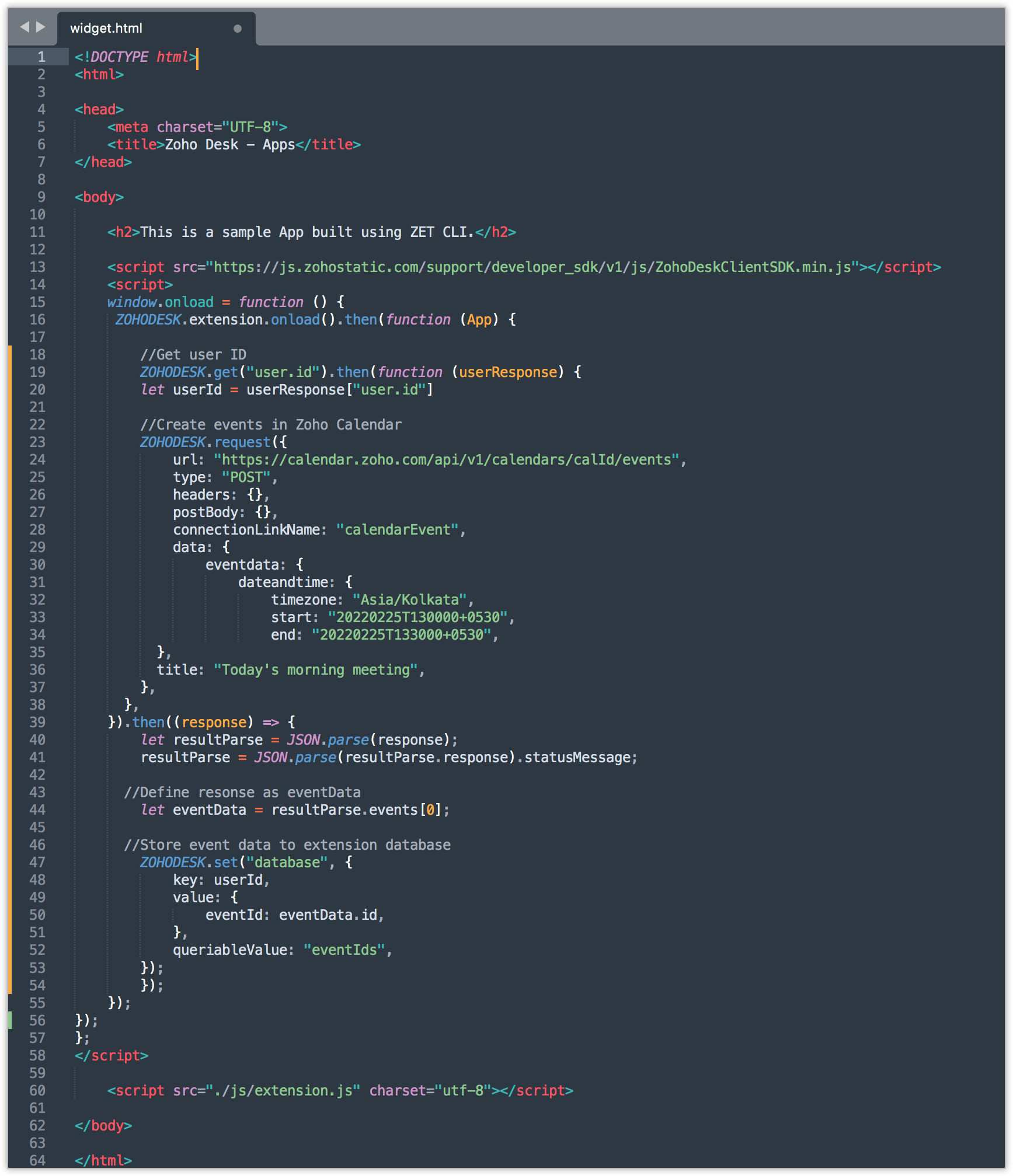
In this code, we're doing the following:
- Creating events in Zoho Calendar by making a call to the Calendar events API, post method. The Request API SDK of Zoho Desk is used to invoke the Zoho Calendar API. The events are created with event date, event start time, and end time, with the time zone defined.
- As mentioned, we need to list those events in our extension for our quick reference, so the required event information is fetched from the Request API's response.
- Finally, we're storing the event information in our extension database using the set method. Here, we have defined key as userId, value as eventData.id, and queriableValue as eventIds. So all the events (eventData.id) created by the user (userId) will be stored within the database (eventIds).
Now that we have the event information in our extension database, we can use the get Data Storage API, define the key and queriableValue to retrieve the event information, process them, and display the events in your customized widget in the extension.
We hope that this example code has given you a clear picture of when and how to use the Data Storage APIs in building extensions for Zoho Desk.
Stay tuned for our next post where we will discuss another SDK method.
See Also
Topic Participants
Vinoth M
Recent Topics
Option to Delete Chats in IM
Currently, there is no option to delete any chats in IM, regardless of their source.Restrict Users access to login into CRM?
I’m wanting my employees to be able to utilize the Zoho CRM Lookup field within Zoho Forms. For them to use lookup field in Zoho Forms it is my understanding that they need to be licensed for Forms and the CRM. However, I don’t want them to be able toReferencing a cell from another sheet
My workbook has multiple sheets. Each sheet has some calcluated totals in certain cells. The front master sheet has a list of everything that is detailed on the other sheets, with the totals. These could change at any time, so the totals need to be references to the other cell's value, not a fixed number. So on the master sheet, I put in =, then go the other sheet and choose the cell and hit Enter. In regular Excel, this works. But in the Zoho sheet, it doesn't work. I have to edit the result byGroup mail for external email addresses
Hello, I was just wondering if the Group mail feature works with external email addresses - e.g. gmail.com or a completely different domain? it seems only internal addresses (hosted with Zoho) receive the mail. Thanks, OliverIs Zoho Shifts included in the Zoho One plan?
In case the answer is no: there's any plan to make it available via One? Thank youMarketing Automation Requirements Questions
I would like to set up a multi-email drip campaign- please see the structure below and confirm if I can achieve this set up in Zoho marketing automation. Where applicable, highlight gaps and workarounds. Thanks Drip email campaign- Can I create one dripThe email address you have entered belongs to a different deployment/region.
Hi, I am trying to create the user - mprust@crombiecomputers.co.uk but keep getting the message below - The email address you have entered belongs to a different deployment/region. Please contact support@zohoaccounts.com for assistance. Look forwardUse Zoho Flow Credits for CRM ‘Actions by Zoho Flow’
Hello Team, We would like to submit a feature request regarding credit usage for “Actions by Zoho Flow” in Zoho CRM. Use Case: We are Zoho One users and actively use Zoho Flow, where our organization has 52,000 Flow tasks per month. In Zoho CRM, we useUnusual activity detected from this IP. Please try again after some time.
Hello Zoho admin and IT team We are a registered website in Eloctronic services and we been trying to add our users to the zoho system but this issue faced us ,, hope you unlocked us please.Alert if a field is ticked.
Hi There, We have two modules named Opportunities (Deals) and End Users (CustomModule1), as per the image below. Within Opportunities, we have a lookup field that looks up from the End Users Module. We are looking to get an alert either via email or anotherZoho CRM Analytics - Allow To Reorder Dashboards
I would like to suggest that you add the ability to reorder dashboards in the Analytics Module. I can see that this has been requested some time ago, the latest 9 years ago. I am not sure if this is a big or small endeavor, but such a small fix can goPlans to allow more columns of monitoring, and monitoring not only your own channels?
Are their any plans to allow more columns of monitoring, and monitoring not only your own channels? Here's why - I'm sure I'm not alone in that we sell other brands products, so not only am I interested in my own brand social channels, but also the socialKaizen #194 : Trigger Client Script via Custom buttons
Hello everyone! Welcome back to another interesting and useful Kaizen post. We know that Client Scripts can be triggered with Canvas buttons and we discussed this with a use case in Kaizen#180. Today, let us discuss how to trigger Client Script when aAdding Choices in a Sub-Form Dropdown
Hi, Has anybody tried Adding Choices to a Dropdown in a Zoho Creator Sub-Form programmatically? My Deluge code adds rows to a subform with 2 fields A and B. A - text field. B - dropdown. My Deluge script adds the row and displays A successfully. For theZoho CRM Email Templates 100% Width No Background How?
Hi, On the Zoho CRM Email Templates in setup > customization > templates > new templates > I choose blank template, but still it puts in a gray background and a max width for the email. I just want to make an email that looks like an email I would send from gmail that has no background or max width. How do you do this?Checking client unsubscribe details
Hi team, Can you please let me know where we can check if a client has unsubscribed, along with the date and time it was done? If this information is not available at our end, please help confirm the unsubscribe date for the below email ID from the backend:Manage control over Microsoft Office 365 integrations with profile-based sync permissions
Greetings all, Previously, all users in Zoho CRM had access to enable Microsoft integrations (Calendar, Contacts, and Tasks) in their accounts, regardless of their profile type. Users with administrator profiles can now manage profile-based permissionsOptimum CRM setup for new B2B business
Can some advise the most common way to setup Zoho CRM to handle sales for a B2B company? Specifically in how to handle inbound/outbound emails. I have spent hours researching online and can't seem to find an accepted approach, or even a tutorial. I haveIntegration with...
Dear Zoho Commerce team, Please could you consider the integration within Zoho Commerce / Inventory and Qapla'? (https://www.qapla.it/en/) This app is better than Aftership in many ways: - Aftership integration require PRO plan and price start from moreScan and Fill CRM Lookup Field
Not sure if there is a reason why this isn't possible or if I'm just missing it. But I would like to be able to use the scan and fill feature on the mobile app to prefill the CRM lookup field and fetch the rest of the data in the form.Customer Management: #2 Organize Customers to Enhance Efficiency
When Ankit started his digital services firm, things felt simple. A client would call, ask for a website or a one-time consultation, Ankit would send an invoice, get paid, and move on. "Just one client, one invoice. Easy.", he thought. Fast forward aZoho Mail and Zoho Flow integration to automatically create ToDo tasks from outbound emails
How do i setup Zoho Mail and Zoho Flow integration to automatically create ToDo tasks from outbound emailsAttachments between Zoho and Clickup, using Flow.
Olá suporte Flow, tudo bem ? Estamos usando o flow para integrar Zoho Desk com o clickup. Não localizamos a opção de integrar anexos entre do zoho Desk para o clickup. Gostaríamos de saber se migrando para o plano pago, teremos suporte para fazer a integraçãoAdding an Account on Zoho Mail Trigger in Zoho Flow
I'm trying to create a flow using the zoho mail trigger "Email Receive". My problem is that when I select this trigger, it only shows one account from the account dropdown. I'm planning to assign it on a different email. How can I add other email adLinnworks
Unless I am missing something, the Linnworks integration is very basic and limited. I have reached out to support but the first response was completely useless and trying to get a reply in a timely manner is very difficult. Surely I should be able toTest data won't load
I am using a Flow to receive orders from WooCommerce and add them to a Zoho Creator app. I recently received an order which failed, and when attempting to test the order I found that it just shows a loading animation and shows up in the history as "queued."AddHour resets the time to 00:00:00 before adding the hour.
Based on the documentation here: https://www.zoho.com/deluge/help/functions/datetime/addhour.html Here's my custom function: string ConvertDateFormat(string inputDate) { // Extract only the date-time part (before the timezone) dateTimePart = inputDate.subString(0,19);WhatsApp Link is not integrating
Hello, I am using zoho flow. when new row added in google sheet it sends email to respected person. In email body I have a text "Share via WhatsApp". behind this text I putted a link. But when the recipient receives email and wants to share my given infoZoho flow - Webhook
If I choose an app as a trigger in Zoho Flow, is it still possible to add a webhook later in the same flow?Zoho Flow + Bigin + Shopify
We are testing Zoho Flow for the first time and want to create a flow based in first purchases. When a client makes his first order, we're going to add the "primeiracompra" (first order) tag to his account in Shopify (it's not efficient, but that's theAdding multiple Attendee email addresses when adding a Zoho Calendar event in Zoho Flow
I am trying to integrate Notion and Zoho Calendar via Zoho Flow. However, the Attendee email address supported by Zoho Calendar - Create event only supports one email address, so I am having difficulty implementing automation to automatically registerIs it The Flow? Or is it me?
I want to do some basic level stuff, take two fields from a webhook, create a zsheet from a template using one field with date appended, create a folder using both fields as the name, and put the zsheet into that folder. I was going to elaborate - butHaving problem with data transferring from Google sheet to ZMA
When connecting Google sheet with Zoho marketing automation it is having the email as a mandatory field. Can I change it as non-mandatory field or is there any other way to trasnfer data from google sheet to ZMA. I have leads which we get from whatsapp,Dropbox to Workdrive synchronisation
I want to get all the files and folders from Dropbox to Workdrive and each time a new file or folder is added in dropbox i want it to be available in Workdrive and wise versa. Sync Updates to Files Trigger: "File updated" (Dropbox). Action: "Upload file"Microsoft Planner Task to Service Desk Plus Request - error n4001
Hi there. I'm trying to create a flow that will create a new request in ServiceDesk Plus when a new task is created in Microsoft Planner. I have succesfully connected both Planner and ServiceDesk Plus, and have configured the 'create request' sectionTrailing Space in "Date and time scheduled "
I am trying to use the Zoho Projects - Create event action in a flow. It is failing with the output error as: "Action did not execute successfully due to an unknown error. Contact support for more details." The input is: { "Duration - Minutes": 30, "Project":Project name by deal name; project creation via flow
Hello, I want to create a project in zoho projects using flow by a trigger at the crm. My trigger is the update of a deal (stage). The project name should be the account name/ deal name. But I dont find the solution to it. Can you please give me the answerSlack / Zoho Flow; Repl
I am trying to add a comment in a zoho ticket when someone reply's to a message in a thread. The Message posted to public channel trigger doesn't seem to pick up thread messages. I also cannot use the thread_ts field as it doesn't seem to pull that in.Get Holiday ready with Zoho Mail's Templates
As the holiday season approaches, it’s time to step away from work and unwind. You may not be able to respond to every email or send individual messages to wish everyone holidays greetings—but It is still important to stay connected. How do you send thoughtfulCustomize folder permissions in a Team Folder in a Team Folder via zoho Flow
HI All, on the nth level folder of a team folder I would like to Customize folder permissions when it's created in the flow of Creating folders. That last level I only want to grant access to a specific group, goup ID 201XXXXXXXX. Can you help with aNext Page