Building Extensions #13: Creating widgets with the JS SDK bundle in Zoho Desk - Resources API

Building Extensions #13: Creating widgets with the JS SDK bundle in Zoho Desk - Resources API

This series aims to equip developers with all they need to build extensions for Zoho Desk in Zoho Sigma and publish them in Zoho Marketplace.

The Zoho Desk platform supports custom fields. The custom fields can be introduced using an extension. The Zoho Desk platform supports this capability through resources.json found in the plugin-manifest file and the Resources API offered in the JS SDK bundle.
 
In this forum post, we'll explore the Resources API in detail with an example of creating custom fields. Other resource types offered by the Zoho Desk platform include webhooks, custom permissions, and channel connectors; we'll talk about these individually in our upcoming forum posts.

Need for custom fields 

There are various scenarios that may call for custom fields. Without creating an exhaustive live, here are a few scenarios in which you may need custom fields in Zoho Desk:
  • You might have to accommodate data from integrated third-party applications inside Zoho Desk. In such cases, you can add custom fields to help with this.
  • Your extension functionality may require some new fields to be available in the Zoho Desk modules. E.g., a few additional fields in your Tickets or Customers modules. In such scenarios, you would add a custom field to the desk modules.
  • You may want to provide agents with some additional information about the customer in the ticket's property section. You can add custom fields and pre-populate them with the relevant information.

Defining custom fields 

The custom fields are to be included in Zoho Desk by defining them in the resources.json of the plugin-manifest file. Below is the structure of the resources.json with sample data filled in.
      ...
      {
          "fields": [{
              "resourceName": "field1",
              "module": "tickets",
              "displayLabel": "Counter",
              "type": "Text",
              "defaultValue" : "none",
              "maxLength": "100"
          }]
      },
      ...
 
Every field you create should have a unique identifier that is defined using the mandatory resourceName key. The resourceName(s) specified in resources.json should be unique across the extension and will be validated before the extension is made available on the Zoho Marketplace. The resourceName also serves as the unique identifier across all organizations that install your extension. The new custom fields will be automatically mapped to the default layout configured for a department, so there is no need to pass the layoutId key anywhere else in the extension code.

Any field you include in your extension will be added to the user's Zoho Desk portal on the very first installation of the extension, while subsequent installations map to the fields already created. The fields are deleted from the portal on the last uninstallation of the extension. You can include a maximum of 10 custom fields in an extension.

Using custom fields in extensions 

The resourceName defined in the resources.json file is automatically mapped with an ID and an apiName, which can be used in the APIs related to the resource as required. You need to retrieve the ID and/or the apiName of a resource to be used in the API calls of your extension.
 
To retrieve this, you can use one of the following approaches:
  • Using merge fields in the invoke API
  • Using the client SDK

 Using the merge fields 

This method is applicable for Desk's invoke API where you need to specify the resourceName value in the following format.
 
      {{resourceType.resourceName.id}} or {{resourceType.resourceName.apiName}}
 
Refer to specifying placeholders in invoke API for more information.

Note: The resourceType should be fields or webhook, based on your use case. The id returns the fieldId or webhookId, based on the value in resourceType. The apiName returns the apiName of the resource and is applicable only to fields.

Using the client SDK 

In this method, you must use the Resource API to retrieve resource details.
 
Note: We will use the second approach in this forum post example; the first approach will be covered when we discuss Desk Invoke APIs.

Resource API   

The resource details of the extension can be obtained using this API provided the resourceName key is given in the resources.json file.

Note: The response will be given against the resourceName given in the extension.
 
Sample Request: Get the details of the resource "field1"
 
      ZOHODESK.get("extension.resource", {resourceName: "field1", resourceType:       "fields"}).then(function(response){
                //response returns the value saved
      }).catch(function(err){
                //error handling
      })
 
Response:
      {
          "status": "success",
          "extension.resource": {
          "resourceName": "field1",
          "id": "4000000020060",
          "resourceType": "fields",
          "apiName": "cf_counter"
          }
      }

Scenario:

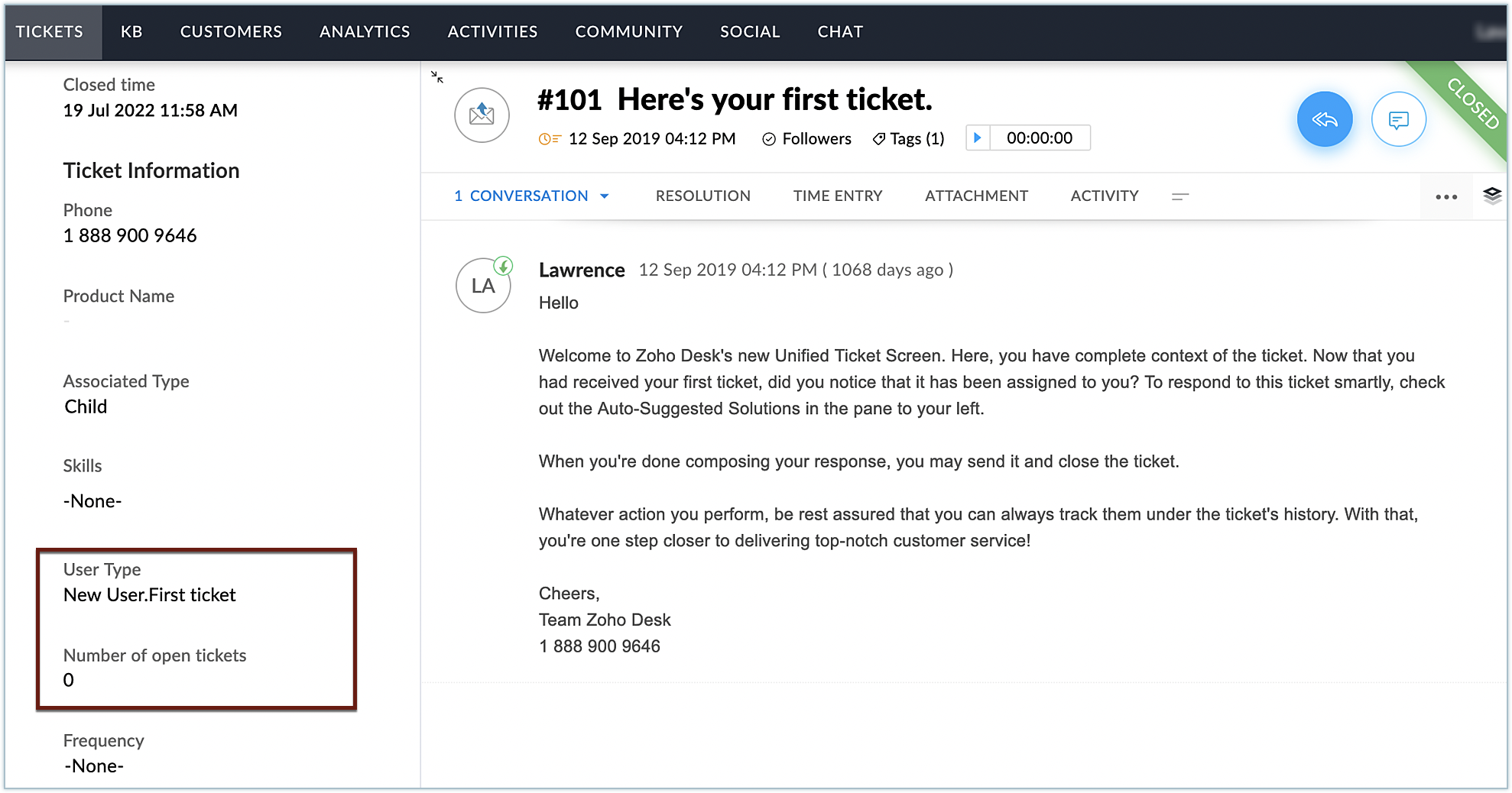
Let's say you plan to provide support agents with some additional information about the users in the tickets' details page. Specifically, you need to display whether the user is a new user or an existing user. If the user is an existing user, you also want to note how many tickets are associated with that user and the number of open tickets. This can be implemented by adding the required custom fields and writing a script that provides details about the user and the tickets associated with them.

Defining fields in resources.json 

As per our use case, you can define two fields with the following properties:
 
Sl.No
Field name
Type
1
User type
Text
2
Number of open tickets
Text
 
Below is the resource.json file that needs to be defined. As mentioned earlier, the resourceName key for every field needs to be unique and has to be defined for every field.
      
      {"fields": [
          {
            "module": "tickets",
            "displayLabel": "User Type",
            "type": "Text",
            "defaultValue" : "none",
            "resourceName": "UserType",
            "maxLength": 100
          },
          {
            "module": "tickets",
            "displayLabel": "Number of open tickets",
            "type": "Text",
            "defaultValue" : "none",
            "resourceName": "openStatus",
            "maxLength": 100
          }
        ]
      }
 
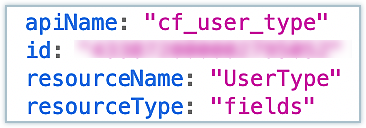
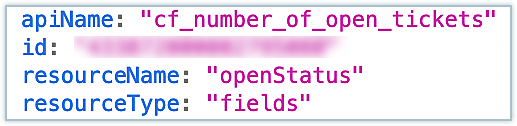
Note: You'll need the API names of the resources in your implementation whenever you refer to the respective resource. The Resources API can be used to fetch the API names. The code below has been used for fetching the API names for the two fields in our use case and the same API names are used in the code. The console output is added for reference.

      ZOHODESK.get("extension.resource", {resourceName: "UserType", resourceType:       "fields"}).then(function(response){
      console.log(response);
      }).catch(function(err){
      console.log(err);
      })
      ZOHODESK.get("extension.resource", {resourceName: "openStatus", resourceType:       "fields"}).then(function(response){
       console.log(response);
      }).catch(function(err){
      console.log(err);
      })

Use case implementation 

To implement our use case, we perform the following steps in extension.onload. The code snippet is added below for reference:
  • Get the email ID of the current ticket.
  • Use the Zoho Desk search API to check if there are any other tickets from the same user.
  • If the search API results show more tickets from the same email, check the status of those tickets.
  • Finally, construct the result so it is set to the custom fields and update them accordingly.

Sample code: 

      Please check the attachments for the sample code.

Output:
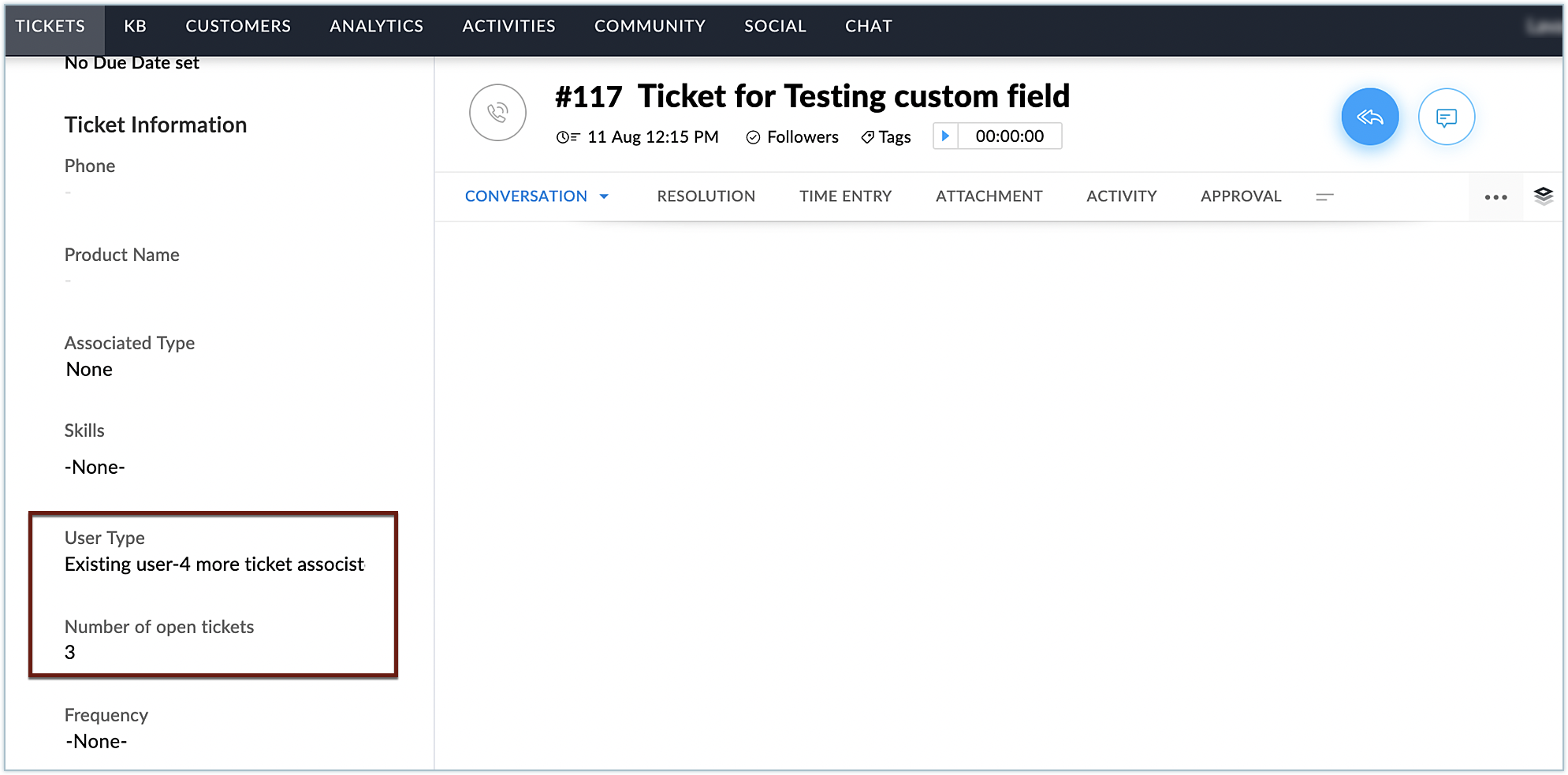


Here, you can see the text for the two custom fields were added to the ticket and were populated with the relevant values. In this manner, you can add required custom fields to Zoho Desk using extensions, based on your business needs.
 
Hope you found this post to be useful. Stay tuned for more posts in this space!

    • Recent Topics

    • editing/applying online payments

      We have customers who pay part or all of an invoice and then cancel their service and want the payment as a credit to future work. It would be ideal if we could make it an excess payment and then void the invoice. I can't make it an excess payment because
    • Contacts per department

      Hello, Is it possible to limit Contacts to a Department? Thanks
    • Good news! Calendar in Zoho CRM gets a face lift

      Dear Customers, We are delighted to unveil the revamped calendar UI in Zoho CRM. With a complete visual overhaul aligned with CRM for Everyone, the calendar now offers a more intuitive and flexible scheduling experience. What’s new? Distinguish activities
    • Is there a plan to allow for the hierarchical organization of Customers / Companies in Zoho Billing?

      We have a few customers who have organizational structures that we haven't quite found a way to deal with in Zoho Billing. In CRM, these sub-companies (or subsidiaries or whatever you want to call them) all have another CRM account as the parent account.
    • This site can’t be reached mail.zoho.com took too long to respond

      In my office at any system, we couldnt able to login zoho email. it shows " This site can’t be reached mail.zoho.com took too long to respond". please fix it soon.
    • Credit Management: #2 Configuring Right Payment Terms for Credit Control

      Think about the last time you ordered something online and saw that little note at the checkout, "Pay on Delivery" or "Pay later". It's simple, but it actually sets the tone. As a business owner, you know exactly when payment is expected. Now, imagine
    • Can send email from zoho mail, but can't receive any.

      Hi, My domain is sattvameditationresort.com. I've updated MX records with those of Zoho. But i can't send any mails to this email id from gmail. I have checked the MX status with MXTOOLS, its showing the correct entry either. The error is as shown below:
    • My domain did not activate

      Hi, my domain (apsaindustrial.com.ar) did not activate, and the phone verification message never arrived. Please would you solve this problem? Thanks.
    • Paid Support Plans with Automated Billing

      We (like many others, I'm sure) are designing or have paid support plans. Our design involves a given number of support hours in each plan. Here are my questions: 1) Are there any plans to add time-based plans in the Zoho Desk Support Plans feature? The
    • Host not found?

      Howdy! So i'm trying to add my custom domain for with the mail server. I have 100% control of my DNS and have tried every single option (TXT, CNAME, and even HTML) multiple times, ensuring i did it properly, to no luck. I get the same error message every
    • Emails are going to notification folder and not in inbox

      emails are going to notification folder and not into inbox
    • Error AS101 when adding new email alias

      Hi, I am trying to add apple@(mydomain).com The error AS101 is shown while I try to add the alias.
    • Related list Mobile Device

      Hello, We use an the Zoho creator application to make reports linked to Accounts. On the computer: it's easy to go the Account and see all the created reports in the related list below On iPad/Phone ZOHO CRM APP: we cannot see the reports on those accounts
    • Report on opportunities showing only the last note added.

      Hi I need to create a report that shows the most recent note added to each opportunity. This is so management can see what the latest update is according to the assigned salesperson. One workaround is to use the status field but this implies added manual work and mistakes as the salesperson would have to copy the existing status to a note before adding the latest status... otherwise the activity history would be lost. My current workaround is a report on Notes with Opportunities as the related module.
    • Please add Zelle as an online payment option

      Hello, I would like to request Zelle be added to the online payment service providers for Zoho Invoice. Considering how ubiquitous Zelle has become as a way to pay people via the major banking institutions, I feel like many freelancers would benefit from
    • Zoho Sheet for Desktop

      Does Zoho plans to develop a Desktop version of Sheet that installs on the computer like was done with Writer?
    • This user is not allowed to add in Zoho. Please contact support-as@zohocorp.com for further details

      Hello, Just signed up to ZOHO on a friend's recommendation. Got the TXT part (verified my domain), but whenever I try to add ANY user, I get the error: This user is not allowed to add in Zoho. Please contact support-as@zohocorp.com for further details I have emailed as well and writing here as well because when I searched, I saw many people faced the same issue and instead of email, they got a faster response here. My domain is: raisingreaderspk . com Hope this can be resolved.  Thank you
    • How to display the CONTACT ID in the Contact page

      Hi, I've seen this conversation below and it is exactly the same question I'm raising now, but unfortunately the last message is not solved https://help.zoho.com/portal/community/topic/show-contact-id-while-editing-contact-form I need to show the ContactId and I don't know how to do this. The last message included in the conversaton shows the way but not it is not completed. "I am sorry by default we do not have the option to show the record ID for the contacts in the field in a record. When you
    • CRM x WorkDrive: We're rolling out the WorkDrive-powered file storage experience for existing users

      Release plan: Gradual rollout to customers without file storage add-ons, in this order: 1. Standalone CRM 2. CRM Plus and Zoho One DCs: All | Editions: All Available now for: - Standalone CRM accounts in Free and Standard editions without file storage
    • Create Canvas list view templates from images powered by Zia

      Currently available for all paid editions of Zoho CRM in the US, EU, IN, JP & CN DCs. Designing a personalized CRM interface just got even easier. In today’s fast-evolving digital landscape, AI is transforming the way we work by automating complex tasks
    • Painfully Slow Zoho mail

      Since yesterday Zoho Mail seems to have starting functioning very slowly and having a few bugs. It's slow to open mails, slow to send, slow to change between email accounts. Sometimes clicking on a particular folder (eg Sent folder) stops working and
    • "Wrong password or login" Problem to configure Zoho on MAIL App on my Macbook

      Hi, I'm having problems to configure my e-mail on my MAIL App(Macbook pro). My e-mail is hari@trespontoum.net Actually was working perfectly, and still working on my Iphone. My MAIL App prompt me that my login or password is wrong. I tried to change 3
    • "User already exist in your org"

      Hello, I've just read a discussion about this issue, which didn't solve my problem. I'm trying to add the following emails: sales@kiss-my-boutique.co.uk returns@kiss-my-boutique.co.uk orders@kiss-my-boutique.co.uk I'm getting an error message each time I try and add them. None of them are primary or secondary emails and none of them have been created as users before. I know this as when I try and login and do 'forgot my password' all I get is an error message saying 'user invalid'. Please advise.
    • Operation Not Permitted

      Hi, I have problem in adding user after verifying the domain but it seems like error appeared which is "operation not permitted". For your information, I had delete other domain before did it.
    • Email forwarding setup fails

      I'm trying to set up email forwarding from my Zoho email to my gmail address. I followed the directions to set up email forwarding here: https://www.zoho.com/mail/help/email-forwarding.html. I did only steps 1-6. After doing this, rather than setting
    • Passing the CRM

      Hi, I am hoping someone can help. I have a zoho form that has a CRM lookup field. I was hoping to send this to my publicly to clients via a text message and the form then attaches the signed form back to the custom module. This work absolutely fine when
    • Shopify store email issues- Not getting emails

      Hi We have migrated from Microsoft outlook to Zoho back in March, we have a shopify store, the domain is hosted on namesilo, not shopify, I have seen some people here complaining about not getting emails from customers who fill out the contact form on
    • How do I fix this? Unable to send message; Reason:554 5.1.8 Email Outgoing Blocked.

      How do I fix this? Unable to send message; Reason:554 5.1.8 Email Outgoing Blocked.
    • Invoice Discount Account

      Is there a way to change the account used for Discounts applied to an invoice? The current Discount account (ZB native account) type is an "Income" type. I would like to change it to "Other Income", but that is not possible, I am assuming because it contains
    • Need Inactive accounts to be visible in Reports in Zoho Books

      I N=need Inactive accounts to be visible in Reports in Zoho Books to do recons of the accounts but when i see the same they are not visible in the Accountant - Account Transactions report
    • API Support for Creating Invoices with Batch-Tracked Items

      Hi Zoho Community, I am working on an integration where we create invoices in ERPNext and push them to Zoho Books. I need to send batch-tracked items (batch numbers) when creating invoices. I could not find any reference in the Zoho Books API documentation.
    • javax.mail.authenticationfailedexception 535 authentication failed

      Hi, I am facing 535 authentication failed error when trying to send email from zoho desktop as well as in webmail. Can you suggest to fix this issue,. Regards, Rekha
    • Phantom Opening Balance

      While experimenting w/ creating a composite item, Zoho added funds to Petty Cash and added Bank Account equal to previous day's balance. I'm unable to undo the adding of funds. Attaching screenshots of both bank account and petty cash transactions.
    • Importing customer comments and multiple shipto addresses

      I am evaluating Zoho Books and have most of my data imported with two exceptions: (1) Import customer comments - in my current system I have several comments of different types, and I need to bring these into Zoho. Preferably Books customer records, but
    • Detailed Account Reports - Add Running Balance

      When one clicks into an account from a report (say P/L or Balance Sheet), the default reports have the Debit, Credit, and then the Amount. The Amount column (last one) is duplicate information. It would be far better and fit more peoples' use cases if
    • How to Billed from two different GST Numbers

      How to Billed from two different GST Numbers. Suppose ABC & Co had GST registration in Delhi and Haryana and Zoho account is created with Delhi GST Registration number. Now i also want to issue invoice from Haryana GST Registration number. How can i proceed ?
    • Payment system for donations management

      I manage an organization where we receive donations from payers. Hence, there is no need to first create invoices and then create payments received against the invoices. What are the recommended best practices to do this in ZohoBooks?
    • How do I associate pricebooks to a customer?

      I setup a few pricebooks, that worked fine. But now the only thing I can do with it, when I enter a quote or sales order, I can select which pricebook to use, but I have to do this product by product every time I add one. Is there a way to connect a pricebook
    • Zoho IP blocked by SpamHaus

      ERROR CODE :550 - 5.7.0 Your server IP address is in the SpamHaus SBL-XBL database, bye
    • IMAP Communication Problems - IMAP Down Again

      We are experiencing the same problems over the last week or so that were supposedly 'solved' according to this thread. Zoho Imap Down Again This is affecting attempts to use IMAP on multiple ISPs and users so is definitely narrowed down to Zoho problems.
    • Next Page