Introducing AI Modeler—a no-code approach to adding AI to your business applications

Introducing AI Modeler—a no-code approach to adding AI to your business applications

Forward-thinking businesses today are embracing AI to make life easier for themselves, their employees, and their customers. But if you haven't started yet, you might be concerned that your business will be left behind. Or maybe you're worried because you don't know much about AI, machine learning, or data science. Well, you can now relax—we've got you covered on all counts!
 
We've been hard at work lately, incorporating AI into Creator without deviating from our long-held low-code philosophy. The result of this hard work is an exciting new feature we're announcing today: AI Modeler.
 
What do you mean by "AI"?
Artificial intelligence is the ability of software to replicate human intellect, such as learning from experience and applying lessons learned while making decisions. While sci-fi enthusiasts and media like to portray artificial intelligence as a scary thing that'll take over the world, the reality is that we haven't reached that stage (yet!).
 
Instead, the current generation of AI technologies has been adopted in many ways, like providing specific benefits to different industries. In general terms, an AI model provides specific intelligence based on trained data, and can be customized to automate or optimize your business process—all with minimal human interference.
 
What's in it for me?
Our AI modeler includes a no-code AI builder that helps you harness the power of AI without having knowledge of programming. The AI Modeler feature will be available under the Microservices section. From there, you can jump into the world of AI with our ready-to-use models, which we've prebuilt and rigorously tested for your use. You'll only have to choose the application name and the form name to deploy these models—it's that easy!
 
Custom models allow you to build customized AI models tailor-made for your business, by providing it with unique data based on which it can work. Here, you'll need to provide the model with sample datasets relevant to your business for it to get familiarized with—this is called training —and then you can test whether it works as intended before deploying it.

Interesting. Tell me more!
While the uses of AI are endless, we've zeroed in on a handful of popularly used models, which we believe will add immense value to your business.

The key capabilities of our AI models are:
  • Prediction
  • OCR (optical character recognition)
  • Object detection
  • Keyword extraction
  • Sentiment analysis 

Prediction (Custom)
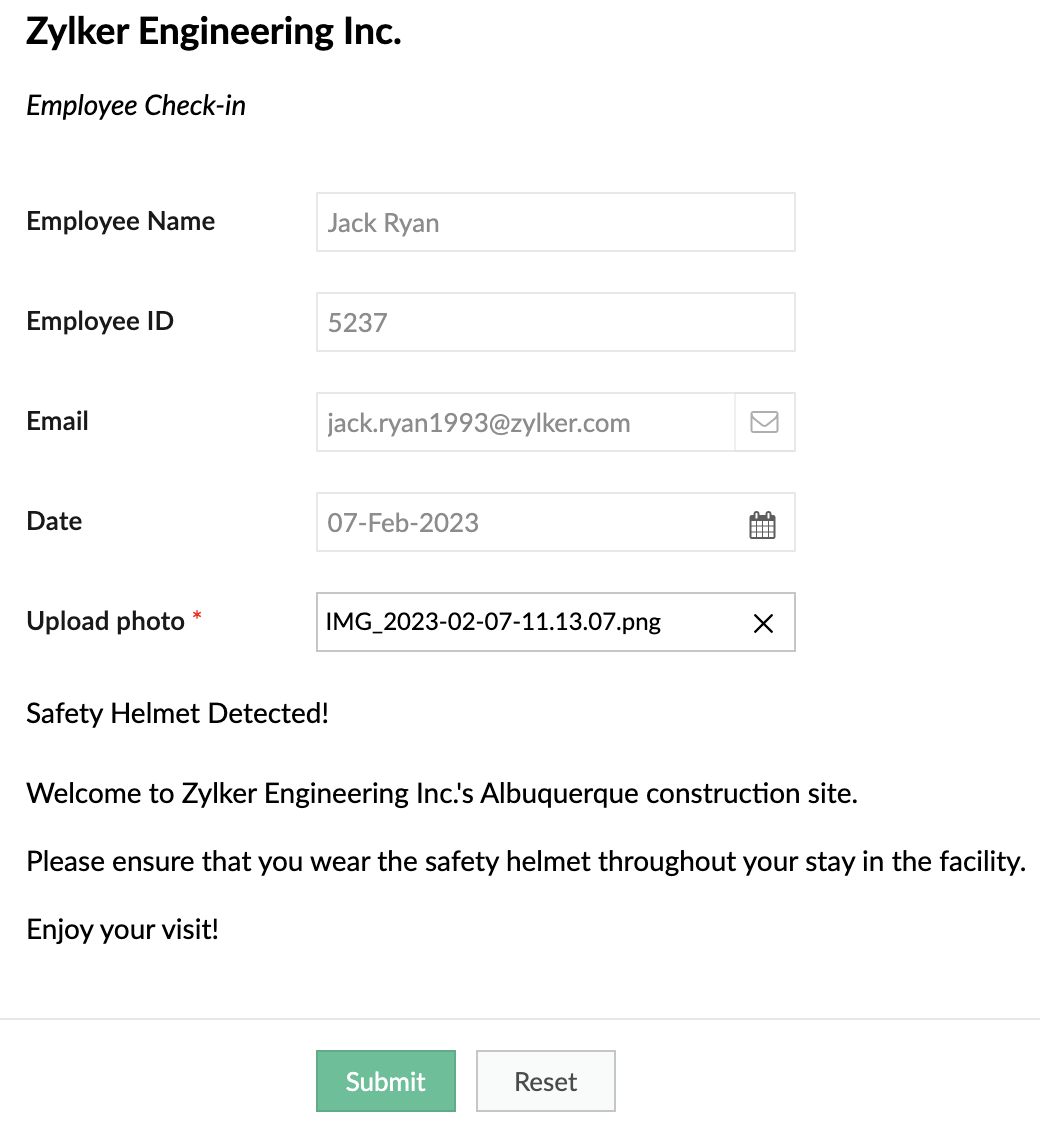
Prediction models process known results from historical data, and try to forecast future outcomes. It allows you to use data from an existing form or CSV file and predict future outcomes with just a few clicks.
 
Example: A store can calculate how much inventory they need in order to meet demand during a particular sales period by providing previous years' sales data.


OCR (Ready-to-use and custom)
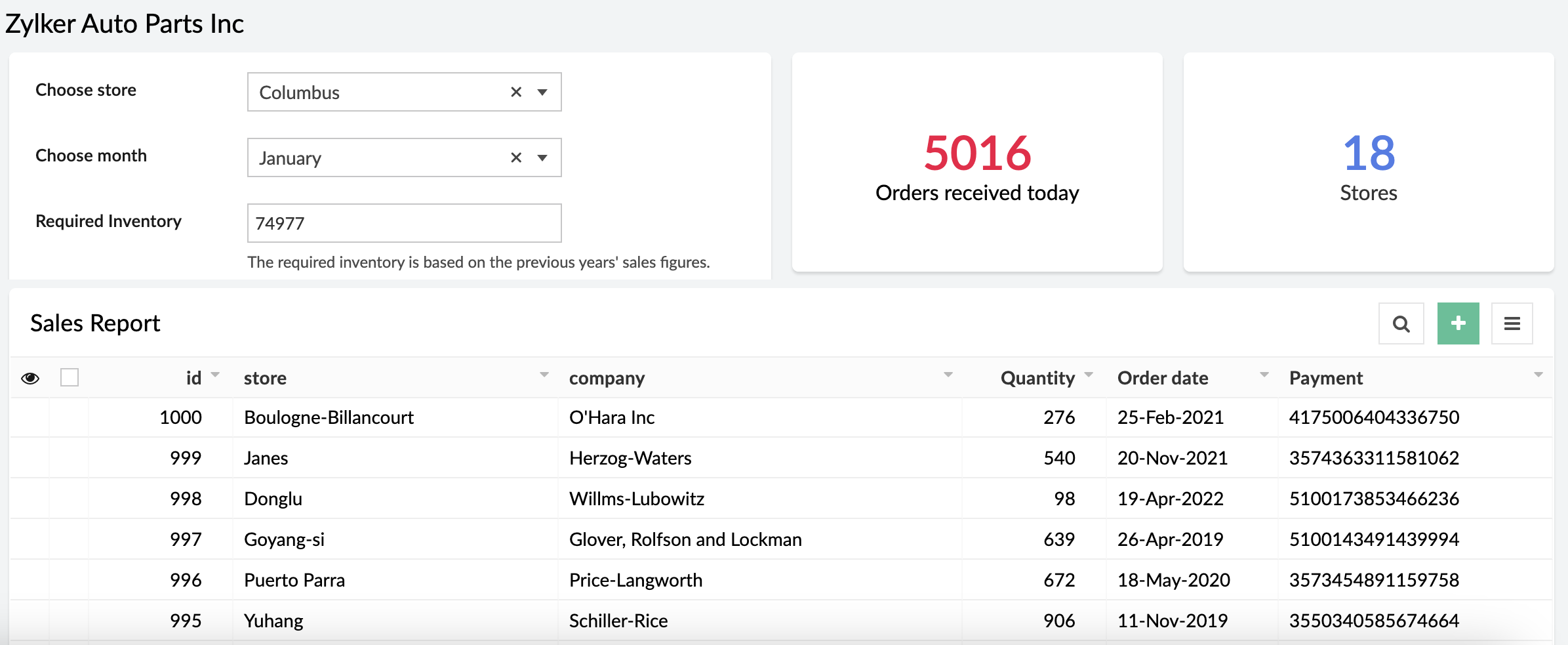
Optimize operations, eliminate repetitive manual tasks, and digitize your business by using our OCR model to extract text from images. The ready-to-use OCR model will extract all the text it identifies in the image, while you can build a custom OCR to extract specific text from images into fields in your forms. Tag the fields to the corresponding values once and eliminate manual data entry forever.

Example: It's 2023, but many people still prefer to settle payments using checks. A business can use our custom OCR to extract details—like the bank name, check number, amount, date, and more—from the checks.

Object detection (Ready-to-use and custom)
Object detection models are used to identify specific objects in images and use them to optimize business processes. Our ready-to-use model is trained to identify common objects (like people, dogs, cars, etc). Otherwise, you can build a custom model and provide it with the training data for the objects you want to identify.
 
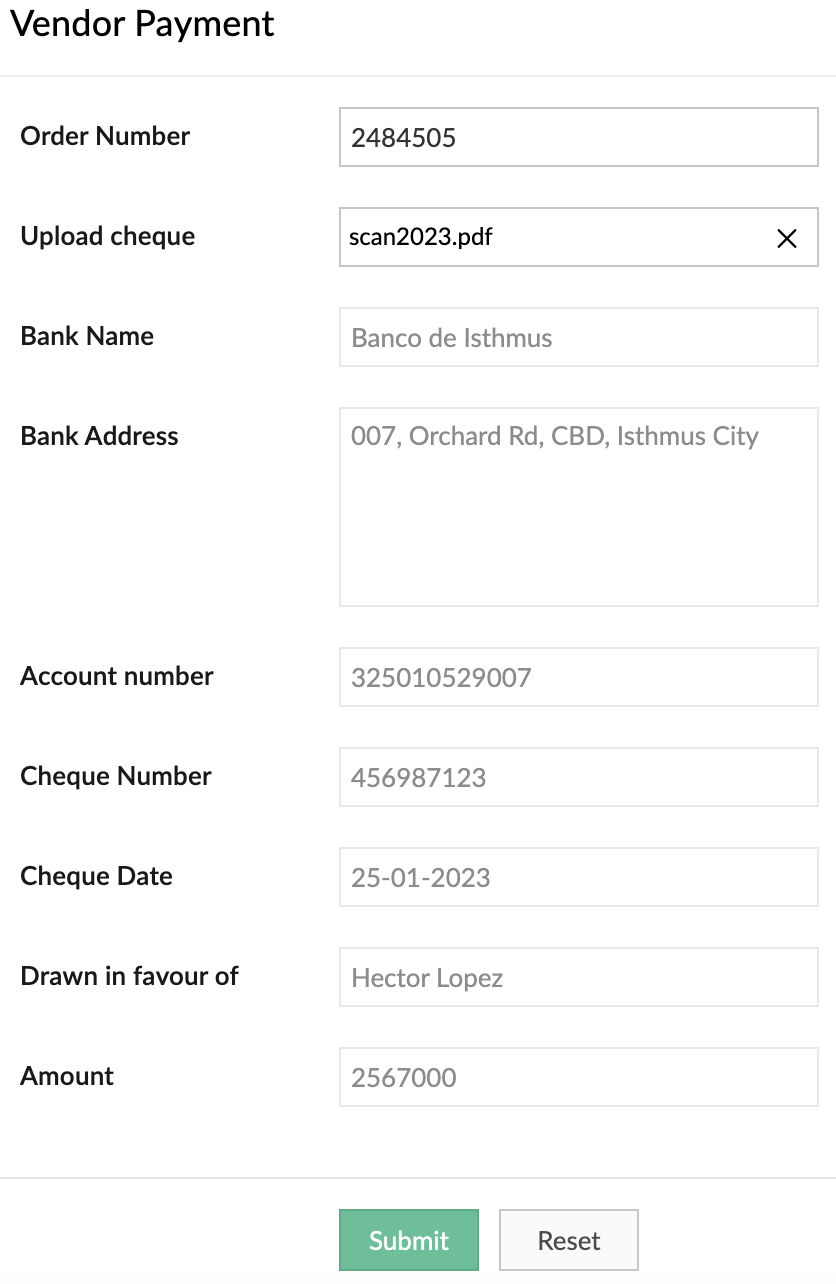
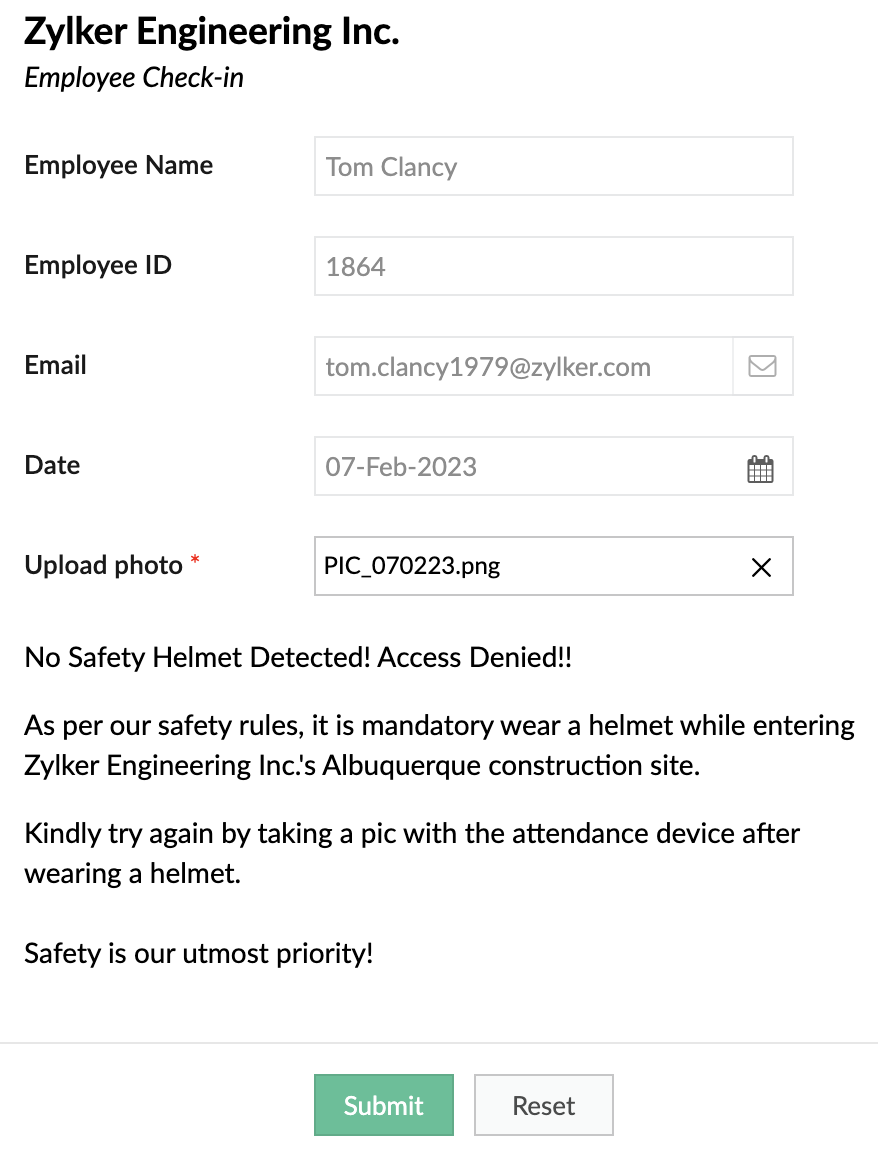
Example: A safety-focused company can use OD models to detect things like whether its employees are wearing a helmet while entering a construction site. 
When helmet is detected


When helmet is not detected:

Keyword extraction (Ready-to-use)
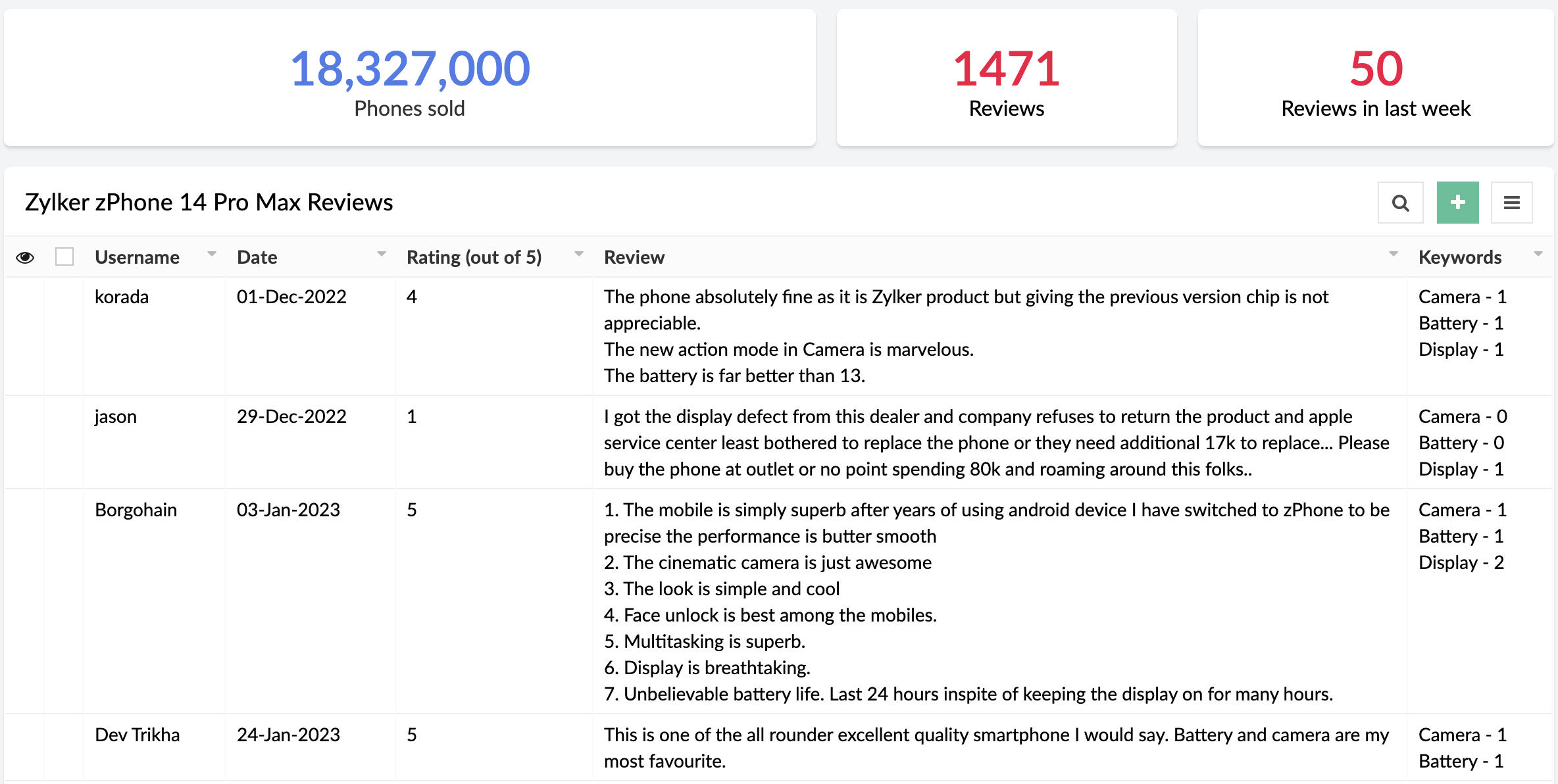
This functionality extracts the most important, representative words/phrases from large amounts of text data. In consumer facing industries, keyword extraction is quite helpful in analyzing customer responses, without having to go through each response manually.
 
Example: An e-commerce site that sells mobile phones allows its customers to post reviews after purchase. Instead of manually going through each of the reviews, the site can use keyword extraction to gain insights automatically. They could choose to extract words like "camera", "battery", and "display" to learn more about the most discussed attributes of the product. 

Sentiment analysis (Ready-to-use)
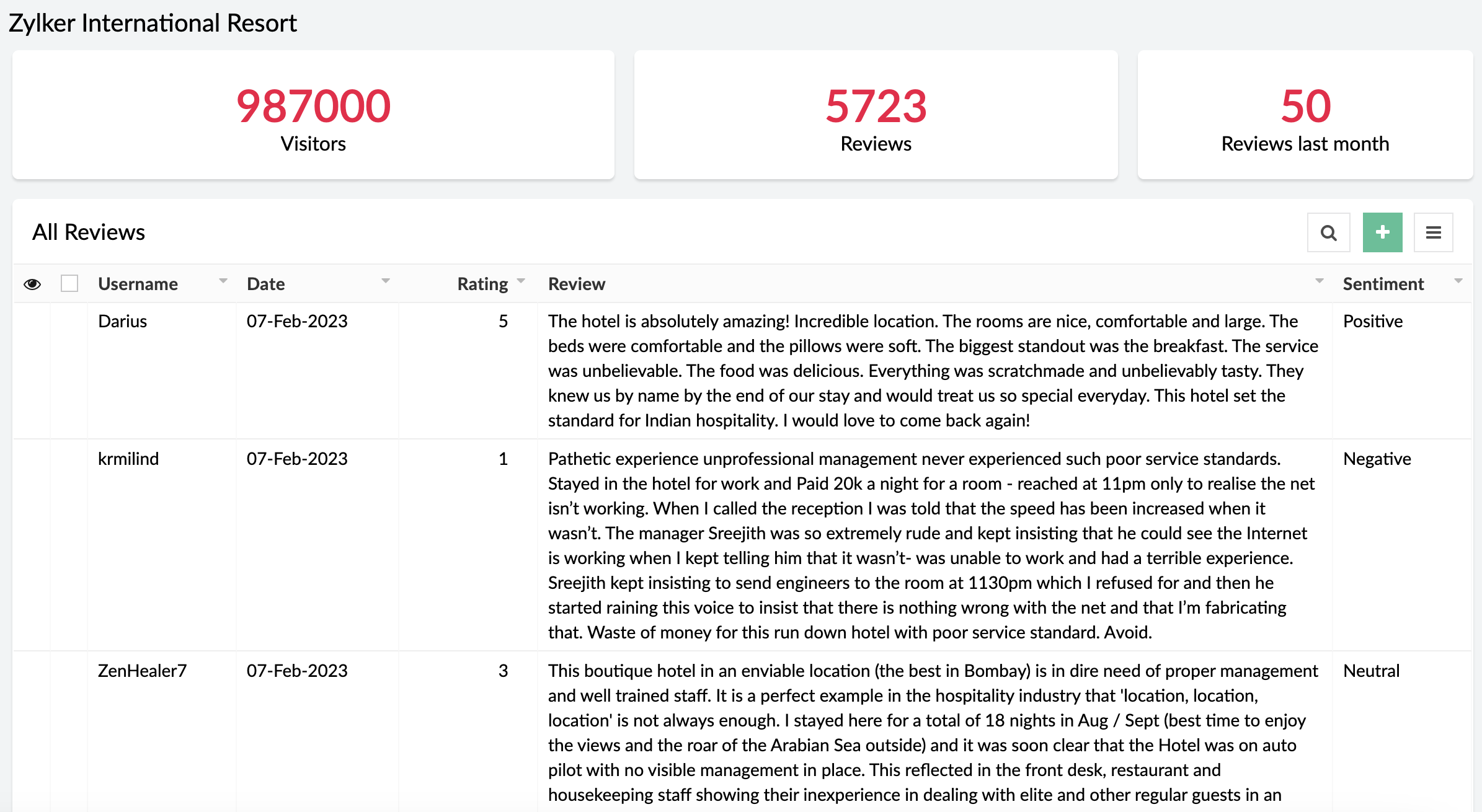
The sentiment analysis model analyzes text and predicts the sentiment expressed (positive, negative, or neutral). Sentiment analysis is widely used across industries to assist in analyzing customer feedback, customer support management, and social media monitoring.

Example: A business receives a large amount of feedback on its products. It can use sentiment analysis to gather whether its products have been well-received or not.

When can I get my hands on it?
Pretty soon! We're as excited as you are and will be rolling out AI Modeler to C6 users on February 20, 2023. Once live, we'll pop in a comment below this post and also update our Release Notes page.
 
Versions - C5  (Ready-to-use models only. Use them via the AI fields in the form builder),
                  C6  (Both custom and ready-to-use models as Microservices)
 
Pricing - Ultimate & Professional
               100 custom models & 250 ready-to-use with 1,000 free AI calls per month
               After exhausting the free AI calls, you'll have to get monthly add-ons for more AI calls. You can choose from the $50(50000 AI Calls / Month), $100(120000 AI Calls / Month), and $200(250000 AI Calls / Month) add-ons based on your requirement.
   
DCs - US, EU, AU, IN, CN

Help documentation
In the meantime, you can go through our comprehensive set of help docs to learn the nitty-gritty of our AI models.
   

Our inbox is always open. Feel free to send your feedback to support@zohocreator.com!
 
Regards,
Zoho Creator Team

    • Sticky Posts

    • Introducing Zoho Creator's 2025 Release Projection 2

      Hello Creators! I'm Prakash, from the Creator product management team, and today I'm delighted to unveil our next set of features as part of Release Projection 2 for 2025. With thoughtful analysis and planning, we've curated powerful new capabilities
    • Zoho Creator - 2023 Release Projection 1

      Hello everyone! A very Happy New Year to you and your family. Hope you're all good and having a great time using Zoho Creator to make your lives easier and your businesses prosper. 2022 was an action-packed year for us at Creator, and we hope to continue
    • Zoho Creator User Group meetups in a city near you! - Oct - Nov, 2023

      Greetings from the Zoho Creator team! We're hosting a series of Zoho Creator meetups in various cities across the globe, and we'd love to meet you there! Our meetups are a great opportunity to network with industry peers, exchange ideas and best practices,
    • Zoho Creator - 2023 Release Projection 2

      Hello everyone! Time truly flies when you're having an incredible journey, and today we mark the completion of an eventful and action-packed six months. It feels like just yesterday when we embarked on this adventure together with the launch of our new
    • Upcoming Updates - August 2022

      Hi all, Greetings from the Zoho Creator team! Today we've got news for you on some exciting updates. And rest assured— there’s more to come! In this post, we'll be going over the upcoming features and improvements for this month as mentioned below. A
    • Recent Topics

    • Zoho Projects API Scope for Issue Attachments

      I try to download issue attachments via the API, unfortunately I always get the following error code when trying to download the file from the supplied URL: {"ERROR_MESSAGE":"INVALID_OAUTHSCOPE","ERROR_CODE":401} indicating an auth scope error. I've tried
    • How to fetch custom fields for time entries in Zoho Project API v3

      In the previous Zoho Projects REST API, we were able to retrieve custom field details for time entries, including picklist options, using the endpoint: GET /restapi/portal/[PORTAL_ID]/timesheetcustomfields In the new Zoho Projects API v3, we tried using
    • Zoho Survey Enhancements

      We love Survey. We use it a ton. It needs some enhancements. Maybe some of these are already on the roadmap? API - this is crucial. We have some complex surveys that take place and need to update records, trigger other functions/automations, etc. I would
    • Images Don't Display on Blog

      Hi, I've just posted a new blog entry, but regardless of format (png or jpeg) Images that display in Preview mode do not display on any browser in the published post.  I've not done anything different with this post than others regarding images, please advice. Thanks! Edit:  I've discovered that moving the image files from a my sub directory folder "Pics for Blog" to the top level of the "Files" folder on my site allows the images to display live.  This, even though my other blog posts are correctly
    • Checkbox Field Mapping Zoho Forms to Zoho Sign

      I have an application that will be filled out via Forms that I am mapping into a PDF Filler on Zoho Sign. I need to have a series of checkboxes mapped to the corresponding fields in Sign and I only see single checkboxes available via the mapping, though
    • MCP > Creator connection failing with Claude

      I'm trying to get claude to access any of my Zoho Creator apps and it keeps failing. I have enabled all tools for creator and ensured in claude settings that everything is authorised. Here is what claude says : Unfortunately, the error messages I'm receiving
    • WorkDrive and CRM not in sync

      1/ There is a CRM file upload field with WorkDrive file set as the source: 2/ Then the file is renamed in WorkDrive (outside CRM): 3/ The File in CRM is not synced after the change in WorkDrive; the file name (reference) in CRM record is not updated (here
    • Books P&L by Customer

      Lately, we have found that the Customer field filter for the Profit & Loss report in Zoho Books is no longer available. We have several projects with the same customer and look at the P&Ls by project AND by Customer (overall). Can you please add back in this field selection alongside the Project field to the P&L report filter? Thanks! -Gina
    • Sent mail sort by date disappeared

      Hello, We used to be able to sort the emails by date in the sent folder, but this feature has recently disappeared. Can we bring it back?
    • I cannot check out to Zoho People.

      When I tried to check out today, there's prompt that inhibits me to check out: To add entry in Attendance, log time for any of your jobs
    • Pricing Strategies: #2 Plan your Service Offerings using Plans

      Meet Harvey & Mia, hailing from the same Tech school, carrying the dream of setting up their own IT maintenance firm in their location. They drew up a clear business plan and put their business in motion on New Year's Eve. They had great reception right
    • Open a record to edit based on another form being edited

      Hi all, I am trying to edit a record based on another record being edited. It works out like this: When I create a Monthly_Update and then submit I open the Monthly_Levels form and pass the ID from the Monthly_Update to a field called mu. I want it to
    • Problem with signature on zoho survey

      Hello, I'm trying to export individual responses with signatures on zoho survey. But the signatures on some of my surveys are not exported as the original image, but as a generic image, same for all (screen joins). Is there a solution to have the signatures
    • Change in Zoho CRM API?

      Hello, I am using the Zoho API trough the PHP SDK v2.1 Since few days, I noticed that I have to change the way I pass the data to the API when I create, update, or upsert a record. Dates Before I was passing a PHP date object to "$record->addKeyValue(...)",
    • How to view CRM Sales Orders in Desk

      What's the usual way to view all CRM sales orders linked to a contact, when viewing a ticket in Desk? I don't want to have to open a new tab to see the order in CRM. And the Desk CRM sidebar doesn't seem to be configurable. Would I have to use an extension
    • Duplicate customers being created in Desk

      Hi I've trying to work out why I've getting duplicated customers being created in my desk. I have an external booking system that generates an email when I get a customer booking a job. A booking email gets sent to Desk where I manage the booking and
    • MTA - BAD IP reputation by outlook/hotmail

      Messages to Microsoft email servers are bouncing back due to poor reputation. Message: 4.7.650 The mail server [136.143.188.206] has been temporarily rate limited due to IP reputation. For e-mail delivery information see https://postmaster.live.com (S775)
    • QuickBooks Extension for Zoho CRM - Advanced Features -2025

      Hello Everyone, We’re happy to announce the latest version of our QuickBooks Extension for Zoho CRM, now officially live on the Zoho Marketplace! This release introduces one-click data sync, a user-friendly UI, enhanced performance, and a powerful set
    • Changing Department often causes the Firefox tab to freeze

      Title, it doesn't seem to happen with neither Opera nor Chrome. And even in Firefox, sometimes it just lets me change the department I'm in no problem, even to All Departments which is probably the most, like, resource heavy? But most of the time, the
    • Need to integrate Zoho Mail Mobile app with Zoho Meeting Mobile App for Android and Apple

      Hello Zoho Team, Please bring integration of Zoho Mail Mobile app with Zoho Meeting for Android and Apple Thanks
    • ¡Muchas gracias por participar a los Meetups de Usuarios de Zoho! Y Novedades del ecosistema Zoho

      ¡Hola Comunidad de Zoho en Español! 👋 Después de un breve lapso de tiempo, volvemos con una nueva edición de nuestro Community Digest, donde te contamos las novedades de los productos de Zoho en los últimos meses. Estas mejoras se centran en nuestros
    • Anyway to move mail from one account to another yet?

      Hello, Is there any way to move email from one mailbox account to another mailbox account in zoho yet? Thanks, Ryan.
    • Using a CRM Client Script Button to create a Books Invoice

      Hello, I need help handling error messages returned to my client script from a function. The scenario I have setup a client script button which is available from each Deal. This CS executes a crm function, which in turn creates an invoice based on the
    • Building Toppings #2 - Learn how to use Bigin's Developer Console to build toppings

      Hey Biginners, In our last post, we discussed what toppings are, why they're essential to extending Bigin's capabilities, and how the Bigin Developer Center serves as the starting point for building them. As a cloud platform, the Developer Center empowers
    • Proposal for Creating a Unique "Address" Entity in Zoho FSM

      The "Address" entity is one of the most critical components for a service-oriented company. While homeowners may change and servicing companies may vary, the address itself remains constant. This constancy is essential for subsequent services, as it provides
    • Links are incorrect when sent out

      I'm adding in hyperlinks into my eDM. When I send a test email, it's all correct. However, when I send out the eDM, all the hyperlinks jump up one space so none of the links are opening to the correct page. Why is this happening and how can I fix it?
    • Tip of the week #16 - Search and filter threads based on criteria

      Zoho TeamInbox lets you search and filter threads with any information that you have about the thread. You just have to input the criteria and Zoho TeamInbox will list all the threads that match the condition.   Firstly, there is a global search you can
    • Introducing recipient authentication via Stripe Identity in Zoho Sign

      Hi everyone! It's important to authenticate your recipient's identity before they access and sign important documents to ensure the highest level of compliance. Zoho Sign already helps businesses do this with various authentication methods: SMS OTP Email
    • Introducing Multi-Asset Support in Work Orders, Estimates, and Service Appointments

      We’re excited to announce a highly requested enhancement in Zoho FSM — you can now associate multiple assets with Work Orders, Estimates, and Service Appointments. This update brings more clarity, flexibility, and control to your field service operations,
    • CRM: hosting a single html file in Zoho and displaying it as a widget

      I have seen that CRM offers the option of uploading a web project to Zoho itself and displaying it as a widget in CRM. The instructions then talk about setting a development environment with Node and developing an application to upload to Zoho. But I
    • Keep Converted Leads

      How do I keep the converted leads in the Leads Module after conversion (converting it to account, contact, deal). I want to add it in a converted stage in the leads module in order to get a report or dashboard and see all converted leads from my pip
    • Customizing Global Search Settings for All Users

      Hi Our team use the brilliant global search functionality within CRM many many times daily. But, we struggle with the out-of-the box columns that CRM gives you. We are always telling users to customize this look to more suit our business, to show the
    • Zoho CRM Kiosk issues

      Firstly this is for a system on the AU servers if that makes a difference. Issues are as follows (For Kiosk): 1. Re-ordering fields in the screen builder is broken. The fields seem to be re-ordering themselves, unless you order everything by moving the
    • Presenting ABM for Zoho CRM: Expand and retain your customers with precision

      Picture this scenario: You're a growing SaaS company ready to launch a powerful business suite, and are looking to gain traction and momentum. But as a business with a tight budget, you know acquiring new customers is slow, expensive, and often delivers
    • Introducing Formula Fields for performing dynamic calculations

      Greetings, With the Formula Field, you can generate numerical calculations using provided functions and available fields, enabling you to derive dynamic data. You can utilize mathematical formulas to populate results based on the provided inputs. This
    • From Zoho CRM to Paper : Design & Print Data Directly using Canvas Print View

      Hello Everyone, We are excited to announce a new addition to your Canvas in Zoho CRM - Print View. Canvas print view helps you transform your custom CRM layouts into print-ready documents, so you can bring your digital data to the physical world with
    • Tip of the Week #77– Stay informed of the activities happening in your organization

      Whenever a message is handled in Zoho TeamInbox, every action is recorded in the Activity Log. This ensures you always know what’s happening across your teams and inboxes. To access it, simply click the Audits icon on the left pane’s top bar after logging
    • Let us add Lookup fields in the Blueprint Transitions

      We are unable to add Lookup Fields in the blueprint transitions in Zoho Desk, we wanted to make it a requirement for our workflow but since it's not available in the transition we cannot. The lookup field exists in the Layout: But it cannot be added/selected
    • Zoho Logs - Not seeing logs since 30 Nov

      Hi, we have a few functions running, I am testing some new ones and noticed that although I can see executions, I cannot see any logs, even when the first line on the functions is a log. I reviewed some existing functions, one of which is invoked on a
    • Workdrive MS Office integration

      Have installed subscribed version of Zoho WorkDrive VSTO runtime not found is the error when I try to install Zoho_WorkDrive_For_Office Unable to open work files in Excel and Word Urgent, since I have migrated all my OneDrive files to work drive already
    • Next Page