Kaizen#135 : Third Party Integration using Client Script
Hello everyone !
Welcome back to another enlightening Kaizen post! In this Kaizen post, we'll explore how to invoke a Third-Party API through Client Script. This enables you to seamlessly connect to external services and fetch dynamic data. Stay tuned to discover the step-by-step process of invoking a Third-Party API withi your client-side scripts. This post will answer the question on Importing data from third party API.
Welcome back to another enlightening Kaizen post! In this Kaizen post, we'll explore how to invoke a Third-Party API through Client Script. This enables you to seamlessly connect to external services and fetch dynamic data. Stay tuned to discover the step-by-step process of invoking a Third-Party API withi your client-side scripts. This post will answer the question on Importing data from third party API.
In this Kaizen post,
- Overview
- What are Connections?
- How to invoke a Connection in Client Script?
- Use Case
- Solution
- Create a Connection.
- Add to Trusted Domain.
- Invoke the connection in Client Script and populate the field using Client Script.
- Summary
- Recommended Reads
1. Overview
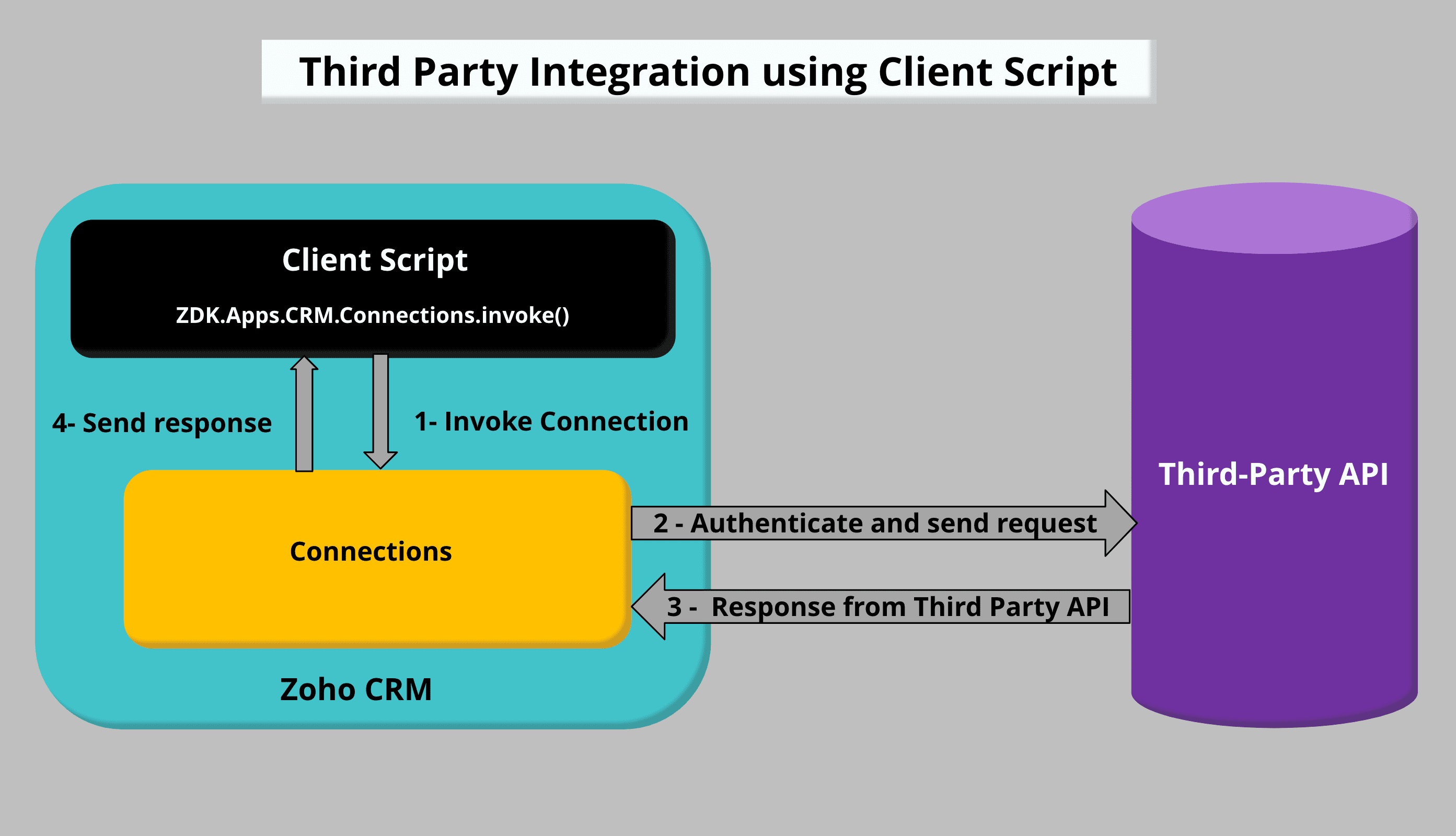
To accomplish Third Party Integration using Client Script, you need to create a Custom service Connection and invoke the connection in Client Script. Once you get the response from the Third Party API call, you can populate or display the required data using Client Script.
2. What are Connections?
Connections in Zoho CRM is used to establish authentication with other Zoho or third-party services to perform integration with them. Check this Kaizen post to know more about Connections and Authentication types.
3. How to invoke a Connection in Client Script?
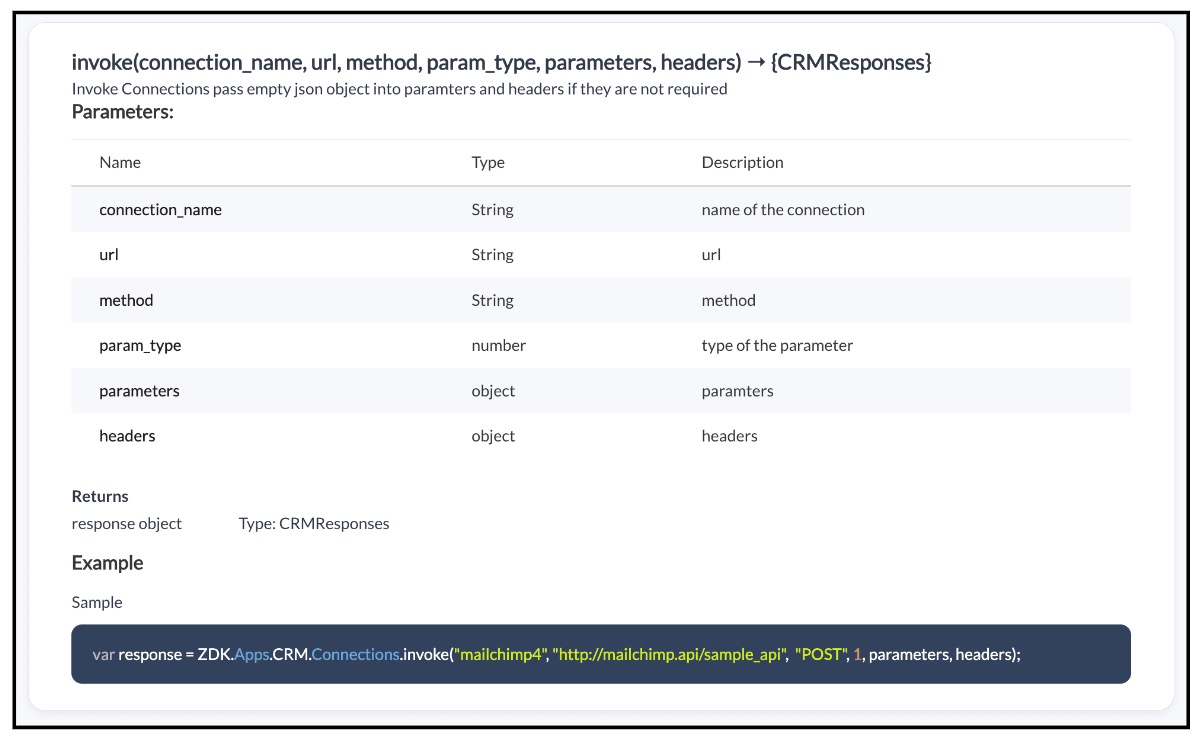
To invoke a Connection using Client Script, you need to use the invoke method with the required parameters.
Syntax : invoke(connection_name, url, method, param_type, parameters, headers)

Note:
Whenever you want to make third party API calls, you need to whitelist them by adding the third party domain to Trusted Domain.
4. Use Case :
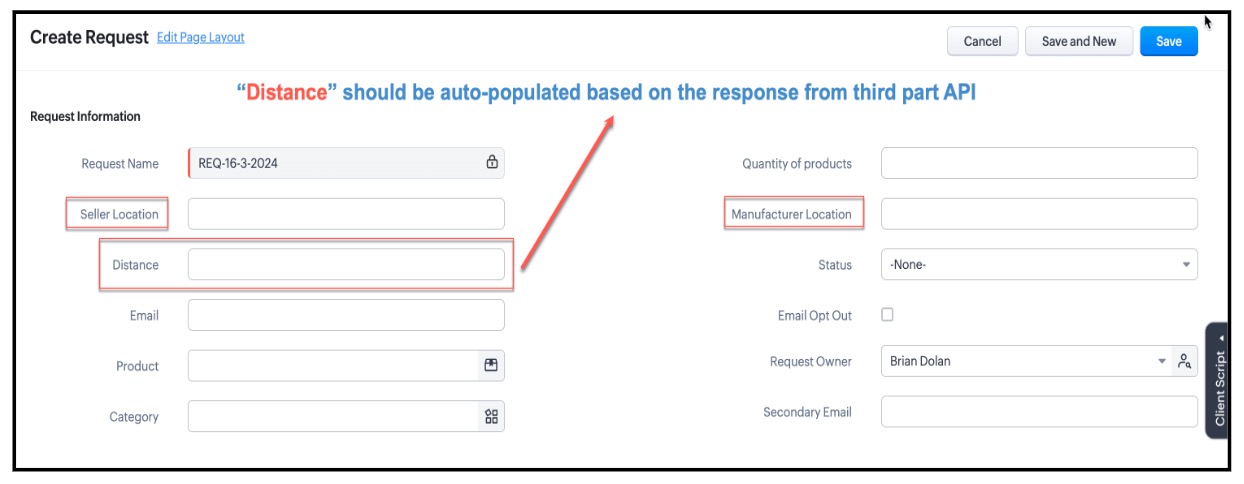
Zylker is a manufacturing organisation. Orders will be placed by the Salesperson by creating a record in the custom module "Requests" . The Admin wants to populate the distance between Manufacturer Location and Seller Location in the "distance" field using the Distance Matrix API.
5. Solution :
To populate the field "Distance" based on the response recevied from the third party API call using Client Script you need to follow the below steps.
- Create a Connection.
- Add to Trusted Domain.
- Invoke the connection in Client Script and populate the field using Client Script.
1. Create a Connection :
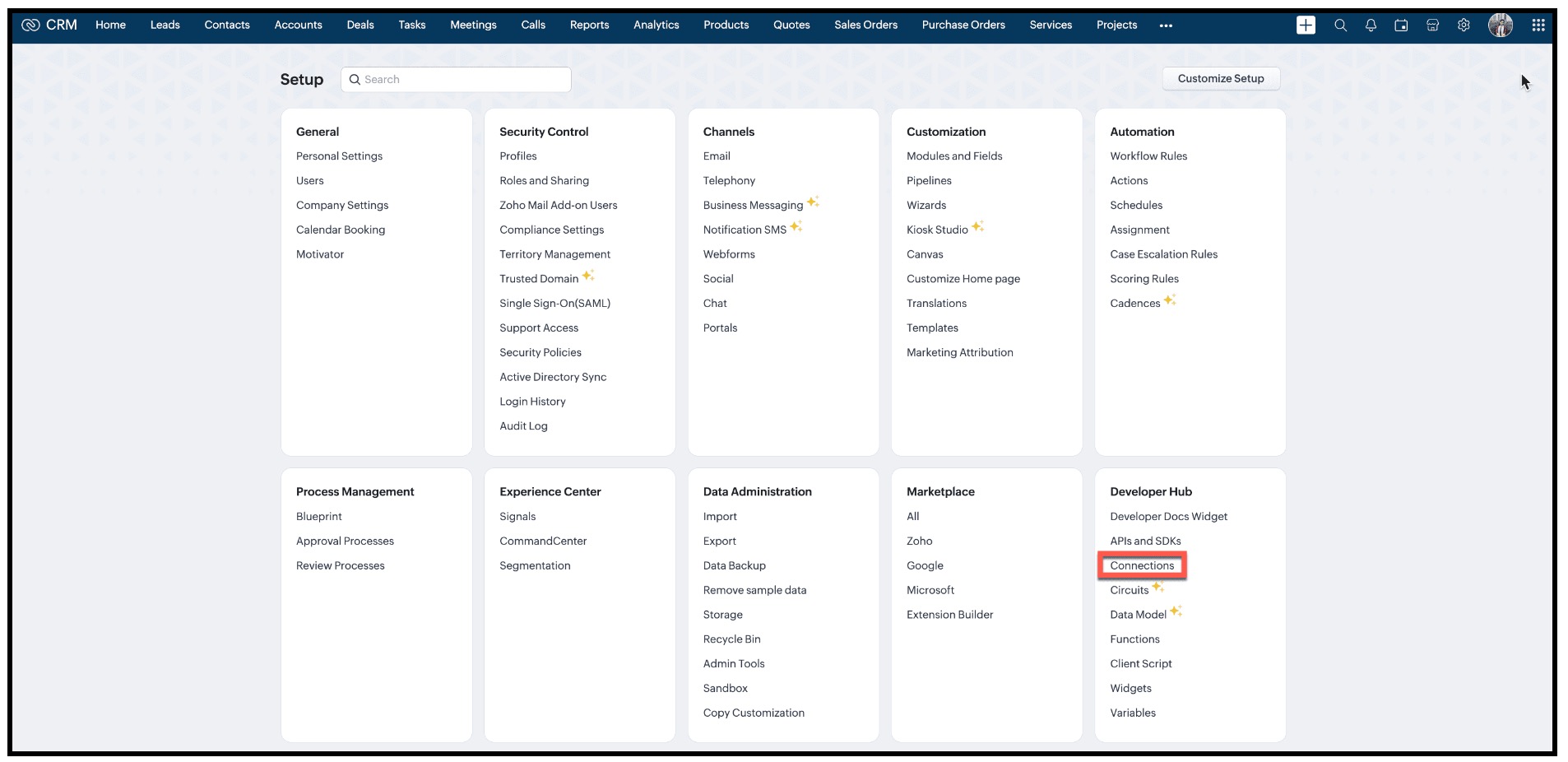
- In Zoho CRM, go to Setup → Developer Hub → Connections and click "Create Connection"
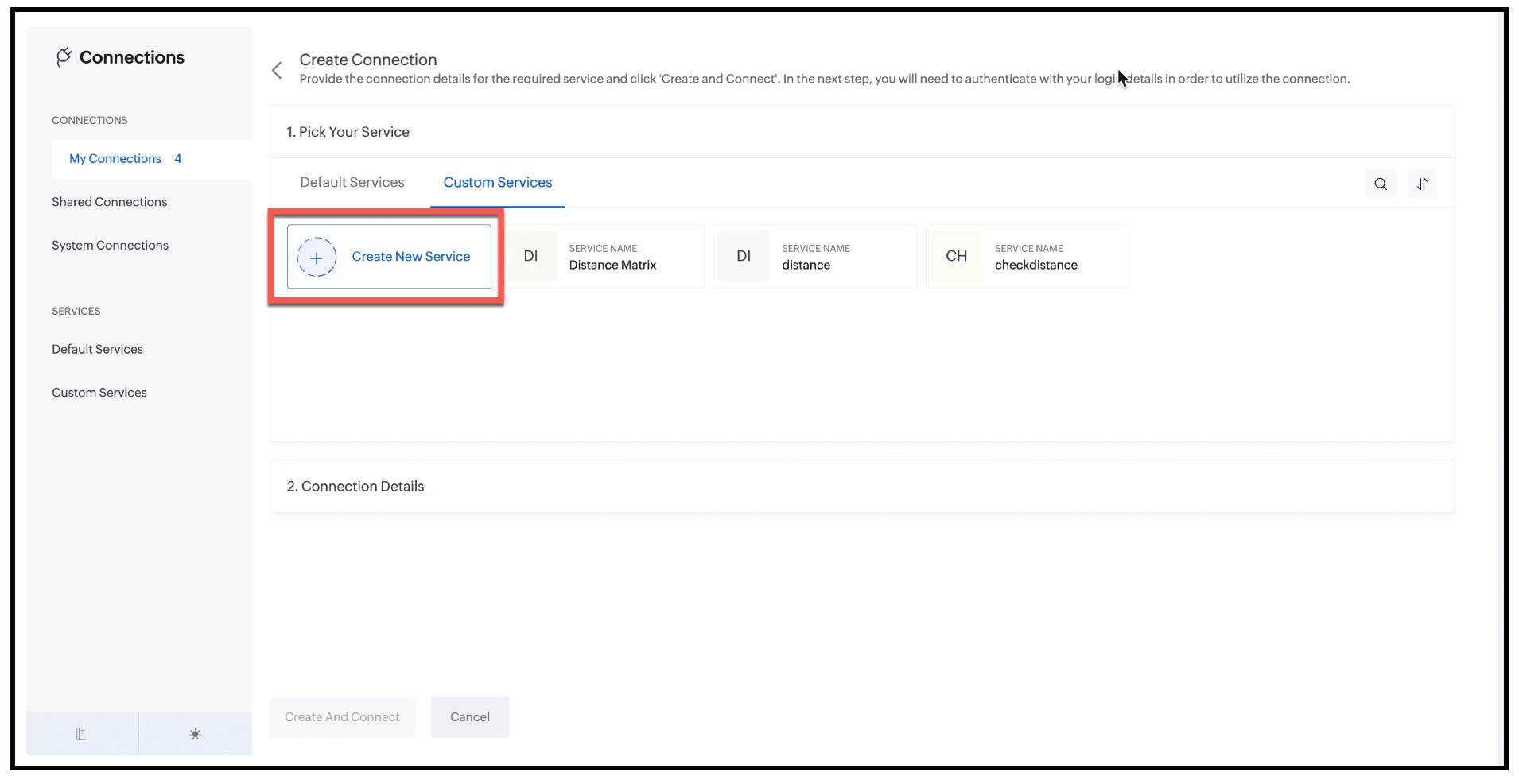
- Under "1. Pick Your Service" , select "Custom Services" and click "Create New Service".
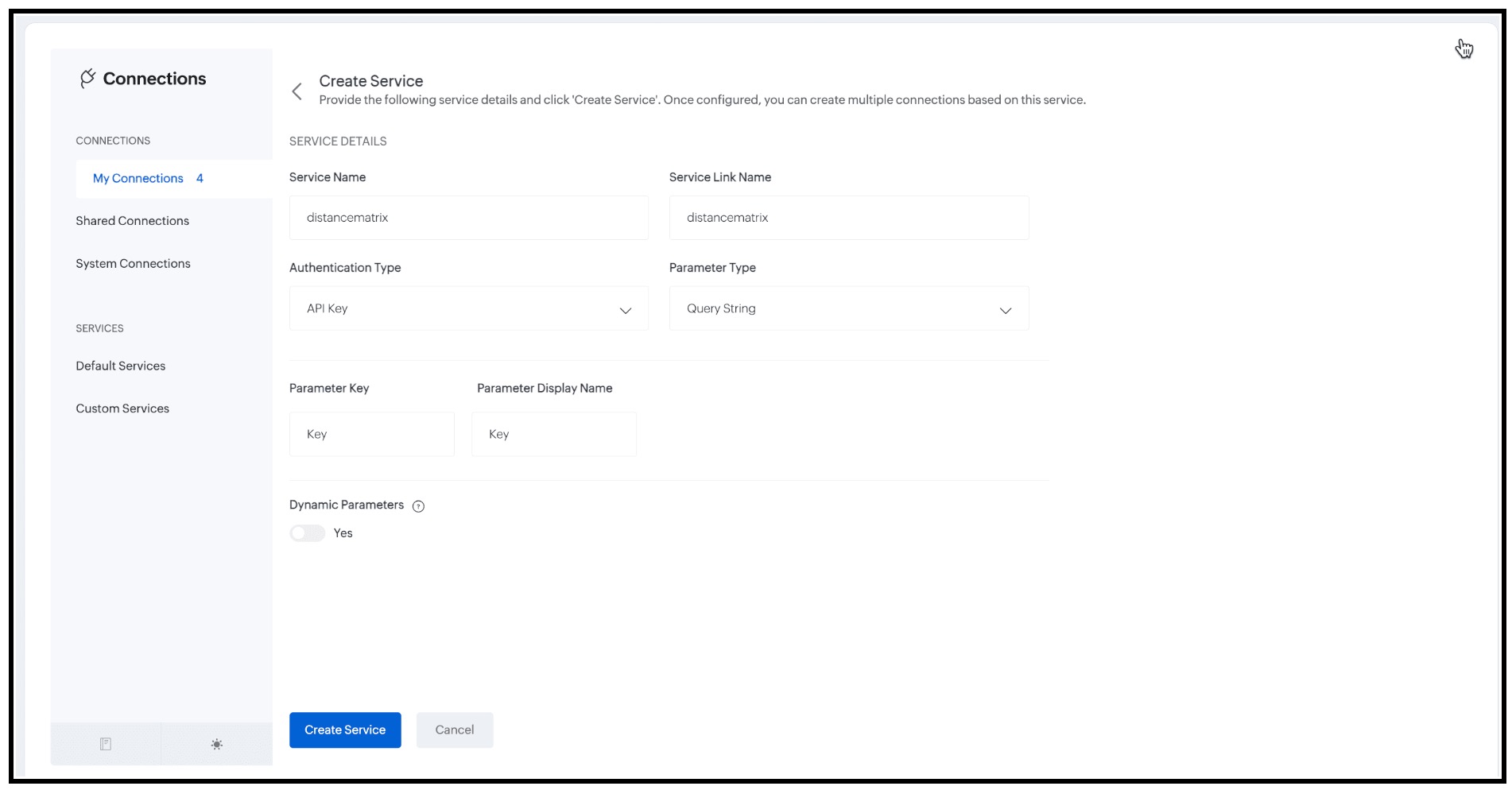
- Enter the following details and click "Create Service".
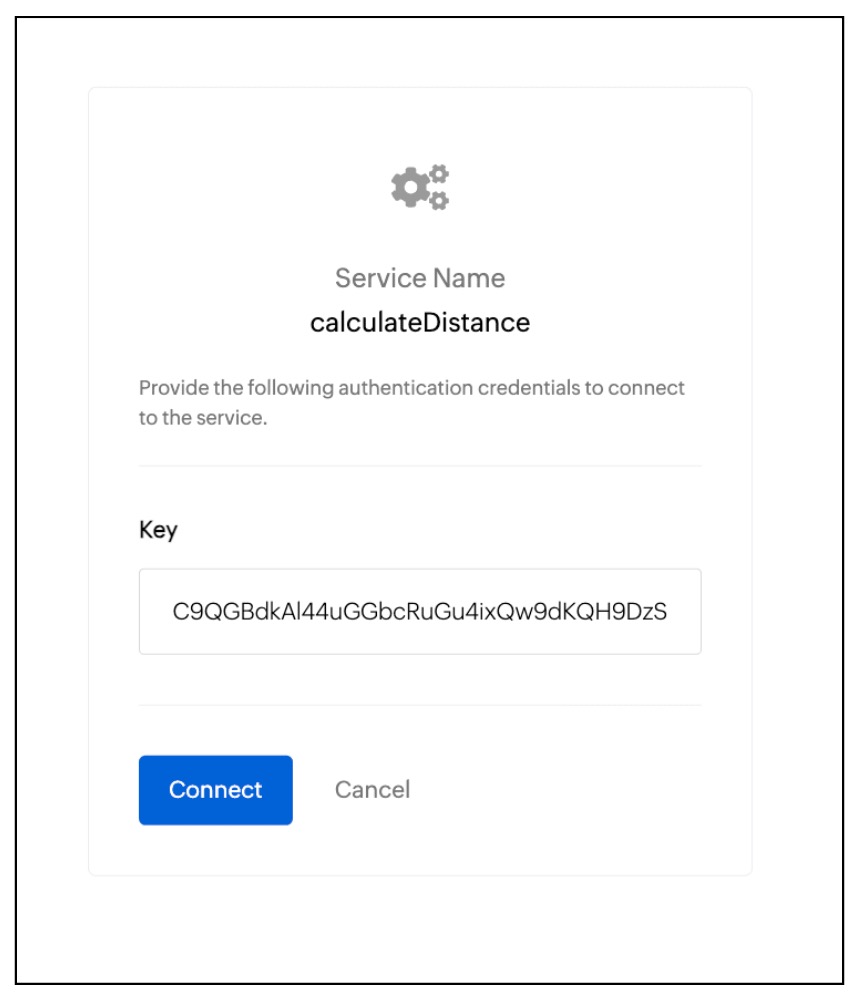
- Now, you will be prompted to enter the authentication credentials, Here it is the API Key. Enter the value and click "Connect".
2. Add to Trusted Domain:
- Whenever you want to make third party API calls, you need to whitelist them by adding the third party domain to Trusted Domain.
- To do this go to Setup → Security Control → Trusted Domain.
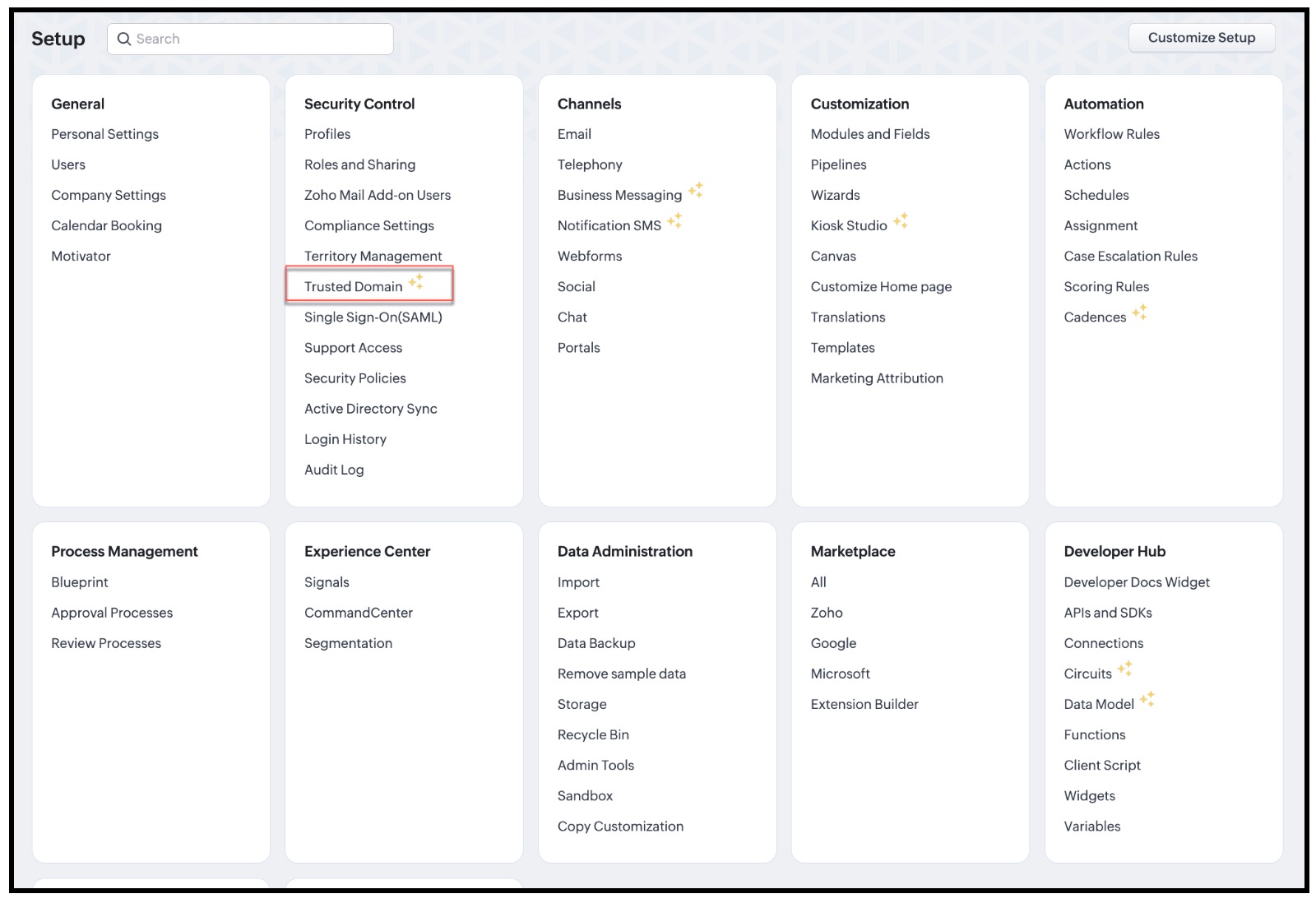
- Click New Trusted Domain.
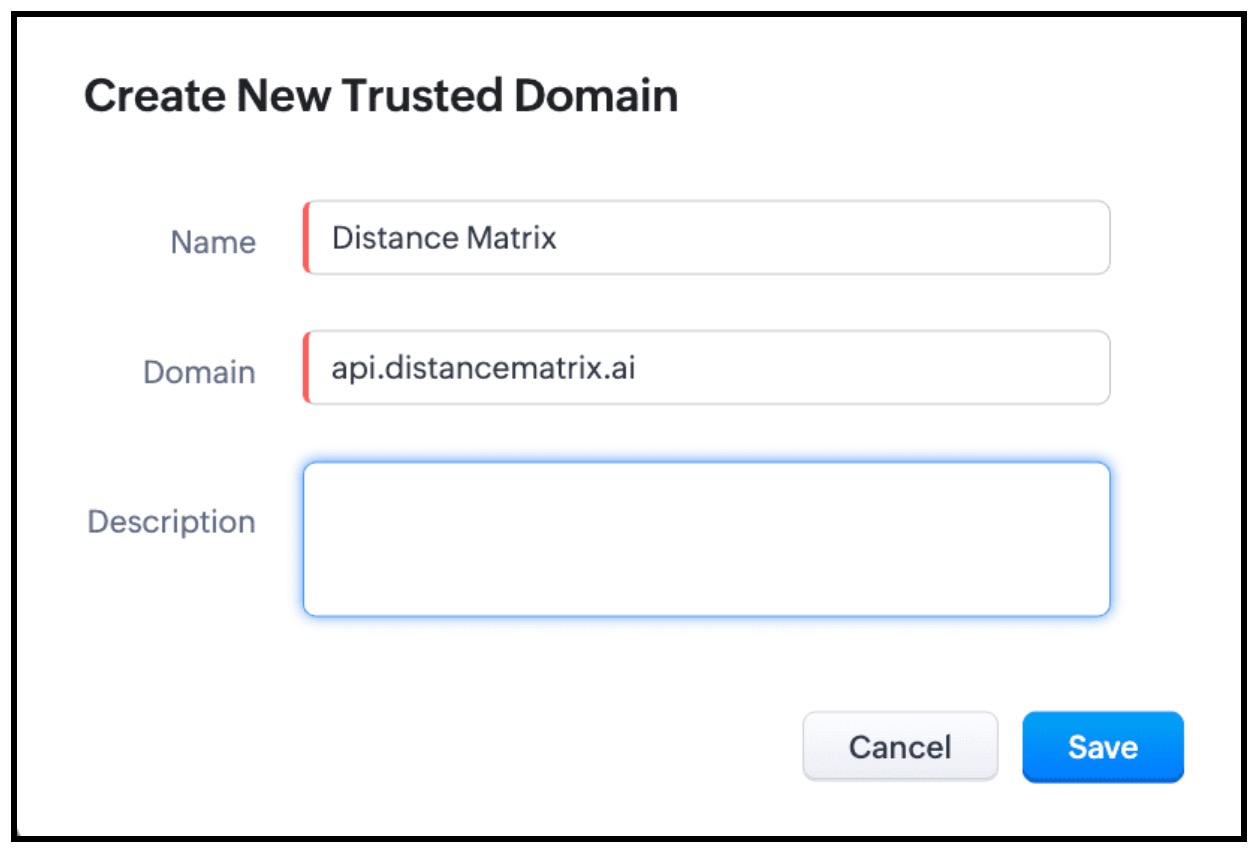
- Enter the Name and Domain details and click Save.
3. Invoke the connection in Client Script and populate the field using Client Script.
- The next step is to invoke the connection using Client Script using the invoke method.
- For this, create a Client Script on Create Page of "Requests" custom module and specify the event as onChange Page event as follows and click Next.
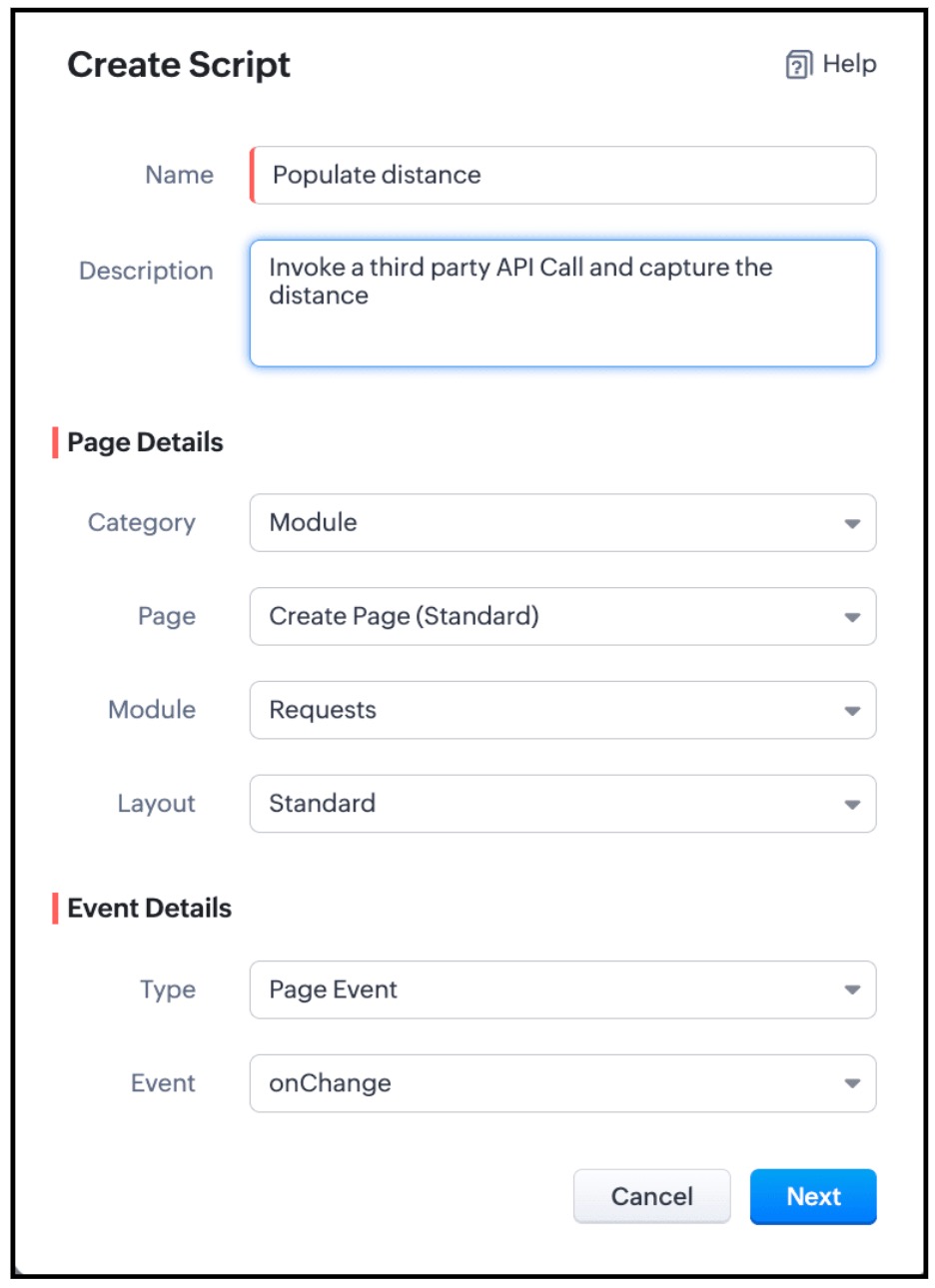
- Enter the below script and click Save.
Script :
- if (field_name == "Seller_Location" || field_name == "Manufacturer_Location") {
- let origins = ZDK.Page.getField('Manufacturer_Location').getValue();
- let destinations = ZDK.Page.getField('Seller_Location').getValue();
- let dist = ZDK.Page.getField('Distance');
- dist.setReadOnly(true);
- var response = ZDK.Apps.CRM.Connections.invoke("measuredistance", `https://api.distancematrix.ai/maps/api/distancematrix/json?`, "GET", 1, { "origins": origins, "destinations": destinations }, {});
- let distance = response._details.statusMessage.rows[0].elements[0].distance.text;
- dist.setValue(distance);
- }
- Here the values of the fields Seller_Location and Manufacturer_Location are captured using getValue() and are stored in origins and destinations respectively. The Third Party API - Distance Matrix returns the distance between origins and detstinations. So you need to pass these two parameters in the invoke() method and capture the response and populate the distance to the "Distance" field using setValue() method.
- As per the following syntax, you should pass the required parameters.
Syntax : invoke(connection_name, url, method, param_type, parameters, headers)
- The connection_name is "distanceMatrix".
- The URL is https://api.distancematrix.ai/maps/api/distancematrix/json?&key=${key}Note that the "key" is represented as ${key} as it is a variable. This is the variable name that you mentioned while creating the Connection.
- GET is the method as we are fetching data.
- For URL parameters , you should mention 1.
- Parameters are { "origins": origins, "destinations": destinations }
- {} represents that there are no headers.
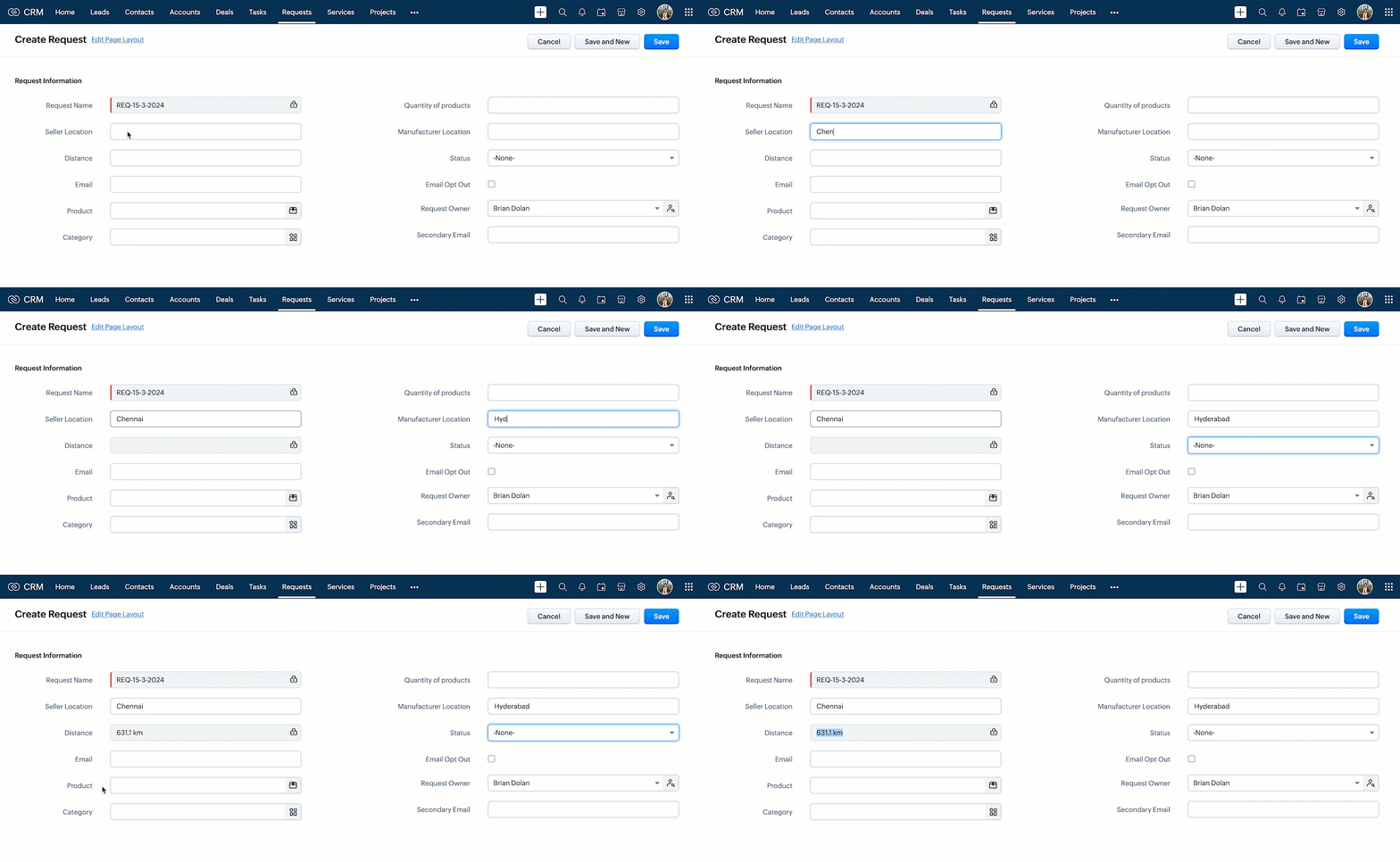
- Now, create a record in Requests and enter the location details. You can see the "Distance" field getting populated as shown below.
- Here is how the Client Script works.
6. Summary :
In this post we have discussed,
- How to invoke a third-party API call in Client Script
- How to create a Custom Service Connection
- How to use Connections in Client Script.
- How to add a new Trusted Domain
- How to populate a field with the response of a third-party API call.
7. Recommended Reads :
- Client Script Overview
- Creating a Client Script
- Client Script Events
- Client Script IDE
- Use cases of Client Script
______________________________________________________________________________________________________________________________________
 Previous post : Kaizen #134 : Manipulating Rich Text Field (RTF) using Zoho CRM APIs | Kaizen Collection : Home.
Join us for our upcoming Zoho CRM Developer Series: Zoho CRM APIs, where you can explore more about Zoho CRM APIs. Register Now!
Cheers!
Maadhari M
Topic Participants
Maadhari M
Haiku Technical Support
Sticky Posts
Kaizen #198: Using Client Script for Custom Validation in Blueprint
Nearing 200th Kaizen Post – 1 More to the Big Two-Oh-Oh! Do you have any questions, suggestions, or topics you would like us to cover in future posts? Your insights and suggestions help us shape future content and make this series better for everyone.Kaizen #226: Using ZRC in Client Script
Hello everyone! Welcome to another week of Kaizen. In today's post, lets see what is ZRC (Zoho Request Client) and how we can use ZRC methods in Client Script to get inputs from a Salesperson and update the Lead status with a single button click. In thisKaizen #222 - Client Script Support for Notes Related List
Hello everyone! Welcome to another week of Kaizen. The final Kaizen post of the year 2025 is here! With the new Client Script support for the Notes Related List, you can validate, enrich, and manage notes across modules. In this post, we’ll explore howKaizen #217 - Actions APIs : Tasks
Welcome to another week of Kaizen! In last week's post we discussed Email Notifications APIs which act as the link between your Workflow automations and you. We have discussed how Zylker Cloud Services uses Email Notifications API in their custom dashboard.Kaizen #216 - Actions APIs : Email Notifications
Welcome to another week of Kaizen! For the last three weeks, we have been discussing Zylker's workflows. We successfully updated a dormant workflow, built a new one from the ground up and more. But our work is not finished—these automated processes are
Recent Topics
Zoho Desk Android app update: Filter, Sort and Saved filters Enhancements
Hello everyone! We are excited to introduce the below features on the Android version Zoho Desk mobile app: 1. Filter & Sort support has been introduced for the Contacts and Accounts modules. 2. Sort options is now available in Custom Modules as well.Accessing shared mailboxes through Trident (Windows)
Hi, I have a created a couple of shared mailboxes. The mailboxes are showing up on the browser based Zoho workplace, but I cannot seem to figure out how to access my shared inboxes through Trident (Windows). Am I missing something or is this feature notClosing the Loop: Why Lookup Asymmetry is Harming Data Integrity in Creator
TL;DR: Lookup fields allow users to add new related records inline via the "+" icon, but there's no equivalent ability to edit an existing related record without navigating away and losing form context. Adding a native "Edit" icon—with automatic Userfiltering lookup field options based on information in another module.
In our CRM system. We have the standard Accounts and Deals modules. We would like to introduce the ability to classify Accounts by Sector. Our desired functionality is to have a global list of all sectors that an Account can select, with the ability toService op locatie organiseren met Zoho FSM: waar lopen organisaties tegenaan?
Bij organisaties met service teams op locatie merken we vaak dat de complexiteit niet zozeer in de planning zelf zit, maar in wat er rond die planning gebeurt. Denk aan opvolging na interventies, consistente servicerapporten, en het bijhouden van installatiesIntroducing Assemblies and Kits in Zoho Inventory
Hello customers, We’re excited to share a major revamp to Zoho Inventory that brings both clarity and flexibility to your inventory management experience! Presenting Assemblies and Kits We’re thrilled to introduce Assemblies and Kits, which replaces theDoes the ability exist to make tax on the customer profile mandatory?
I am reaching out to inquire about the possibility of making the "Customer Tax" field mandatory when creating a new customer in Zoho. We want to ensure that all customers have their tax information recorded to maintain compliance with our internal processes.email association with CRM
Why is it 2024 (almost 2025) and Zoho has not figured out how to integrate email with CRM? It is so inconsistent at associating emails within CRM. I am an attorney. I have clients and work with other attorneys. Attorney John Doe is associated with multipleCredit Note for Shipped and Fatoora pushed invoices
We have shipped a Sales Order and created an Invoice. The Invoice is also pushed to Fatoora Now we need to create a credit note for the invoice When we try it, it says we need to create a Sales Return in the Zoho Books, we have already created a SalesFSM - Timesheet entires for Internal Work
Hi FSM Team, Several of my clients have asked how they can manage internal timesheets within Zoho FSM. Since their technicians already spend most of their day working in FSM, it would be ideal if they could log all working hours directly in the FSM app.Add a way of clearing fields values in Flow actions
It would be great if there was an option to set a field as Null when creating flows. I had an instance today where I just wanted to clear a long integer field in the CRM based on an action in Projects but I had to write a custom function. It would beRole Management
I am creating an analytics dashboard for a company that will be utilized by its various departments such as Finance, Marketing, and HR. My goal is to design the dashboard with separate tabs for each department. Additionally, I plan to implement role-basedAnnouncing new features in Trident for Windows (v.1.37.5.0)
Hello Community! Trident for Windows just received a major update, with a range of capabilities that strengthen email security and enhance communication. This update focuses on making your mailbox safer and your overall email experience more reliable.Early Payment Discount customize Text
Hi, I’m currently using Zoho Books and am trying to customize the standard “Early Payment Discount” message that appears in the PDF invoice template. I’ve reviewed the documentation here: https://www.zoho.com/books/help/invoice/early-payment-discount.htmlDeprecation of SMS-based multi-factor authentication (MFA) mode
Overview of SMS-based OTP MFA mode The SMS-based OTP MFA method involves the delivery of a one-time password to a user's mobile phone via SMS. The user receives the OTP on their mobile phone and enters it to sign into their account. SMS-based OTPs offerDKIM Now Mandatory - Changes to Zoho Forms Email Policies
Hello Zoho Forms Users, This post is to inform you about an important update regarding the authentication of all email domains in your Zoho Forms account. This year, we are doubling down on our commitment to deliver a secure, seamless, and empoweringCall description in notes
When completing a call, we type in the result of the call in the description. However, that does not show up under the notes history on the contact. We want to be able to see all the calls that have taken place for a contact wihtout having to go intoEmail Address for Contact not Populating
When I click "Send Mail" from a Contact's page, their email address does not auto populate the "To" field. How do I make this happen?New in CRM: Dynamic filters for lookup fields
Last modified on Oct 28, 2024: This feature was initially available only through Early Access upon request. It is now available to all users across all data centers, except for the IN DC. Users in the IN DC can temporarily request access using this formWhy hybrid project management might be the best fit for you?
Project management techniques are designed to equip teams with proven methods for easy and efficient project execution. While management teams may have apprehensions about adopting the hybrid method of project management, we’ve compiled the top reasonsAllow all Company Users to view all projects, but only owner/admins can change projects
I was wondering if there was a permission setting I could adjust to allow all our company users to see all projects created. Then, only the project owners and admins with the change permission. ThanksSeeking help to be able to search on all custom functions that are defined
Hello I have a lot of custom functions defined (around 200) and i would like to search some specific strings in the content of those. Is there a way to accomplish that? If not, is there a way to download all existing custom functions in some files locallyTotals for Sales Tax Report
On the sales tax report, the column totals aren't shown for any column other than Total Tax. I can't think of a good reason that they shouldn't be included for the other columns, as well. It would help me with my returns, for sure. It seems ludicrousAdd Bulk Section / Grid Layout Duplicate Feature in Zoho Forms Builder
Currently in Zoho Forms, users can only duplicate individual fields. There is no option to duplicate an entire section or two-column/grid layout with all internal fields. This becomes inefficient when building structured forms such as Family Details,Leistungsdatum in Rechnungen (Zoho Books)
Hallo, ist es irgendwie möglich den Leistungszeitraum in der Rechnung aufzuführen? Beste Grüße AleksZoho Trident Windows - Streams Not Visible
Namaste We’re having an issue with Streams not being visible in Trident (Windows), which is important for us as we share many emails internally. It appears that the feature to show Streams above the Inbox folder, as seen in the default mailbox view, isSales IQ Chat Widget is Only Displaying Last Name
Can anyone suggest why the widget is only displaying "last name"?! We have the latest version of the wordpress plugin installed. Thanks Thanks!Shopify - Item sync from Zoho Inventory
Hi team, We’ve connected Shopify with Zoho Inventory. We want that when an item is created in Zoho Inventory, it must create a product in Shopify. But currently, new items created in Zoho Inventory are not getting created in Shopify even after clickingIs it possible to setup bin locations WITHOUT mandating batch tracking?
Hi fellow zoho users, I'm wondering if anyone else has a similar issue to me? I only have some products batch tracked (items with shelf life expiry dates) but I am trying to setup bin locations for my entire inventory so we can do stock counting easier.Kill zoho meeting
Saying the quiet part out loud. Can zoho please just give up on the idea that they can make a meeting platform and just make our workplace licenses cheaper when you remove it so people can switch to zoom or teams. Tired of the excuses, you guys cant makeUtilisation de Zoho en conformité avec l’article 286 du Code général des impôts (CGI)
Cher(e) client(e), Conformément à l’article 286 du Code général des impôts (CGI) impose aux entreprises assujetties à la TVA d’utiliser des systèmes de caisse ou de gestion commerciale certifiés lorsqu’elles enregistrent des ventes à des particuliers.Unable to Create Task as a Support Administrator
Hello! I want to ask for help regarding creating tasks within the tickets. I am by default the Support Admin. I should be able to create tasks or activities right? But there's a prompt that I need to contact the Administrator. See photos for reference.Introducing Forms in Zoho Sheet
We hereby bring you the power of forms in Zoho Sheet. Now, build and create your own customized forms using Zoho Sheet. Be it compiling a questionnaire or rolling out a survey, Zoho Sheet can do it all for you. Forms is an excellent feature that helps you collect information in the simplest of ways and having it in Zoho Sheet takes it a notch higher. Build Simple yet Powerful forms Building forms using Zoho Sheet is fairly simple. The exclusive 'Form' tab lets you create one quickly. Whether youLayout one survey question in a time & redirect next Page based on previous response
I have doubt while, I am scripting survey on the Zoho where I redirecting to next page based on my previous response but didn’t get success on this. Please help me on this and tell me how I layout one survey questions in a time when I submit responseZoho Bookings form pre-filled with Zoho Forms in
Hi, I've got a contact page on my website and I'd like to have the option to book an appointment (redirected to zoho bookings page) after an option is submitted on the contact form. how would I go about doing this? thanksSupport “Other” Option with Free Text in Dropdown Fields
Hello Zoho Bookings Team, Greetings, We would like to request an enhancement to the registration form fields in Zoho Bookings, specifically for dropdown fields. Current Limitation: At the moment, dropdown fields do not support an “Other” option that allowsDetailed Balance Sheet for tax preparer
I'm using the free edition of Zoho Books. My tax preparer is asking for "detailed" Profit & Loss and Balance Sheet reports which include all the activity and transactions within the various categories. The default reports do not include these details.Sending automated messages that appear in the ticket's conversation thread
Good morning, esteemed Zoho Desk community, warm greetings Today I am here to raise the following problem, seeking a solution that I can implement: I need to implement an automation that allows me to send reminder messages to customers when I am waitingPayment Card or Identity form-fill from Vault?
Hello! I'm working on replacing Bitwarden with Vault and one issue I've run into is that I can't find any option to fill address and payment forms from Payment Card or Identity info that has been saved in Vault. Is there a way to do this? Is it a plannedAbility to add VAT to Retainer Invoices
Hello, I've had a telephone conversation a month ago with Dinesh on this topic and my request to allow for the addition of VAT on Retainer Invoices. It's currently not possible to add VAT to Retainer Invoices and it was mutually agreed that there is absolutely no reason why there shouldn't be, especially as TAX LAW makes VAT mandatory on each invoice in Europe! So basically, what i'm saying is that if you don't allow us to add VAT to Retainer Invoices, than the whole Retainer Invoices becomesNext Page