Spotlight 34: Handle event engagement in one space
Having one place where you can run sessions, promote networking, and drive attention to exhibitor booths can help increase engagement at events.
In Zoho Backstage's Virtual Space, you can provide event participants with a unified experience to join sessions, participate in discussions using networking tables, and interact with exhibitors, all from one place.
Set up the Virtual Space
Every time you open a session, visit a booth, or join a networking table, you will be redirected to the Virtual Space. Once you have entered the Virtual Space through any of the above options, you can easily switch between these options inside the Virtual Space itself. Event participants also get to experience the same thing when they do this from the event microsite.
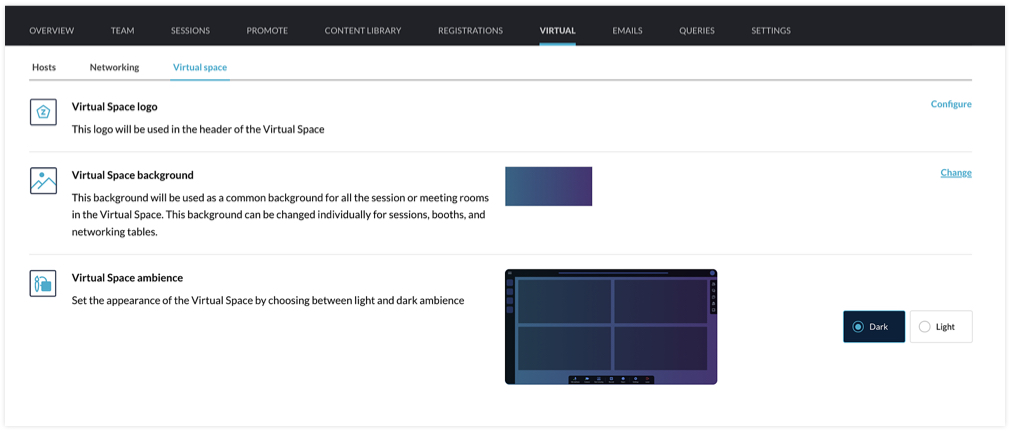
You can customize the Virtual Space to reflect your brand or event's theme by choosing a logo, a background, and the ambience. The logo you've set for the event will be chosen for the Virtual Space by default, but you can select a different one if needed. For the background, the option that you choose will be applied for all sessions, tables, and meeting rooms in exhibitor booths. You can even modify the background scheme at a granular level by selecting a different background for individual booths, sessions, or tables. The Virtual Space ambience can either be set to Dark or Light.
Set the stage for sessions
When hosting a session, you can go to the event microsite and visit the Agenda page. There you can click the Start session button. Alternatively, you can also do this from Backstage. Go to the Conduct Dashboard and click the Present sessions tab. Next, click a session in the timeline on the left and click the Start session button. You can then broadcast the session with the help of the webcasting service that you've selected.
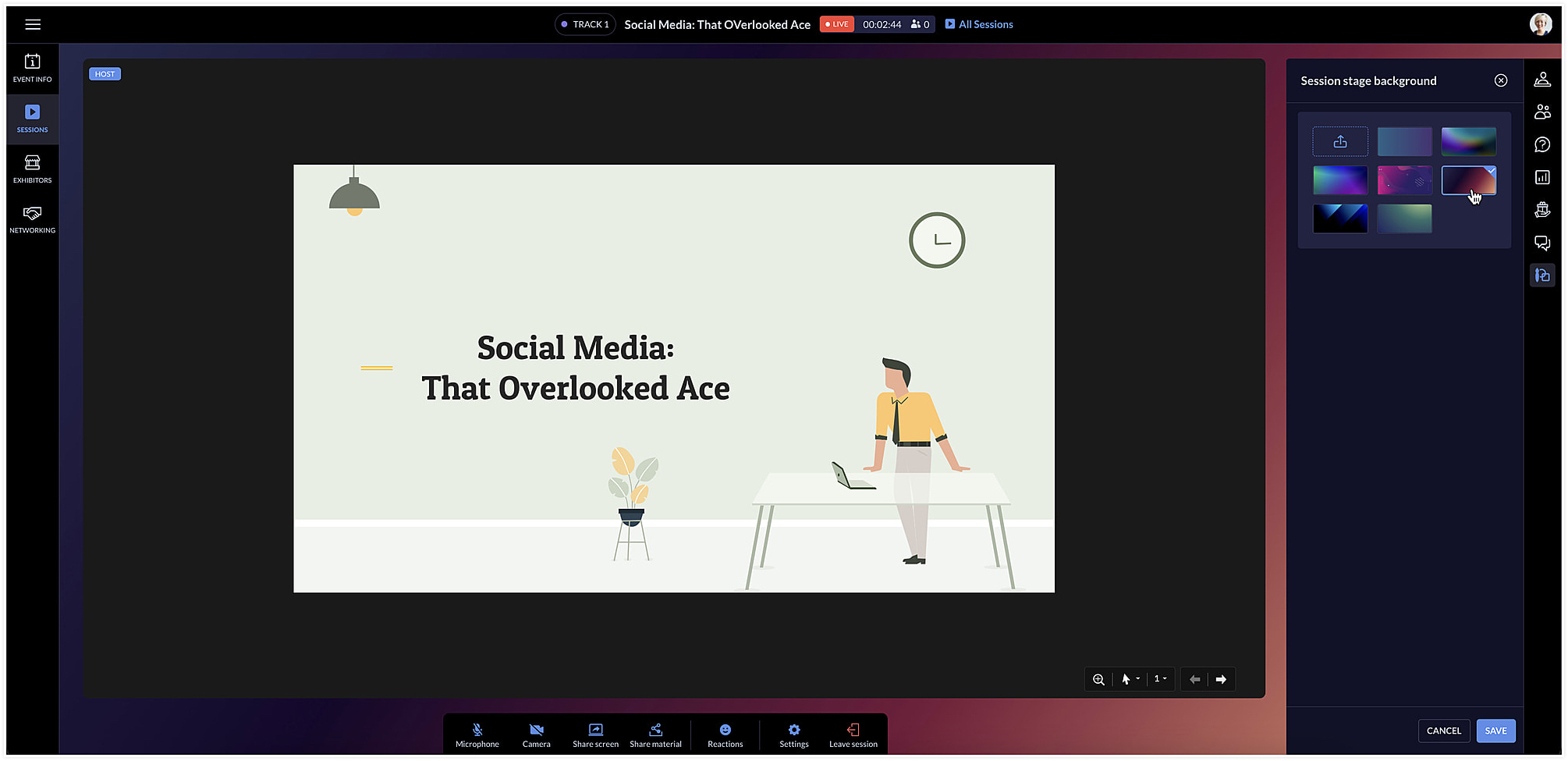
The session area will be designed based on the Virtual Space settings you've chosen. To change the background color for a specific session, click the Session stage background icon [ ] at the right and choose a background option from the list.
] at the right and choose a background option from the list.Facilitate communication with networking tables
Networking tables can be an opportunity for event participants to make important connections. Think of them as similar to round table discussions that take place at a physical event. Attendees can take a seat at a virtual networking table and interact with others there. Networking tables can be used by anyone who is a part of the event such as speakers, attendees, sponsors, or event exhibitors.
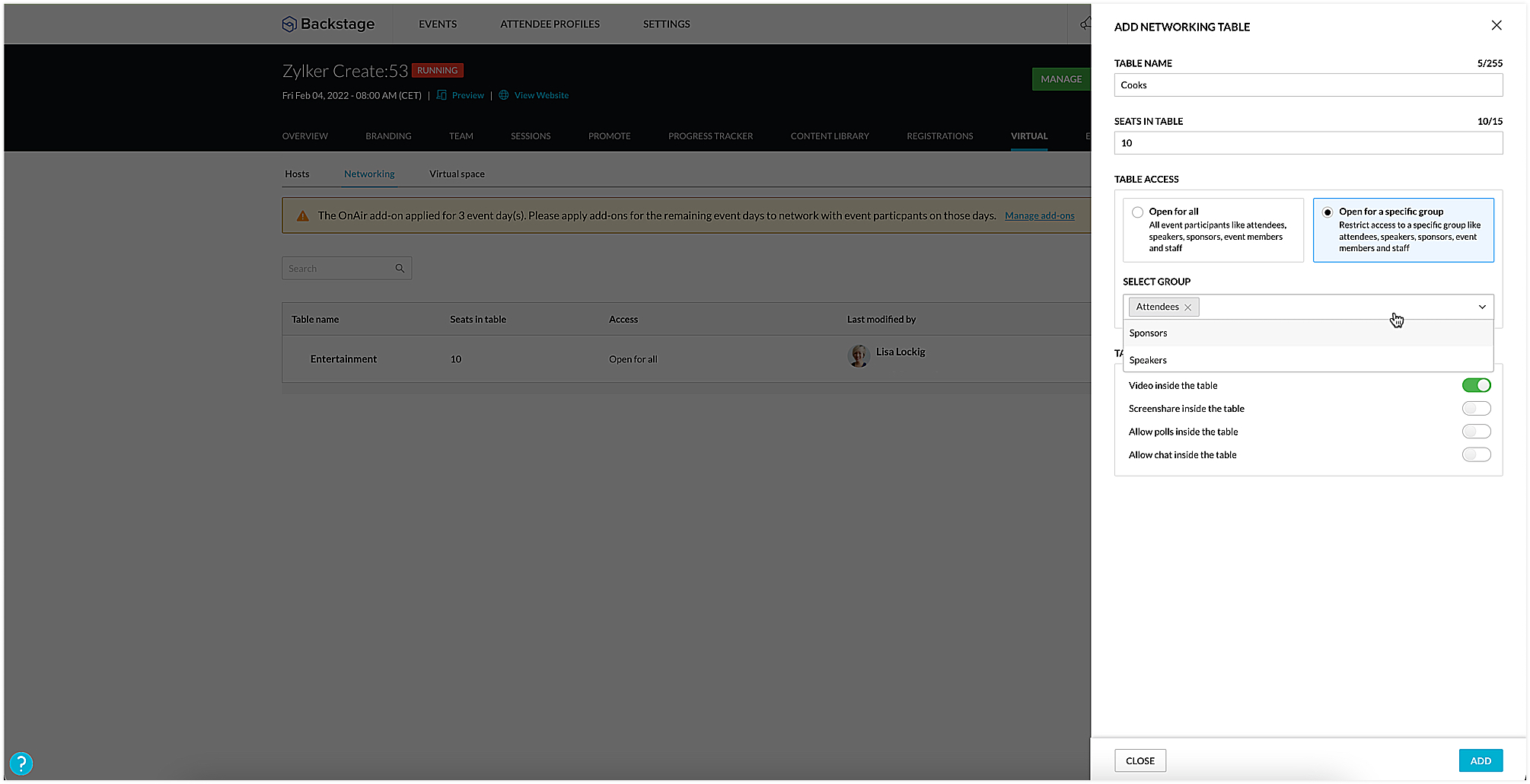
To create a networking table, go to the Manage Dashboard and click the Virtual tab, then click the Networking tab. Here you can say how many seats must be available and enable options such as chat, video stream, polls, or screen sharing for everyone at the table, if necessary. You could also choose to make tables exclusive so that they will be available only to certain participants. To do this, select the Open for a specific group radio button, and select the group you want to make them available to.
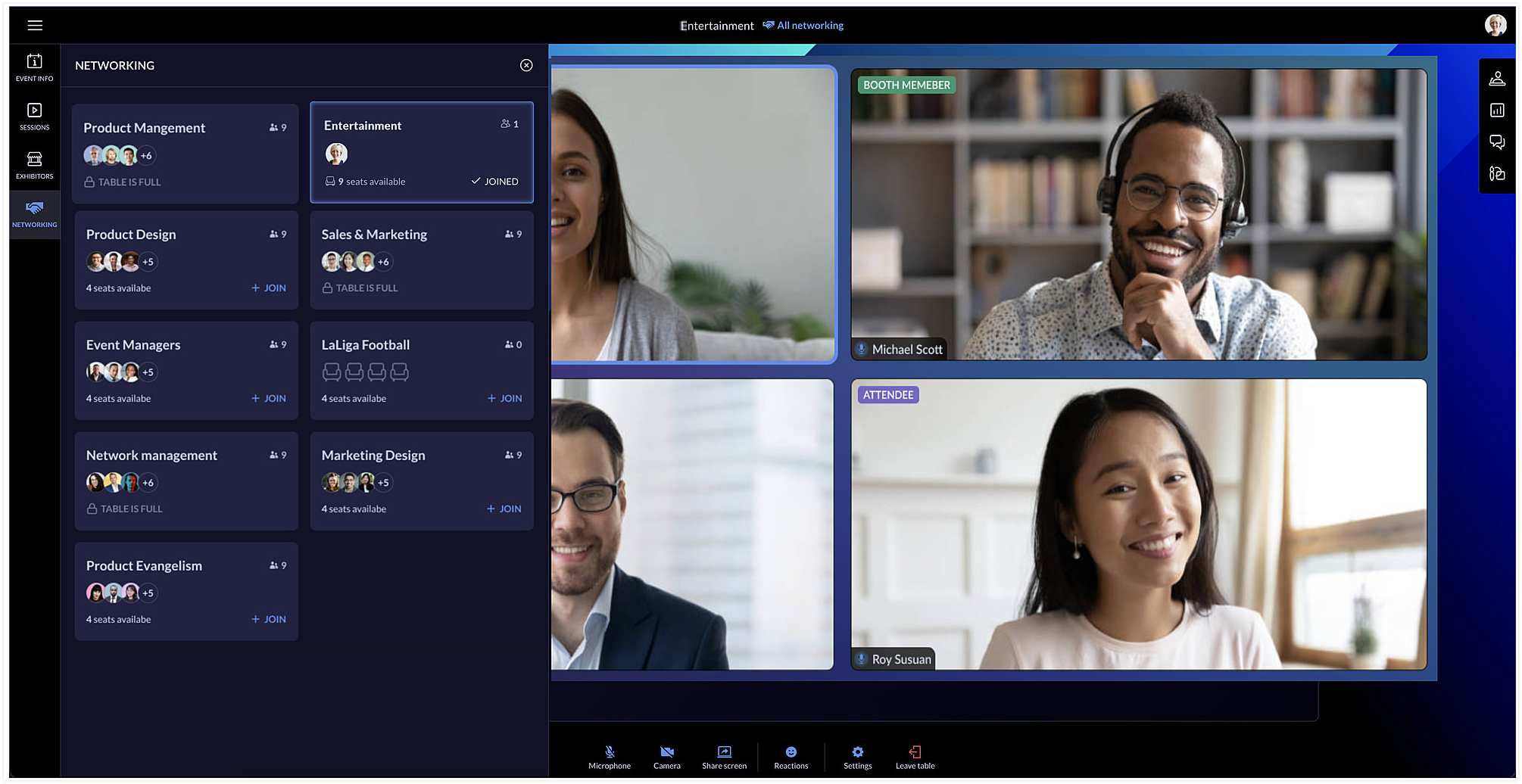
Event team members can join networking tables to take part in the discussion or just observe the conversation. Event members who join networking tables can manage ongoing interactions by muting or unmuting the mics or pausing the video stream of participants.
Each table can have a background of its own too. You can do this by clicking the Networking tab in the Virtual Space and clicking the Table background icon [ ].
].
].Showcase exhibitors to interest attendees
The Virtual Space also includes the Exhibitors tab, which lists all the exhibitors who are associated with your event. Exhibitors can send a request to the event team through the event microsite. Once the request is approved, they can conduct meetings with interested booth visitors during the virtual event.
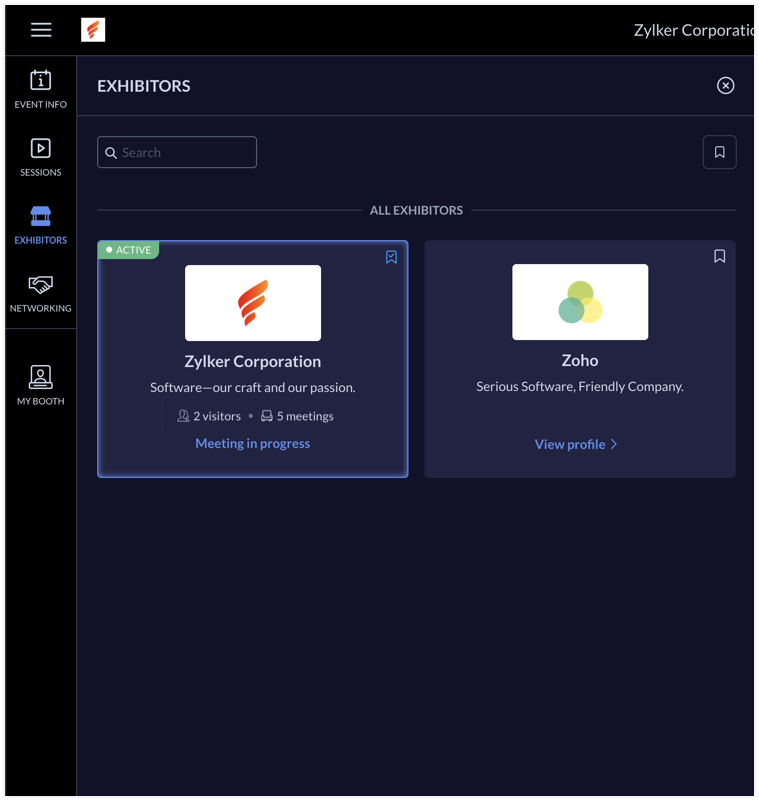
Exhibitors can use the rehearsal option before the event to practice meeting flow with test participants. During the event, the My Booth tab in the Virtual Space gives an overview of the exhibitor's information and also the members who are available in the booth. The number of ongoing meetings and visitors who are in the waiting room will be visible here. An exhibitor's booth background scheme can also be modified in the Virtual Space using the Expo meeting background icon [ ].
].
].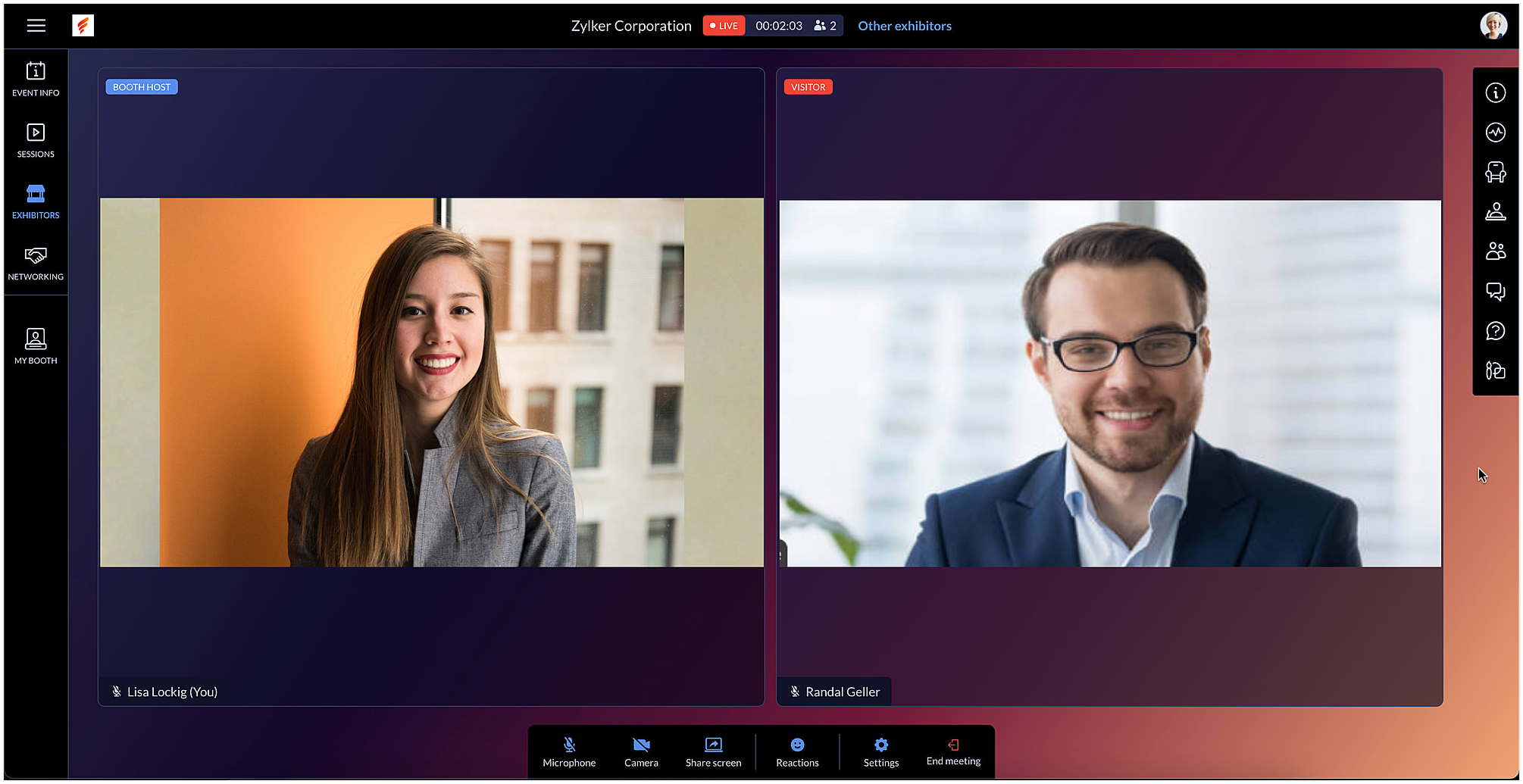
Exhibitors can also use the chat and questions option to interact with visitors when meeting with them. When viewing information for other exhibitors in the Exhibitors tab, you can do this without leaving an ongoing meeting, if you're a part of one.
After the event is over, exhibitors can export chat messages from the event microsite and, based on the permission given, they can also view and export the lead list from the Leads tab.
In Backstage, you can see an overview for details regarding exhibitors and their booths. To view this, go to the Overview tab in the Manage Dashboard and click the Exhibitors tile. Here you can keep track of booth purchases, view the sales overview for booths, and also examine analytics for meetings in booths.
Engage event participants in the Virtual Space and customize it to match your event's style. You can also start a discussion about this in our community or write to us at support@zohobackstage.com with your thoughts or questions.
Happy organizing!
Topic Participants
Tina Samuel
Sticky Posts
Spotlight 26: Host interactive virtual sessions with Backstage OnAir
According to a recent survey by Markletic, two of the biggest challenges organizers face when hosting online events are attendee engagement and interaction. Where in-person events bank on the impact of face-to-face communication to engage attendees, virtual
Recent Topics
Zeptomail API error 500 internal server error
Hi Everyone, getting this eror continuously! Can anyone please guide around the same! Zeptomail API error 500 internal server error Best RegardsWaiting multiple days to buy credits, causing my website to suffer
So I own a fairly large website that gets a lot of registered users. I use transmail send activation emails, and also forgot password emails. I sent an email to zoho's presales team when I was only at 4K/10K emails sent, hoping to buy more credits beforeFollow up
Hello, I sent a message 2 days ago but I don't receive any response and I cannot find my ticket here. this is the ticket: Your ticket has been created with the ticket ID 68925465 and subject "Fwd: Fishing-alert" looking forward to seeing your response.What's new in TransMail!
Note: TransMail is now ZeptoMail. Click here to know more. Hello again, everyone! We've recently crossed the 6 months mark of TransMail's launch. In this time post our launch, we have been constantly working on updating our platform and adding new featuresJune 2021 in TransMail!
Note: TransMail is now ZeptoMail. Click here to know more. Hello again, everyone! Hope you and your loved ones are doing well. If you're doing less than fine, we truly hope that things only get better for you. We've had a few updates in the past monthTransMail has a new name—ZeptoMail!
Tried navigating to TransMail's community forum but see a different name now? That's because TransMail has a new name. TransMail is now ZeptoMail! As we’ve grown from an internal service used mainly by other Zoho products to an up-and-coming competitorJuly 2021 in ZeptoMail!
Note: TransMail is now ZeptoMail. Click here to know more. Hello again, everyone! Hope you and your loved ones are doing well. We've had a few updates in the past month in ZeptoMail—some new features and some important announcements. Take look at whatSend Email From the ZeptoMail BY API
What is Zeptomail:- Transactional email service with reliable and fast delivery How we can Create a Connection for Zeptomail in Zoho CRM Go to the Setup Click on Connection Enter Connection Details:- Generate Consumer Key & Consumer Secret Using ZohoCustomer email on Opencart 3
When I place an order, 2 emails are sent: 1) administrator 2) to the user The administrator receives a beautiful letter, but the user receives a damaged letter (see screenshot). What could be the problem?[Announcement] Insert image from URL changes in Zoho Writer
Hi Zoho Writer users! We'd like to let you know that we've changed the behavior of the Insert image from URL option in Zoho Writer for security reasons. Earlier behavior Once you inserted an image URL in a Writer document, the image would be fetched fromWriter sing up problom
Zoho writer sing up prolom faceUnable to copy into a new document
Whe I create a new Writer doc and attemp to copy and past I get this message. The only way to copy into a document is I duplicate an existing document, erase the text and save it under a different name and then paste the information. Not ideal. Can you[Webinar] Live demos and user Q&A with Zoho Writer product experts
Join us on June 12, 2025 for live demos based on your use cases and real-world scenarios raised via form. This is also an opportunity to get your questions answered directly by product experts from the Zoho Writer team. Webinar agenda Live demos basedZoho Writer's built-in citation and bibliography generator
Hey researchers and writers! Do you manually format citations and bibliographies, spending hours jumping between apps and tabs? If so, then check out Zoho Writer's built-in "Citations and Bibliography" feature. Imagine you're writing a thesis on the futureSingle and group checkboxes in Zoho Writer's fillable forms
Hey Writer Fam, Are you making the most out of single and group checkboxes in fillable forms in Zoho Writer? Here is a handy tip to optimize your use of checkboxes, both single and group, and enhance your data collection process. Single checkboxes: SingleCollaborate efficiently with Zoho Writer's track changes feature
Hi Zoho Writer Community, Zoho Writer's track changes feature is a simple, built-in solution that helps you and your team work together efficiently. Instead of juggling multiple versions of a document or building up a long email chain of comments, eachZoho Writer's WordPress extensions
Hey Zoho Writer users! Say goodbye to all your WordPress content publishing woes with Zoho Writer's WordPress extensions. Publish content with all your formatting and images, republish content when you update a document, and more—from a single windowTime-saving table hacks
Hey Zoho Writer Community, Do you find yourself using a lot of tables in your documents? We're here to share some of our time-saving hacks that will help you work more efficiently, organize your data, and make your documents look neat and professional.Automating document approval and signing with Zoho Writer and Zoho Sign
Hey Zoho Writer Community! Here's another automation tip to make your processes more efficient! Question: Can I send a document for client approval first, then automatically send it for signing with Zoho Sign if they approve? Since it's the same personCustomization hacks in Zoho Writer - Part 2
Hey community, We're back with some more tricks to personalize your documents, save time, and get in the zone when you work in Writer. Check out part 1 of this post if you haven't already. Let's dive right in! Document ruler units Imagine you're creatingSimplify your tax calculations with Zoho Writer
Hello Zoho Writer Community! Tax season can be stressful, but with Zoho Writer, managing your income tax calculations becomes straightforward and efficient. Here’s an example of how you can use the tables and formulae of Zoho Writer to calculate incomeEnhance document navigation with headings and TOC
Hey Zoho Writer Community! We're back with some useful features in Zoho Writer that can simplify your document creation and navigation process. Let's dive right in! Check out our video on how to make the most of Zoho Writer's heading and table of contentsUse and download in PDF format of Zoho wirter Merge template using deluge
Hello Zoho Developers. Here is some information about Zoho Writer. Writer is not just another online word processor, it's a powerful tool for editing, collaboration, and publishing. Even with its wide range of features, Writer's pared-down user interfaceCustomization hacks in Zoho Writer - Part 3
Hello everyone, Welcome back to Part 3 of our customization tips in Zoho Writer! In this third installment, we'll be diving into some essential customization settings that can enhance your document creation experience. Sender email address in mail mergeDaytime saving timezones messing up writer pdf
Hi, I need help for something I can't figure out. I created a Form to collect data and it is set up with my current Daylight Saving Time (GMT-3). This form is used to generate a contract (pdf Writer) with dates from an event that is being held in 4 monthsIssue with locked content in Writer
Hi, I have seen the documentation which outlines how to lock specific content within a Writer document so that it can't be modified by collaborators, but I have come across an issue. When the editor locks a paragraph for example, then a collaborator can'tDeprecation of certain URL patterns for published Zoho Writer documents
Hi Zoho Writer users! We'd like to let you know that we have deprecated certain URL patterns for published and embedded documents in Zoho Writer due to security reasons. If the published or embedded documents are in any of these URL patterns, then theirUsing Mail Merge Template to Print Documents with One Subform Record's Fields per Document
Hello, We have a Mail Merge template created in Zoho Writer which is not able to perform the functionality which is currently required to automate the documentation task portion of our process. The CRM module we are primarily using is based on a "Loans"Problem with Writer and Workdrive
Hi team, I’m the super admin for our Zoho One org. WorkDrive is active, and Zoho Docs is deprecated for our org. However, Zoho Writer cannot connect to WorkDrive at all — we’ve cleared cache, tried incognito, and restarted several times. I was able toSet to Review for all
We are testing the use of Writer as part of an internal review process for statement of work documents and have found that when the document is changed from Compose to Review by one person, that is not reflected for all others who view the document. IsI’ve noticed that Zoho Sheet currently doesn’t have a feature similar to the QUERY formula in Google Sheets or Power Query in Microsoft Excel.
These tools are extremely helpful for: Filtering and extracting data using simple SQL-like queries Combining or transforming data from multiple sheets or tables Creating dynamic reports without using complex formulas Having a Query-like function in Zohostock
bom/bse : stock details or price =STOCK(C14;"price") not showing issue is #N/A! kindly resolve this problemSOME FEATURES ARE NOT IN THE ZOHO SHEET IN COMPARISION TO ZOHO SHEET
TO ZOHO sir/maam with due to respect i want to say that i am using ZOHO tool which is spreadsheet i want to say that some features are not there in zoho sheet as comparison to MS EXCEL like advance filter and other Features which should be there in ZOHOZoho sheet for desktop
Hi is zoho sheets available for desktop version for windowsTip #18: 6 Trendlines and when to use them in your spreadsheet data?
Charts are a great tool for visualizing and interpreting large chunks of data in spreadsheets. Zoho Sheet offers you 35+ chart options, along with AI-powered chart recommendations based on the data set you select. There are various chart elements thatPerform customized calculations with the new LAMBDA functions!
We released the LAMBDA function in Zoho Sheet in 2021, enabling customized calculations inside predefined functions. Now, we're extending LAMBDA's capabilities with six new functions. Each of these functions applies LAMBDA to the given input, performsTip #17: Easily share spreadsheets with non-Zoho account users
With efficient, collaboration-friendly options, Zoho Sheet is a popular choice among users. Sheet's external share links help you collaborate more effectively by sharing your spreadsheets with anyone outside your organization, including users who do notWork seamlessly with Sheet's shortcuts without affecting the browser
Navigating your worksheets and performing specific actions should be a quick and easy process. That's where keyboard shortcuts come in. Shortcut keys help you accomplish tasks more efficiently, eliminating the need to move away from the keyboard. WhatZoho Sheet for iPad: Improved UI, external keyboard support, and more!
The portability and capabilities of the iPad have made it an essential device in the business world. With this in mind, we had launched an exclusive Zoho Sheet app for iPad, with device-specific improvements and enhanced usability. Now, we're improvingThe new Zoho Sheet for Android: Seamless UI and advanced features
At Zoho Sheet, we know mobile apps have become the go-to platforms for creating, sharing, and storing information. And we understand the importance of an efficient and seamless app experience. We've been working hard on improving the overall user experienceNext Page