Zoho Projects - Q3 Updates | 2025

Zoho Projects - Q3 Updates | 2025

Hello Users,


The final quarter of the year 2025 has begun, and we at Zoho Projects are all set with  a plan. New targets to achieve and new milestones to reach, influenced by the lasting imprint of the past quarter. 2025's Q3 saw some new features and enhancements that made the project management process more customizable, user-focused, and prompt.

Let's look back at the highlights of Zoho Projects in Q3:
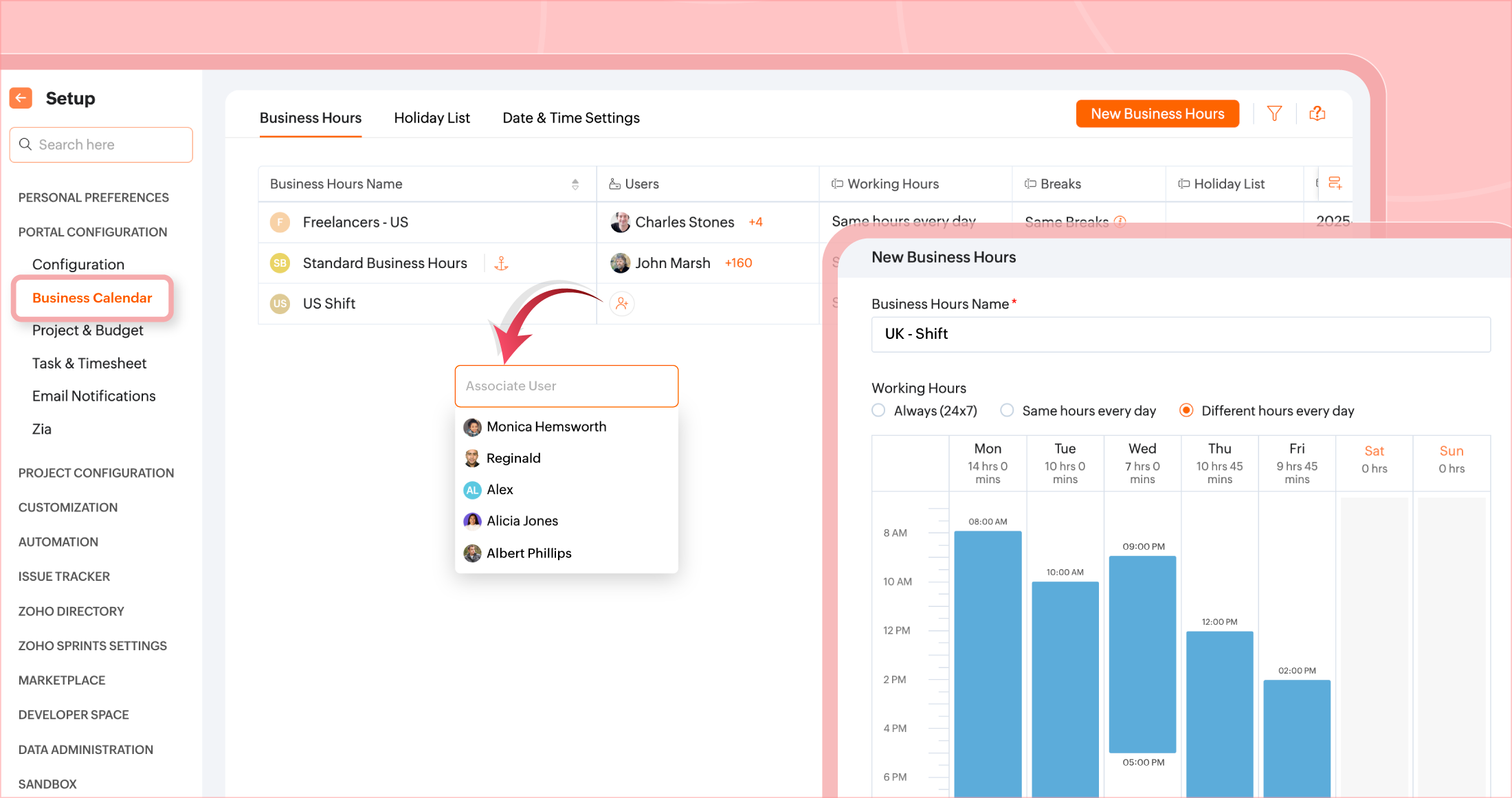
  1. User-based Calendar
Project managers can set up different business calendars for users working across geographies. This enables better coordination in meetings, team tasks, and managing deadlines. Additionally, users can set break hours to manage time more efficiently. Learn more

  1. Layout Rules for Issues
Properties of issue fields can be modified based on matching conditions. Specific field values can be viewed based on the value selected in another field configured in the issue layout. Learn more


  1. Quarter Day Time offs
Leaves or Time offs are now further categorized into quarters. Users can apply for Quarter day time off and choose among the 4 quarters of the day. Learn more


  1. Recycle Bin for all modules
Projects, tasks, task list, issues, milestones or project templates can be trashed or retrieved from recycle bin. This data can be restored within 30 days. Learn more


  1. Module specific Timesheet Filters
Timesheet can be filtered to view time records based on tasks, issues, or general time logs.


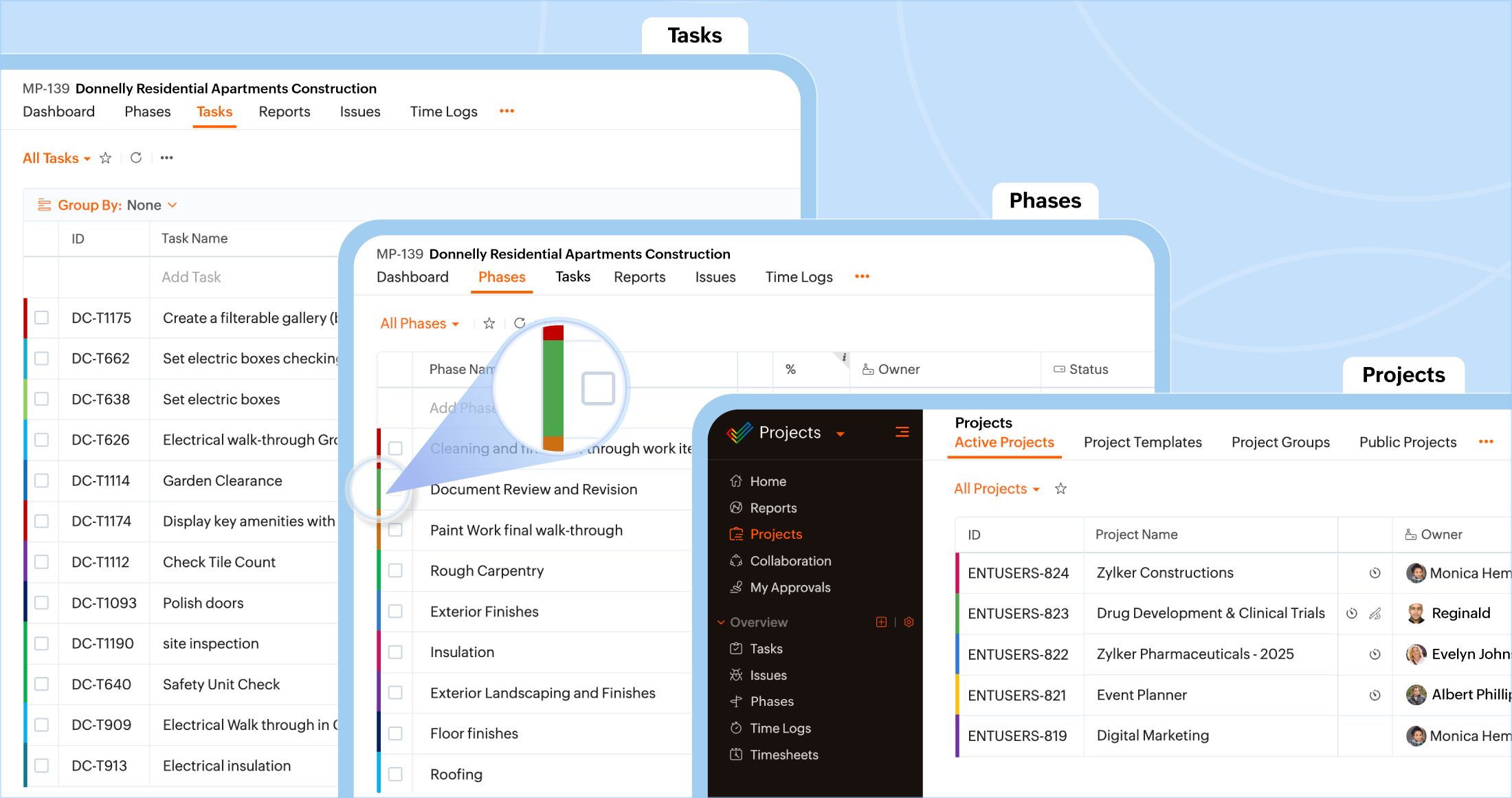
  1. Color-coded modules
All modules in Zoho Projects: Projects, Phases, Task lists and Tasks can be color-coded for easy identification.


  1. Issues and Phases Export
Issues and Phases in a portal or project can be exported or scheduled for export. Users can export all at once or schedule a periodic customised export as per requirement. Learn more about Issues & Phases export.


  1. Timesheets are  now Time logs
Timesheets have now been renamed to Time Logs. With no change in functionality, Time log captures the number of hours spent on a task or an issue during the day. Learn more


  1. Comments reaction
Comments come with reactions. Users can show agreement or amazement with icons instead of texts. Learn more


  1. Task Grouping
Tasks can be grouped based on default fields or custom fields for a more filtered view. Learn more

 
  1. Zoho Flow Integration
Zoho Flow integration enables users to include multiple third party actions into their project or task automation. Add Zoho Flow action in Workflow rules and blueprints to integrate, automate, and connect your projects or tasks directly to required third-party applications. Learn more


  1. Reusable Task list from existing project template
Task list from an existing project template can be directly added to a project template. Learn more


  1. Long URL field
In addition to short URL field, longer URLs up to 1000 characters can be added in Long URL field. Users can also convert their short URL into long URL. Learn more

This quarter only pushed us to add in more details to our product plan and we are already taking charge. Zoho Projects has more to offer and evolve based on your feedback and suggestions. Keep an eye out for more features and enhancements in the coming quarters.
Want to rewind on all Zoho Projects advancements throughout the years? Click here.

    Access your files securely from anywhere


                          Zoho Developer Community


                                                • Desk Community Learning Series


                                                • Digest


                                                • Functions


                                                • Meetups


                                                • Kbase


                                                • Resources


                                                • Glossary


                                                • Desk Marketplace


                                                • MVP Corner


                                                • Word of the Day


                                                • Ask the Experts


                                                          • Sticky Posts

                                                          • Accessibility Spotlight Series - 1

                                                            Every user interacts with products differently, what feels intuitive to one may be challenging for another. Addressing this, accessibility is built into Zoho Project's design philosophy. This helps users navigate and perform actions with ease irrespective
                                                          • Customize User Invites with Invitation Templates

                                                            Invitation Templates help streamline the invitation process by allowing users to create customized email formats instead of sending a one-size-fits-all email. Different invitation templates can be created for portal users and client users to align with
                                                          • Zoho Projects - Q3 Updates | 2025

                                                            Hello Users, The final quarter of the year 2025 has begun, and we at Zoho Projects are all set with a plan. New targets to achieve and new milestones to reach, influenced by the lasting imprint of the past quarter. 2025's Q3 saw some new features and
                                                          • Introducing Version-3 APIs - Explore New APIs & Enhancements

                                                            Happy to announce the release of Version 3 (V3) APIs with an easy to use interface, new APIs, and more examples to help you understand and access the APIs better. V3 APIs can be accessed through our new link, where you can explore our complete documentation,
                                                          • Schedule Exports for Regular Project Updates

                                                            Tracking project data often means exporting data at regular intervals. Instead of manually exporting data every time, users can schedule exports for Phases, Tasks, and Tasks in Zoho Projects. These exports can be set to run once, daily, weekly, or monthly


                                                          Manage your brands on social media


                                                                Zoho TeamInbox Resources


                                                                    Zoho CRM Plus Resources

                                                                      Zoho Books Resources


                                                                        Zoho Subscriptions Resources

                                                                          Zoho Projects Resources


                                                                            Zoho Sprints Resources


                                                                              Qntrl Resources


                                                                                Zoho Creator Resources


                                                                                    Zoho CRM Resources

                                                                                    • CRM Community Learning Series

                                                                                      CRM Community Learning Series


                                                                                    • Kaizen

                                                                                      Kaizen

                                                                                    • Functions

                                                                                      Functions

                                                                                    • Meetups

                                                                                      Meetups

                                                                                    • Kbase

                                                                                      Kbase

                                                                                    • Resources

                                                                                      Resources

                                                                                    • Digest

                                                                                      Digest

                                                                                    • CRM Marketplace

                                                                                      CRM Marketplace

                                                                                    • MVP Corner

                                                                                      MVP Corner


                                                                                        Design. Discuss. Deliver.

                                                                                        Create visually engaging stories with Zoho Show.

                                                                                        Get Started Now


                                                                                          Zoho Show Resources

                                                                                            Zoho Writer

                                                                                            Get Started. Write Away!

                                                                                            Writer is a powerful online word processor, designed for collaborative work.

                                                                                              Zoho CRM コンテンツ


                                                                                                Nederlandse Hulpbronnen


                                                                                                    ご検討中の方


                                                                                                          • Recent Topics

                                                                                                          • Disputed Purchase Invoices

                                                                                                            We have recently moved to Zoho Books from Sage. In Sage we were able to post a purchase/vendor invoice but mark it as on dispute. This would usually be a pricing query or if something was damaged. It would show in their ledger, so we could agree their
                                                                                                          • No TDS Deduction

                                                                                                            In some of our case, where we are reselling items at the same rate we purchased. In this scenario, Indian IT Law has a provision to request customer not to deduct TDS if the transaction value is same. TDS is paid by us (intermediary reseller) before we
                                                                                                          • CBSA - GST CHARGES on imports

                                                                                                            Hi there, We have a questions about landed cost categorization. We received a shipment from overseas. CBSA invoiced us for the GST on the items. Now we entered the CBSA-GST as a separate bill and attached it as landed cost to the main invoice based on
                                                                                                          • Zoho Books

                                                                                                            How do I manually insert opening balance?
                                                                                                          • Sales order & purchase order item links for item details

                                                                                                            This is fantastic for checking lots of things, I use it a lot. It would be great to see it extended to invoices & bills On another note, may as well throw in my favourite whinge ..... Wish you guys would get the PO receive differences sorted urgently,
                                                                                                          • Bank charges are applied. Please select a bank account.

                                                                                                            Hello, I'm trying to add bank charges to a customer payment, but I get the error message "Bank charges are applied. Please select a bank account." I found this old thread, where it says that I need to "select a Bank account for the 'Deposit To' dropdown
                                                                                                          • How to add receipts

                                                                                                            How to add receipts
                                                                                                          • Is it really true that I can't set the default 'deposit to' account in 2025?

                                                                                                            I've been using Books for 7 years and the default account has never been a problem. I usually manually reconcile invoices and have never had a thought about which account. It has always been my account. However, I recently noticed that for the past 4
                                                                                                          • Support for auto-upgrade in TrueSync (for Windows)

                                                                                                            WorkDrive TrueSync app now supports auto-upgrading to the latest version for Windows OS. You must manually download and install the TrueSync app version 3.4.0 to avail this feature. Download the latest TrueSync app for Windows (version 3.4.0) Supported
                                                                                                          • WorkDrive API Documentation

                                                                                                            WorkDrive provides users and developers an extensive set of APIs to help integrate functionalities of Zoho WorkDrive with other Zoho applications and third-party tools. We have published the official WorkDrive API Documentation page for all external users.
                                                                                                          • March 15, 2023: Zoho Docs is discontinued

                                                                                                            As of today (March 15, 2023) Zoho Docs is discontinued for all users. We would like to thank our customers for trusting us for so many years! Going forward, we're confident you'll enjoy using Zoho WorkDrive for all your advanced file management and collaboration
                                                                                                          • Introducing WorkDrive 4.0: Enhanced productivity. Advanced data administration. (Phase 1)

                                                                                                            Hello All, We're excited to share the release of WorkDrive 4.0, which includes important new features and enhancements focused primarily on productivity, secure collaboration, data administration, integrations, and user experience. Read the official announcement
                                                                                                          • Ask the Experts: Five-hour live Q&A session with Zoho WorkDrive product experts

                                                                                                            Have questions about WorkDrive 5.0? Let’s talk! We recently launched Zoho WorkDrive 5.0, packed with powerful updates to help your team work smarter, stay secure, and get more value from your business content. From content-centric workflows and AI-powered
                                                                                                          • External download link limit

                                                                                                            Can You please help us to understand this For Zoho WorkDrive external users, the download limit is a maximum of 5 GB total download size and a maximum of 50 first-level files and folders What is the meaning of first level? We are using these files in
                                                                                                          • Dynamically catching new file creations

                                                                                                            I have a team folder with many subfolders, and in those folders we add new documents all the time. I'd like to have a workflow or script to notify me (and then take other actions) when a file is added anywhere in that structure that ends in "summary.txt".
                                                                                                          • Rotate an Image in Workdrive Image Editor

                                                                                                            I don't know if I'm just missing something, but my team needs a way to rotate images in Workdrive and save them at that new orientation. For example one of our ground crew members will take photos of job sites vertically (9:16) on his phone and upload
                                                                                                          • Workflow workdrive rollout

                                                                                                            Hi! When will workflow be rolled out to all users? Thanks.
                                                                                                          • Sync desktop folders instantly with WorkDrive TrueSync (Beta)

                                                                                                            Keeping your important files backed up and accessible has never been easier! With WorkDrive desktop app (TrueSync), you can now automatically sync specific desktop folders to WorkDrive Web, ensuring seamless, real-time updates across devices. Important:
                                                                                                          • 🚀 WorkDrive 5.0: Evolving from a file sharing app to an intelligent content management platform: Phase 2

                                                                                                            Hello everyone, WorkDrive's primary focus has always been to provide an intelligent and secure content management platform, simplify collaboration, and be the central repository of files for all Zoho apps. In our previous announcement, we unveiled the
                                                                                                          • Join our live webinar: Explore the WorkDrive TrueSync application!

                                                                                                            Hello everyone, We are thrilled to invite you to a live webinar focused on mastering the WorkDrive TrueSync application. Discover how to seamlessly sync your content between the cloud and your computer, ensuring smooth and efficient file management. Our
                                                                                                          • Creating and managing a Team Folder using WorkDrive TrueSync

                                                                                                            Hello everyone, Are you tired of constantly switching between your Desktop TrueSync app and the WorkDrive web app to create and manage Team Folders? We’ve made things easier for you. You can now create and manage Team Folders directly within the TrueSync
                                                                                                          • Live webinar: Getting the most out of WorkDrive in Zoho Workplace

                                                                                                            Hello everyone, We’re excited to invite you to our upcoming live webinar, where we’ll explore how to maximize your use of WorkDrive as part of the Zoho Workplace bundle. This is a fantastic opportunity to elevate your productivity and streamline your
                                                                                                          • Live webinar: Mastering data migration, organization, and team collaboration

                                                                                                            Hello everyone, We’re excited to invite you to our upcoming live webinar! Discover how to seamlessly migrate your data, optimize file organization, and boost team collaboration using Zoho WorkDrive’s powerful features. This is a fantastic opportunity
                                                                                                          • Edit images seamlessly with WorkDrive's built-in Image Editor

                                                                                                            Are you tired of switching between multiple tools just to make simple edits to your images? We understand the hassle, which is why Zoho WorkDrive now comes with a built-in image editing tool, powered by Zoho Annotator. This tool allows you to edit images
                                                                                                          • Supercharge your email workflow with WorkDrive's add-in for Microsoft Outlook

                                                                                                            Consider this: You’re handling a critical project, and your inbox is packed with important attachments, email threads, and client communications. The back-and-forth routine of downloading files to your computer, uploading them to WorkDrive, and manually
                                                                                                          • Secure and promote your content with Custom Watermarking

                                                                                                            Imagine this: You’re a professional photographer who regularly shares your work online with potential clients and collaborators. Recently, you notice that some of your images have been reposted without any credit or permission. This not only impacts your
                                                                                                          • Live webinar: Explore WorkDrive's seamless integrations with key Zoho apps

                                                                                                            Hello everyone, We’re excited to invite you to our upcoming live webinar, where we'll delve into the seamless integration of WorkDrive with other key Zoho applications! This is a fantastic opportunity to enhance your productivity and streamline your workflows
                                                                                                          • Join us in Singapore for the Zoho WorkDrive User Group meetup!

                                                                                                            Hello, everyone! Exciting news! We'll be hosting an upcoming Zoho WorkDrive user group meetup in the beautiful city of Singapore this November. At this Zoho User Group meetup, we'll guide you through ways to use WorkDrive as a platform and build custom
                                                                                                          • WorkDrive TrueSync now supports ARM64-based Windows devices!

                                                                                                            We’re excited to announce that the Zoho WorkDrive TrueSync app now fully supports Windows devices with ARM64 architecture! Whether you're working on an ARM-based device or an x64 processor, you can now enjoy the same seamless file synchronization experience
                                                                                                          • Live webinar: 2024 recap of Zoho WorkDrive

                                                                                                            Hello everyone, We’re excited to invite you to our year-end live webinar! This session will take you through the transformative features and updates we’ve introduced in Zoho WorkDrive this year, helping you streamline document management like never before.
                                                                                                          • Option to Disable Download for Documents Shared via Permalink

                                                                                                            Dear Zoho Writer Team, Currently, when sharing a Writer document using the regular permalink (Collaborators with external users), there is no option to restrict the ability to download the document. While the external share link allows such restrictions,
                                                                                                          • Live Webinar: Optimizing back-office operations in the manufacturing industry to maximize profitability

                                                                                                            Hello everyone, We’re excited to invite you to our upcoming live webinar on February 6! Discover how Zoho WorkDrive can help manufacturing businesses optimize back-office operations, improve efficiency, and boost profitability. Our product experts will
                                                                                                          • Important update for WorkDrive TrueSync users in China Data Center (CN DC) & Chinese language users in other DCs

                                                                                                            Dear WorkDrive TrueSync users, We recently identified an issue affecting users who have set their WorkDrive TrueSync app language to Chinese (Simplified/Traditional). During the auto-update process, the app would not restart automatically and unexpectedly
                                                                                                          • Live webinar: Streamlining legal operations: Leveraging Zoho WorkDrive for law firm success

                                                                                                            Hello everyone, Managing legal documents across departments and jurisdictions can be complex, but it doesn’t have to be. Join us on March 6 for an exclusive webinar where we’ll show you how Zoho WorkDrive empowers legal teams to stay compliant, organized,
                                                                                                          • Calendar not working

                                                                                                            Are we the only ones. On any browser we cannot click on any of our calendar appointments and get them to open. They just make the browser loop. WE have reached out and have been told they are working on it. The office staff are really stuck. The point
                                                                                                          • [Live Webinar] New in Zoho WorkDrive: AI enhancements, Data Loss Prevention, Version Controls, and more

                                                                                                            Hello everyone, We're excited to bring you another round of powerful updates in Zoho WorkDrive! Join us on May 15 for an exclusive live webinar where we’ll unveil the latest features designed to enhance your team’s productivity, collaboration, and data
                                                                                                          • How to Download a File from Zoho WorkDrive Using a Public Link

                                                                                                            How to Download a File from Zoho WorkDrive Using a Public Link If you're working with Zoho WorkDrive and want to download a file using a public link, here's a simple method to do so using API or a basic script. This approach helps developers or teams
                                                                                                          • WorkDrive TrueSync for macOS 26 (Tahoe) Beta

                                                                                                            Hello everyone, With Apple unveiling the macOS 26 (Tahoe) Beta, we know many of you are eager to explore the latest features and enhancements. We’re excited to support your enthusiasm! As part of our commitment to delivering seamless cross-platform experiences,
                                                                                                          • domain not verified error

                                                                                                            Hi when i try to upload a video from zoho creator widget to zoho work drive iam getting domain not verified error.I don't know what to do .In zoho api console this is my home page url https://creatorapp.zoho.com/ and this is my redirect url:www.google.com.Iam
                                                                                                          • Live Webinar: Getting Started with Zoho WorkDrive - A Complete Overview

                                                                                                            Hello everyone, We’re excited to invite you to our upcoming live webinar! Discover how to set up your team, bring in your data, and make the most of WorkDrive’s collaboration, organization, AI, and security capabilities. This session is perfect for anyone
                                                                                                          • Next Page