Zoho Sprints - Q2 Updates for 2026 | Zoho Community
Improve your agile project management experience with the newly released capabilities in Zoho Sprints. This quarter we've shipped a few new features and enhancements that are built around smarter planning and execution tools, tighter integrations, and improved user experience. Q2 2026 is all about helping you move faster and stay ahead of your project.
The following are the updates:
- Export test case and execution data
- Apply layout rules for releases
- Plan for sprint capacity
- View entities on a global calendar
- Create folders through Google Drive Extension
- Add custom nested picklist in form layout
- Use Zia Search for Zoho Sprints
- Compare data using duration and work hours in Timesheet report
- Restrict, pin, and share comments
- Add weekly logs in global view
- Add custom fields to OKR layout
- View unread notifications

Export test cases and execution details
Your test management system now enables you to export test cases and execution details for use or reference outside your Zoho Sprints environment. Export the data in XLS or CSV format and download the file for offline access or external use. Learn more
Sprint Capacity Planning
Capacity Planning is an integral aspect of an efficient agile project process. Zoho Sprints now equips sprint managers with the necessary tools to plan and assign work items to the team members based on their availability and workload. This helps proper load distribution and better productivity. The process helps set realistic deadlines, assess member availability, avoid uneven workload, and eventually improve overall sprint health. Learn more

View entities on global calendar and add weekly logs
Global View has two major capabilities:
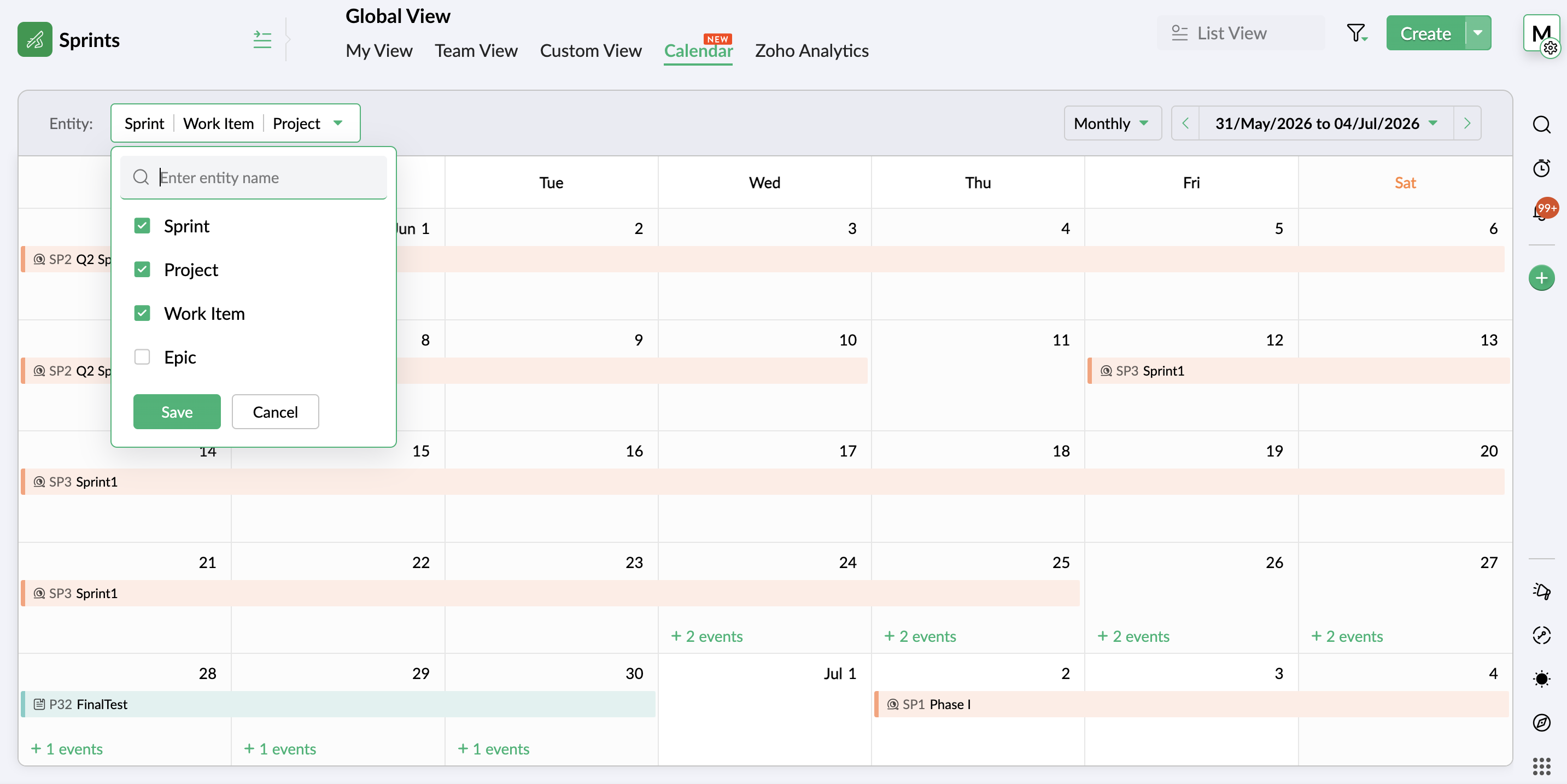
- An additional view in the Global View presents your workspace entities on a calendar for a comprehensive, date-based view. It provides an overview of all the project activities throughout the workspace on a weekly or monthly calendar. Easily scan through the schedule of project, work item, sprint, epic, release, timesheet, or meeting. Learn more
- Adding weekly logs is now possible through global view. The timesheet view allows you to add logs in bulk through a weekly table, enabling multiple time logs being added in a single interface.
Create folders through Google Drive Extension
Google drive extension previously facilitated item level coordination between your Google and Sprints workspace. Now, its scope is widened to include Project, Sprint, Epic, and Release modules as well. Learn more
This enhancement also includes the google drive folder creation and parent folder mapping abilities that customers have requested.
Add custom nested picklist in form layout
Use the nested picklist option to heighten the capabilities of the picklist options in your custom layouts. Define groups of picklists in a single field to add sub-options under one the main options, creating a nested list of options. Learn more
Compare data using duration and work hours in Timesheet report
The duration and work hours details are incorporated into Actual vs Planned Timesheet report for better comparison-based insights. It offers a comparison of the actual hours for sprints and work items against their duration and work hours. This gives an understanding of the gaps in the pace of progress in terms of duration. Learn more
Search using Zia
Leverage a single search interface instead of sifting through individual projects to find and access your Zoho Sprints work items. Zia Search provides a unified search platform to find targeted information across workspace. Learn more

Restrict, pin, and share comments
- Restrict comments view access to your workspace to ensure external users cannot view them.
- Pin important comments at the top of the thread.
- Include comments across work items to reflect in linked or shared items.
Use Google Meet in MeetingBridge
Google Meet is now available alongside other service providers on MeetingBridge. Users with an existing Google account configured in Zoho Sprints can easily add Zoho Sprints OAuth scope to Google workspace to authenticate integration. Learn more
Apply layout rules for releases
The utilities of layout rules feature in now extended to the release module. Expand the scope of your data gathering and processing unit by adding conditional rules and subsequent trigger actions. Adding rules to your release layout provides you with an additional layout of customization that enables you to better refine data using facilities like dynamic show/hide fields or sections, mandate certain fields, set default values, or restrict picklists to adapt the layout to your project preferences. Learn more
Customize OKR layout
Add custom fields to the existing Objectives and Key Results layout to introduce business-specific or organization-specific details that need to be documented. Create a more targeted and self-reliant goal tracking system that work best for your vision. Learn more
View unread notifications
The new Unread view in Notifications section provides a dedicated view for unread notifications. The notifications that are read will be removed from this view.
There're more features and enhancements lined up for the upcoming quarter. So keep an eye on this space. In the meantime, explore these features and let us know which of these live up to your expectations.
Thanks,
Zoho Sprints Team