Step 4: Commission Structure
Commission Structure

This document exists to help you take a commission plan from "we've decided who gets paid and when" to "here's exactly how much they get paid, configured in the system."
- Decide how commission scales — pick between a flat, predictable structure or a tiered one that rewards bigger or harder-won deals more.
- Decide what's being measured — commission on each individual product sold, or on the size of the whole deal.
- Decide what triggers payment — every transaction, or only once a rep hits a target.
Types of commission structure in Zoho Incentives
Incentives for Zoho CRM comes with two commission structures:
Flat for predictive or standardized commissionable
Tiered for competitive commissioning
Let’s understand these structures by definition before getting into how they work!
Flat commission structure
- If you choose flat amount to calculate, then irrespective of the sale amount, the commission would be authorized only for the amount specified.
Say, for a commission plan based on the total amount, you determine the commission to be $ 2,000 per sale. Then, even if the sales amount to a $ 10,000 or $100,000, the commission will be a flat amount of $ 2,000 for each sale.
- If you choose a flat percentage to calculate, then commission percentage remains the same for all the sale, while the commission value may vary based on the sale value.
For the same setup, let’s say, you determine the commission percentage to be 10% per sale. If the sale amount is $ 10,000, then at 10% commission , the commission value will be $ 1,000. However, for a sale value of $1 00,000, then at 10% commission , the commission value becomes $ 10,000.
Tiered commission structure
As you can see, there are four tiers that offer increasing commission values as the transaction value goes up. An employee who knows about this competitive remuneration will be motivated and put forth their best strategies to achieve a win-win.
Calculation methods available for tiered commission structures
Flat, Differential, and Prorated differential
There are three tiers for varying accomplishments, each of them offering commission amounts with aggressive differences between the tiers.
Tiered: Flat
Tiered: Differential

The unit difference in the value range in each of the tiers are determined.
The sale value is split into the first tier until that tier is maxed out.
Based on the first split, the resultant value is carried over to the subsequent tier.
As the sale value keeps consuming these tiers, the commission values of each tiers will be apportioned until the last tier that consumes the value totally.
Evelyn is a field sales rep tasked with selling made-to-order solutions for enterprises. After pursuing for nine months, she finally converged a deal at $ 120,000. Unlike the retail sales, these kinds of implementations involves a lengthier sales cycle with hard negotiations. So, Zylker has allocated differential structures for sales reps creating enterprise sales.

Trivia 1: Because, the deal value ( $ 120,000) consumed all three tiers, the commission values in the three tiers are added up to become $ 17,350. While for the same deal value ($ 120,000), if commissions are computed using flat logic, Evelyn would have gotten only $12,000 as commission, making differential calculation a competitive remuneration.
Trivia 2: If we apply differential logic for Adam’s retail example, the deal value consumed only two tiers, making his commission value to be $5,350 with an increase of $350.
Tiered: Differential Prorated
Calculation:
- The number of units in the each tier is determined.
- The value of each unit is calculated.
(Formula: Value per unit= commission amount for the tier / number of units in that tier) - The sale value is split based on the units of each tier. After a tier is consumed by the value, the remainder of the value is carried over to the subsequent tiers. This distribution continues until the sale value gets exhausted in one of the advancing tiers.
- The Units consumed is determined as percentage to assess the consumption.
(Formula: Units consumed in % = Units consumed by sale value for a tier/ total number of units available in a tier *100). - The per unit value (from step 2) is used to find out employee’s prorated amount for each tier. (Formula: Employees’ commission per tier = Value per unit * number of units consumed)
Now that we understand the types of commission structures and respective calculation methods, let’s get into the app.
Configuring Commission Structure
Until Step 4: Commission Structure
Incentives for Zoho CRM offers quota-based and transaction-based commissioning system. It also lets you choose how you should issue these commissions: Either for each participating line items or for each transaction.
- Transaction type commission plans based on line items
- Transaction type commission plans based on total amount
- Quota attainment commission plans based on line items
- Quota attainment commission plans based on total amount
For Transaction type commission plans based on line items
SET
[Applicable for commission plans built based on line items]
A Set is an aggregation based on product type or vendors, to which common commission structures are applied. These line items when used in a quote, the commission values will be applied to and based on the quantities ordered, the commission will be multiplied.
ℹ: To configure this Set is why you choose the commission for module in Plan Details.
Say you want to offer 6% as commission for each accessories in the quote. A collection of accessories from your offerings can be a grouped as a Set.
Or, you want to accelerate adoption for your homegrown brand and any parts in the quotes can be configured to commission at a higher value.
Once a Set is configured, the next step is furnishing commission structure details for the line item-based commission plan.

In the Commission Structure Details page, do the following:
Choose the Commission Structure Type: You can choose from Flat or Tiered.
If you have chosen a Flat structure,
Provide the Commission Value Type from the options: Percentage of unit price or Flat amount of each unit.
If you have chosen a Tiered structure,
- Further choose the Calculation method from the following options: Flat (Direct), Differential, or Differential Prorate (Prorated differential).
- Define the tier in the field: Tier is Based on. You can structure the tier based on amount or on quantities.
- If you choose based on amount, it will mean for sale for $1 to $100, you would give $50 as commissions.
-If you choose based on quantity, it will mean for sale of 1 to 50 units of a product, you would provision $ 50 as commissions. - In the Commission Value Type, you can set the values as flat amount, in percentage of unit price, or Flat amount on each unit.
ℹ Choosing Flat amount on each unit as a value type will multiply the chosen value based on the quantity of participating item during computation. - In the Tiered Formulas table, provide the tier range and values.
Because they want to apply higher commission values to the Zylker parts, the commission plan needs to based on line items and a Set has to be created.
Now, for each transaction wherever Zylker parts are quoted, the respective agent gets a higher commission value for each line item.
For Transaction type commission plans based on total amount
- Choose the Commission Structure Type from the following options: Flat and Tiered.
If you choose a Flat structure type for a plan based on total amount, then the value can only be in percentage. - Choose the Commission Value Type as Percentage of total amount.
- In the Commission Value field, provide the percentage of commission you’d like to provide.
- If you choose a Tiered structure for a plan based on the total amount, then you should chose the calculation method. Because this plan itself is based on total amount, the tier range will be between two amount values and the commission value for each of them can either be percentage of the total amount or flat amount.
ℹ Contrary to the Flat structure, the value can be in percentage or amount, as tiers start from 0 and the possibility of commissioning for a sale value at 0 is also zero. - Choose the Calculation Method from the following options: Flat, Differential, or Prorated Differential.
- Choose on what bases the tier is based on in the Tier is Based on field. When it comes to plans based on total amount, the tier range is always between two amounts, by default.
- Choose the Commission Value type to be a Flat Amount or Percentage of total amount.
- In the ensuing tier table named Tiered Formulas, provide the tier ranges and the respective commission values for each tier.
- You can configure up to four tiers for a commission plan.
- The lowest limit of the tier is set as 0 by default and require an exhaustive maximum upper limit to define the tiers.
For Quota attainment commission plans based on line items
For the commission plan that is built on quota attainment for line items, the commission is provisioned based on the meeting of the quota limits, irrespective of quota being value-based or volume-based and the commission is applied for each line items upon meeting the quota.
On the Commission Structure Details page, do the following:
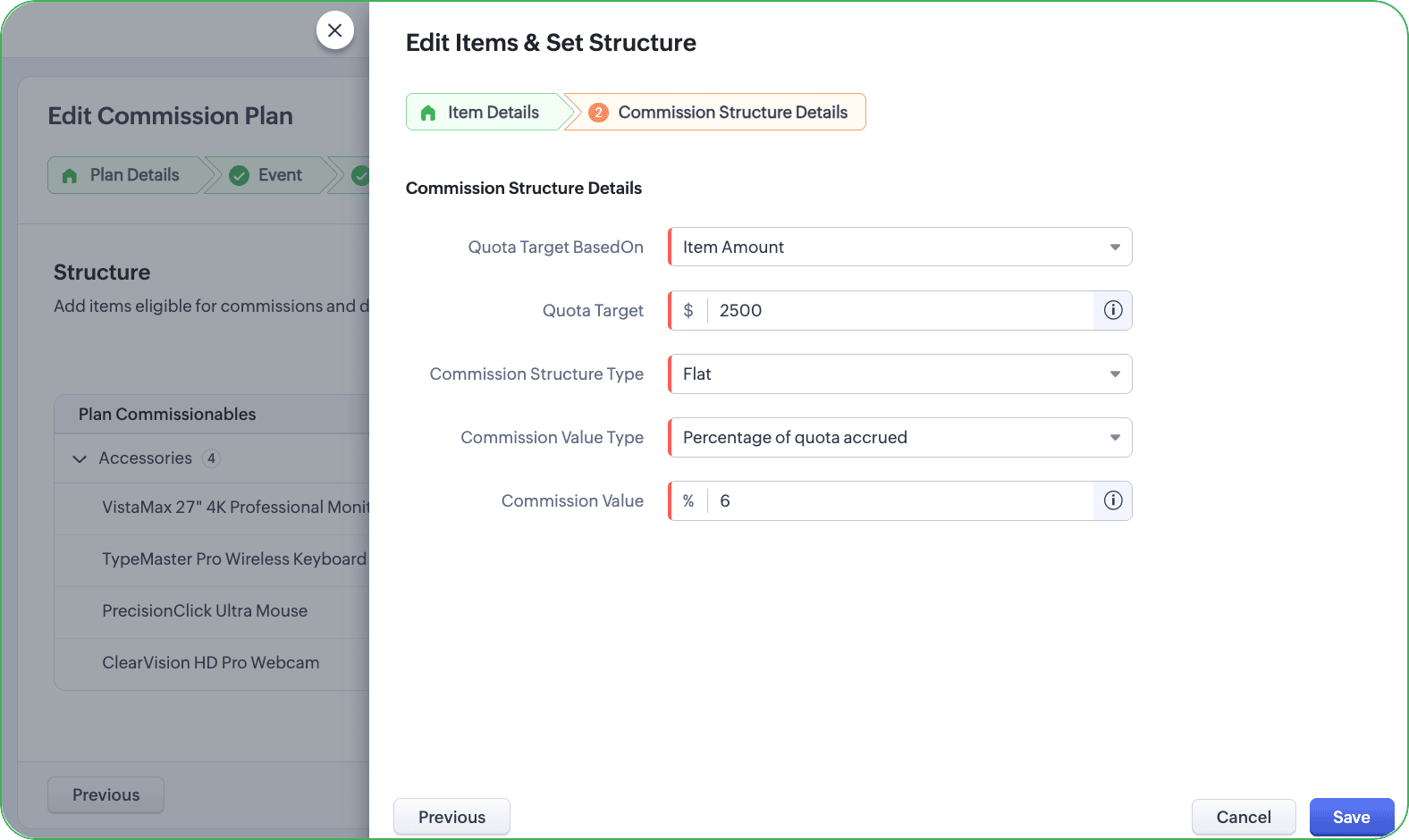
- Choose the desired value for the field Quota target based on: Item amount (value) or Item quantity (volume).
- If the quota target is based on Item amount, then it implies the commission shall be provisioned when the specified amount is attained. Choose the value for the Quota Target.
- Choose the Commission Structure type from the options: Flat and Tiered.
- If you have chosen Flat structure, provide Commission Value Type. For a Quota target based on Item Amount, the value can be computed only as percentage. Choose the Commission value Type to be Percentage of quota accrued.
- Provide the Commission Value in percentage.|
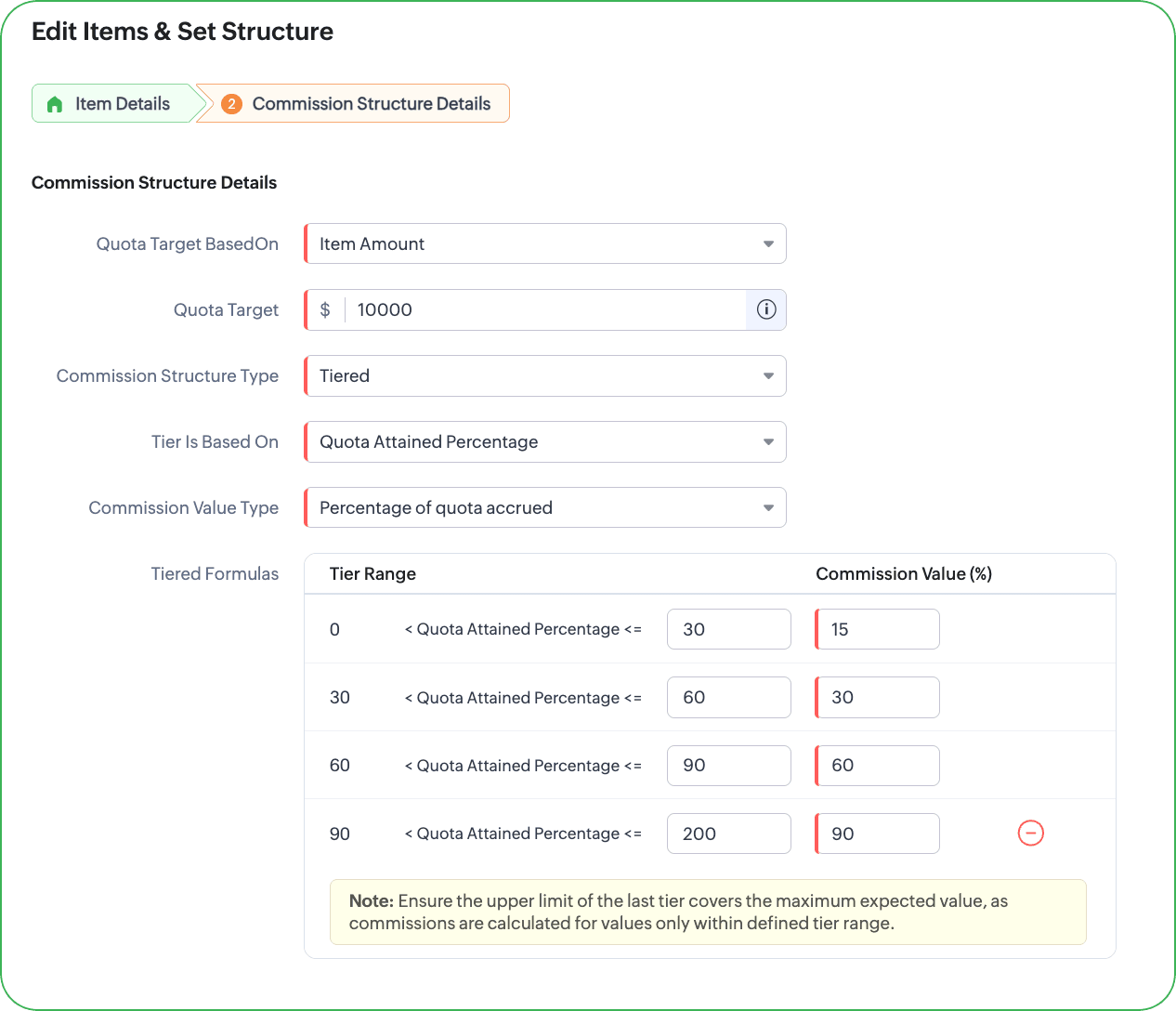
- If you have chosen Tiered structure, then choose how the tier range should be. In context of quota attained target being amount, then the tier will be based on Percentage and the value can either be percentage of quota accrued or a flat amount. In the Commission Value Type, choose the value type from the following options: Percentage of quota accrued or Flat amount.
- In the Tiered Formula, provide the tier range and values.
- If you have chosen Flat structure, provide Commission Value Type. For a Quota target based on Item Amount, the value can be computed only as percentage. Choose the Commission value Type to be Percentage of quota accrued.
- Provide the Commission Value in percentage.|
- If you have chosen Tiered structure, then choose how the tier range should be. In context of quota attained target being amount, then the tier will be based on Percentage and the value can either be percentage of quota accrued or a flat amount. In the Commission Value Type, choose the value type from the following options: Percentage of quota accrued or Flat amount.
- In the Tiered Formula, provide the tier range and values.
If by the plan duration, the agent have attained the target and exceeded, the commissions will be computed including the prorated period and if the agents fail to meet the target within the plan duration, the commission will be issued only for what they met.
For quota attainment plans based on Total amount
On the Commission Structure Details page:
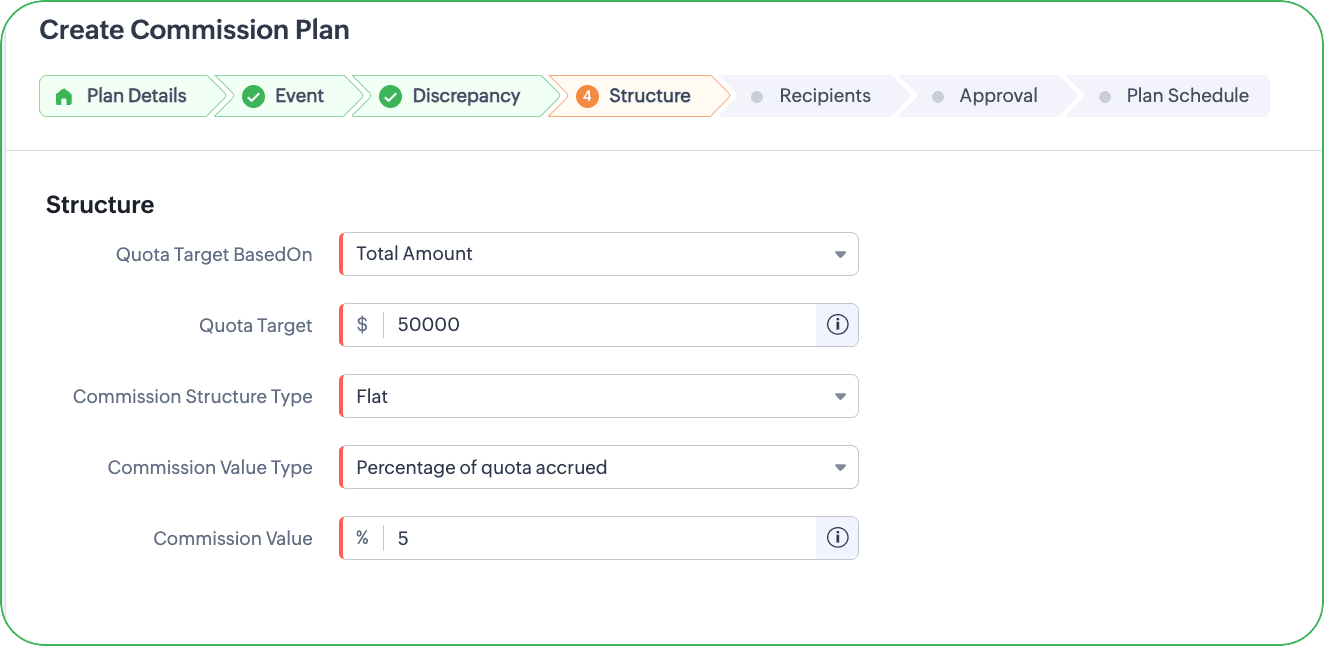
- Choose Total Amount in the Quota Target based on field.
- Specify the Quota Target in numbers. (Example $50,000)
- In the Commission Structure Type, choose from Flat or Tiered.
- If you have chosen Flat, then in the Commission Value Type field, choose Percentage of Quota accrued.
- In the ensuing Commission Value field, enter the desired commission percentage as value.
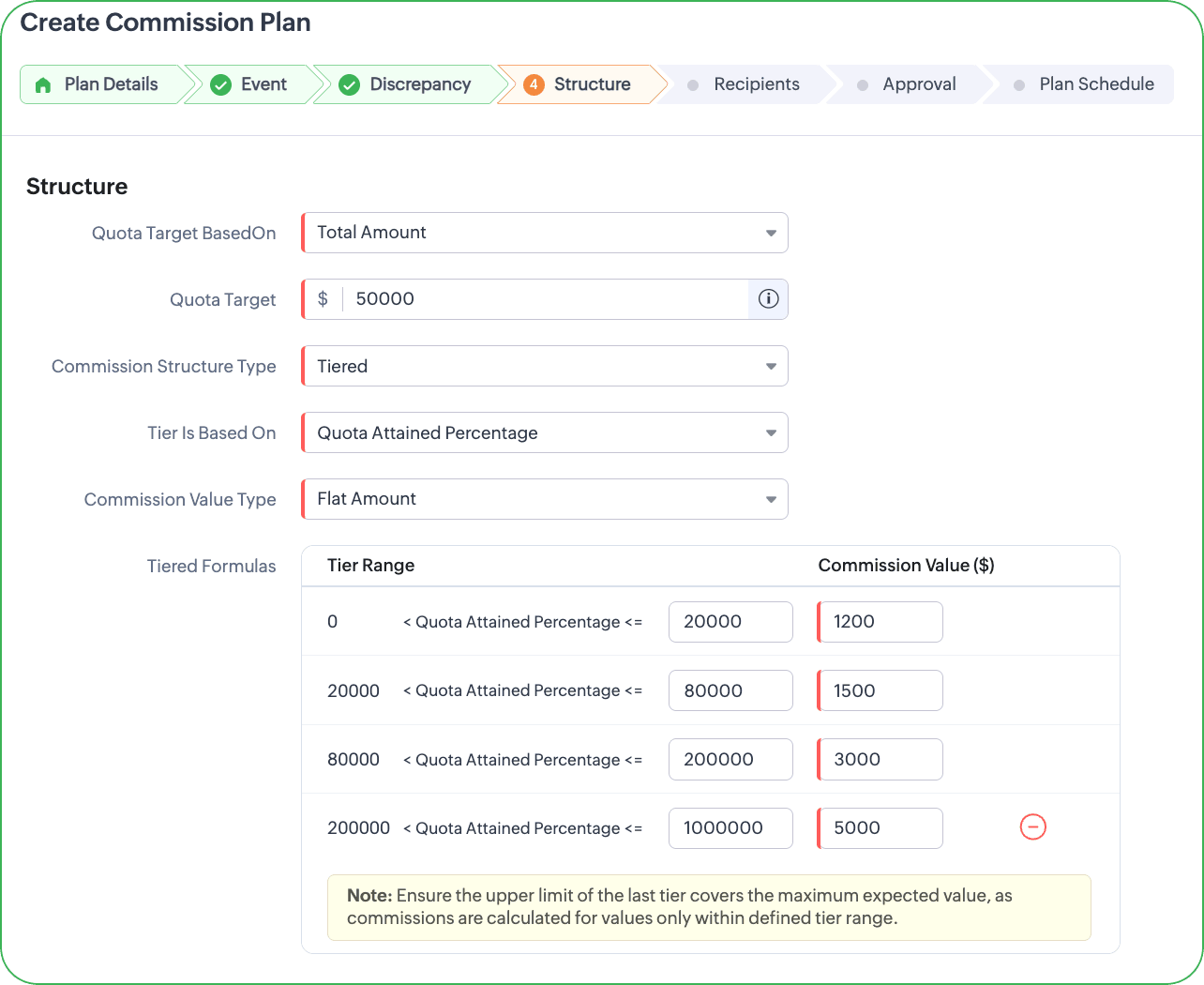
- If you have chosen Tiered, then do the following:
- Choose Quota Attained Percentage in the Tier is Based on field.
- In the ensuing Commission value type, choose between the options: Percentage of quota accrued, Flat Amount.
- In the Tiered Formulas, specify the tier range and the respective Commission Values for each Tiers you would like.
- If you have chosen Flat, then in the Commission Value Type field, choose Percentage of Quota accrued.
- In the ensuing Commission Value field, enter the desired commission percentage as value.
- If you have chosen Tiered, then do the following:
- Choose Quota Attained Percentage in the Tier is Based on field.
- In the ensuing Commission value type, choose between the options: Percentage of quota accrued, Flat Amount.
- In the Tiered Formulas, specify the tier range and the respective Commission Values for each Tiers you would like.