【Zoho CRM】アクセシビリティ向上機能リリースのお知らせ
ユーザーの皆さま、こんにちは。コミュニティチームの中野です。
今回は「Zoho CRM アップデート情報」の中からアクセシビリティ向上機能をリリースしましたのでご紹介します。
アクセシビリティ向上機能とは?
すべての人が快適に利用できるように、フォントサイズの調整、色覚サポート、キーボード操作の最適化など、18のアクセシビリティコントロールを提供し、ユーザーのニーズに応じたカスタマイズを可能にします。
 概要動画はこちら(英語)
以下にて、本機能の一部を紹介します。
アクセシビリティ向上機能の設定方法
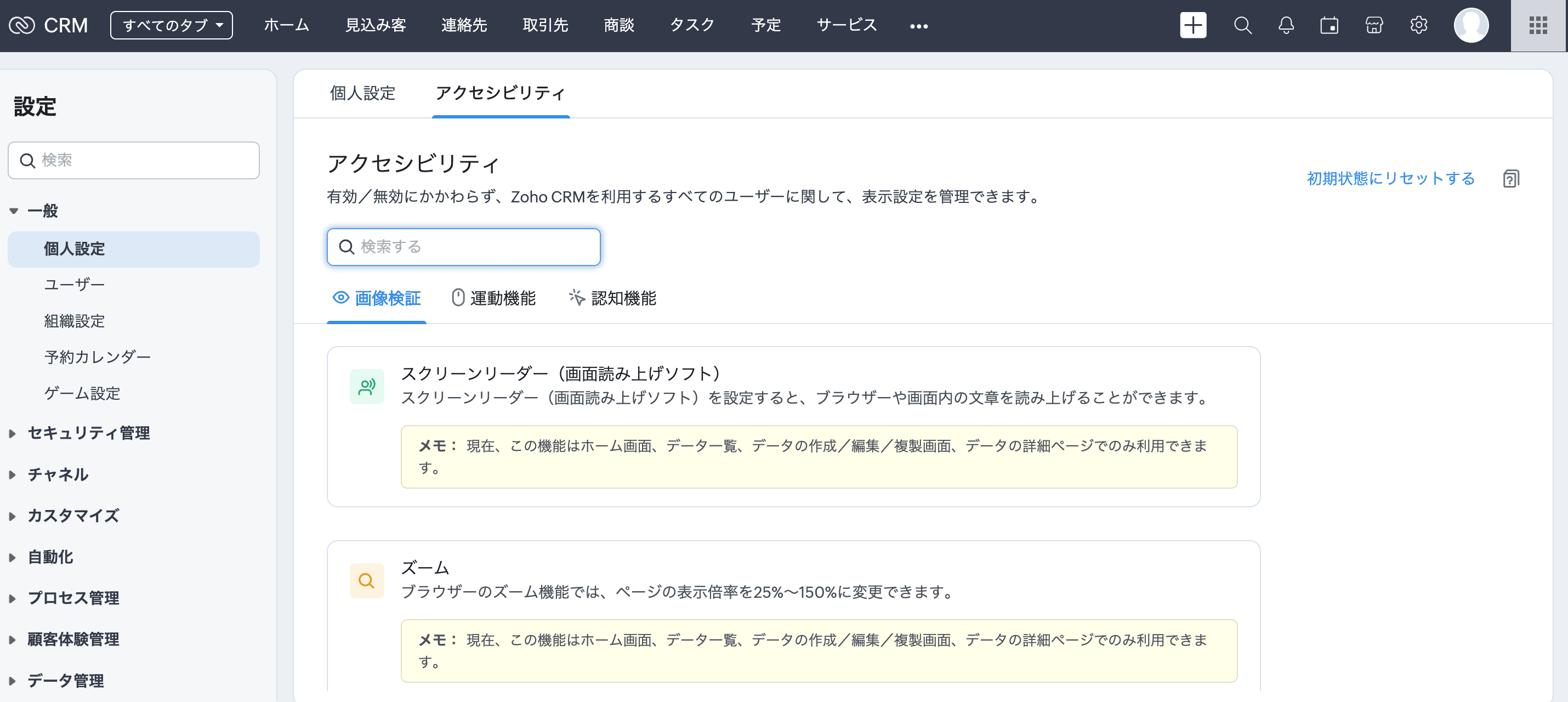
[設定]→[一般]→[個人設定]→[アクセシビリティ]に移動します。
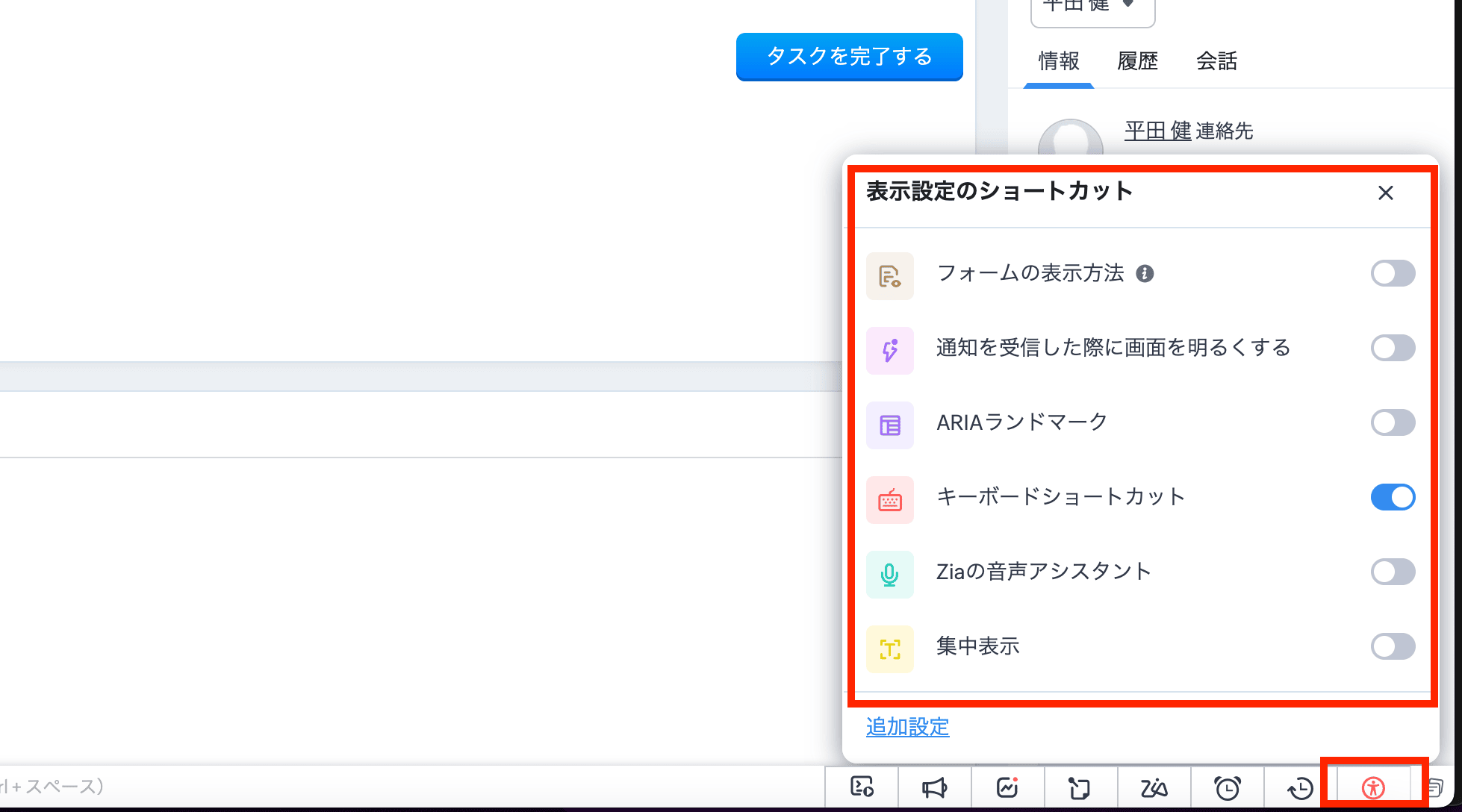
また、画面下部のツールバーにあるアイコンからもアクセスできます。このアイコンをクリックすると、主な機能の有効/無効を切り替えることができます。さらに、[詳細設定]をクリックすると、アクセシビリティ向上機能の設定画面が開きます。
視覚サポートの機能
拡大と縮小
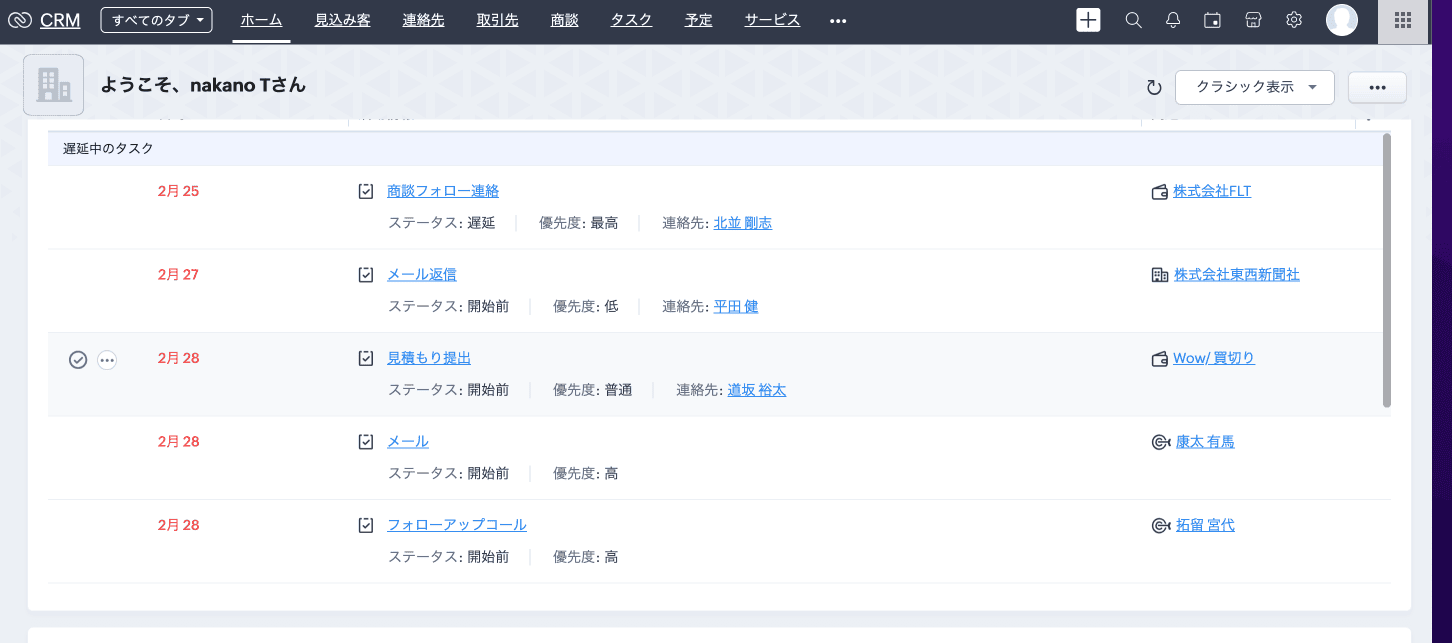
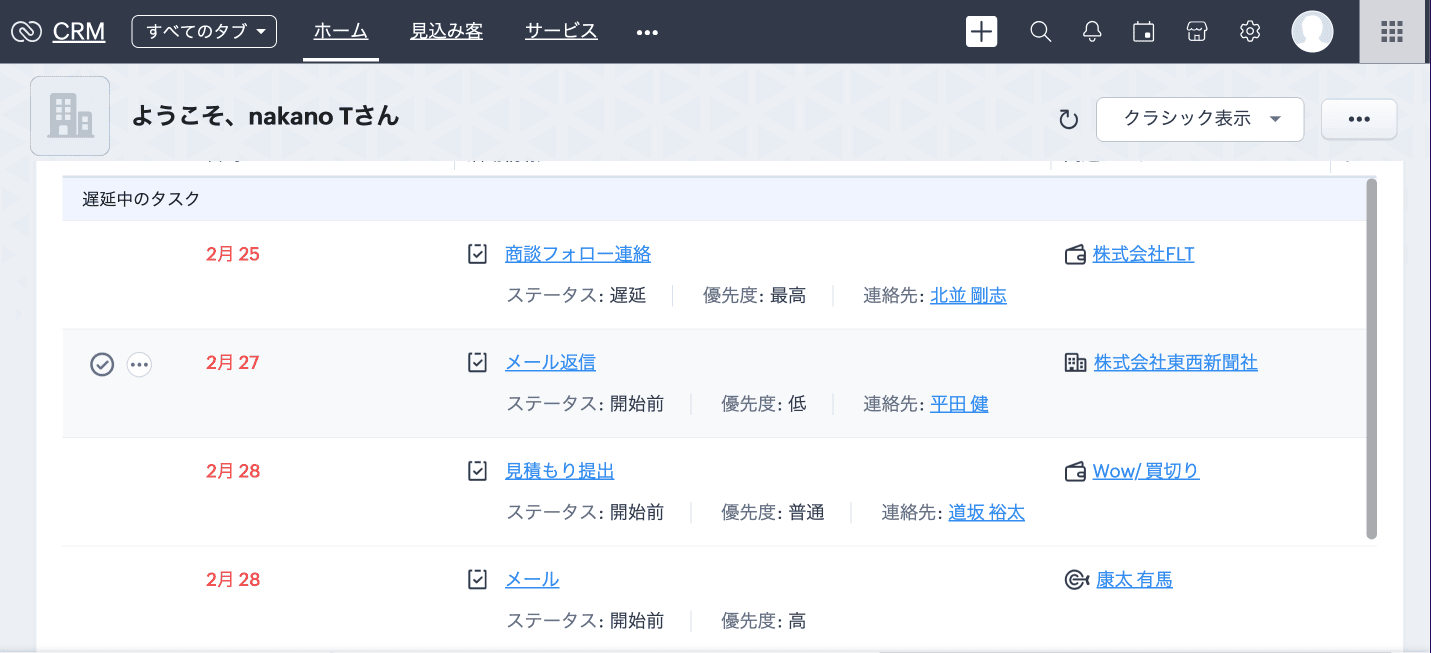
ほとんどのブラウザーは、ページを拡大または縮小して表示する機能を備えています。このため、自分のブラウザーの拡大/縮小率を調整することで、Zoho CRMの画面を見やすくできます。Zoho CRMの画面は、拡大/縮小率が25%~150%の範囲で正常に機能するように作られています。
100%
↓
130%
使用方法
表示を拡大するには、[Ctrl]または[command]キーを押しながら[+](プラス)キーを押します。
表示を縮小するには、[Ctrl]または[command]キーを押しながら[-](マイナス)キーを押します。
拡大/縮小率をリセットするには、[Ctrl]または[command]キーを押しながら[0](ゼロ)を押します。
運動機能をサポートする機能
キーボードショートカット

認知機能をサポートする機能
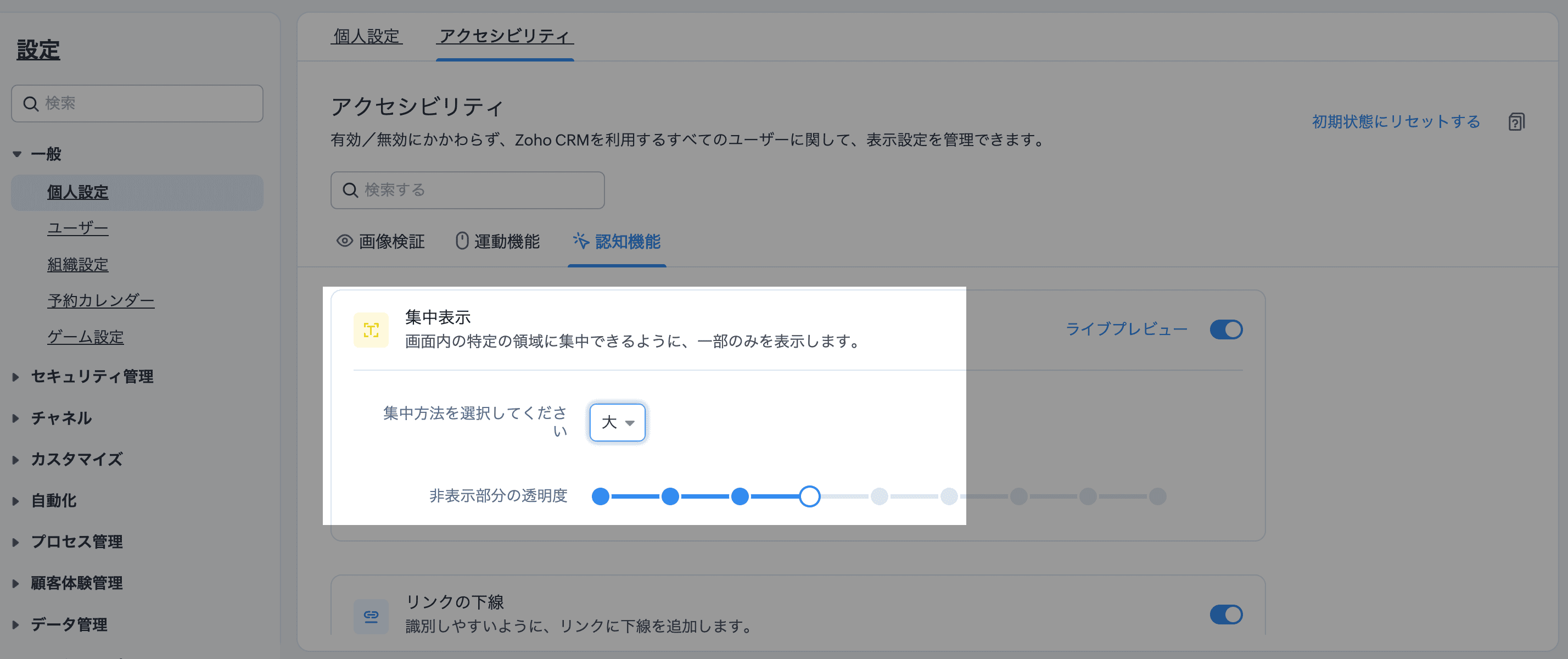
集中表示
CRMのインターフェイスは、オールインワンでビューを表示するように情報が詰め込まれていることが多いですが、気が散りやすいユーザーにとっては圧倒されることがあります。集中表示は、気が散るものを遮断し、カーソル周辺だけに集中することを可能にします。
「非表示部分の透明度」より、暗く表示するエリアをどの程度暗くするか調整することも可能です。


注:以下の機能については、現在、ホーム画面、データ一覧、データの作成/編集/複製画面(標準)、データの詳細ページ(標準)でのみ利用できます。
└スクリーンリーダー / ズーム / 独自のエラーメッセージの表示 / ARIAランドマーク /標準の移動順
また、以下の機能については、現在、データの作成/編集/複製画面(標準)、データの詳細ページ(標準)でのみ利用できます。
└フォームの表示方法 / 必須項目の表示(必須項目のみ/すべての項目)
関連記事:アクセシビリティ向上の設定
アクセシビリティ向上機能について、興味のある方はぜひ試してみてください。
……………………………………………………………………………………………
++Zoho オンラインフォーラムに投稿された情報を、いち早くGETしませんか?++
Zoho Japan Community フォーラムの右側「フォローする」ボタンをクリックいただくと、最新の新着投稿やコメントをメールでお送りします。興味のあるサブフォーラムの投稿のみ通知を受け取ることも可能です。
※フォーラムトップから興味のあるサブフォーラムを選択し、「フォローする」をクリックしてください。
コミュニティのイベント情報も当フォーラムでお知らせ予定ですので、ぜひフォローをお願いします!Topic Participants
Junya Nakano
Recent Topics
On Edit Validation Blueprint
Hello, I have a notes field and a signature field. When the Approve button is clicked, the Signature field will appear and must be filled in. When the Reject button is clicked, the Notes field will appear and must be filled in. Question: Blueprint will¿Puedo migrar mi sitio desde WordPress a Zoho? ¿Zoho admite herramientas con código personalizado?
¡Hola comunidad! Estoy evaluando la posibilidad de migrar mi sitio web https://calculadoradenotas.cl/ desde WordPress a una solución Zoho, y tengo algunas dudas técnicas que espero puedan aclararme. Mi sitio no es solo informativo: es una herramientaHow do I link my invoice to an estimate?
There has been instances where I have created estimates, however, invoices for the same estimate were created independently. The status of these estimates hasn't converted to 'invoiced'.Zoho Books (and other finance suite apps) - Retrospective Linking of Invoice and Sales Orders to Quotes.
In some cases, Quotes and Invoies may be created sperately instead of using the convert feature. In this feature request I am asking for the Finance Suite team to consider adding a lookup field to reference the quote on Invoices and Sales Orders, or someImpossible to import Journal from Freshbooks
I have been trying to import journals from Freshbooks since August 30th. Every time I try to import, I get an error message. I have already made sure every row has a date. First it was saying the account and notes had unexpected input and that every debit/creditZoho Payroll's USA and KSA editions are available in Zoho One!
Greetings! We’re excited to share that Zoho Payroll, currently available only in India and the UAE, is now introducing the KSA (Kingdom of Saudi Arabia) edition and the USA (United States of America) edition, and these editions are now available in ZohoPeppol: Accept Bill (Belgium)
Hi, This topic might help you if you're facing the same in Belgium. We are facing an issue while accepting a supplier bill received by Peppol in Zoho Books. There is a popup with an error message: This bill acceptance could not be completed, so it wasCRM x WorkDrive: We're rolling out the WorkDrive-powered file storage experience for existing users
Release plan: Gradual rollout to customers without file storage add-ons, in this order: 1. Standalone CRM 2. CRM Plus and Zoho One DCs: All | Editions: All Available now for: - Standalone CRM accounts in Free and Standard editions without file storageSubheaders for Sections in forms
Currently, every form section has a field name, which one can choose to show/hide to the end user. It would be great if there was an option to show a SUB-HEADER in addition to a header. It would be useful for explaining to the end user what the sectionConvert invoice from zoho to xml with all details
How to convert an Invoice to XML format with all detailsPrevent subform editing on a module's detail's page
Hi everyone, We would like to prevent any editing of the subform data in the : Create page Edit page Details page (as subform editing is now allowed by the recent UX update) We are able to prevent editing by making the subform fields read only in theExport Invoices to XML file
Namaste! ZOHO suite of Apps is awesome and we as Partner, would like to use and implement the app´s from the Financial suite like ZOHO Invoice, but, in Portugal, we can only use certified Invoice Software and for this reason, we need to develop/customize on top of ZOHO Invoice to create an XML file with specific information and after this, go to the government and certified the software. As soon as we have for example, ZOHO CRM integrated with ZOHO Invoice up and running, our business opportunitiesRefresh frequency
Dear Zoho Team, I really, truly appreciate that Zoho Books gets frequent updates. As a matter of fact this is how a good SaaS company should stay on top. However, I feel that I have to hit refresh almost every day. This was exciting at the beginning butZoho Books | Product updates | January 2026
Hello users, We’ve rolled out new features and enhancements in Zoho Books. From e-filing Form 1099 directly with the IRS to corporation tax support, explore the updates designed to enhance your bookkeeping experience. E-File Form 1099 Directly With theWeekly Tips : Save Time with Saved Search
Let's assume your work requires you to regularly check emails from important clients that have attachments and were sent within a specific time period. Instead of entering the same conditions every time—like sender, date range, and attachments included—youBring real app analytics into Zoho Creator apps with Zoho Apptics
We’re kicking off the year with a release we’ve been looking forward to for a long time. After being in the works for a while, Zoho Creator and Zoho Apptics are now officially integrated, bringing in-depth product analytics directly into the Zoho CreatorDiscontinuing Zoho ShowTime service on May 30, 2026
Hello everyone, As a follow-up to our earlier announcement, we’d like to share an important update regarding Zoho ShowTime’s discontinuation timeline. Zoho ShowTime, our online training platform, reached its end of life on December 31, 2025, and its servicesemailing estimates
Shows up in the customer mail logs as sent but nobody is receiving them, even when I send them to myself I don't get them ??? Something wrong with the mail server or my end ?Ability to CC on a mass email
Ability to CC someone on a mass email.Franchise
Is there a solution of how to organize global franchise organisations?No background for video recordings, no playback speed, can't even playback longer recordings - have to download…
Hi. We utilize heavily video messages on Slack, but wanted to migrate to Cliq with Zoho One, however very basic yet very frequently used feature is missing: backgrounds for video recordings and playback speed. We were not happy with Slack's 5 minute limitsBookings duration - days
Hi team, Is there any way to setup services/bookings that span multiple days? I am using Zoho Bookings for meeting room bookings. Clients may wish to book a room for more than one day, for up to a month. If not, is there a plan to allow services to be setup with durations of Days as well as hours and minutes? Many thanks, Anna.Customer address in Zoho Bookings
Hello, Is it possible to add customer address information to the Zoho bookings appointment screen? Or have it pull that information automatically from the CRM? We are wanting to use this as a field management software but it is difficult to pull the address from multiple sources when it would be ideal to have a clickable address on the appointment screen that opens up the user's maps. It would also be advantageous for the "list view" to show appointment times instead of just duration and bookingOrganize and manage PDFs with Zoho PDF Editor's dashboard
Hello users, Zoho PDF Editor's dashboard is a one-stop place to upload, sort, share PDF files, and more. This article will explore the various capabilities that Zoho PDF Editor's dashboard offers. A few highlights of Zoho PDF Editor's dashboard: UploadFeature Request - Allow Customers To Pick Meeting Duration
Hi Bookings Team, It would be great if there was an option to allow customers to pick a duration based on a max and minimum amount of time defined by me and in increments defined by me. For example, I have some slots which are available for customersNew feature: Invite additional guests for your bookings
Hello everyone, Greetings from Zoho Bookings! We are happy to announce the much-awaited feature Guest Invite, which enhances your booking experience like never before. This feature allows additional participants to be invited for the bookings to makeChanging the owner of a call
Am I correct in my conclusion that I cannot change the owner of a call in Zoho? The field does not show up in the screen, nor can I make it show up as the systems does not give me that option. I cannot "mass update" it either. I tried it, but Zoho refuses to change the name of the owner. Please help out: how do I change the owner of a call.Unified Notes View For Seamless Collaboration
To facilitate better coordination among different departments and team members, the notes added to a record can now be accessed in all its associated records. With this, team members, from customer service representatives to field technicians, can easilyRemove Profiles from "Forecast" Module
How can I remove Profiles from My forecast Module? Image Below The only revenue generators are the VP's, and the Estimation Managers, and the Estimators subordinate to the Est. Managers. How can I remove the unused Profiles? Its frustrating to see themUplifted homepage experience
Editions: All editions. Availability update: 17th February 2026: All editions in the CA and SA DC | JP DC (Free, Standard and Professional editions) 23 February 2026: JP (All Editions) | AU, CN (Free, Standard, Professional editions) 27 February 2026:Logging Out of FSM
I have tried to log out of FSM app of the last person and it will not let me do so. I need to log in to my account.Restoring records from the recycle bin programatically
Background I'm working on a piece of software to automate conversion of Leads into Deals based on order status from my company's website. The process is mostly complete, right now I'm just working on handling a few edge cases to ensure data integrity.Does Zoho Learn integrate with Zoho Connect,People,Workdrive,Project,Desk?
Can we propose Zoho LEarn as a centralised Knowledge Portal tool that can get synched with the other Zoho products and serve as a central Knowledge repository?All new Address Field in Zoho CRM: maintain structured and accurate address inputs
Availability Update: 29 September 2025: It's currently available for all new sign-ups and for existing Zoho CRM orgs which are in the Professional edition exclusively for IN DC users. 2 March 2026: Available to users in all DCs except US and EU DC. LatestCreate static subforms in Zoho CRM: streamline data entry with pre-defined values
Last modified on (9 July, 2025): This feature was available in early access and is currently being rolled out to customers in phases. Currently available for users in the the AU, CA, and SA DCs. It will be enabled for the remaining DCs in the next coupleSalesIQ Identity Update for Logged In Wordpress User
Hey folks, SalesIQ does not automatically detect when a visitor logs in to WordPress and update their identity to match. For example, if a client of ours visits the site and logs in, SalesIQ will not track them correctly by default. The Solution The solutionFeature Request – Conditional Visitor Information Request in Zoho SalesIQ
We would like to request the ability to conditionally ask for visitor details based on the communication channel used in Zoho SalesIQ. Specifically: When a visitor initiates a conversation through the live chat widget on the website, we want to continueZoho Sign Not Delivering
I have sent several contracts out via Zoho Sign. They do not seem to be getting delivered. I had one person receive it, but the others have not. I had one person tell me they sent it back to me and never got it and doesn't show as signed. I've sentAdd zoho calendar to google calendar
Hi I keep seeing instructions on how to sync Zoho CRM calendar with google calendar but no instructions on how to view Zoho calendar in my google calendar.Paragraph spacings in Zoho Notebook are double-spaced only. Is there a way to keep the original spacing format?
Sorry I don't know the proper terminologies but the best way I can put it is all single-spaced paragraphs that I copy to Zoho Notebook become double-spaced paragraphs. It's very inconvenient and counterproductive when copying and pasting things from andNext Page