Announcing DataPrep 2.0 Beta!

Being data-driven is an important end goal for all organizations, because when businesses can manage, analyze, and make actionable decisions based on data, they have a competitive advantage.
With that said, how confident are you in making business decisions based on your business data? How clean is your CRM data? Or how much time is spent on manual data cleansing and preparation?
To help you solve these problems, we're pleased to announce the release of the DataPrep 2.0 public beta! With this new version, it's now even easier to build an end-to-end pipeline and have complete control over the quality and movement of your data.
What's new in 2.0?

Visual pipeline builder
The all-new pipeline canvas lets you design a seamless end-to-end data flow. Earlier, you were limited to working with a single dataset at a time—but now data can be fetched from multiple sources, more than one dataset can be prepared and used simultaneously, and the data can be exported to multiple destinations. This helps businesses visualize data flows better, simplify complex workflows, and work with data with more confidence.
Unified scheduling of end-to-end pipelines
A massive upgrade has been made to our scheduling feature. In DataPrep 1.0, the sources and destinations had separate schedules which had to be manually managed by staggering the schedule timing, which was hard. But with 2.0, the scheduling can now be set up at the pipeline level. A single unified schedule can be used to manage imports, processing, and exports for all sources and destinations within the pipeline.
Monitor jobs with ease
With automated pipelines, data transfer happens around the clock. Sometimes, there can be issues with fetching data, and the data transfer can fail. But with jobs, you can easily monitor failed jobs with granular details and identify the points of failure. This ensures your organization doesn't miss out on any valuable data.
Comprehensive version history
Maintain a complete audit trail with version history. Working with data can be challenging; but with the help of this feature, you can easily track changes and run experiments to get more out of your data. Not happy with your experimental changes to data? Easily switch back to the previously published version with the click of a button.
Backfill your data effortlessly
There can be outages in the data pipeline, this can be due to source or destination failure, changes in the data or model requiring changes in the preparation steps, and can take a while to be restored. However there is no easy way to catch up on processing the data during the outage, to solve this we are now introducing the Backfill feature. The backfill feature can be used to fetch data and simulate a scheduled process for a selected period of time. For example, if there was an outage of 2 days on a pipeline that was setup to run every hour. With backfill, you can now create a configuration to process all that data by simulating the schedule process for the missed two days, this will create 48 new jobs that will run in sequence and process the missed data for two days.
Efficient row processing with incremental fetch
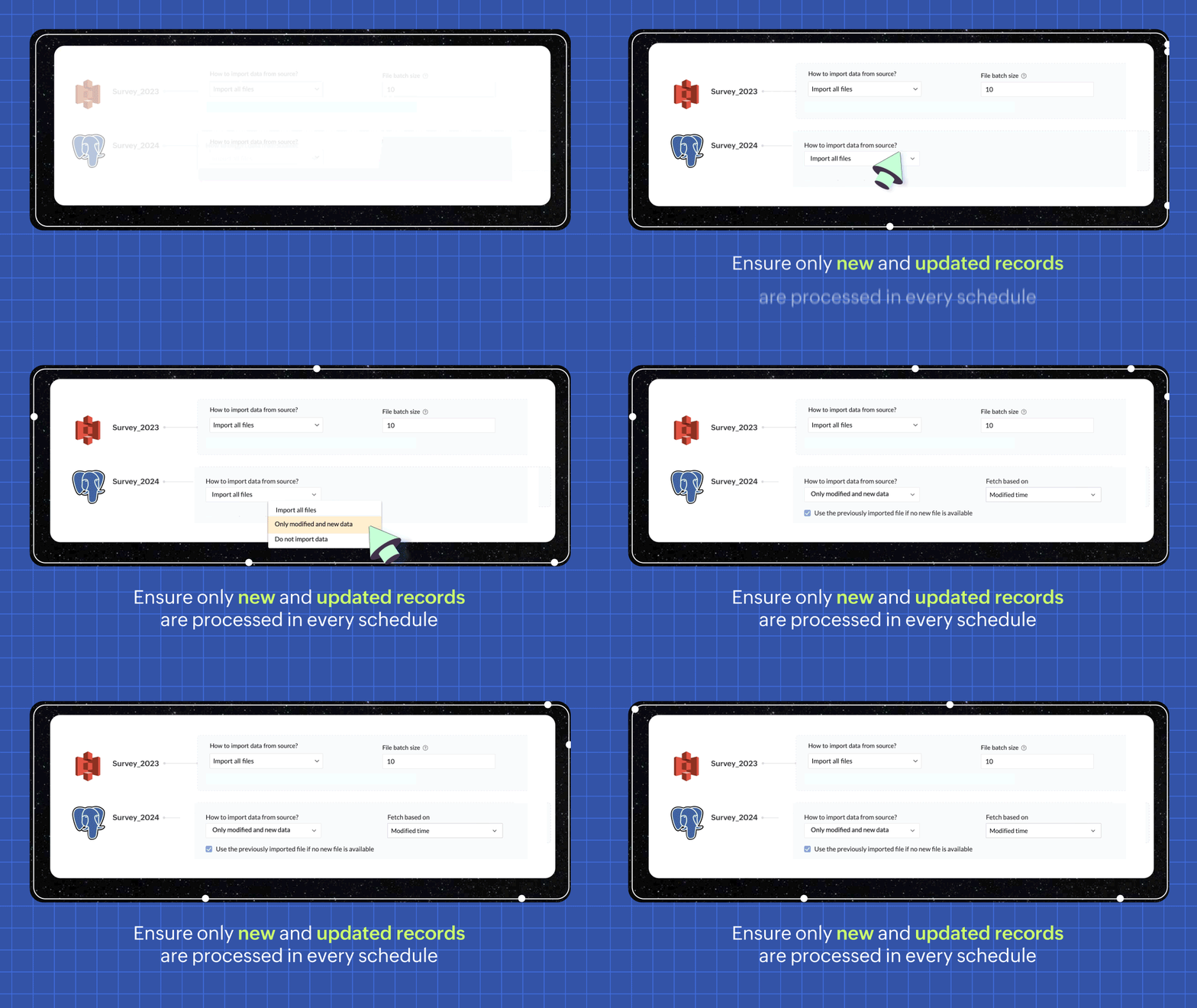
In every scheduled run, choosing the incremental fetch option fetches only the new and updated data from the source for processing. This was available for few sources in 1.0, but we're expanding the support to all data sources in 2.0. Incremental fetch job runs faster, compared to full fetch as only the newly added rows are processed, also making it more cost effective.
Transforms made simple with OpenAI
Our new transforms, powered by OpenAI, help generate complex formulas based on logic written in simple English or transform data based on the sample output given. This simplifies the data preparation process and makes Zoho DataPrep more accessible, even for organizations that don't have a dedicated data analyst team.

Create instant pipelines with templates
We built DataPrep with a vision of helping businesses, big or small, have better access to all their business data—but we understand that the data game can be tricky when you're starting out.
To keep our vision alive and to help everyone start using their business data better, we've built a template gallery based on various business use cases that can easily be used to create a pipeline architecture. Just click on the template to add the formula instantly and transforms needed for the data workflow.
You can also save your own data pipelines as templates to make recreating pipelines easier or to apply the data pipeline over a different set of data. You can also share the data pipelines with your organisation or export them as files to share across different organisations.

New dashboard showcasing your pipeline status
Our new and improved dashboard shows the status of all your pipelines instantly. Easily monitor your scheduled runs, identify failed jobs, and ensure your data is up-to-date in your system.

Make data movement easier with other business applications
We are expanding the list of data connectors supported in Zoho DataPrep and as a start we have released the Zoho Creator integration.

Migrating data into Zoho Creator, as well as seamlessly moving data between various modules within your custom Creator app, has been made easy with DataPrep.
As more organizations are adopting SaaS products in their tech stack, in order to make data more available, we're opening up integrations with HubSpot, Salesforce, and SurveyMonkey, as well as many more Zoho products, in the next couple of months. Stay tuned for more data connectors in Zoho DataPrep!
Can't wait to try DataPrep 2.0?
All our existing customers can access the Beta version right from within their DataPrep home page. The Beta is not available for Zoho One users yet, but if you want to try out the Beta on a standalone account, contact us at customersuccess@zohodataprep.com
Zoho DataPrep is designed to make data preparation and movement easy. With DataPrep 2.0, we have completely revamped our product with the new pipeline builder, unified schedules, pipeline templates and universal incremental fetch that lets you easily manage complex data preparation jobs and data movement. We've also included 50+ other updates to help you clean, prepare, and monitor your business data effortlessly.
Check out all updates in 2.0
Check out all updates in 2.0
Topic Participants
Viswanath Subramani SS
Ben Norman
SaaSguru
Sticky Posts
Announcement: Zoho DataPrep to Deprecate Password-Only Authentication for Snowflake Connections on July 31, 2025
As part of our ongoing commitment to security and in alignment with Snowflake's pledge to the Cybersecurity and Infrastructure Security Agency (CISA) Secure by Design initiative, Zoho DataPrep will no longer support single-factor password authentication.Announcement: Zoho DataPrep 1.0 will be deprecated on April 15, 2026
We'd like to inform you that the Zoho DataPrep 1.0 version will be officially deprecated as of April 15, 2026. This aligns with our efforts to streamline and improve your overall experience with Zoho DataPrep 2.0 which was released in Sep 2024 . To ensureAnnouncement: Migrate your workspaces to Zoho DataPrep 2.0
Zoho DataPrep 2.0 was recently launched with exciting new updates to the platform. You can read more about the new updates in the previous announcement. To take full advantage of the new data pipeline features, migrate your existing workspaces from theAnnouncing Zoho DataPrep 2.0: An AI-Powered Data Management Platform
Originally launched in 2021, Zoho DataPrep started as an efficient self-service data preparation solution. We are excited to launch our new version 2.0, with significant enhancements to our platform to help you manage your end-to-end data needs with theAnnouncing DataPrep 2.0 Beta!
Being data-driven is an important end goal for all organizations, because when businesses can manage, analyze, and make actionable decisions based on data, they have a competitive advantage. With that said, how confident are you in making business decisions
Recent Topics
Consumption based inventory
I am currently using Zoho Books for my hospitality business, which includes lodging and restaurant services. We purchase many items in bulk for storage and consumption as needed. I'd like these items to be recorded as inventory when purchased and categorizedSmarter Access Control: Role-Based Access vs. Responsibility-Based Profiles
Every business has roles, responsibilities, and workflows. While roles help define structure, responsibilities within those roles are rarely the same. As your team grows, some members need access to only a specific set of features. Others require visibilityPartner with HDFC And Sbi Bank.
Hdfc and sbi both are very popular bank if zoho books become partner with this banks then many of the zoho books users will benefit premium features of partnered banks.API in E-Invoice/GST portal
Hi, Do I have to change the api in gst/e-invoice portal as I use zoho e books for my e-invoicing. If yes, please confirm the process.Member role in zoho meeting
does a user with member role can see other users in the organizationHow to post more than 4 Images on Instagram?
Hi I read several articles to the topic od how to post more than 4 images on instagram, but i can't figure out how it works. I can't find the content editor and i installesd the z share extension for google chrome. Could someone please help me? ThanClone Recurring Expenses
Our bookkeeping practices make extensive use of the "clone" feature for bills, expenses, invoices, etc. This cuts down significantly on both the amount of typing that needs to be done manually and, more importantly, the mental overhead of choosing theZoho Books - How to Invoke a Custom Function in Schedulers
We have multiple schedulers that send emails to customers in batches. Currently, we are maintaining the same code across several schedulers. Is it possible to use a custom function inside a scheduler script? If yes, how can we invoke the custom functionSpecial characters (like â, â, æ) breaking when input in a field (encoding issue)
Hey everyone, We are currently dealing with a probably encoding issue when we populate a field (mostly but not exclusively, 'Last Name' for Leads and Contracts). If the user manually inputs special characters (like ä, â, á etc.) from Scandinavian languages,Set Custom Icon for Custom Modules in new Zoho CRM UI
Notes badge as a quick action in the list view
Hello all, We are introducing the Notes badge in the list view of all modules as a quick action you can perform for each record, in addition to the existing Activity badge. With this enhancement, users will have quick visibility into the notes associatedIs Zoho Live Chat compatible with WordPress CMS?
Hello, I have a website called www.jjrlab.com and I'm interested in using Zoho Chat on it. Does it support WordPress CMS? Thanks.Introducing spam detection for webforms: An additional layer of protection to keep your Zoho CRM clean and secure
Greetings all, One of the most highly anticipated feature launches—Spam Detection in webforms—has finally arrived! Webforms are a vital tool for record generation, but they're also vulnerable to submissions from unauthenticated or malicious sources, whichBring your CRM and Desk app inside SalesIQ with widgets
Have you ever been confused and frustrated with multiple open tabs and switching back and forth from SalesIQ to other apps to perform your business-specific operations? How effective would it be to have all the required tools and data of the apps youSpeak Your Customers' Language: SalesIQ's chatbots now support 30 languages 🤖
We're unveiling some major upgrades to our chatbot that are set to revolutionize your experience! Now SalesIQ support 30 languages for both Zobot and Answer bot. By speaking your customers' language, you can enhance engagement, improve customer satisfaction,Repeat Column merge in ZOHO writer columns doesn't allow to set max columns per row
I'm using ZOHO writer to merge data from a ZOHO CRM subform and I want it to make a table. We're using Insert Table for Column Repeat, because this is what we need. (Name of column (Teamname) and underneath that a list of names of teammembers). It worksPersisting email signals to contact timeline?
Hello there. Regarding the email signals that are logged when a contact opens an email, am I correct that these signals are not logged to a contact's timeline? Ideally, I would like to have this context available for future follow-ups, if the contactTrouble with using Apostrophe in Name of Customers and Vendors
We have had an ongoing issue with how the system recognizes an apostrophe in the name of customers and vendors. The search will not return any results for a name that includes the mark; ie one of our vendors names is "L'Heritage" and when entering theReally want the field "Company" in the activities module!
Hi team! Something we are really missing is able to see the field Company when working in the activities module. We have a lot of tasks and need to see what company it's related to. It's really annoying to not be able to see it.🙈 Thx!Upcoming update to Google Drive integration in Zoho Creator
Hello everyone, We're writing to inform you about an upcoming update to how Zoho Creator integrates with Google Drive. In Zoho Creator, during actions like importing files to create an app or attaching files to fields, you can choose files directly fromChanging Account Type in Chart of Accounts
Does anyone know how to change/edit the account type for an Account name in Chart of Accounts. Zoho will not let me do this for some reasonManaging Scheduled Replies
Communication is most effective when the intended message reaches the right person at the right time. However, this can be challenging when communication occurs across different time zones. By scheduling replies, businesses can ensure that responses reachShow price book list price
When using price books, once you add products to the price book in the Products related list you can display the Unit price which is the default list price; however, there is no option to show the price book list price. To see the price book list priceAllow Attaching Quartz Recordings to Existing Zoho Support Tickets
Hi Zoho Team, We would like to request an enhancement to how Zoho Quartz recordings integrate with Zoho Support tickets. Current Behavior: At the moment, each Quartz recording automatically creates a new support ticket. However, in many real-world scenarios:Can I hide empty Contact fields from view?
Some contacts have a lot of empty fields, others are mostly filled. Is there a way I can hide/show empty fields without changing the actual Layout? I would like to de-clutter my view, and also be able to add information later as I am able. I would beManage user roles and profiles from the Bigin app (iOS and macOS)
Hello everyone! We're happy to announce that you can manage user roles and profiles from the Bigin mobile app. The Users & Controls section has three subsections: Users, Profiles, and Roles. Users Employees who belong to your Bigin organization are calledSupport Bots and Automations in External Channels
Hello Zoho Cliq Team, How are you? We actively use Zoho Cliq for collaboration, including with our external developers. For this purpose, external channels are a key tool since they work seamlessly within the same interface as all of our other channelsForm to PDF template
I am looking to create a Form and when information is inputted, it will merge it into a PDF template we already have. There could be multiple lines in the form and each line inputs information into a new page of a PDF template.Please verify my account
Hi, We have just launched our website and received media coverage in our country. Hundreds of users are signing up for our platform every day. We would like to send them a welcome email, but we are unable to do so because our ZeptoMail account has notSubject character limit increase
We have an occasional user case where subject lines exceed 500 characters which is the ZeptoMail imposed limit. While I understand long subject lines are not "best practice", these are particular notification emails with specific information for clientAccount blocked
Yesterday I got my Zeptomail account blocked due to too many hard bounces. My account is used exclusively for sending transactional emails (eg. your order has been shipped, a form has been filled, etc) and the sudden blocking impacted hundreds of websitesNested notebooks
Dear Sir/Madam, I would like to know if it is possible to nest notebooks. It would be very helpful when there are too many, as it would improve organization. Thank you for your response. Best regards.Cannot see correct DNS config for mail after moving domain to another provider
I have moved my domain from one provider to another and after that zoho mail stopped working (expected). Problem is, zoho mail admin panel still shows (10 hours after move) that all records are correct while I haven't changed anything in my domain DNSProactive Alert for Existing Open Tickets per Contact / Account
Hello Zoho Desk Team, Greetings, and hope you’re doing well. We would like to submit a feature request aimed at improving agent awareness and efficiency when handling tickets in Zoho Desk. Use case When an agent opens a ticket (new or existing), it isTicket resolution field - can you add links, video, and images?
Seems like the ticket resolution fields is just a text field. Any plans to add the ability to add links, images...the same functionality in the problem description box? I would like to send the customer a link to a KB article, a link to our Wiki, embedTicket Resolution - Add rich formatting, screenshots and attachments
The resolution field only allows plain text at the moment. Many of our resolutions involve posting screenshots as evidence, it would be great for us to be able to have rich text formatting, be able to paste screenshots and add attachments in the solutionCRUD actions for Resources via API
Hello, is it possible to perform CRUD actions through the API for Resources? We want to create a sync from Zoho CRM Car record to Bookings resources to create availabilities for Car bookings. For Test drives, not only the sales person needs to be available,Kaizen #140 - Integrating Blog feed scraping service into Zoho CRM Dashboard
Howdy Tech Wizards! Welcome to a fresh week of kaizen. This week, we will look at how to create a dashboard widget that displays the most recent blog post of your preferred products/services, updated daily at a specific time. We will leverage the potentialConvert Lead Automation Trigger
Currently, there is only a convert lead action available in workflow rules and blueprints. Also, there is a Convert Lead button available but it doesn't trigger any automations. Once the lead is converted to a Contact/Account the dataset that can be fetchedI'm getting this error when I try to link an email to a deal inside the Zohomail Zoho CRM extension.
When I click "Yes, associate," the system displays an "Oops!! Something went wrong" error message. I have attached a screenshot of the issue for reference.Next Page