Automating appointment status and customer feedback collection

Automating appointment status and customer feedback collection

Hello community members,

In the spirit of elevating your scheduling game for 2024, we're bringing you a couple of useful workarounds that can enhance your overall Bookings experience.

We have divided the community post into two halves. In the first half, we will show how to automate the appointment status to Completed. This action ensures that emails are automatically triggered after the appointment is completed. In the second half, we will explore how to add and prefill the feedback form in your customer emails. This will allow you to efficiently gather feedback from customers.

In an effort to streamline the entire process, we're merging both topics into a single post. This aims to automate updating the appointment status to completed, triggering the completion email to customers, and seamlessly integrating our Zoho Survey form for actively collecting valuable feedback.

Automating the appointment status

Currently, updating an appointment's status to Completed is a manual process in Zoho Bookings. However, with our new workaround, you can now streamline this task through automation. We've included steps below that will make it so that once an appointment has ended, its status will automatically switch to Completed.  

Note that if you mark an appointment as No show, your selection will not be overwritten by this new workaround. 

If you're still concerned about this, consider editing the content of the appointment completion trigger email, providing generic content suitable for both attendees and non-attendees. This guarantees that even if all appointments are marked as completed, a generic email with relevant information will be sent to all customers.

Prerequisites for automating the appointment status 

1. Zoho Bookings basic or premium subscription.
2. Zoho Flow paid subscription

How to automate 

A. First, we'll create a new flow in Zoho Flow:

1. Sign in to Zoho Flow.

2. Select the Create flow option.
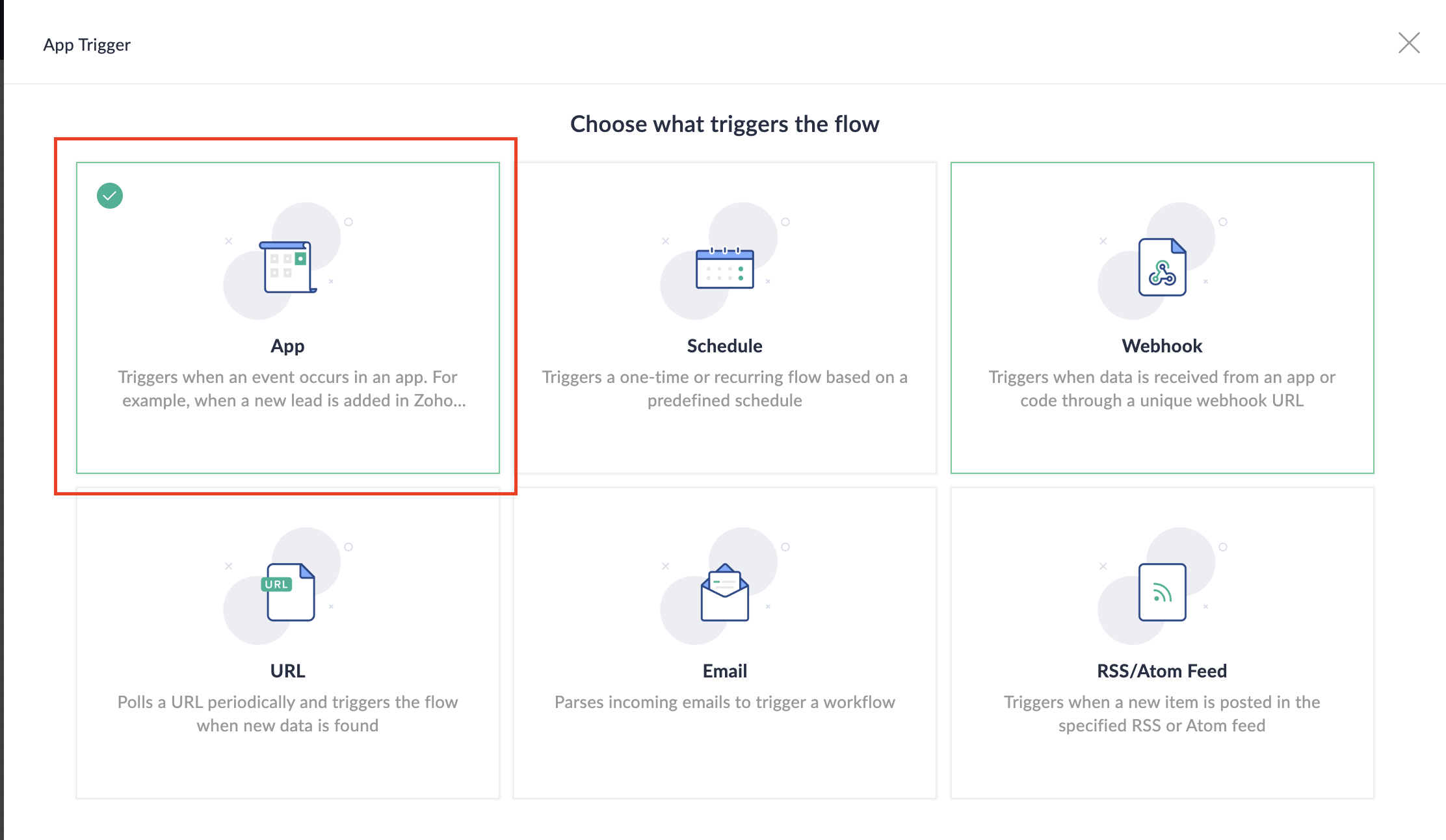


3. Select App and search for Zoho Bookings in the search bar.
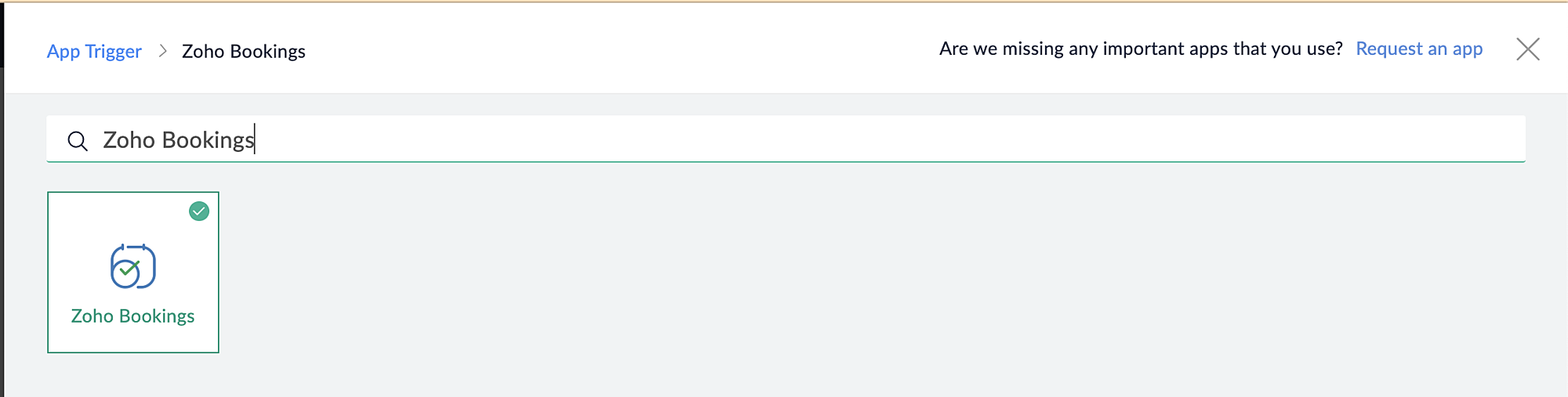


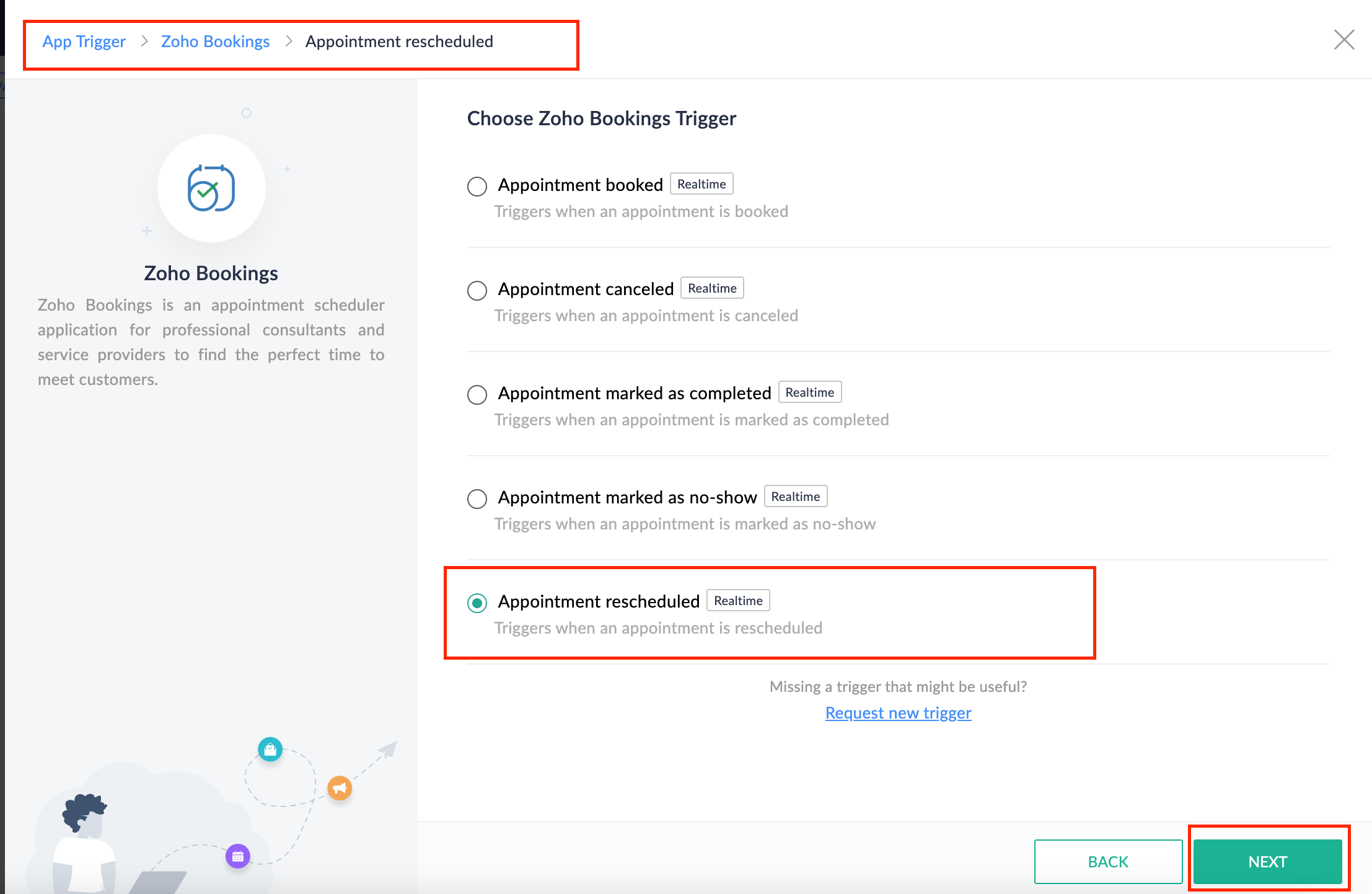
4. Select the Appointment booked trigger.
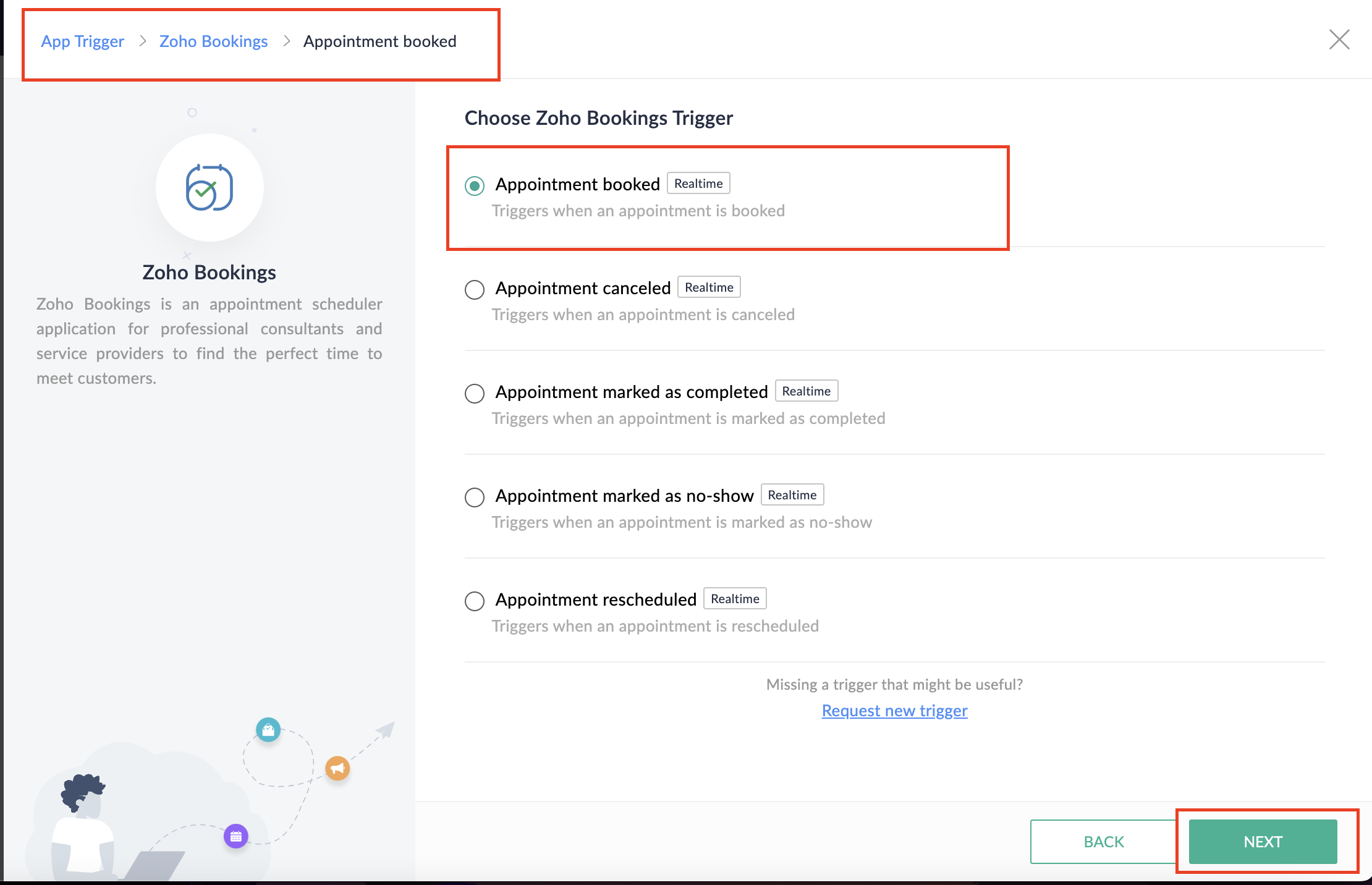


5. Select the Connection and Variable Name.
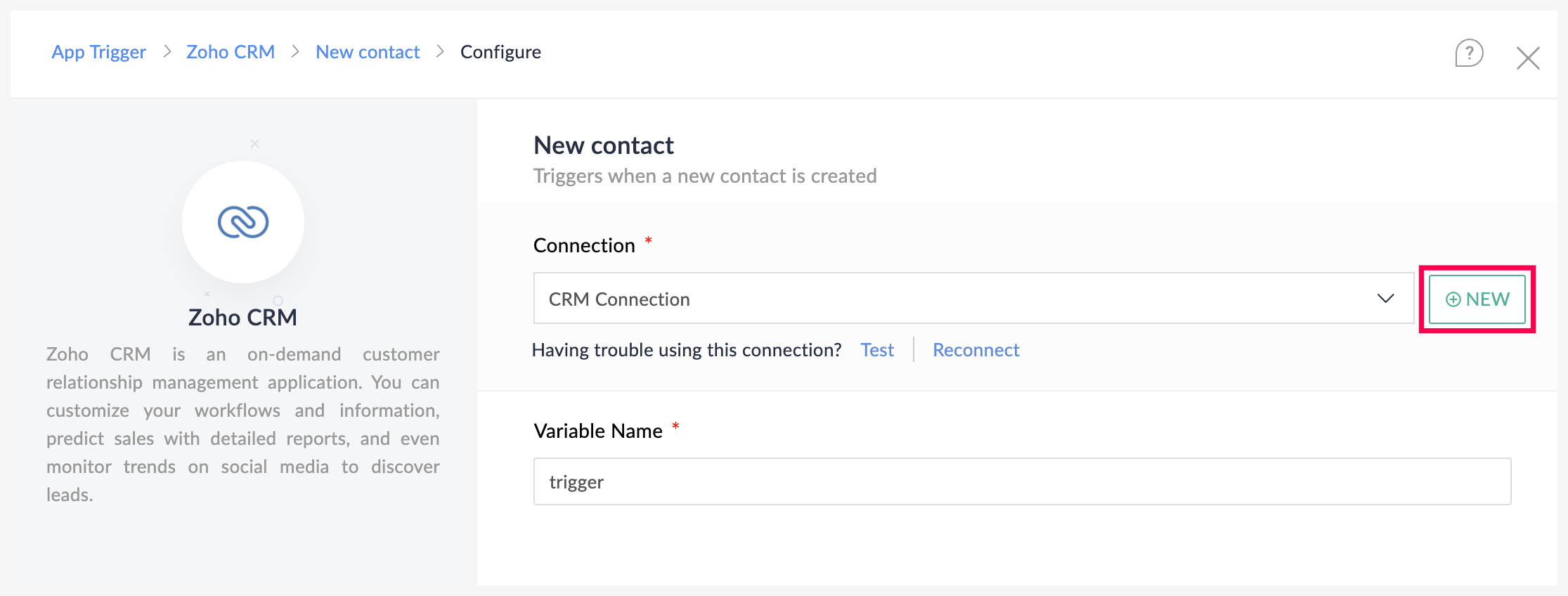


6. Click Done. 

You have now created a new flow for Zoho Bookings.

Other helpful links for this process:
B. Next, let's configure the logic: 

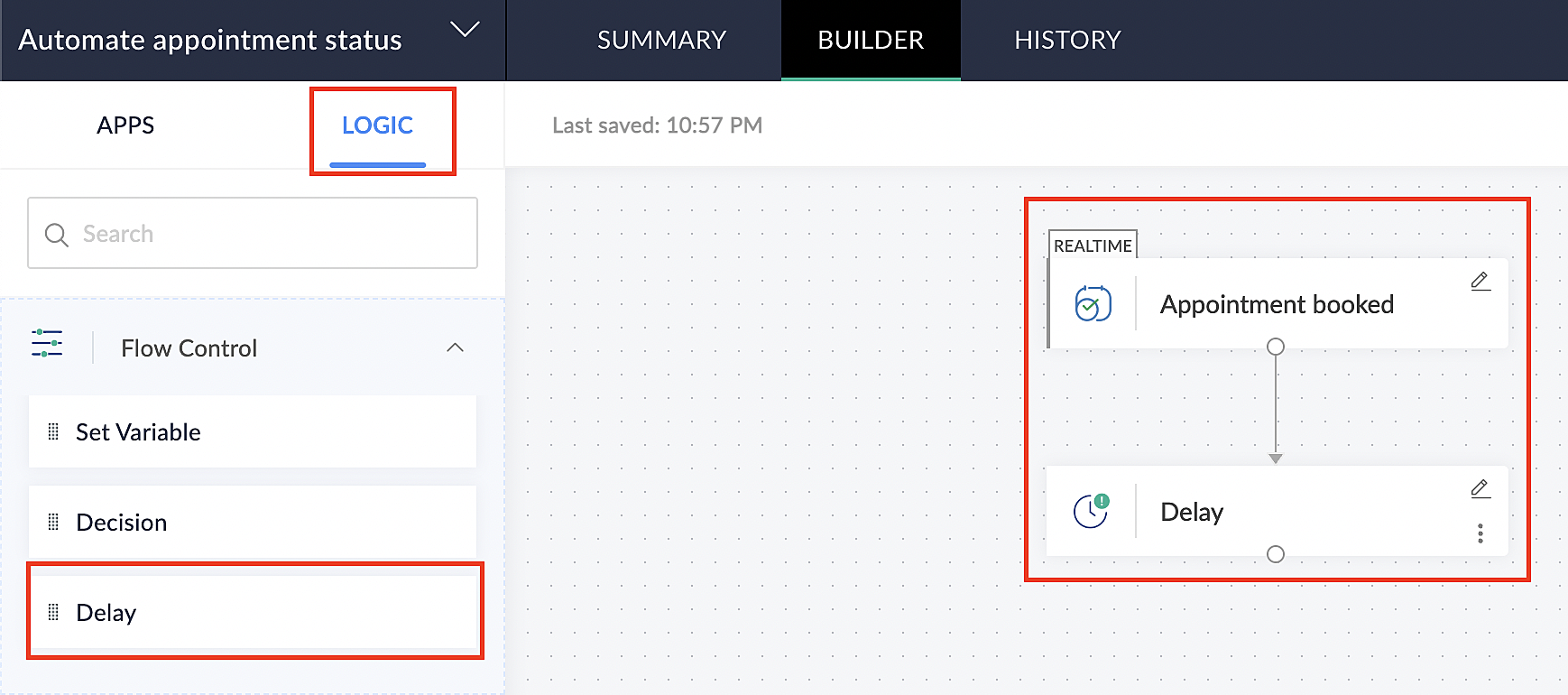
1. Navigate to the Logic tab in Zoho Flow.

2. Click the Flow Control dropdown and select Delay.

3. Drag and drop the Delay function to the bottom of the Appointment booked trigger.
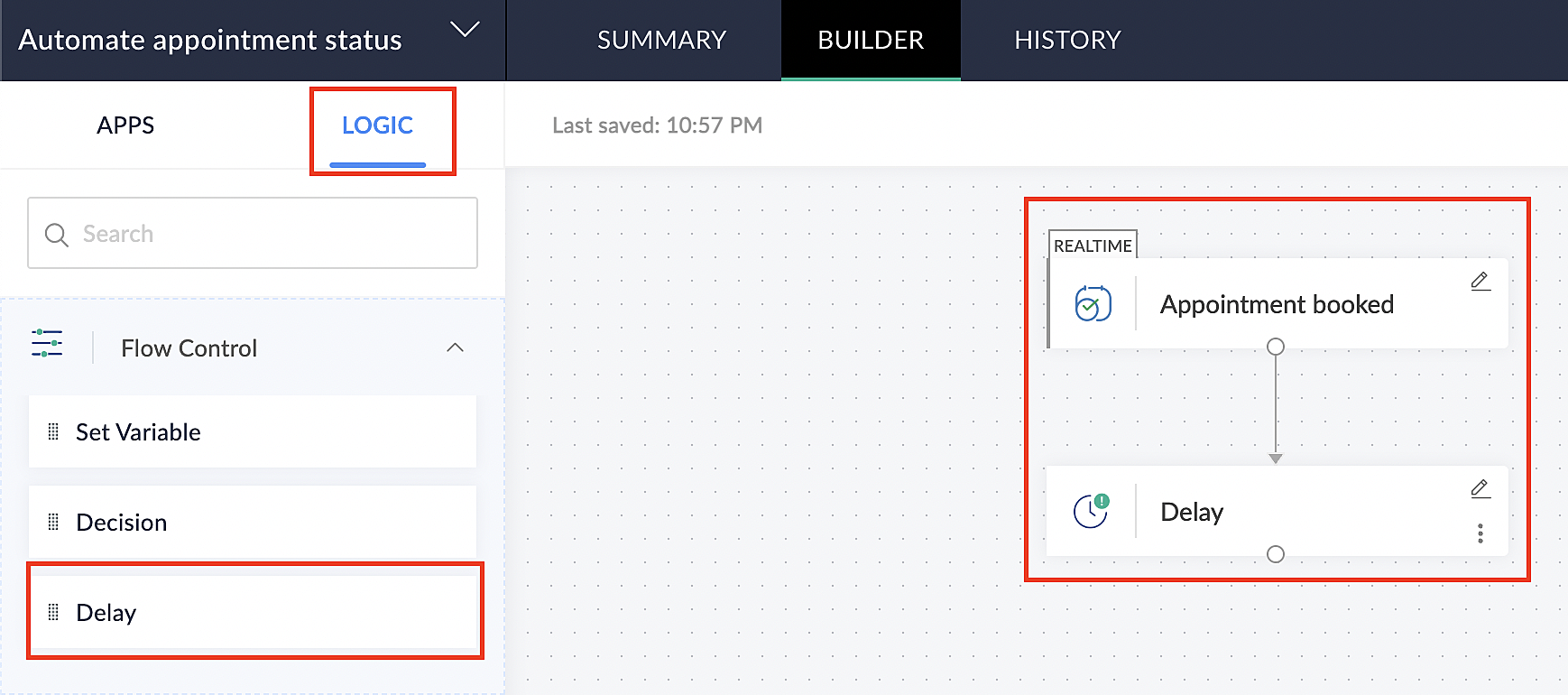


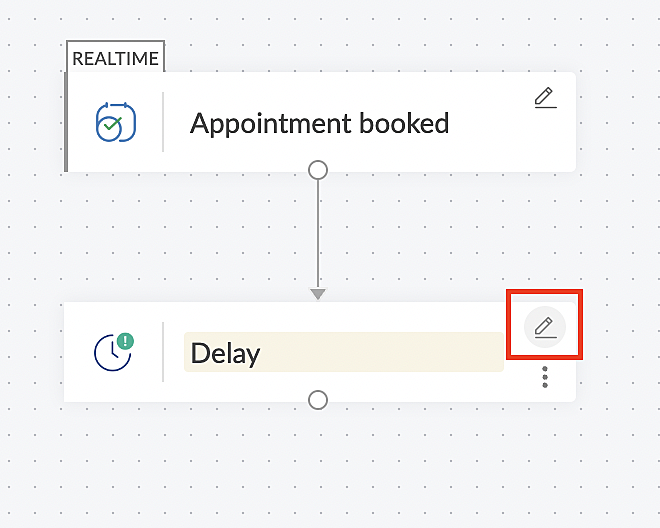
4. Click on the edit icon next to the Delay function.


5. In the Delay For the column, select the appointment end time variable from the available Zoho Bookings variables.
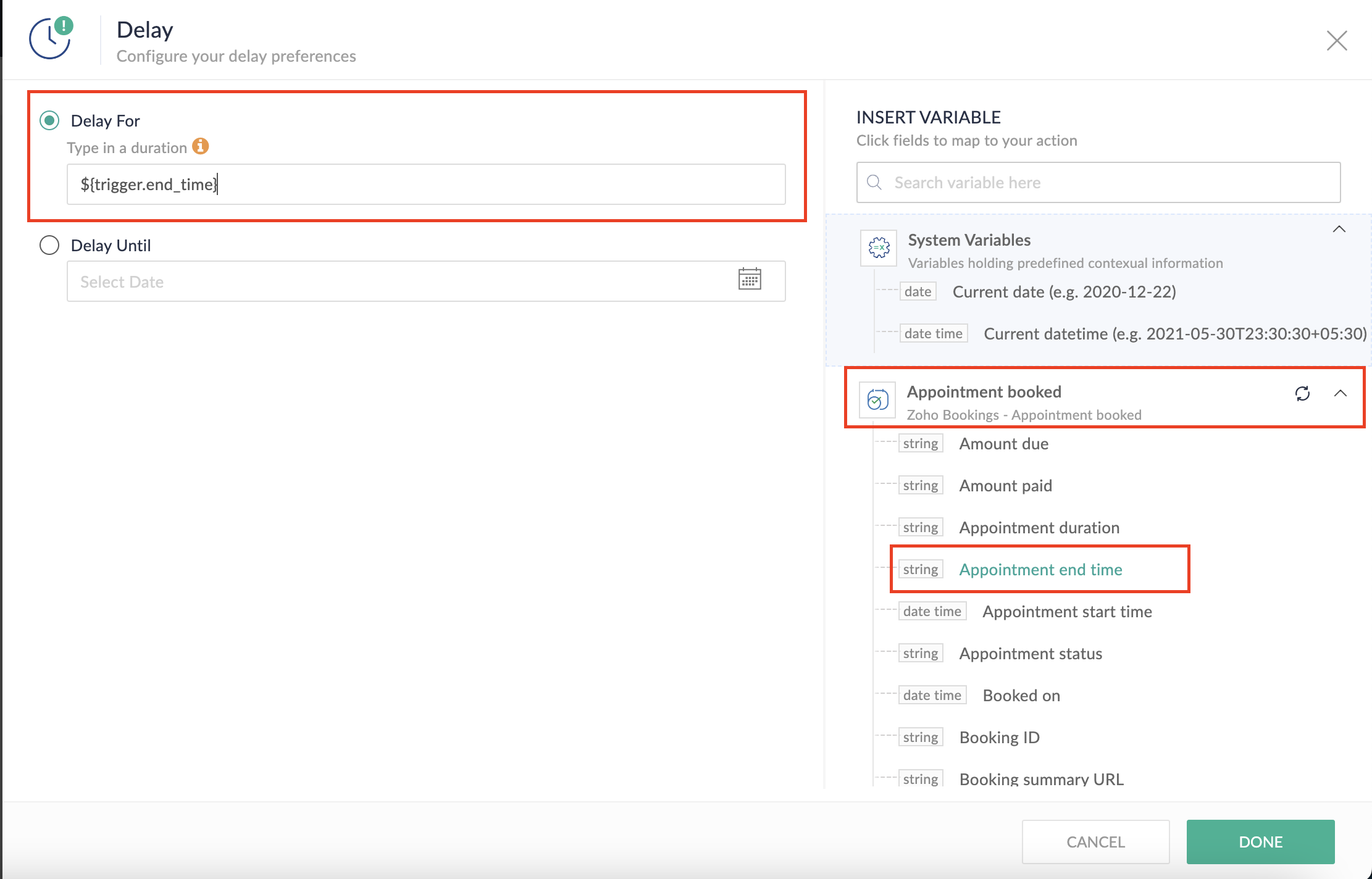


Completing this steps helps us ensure that this workflow executes exclusively at the end of each appointment.

C. We can now allocate additional time for any necessary actions:

For example, let's consider extending the remaining actions by an extra 5 minutes. This extension grants you additional time to update the appointment status. 

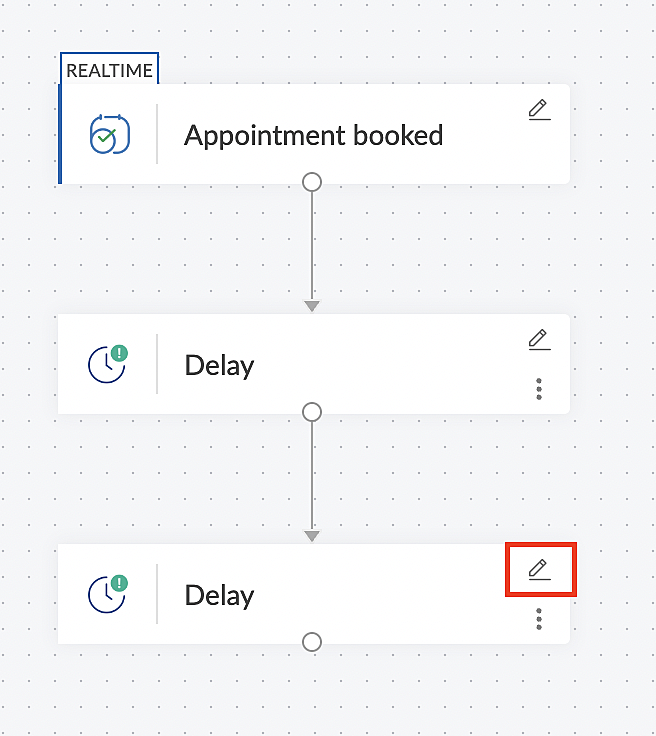
1. From the Logic tab, drag and drop another Delay action to the bottom of the first Delay action.


2. Click on the edit icon next to the Delay function.


3. In the Delay For column, set the desired extra time based on your preference. If going by our proposed example, we'd configure an additional 5 minutes.
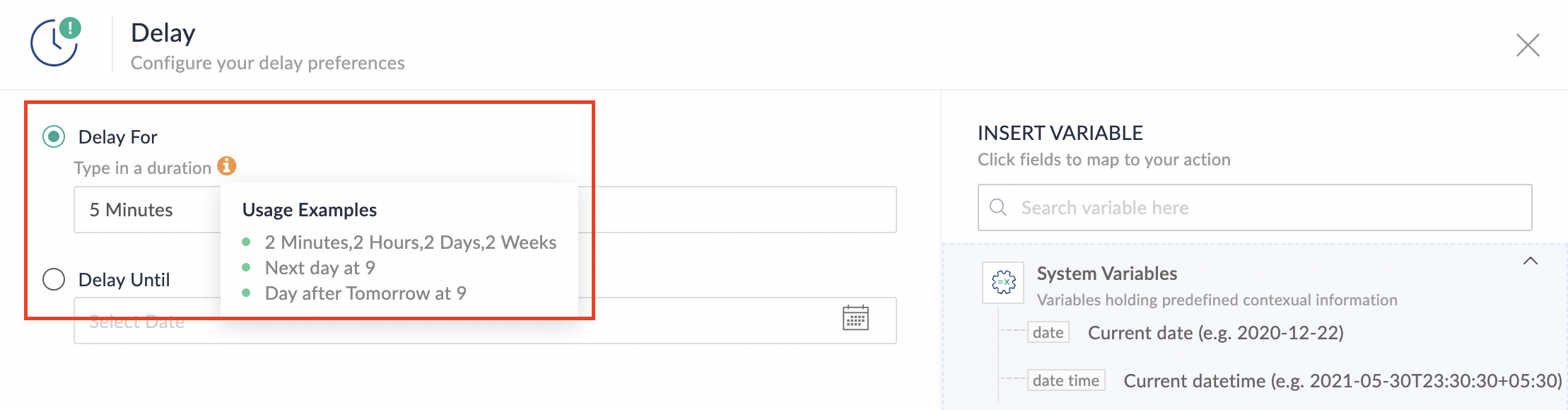

For more details: Delay

Note: If you decide not to include extra time and prefer to execute the flow precisely at the end of the appointment duration, you do not need to complete this section of steps.

D. Finally, let's configure a custom function

Through this step, we'll ensure our ended appointment's status updates to Completed (as long as no other status has been selected).

1. From the Logic tab, click the Custom Functions dropdown.
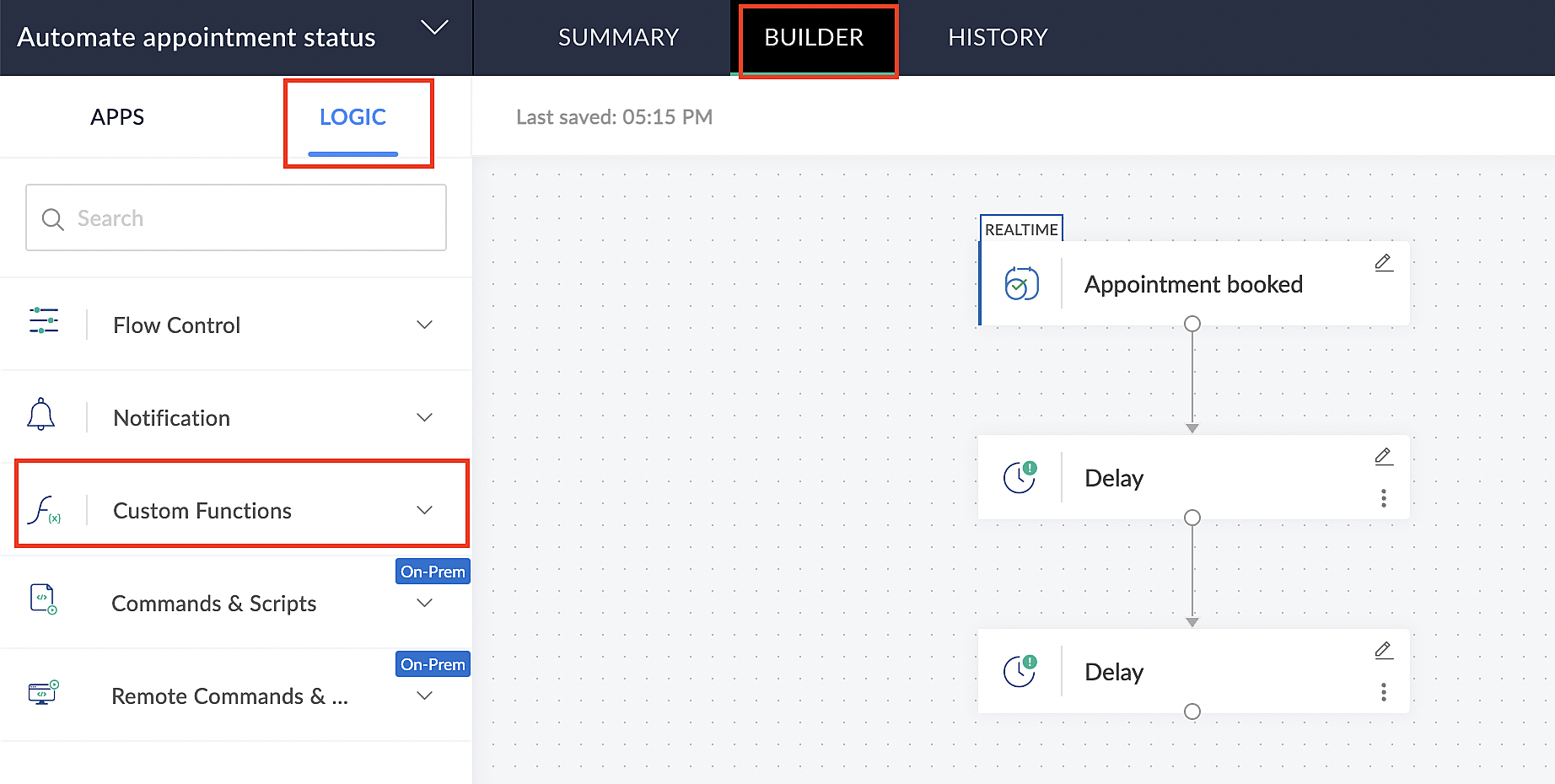


For more details: Custom Functions

2. Click +Custom Function.
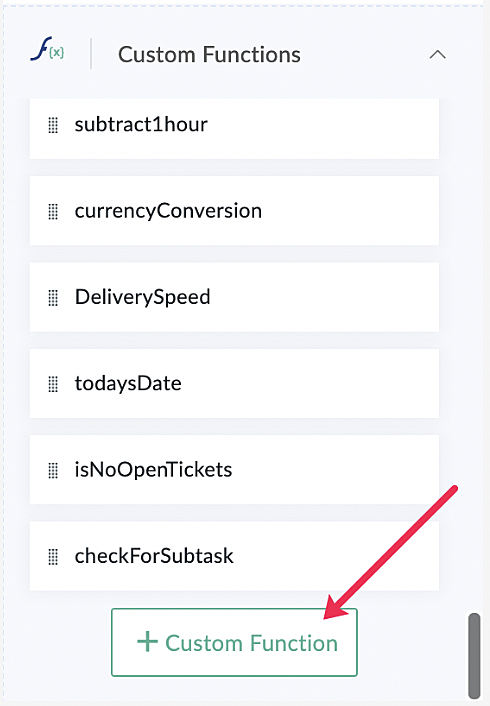


3. Add a relevant name for the function under Function Name, and set the Return Type as void - Returns nothing from the dropdown.

4. Under Input parameters, type bookingID and select string from the dropdown as shown in the screenshot below.
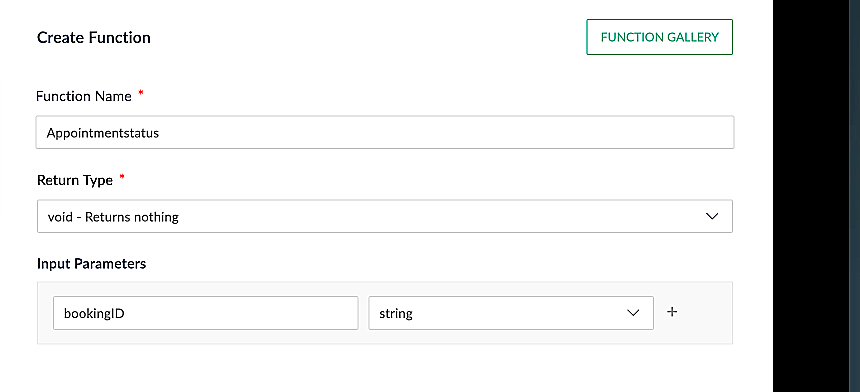


5. Click Create to open the Deluge script page, where we will enter our code for execution.
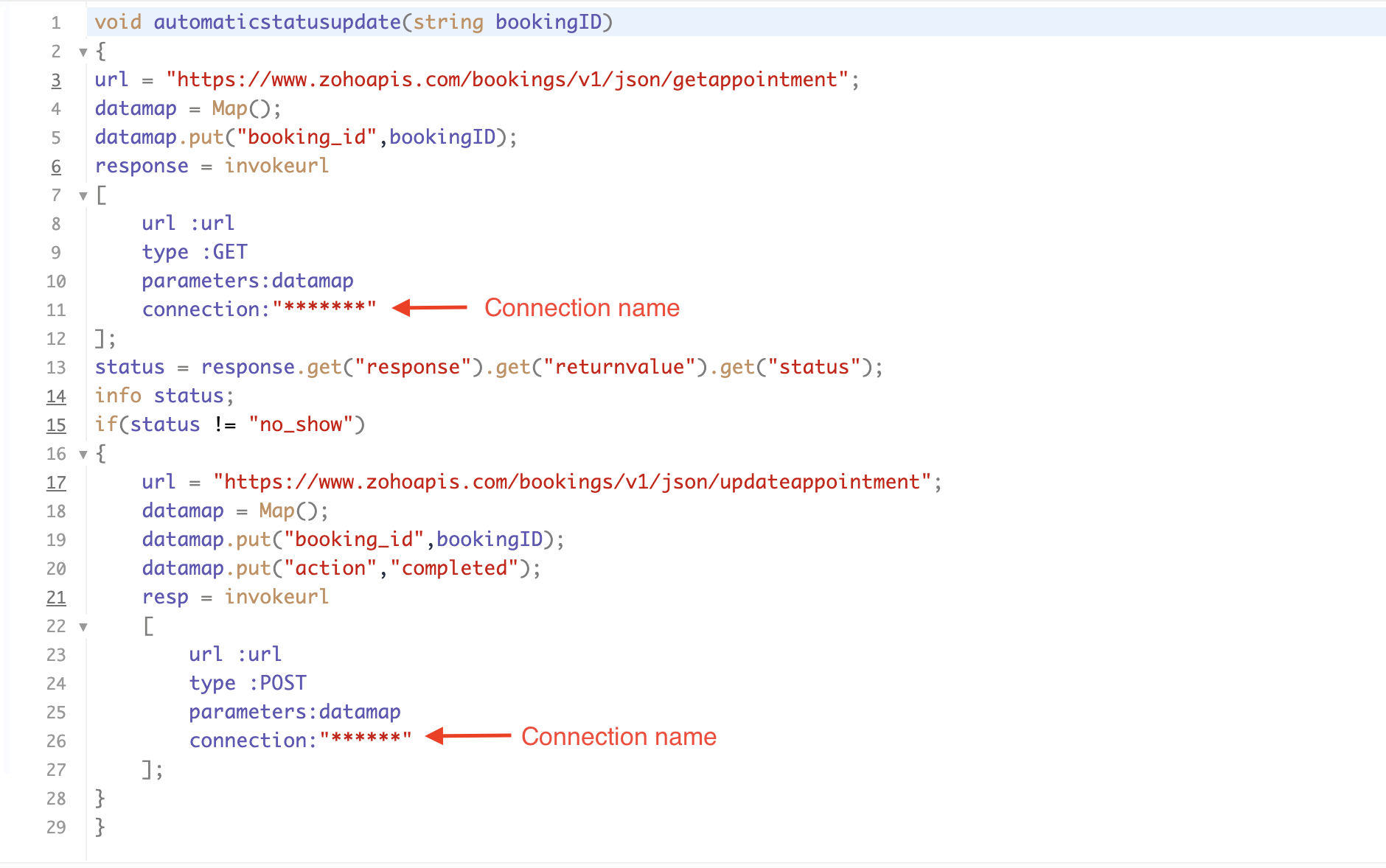
Please configure the below code in the Deluge script page.  

Code Link


If you're interested, here is a brief explanation of the code:

Line 1: To pass the input data below to the code.
  • Booking ID: Identifies the specific booking for fetching details and checking the status.
Line 3: Set up the API endpoint URL based on the Zoho Bookings account's data center.
Line 3–12: We utilize the Get Appointment API' to retrieve the appointment details. For more details: Get Appointment API

Line 13: Here, we're fetching the status of the respective appointment from the response of the Get Appointment API.

Line 15: Implement an 'if' condition to execute the code only if the appointment status is not No show.

Line 16–27: In this step, we utilize the 'Update Appointment API to mark the appointment status as Completed' when the condition specified in line 15 of the code is met.

This is how the final flow will look:
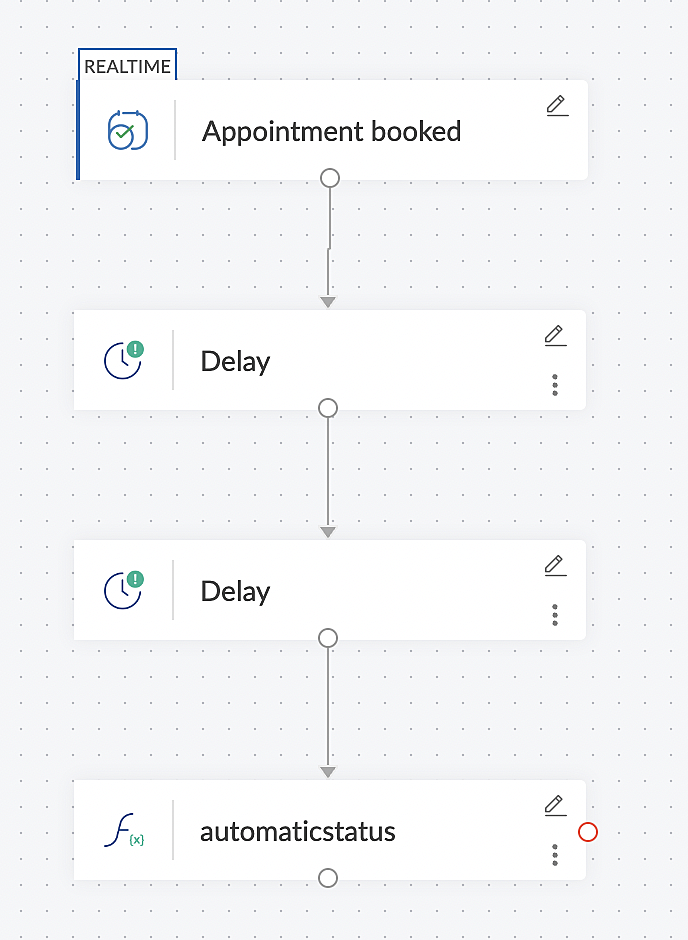


Note: The described flow is tailored for newly scheduled appointments. For cases where appointments are initially scheduled and later rescheduled, a separate flow must be created. The flow for rescheduled appointments follows the same steps outlined above, with the only modification being the initial trigger. Instead of the 'Appointment booked' trigger, please substitute it with the 'Appointment rescheduled' trigger in step A (steps B, C, and D remain the same).


Collecting feedback with surveys

Ensuring a seamless and positive customer experience is a top priority for every appointment. An integral part of this process involves gathering feedback from customers after the appointment's completion. This valuable feedback not only helps understand their sentiments but also provides insights for continuous improvement. 

Let's explore how to leverage Zoho Survey to collect valuable feedback from customers. Additionally, we'll delve into the process of pre populating survey fields with the customer's name extracted from the appointment.

How to create a survey in Zoho survey:

You have the option to create a new survey from scratch or choose from templates or existing surveys.

For more details, refer to: Create a Survey.

As an example, let's use the Customer Feedback Survey from the templates.
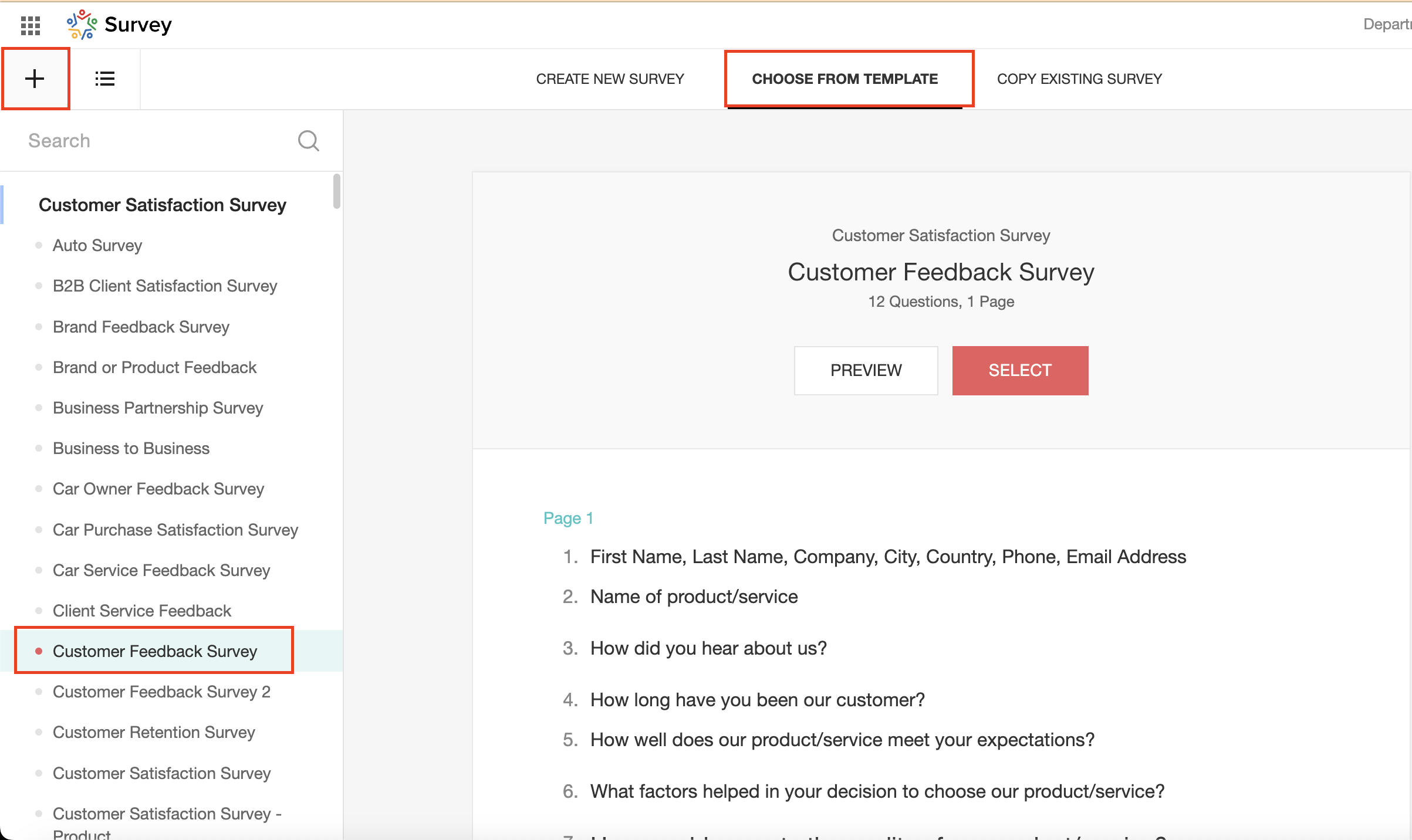


To enhance your survey experience, you have the flexibility to edit the survey form and select specific fields for inclusion.

Now, let's take a closer look at streamlining the customer experience by auto-populating the field inputs in Zoho survey with customer details. This additional step eliminates the need for customers to add their information manually, contributing to an enhanced overall experience.

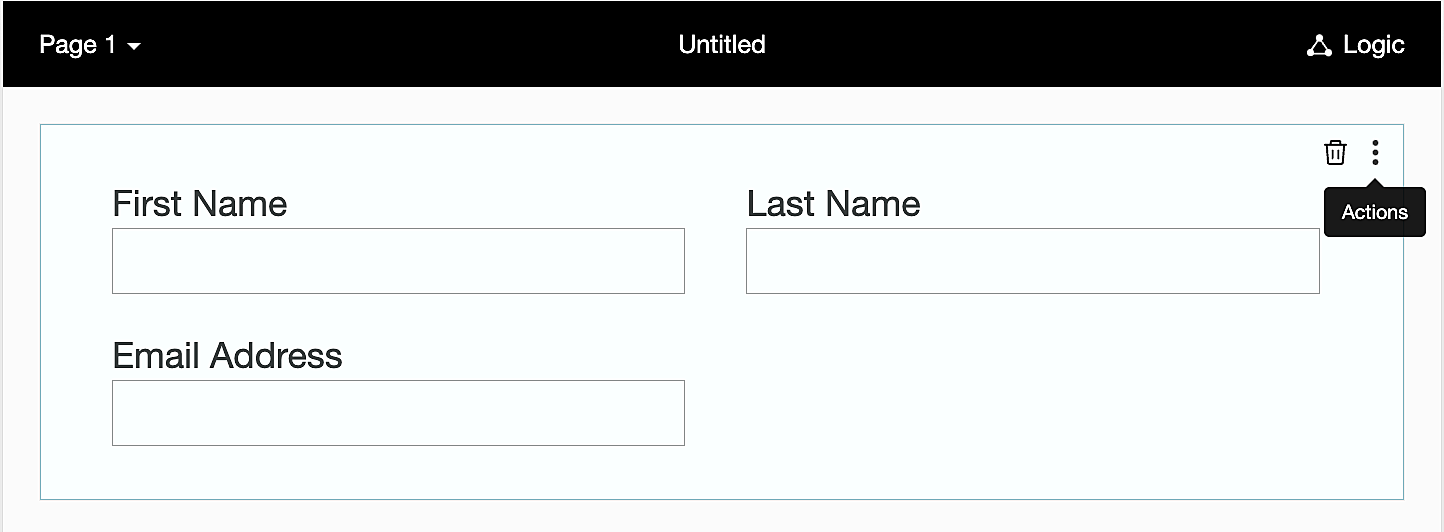
1. Click on the Actions button (three dots) next to the Last Name field, and choose Edit.


2. Click on Advanced options and check the box next to Prepopulate answer.
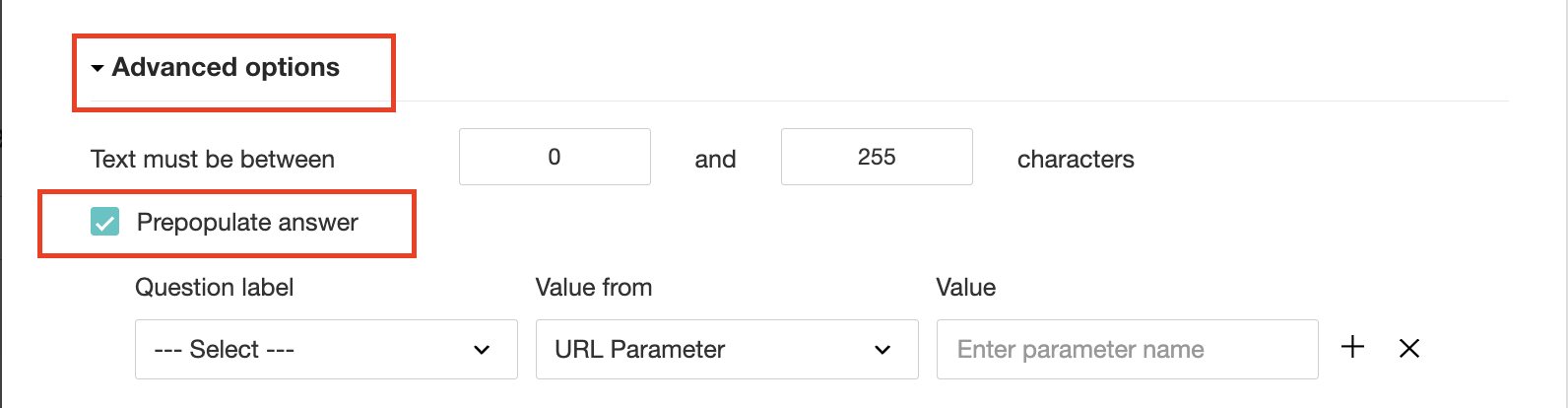


3. Select First Name, Last Name, and Email Address under Question label and URL parameter in each corresponding Value from field.
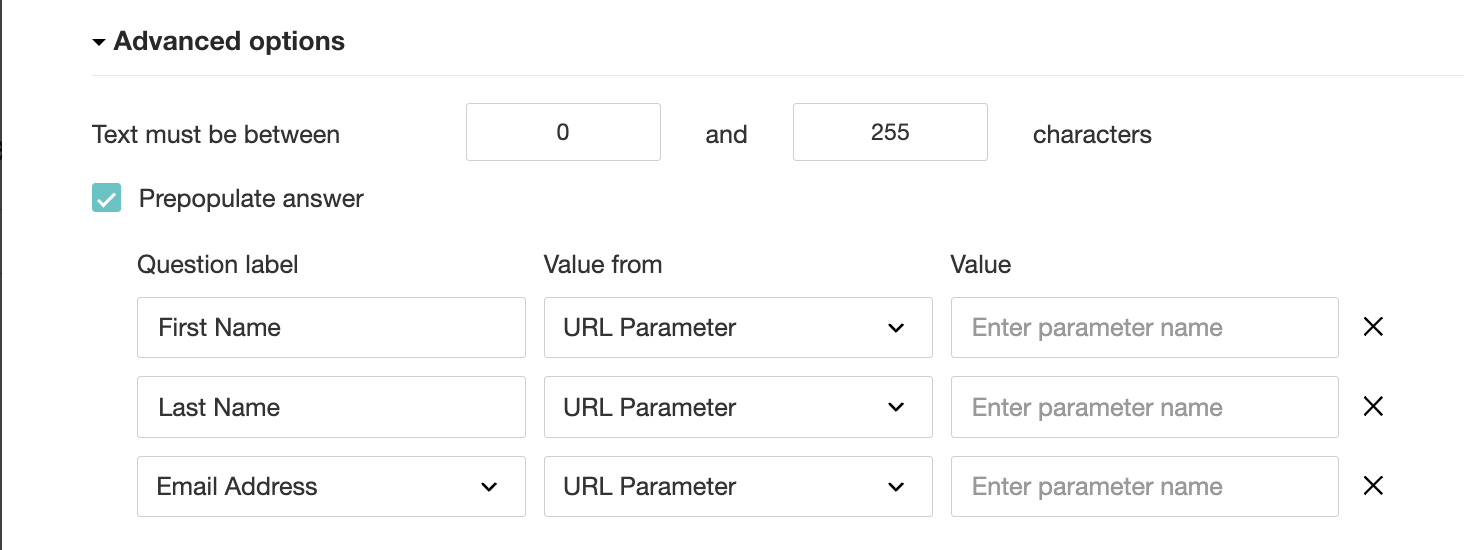


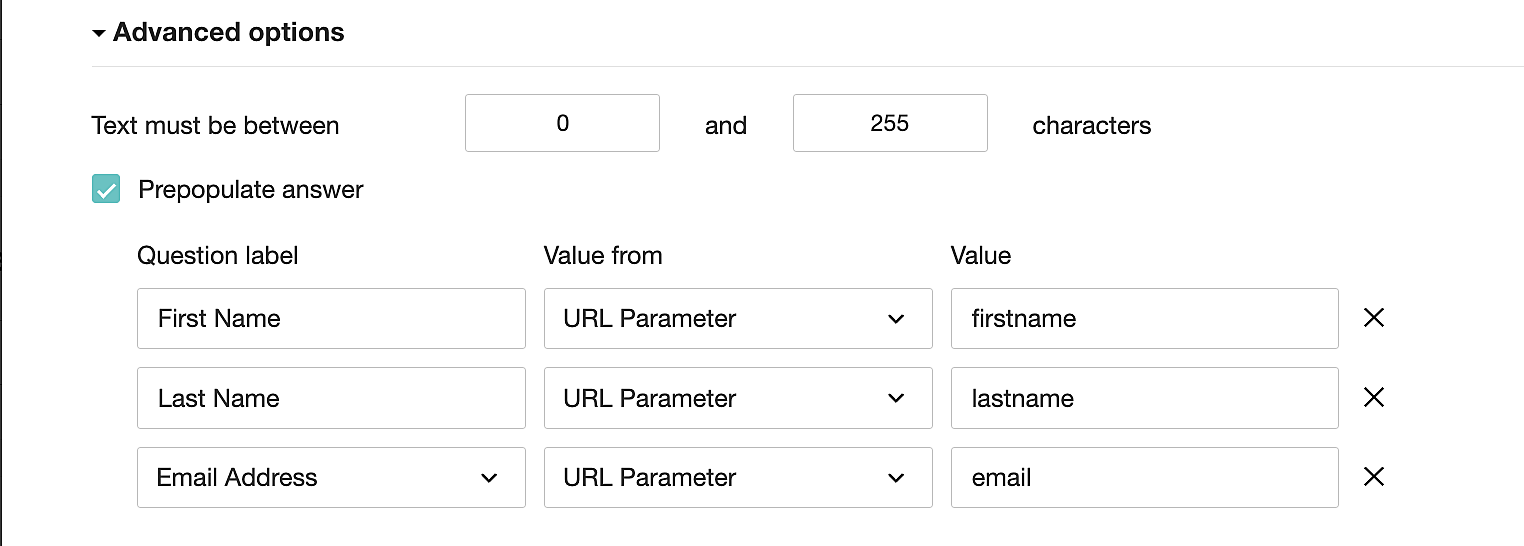
4. In the Value field, configure the parameter name (e.g., firstname, lastname, email). Once configured, this parameter name will be used in the survey link to prefill the fields in the survey form. Customize it as per your requirements, ensuring consistency with the term used in the survey URL.


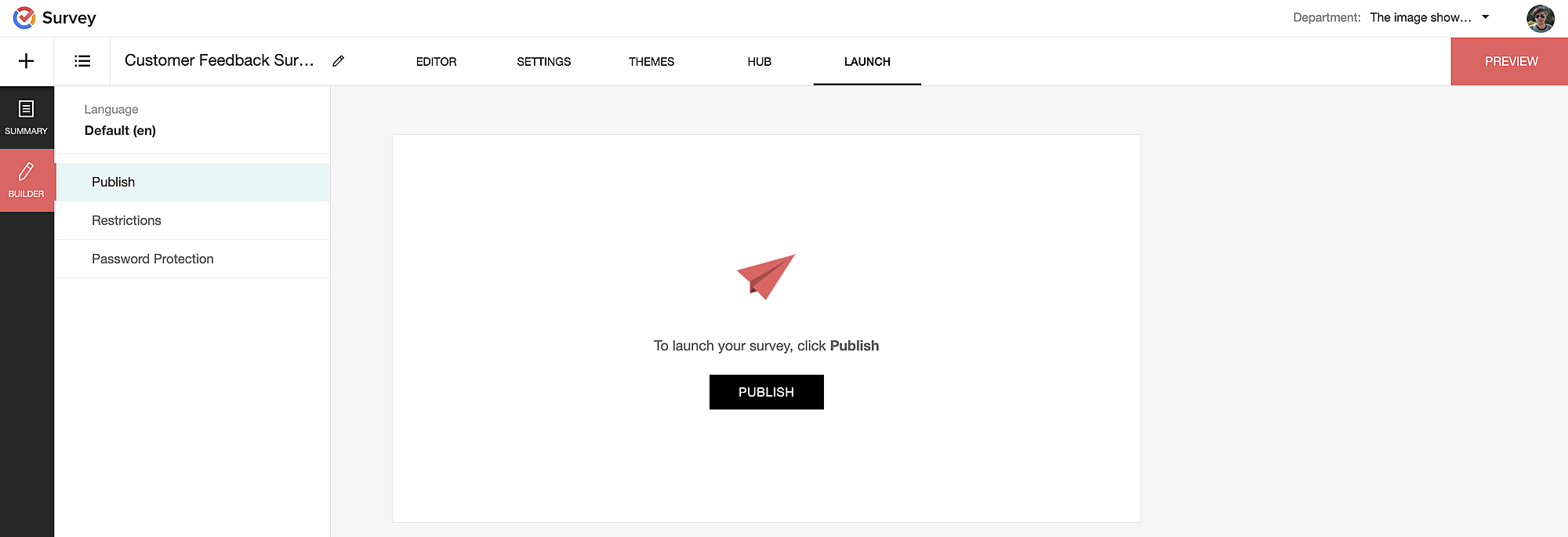
To publish the survey, go to the Launch tab and click on the Publish button to obtain the Zoho Survey URL.


Pre-populating fields in the Zoho Survey form

Once we have the Zoho Survey URL, we'll need to match the configured parameter name and variables from the Zoho Bookings email notifications. These variables play a crucial role in dynamically fetching customer information and populating it in the Zoho Survey form.

For details about variables in Zoho Bookings email notifications, refer to this link: Pre-defined variables

We'll now edit the survey URL to align the variables with the configured Value, or parameter name, from our prepopulated answer settings.

Let's say this is our survey URL: 

https://survey.zohopublic.com/zs/E****h

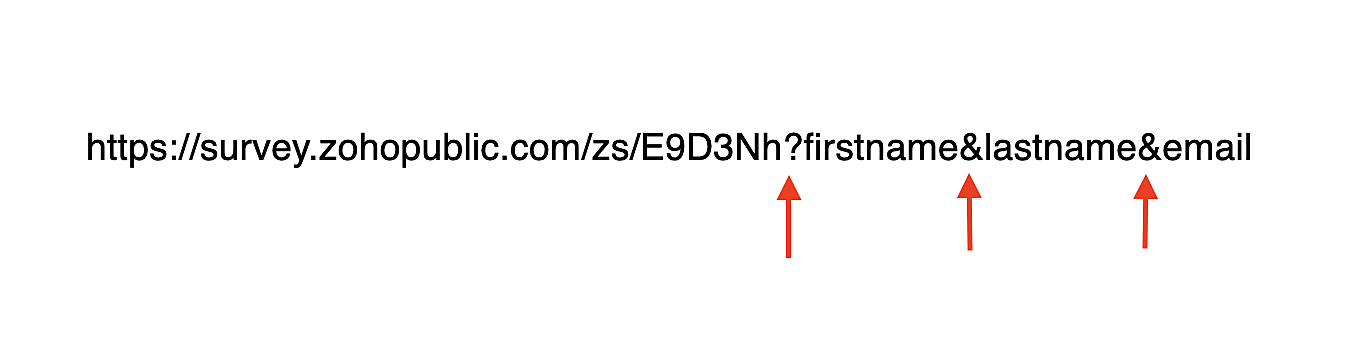
We'll want to use a question mark ("?") at the end of the survey URL and an ampersand ("&") to separate different parameter names.

Here's what that would look like using our example Value names from earlier:

Now, let's map the parameter names to the Zoho Bookings variables.

It would look like this:


For more details: Autofill 

Where to use the Zoho Survey URL

To enable the automatic sending of the Zoho Survey URL to customers upon updating the appointment status to Completed, follow these steps in the Zoho Bookings application:

For one-on-one services:

1. Click on Service in the top left corner.
2. Select the desired one-on-one service.
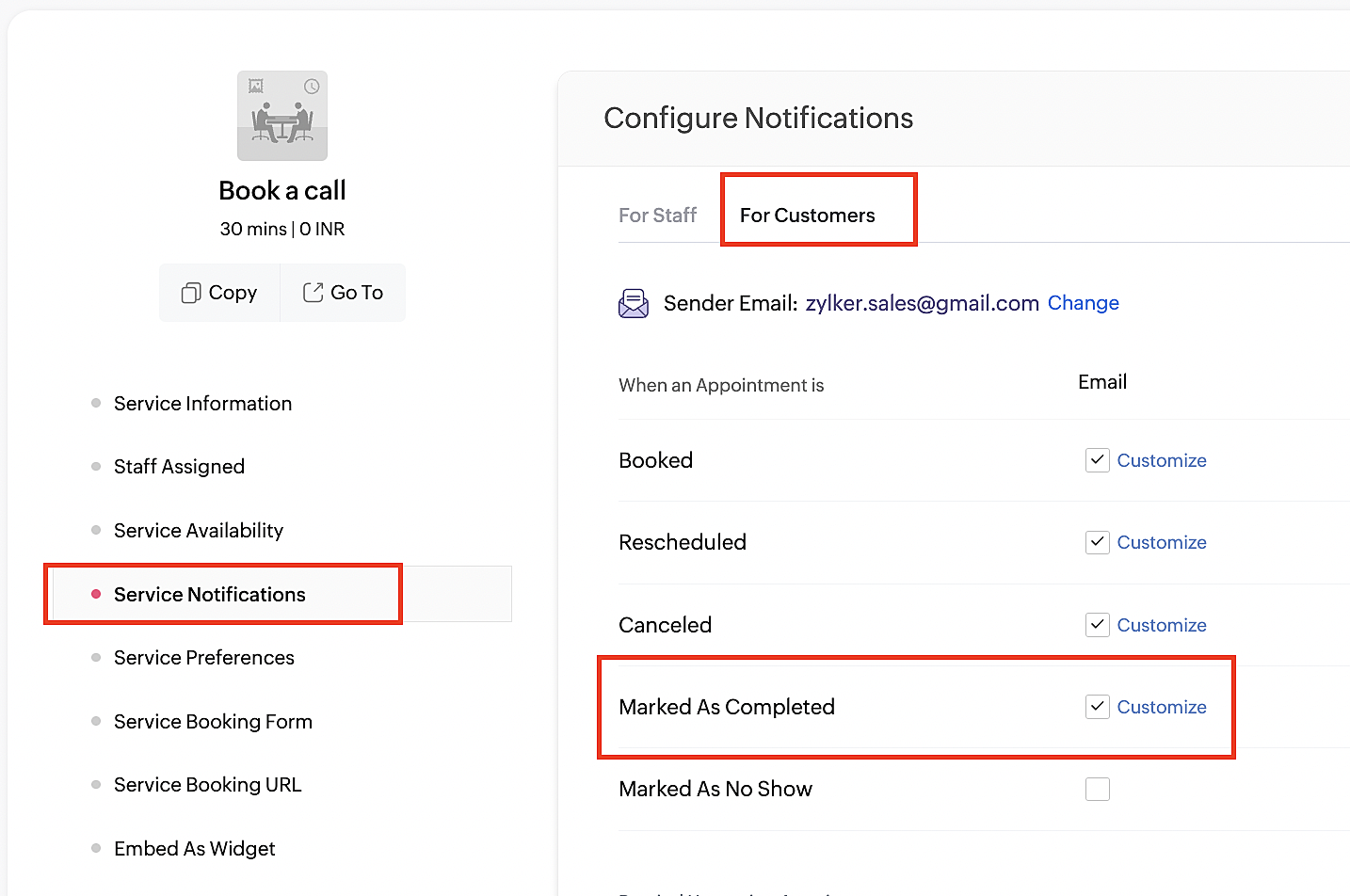
4. Navigate to the For Customers tab.
5. Click Customize next to the Mark As Completed' trigger to access the email content.


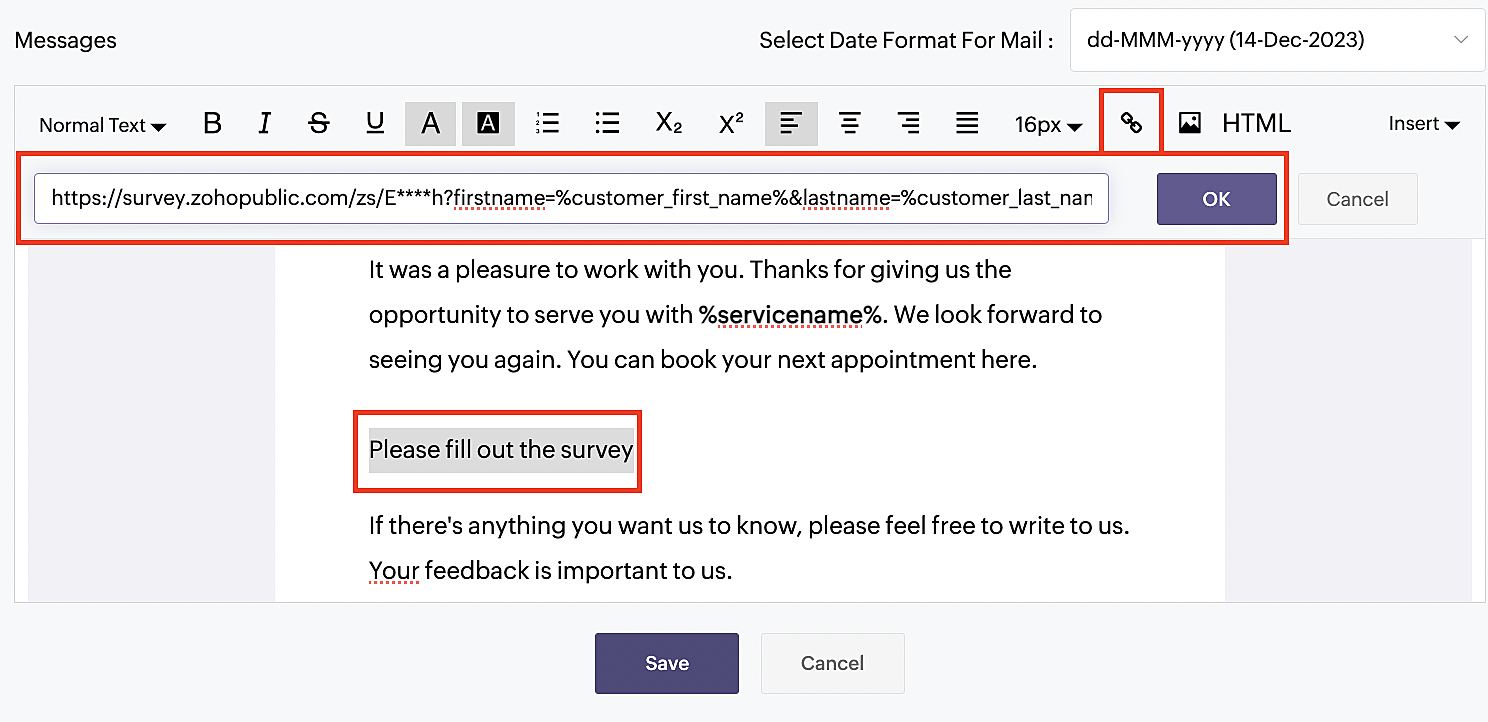
6. Enter your desired name for the button. For example, you might use something like 'Please fill out the survey'. 

7. Select the entered text and click on the Add Link icon. Paste the configured Zoho Survey URL in the URL box. This will convert your text into a hyperlink that leads to the survey.


For group and resource booking services, please follow the same steps under Workspaces > Notifications.

For more details: Workspace Notifications

With the completion of this step, we have incorporated the Zoho Survey URL with dynamic variables, facilitating the dynamic autofill of customer data.

To wrap it up

With the successful implementation of the configuration described above, the entire process of automating status updates and collecting feedback is now seamlessly integrated, promising an elevated and enhanced product experience for all users.

If you have any questions or need assistance with your configuration, please email us at hello@zohobookings.com or support@zohobookings.com.


    • Sticky Posts

    • Approve or deny appointments based on criteria

      Hey, community members! Have you ever wondered how to automatically approve or deny appointments? While we're still working on building that feature, we've got an alternative method to cancel appointments if they don't meet your specific criteria. Let
      • Recent Topics

      • Release Notes | January 2026

        We have rolled out a set of powerful new enhancements across Zoho Vertical Studio that bring several long-awaited capabilities to your applications. These updates focus on deeper customization, smarter automation, better reporting, and improved usability
      • Product Request: Send email to Secondary email

        Guys, we should be able to send the campaign to the secondary email too.  Is this on the plans for Zoho Campaign? It looks like I can map the secondary email from the CRM to the Campaigs, but can not send the message.  
      • Introducing WhatsApp integration and quick editing capabilities in Zoho Sign

        Hi there, Zoho Sign already helps users collect signatures via email and SMS, and we're happy to announce that you can now send documents and authenticate recipients right through WhatsApp. Some of the key benefits include: Communication with recipients
      • Depositing funds to account

        Hello, I have been using Quickbooks for many years but am considering moving to Zoho Books so I am currently running through various workflows and am working on the Invoicing aspect. In QB, the process is to create an invoice, receive payment and then
      • Franchise

        Is there a solution of how to organize global franchise organisations?
      • Can multiple agents be assigned to one ticket on purpose?

        Is it possible to assign one ticket to two or more agents at a time? I would like the option to have multiple people working on one ticket so that the same ticket is viewable for those agents on their list of pending tickets. Is something like this currently
      • Recording overpayment?

        So a customer just overpaid me and how do I record this? I can't enter an amount that is higher than the invoice amount. Eg. Invoice is $195 and he sent $200. He's a reccuring customer so is there a way to record so that he has a $5 advance for future invoice?
      • Holidays

        Hi; For defining Holidays, you need to add logic to handle the year as well as the month & day. We need to be able to enter Holidays for the next year. I need to add a holiday for January 2, 2017, but I can't until January 1st, which is a Sunday and we
      • Composite Product (kit) - Dynamic Pricing

        I am setting up Composite Products for item kits that I sell. I also sell the items from the kit individually. Problem is when pricing changes on an individual part, the Composite Product price does not change meaning when the cost of item # 2 in the
      • Urgent: Slow Loading Issue on Zoho Commerce Website

        Dear Zoho Support Team, I am experiencing slow loading times on my Zoho Commerce website, which is affecting its performance and user experience. The issue persists across different devices and networks. Could you please investigate this matter and provide
      • Need help with importing expenses

        I'm using the template downloaded from the application. When I try to import my expenses, I get the message: Duplicate entry in the Expense Date column. Ensure it contains unique values. None of the rows will import. There are duplicate dates, but they
      • Super Admin Logging in as another User

        How can a Super Admin login as another user. For example, I have a sales rep that is having issues with their Accounts and I want to view their Zoho Account with out having to do a GTM and sharing screens. Moderation Update (8th Aug 2025): We are working
      • Client Portal ZOHO ONE

        Dear Zoho one is fantastic option for companies but it seems to me that it is still an aggregation of aps let me explain I have zoho books with client portal so client access their invoice then I have zoho project with client portal so they can access their project but not their invoice without another URL another LOGIN Are you planning in creating a beautiful UI portal for client so we can control access to client in one location to multiple aps at least unify project and invoice aps that would
      • Search not working!

        I have items in my notebook tagged but when I search for a tag nothing comes up! Any fix for this?
      • ERROR CODE :550 - 550 5.1.1 Invalid email recipients

        This message was created automatically by mail delivery software. A message that you sent could not be delivered to one or more of its recipients. This is a permanent error. mustafa.ashraf@techlink-eg.net, ERROR CODE :550 - 550 5.1.1 Invalid email recipients
      • What's New in Zoho POS - February 2026

        Hello everyone, Welcome to Zoho POS’s monthly updates, where we share our latest feature updates, enhancements, events, and more. Let’s take a look at how February went. Purchase and sell items on different units We have introduced a unit conversion functionality
      • Can i integrate bigin with google voice?

         I make all my calling through google voice to seprate my personal line from business. I want to log my calls with customers automatically but i domt see anywhere where i can do that. Any help? Im pretty sure i wont be able to. Sad
      • POP/SMTP access authentication failed

        I am unable to log setup outlook for my zoho mail account. I am using these settings poppro.zoho.com port 995 SSL smtp.zoho.com port 587(tls)/465(ssl) username/password works on mail.zoho.com but not with POP access. Can you help?
      • Our Review Of Zoho CRM after 60 Days

        The purpose of this is to just share with Zoho why I love their product, but ultimately why I could not choose Zoho CRM for our next CRM. About two months ago we begun a CRM exploration process for our financial planning firm, based in Texas. We already
      • Error AS101 when adding new email alias

        Hi, I am trying to add apple@(mydomain).com The error AS101 is shown while I try to add the alias.
      • Enhancement in Zoho CRM: Control who gets to participate in a forecast by customizing the user hierarchy

        Include only users from the sales function; exclude the rest Dear Customers, We hope you're well! We started this year with a series of exciting enhancements to Zoho CRM and to this list, we are thrilled to add an enhancement to forecasting. Let's talk
      • This domain is not allowed to add. Please contact support-as@zohocorp.com for further details

        I am trying to setup the free version of Zoho Mail. When I tried to add my domain, theselfreunion.com I got the error message that is the subject of this Topic. I've read your other community forum topics, and this is NOT a free domain. So what is the
      • Possible to generate/download Quote PDF using REST API?

        See title. Is there any way after a quote has been created to export to a PDF using a specified template and then download it? Seems like something that should be doable. Is this not supported in the API v2.0?
      • Allow Admin to Configure Report > More Options Button

        As an Admin, I want to configure the options of the Report > More Options button to improve UX and reduce Developer overhead. See attached screenshot. Original question posted here: https://help.zoho.com/portal/en/community/topic/modify-standard-rep
      • Generate a link for Zoho Sign we can copy and use in a separate email

        Please consider adding functionality that would all a user to copy a reminder link so that we can include it in a personalized email instead of sending a Zoho reminder. Or, allow us to customize the reminder email. Use Case: We have clients we need to
      • Multiple Zoho One accounts

        Hello. I'm searching for a solution to run multiple organizations under 1 Zoho One account or have a different Zoho One account for each organization and still be able to easily login to each. Currently Zoho One doesn't allow the same email address to
      • Manage Every Customer Conversation from Every Channel inside Zoho SalesIQ

        Your customers message you from everywhere. But are you really able to track, manage, and follow through on every conversation, without missing anything? With interactions coming in from websites, mobile apps, and messaging platforms like WhatsApp and
      • You cannot send this campaign as there is no contact in the selected mailing list.

        We have synced contact lists and sent campaigns just fine prior to today.  Now no matter what list I upload when I go to send the campaign it gives an error "You cannot send this campaign as there is no contact in the selected mailing list." And now it
      • Custom view inconsistencies

        Why is "is not" missing from criteria, along with other comparison operators ??? It makes it almost impossible to build required custom views, I don't want "void" invoices listed & why on earth would "Void" invoices be showing when the criteria includes
      • Pivot Report Formula - using a today() variable

        Is it possible for me to use a value of today() in a formula on a pivot table? I'm trying to identify where the end date of a project is greater than the current date if("10. Projects (Zoho Projects).End Date" > today(), 'Yes', 'No') I get the error that
      • Cannot connect IMAP to outlook

        Hello I have followed the instructions to connect my zoho account to Outlook IMAP but get this message: Session Id: bba118fb-151c-824f-9512-3ad1e91b109d Timestamp: 1708976566964 Error code: INVALIDCREDENTIALS INTERACTIONREQUIRED I'm using the exact configeration
      • Department Overview by Modified Time

        We are trying to create visuals to show the work our agents do in Zoho Desk. Using Zoho Analytics how can we create a Department Overview per modified time and not ticket created time? In order for us to get an accurate view of the work our agents are
      • Where is the settings option in zoho writer?

        hi, my zoho writer on windows has menu fonts too large. where do i find the settings to change this option? my screen resolution is correct and other apps/softwares in windows have no issues. regards
      • Enhance Sign CRM integration

        Hello all, I'm working on a custom Deluge script to enhance the integration between Zoho CRM and Sign by using a writer merge template for additional flexibility. I want to replicate the post-sign document integration that exists between CRM and Sign
      • Zoho Workdrive download was block by security software

        Hi Team, Recently workdrive download was blocked by huorong security. Could you please advise how to put zoho workdrive as white list? every time we put "*.zohoexternal.com" or "workdrive.zohoexternal.com", the warning msg will still pop in next dow
      • Choosing a portal option and the "Unified customer portal"?

        I am trialling Zoho to replace various existing systems, one of which is a customer portal. Our portal allows clients to add and edit bookings, complete forms, manage their subscriptions and edit some CRM info. I am trying to understand how I might best
      • General feedback

        I think Zoho is at the moment (potentially) the best, or perhaps the only, real online solution, for business, and not just business. Surely the only one that has all the features that I need (and I've probably tried everything, at least all that has a cost-free option). It has still got lots of bugs and imperfect features, so I do hope it keeps developing and becomes a really professional platform. Lots of people (including me) want to use such one platform for all scheduling/mail/note-taking...
      • How to add SSL to Short URL custom domain?

        Hi, I've added a custom domain the the URL Shortener Domains. It's creating the short URL fine, but when clicking through, firstly I get an SSL warning, then a 400 Bad Request warning.
      • Single Portal for Multiple Apps

        Hello, I'm just getting started with Zoho and I'm very overwhelmed. I am currently using the free trial of Zoho One, but if I can figure it out, I intend to upgrade to the paid version. Zoho One, of course, gives me  access to an entire suite of services/applications. One of the things I'd like to do is have a single place for clients (customers?) to log in and view current projects, invoices, contact information, etc. A single login for my clients. A single portal. I've come across documentation
      • Antispam validation failed for your domain in Accounts

        I tried adding a domain to zeptomail.zoho.com, but the “add domain” operation failed. The front‑end error reads: “Domain could not be added. Please contact support@zeptomail.com.” The back‑end API returned: ``` { "error": { "code": "TM_3601", "details":
      • Next Page