Introducing Open Shifts (beta) in Zoho Workerly

We are excited to introduce Open Shifts (beta) in Zoho Workerly, which allows businesses to easily manage last-minute staffing needs. This feature is designed for industries with unpredictable shift schedules, such as healthcare, retail, and security. Open Shifts enable employees to claim available shifts, helping you fill vacancies quickly and without hassle.
What are Open Shifts?
Open Shifts are unassigned work slots that can be made available to your temps, allowing them to voluntarily pick up shifts that match their availability. This feature offers your temps more flexibility and control over their schedules while allowing you to fill urgent staffing requirements without time-consuming manual assignments.
Core Use Case
Let’s look at an example: You’re managing a retail business, and suddenly, you experience a surge in foot traffic during the holiday season. Your current staffing schedule can’t handle the increased demand. Instead of manually assigning extra shifts to temps who may not be available or suitable, you can post Open Shifts. These shifts will be visible to your temps who are eligible and available, allowing them to pick up the extra work at their convenience. This dynamic, self-service approach benefits both managers and temps have more autonomy over their schedules, and you ensure that your shifts are filled swiftly without additional coordination.
The Problem
Staffing in dynamic industries is often unpredictable. There’s always the challenge of quickly finding available temps for sudden shift openings, which can disrupt operations and lower productivity.
The Solution
Zoho Workerly’s Open Shifts feature empowers your temps to pick up available shifts, saving you the hassle of scrambling to find replacements. This feature ensures that your shifts are filled on time, with minimal management intervention.
Create Open Shifts
To create open shifts:
- Go to the shifts module and select the Temp's view.
- The Create Open Shifts option is available only when a job is filtered. Filter the job you’re working with to enable this feature.
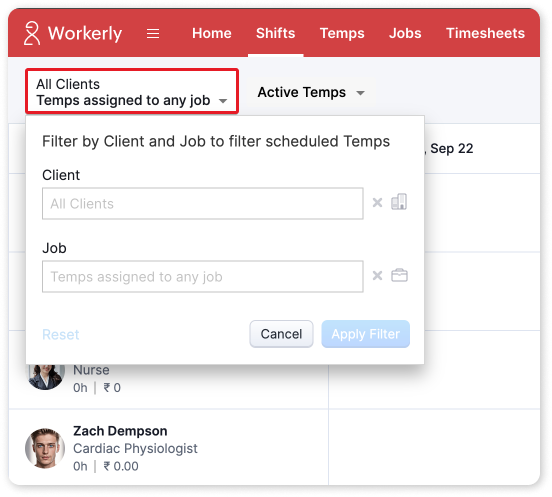
- In the Shifts tab, an Open Shift row will appear above all listed temps. Click + Shift to create Open Shifts for the selected job. Additionally, you can view the total temp matches available for the job by selecting ##Total Matches.
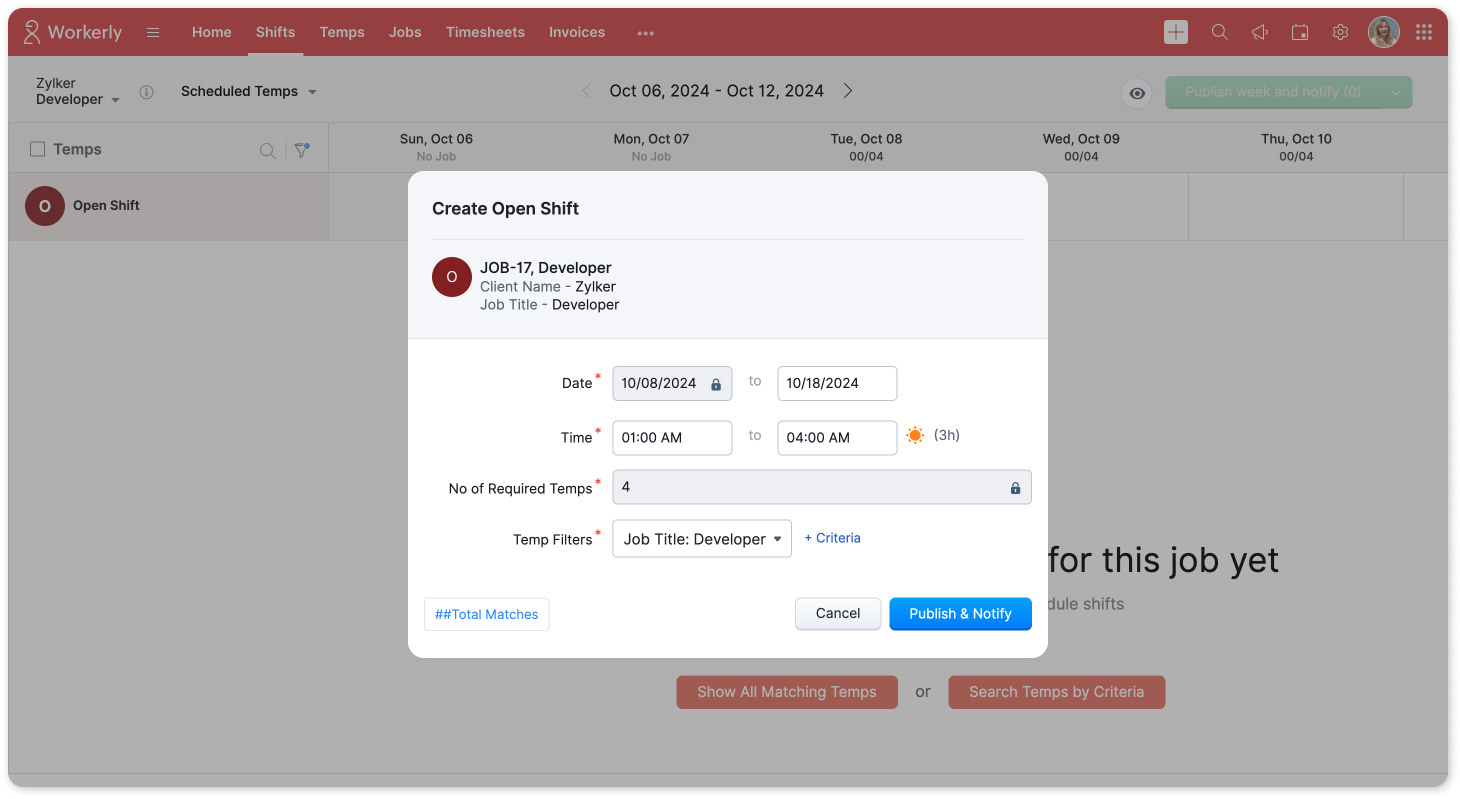
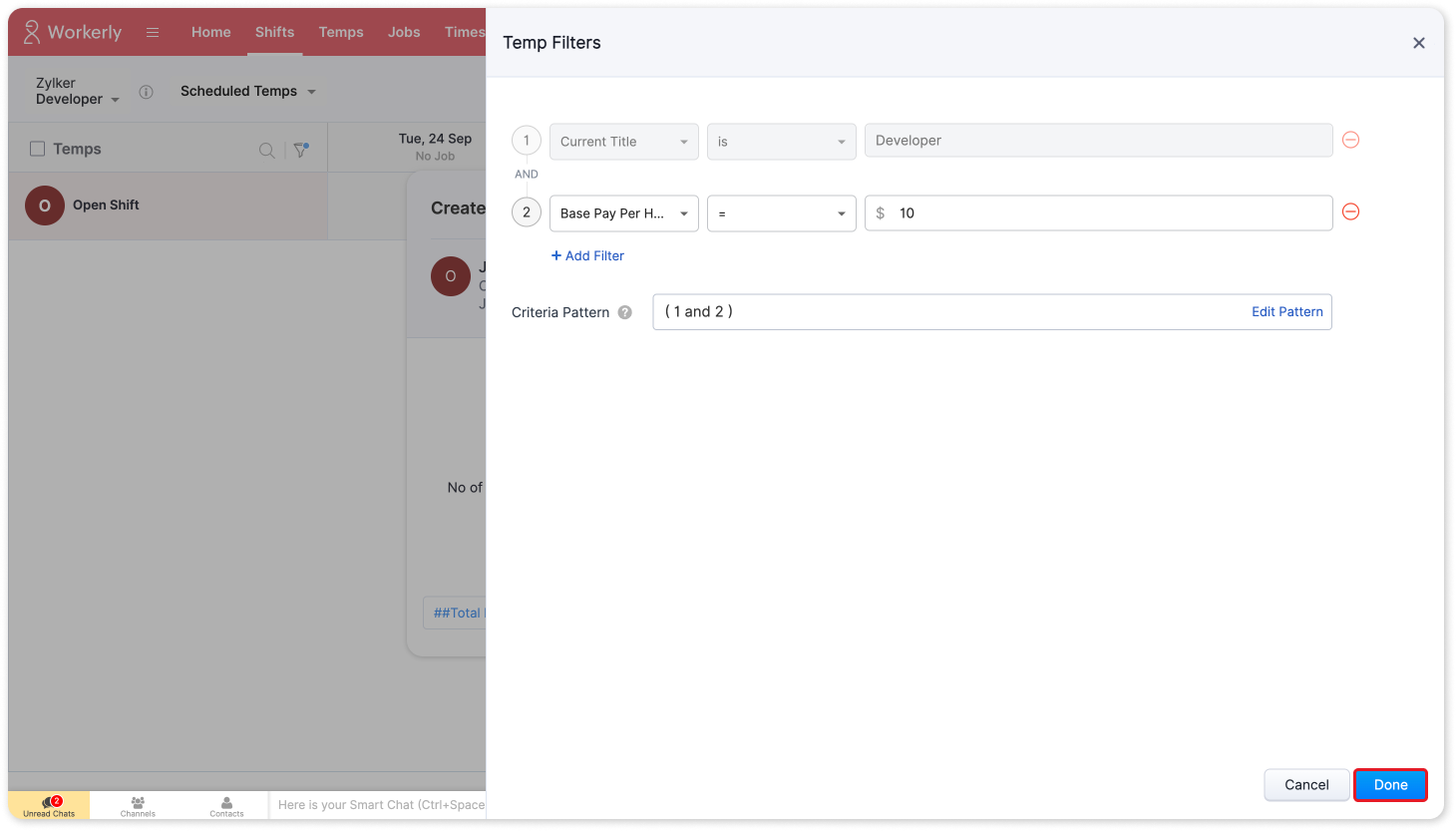
- If required, apply criteria to Temp Filters to narrow down suitable temps, and click Done.
- Click Publish & Notify to finalize and save the Open Shifts.
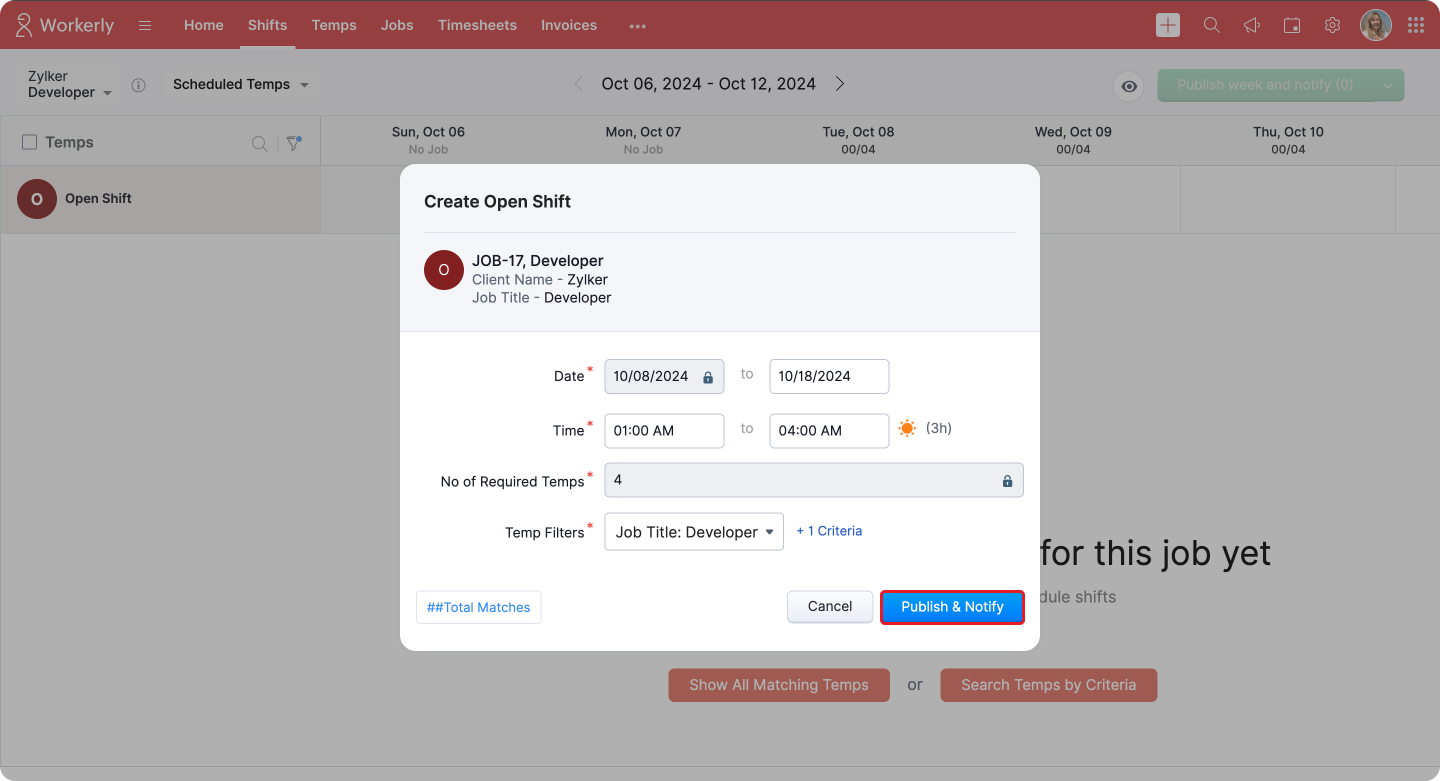
- Once the Open Shifts are published, you can view the progress of the shift through a status chart. This chart breaks down the temps' responses as follows:
- Pending: The number of temps yet to respond to the shift invitation.
- Accepted: The number of temps who have accepted the shift.
- Rejected: The number of temps who have declined the shift.
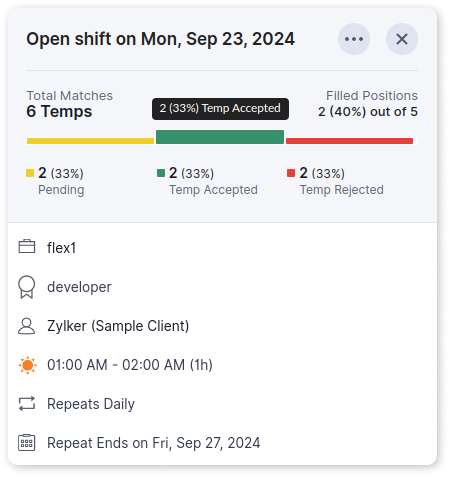
Additionally, the chart provides real-time updates on filled positions out of the total number of required temps, helping you track how quickly the open shift is being filled.

Note:
Temp acceptance settings are applicable for existing jobs, but only new jobs will have the option to create Open Shifts. This distinction ensures that the Open Shift feature is available for newly created jobs while allowing temp acceptance rules to continue for ongoing jobs.
Please note, this change will take effect after the beta version is fully released.
Please note, this change will take effect after the beta version is fully released.
Benefits
- Empowers Temps: Temps can view and claim shifts that fit their schedule, giving them more autonomy and control over their work-life balance.
- Fills Vacancies Fast: By encouraging temps to pick up shifts proactively, you minimize downtime and keep your business running smoothly, even during unexpected staffing shortages.
- Customizable Filtering: With advanced filters, you can ensure that the right temps see the right shifts, based on job requirements, skills, and availability.
- Works Across Industries: Whether in healthcare, retail, hospitality, or manufacturing, Open Shifts provides a versatile solution to your staffing needs.
By using Open Shifts, you can fill staffing gaps in real time and empower temps to manage their schedules for smooth business operations.
Questions? Suggestions? Feel free to leave a comment below or reach out to our support team at support@zohoworkerly.com.
Regards,
Team Zoho Workerly
Topic Participants
Akshaya P
Recent Topics
Android app sync problem - multiple devices have same problem
Hello, I am having a problem with synchronization in the Android app. When I create a drawing, the data does not sync correctly—only a blank note is created without the drawing. I tested this on multiple devices, including phones and tablets, and theHow can i resend a campaign to only one of the recipients on the original campaign
How can i resend a campaign to only one of the recipients on the original campaign ? Sincererly, MikeHow to show branch instead of org name on invoice template?
Not sure why invoices are showing the org name not the branch name? I can insert the branch name using the ${ORGANIZATION.BRANCHNAME} placeholder, but then it isn't bold text anymore. Any other ideas?Marketing Automation Requirements Questions
I would like to set up a multi-email drip campaign- please see the structure below and confirm if I can achieve this set up in Zoho marketing automation. Where applicable, highlight gaps and workarounds. Thanks Drip email campaign- Can I create one dripQuestion about using custom_fields in Storefront Add-to-Cart API (error 2003 – required details)
Hi everyone, I’m working with the Zoho Commerce Storefront API, specifically the Add to Cart endpoint: POST /storefront/api/v1/cart According to the documentation, this endpoint supports a custom_fields parameter for adding line-item custom data. I’mCan a project be cloned?
Good afternoon, greetings. I would like to ask if it's possible to clone a project in Microsoft Project. I found a way to do it using templates, but I'm not sure if there's a direct way to clone a project. Thank you in advance for your attention, andTimesheet Tasks in Zoho Books: associate to service item
How do we associate a service item to timesheet tasks in Zoho Books? For example: Joe spent 5 hours on project:task1 which is Service Item#1 (Income:Service1). When the invoice is issued thru the Project Invoice section, this is not available. When theTask/Activity indicator in SalesPipeline overview has disappeared
I Just logged in my ZOHO CRM first 2026 checking my salespipeline overview , Every record card used to show an indication that there was an open task (Yellow if the expiry date was close, red if the expiry date was today and grey when it had expired).Tip #56- Accessibility Controls in Zoho Assist: Hearing- 'Insider Insights'
As we begin the new year, it’s a great time to focus on making our tools more inclusive and accessible for everyone. Remote support often involves long hours in front of screens, varying lighting conditions, and users with diverse accessibility needs.Zoho Desk Android app update: Table view for All Departments view, custom button
Hello everyone! In the latest version(v2.9.25) of the Zoho Desk Android app update, we have introduced Table view for the 'All Departments' view in the ticket module. We also have supported an option that allows tickets in the Table view to be sortedWhat's New - December 2025 | Zoho Backstage
In December, Backstage introduced a focused set of updates that improve how you manage registrations, communicate with attendees, and track participation. These enhancements are designed to give organizers greater flexibility and clearer control acrossAdd multiple users to a task
When I´m assigning a task it is almost always related to more than one person. Practical situation: When a client request some improvement the related department opens the task with the situation and people related to it as the client itself, the salesmanA Roundup of Zoho Sprints 2025
Sorting Custom Date in API isn't working w pagination limit
How can we sort a custom field with DATE using pagination? Starting at page=1 then moving to page=2 with a limit of 10 each, its all messed up and even shows some of the same records as page 1? https://www.zohoapis.com/crm/v2/INVOICE_MODULE/search?criteria=(FM_Contact_ID:equals:1234)&sort_by=Invoice_Date&sort_order=desc&per_page=10&page='SAP Business One(B1) integration is now live in Zoho Flow
We’re excited to share that SAP Business One (B1) is now available in Zoho Flow! This means you can now build workflows that connect SAP B1 with other apps and automate routine processes without relying on custom code. Note: SAP Business One integrationEnhancement in Role and Profile mapping of agents in Sandbox
Hello everyone! We have brought in a modification in the way users are mapped to a particular role and profile in Sandbox. What has changed? When agents are copied from production to Sandbox: If a user's current role and profile is available in Sandbox,The reason I switched away from Zoho Notebook
My main reason for switching to Zoho was driven by three core principles: moving away from US-based products, keeping my data within India as much as possible, and supporting Indian companies. With that intent, I’ve been actively de-Googling my digitalDecimal places settings for exchange rates
Hello, We are facing issues while matching vendor payments with banking feeds. As we often import products/services exchange rate comes into play. Currently, ZOHO allows only six digits for decimal places. We feel that conversions like JPY to INR requireZoho removed ability to see all Scheduled Reports!
If you are not the owner of a scheduled report, Zoho recently removed the capability to see each scheduled report. As an admin who relies on seeing all scheduled reports being sent, this is a terrible update. Now I cannot see ANY scheduled reports...even the ones I am being sent!! This should be a setting for admins to control. This is a bad update.Automate Backups
This is a feature request. Consider adding an auto backup feature. Where when you turn it on, it will auto backup on the 15-day schedule. For additional consideration, allow for the export of module data via API calls. Thank you for your consideration.GCLID and Zoho Bookings
Is there anyway to embed a Zoho Bookings signup on a landing page and pass the GCLID information? More specifically, can this be done using auto-tagging and not manual tagging the GCLID? I know Zappier has an integration to do this but is there a betterMerge Items
Is there a work around for merging items? We currently have three names for one item, all have had a transaction associated so there is no deleting (just deactivating, which doesn't really help. It still appears so people are continuing to use it). I also can't assign inventory tracking to items used in past transactions, which I don't understand, this is an important feature moving forward.. It would be nice to merge into one item and be able to track inventory. Let me know if this is possible.Create PO from an invoice
We are a hardware and software sales company which receives orders over the internet. We drop ship most of our products from a warehouse outside of our company. Our orders get sync'd into Zoho from our store via onesaas as invoices. It would be greatBlueprint or Validation Rules for Invoices in Zoho Books
Can I implement Blueprint or Validation Rules for Invoices in Zoho Books? Example, use case could be, Agent confirms from client that payment is done, but bank only syncs transactions tomorrow. in this case, Agent can update invoice status to done, andResetting auto-number on new year
Hi everyone! We have an auto-number with prefix "D{YYYY}-", it generates numbers like D2025-1, D2025-2, etc... How can we have it auto-reset at the beginning of the next year, so that it goes to D2026-1? Thanks!The Social Wall: December 2025
Hello everyone! As we wrap up the final edition of the Social Wall for 2025, it’s the perfect time to look at what went live during December. QR code generator From paying for coffee to scanning metro tickets, QR codes are everywhere and have made everydayCustom AI solutions with QuickML for Zoho CRM
Hello everyone, Earlier, we introduced Custom AI Solutions in CRM that let you access QuickML for your custom AI needs. Building on that foundation, we’ve now enabled a deeper integration: QuickML models can be seamlessly integrated into CRM, and surfaceHelper Functions and DRY principle
Hello everyone, I believe Deluge should be able to use 'Helper functions' inside the main function. I know I can create different standalones, but this is not helpful and confusing. I don't want 10000 different standalones, and I dont want to have toIntroducing workflow automation for the Products module
Greetings, I hope all of you are doing well. We're happy to announce a few recent enhancements we've made to Bigin's Products module. The Products module in Bigin now supports Workflows, enabling you to automate routine actions. Along with this update,Zia Formula Expression Generator for Formula fields
Hello everyone! Formula fields are super useful when you want your CRM to calculate things for you but writing the expression is where most people slow down. You know what you want, but you’re not fully sure which function to use, how the syntax shouldIssue with Zoho Creator Form Full-Screen View in CRM Related List Integration
Hi Team, We have created a custom application in Zoho Creator and integrated it into Zoho CRM as a related list under the Vendor module, which we have renamed as Consignors. Within the Creator application, there is a form named “Pickup Request.” InsideWrapping up 2025 on a high note: CRM Release Highlights of the year
Dear Customers, 2025 was an eventful year for us at Zoho CRM. We’ve had releases of all sizes and impact, and we are excited to look back, break it down, and rediscover them with you! Before we rewind—we’d like to take a minute and sincerely thank youRestrict Users access to login into CRM?
I’m wanting my employees to be able to utilize the Zoho CRM Lookup field within Zoho Forms. For them to use lookup field in Zoho Forms it is my understanding that they need to be licensed for Forms and the CRM. However, I don’t want them to be able toUnknown table or alias 'A1'
I would like to create a subquery but i am getting the following error: Unknown table or alias 'A1' used in select query. This is the sql statement: SELECT A1.active_paying_customers, A1.active_trial_customers, A1.new_paying_signup, date(A1.date_active_customers),in the Zoho creator i have address field based the customer lookup im selecting the addresss , some times the customer address getting as null i want to show as blank
in the Zoho creator i have address field based the customer lookup im selecting the addresss , some times the customer address getting as null ,i want to show as blank instead of showing null. input.Billing_Address.address_line_1 = ifNUll(input.Customers_Name.Address.address_line_1,"");Question about upgrade and storage space Zoho Notebook
After upgarding my Zoho Notebook plan, I am running into the following issue. I just upgraded from a free Zoho Notebook subscription to Pro Lite after I got a notification in my Window Zoho Notebook desktop app saying that I had run out of space. However,Printing to a brother label maker
I see allot of really old unanswered posts asking how to print to a label maker from a zoho creator app. Has their been any progress on providing the capability to create a customized height & width page or print template or whatever to print labels?Sync desktop folders instantly with WorkDrive TrueSync (Beta)
Keeping your important files backed up and accessible has never been easier! With WorkDrive desktop app (TrueSync), you can now automatically sync specific desktop folders to WorkDrive Web, ensuring seamless, real-time updates across devices. Important:Track online, in-office, and client location meetings separately with the new meeting venue option
Hello everyone! We’re excited to announce meeting enhancements in Zoho CRM that bring more clarity and structure to how meetings are categorized. You can now specify the meeting venue to clearly indicate whether a meeting is being held online, at theAnnouncing new features in Trident for Mac (1.32.0)
Hello everyone! We’re excited to introduce the latest updates to Trident, which are designed to reinforce email security and protect your inbox from evolving threats. Let’s take a quick look at what’s new. Deliver quarantined emails. Organization adminsNext Page