What's New in Zoho Inventory | January - March 2025
Hello users,
We are back with exciting new enhancements in Zoho Inventory to make managing your inventory smoother than ever! Check out the latest features for the first quarter of 2025. Watch out for this space for even more updates.
Email Insights for Sales Orders
We have introduced the Email Insights feature for Sales Orders in Zoho Inventory. With this feature, you can track emails sent for Sales Orders and view when the email was opened. The 'Client Viewed' filter allows you to find Sales Orders that have been viewed via email by the recipient.

Stock Availability Filter in Stock Counts
We have added a Stock Availability Filter to Stock Counts. This filter allows you to filter and add items to a stock count based on their stock availability, making the counting process more efficient.
View and Customize Stock Status in Transactions
When creating a transaction, you can now see both the Stock on Hand and the Available for Sale quantity for each item. The displayed quantity will depend on the selected View option.

Export Bin Locations Report
You can now export the Bin Locations Details Report and Bin Location Transaction Summary Report in your preferred format such as PDF, XLS, or XLSX. This enhancement makes it easier to analyze your bin-level inventory data.
To export a bin locations report, go to Reports > Bin Locations Details Report under Inventory
Add Dropshipping Address in Sales Orders
You can now add a dropship address in your Sales Orders. This address is used exclusively for the specific transaction and will not be saved to the customer's additional address list. You can also view and copy addresses from existing customers when setting the dropship address.
To add a dropshipping address, go to Sales > Sales Orders, edit/create a sales order, and click + Dropshipping Address.

New & Improved Zoho Inventory Reports
Introducing enhancements to Inventory reports for better control and visibility. The Stock Summary Report now supports custom reports, amount columns, and a stock tracking mode filter. Bulk export is available for up to 500,000 records (based on your plan) for key reports like Inventory Summary and FIFO Cost Lot Tracking. Purchase Order Reports now offer detailed columns such as Quantity Ordered, Received, In Transit, and Late By Date. Custom reports, Show/Hide Columns, and advanced filters are now supported across various reports including Inventory Aging, ABC Classification, Committed Stock, Product Sales, Valuation, Landed Cost, and Active Purchase Orders. The Sales by Item Report adds a Report Basis filter, while the Sales Return History Report gets a complete revamp with status tracking, return reasons, grouping, customizations, and scheduled exports. The Inventory Valuation Summary includes a new Stock Account column with filters, and you can now exclude transfer orders in Inventory and Stock Summary reports. These changes will provide a more flexible and insightful reporting experience.
Display Type for Lookup Custom Fields
We now support different display types for lookup custom fields. You can choose between a List view and a Dropdown view. This feature is currently available for specific lookup modules, like items, vendors, purchase orders, and customers.
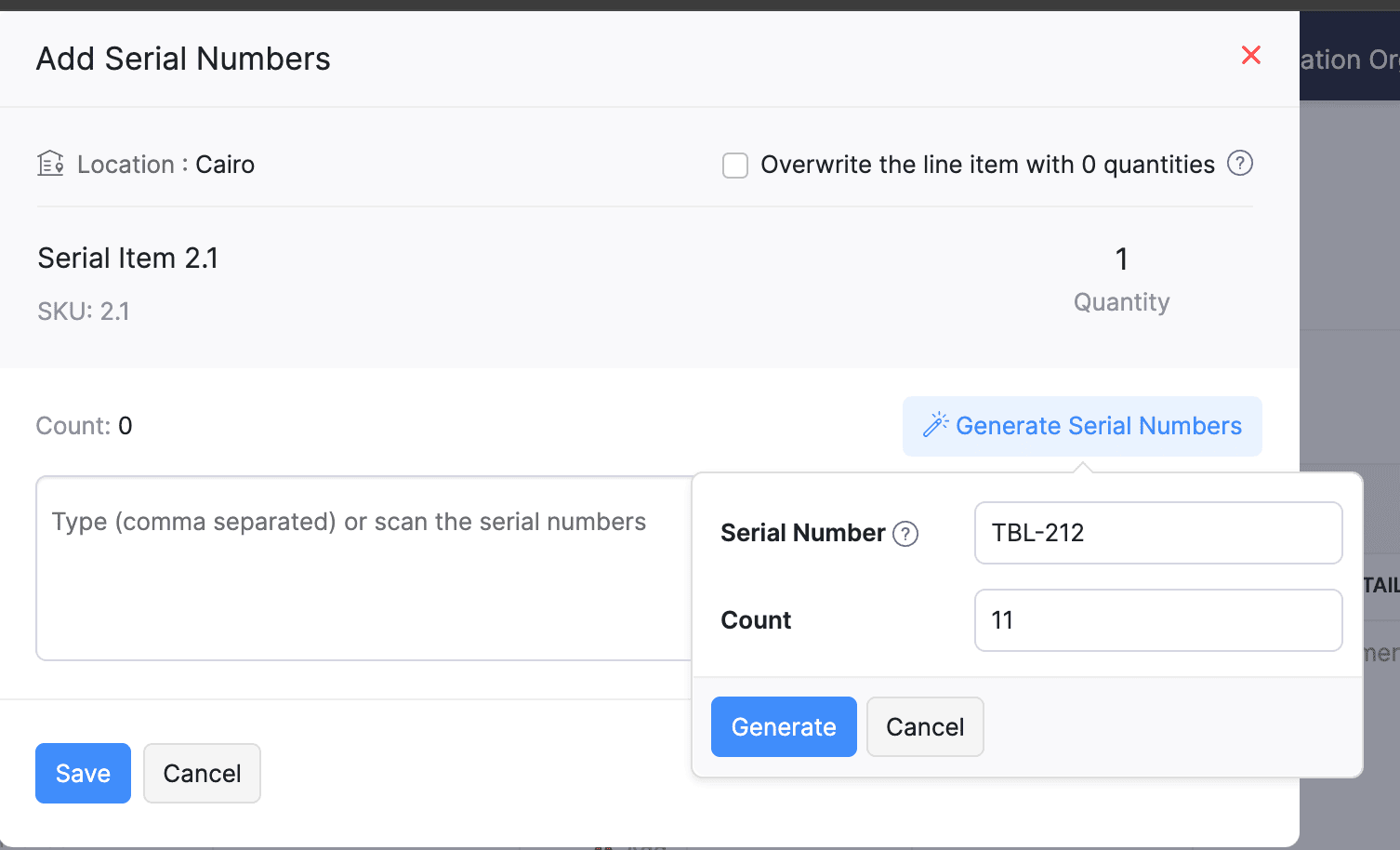
Generate Serial Numbers in Inward Transactions
Introducing support serial number generation for inward transactions. You can set a starting serial number and specify the required count to ensure precise inventory tracking and save time.
Note: The starting serial number must always end with a numeric value.
To generate serial numbers, select an item from the item table, click Add Serial Numbers, then select Generate Serial Numbers. Enter the starting value and count, then click Generate.
Note: The starting serial number must always end with a numeric value.
To generate serial numbers, select an item from the item table, click Add Serial Numbers, then select Generate Serial Numbers. Enter the starting value and count, then click Generate.
Batch Tracking Enhancements
Batch Tracking just got more powerful and flexible with some major enhancements. You can now create and edit batches directly from the item details page, making management easier. A new return option allows items to be returned to the same sold batch, improving stock accuracy. You can also use the same batch across multiple line items in purchase transactions. Batch status control lets you mark batches as Inactive, keeping them out of transactions while retaining them for reports. Plus, all batch activity including creation, edits, restocks, and transfers is now visible in the Audit Trail report.
Item Description for UPS Line Items
We have improved the UPS Paperless Invoice feature by introducing the ability to add and edit item descriptions and unit prices individually for each line item within a package. Previously, a single description was applied to all items in a package, limiting the level of detail you could provide. With this update, you now have more control and flexibility.

Enhanced Shopify Integration
We have improved the shopify integration. You can now set sync frequency and mapping options for each store separately. Item sync runs every 24 hours by default, but you can also set it up manually if needed. Non-taxable items are now created with the correct tax exemption. When setting up Sales Order sync, you’ll pick a start date and can set how often it runs. Each store can now sync independently. You can also decide if sales orders should be fetched to Zoho Inventory under a single customer or create new customers using fields like email or name. Now, sync history includes filters for sync type and status, making it easier to show both successful and failed sync.
To integrate Shopify with Zoho Inventory, go to Settings > Integrations & Marketplaces > Shopify
Pin Columns in Transaction List Page
You can now pin up to two columns in the transaction list page in both default and custom views to keep key information visible while scrolling. This feature is available when a view contains more than eight columns.
To pin columns, go to any module, click the Customize Columns icon, hover over the fields, click the Pin icon, and then click Save.

Edit Etsy Orders
You can now edit orders fetched from Etsy with ease. Previously, Etsy orders were imported with non-editable details and tax. Now, you can edit these orders and override the tax applied based on the tax rate configured at your organization level.
To integrate Etsy, go to Settings > Integrations & Marketplaces > Etsy
Clone Delivery Challans
You can now duplicate delivery challans by cloning the existing ones, thereby saving time.
To clone a delivery challan, go to Delivery Challans, select a challan, click the More icon, and select Clone from the dropdown.

Enhanced Export and Print Preferences for Reports
We have added new customization options for report exports and print preferences. You can now set custom file names for exported reports, display column headers on each PDF page, and organize report data into separate pages based on the group by field.
Multi-Factor Authentication (MFA) for Portals
We are improving security by adding Multi-Factor Authentication (MFA) to both Customer and Vendor Portals. This extra security step requires users to enter a Time-Based One-Time Password (TOTP) along with their login credentials.
Admins can turn on MFA in the Customer Portal settings, making it mandatory for customers and vendors to set it up using an authenticator app. Once enabled, users will need to enter a TOTP code each time they log in. If needed, admins can reset MFA for users.
Note that even if MFA is disabled later, users that have already set it up will still need to enter the TOTP code. If they lose access to their authenticator app, they should contact an admin for a reset.
To enable multi-factor authentication for your customers and vendors, go to Settings > Preferences > Customer Portal. Check the Enable multi-factor authentication (MFA) option.

Import Move Orders and Putaways
We have introduced import option for the Move Orders and PutAway modules. You can now seamlessly import data for these, making bulk updates and record creation faster and more efficient.
To import move orders and putaways, go to Transfer Orders/Putaways under Inventory > Click More in the top right corner > Import Transfer Orders/Putaways.
Attach Documents in Purchase Receives
You can now upload, attach, and manage documents directly from the Purchase Receive creation and edit page.
To attach a document in purchase receive, go to Purchases > Purchase Receives > + New > Upload File.

Print & PDF Support for Purchase Receives
You can now generate and print or download your purchase receives. We have also supported a standard template with which you can view the PDF of your purchase receives to simplify record-keeping.
To print or download a purchase receive, go to Purchases > Purchase Receives. Select the purchase receive and click PDF/Print.
To view the PDF of a purchase receive, go to Purchases > Purchase Receives. Select the purchase receive and enable the Show PDF View option on its details page.

Filter Lookup Custom Fields
You can now filter your lookup custom fields by using custom views and setting criteria. The records will be shown based on the chosen custom view and the rules set by you, making sure all the conditions are met.

Leave Organization Option
We have introduced the option to leave an organization from the Manage Organizations page. However, if you are the admin who created the organization or the only admin, you will need to delete the organization instead. Additionally, before you leave, ensure the integrations are disabled, if any.

That's all for now, folks! Try these new features and share your feedback. If you need assistance, reach out to us at support@zohoinventory.com.
Best Regards,
The Zoho Inventory Team
Topic Participants
Akshin Eniyavel S
Jahmonesalmon
Roshin Uchakavil
Marie Sharps Canada
Tocayah
Recent Topics
Reverse Charge Services (Non-EU) Showing Correctly in 84/85 and 67, But Missing in Box 46 - Germany
Hi, I'm located in Germany and I’ve set up my expenses for non-EU services (e.g., OpenAI, DeepSeek) under the reverse charge mechanism (§ 13b UStG) in Zoho Books, and I noticed some discrepancies in the VAT Summary Report. What’s Correct: Reverse ChargeZoho Live Chat/Support
What is going on with Zoho support lately? I've tried to use the live chat feature 4 different times and it refuses to connect to any (despite waiting over 30 minutes one of the tries). I finally gave up and emailed my question nearly a week ago and stillCan we have a module to records Certificate No and TDS rates for Lower TDS Certificates by the vendors ?
Can we have a module to records Certificate No and TDS rates for Lower TDS Certificates by the vendors ?Tip #38- Track Organizational Changes: A Guide to Using Action Log Viewer- 'Insider Insights'
Hello Zoho Assist Community! Ever needed to trace who did what and when within your remote support operations? Let’s say your support team is growing, and you want to monitor key activities like settings updates, user invites, module changes, or permissionAnswer Bot - Issues with language recognization
When a user enters the phrase "gift vouchers" into the chatbot as their first message, the bot responds in French, even though: The default bot language is set to English The user's browser language settings are set to English All translate settings inTip of the Week #67– Avoid confusion – Mark duplicate threads.
When customers send the same message to multiple email addresses, such as support@ and sales@, your team may end up seeing the same message in different inboxes. This creates confusion, risks double replies, and clutters your workspace. Use the Mark asFinal Reminder: Discontinuation of Older ASAP Widgets and Mobile SDK Support
We launched the new ASAP Help Widget last year, introducing a unified and enhanced experience. Since then, older configurations have been placed in read-only mode, with all major updates and improvements built exclusively on the new version. As part ofZoho Subscriptions -- Zoho Commerce integration
Is there integration between Zoho Subscriptions and Zoho Commerce? I would like to create subscription plans in Zoho Subscritpions and list them for on my Zoho Commerce store.Website show Blank white screen
Customer called me to tell me my website is currently down upon review it shows a white screen however I can access everything via editor. JITCADCAM.comHow manufacturing analytics can transform your enterprise with Zoho Projects Plus
Did you know that every single car is made up of 30,000 to 40,000 individual parts? All of these are manufactured meticulously in various facilities before being assembled into one. The global manufacturing industry spans a wide range from deliveringCustomize your SalesIQ live chat with Custom CSS and blend it with your website design
Hi everyone. Hope you all are having a great day! SalesIQ offers various inbuilt customization choices for your chat widget and window like changes in colour, theme, font etc. Although these choices are many, sometimes they may not match with the designFrom Email Address When Replaying to Missed Chats
One of the most common things we do is follow up on every missed chat. Missed chats are like money in the bank, people just waiting for your response and to start a relationship with our companies. However, SalesIQ only lets you respond from 1 email address from your entire account?! We have happily paid for 4 subscriptions, but our users cannot reply from their own email address? How are we supposed to build customer relationships? The fix to this issue is so simple, just load in the logged inNarrative 6 - The impact of rebranding
Behind the scenes of a successful ticketing system - BTS Series Narrative 6 - The impact of rebranding Every organization has invested in branding to set itself apart, and that should be reflected in the help desk. Zoho Desk enables organizations to applycustom color palette for picklist in Sheet
Migrating over from Google Sheets and missing the ability to customize the individual item colors of my picklist/dropdown menus. Is this something that is possible? A search showed me creating a custom color palette in Analytics is possible but I am notWhat's New - July 2025 | Zoho Backstage
Start smart, end strong. From knowing who’s coming to celebrating who showed up, July’s updates help you run events that feel organized from the first invite to the final thank you. Planning an event used to be like writing a choose-your-own-adventureImage Upload Field API get encrypted ID and sequence number
Hello is there a way to extract the encrypted id and sequence number from image upload fields through the Zoho CRM API? I created a custom script with javascript within Zoho CRM, but I want to extract the encrypted id and sequence number for all my imagesAttention: Changes to 10DLC TCR pricing and new authentication requirements
Hi everyone, Starting August 1, 2025, The Campaign Registry (TCR) is introducing new pricing changes and a mandatory brand verification process called Authentication+ 2.0, which will affect how you register and manage your 10DLC messaging services. TheseBetter Time Tracking
We need better time tracking customization for IT MSPs. We also need reporting that is built in, rather than having to try and fumble with creating custom reports. We also need to be able to mark whether a ticket has been billed or not, I don't thinkScheduled Tickets Need Updated
There is a very clunky manual way to create reoccurring scheduled tickets. This should be created to be easy for the administrator to create. We create several (10 to 12) reoccurring tickets per account for biweekly and monthly auditing purposes.. TheTeam Feeds Improvements
Team Feeds needs to show a feed of every action within the department. Currently it seems that the feed will only show a ticket that I've personally commented on or interacted with/followed. A feed should be that, a feed. As a manager I would like toBetter Security, Better User Experience | Help Center Update | June'25
As part of our commitment to enhancing user experience and security, we are happy to announce updates to our authentication mechanism. This update introduces several key enhancements designed to improve the password recovery process and streamline theUpload Logo to Account Page
It would be nice to set a logo for an AccountView Agent Collision on Ticket List Page
It would be nice from the ticket listing page (views) to see what agents are working on what tickets rather than having to click into each ticket throughout the day to see what agents are working on what tickets. This functionality would also be desiredRestrict user from viewing the detail standard view
Is there any way to restrict a user(it can be user-field-based) from viewing the detail standard view? Basically, I have created a canvas detailed view so that on some conditions I can hide some data from the users but the standard view client scriptUpload Picture to Contact
It would be nice to upload a profile picture to a contact.Allowing Pictures for Client Contacts
Do you have any plans to allow us to add pictures of our client contacts? There is a silhouette of a person there now, but no way that I can see where I can actually add a picture of the individual.Agent name Alias
I am seeing that Full name of my staffs are written on every ticket response which is not good for some reasons. It is possible to user like this: Manny P. (First Name with Last Name's First Letter) or Manny (First Name) This is want we want to showUnable to add attachments to tickets through Desk API
I able to use the Desk API to generate tickets. However when I try to use the tickets/{ticketId}/attachments endpoint, I always get an Unauthorized error. My app has Desk.Tickets.ALL included in its scope so this should not be an issueWhat's wrong with this COQL?
What's wrong with this COQL? Code returns "invalid operator found". SELECT id, Name, Stage, Account, Created_Time, Tag FROM Production_Orders WHERE (Account = '4356038000072566002' AND Stage NOT LIKE '%customer%') ORDER BY Created_Time DESC LIMIT 200[Feature Request] Add support for internationalized top-level domains mail hosting
This is an important request to add support for internationalized domains mail hosting to https://www.zoho.com/mail/ In this case, that is only limited to domain name/mail address however currently it's already possible for us send mails etc using belowAdd Enable/Disable to Field Rules and other Rules
Hi, Sometimes I have rules setup for fields, and until I want to enable them for use, I can set the fields to Hidden but rules still show them, today you have to delete rules and then recreate them again, would be nice to have a toggle for Enabled/DisabledSyncing stuck for days
Hello when I made an account a few days ago and synced all my notes to it, it is still syncing. My app is only 400mb so I do not know why it is taking so long. Please helpWorkflow runs on every edit despite not ticking the field repeat this workflow whenever a parent is edited.....
Hi, It is my understanding that this workflow should only trigger once. Why is this triggering on every edit of the field? Based on another support query - directly from Zoho, If i tick the box 'repeat this workflow whenever a parent is edited' it shouldHow do you add or update tags on Zoho CRM records via n8n? (Workarounds or best practices?)
Hi all, I’m running into some limitations with the Zoho CRM node in n8n and was wondering how others have handled this: From what I see, the standard Zoho CRM node in n8n doesn’t allow you to add or update tags when creating or updating contacts/leads.API PARAMETER FOR TICKET CLOSED TIME
Hi, Is there a parameter for filtering tickets by closed time in zoho api, i can see closed time in the API response i get, but can't get tickets by that field while calling. Regards, Anvin AliasReply to email addresses wrong.
I have setup my Zoho mail account using my main domain and I also have an Alias setup from a different domain. In Settings - Mail - Compose I have selected to the option "For replies, send using The same email address to which the email was sent to".Meeting integration with Otter.ai
Would love for an integration with an AI transcription service like Otter.ai to be integrated with Zoho Meeting. ThanksHow to close/delete a free creator account?
I have a free zoho creator account associated with my email address that is not being used. I want to become a user of another paid zoho creator account but I can not associate with the paid account with the same email. I assume if I can close or delete the free account I will be able to use the paid account. I have emailed support but no response. Suggestions?Zoho books and zapier causes Invalid data provided
I have been using zoho books with zapier for over 2 years now, everything was working fine. On September 13th my zaps stopped working. Now on step create sales invoice in zoho books i get an error: Failed to create a create_invoice_v2 in Zoho Books TheCRM report
Is it possible to pull a contacts report that also includes the company industry, as well as the company name? I’m having trouble combining company and contact fields – any help is appreciated. Thank you, SamNext Page