Zoho Creator Upcoming Updates — March 2023
Hello all!
Zoho Creator continues to rapidly develop new features and functionalities to help you solve your business challenges. We'll never cease working to amaze you with incredible new updates. And today, we're announcing a neat range of features coming up in March.
-
Form drafts
-
Vertical subforms
-
Creator Extensions
-
Zia Help Assistant
-
Screen Record by Quartz in Zia Help Assistant
- Activity-based user filter
- - - - - - - - - -
Form drafts
Sometimes, your users may find it difficult to finish filling in a form containing a large number of fields. It may take them significant amounts of time, as they don't have all details available at hand—or they could be interrupted and lose the opportunity to complete the form.
In such cases, your users will appreciate it if they can save the partially filled forms and then come back later and resume working on them without any data loss. With this in mind, we'll be launching the Save as Draft feature, which allows users to save up to 3 drafts for each form, for a period of 15 days.
Where can I enable it?
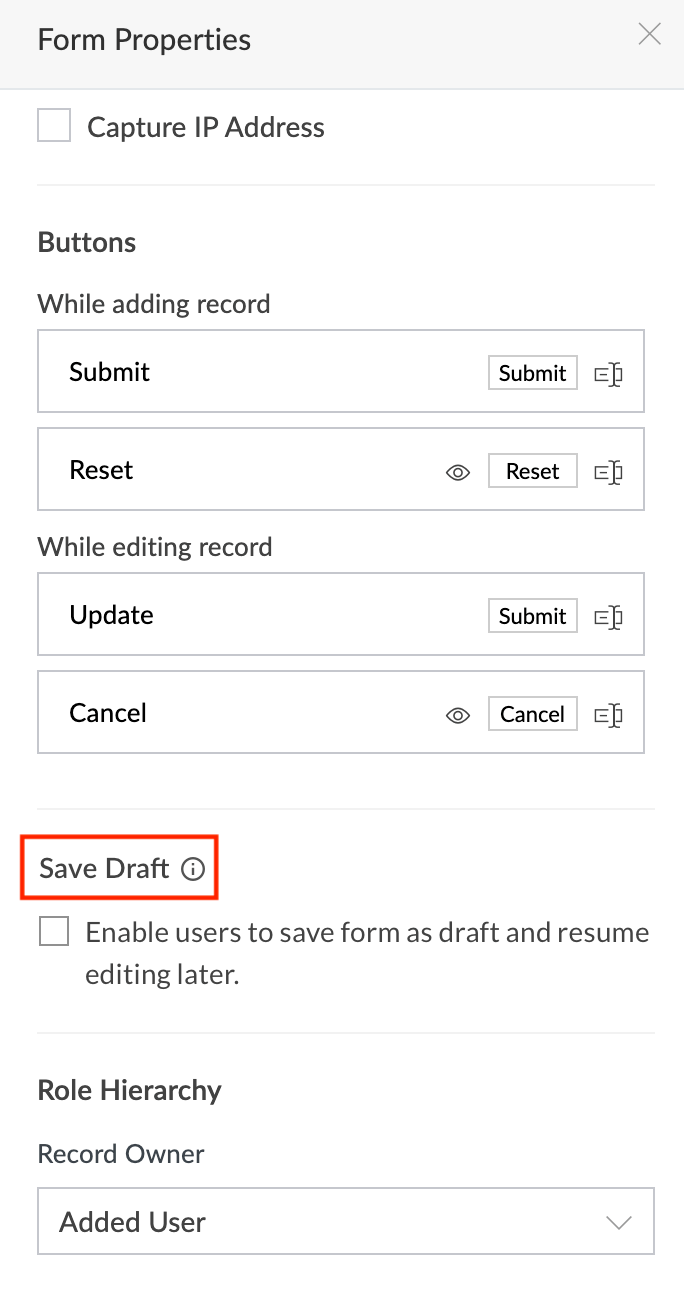
Navigate to the required
Form -> Form Properties -> Save Draft
section. Then tick the checkbox beside Enable users to save form as draft and resume editing later
option.
What should my users do?
-
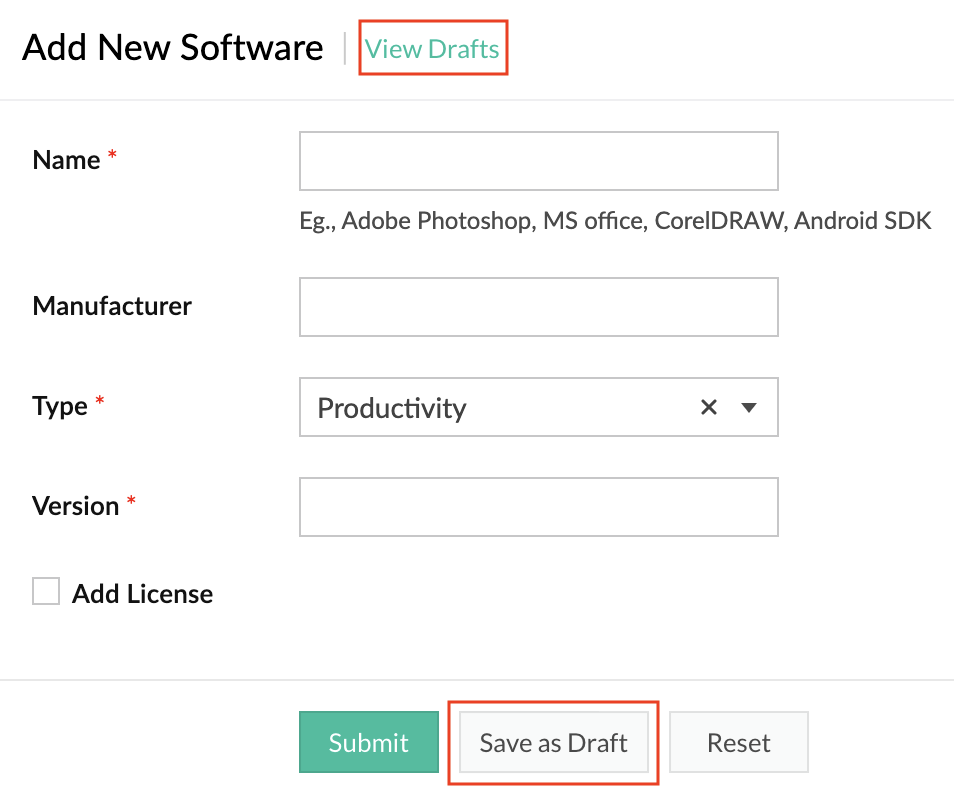
While filling in the form, they'll see a
Save as Draft button. Clicking on it will save the progress they've made up to that moment.
-
The
View drafts
option will list their saved drafts. Click on the required draft to continue editing it and then submit the form.
How do I benefit?
The Save as Draft feature, apart from reducing the hassle for your users, also helps in lessening the risk or impact of accidental data loss.
Applicable for:
C5, C6
Availability:
All DCs
Released on: 05-Jul-23
- - - - - - - - - -
Vertical subforms
Subforms are an invaluable part of Forms, as they enable you to collect and visualize line items in a form. Taking it up a notch, we'll now be introducing the possibility of displaying a subform as a popup, with vertical listing of its fields.
Consequently, with the introduction of the new popup option, we'll be adding a new section,View type, within the
Field Properties
pane of subforms. Further, the existing method of displaying subforms has been christened
Grid
in the View type section, and it'll be the default option going forward. The vertical listing of subforms as popups are called List.
Where can I enable it?
Navigate to the required
Form -> Subform -> Field properties -> View type.
Here choose the
List
option.
How do I benefit?
By displaying subforms as popups, you can simplify the tedious process of filling in forms with a large number of fields, thereby achieving a superior user experience during data entry processes.
Applicable for:
C5, C6
Availability:
All DCs
Released on: 17-Apr-23
- - - - - - - - - -
Creator Extensions
With the aim of enhancing the versatility and extensibility of Zoho Creator, we've come up with a brand new functionality called
Creator Extensions
.
This will open up the possibility of building and delivering Creator components as independent add-ons known as
extensions
, which can be distributed to other Zoho Creator users who can then install and use them in their applications. Extensions enable the delivery of a customized range of functionalities which are not available by default in Creator.
Note:
In the initial phases, only widgets
can be offered as extensions. More components will be added later.
Working with extensions
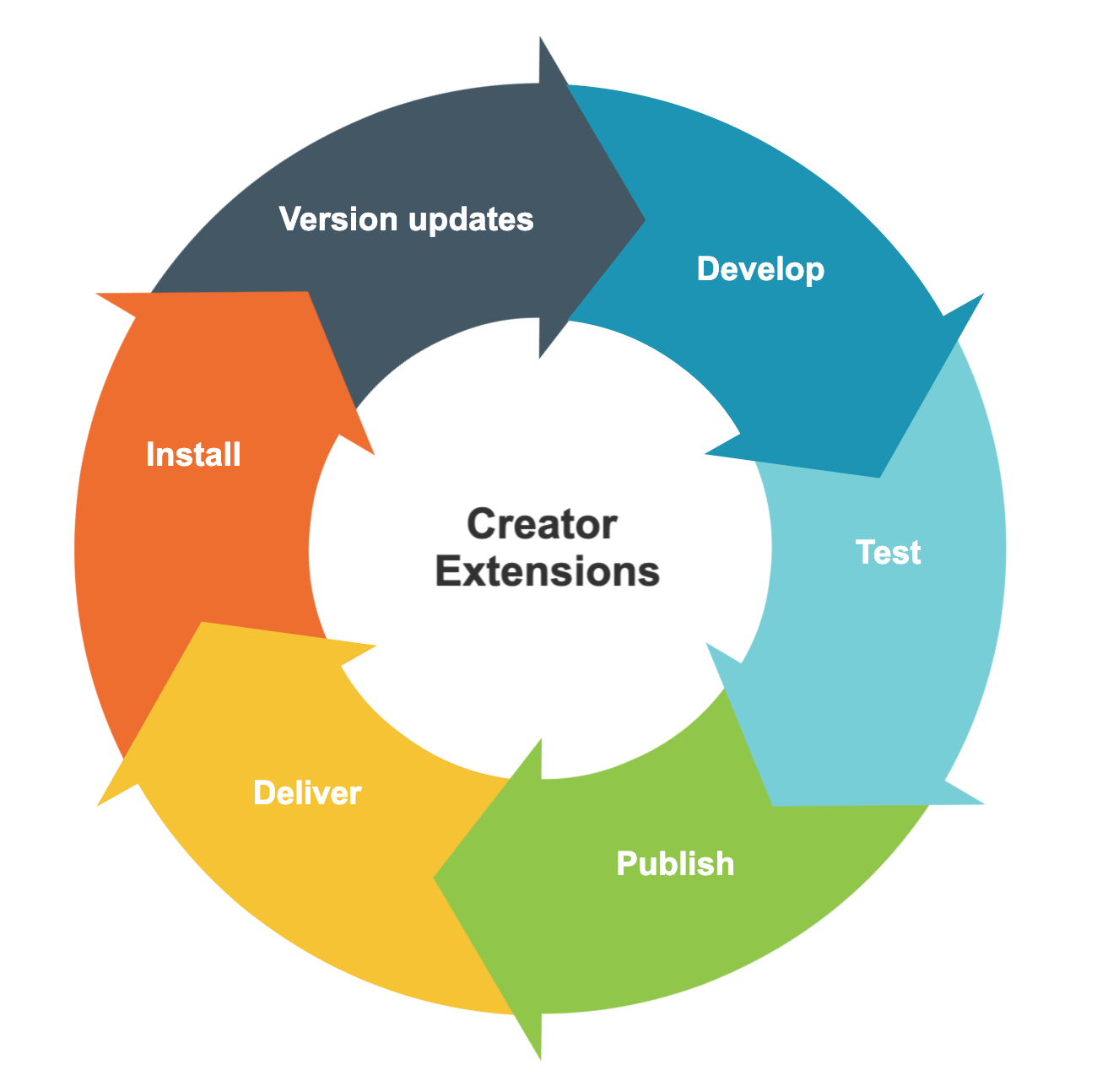
Get started by building a widget, then turn it into an extension in
Sigma, test it out, and publish it. You can choose to distribute it publically on
Zoho Marketplace, where it will be available for all. Later, you can add enhancements and publish new versions.
The lifecycle of an extension
How do I benefit?
You can use our low-code platform to turn your breakthrough ideas into profitable endeavours by building powerful extensions and selling them on Zoho Marketplace. All the while, you can easily manage the entire lifecycle of these extensions.
Applicable for:
C6
Availability:
All DCs
Released on: 23-May-23
- - - - - - - - - -
Zia Help Assistant
Zoho Creator's no-nonsense approach to low-code development, the robustness of the platform's performance, and recent big-ticket investments into AI has been well appreciated by all.
With that in mind, we've come up with a very intuitive new assistant, whose AI-assisted guidance will help upskill your command of Creator and learn more with contextual help. Further, this new, powerful, and all-encompassing help widget will show the entire range of options available to assist you.
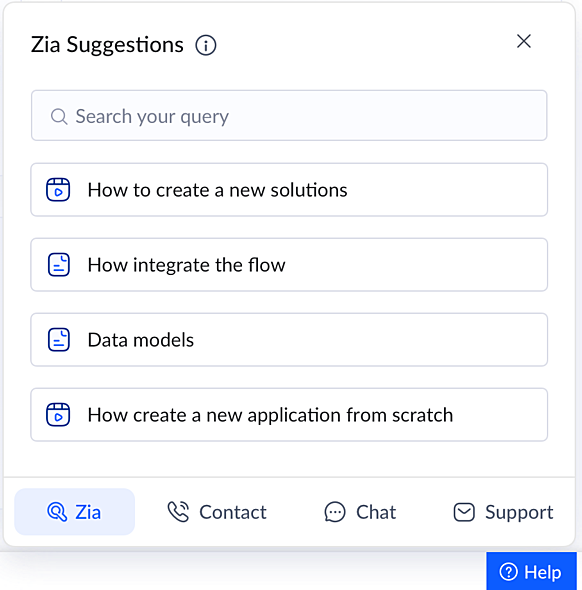
Zia - Our very own AI assistant will scan the entire knowledge base and auto suggest relevant help articles based on your current screen. Say you're in the Solutions section—Zia will list off the articles explaining the procedure to create different solutions (Applications, BI & Analytics, and Integration Flows). Being powered by an advanced NLP engine, Zia has the ability to understand your questions, identify patterns, and suggest the best answers to deliver the assistance you need.
Contact - You'll get a list of our common toll-free support phone numbers. Call us at the number shown for your country and get support over the phone.
Chat - Live chat is a faster and more convenient way to get in touch with our support team. Get instant responses to aid you with your questions.
Support - Use this option to send questions/feedback to support via email. Additionally, from here you can also allow the support team to access your app and help you out. Finally, you can also use the Screen Record option to send us a video recording of the issue you are facing. More details on the Screen Record feature is given further below in this post.
How do I access it?
-
Just click on the
Help
option present in the bottom toolbar of Zoho Creator.
- Then choose the support option you prefer and proceed.
How do I benefit?
Apart from an improved and seamless support experience, the widget will help you get faster resolution, which can improve your business performance and productivity.
Applicable for:
C6
Availability:
All DCs
Released on: 11-May-23
- - - - - - - - - -
Screen Record in Zia Help Assistant
Pushing the boundaries of contemporary support tools, we'll be launching
Screen Record by Quartz, an error debugging and virtual diagnostic tool.
This privacy-first tool will be introduced as a built-in functionality within Zoho Creator, and will be incorporated within the new Zia Help Assistant.
There may be certain cases that can be better conveyed to our support team via a video rather than other options. Instead of writing it all out, you can just record your screen, replicate the issue, and send the video to us without breaking a sweat.
What it means for you
The tool doesn't stop at just letting you record your screen. It comes with an easy video editor which provides quick provisions to further describe your issues, like adding annotations, augmenting a recording with voice overlays, and much more. Most importantly, for privacy purposes, you can trim the video or blur out sensitive portions of the recording to hide important data (like email addresses, etc).
What it means for us
Apart from providing visuals to our support team, this tool is powerful enough to collect, upon you granting consent, relevant data—like client-side and server-side diagnostic metrics, application logs, and network diagnostics—to help us understand the issue better and pinpoint the problem at hand more swiftly.
How does it benefit you?
You can now promptly convey the issue you are facing using Screen Record by Quartz and get accelerated ticket resolution times with no compromise on your privacy, security, or productivity.
Applicable for:
C6
Availability:
US, EU, AU and IN
Release on: 11-May-23
- - - - - - - - - -
Activity-based user filter
Users logging in to their accounts may seem like a trivial everyday occurrence. But keeping track of user login activities enables an organization to monitor behavior exhibited by its users, and helps in performing analysis and bulk actions on users for smoother user management.
Further adding on to the existing filter options (based on application and user status) under Users, we'll be adding a new option, based on
Last login.
How to do it?
Navigate to
Users-> Filter
. Then click on
Last access
and choose the required filter criteria from the dropdown.
How do I benefit?
The filter can help you monitor and audit users based on their login activity in your account, and get actionable information to accelerate the user management process.
Applicable for:
C5, C6
Availability:
All DCs
- - - - - - - - - -
We'll notify you as these features are rolled out. In the meantime, let us know what you think about these updates in the comments below!
That's all we have for March! We'll be back soon with another set of updates.
Regards,
Zoho Creator Team
Topic Participants
Ashwin Vishal R
Damien Cregan
Chapman&Co
Xenios Xenofontos
Sankha MIshra
Sticky Posts
Introducing Zoho Creator's 2025 Release Projection 2
Hello Creators! I'm Prakash, from the Creator product management team, and today I'm delighted to unveil our next set of features as part of Release Projection 2 for 2025. With thoughtful analysis and planning, we've curated powerful new capabilitiesZoho Creator - 2023 Release Projection 1
Hello everyone! A very Happy New Year to you and your family. Hope you're all good and having a great time using Zoho Creator to make your lives easier and your businesses prosper. 2022 was an action-packed year for us at Creator, and we hope to continueZoho Creator User Group meetups in a city near you! - Oct - Nov, 2023
Greetings from the Zoho Creator team! We're hosting a series of Zoho Creator meetups in various cities across the globe, and we'd love to meet you there! Our meetups are a great opportunity to network with industry peers, exchange ideas and best practices,Zoho Creator - 2023 Release Projection 2
Hello everyone! Time truly flies when you're having an incredible journey, and today we mark the completion of an eventful and action-packed six months. It feels like just yesterday when we embarked on this adventure together with the launch of our newUpcoming Updates - August 2022
Hi all, Greetings from the Zoho Creator team! Today we've got news for you on some exciting updates. And rest assured— there’s more to come! In this post, we'll be going over the upcoming features and improvements for this month as mentioned below. A
Recent Topics
Unable to send message;Reason:553 Relaying disallowed. Invalid Domain
i have facing the issue "Unable to send message;Reason:553 Relaying disallowed. Invalid Domain" if i verify domain evertthing i did but still face the same error.ZohoMail is so close to being Perfect BUT
Why don’t you have HILIGHTING???!! I've been trying to find a substitute for Edison Mail but I want & need hilighting (preferably in more than just yellow)! Is this even on your To Do list? I’m so disappointed. 🙄Override Auto Number field?
We are preparing to migrate from Salesforce. In Salesforce, we auto-generate a unique number on our Opportunities (Potentials). If the Opportunity results in a contract, we use that unique number as the Contract number. There are some situations whereUsing a third party service provider want to move directly with Zoho
Hi good day I’m currently using Zoho but I’m using a third party service provider I want to move directly with you guys I’m using Zoho email and invoices and my domain please let me know if it’s possible to move away from the third party provider my emailRequest for Assistance Regarding Email Sending Issue (554 5.1.8 - Email Outgoing Blocked)
Dear Zoho Support Team, I hope this message finds you well. I am writing to request assistance with an issue we are currently facing regarding our Zoho Mail account. Our email account, admin@tuyensinhcanuoc.com, is encountering the following error whenZoho Mail API returns empty inbox (0 messages) but webmail shows 37 unread emails
Hello, I'm experiencing a discrepancy between Zoho Webmail and the Mail API (EU region). **Setup:** - Account: EU datacenter (mail.zoho.eu) - API: Self Client OAuth2 via api-console.zoho.eu - Scopes: ZohoMail.messages.READ, ZohoMail.messages.UPDATE, ZohoMail.folders.READ,Zoho Mail not working
Zoho Mail not workingShipStation and Zoho Inventory
Hello, I am looking to sync zoho inventory with shipstation ZOHO INVENTORY SHIP STATION Sales Order ==> create ORDERS INVOICE <== Shipments What exactly does BETA mean on the Shipstation connector? This is required for me to sign-on in the next month. Thanks in advance for your efforts550 5.4.6 Unusual sending activity detected. Please try after sometime
Hi, I am receiving this error message when trying to send my emails. The only reason I can think why this is happening is my previous two emails were bounced back to me due to a non working mailbox error. I have followed the online links for unblocking but it says there are no blocks on my account. How and when can I get my email working again to send emails? Thanks,E
We are trying to add our Zoho Form embed in our Elementor Page Builder. After adding Zoho Forms widget in elementor page builder it’s displaying in backend page builder but it’s giving 403 error while trying to save, as it’s not reflecting in front end.Formatting Problem | Export to Zoho Sheet View
When I export data to Zoho Sheet View, ID columns are automatically formatted as scientific notation. Reformatting them to text changes the actual ID values. For example, 6557000335603071 becomes 6557000335603070. I have attached screenshots showing thisConnecting Zoho Inventory to ShipStation
we are looking for someone to help connect via API shipStation with Zoho inventory. Any ideas? Thanks. Uricustom module import.
Is there a way to import data into a custom module? Thanks RudyHEIC File Type Viewer
Hi, It would be nice to be able to click on the images in the All Entries/Reports Tables which are HEIC the same as JPG, PNG, etc. so they open in a viewer from Zoho or the Attachment Service, today HEIC requires you to download each image and open itBuilding Toppings #4 - Setting up and using connections in Bigin toppings
When building a topping to extend Bigin's functionality and connect it with third-party applications, creating and handling connections is an important step. Connections provide a secure way for your topping to authenticate and communicate with otherNeed code format to specify default values
Can someone please direct me to the code syntax or the proper translation per the instructions circled below. These instructions don't seem correct.AI Interview Insights: Turn Recorded Interviews into Quick Transcripts & Summaries
Evaluating interviews shouldn’t require replaying long recordings or taking manual notes. With AI Interview Insights, you can now review complete transcripts and AI-generated summaries of your One-way (Recorded) interviews right inside Zoho Recruit. ThisFacing email delivery issues? Verify your domain's DNS records
Have you ever wondered why your legitimate emails are landing in the recipient’s spam folder? Or been surprised to see emails sent from your registered domain getting rejected by recipient email servers? Why does this happen? In most cases, this happensOrder of Departments in Help Desk
In the end user portal, , the departments are sorted by the date of creation of the department (or perhaps their id). Is there a way to choose the display order of the departments or at least to be able to sort them alphabetically?COGS - Account showing negetive
I have multiple COGS account and in these all there is one account is negetive so suggest why it is showing negetive value.?Create CRM Deal from Books Quote and Auto Update Deal Stage
I want to set up an automation where, whenever a Quote is created in Zoho Books, a Deal is automatically created in Zoho CRM with the Quote amount, customer details, and some custom fields from Zoho Books. Additionally, when the Sales Order is converted%PaymentLink%
Does not work. Software creates a BAD link. ....and yes payment options are turned on. Link on the invoice pdf once opened will work but this template is a joke.Google Photos
I am hoping that my question already has a fix. I current have Google synced accounts that I want to get away from. One in particular on is Google photos. Is there any software, or 3rd parties that I can join to back my photos up straight to specifically designated file in the ZOHO cloud that's tied to Docs? Please advise... MikeHow to block a WhatsApp user for sending spam
Is there a way to block those whatsapp users that just come to play and annoy our service, they also spam us. We have a waba service with sales iqZoho Books Items Categorisation/Grouping/Folder
Is there a way to do items categorisation? a folder structure? Product Type A - Option 1/2/3 Product Type B - Option 1/2/3 Current problem : I have more than 50 items on the list, its hard for team to navigate.Cash payments before invoice date
We have been using zoho books for our hospitality business for some time and have been very happy with the system. However in 2025 an update was pushed through and we are now not able to record payments for invoices before the invoice date. the case scenarioCopy / Duplicate Workflow
I have workflows setup that are very similar to each other. We have a monitoring system watching servers, and all notifications - no matter what client it is about - will come from a noreply@ address which is not very helpful in having it auto assigned to the right account. I have setup a workflow that will change the contact name of the ticket (currently it would say noreply@) to the correct customer which is based on the subject line, as that mentions which server the alert it is about. I needTransfer between two customers (Peters Rental account to Peters Private account)
we are a Property Management company. Our customers have to accounts (registered as two customers - Peter Rental and Peter Private On the rental account all income and costs fron rental activities are noted. On the private account all private are notedAutomation#18: Automatically Fetch Values from Contacts to the Tickets Module
Hello Everyone, Welcome to this week's edition, where you can seamlessly sync fields from the Contacts to the Tickets module. For efficient business operations, it's crucial to have details mapped across different modules. Zylker Secure offers antivirusCharge multiple invoices
We use auto-charge/recurring invoicing for 100's of clients. If we create a single manual invoice we can charge it to the credit card for these clients with the CC added to their recurring invoices. If a client has multiple outstanding invoices, is there a way to make one charge for all of the invoices instead of a separate charge to the cc for each invoice?Handling/tracking escalation management in Zoho
Hi all, I am working on finding a tool to register and track our escalation management process. Specifically, this is about client escalations, typically related to project delivery issues. The idea is that we could have some sort of form with core questionsGlobal Choice List share ownership
I have created several forms that use one or more Global Choice Lists. These lists have been published to Org. I would like to allow one or more admins to edit the choices in these lists. Any help appreciated. GeoffSetting up property management in Zoho Books
Hi, I run a property management business that manages property complexes. There are multiple owners, some owning more than one property on the same complex. My role is to manage the fees they pay for maintenance of common areas, such as the swimming poolHow to prevent users from switching price lists in an order?
Hi, I have Zoho Finance integrated with Zoho CRM. My team will be placing orders through the CRM using the Finance module. When creating a new customer I will assign it a price list, I don't want the sales rep to switch to a different Price List, otherMollie Connect in Zoho Books
Have noticed that Zoho Books is missing the most popular payment provider in Europe: Mollie. Knowing that Mollie has a solid Java SDK, why is this not yet implemented in Zoho Books for European customers? More info: https://docs.mollie.com/oauth/ovUnable to change Lookup field from Multi Select to Single Select
I am trying to change a Lookup field in my Zoho Creator form from Multi Select to Single Select, but I am unable to find any option to do this.Simple Callback Notifications Needed
My team are terrible at remembering their CRM callbacks, often due to how long in the future they are set for. Is there a way i can set an e-mail notification for when a callback is due? For example we set it for 9am one day and five minutes before theyPersonal Data (RODO), Cookies / Trackers - ePrivacy
I have noticed several issues that should be addressed on the customer support page. Zoho Desk provides the support portal, but it currently lacks the following options: A GDPR and personal data processing consent checkbox before logging in, located inHow to set a multi-lookup field as mandatory?
Allow Multiple Scheduled Appointments with Zoho Support
Dear Zoho Team, I hope you're doing well. First, thank you for introducing the option to schedule support calls via the Zoho CRM booking link. This has been a fantastic enhancement, eliminating the need for back-and-forth coordination when schedulingNext Page