Zoho Creator Upcoming Updates — March 2023
Hello all!
Zoho Creator continues to rapidly develop new features and functionalities to help you solve your business challenges. We'll never cease working to amaze you with incredible new updates. And today, we're announcing a neat range of features coming up in March.
-
Form drafts
-
Vertical subforms
-
Creator Extensions
-
Zia Help Assistant
-
Screen Record by Quartz in Zia Help Assistant
- Activity-based user filter
- - - - - - - - - -
Form drafts
Sometimes, your users may find it difficult to finish filling in a form containing a large number of fields. It may take them significant amounts of time, as they don't have all details available at hand—or they could be interrupted and lose the opportunity to complete the form.
In such cases, your users will appreciate it if they can save the partially filled forms and then come back later and resume working on them without any data loss. With this in mind, we'll be launching the Save as Draft feature, which allows users to save up to 3 drafts for each form, for a period of 15 days.
Where can I enable it?
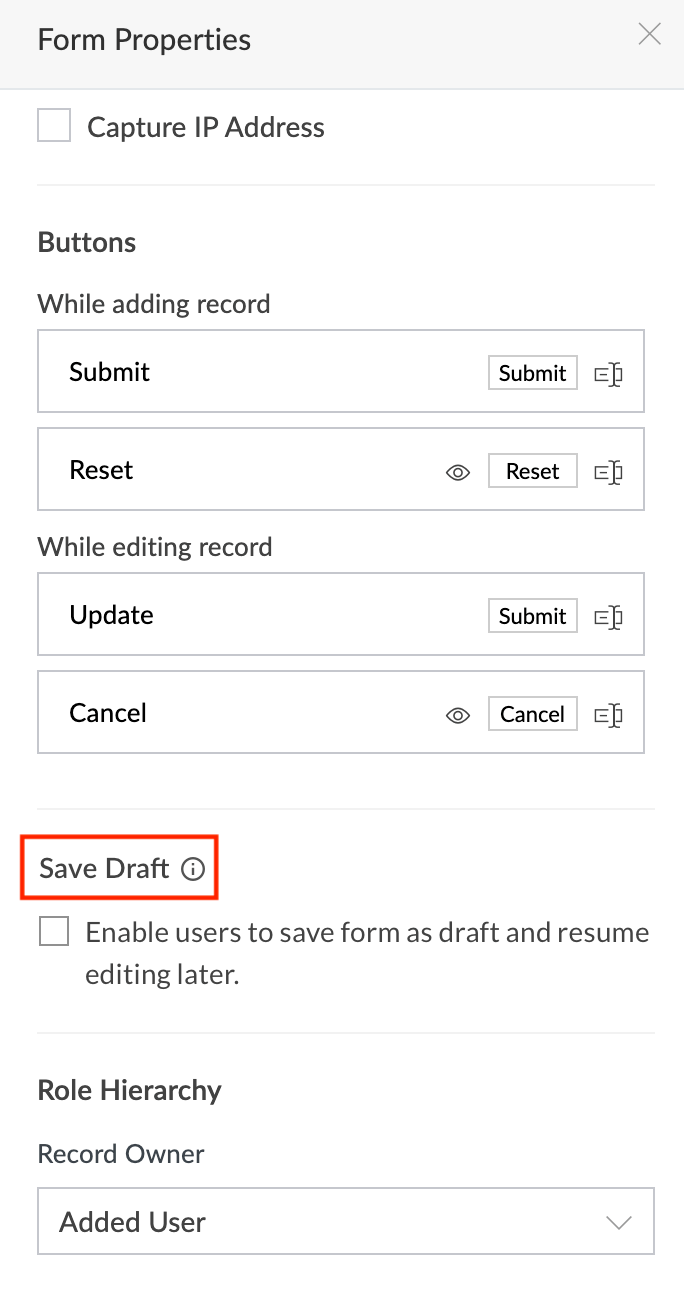
Navigate to the required
Form -> Form Properties -> Save Draft
section. Then tick the checkbox beside Enable users to save form as draft and resume editing later
option.
What should my users do?
-
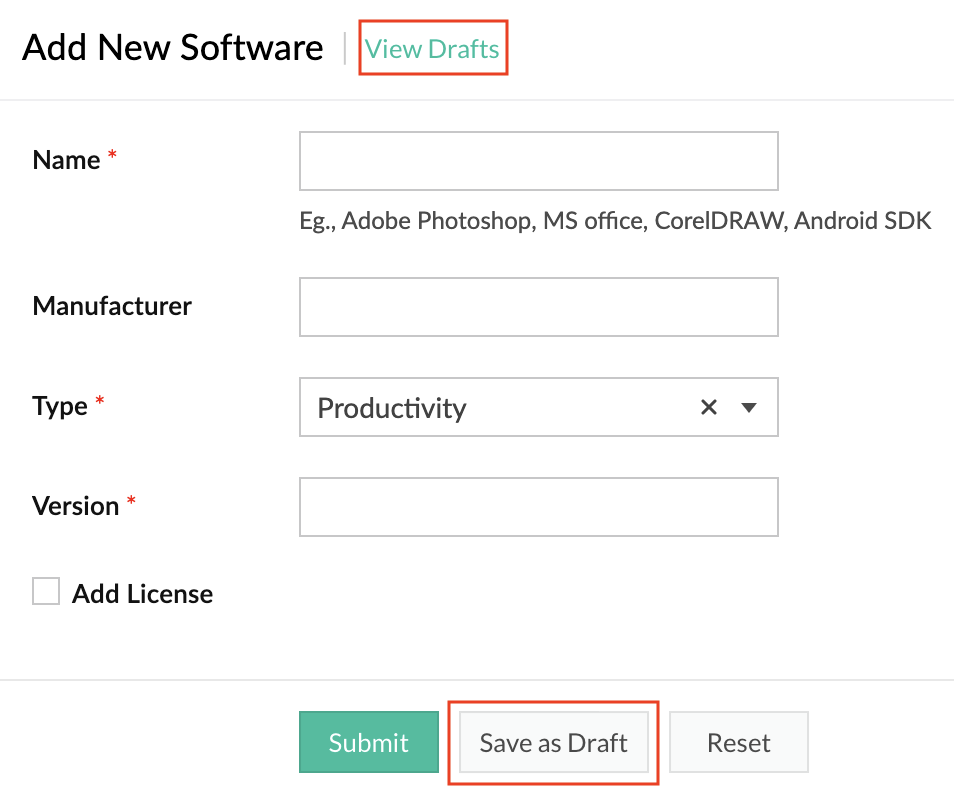
While filling in the form, they'll see a
Save as Draft button. Clicking on it will save the progress they've made up to that moment.
-
The
View drafts
option will list their saved drafts. Click on the required draft to continue editing it and then submit the form.
How do I benefit?
The Save as Draft feature, apart from reducing the hassle for your users, also helps in lessening the risk or impact of accidental data loss.
Applicable for:
C5, C6
Availability:
All DCs
Released on: 05-Jul-23
- - - - - - - - - -
Vertical subforms
Subforms are an invaluable part of Forms, as they enable you to collect and visualize line items in a form. Taking it up a notch, we'll now be introducing the possibility of displaying a subform as a popup, with vertical listing of its fields.
Consequently, with the introduction of the new popup option, we'll be adding a new section,View type, within the
Field Properties
pane of subforms. Further, the existing method of displaying subforms has been christened
Grid
in the View type section, and it'll be the default option going forward. The vertical listing of subforms as popups are called List.
Where can I enable it?
Navigate to the required
Form -> Subform -> Field properties -> View type.
Here choose the
List
option.
How do I benefit?
By displaying subforms as popups, you can simplify the tedious process of filling in forms with a large number of fields, thereby achieving a superior user experience during data entry processes.
Applicable for:
C5, C6
Availability:
All DCs
Released on: 17-Apr-23
- - - - - - - - - -
Creator Extensions
With the aim of enhancing the versatility and extensibility of Zoho Creator, we've come up with a brand new functionality called
Creator Extensions
.
This will open up the possibility of building and delivering Creator components as independent add-ons known as
extensions
, which can be distributed to other Zoho Creator users who can then install and use them in their applications. Extensions enable the delivery of a customized range of functionalities which are not available by default in Creator.
Note:
In the initial phases, only widgets
can be offered as extensions. More components will be added later.
Working with extensions
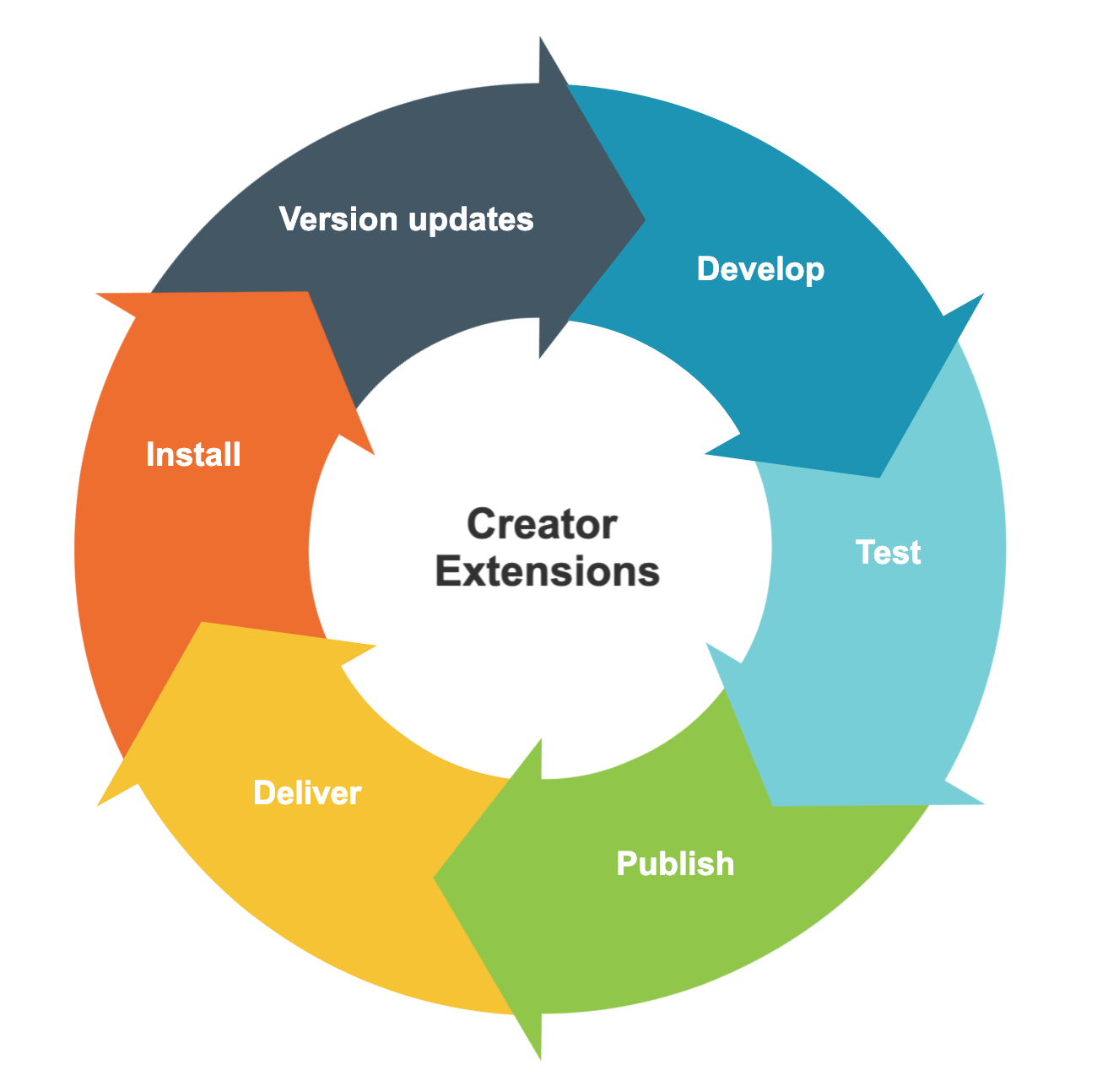
Get started by building a widget, then turn it into an extension in
Sigma, test it out, and publish it. You can choose to distribute it publically on
Zoho Marketplace, where it will be available for all. Later, you can add enhancements and publish new versions.
The lifecycle of an extension
How do I benefit?
You can use our low-code platform to turn your breakthrough ideas into profitable endeavours by building powerful extensions and selling them on Zoho Marketplace. All the while, you can easily manage the entire lifecycle of these extensions.
Applicable for:
C6
Availability:
All DCs
Released on: 23-May-23
- - - - - - - - - -
Zia Help Assistant
Zoho Creator's no-nonsense approach to low-code development, the robustness of the platform's performance, and recent big-ticket investments into AI has been well appreciated by all.
With that in mind, we've come up with a very intuitive new assistant, whose AI-assisted guidance will help upskill your command of Creator and learn more with contextual help. Further, this new, powerful, and all-encompassing help widget will show the entire range of options available to assist you.
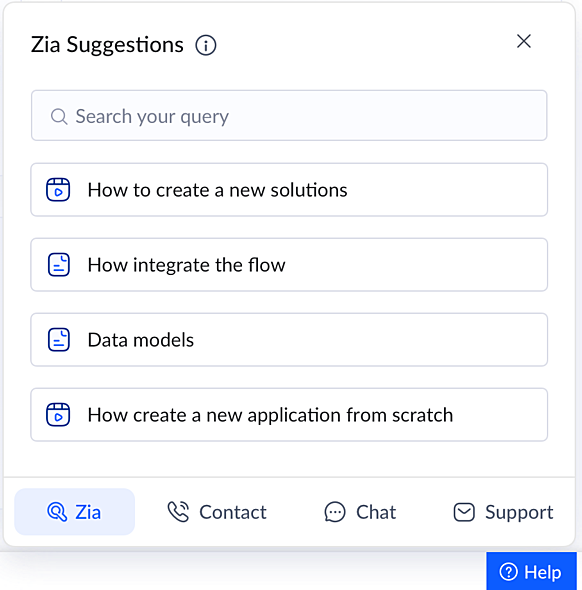
Zia - Our very own AI assistant will scan the entire knowledge base and auto suggest relevant help articles based on your current screen. Say you're in the Solutions section—Zia will list off the articles explaining the procedure to create different solutions (Applications, BI & Analytics, and Integration Flows). Being powered by an advanced NLP engine, Zia has the ability to understand your questions, identify patterns, and suggest the best answers to deliver the assistance you need.
Contact - You'll get a list of our common toll-free support phone numbers. Call us at the number shown for your country and get support over the phone.
Chat - Live chat is a faster and more convenient way to get in touch with our support team. Get instant responses to aid you with your questions.
Support - Use this option to send questions/feedback to support via email. Additionally, from here you can also allow the support team to access your app and help you out. Finally, you can also use the Screen Record option to send us a video recording of the issue you are facing. More details on the Screen Record feature is given further below in this post.
How do I access it?
-
Just click on the
Help
option present in the bottom toolbar of Zoho Creator.
- Then choose the support option you prefer and proceed.
How do I benefit?
Apart from an improved and seamless support experience, the widget will help you get faster resolution, which can improve your business performance and productivity.
Applicable for:
C6
Availability:
All DCs
Released on: 11-May-23
- - - - - - - - - -
Screen Record in Zia Help Assistant
Pushing the boundaries of contemporary support tools, we'll be launching
Screen Record by Quartz, an error debugging and virtual diagnostic tool.
This privacy-first tool will be introduced as a built-in functionality within Zoho Creator, and will be incorporated within the new Zia Help Assistant.
There may be certain cases that can be better conveyed to our support team via a video rather than other options. Instead of writing it all out, you can just record your screen, replicate the issue, and send the video to us without breaking a sweat.
What it means for you
The tool doesn't stop at just letting you record your screen. It comes with an easy video editor which provides quick provisions to further describe your issues, like adding annotations, augmenting a recording with voice overlays, and much more. Most importantly, for privacy purposes, you can trim the video or blur out sensitive portions of the recording to hide important data (like email addresses, etc).
What it means for us
Apart from providing visuals to our support team, this tool is powerful enough to collect, upon you granting consent, relevant data—like client-side and server-side diagnostic metrics, application logs, and network diagnostics—to help us understand the issue better and pinpoint the problem at hand more swiftly.
How does it benefit you?
You can now promptly convey the issue you are facing using Screen Record by Quartz and get accelerated ticket resolution times with no compromise on your privacy, security, or productivity.
Applicable for:
C6
Availability:
US, EU, AU and IN
Release on: 11-May-23
- - - - - - - - - -
Activity-based user filter
Users logging in to their accounts may seem like a trivial everyday occurrence. But keeping track of user login activities enables an organization to monitor behavior exhibited by its users, and helps in performing analysis and bulk actions on users for smoother user management.
Further adding on to the existing filter options (based on application and user status) under Users, we'll be adding a new option, based on
Last login.
How to do it?
Navigate to
Users-> Filter
. Then click on
Last access
and choose the required filter criteria from the dropdown.
How do I benefit?
The filter can help you monitor and audit users based on their login activity in your account, and get actionable information to accelerate the user management process.
Applicable for:
C5, C6
Availability:
All DCs
- - - - - - - - - -
We'll notify you as these features are rolled out. In the meantime, let us know what you think about these updates in the comments below!
That's all we have for March! We'll be back soon with another set of updates.
Regards,
Zoho Creator Team
Topic Participants
Ashwin Vishal R
Damien Cregan
Chapman&Co
Xenios Xenofontos
Sankha MIshra
Sticky Posts
Introducing Zoho Creator's 2025 Release Projection 2
Hello Creators! I'm Prakash, from the Creator product management team, and today I'm delighted to unveil our next set of features as part of Release Projection 2 for 2025. With thoughtful analysis and planning, we've curated powerful new capabilitiesZoho Creator - 2023 Release Projection 1
Hello everyone! A very Happy New Year to you and your family. Hope you're all good and having a great time using Zoho Creator to make your lives easier and your businesses prosper. 2022 was an action-packed year for us at Creator, and we hope to continueZoho Creator User Group meetups in a city near you! - Oct - Nov, 2023
Greetings from the Zoho Creator team! We're hosting a series of Zoho Creator meetups in various cities across the globe, and we'd love to meet you there! Our meetups are a great opportunity to network with industry peers, exchange ideas and best practices,Zoho Creator - 2023 Release Projection 2
Hello everyone! Time truly flies when you're having an incredible journey, and today we mark the completion of an eventful and action-packed six months. It feels like just yesterday when we embarked on this adventure together with the launch of our newUpcoming Updates - August 2022
Hi all, Greetings from the Zoho Creator team! Today we've got news for you on some exciting updates. And rest assured— there’s more to come! In this post, we'll be going over the upcoming features and improvements for this month as mentioned below. A
Recent Topics
Zoho CRM Meetings Module Issues
We have a use-case that is very common in today's world, but won't work in Zoho CRM. We have an SDR (Sales Development Rep) who makes many calls per day to Leads and Contacts, and schedules meetings for our primary Sales Reps. He does this by loggingZoho Books integration sync from Zoho CRM does not work
Hi Zoho Community & Zoho Support We just tried to get a sync some products into Zoho Books from CRM using the native sync and we're getting an error: "It looks like some mandatory fields you're trying to map are empty. Please provide valid field namesP & L Sub-categorized accounts
How can I show sub-categorized Income and Expense accounts on the P & L report?Report showing Bill Details with Project and Sales Invoice Number
Hi There, I am hoping that someone can help, I am looking for report that can show the bill and expense details along with project its as assigned to and the invoice number that the sales has been raised in. The goal is I can filter a customer/projectAdvanced Payment for Inventory Items with serial numbers
Hello, We sell equipment that we track the unique serial numbers on using Sales Orders. We can charge the customers an advanced payment, then the balance on delivery. We cannot figure out a way to do this in Books/Inventory: - Cannot part invoice a SOIs it possible to restrict ZCRM user to see only custom views created by administrator
I have segmented data in my CRM and I want to allow different users to be able to see only parts of it based on some criteria. I've tried to create and share a custom view, but then there is always an option for user to see all open lead for example.Issues Logging into ZOHO
Hello, one of my coworkers is having issues logging into ZOHO, she has requested a code when entering and the email is correct but she has not received the code. can you help us with this?Google Fonts Integration in Pagesense Popup Editor
Hello Zoho Pagesense Team, We hope you're doing well. We’d like to submit a feature request to enhance Zoho Pagesense’s popup editor with Google Fonts support. Current Limitation: Currently, Pagesense offers a limited set of default fonts. Google FontsAdd Popup Rejection Metrics to Reports
Hello Zoho PageSense Team, We would like to request improved reporting for popup interactions. Current Limitation: PageSense currently provides conversion data, but there is no clear visibility into: Popup rejections Popup closes (✕ button clicks) DismissalsAbility to Reset / Reinitialize Popup Cookies
Hello Zoho PageSense Team, We would like to request the ability to manually reset popup cookies. Current Limitation: At the moment, it is not possible to initiate a new popup cookie from the our side. Visitors who rejected or closed a popup will not seeControl Popup Cookie Expiration Duration
Hello Zoho PageSense Team, We would like to request an enhancement related to popup cookie management. Current Limitation: Currently, PageSense popup cookies remain active for 365 days, and this duration cannot be modified by us. If a visitor closes orClone / Export Popup Design Across PageSense Projects
Hello Zoho PageSense Team, We hope you’re doing well. We would like to request an enhancement that allows popup designs to be reused across different PageSense projects. Problem Statement: Currently, Zoho PageSense allows popups to be duplicated onlyAre there settings for hyperlinks?
Clicking a hyperlinked cell in Sheet creates this little pop-up with the actual hyperlink inside. Is it possible to have a 1-click link where if you click the cell it opens the link directly with no pop-up?Automatically include all ticket attachments in the ticket resolution email
Hello Zoho Community, We are implementing Zoho Desk in a real customer-facing production environment and have run into a limitation that is becoming a blocking requirement for our clients. The problem When a ticket is closed or resolved, Zoho Desk sendsFinding text within a ticket: Expand All or Search this Ticket
The auto-collapse feature within a ticket is nice for screen scrolling, however it makes it difficult to find text within the ticket if the email is collapsed. In fact you cannot find text if it is collapsed. I would like to propose a feature that allowsBooks & Desk. Client mapping
Hi, I’ve been using Zoho Books for several years and am now looking to improve my customer service. I'm experimenting with Zoho Desk and want to sync and map my client data from Zoho Books. However, it seems that mapping requires both contacts to haveString handling
If I cut a currency string from a quote and try and paste it into the Deal "Amount", it will fail unless I manually delete any commas. Dollar signs are no problem, but comma's seem to fail. Please correct this Input Validation error.Feature Request - Allow Customers To Pick Meeting Duration
Hi Bookings Team, It would be great if there was an option to allow customers to pick a duration based on a max and minimum amount of time defined by me and in increments defined by me. For example, I have some slots which are available for customersYouTube Live streaming? how to? Zoom has this feature, built-in. Can't find it on zoho meetings.
YouTube Live streaming? how to? Zoom has this feature, built-in. Can't find it on zoho meetings.Feature Request - A Way To Search Item Groups
Hi Inventory Team, I can't find any way to filter or search by fields of Item Groups. It would be great to see that functionality added. I have a use case where a single product might come from 5 or more suppliers and each supplier's item is an Item inFeature Reqeust - Include MPN In Selectable FIelds
I have noticed that the MPN is not available to show in the list view of Items. Please consider adding it as EAN, UPC and ISBN are all available, so it doesn't make much sense to exclude this similar option. Thanks for considering my feedback.Feature Request - Option To Hide Default System Fields on Items
Hi Zoho Inventory Team, As far as I know it is not possible to hid some of the defult system fields on Items, such as UPC, MPN, EAN, ISBN. A good use case is that in many cases ISBN is not relevant and it would be an improved user experience if we couldMaking an email campaign into a Template
I used a Zoho Campaign Template to create an email. Now I want to use this email and make it a new template, but this seems to be not possible. Am I missing something?Campaigns does not work!
I am running into so many problems trying to use Zoho Campaigns, that I am seriously considering dropping the app from my (shrinking) list of Zoho applications I actually use. Apart from having to fight the software trying to create a design and email,Feature Request - Make Available "Alias Name" Field In Item List View
Hi Zoho Inventory Team, I have noticed that the "Alias Name" field does not appear on the list of selectable columns in the Customise Columns feature in the Items module. This would be very useful to see for businesses who are using the Alias Name fieldCliq iOS can't see shared screen
Hello, I had this morning a video call with a colleague. She is using Cliq Desktop MacOS and wanted to share her screen with me. I'm on iPad. I noticed, while she shared her screen, I could only see her video, but not the shared screen... Does Cliq iOS is able to display shared screen, or is it somewhere else to be found ? Regardsproject name field issue- n8n
Hey guys, I have a question. I want to create a new product using the workflow. The problem is with the product name field; I don't know how to fill it in. The workflow starts with retrieving information from the leads table, retrieving links to scrapeHow to filter Packages in zoho inventory api
Hi Team, I want to perform some tasks in a schedular on the packages which are in "Shipped" state. I tried to use filter_by in my api call but in return I get response as {"code":-1,"message":"Given filter is not configured"} My Api request is as followsCRM
Is anyone else experiencing this issue? Our company is not moving out of using Gmail's web app. It just has more features and is a better email program than Zoho Mail. Gmail has an extension (Zoho CRM for Gmail) that we're using but we've found some seriousSyncing with Google calendar, Tasks and Events
Is it possible to sync Zoho CRM calendar, task and events with Google Calendar's tasks and events. With the increasing adoption by many major tool suppliers to sync seamlessly with Google's offerings (for instance I use the excellent Any.do task planningHow can i view "Child" Accounts?
It can be very useful in our field of business to know the parent-child account relationship. However, there seems to be a shortcoming in the parent account view: no child account list. How can we view the child accounts per each account?Ability to assign Invoice Ownership through Deluge in FSM
Hi, As part of our process, when a service appointment is completed, we automated the creation of the invoice based on a specific business logic using Deluge. When we do that, the "Owner" of the invoice in Zoho FSM is defaulted to the SuperAdmin. ThisEasily perform calculations using dates with the new DATEDIF function
Hey Zoho Writer users! We've enhanced Zoho Writer's formula capabilities with the new DATEDIF function. This allows you to calculate the difference between dates in days, months, and years. Function syntax: =DATEDIF(start_date, end_date, unit) Inputs:Adding Comments Using Workflows - How to Change User Attributed
We have worklflows in Desk where a comment is added to a ticket based on certain criteria. It seems that the comment added is always attributed to the user who last edited the workflow. This does not make sense for us because: - It's misleading to otherAdd Attachment Support to Zoho Flow Mailhook / Email Trigger Module
Dear Zoho Support Team, We hope you are well. We would like to kindly request a feature enhancement for the Mailhook module in Zoho Flow. Currently, the email trigger in Zoho Flow provides access to the message body, subject, from address, and to address,Conect chat of salesiq with zoho cliq
Is there any way to answer from zoho cliq the chat of salesiq initiated by customers?Les dernières avancées en saisie de données et collaboration
Après une année dédiée à la recherche et au développement, notre équipe est prête à dévoiler des améliorations majeures pour Zoho Sheet. Ces nouveautés seront lancées par étapes afin d’en assurer une prise en main optimale. Nous commençons avec des fonctionnalitésDeluge Learning Series – Client functions in Deluge | January 2026
We’re excited to kick-start the first session of the 2026 Deluge Learning Series (DLS) with Client functions in Deluge. For those who are new to DLS, here’s a quick overview of what the series is all about: The Deluge Learning Series takes place on theRich Text For Notes in Zoho CRM
Hello everyone, As you know, notes are essential for recording information and ensuring smooth communication across your records. With our latest update, you can now use Rich Text formatting to organize and structure your notes more efficiently. By usingImplement Meeting Polls in Zoho Bookings
Dear Zoho Bookings Support Team, We'd like to propose a feature enhancement related to appointment scheduling within Zoho Bookings. Current Functionality: Zoho Bookings excels at streamlining individual appointment scheduling. Users can set availabilityNext Page